Installing APM Insight PHP Agent and Data Exporter in AWS Elastic Beanstalk
To monitor PHP applications deployed in AWS Elastic Beanstalk using Applications Manager, it is necessary to install both the APM Insight PHP Agent and the Applications Manager Data Exporter during the deployment process. This can be automated by adding a custom configuration script inside the .ebextensions directory of your application bundle.
- Add Configuration Script
Create a configuration file named apm-php-agent.config under the .ebextensions folder of your application source bundle with the following content:files:
"/opt/elasticbeanstalk/hooks/appdeploy/post/apm-php-agent.sh":
mode: "000755"
owner: root
group: root
content: |
#!/bin/sh
export $(cat /opt/elasticbeanstalk/deployment/env | xargs)
wget -O InstallDataExporter.zip https://www.manageengine.com/products/applications_manager/54974026/InstallDataExporter.zip && unzip InstallDataExporter.zip
sh InstallDataExporter.sh
wget -O InstallAgentPHP.zip https://www.manageengine.com/products/applications_manager/54974026/InstallAgentPHP.zip && unzip InstallAgentPHP.zip
sh InstallAgentPHP.sh
commands:
apm_php_agent:
command: "sh /opt/elasticbeanstalk/hooks/appdeploy/post/apm-php-agent.sh" - Set Environment Variables
Edit your Elastic Beanstalk application configuration to include the following environment properties: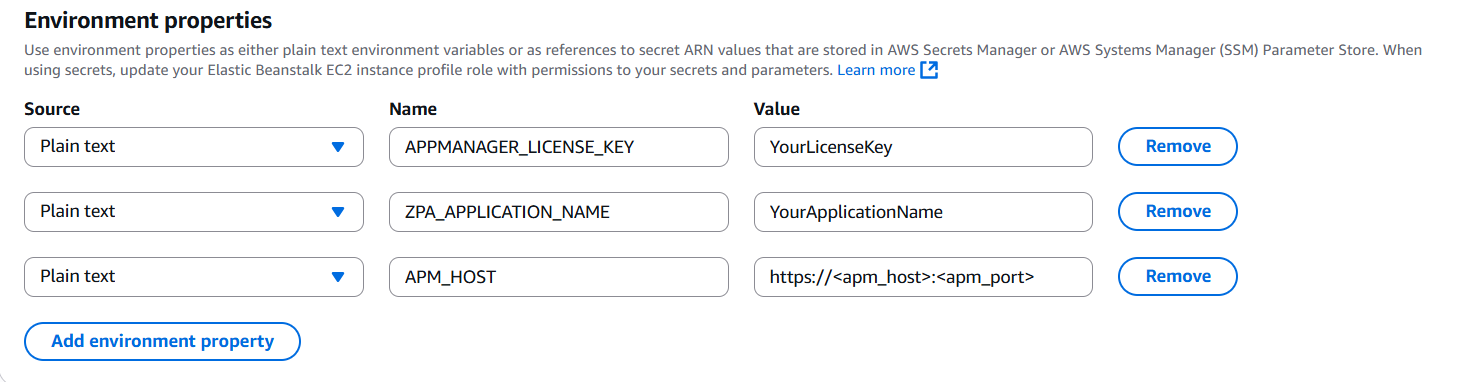
- APPMANAGER_LICENSE_KEY — Your APM Insight license key from Applications Manager
- ZPA_APPLICATION_NAME — A unique name to identify your PHP application in APM Insight
- APM_HOST — Hostname or IP address of your Applications Manager instance
Note:
- The APM Insight PHP Agent and the Applications Manager Data Exporter must be installed in the same environment for monitoring to work correctly.
- Ensure that the EC2 instances in your Elastic Beanstalk environment have internet access to download and install the agent and exporter scripts.

