Integrate Applications Manager with FortiSIEM
FortiSIEM is a Security Information and Event Management (SIEM) solution that provides real-time monitoring, event correlation, analytics, and incident response across IT environments. It collects and analyzes log data from multiple sources to detect security threats and operational issues.
By integrating Applications Manager with FortiSIEM using the Syslog (UDP) protocol, alarm events, audit logs, and access logs generated by Applications Manager can be forwarded to FortiSIEM in real time. Once integrated, FortiSIEM processes and correlates these events for centralized monitoring, alerting, and security analysis, facilitating unified visibility and correlation to detect threats and performance issues.
Configuring FortiSIEM to receive events
Before configuring Applications Manager, FortiSIEM must be set up to receive syslog messages from the Applications Manager server. Follow the steps below to configure FortiSIEM:
- Deploy the Supervisor, then install the collector node to start gathering data.
- Register the collector node to the supervisor.
- Enable Syslog UDP input on the collector.
- Allow Port 514 (UDP) on Collector OS to receive the logs.
- Ensure to enable the UDP Syslog in FortiSIEM.
- You can create custom parsers and apply other customizations, if required.
Once configured, FortiSIEM will be ready to receive syslog events from Applications Manager.
Note: Ensure that UDP port 514 (or the particular port configured for receiving syslog) is reachable and not blocked by firewalls. Refer to FortiSIEM documentation for detailed steps on Syslog UDP host and port configuration.
Configuring Applications Manager
After configuring FortiSIEM to receive syslog events, you need to configure Applications Manager to forward the required logs and alarms events. This involves configuring the SIEM integration for FortiSIEM and associating an action profile to ensure that relevant data is transmitted to FortiSIEM in the appropriate format.
1. Configure SIEM integration to forward audit and access logs
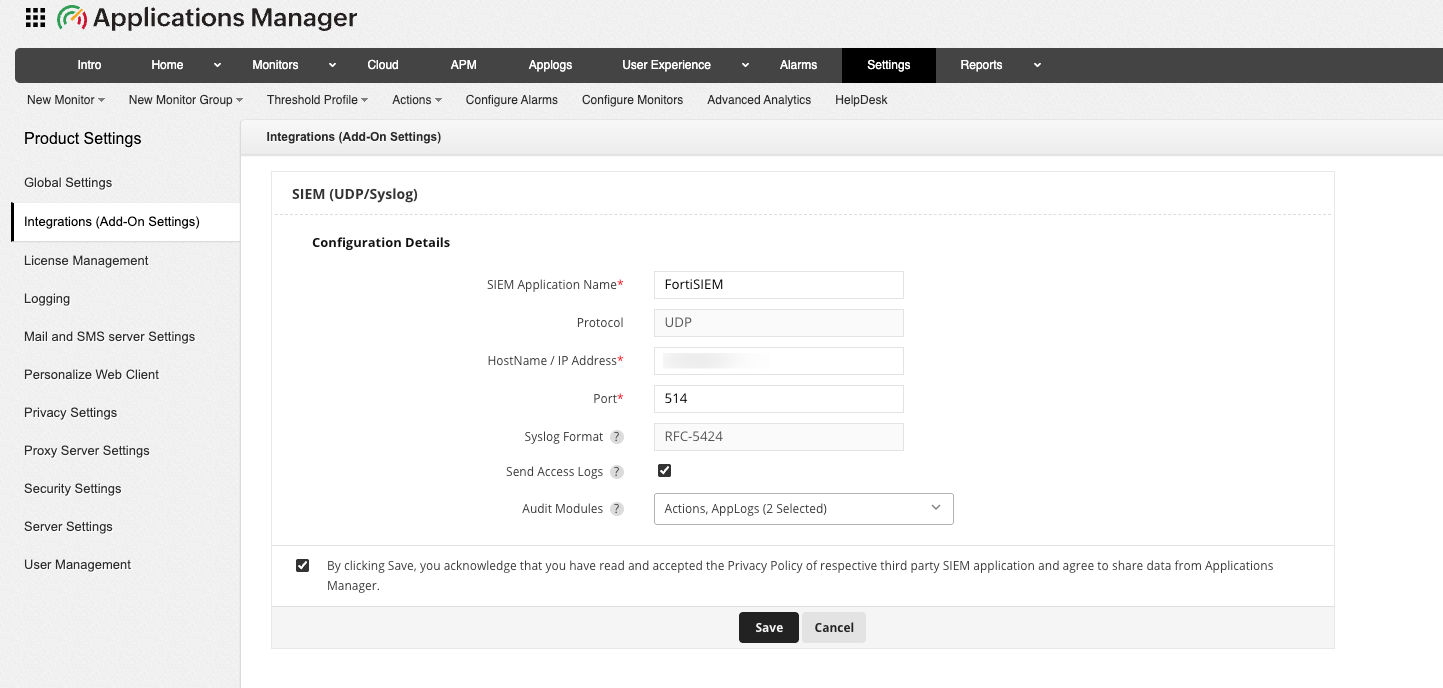
To forward audit and access logs to FortiSIEM, you need to first configure the SIEM (UDP/Syslog) integration settings in Applications Manager to allow selected audit modules and user access logs to be transmitted to the specified server. Follow the steps below to configure SIEM integration for FortiSIEM:
- Go to Settings → Product Settings → Integrations (Add-On Settings) → SIEM (UDP/Syslog) → Add.
- Provide the SIEM Application Name as FortiSIEM.
- Specify the Hostname / IP address of the collector node.
- Enter the Port number of the Syslog listening port as 514 (default Syslog port for FortiSIEM).
- Enable Send Access logs to forward Applications Manager's access logs, which include client IP, user agent, and request details.
- Select the required Audit modules from the dropdown whose logs should be forwarded to FortiSIEM. You can also select both together based on your requirements.
- Acknowledge the message and click on Save to proceed with configuring the integration.
Once done, audit logs and access logs event will now be forwarded to FortiSIEM.
2. Associate SIEM Action profile for alarm forwarding
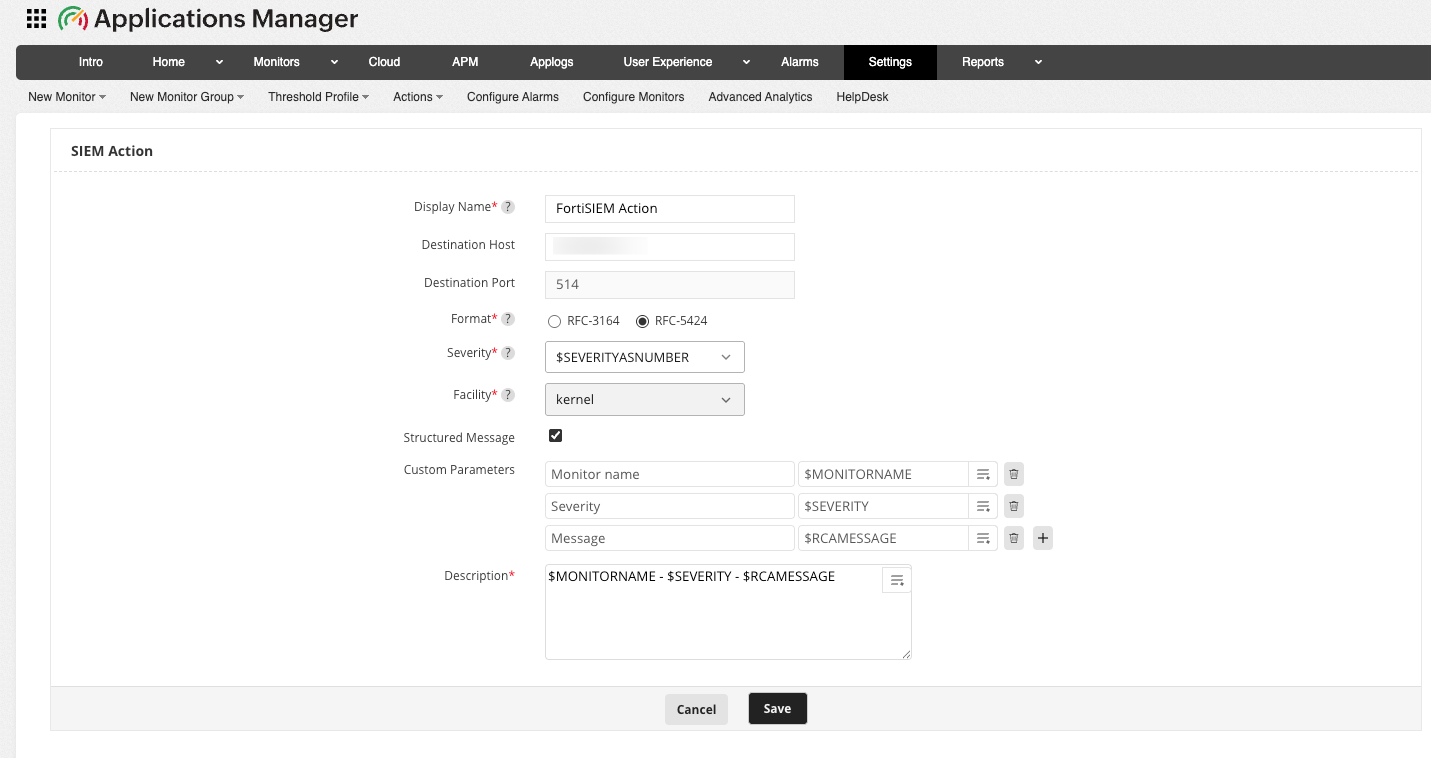
To forward alarm events to FortiSIEM, the next step is to create and configure an SIEM Action profile. The SIEM Action profile defines the destination host, syslog format, severity mapping, and message structure for alarm notifications. Follow the steps below to create and configure the SIEM Action profile for FortiSIEM:
- Go to Action tab and click on SIEM Action. Alternatively, you can navigate to Settings → Alarm / Action → Action → Create SIEM Action.
- Enter the unique Display Name of the SIEM action.
- Choose the Format of Syslog message to be used when forwarding events. RFC 3164 and RFC 5424 are standardized Syslog formats that define how log messages are structured.
- Select the Severity level for the alarms forwarded to FortiSIEM server. By choosing $SEVERITYASNUMBER, the event will automatically inherit the default severity based on the corresponding Applications Manager alarm level.
- Select the Facility of the Syslog message under which the forwarded events need to be categorized in the FortiSIEM server.
- Enable the Structure Message option to include structured data within the Syslog message. Once enabled, provide the Custom Parameters that are to be added as inputs in the required fields.
- Enter the Description for the message template to be sent to FortiSIEM server. This field defines the main content of the Syslog event that will appear in the FortiSIEM console.
- Click on Save to apply the changes.
After creating the SIEM Action Profile, associate it with the required alarm actions to ensure that monitoring alerts are forwarded to FortiSIEM in real time.
Verifying the integration
Once both Applications Manager and FortiSIEM are configured, check for the logs received from Applications Manager to FortiSIEM. Once integrated, FortiSIEM will continuously receive event data from Applications Manager, providing enriched insight into application-level behaviour alongside infrastructure and application logs.