Integrate Applications Manager with Microsoft Sentinel
Microsoft Sentinel is a cloud-native Security Information and Event Management (SIEM) solution from Microsoft that provides intelligent security analytics and threat intelligence across the enterprise. Sentinel collects and correlates security logs and alerts from multiple sources, enabling real-time threat detection, investigation, and automated response using built-in analytics and playbooks.
By integrating Applications Manager with Microsoft Sentinel using syslog, you can forward real-time audit logs, access logs, and alert events for centralized security monitoring and incident analysis. This integration enhances operational security by combining application performance events with Sentinel’s analytics and threat intelligence. Forwarded logs and events can be analyzed, correlated, and acted upon within the Sentinel portal, enhancing overall security visibility and operational response.
- Configuring Microsoft Sentinel to receive events
- Configuring Applications Manager
- Verifying the integration
Configuring Microsoft Sentinel to receive events
Before configuring Applications Manager, Microsoft Sentinel must be set up to receive syslog messages from the Applications Manager server. This usually involves creating a Log Analytics Workspace and enabling syslog data collection settings so that events sent from the Applications Manager server can be accepted and processed correctly. To enable Microsoft Sentinel to receive syslog events from Applications Manager:
- Log in to the Azure portal and go to Microsoft Sentinel.
- Click + Add and then select or create a Subscription and a Resource Group.
- Choose an existing Log Analytics Workspace or create a new one.
- Add Microsoft Sentinel to the selected Log Analytics Workspace.
- To capture syslog events, deploy a Linux VM and install the Log Analytics agent.
- Go to the Log Analytics Workspace → Agents management
- Under Linux Servers, click Download agent and install.
- Obtain the Workspace ID and Key from the Azure portal, located under Log Analytics Workspace → Agent Management, and configure the agent accordingly.
- Configure the Linux VM to receive syslog over UDP port 514.
- To configure Syslog collection in Sentinel,
- Go to Log Analytics Workspace → Data Sources → Syslog.
- Click Add, choose the required Facility and Severity level and then click Apply.
Note: Ensure that UDP port 514 (or the particular port configured for receiving syslog) is reachable and not blocked by firewalls. Refer to Microsoft Sentinel documentation for detailed steps.
Configuring Applications Manager
After configuring Microsoft Sentinel to receive syslog events, you need to configure Applications Manager to forward the required logs and alarms events. This involves configuring the SIEM integration for Microsoft Sentinel and associating an action profile to ensure that relevant data is transmitted to Microsoft Sentinel in the appropriate format.
1. Configure SIEM integration to forward audit and access logs
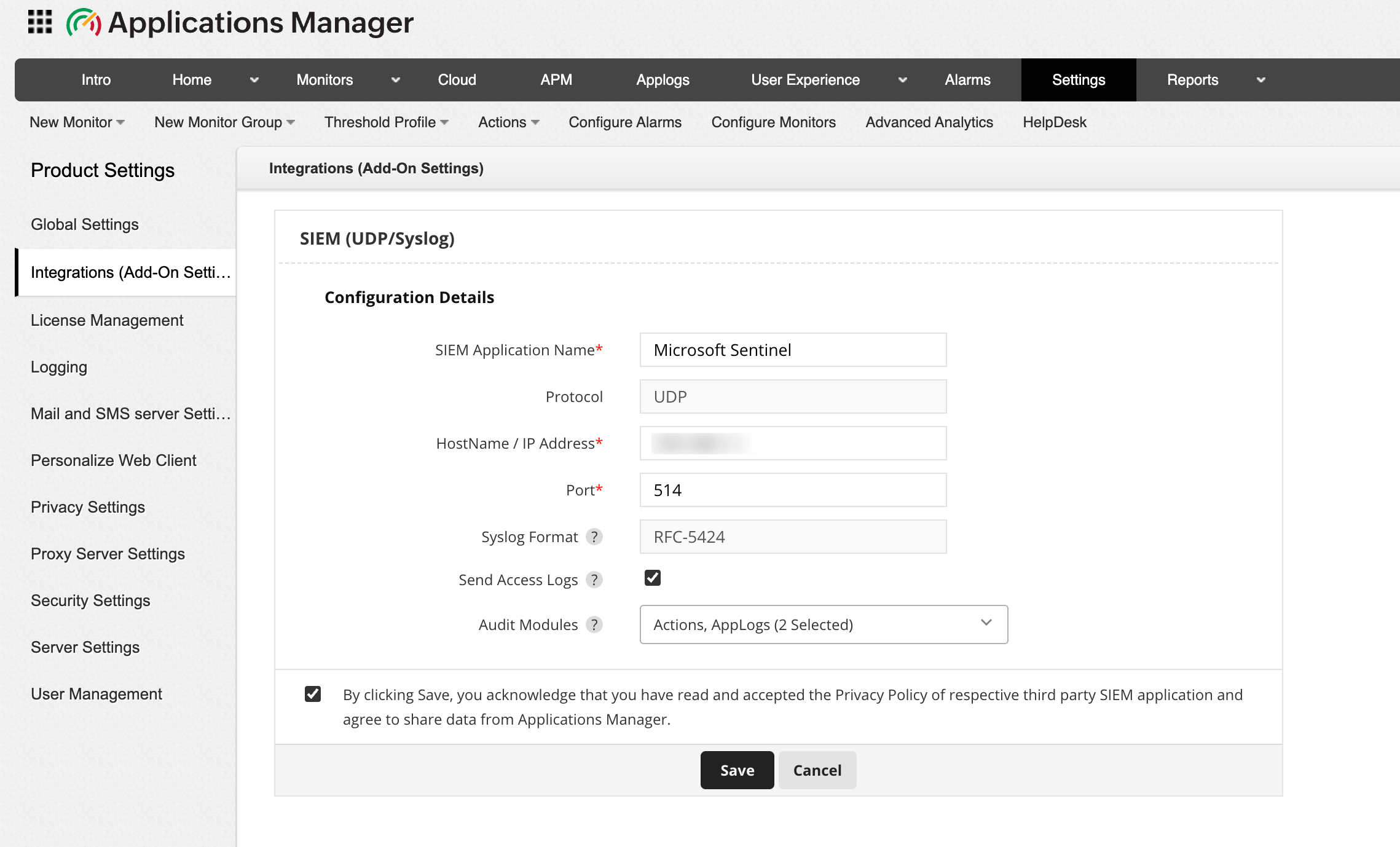
To forward audit and access logs to Microsoft Sentinel, you need to first configure the SIEM (UDP/Syslog) integration settings in Applications Manager to allow selected audit modules and user access logs to be transmitted to the specified Microsoft Sentinel server. Follow the steps below to configure SIEM integration for Microsoft Sentinel:
- Go to Settings → Product Settings → Integrations (Add-On Settings) → SIEM (UDP/Syslog) → Add.
- Provide the SIEM Application Name as Microsoft Sentinel.
- Specify the Hostname / IP address of your Linux VM.
- Enter the Port number of the Syslog listening port as 514 (default Syslog port for Microsoft Sentinel).
- Enable Send Access logs to forward Applications Manager's access logs, which include client IP, user agent, and request details.
- Select the required Audit modules from the dropdown whose logs should be forwarded to Microsoft Sentinel. You can also select both together based on your requirements.
- Acknowledge the message and click on Save to proceed with configuring the integration.
Once done, audit logs and access logs event will now be forwarded to Microsoft Sentinel.
2. Associate SIEM Action profile for alarm forwarding
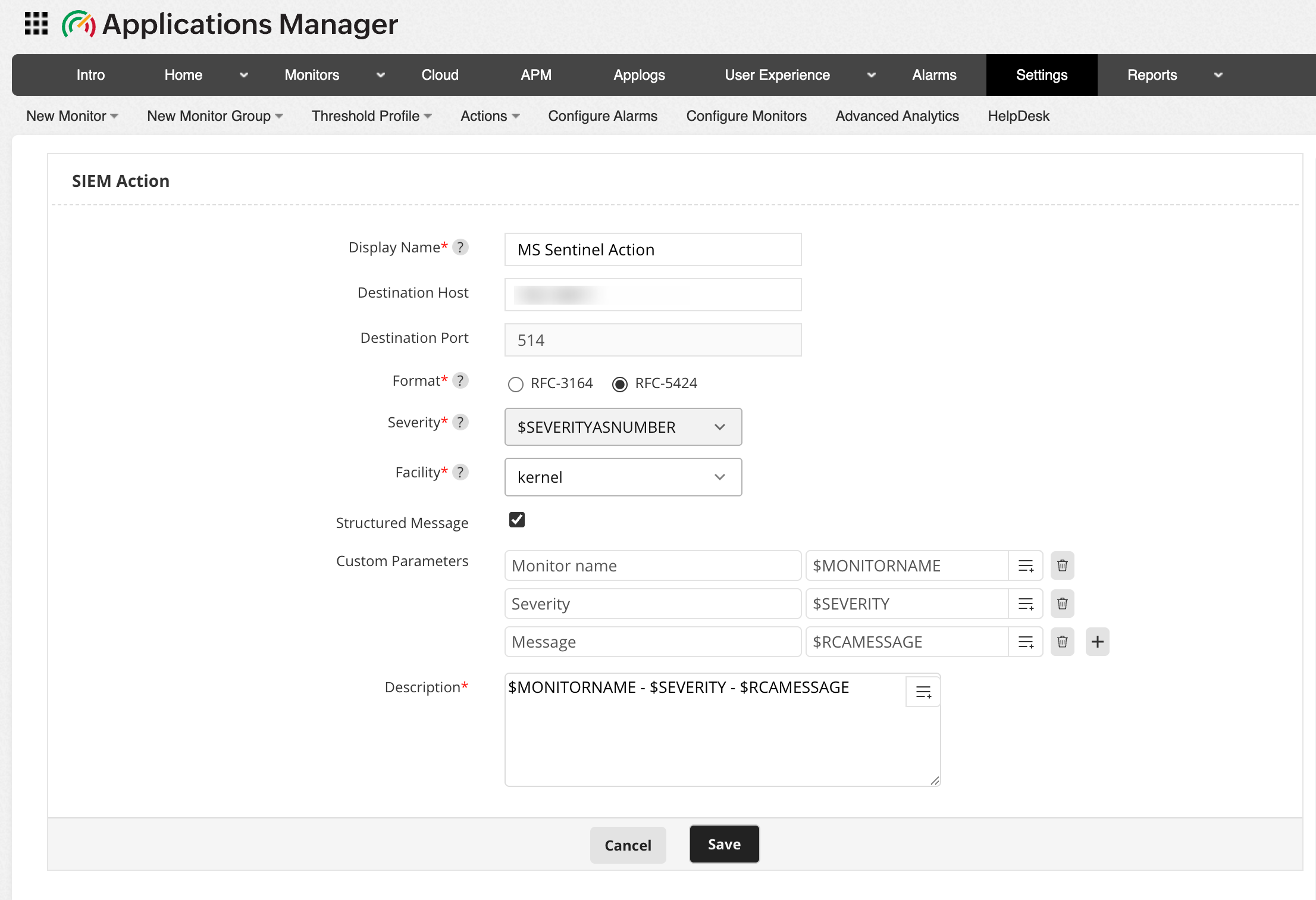
To forward alarm events to Microsoft Sentinel, the next step is to create and configure an SIEM Action profile. The SIEM Action profile defines the destination host, syslog format, severity mapping, and message structure for alarm notifications. Follow the steps below to create and configure the SIEM Action profile for Microsoft Sentinel:
- Go to Action tab and click on SIEM Action. Alternatively, you can navigate to Settings → Alarm / Action → Action → Create SIEM Action.
- Enter the unique Display Name of the SIEM action.
- Choose the Format of Syslog message to be used when forwarding events. RFC 3164 and RFC 5424 are standardized Syslog formats that define how log messages are structured.
- Select the Severity level for the alarms forwarded to Microsoft Sentinel server. By choosing $SEVERITYASNUMBER, the event will automatically inherit the default severity based on the corresponding Applications Manager alarm level.
- Select the Facility of the Syslog message under which the forwarded events need to be categorized in the Microsoft Sentinel server.
- Enable the Structure Message option to include structured data within the Syslog message. Once enabled, provide the Custom Parameters that are to be added as inputs in the required fields.
- Enter the Description for the message template to be sent to Microsoft Sentinel server. This field defines the main content of the Syslog event that will appear in the Microsoft Sentinel console.
- Click on Save to apply the changes.
After creating the SIEM Action Profile, associate it with the required alarm actions to ensure that monitoring alerts are forwarded to Microsoft Sentinel in real time.
Verifying the integration
Once both Applications Manager and Microsoft Sentinel are configured:
- In the Azure portal, go to Microsoft Sentinel → Logs section.
- Use Kusto Query Language (KQL) queries to view the logs and verify that events from Applications Manager are being received and indexed.
Once integrated, Microsoft Sentinel will continuously receive event data from Applications Manager, providing enriched insight into application-level behaviour alongside infrastructure and application logs.

