Licensing in Mobile App Monitor
The Mobile App Monitor, unlike other monitors, is licensed based on the total page views consumed by each Mobile App Monitor. The page views count is the combined value of the number of page views of all the Mobile App Monitors. This count is regularly collected and reset on the first of every month. When the count exceeds the prefixed page views limit, the data collection process will cease immediately.
What are page views?
Licensing information
Various attributes of the Mobile App Monitor such as page views and the page views reset time are recorded for licensing purposes. To view a monitor's licensing details, go to Support → License Information → Total page views consumed.
- Hover over the page views count to view the time when page views got reset in the server.
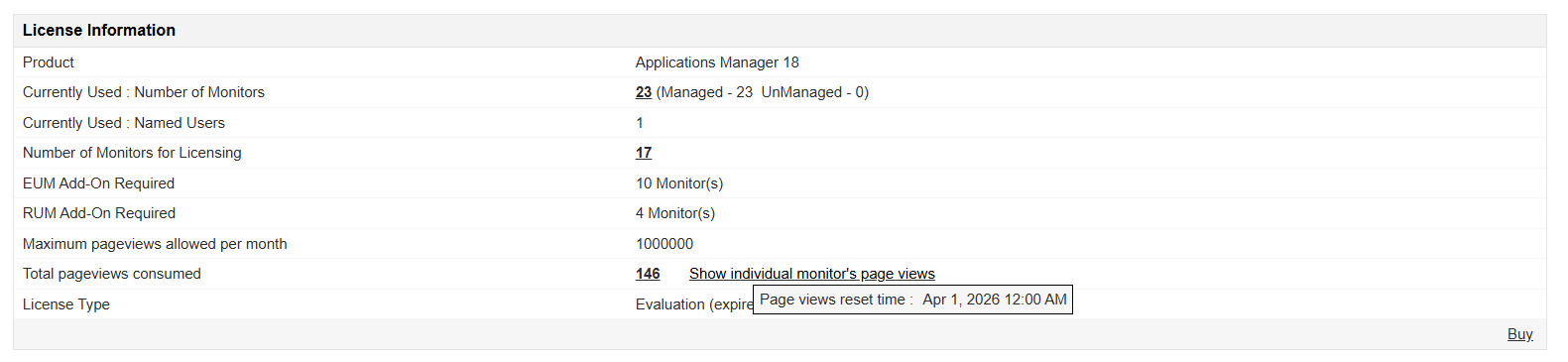
- To view the audited time when the page views value exceeded the limit in the current month, go to Settings → Audit Logs.

- Users will receive a notification email when the page views count is about to exceed a predefined limit. To access and customize this option go to Settings → License Management → License Expiry Notification → Notify when RUM/Mobile App Monitor Page views get consumed via email.
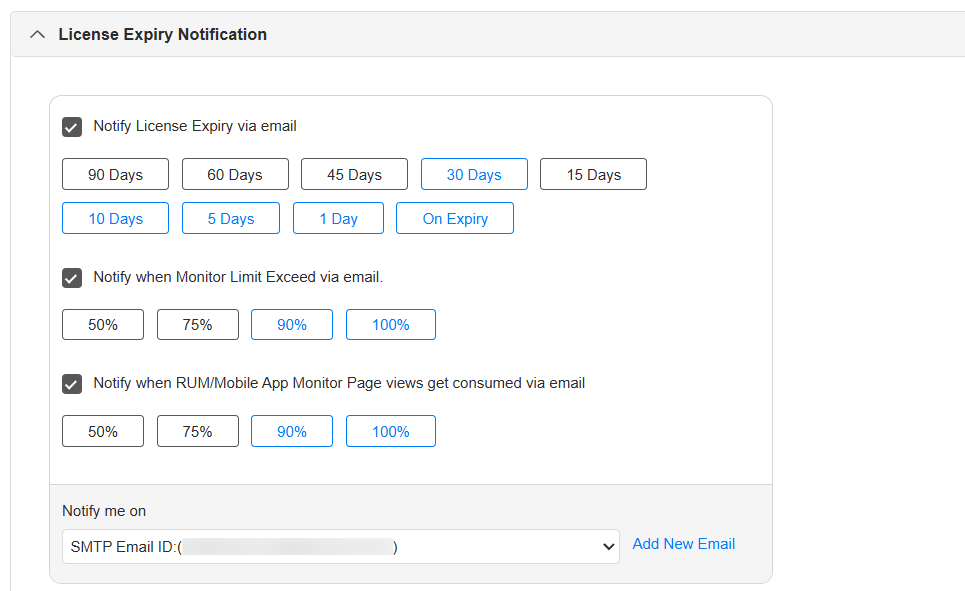
The page views consumption percentage options include 50%, 75%, 90%, and 100%. By default, the email will be sent when 90% of the limit has been consumed.
Note: The above option is not available in the Probe Server and Plugin builds.
To learn more about the pricing plans of Applications Manager's Mobile App Monitor (RUM Add-on), click here.

