V3 REST APIs
Steps for Authentication
To authenticate your requests to the API, you need to include an Authorization header in your HTTP requests. The value of the Authorization header should be your API key.
- Click on the Profile icon present in the top-right corner of the UI.
- Click on Edit and select 'Click here' to view the REST API key.
- Copy the unique REST API key generated (Eg: 884ff42XXXXXXXXXXXXXXX3d6d5).
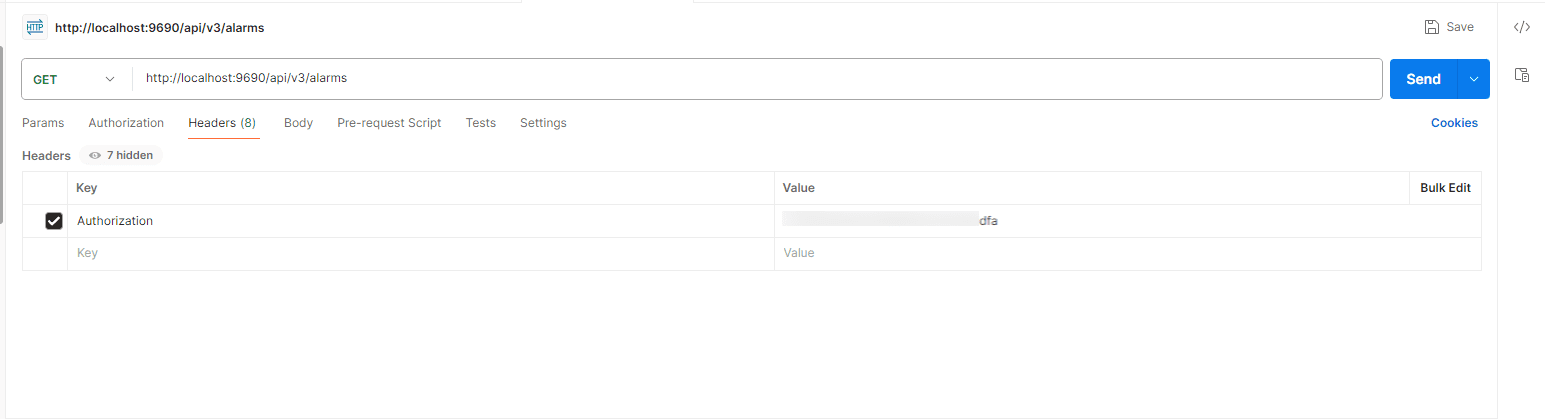
Note: Authentication using the API key in request parameters is supported for V1 APIs. However, in the case of V3 APIs, authentication with the API key must be performed exclusively via the request header. The API key authentication based on request parameters will not function for the V3 APIs.
Using REST API through Curl command
You can also execute REST API calls through the curl command from the command line by providing the required details in the following format:
curl "http://localhost:9090/api/v3/alarms"
-X [METHOD_TYPE] \
-H "Authorization: [API_KEY]"
Example
curl -X GET \
"http://localhost:9090/api/v3/alarms" -H"
Authorization: 884ff42XXXXXXXXXXXXXXX3d6d5"
Using REST API through Wget command
You can also perform REST API calls using the wget command from the command line by providing the required details in the following format:
wget --header="Authorization: [API_KEY]" "[COMPLETE_RESTAPI_URL]"
Example
wget --header="Authorization: 884ff42XXXXXXXXXXXXXXX3d6d5"
"http://localhost:9291/api/v3/alarms"

