Fake Maccy Stealer
Fake Maccy clipboard manager drops an infostealer that masquerades as Finder
If you've ever copied a password, a 2FA code, or an API token, you've trusted your clipboard to hold onto it for a moment. Most of us never think twice about it. That small, invisible convenience is exactly what a new macOS malware campaign is built to exploit.
It starts the way a lot of attacks do now, with a search. Someone looks up Maccy, a popular open-source clipboard manager for Mac, and clicks a result sitting right next to the real one. The site looks right. The download looks like an installer. They run it, and within moments a hidden script quietly drops a disguised program onto their Mac, and dresses it up with the Finder icon. It now launches every time they log in, and starts pulling out saved passwords, browser logins, and whatever is sitting in the clipboard at that time.Nothing looks out of place.
This is a report on a previously undocumented macOS infostealer campaign our team has been tracking, which we refer to internally as MacOSapp1, a name lifted straight from a string hardcoded inside the malware. What makes it worth documenting isn't the bait, which is familiar: a fake domain impersonating a trusted developer tool. What is distinctive is how the malware infects and impacts your system.The campaign uses an execution path that slips past Apple's most recent defenses, and it hides in a corner of macOS that most security tools still aren't watching closely.
A masquerading clipboard manager
Maccy is a popular open-source clipboard manager distributed from maccy.app and built by an Apple Developer-ID-signed publisher. The threat actor registered maccyapp[.]com—a near-identical domain—and launched a site visually similar to the legitimate project. Through clever search engine optimization, the malicious result surfaces alongside the genuine one for users searching for the product name.
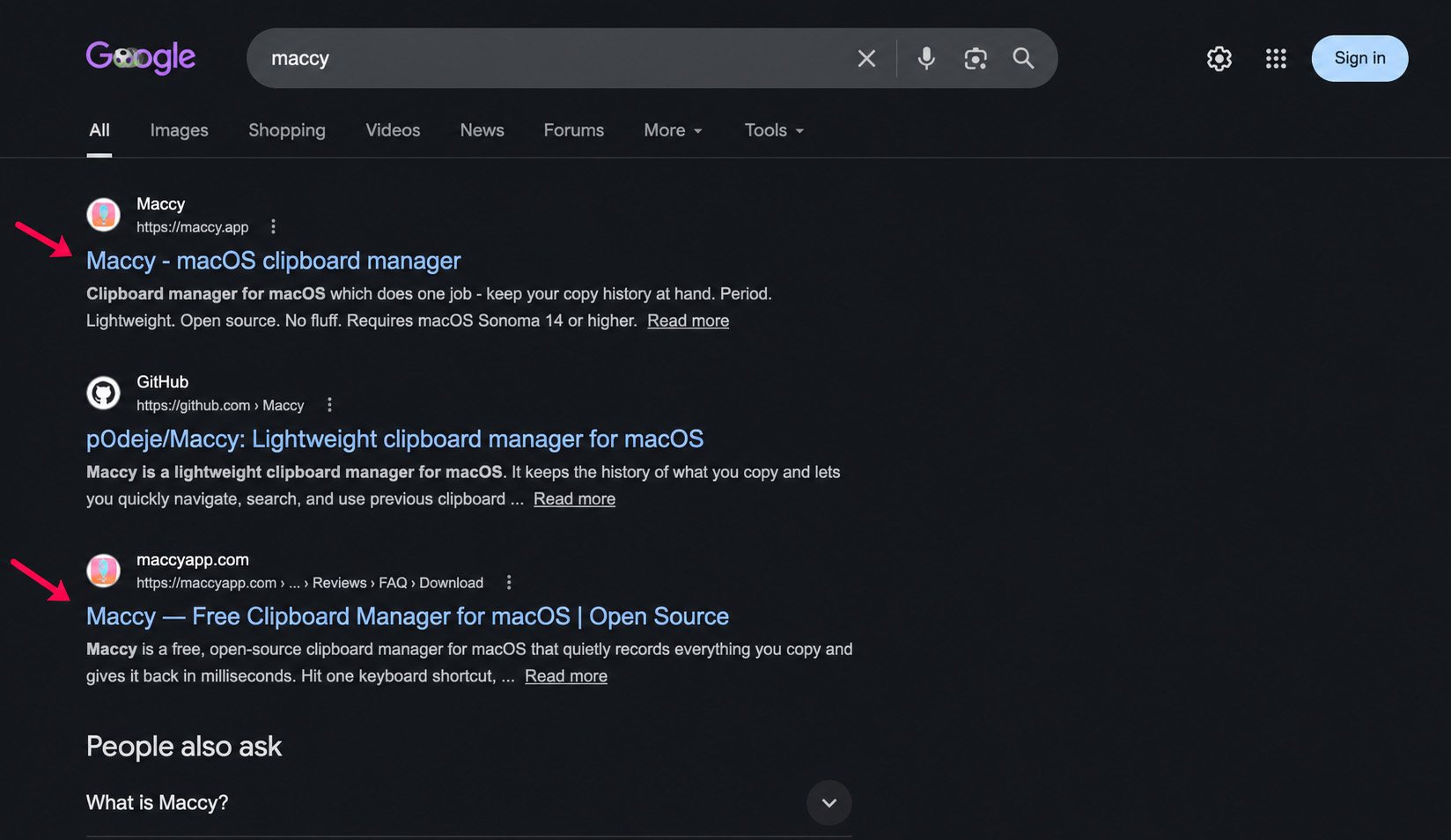
The payload distributed from the fake domain is a disk image named maccy.dmg. Worth noting: the official Maccy project does not ship as a DMG. Every legitimate release on GitHub is published as Maccy.app.zip.
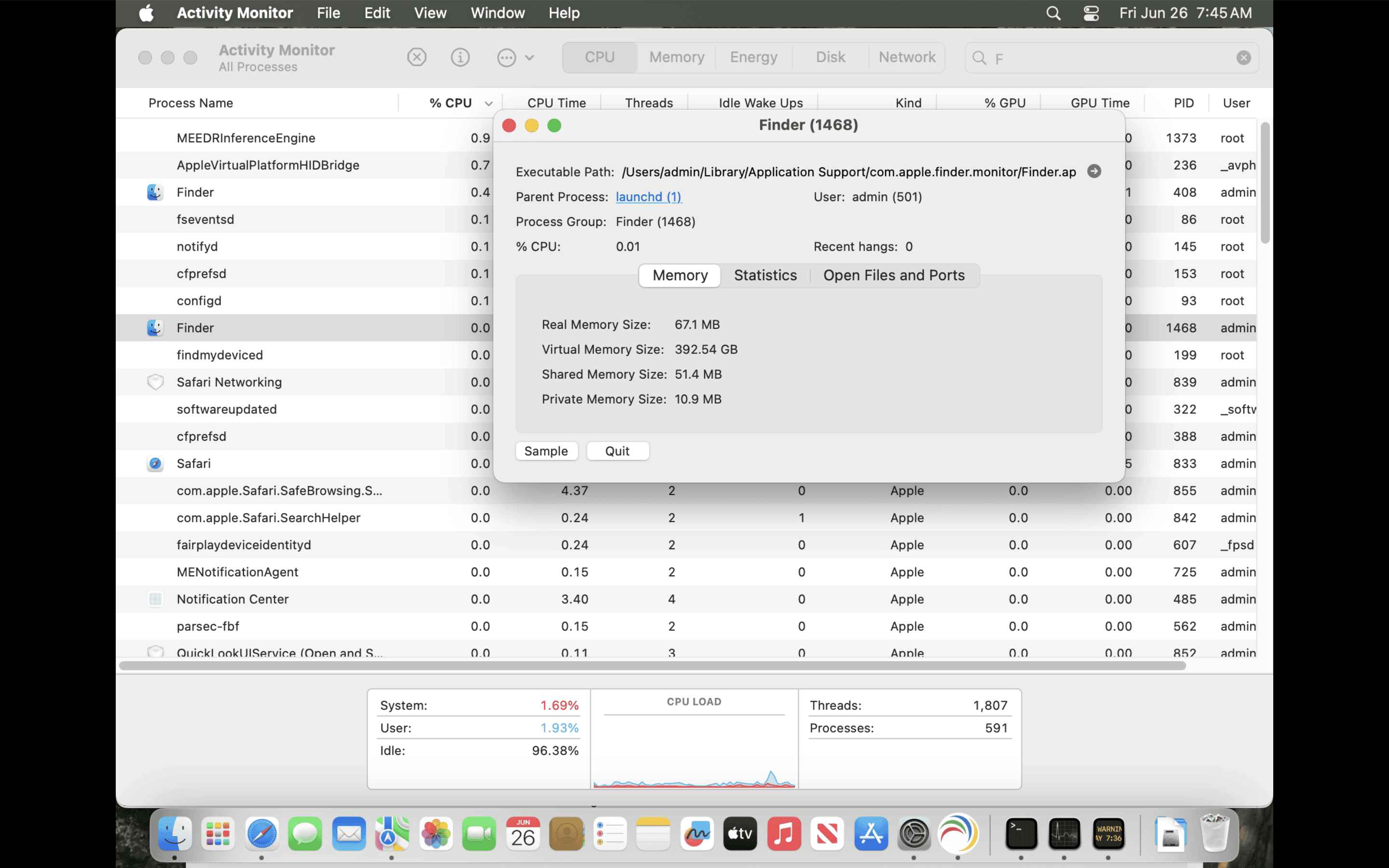
The script editor lure
Opening the DMG does not present a typical macOS application bundle. Instead, the victim is shown an Apple Script Editor window containing what appears to be a short configuration script. A few lines of JavaScript reference the official Maccy App Store URL, with on-screen instructions to press ⌘ + R or click the Run button to complete installation. The Apple App Store URL is a deliberate trust signal; the visible code is decorative.
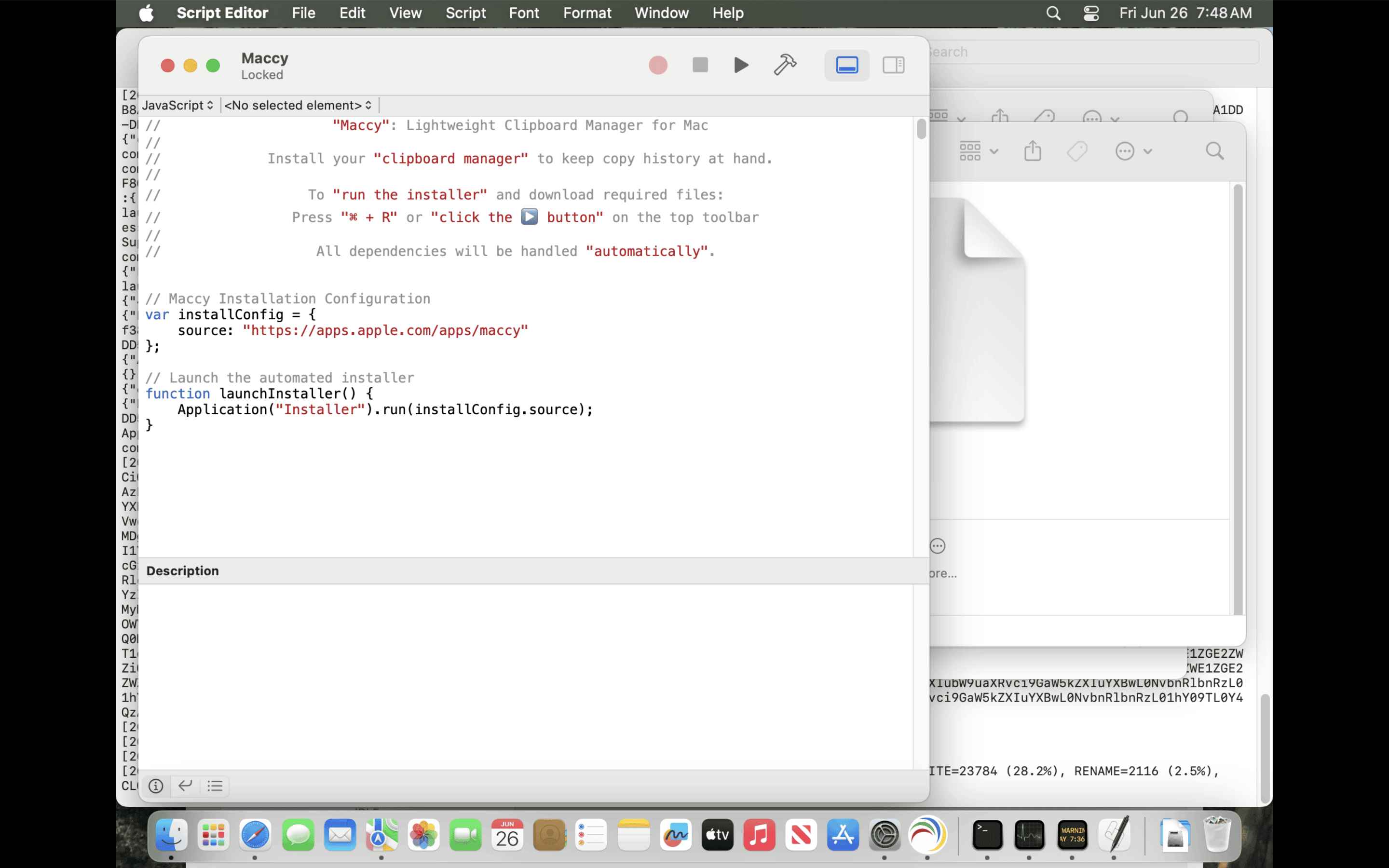
The real payload is a heavily obscured JavaScript for Automation (JXA) routine hidden below the visible window through whitespace padding.
It uses string reversal, XOR character arithmetic, and URI-encoded Function() constructors to assemble its instructions. When the user clicks Run, this hidden code executes inside the Script Editor's process and that execution approach is what makes the campaign notable.
Apple's recent mitigations around fake-installer lures have focused on Terminal paste prompts, the surface most commonly abused by the ClickFix family of social engineering attacks. Script Editor is also Apple-signed and inherently trusted, but those specific mitigations do not apply to it. macOS does still surface a warning: when the script runs, the user is told it comes from an unidentified developer and is asked whether to proceed. The catch is that this is the same prompt users have been conditioned to click through for years, and the lure is built around getting them to do exactly that. Once the user approves, the code executes inside Script Editor's process context with no further quarantine, paste, or notarization check on what the in-memory script actually does. The campaign relies on that one click.
Before executing its installer logic, the JXA script runs three independent geographic checks—against system time zone, country code, and keyboard input language—and aborts silently if the host machine resolves to Russia, Belarus, Kazakhstan, Armenia, Azerbaijan, Kyrgyzstan, Moldova, Tajikistan, Uzbekistan, Turkmenistan, or Georgia. A fourth check inspects the system architecture, used to tell the C2 which binary to serve. Geofencing against the Commonwealth of Independent States is a documented self-protection pattern among Russian-speaking malware operators, intended to avoid creating victims who could file a domestic complaint. It does not identify victims; it identifies operators.
A second finder, hiding in plain sight
For hosts that pass the geo check, the dropper writes a Rust-compiled, ARM64-native Mach-O binary to:
~/Library/Application Support/com.apple.finder.monitor/Finder.app/Contents/MacOS/F8C06C86
Three details in that path are deliberate. The containing directory com.apple.finder.monitor imitates the reverse-DNS naming convention Apple uses for its own system services.
The bundle is named Finder.app and uses a copy of the genuine Finder icon, lifted from/System/Library/CoreServices/Finder.app/Contents/Resources/Finder.icns. And the executable inside is named with eight random hex characters (F8C06C86 in the sample we analyzed), which we believe is regenerated per host—defeating hash-based IOC sharing on the binary name.
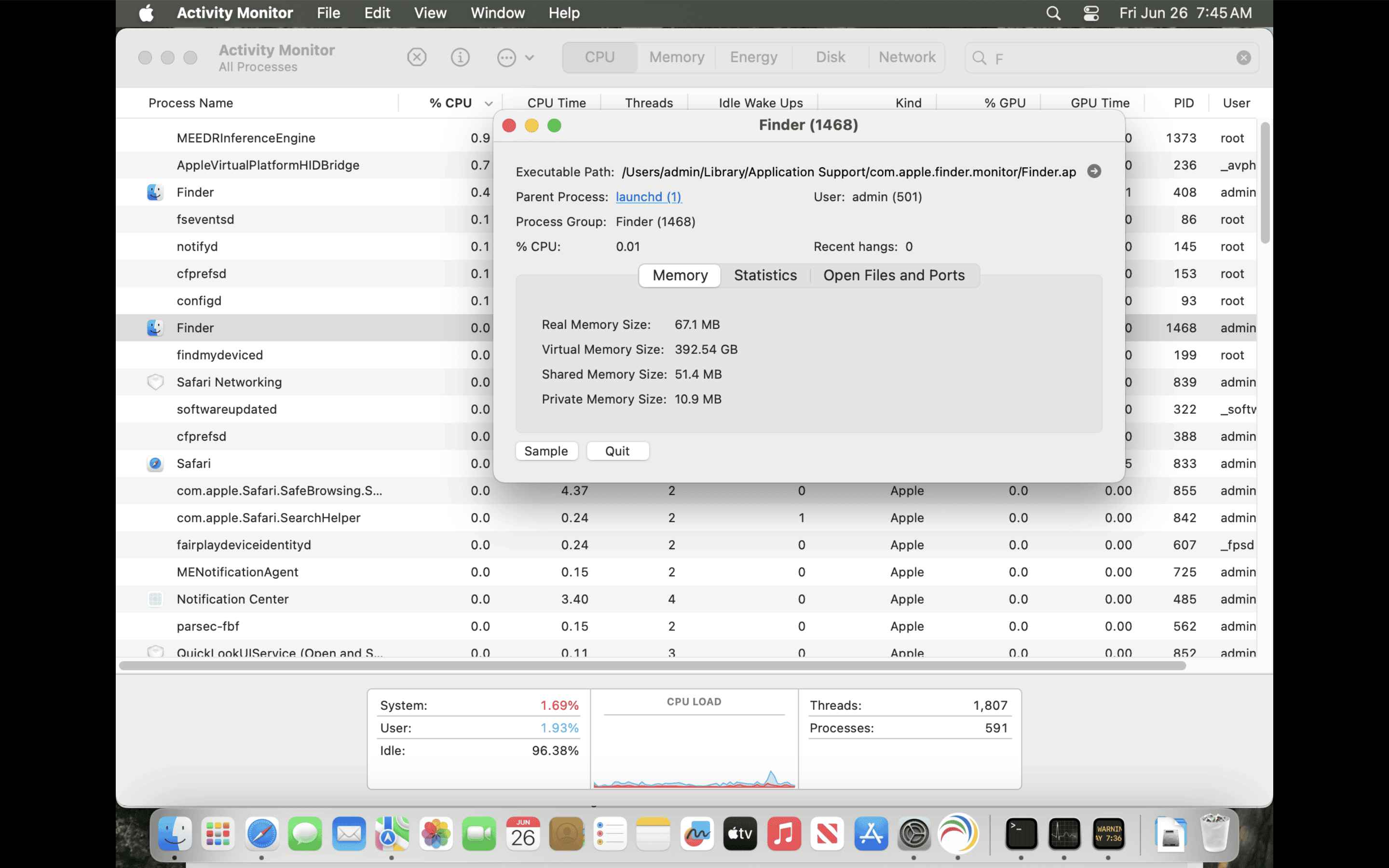
The binary is ad-hoc signed with no Apple Developer ID and no Team Identifier. A direct Gatekeeper assessment (spctl --assess) rejects it. But by the time the binary is dropped, the user has already authorized execution through Script Editor, and Gatekeeper does not re-evaluate.
The runtime result is a second process named Finder running alongside the genuine one. Both display as "Finder" in Activity Monitor; only the executable path distinguishes them.
Persistence through login items
The malware registers itself for automatic launch via Login Items, using the LSSharedFileList and SMAppService APIs. The entry is visible to the user under System Settings → General → Login Items & Extensions, but inherits the Finder display name from the masquerading bundle—making it unlikely to stand out to a user reviewing autostart entries.
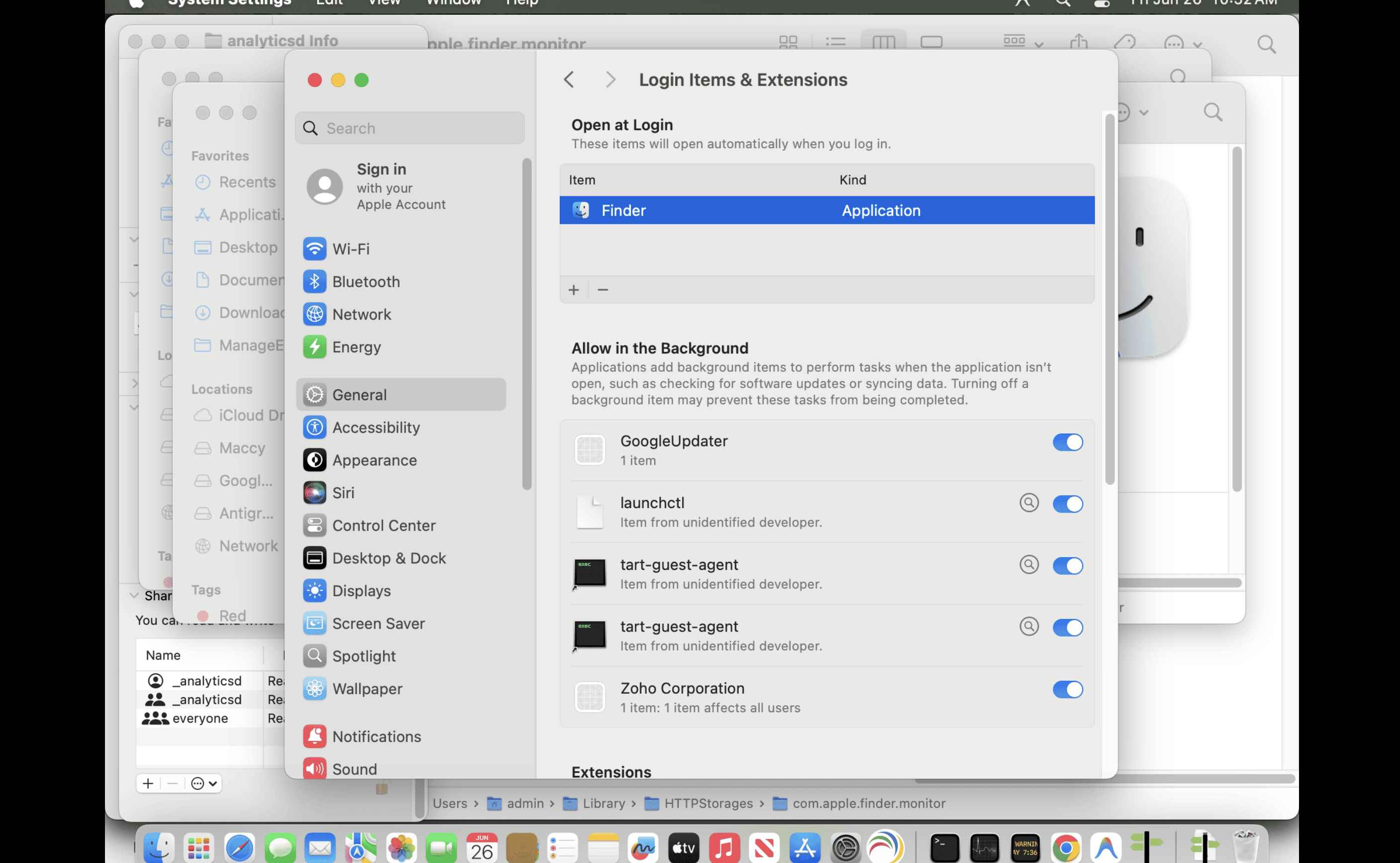
The choice of persistence mechanism is worth flagging. LaunchAgent and LaunchDaemon persistence has been the dominant technique on macOS for years, and detection coverage in EDR and AV products is heavily oriented toward those locations. Login Items have been used by other recent macOS malware families but receive less detection focus.
The campaign installs nothing in ~/Library/LaunchAgents or /Library/LaunchDaemons.
What it takes, and how it leaves
Running entirely within the user's context, the malware harvests data accessible without a privilege escalation: macOS Keychain entries via the SecItemCopyMatching API chain, browser credentials and cookies from Chrome, Firefox, and Safari databases via direct SQLite access, Apple Notes content, and—closing the loop on the lure—the contents of the clipboard itself, captured through NSPasteboard.generalPasteboard. Users who installed what they believed was a clipboard manager are having their clipboard read by it.
The lure choice is, in retrospect, perfectly aligned with the payload. Clipboard manager users—developers, IT staff, security professionals—copy sensitive material in the course of their work: temporary passwords, 2FA codes, API tokens, recovery phrases, SSH keys. A clipboard running on such a host is, by design, a structured cache of recently used secrets. Compromising the manager trades access to a single endpoint for a curated harvest of credentials.
Collected data is staged in /private/tmp, encrypted with ChaCha20-Poly1305—the IETF AEAD variant defined in RFC 8439—and exfiltrated over HTTPS to:
https://avengerflow[.]com/api/sync
The C2 domain domain fronted Cloudflare to 172.67.210.219 and 104.21.93.138. A backend origin has been observed on AWS EC2 at 51.92.110.33. Beacons are prefixed with the campaign identifier MacOSapp1 followed by the encrypted blob.
The channel is bidirectional. The C2 returns encrypted responses to the implant, making this not strictly an infostealer but a backdoor with credential-harvesting as its first observed function. A compromised host should be treated as actively controlled, not just leaked.
Indicator type | Value |
SHA-256 | 45bd0e321aa85b63b5dee4e87465e4088546eea5da6efb9c96847023384c48c9 |
Delivery domain | maccyapp[.]com |
C2 domain | avengerflow[.]com |
C2 URL | https://avengerflow[.]com/api/sync |
C2 IP | 172.67.210.219 |
C2 IP | 104.21.93.138 |
Origin IP | 51.92.110.33 |
File path | ~/Library/Application Support/com.apple.finder.monitor/ |
File path | ~/Library/Caches/com.apple.finder.monitor/ |
File path | ~/Library/HTTPStorages/com.apple.finder.monitor/ |
Bundle identifier | com.apple.finder.monitor |
Campaign identifier | MacOSapp1 |
Defending against the campaign
For users: verify Maccy downloads against the official sources only—maccy.app, the project's GitHub releases page, or the Mac App Store listing by publisher Alexey Rodionov (Team Identifier MN3X4648SC). Legitimate Maccy ships as Maccy.app.zip, never as a DMG.
For defenders: block maccyapp[.]com and avengerflow[.]com at the DNS and proxy tier, scan endpoints for the SHA-256 and the file paths above, and audit Login Items entries for any process named Finder whose path does not begin with /System/Library/CoreServices/Finder.app. A second process named Finder in Activity Monitor running from any location other than the system path is a high-confidence indicator of compromise.
ManageEngine Malware Protection Plus and Endpoint Central block the delivery and C2 infrastructure at the network layer, flag the unsigned Finder masquerade at the application layer, and surface the Login Item persistence entry for centralized remediation across managed endpoints. Compromised hosts should be treated as full credential breaches—Keychain contents, browser-stored passwords, clipboard history, and any active web session should be considered exposed.