Vulnerability Assessment and Prioritization
Endpoint Central agent regularly scans your network for vulnerabilities and displays the results in the web console. This page explains how to assess, prioritize, and act on detected vulnerabilities using risk scores, threat intelligence, and the Vulnerability Dashboard.
Overview
Since the Endpoint Central agent is installed using domain credentials, all vulnerability scans performed by the agent are authenticated scans. With new vulnerabilities emerging constantly, identifying what to remediate first can be challenging.
To address this, Endpoint Central provides a comprehensive, context-driven prioritization approach that combines AI/ML insights, real-world threat intelligence, and environment-specific context.
Vulnerabilities can be prioritized using:
- Risk Score (AI/ML-based) for overall risk ranking
- Severity (CVSS 3.0 / 4.0) for standardized criticality
- Risk Indicators such as exploits, actively exploited, zero-day, threat actors, and malware
- EPSS Score for likelihood of real-world exploitation
- Affected Systems to understand exposure
- Patch Availability & Remediation Method for faster resolution
- CERT Advisories & External Intelligence for validated context
- Vulnerability Age & Timeline to track how long a vulnerability exists and how its risk evolves, using key dates like Published, Discovered, ME Warned, and Updated
The Vulnerability Dashboard further enhances prioritization with a unified, visual view of risk:
- Summary cards show total vulnerabilities with severity distribution and increasing or decreasing trends over time
- CISA KEV by Due Date helps prioritize based on deadlines
- Emerging Risk Catalog (ERC) highlights newly identified and high-risk threats
- Zero-Day insights surface vulnerabilities without fixes
- Risk Prioritization Funnel shows how vulnerabilities are narrowed into critical groups based on exploitability and real-world risk
- Vulnerabilities Over Time tracks trends to identify spikes and measure remediation effectiveness
- Recommendations provide direct actions for critical vulnerabilities
- Vulnerability Age Matrix helps prioritize older, unresolved vulnerabilities
Additionally, the Vulnerability Insights view provides context such as exploit availability, impact, and advisory details.
Applies to:
- Windows
- Linux
- macOS
Prioritization from Vulnerabilities View
Navigate to Threats → Vulnerabilities.
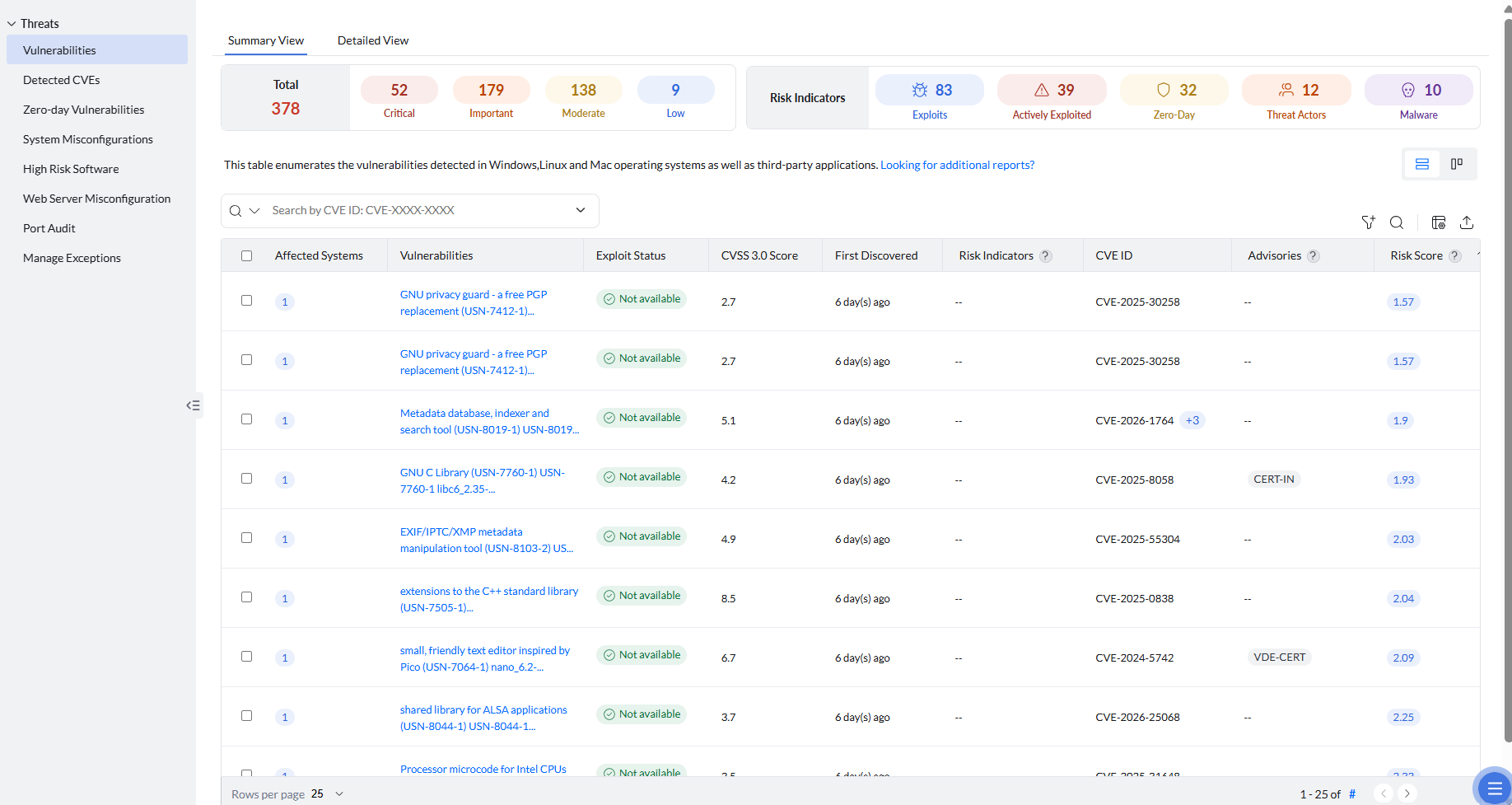
At the top, you can see a categorized summary of vulnerabilities across endpoints, grouped by severity and risk indicators.
Severity Summary
Vulnerabilities are classified into four severity levels ranging from low to critical based on their impact and exploitability. Total provides the count of vulnerabilities detected across all endpoints. The count for each severity level is also displayed. Severities are classified as:
- Critical: Vulnerabilities with the highest impact and likelihood of exploitation, requiring immediate remediation.
- Important: High-risk vulnerabilities that can be exploited under certain conditions and should be prioritized next.
- Moderate: Vulnerabilities with medium impact and lower exploitability, which can be addressed in a phased manner.
- Low: Vulnerabilities with minimal impact and low risk, which can be handled with lower priority.
Vulnerability severity and patch severity are separate ratings and may differ. Use the vulnerability severity when prioritizing the vulnerability, and use the patch severity when evaluating the associated patch. A vulnerability's severity may also change when its scoring information is updated.
Risk Indicator Summary
Risk Indicators provide additional context about vulnerabilities beyond their severity by highlighting real-world exploitability, threat relevance, and attack activity. The count for each risk indicator is also provided to help you quickly assess and prioritize vulnerabilities. These indicators are classified as:
- Exploits: Vulnerabilities for which exploit code is publicly available, increasing the chances of attack. You can see all the detailed information about all known exploits by clicking on a specific vulnerability.
- Actively Exploited: The vulnerability is currently being exploited in real-world attacks, validated using external threat intelligence sources. These vulnerabilities require immediate attention.
- Zero-Day: Vulnerabilities that were exploited or discovered before an official patch was available, often supported by early external reports and threat intelligence, making them highly risky.
- Threat Actors: Indicates vulnerabilities linked to known threat actors or attack groups, suggesting targeted or organized exploitation activity.
- Malware: Vulnerabilities associated with known malware and ransomware campaigns, backed by external research and security reports indicating active usage by malicious software.
Vulnerability Prioritization Parameters
This view also displays all the vulnerabilities detected across endpoints. Endpoint Central helps you assess the risk posed by vulnerabilities using the following parameters. Select the required columns using the Column Chooser to customize the view based on the information you want to display. The view lists a vulnerability only for computers that are in the signed-in account's scope.
- Risk Score: This is the most important parameter for prioritization. It is Endpoint Central's AI/ML-based metric that assigns a value from 0 to 10 based on multiple risk factors. Higher scores indicate higher priority. To learn more about Risk Score, refer to this page.
- Affected Systems: Indicates the number of endpoints impacted by a vulnerability, helping you understand its spread and prioritize remediation based on exposure. By clicking on the count, you can view detailed information about each affected system.
- Exploit Status: Displays whether exploit code is available for the vulnerability. In some console views, this field is displayed as Security Vulnerability Status, with the values Available and Not Available. These values describe exploit availability and are independent of Patch Availability and the Fix action. Vulnerabilities for which exploit code has been disclosed are at high risk of being exploited. Exploit-code-available vulnerabilities with critical severity levels must be prioritized and eliminated first.
- CVSS 3.0: Represents the severity of a vulnerability based on standardized metrics such as exploitability and impact, helping you assess how critical the vulnerability is.
- First Discovered: The date when the vulnerability was initially detected in your environment, helping you track its presence over time.
- Risk Indicators: For each vulnerability, you can see the associated risk indicators that help you understand its potential impact and prioritize remediation effectively.
- CVE ID: A unique identifier assigned to publicly known vulnerabilities, helping standardize and track them across different platforms and security tools. You can also view all related CVE IDs for a vulnerability by clicking on the count displayed next to the source CVE.
- CERT Advisories: Trusted guidance from global and regional sources such as CISA alerts, CERT advisories, and other recognized organizations to help validate severity, affected versions, and recommended remediation.
- EPSS Score: Indicates the likelihood of a vulnerability being exploited in the wild, expressed as a probability between 0 and 1. This helps prioritize vulnerabilities based on real-world exploitation risk rather than severity alone.
- Remediation Method: Clarifies how the vulnerability can be remediated, categorized as Deployable Patch, Vendor Recommended Manual Patching, Manual Workaround, or No Fix Available. If a patch is available, it is recommended to prioritize and remediate that vulnerability first.
- Patch Availability: Indicates whether a patch can be deployed directly from the console. Manual Fix Required means that no directly deployable patch is mapped to the vulnerability; open the vulnerability and follow the instructions under Remediation. If those instructions identify an applicable vendor update, such as a Windows cumulative update, deploy that update. Not Available means that the vendor has not released a supported fix. If the remediation information states that a fix is expected in an upcoming update, wait for the official vendor update instead of attempting to deploy an unrelated package.
- ME Warned Date: Indicates the date when Endpoint Central issued a warning for the vulnerability in its Emerging Risk Catalog (ERC). The ERC is a continuously updated repository of emerging exposures that captures early warning signals such as exploit chatter, proof-of-concept (PoC) availability, and attack trends.
- Patch ID: Displays the unique identifier of the patch associated with the vulnerability. This is shown only when the remediation method is Deployable Patch.
- OS Platform: Indicates the operating system platform affected by the vulnerability, such as Windows, macOS, or Linux.
- Updated Date: Indicates the date when the vulnerability details were last updated.
- CVSS 3.0 Vector: A standardized string representation that describes the characteristics of a vulnerability using specific metrics such as attack vector, attack complexity, privileges required, user interaction, scope, and impact.
- Supported Date: Indicates the date from which Endpoint Central started supporting detection or remediation for the vulnerability.
- Patch Name: Displays the name of the patch associated with the vulnerability. This is shown only when the remediation method is Deployable Patch.
- Published Date: Indicates the date when the vulnerability was publicly disclosed by the vendor or security community.
- Severity: Vulnerabilities are classified into levels such as Low, Moderate, Important, and Critical based on their impact and exploitability. Critical vulnerabilities should be prioritized and remediated first.
- Discovered Date: Indicates the date when the vulnerability was originally discovered by researchers or security organizations.
- CVSS 4.0 Vector: A standardized string that represents the characteristics of a vulnerability using updated metrics such as attack requirements, exploitability, and impact. Compared to CVSS 3.0, it introduces refined metrics, better context awareness, and additional factors like safety, recovery, and system impact.
- CVSS 4.0 Score: Represents the severity of a vulnerability based on the CVSS 4.0 standard, incorporating enhanced scoring with additional context and improved accuracy over CVSS 3.0.
- Resolution: Provides the recommended steps or actions required to remediate the vulnerability, which may include applying patches, performing manual fixes, or following vendor-recommended workarounds.
Filtering from Vulnerabilities View
Having understood these parameters for prioritization, you can use filters in this view to narrow down and focus on the most relevant vulnerabilities based on risk, impact, and environment-specific criteria.
- Vulnerability Filter: Allows you to filter vulnerabilities based on attributes such as Risk Score, Patch Availability, EPSS Score, Risk Indicators, CVSS 3.0 Score, Advisories, CISA Due Date, Discovered Date, CVSS 4.0 Score, Severity, CVE ID, Published Date, Operating System, Application, ME Warned Date, Vulnerability Name, and Exploit Status. This helps you quickly identify high-risk or actively exploitable vulnerabilities and prioritize remediation accordingly.
- Computer Filter: Enables you to filter vulnerabilities based on endpoint-specific details such as Computer Name, Platform, Domain Name, Branch Office, Custom Group, Operating System, Language, and Agent Live Status. This helps you scope vulnerabilities to specific systems, locations, or groups for targeted remediation.
Using these filters effectively, you can streamline your remediation efforts and focus on addressing the most critical vulnerabilities first.
Export pending vulnerability details
- Navigate to Threats & Patches → Threats → Vulnerabilities.
- Select the Detailed View tab instead of Summary View to list pending vulnerabilities.
- Use the Column Chooser to include the required details, such as CVE ID and Patch ID.
- Export the Detailed View.
The exported Detailed View contains pending vulnerabilities. Patch ID is available only when the remediation method is Deployable Patch. If the vendor has not released a patch, Patch ID is not available. To review successfully installed patches, use the Installed Patches report, where CVE details are available in the patch description. This export does not include software inventory fields such as installation date. Use the software inventory report for the installation date and version history, and use this Detailed View for the CVE ID, CVSS score, and detected software version.
Export vulnerabilities by published date
- Navigate to Threats & Patches → Threats → Vulnerabilities.
- Apply the Published Date Between filter and select the required date range.
- Use the Column Chooser to select the required columns.
- Export the filtered view.
The exported report contains vulnerabilities that are still detected in your environment. Vulnerabilities that have already been remediated are not available in this view.
Vulnerability Insights
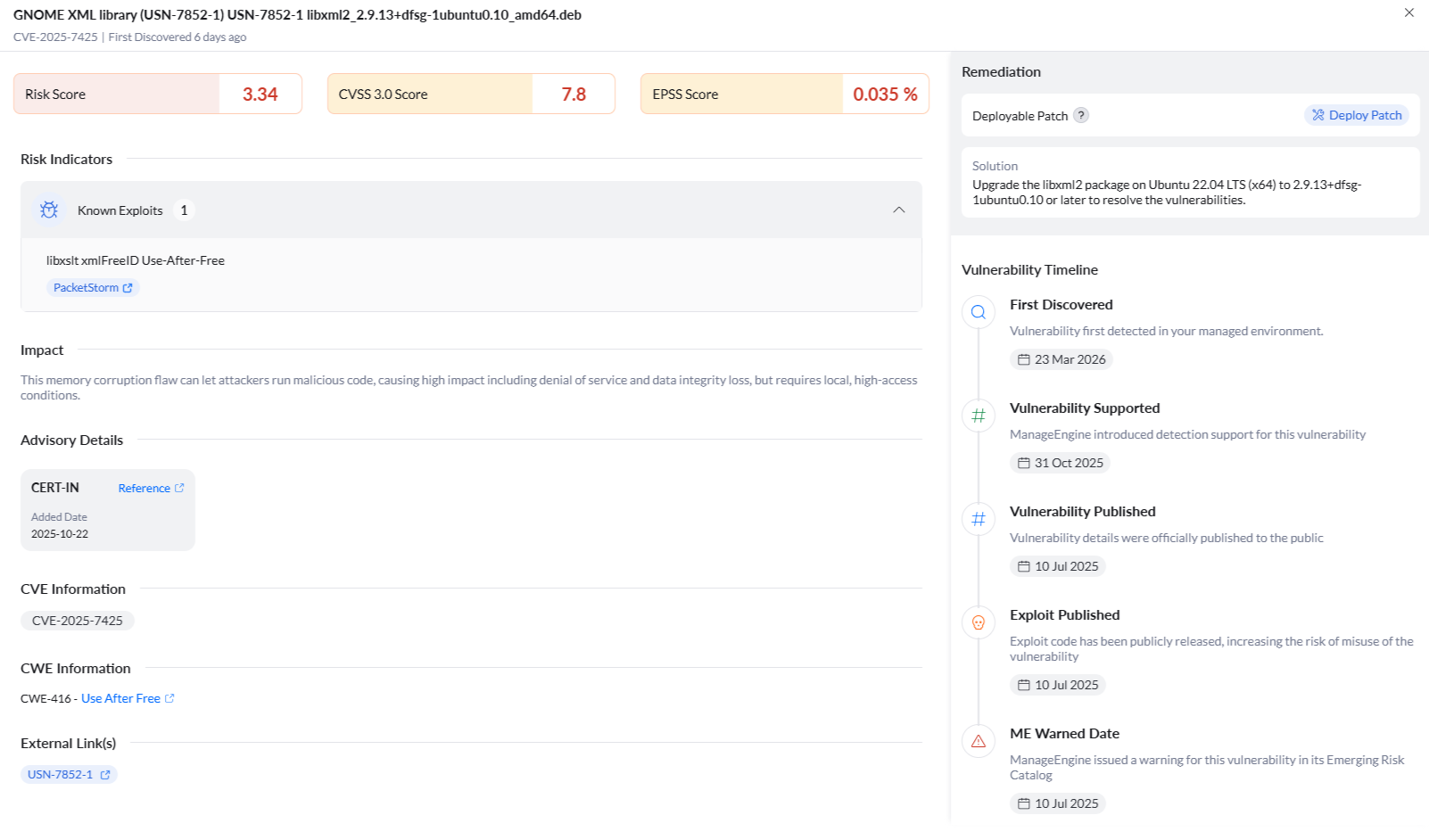
By clicking on a specific vulnerability, a new window opens with detailed information such as its Risk Score, CVSS Score, and EPSS Score.
Under Risk Indicators, you can view detailed information about real-world exploitability and threat context. These indicators are enriched with external references from trusted sources to validate attack activity and exploitation evidence.
Exploit Count and Lists shows how many public, ready-to-use exploits or attack proofs exist and provides links to them. A higher count typically indicates practical, attacker-ready risk rather than theoretical exposure.
Similarly, for vulnerabilities that fall under the following categories, you can view relevant details and external references to understand their risk and impact:
- Actively Exploited
- Zero-Day
- Malware
- Threat Actors
Impact summarizes real-world consequences if the vulnerability is exploited. It highlights potential damage such as data loss, system compromise, or service disruption, helping you understand the business and operational impact and prioritize remediation accordingly.
Under Advisory Details, you can view trusted references related to mentioned CERT advisories to validate severity, affected versions, and remediation.
CVE Information provides the source CVE and all associated CVEs related to the vulnerability, helping you understand its full scope.
CWE Information provides information about the Common Weakness Enumeration (CWE), which is a root weakness classification that helps identify underlying security flaws, supporting program-level hardening and secure coding improvements.
External Links is a curated evidence hub with tagged sources such as Advisory, PoC, Blog, KEV, and more, enabling quick validation and deeper analysis of vulnerabilities.
Under Remediation, you can see the method available to fix the vulnerability. If a deployable patch is available, you can directly remediate it by clicking on the Deploy Patch option. It will take you to the manual patch deployment settings page.
Finally, Vulnerability Timeline provides a date-ordered view of the vulnerability lifecycle, from initial disclosure to remediation. It includes key events such as publication date, exploit availability, risk escalation indicators like CISA KEV inclusion and deadlines, Endpoint Central-specific signals such as ERC flags and coverage availability, along with your internal discovery context to help you understand how the risk has evolved over time.
Vulnerability Dashboard
Navigate to Dashboard → Vulnerabilities.
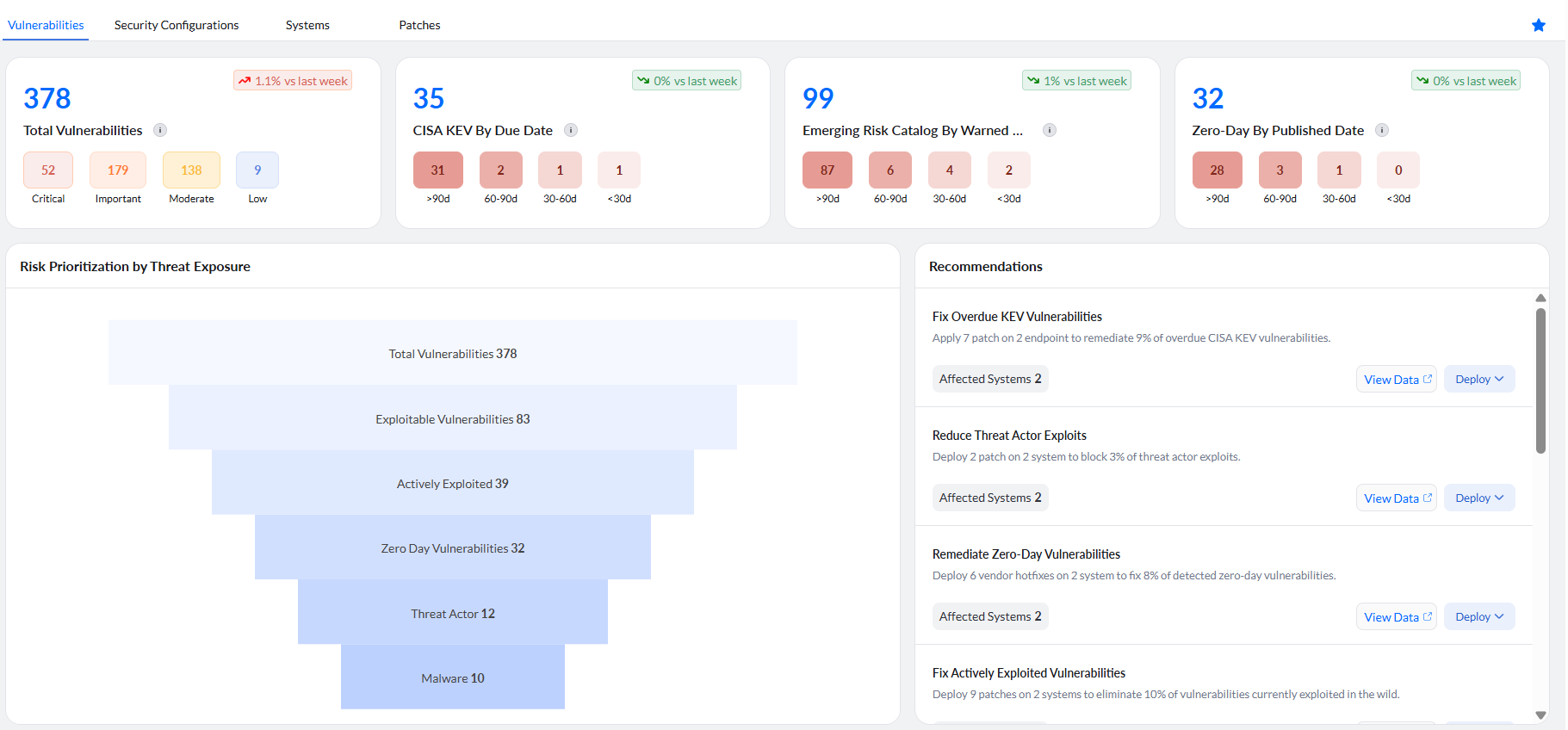
The top section of the dashboard provides a high-level summary of vulnerabilities across your environment, enabling you to quickly assess overall risk and determine prioritization needs. It also displays overall trends over time across all endpoints collectively, helping you understand how your security posture is evolving at an environment level and whether remediation efforts are effectively reducing risk.
- The Total Vulnerabilities card shows the overall count of detected vulnerabilities, along with a severity-wise breakdown into Critical, Important, Moderate, and Low.
- The Critical count on the Vulnerabilities dashboard and the Critical count on the Patches dashboard are different views and are expected to differ. Deploying a patch reduces the vulnerability count only when that patch is mapped as the fix for those vulnerabilities.
- The CISA KEV By Due Date card highlights vulnerabilities listed in the Known Exploited Vulnerabilities (KEV) catalog, grouped based on remediation timelines such as >90 days, 60–90 days, 30–60 days, and <30 days.
- The Emerging Risk Catalog By Warned Date card displays vulnerabilities identified through Endpoint Central's early warning signals, categorized based on how recently they were flagged.
- The Zero-Day By Published Date card shows vulnerabilities that were disclosed before patches were available, grouped by their published timelines.
Risk Prioritization by Threat Exposure
This is a funnel curve representing how the total number of vulnerabilities is progressively prioritized and filtered based on exploitability and real-world risk criteria. As you move down the funnel, vulnerabilities are narrowed into more critical categories such as exploitable, actively exploited, zero-day, and those linked to threat actors or malware. By clicking on any section, you can view the corresponding list of automatically filtered vulnerabilities for deeper analysis and remediation.
Recommendations
For critical vulnerabilities requiring immediate attention, the dashboard provides recommendations so you can quickly access the required details and move to remediation with less effort. You can directly deploy the patch from here.
Vulnerabilities Over Time
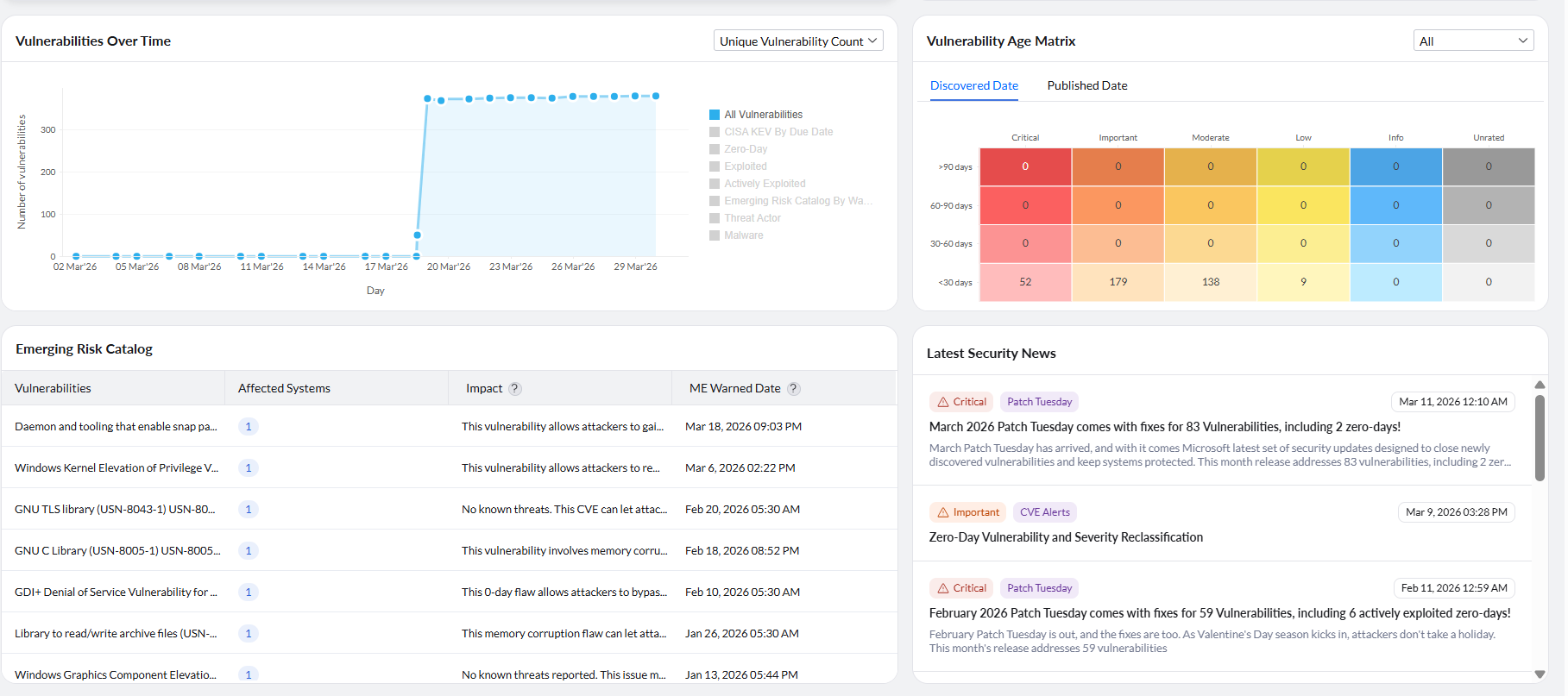
The Vulnerabilities Over Time chart provides a trend view of how vulnerabilities are discovered and evolve across your environment over a period of time. It helps you track changes in the number of vulnerabilities on a day-to-day basis. You can use this chart to identify spikes or sudden increases in vulnerabilities, which may indicate events such as new patch releases, large-scale scans, or newly disclosed threats. It also helps you monitor whether vulnerabilities are being reduced over time as remediation actions are performed.
You can switch between different categories such as All Vulnerabilities, CISA KEV by Due Date, Zero-Day, Exploited, Actively Exploited, Emerging Risk Catalog by Warning Date, Threat Actor, and Malware to analyze specific risk trends and understand how exposure is changing across different risk indicators. You can also view the data based on unique vulnerability count or total vulnerability instances count depending on your analysis requirement.
Emerging Risk Catalog
This provides a detailed list of vulnerabilities detected across your environment along with key contextual information to support prioritization and remediation. Each entry includes the Vulnerability name, the number of Affected Systems, a brief Impact description explaining the potential risk, and the ME Warned Date, which indicates when the vulnerability was flagged in Endpoint Central's Emerging Risk Catalog. By reviewing this information, you can quickly assess the spread, severity, and potential impact of each vulnerability, and prioritize remediation efforts accordingly.
Vulnerability Age Matrix
Endpoint Central lets you calculate the age of a vulnerability either from the date on which the vulnerability is published or from the date on which it is discovered in your network. Letting a vulnerability reside in your network for a longer time is an indication of weak security. Therefore, vulnerability age must be taken into consideration while prioritizing vulnerabilities.
The Vulnerability Age Matrix in the dashboard groups vulnerabilities based on both severity and age. You can choose to view the age of vulnerabilities either from published date or discovered date. Click on the age and severity level based on your priority to view a list of vulnerabilities that belong to that category. Then select the vulnerabilities you want to fix and remediate them.
A vulnerability remains in its existing age bucket until remediation is completed and a subsequent vulnerability scan confirms that the endpoint is no longer affected. Installing a newer patch does not remove an older entry when the underlying vulnerability is still detected.
Additional Resources
If you have any further questions, refer to the Frequently Asked Questions section.