Secure your Endpoint Central Account
If you are reading this, chances are that you are using the default login credentials, which is why we have locked your account. Please follow the steps below to reactivate the account and reset your password. Why is this necessary?
Steps for Administrator to reset his/her password using a Tool
You can reset the default admin password of Endpoint Central by following the steps mentioned below:
- Go to Services.msc and stop ManageEngine Endpoint Central
- Open command prompt in elevated mode and navigate to <Install_Dir>\DesktopCentral_Server\bin directory
- Execute resetPassword.bat
- You will find the options as listed below:
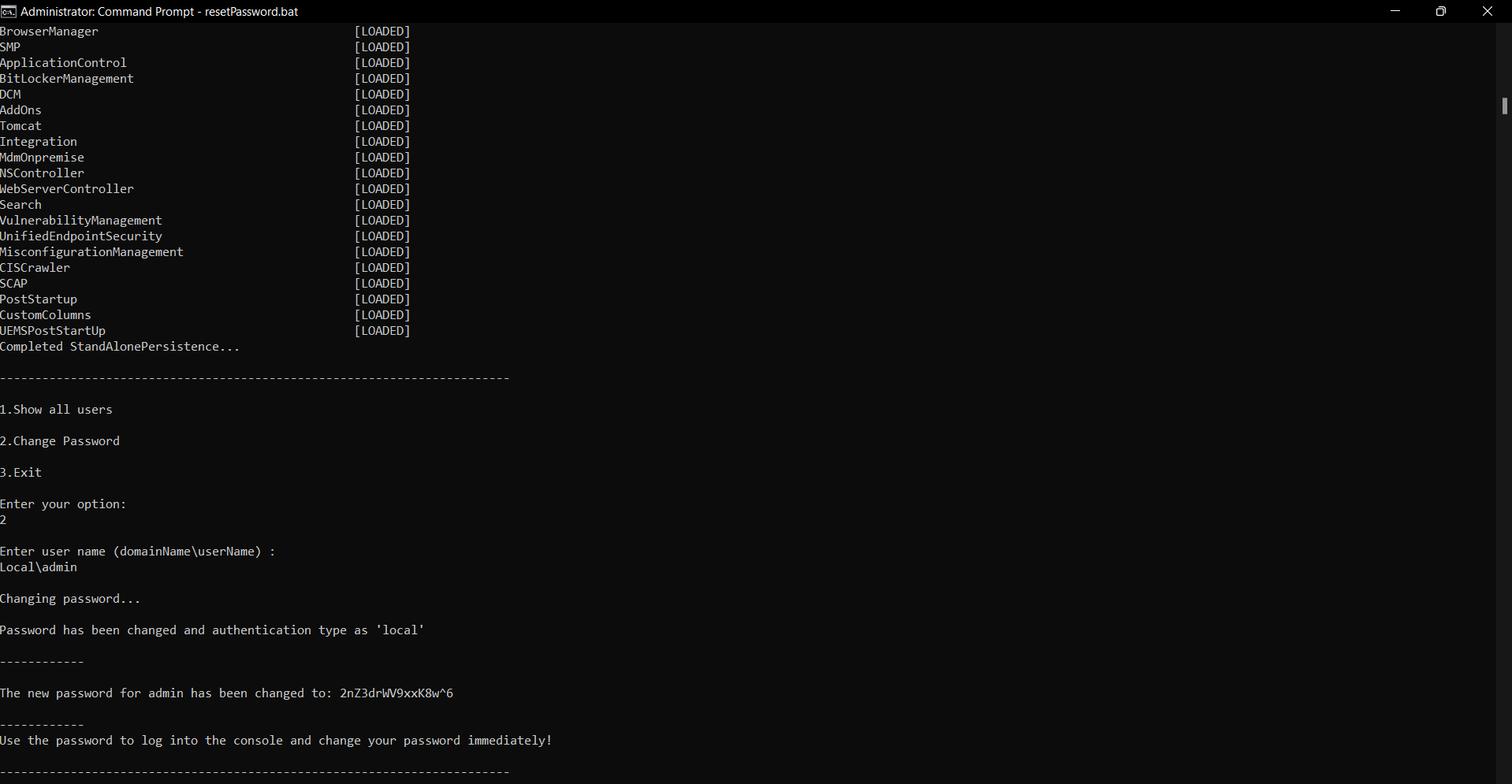
- Choose the operations
- View all existing users
- Change password
- Exit
- Choose "2" to reset password
- Enter the username.
- A password with random characters will be generated and displayed.
- Start the ManageEngine Endpoint Central Server service from Services.msc.
- Choose Local Authentication and login using the user name and the generated password.
Note:It is highly recommended to reconfigure Secure Gateway Server after you reset the default credentials. Steps to reconfigure Secure Gateway Server here.
Steps to disable the banner post password reset:
- Download the attached closeLoginBanner.zip file.
- Extract it in
/bin folder. - Run the closeLoginBanner.bat file as administrator.
Why do we strongly recommend changing the password?
Securing user accounts is a not only important but our foremost priority. Using default admin account with the same password quite vulnerable. Typically, malicious actors may attempt to breach a default administrative account named "admin" because it is quite common in the business. The possibility of an account compromise may still exist despite the enhanced security measures if default passwords are in use. Following that, we have locked all the accounts that have admin as their default username and password.
Note:Please refer to our Security tips and recommendations document for enhanced security. If you need assistance, our support team is always ready to help. Please reach out to us at endpointcentral-support@manageengine.com.




