Introduction to IP Addresses: A guide to understanding the basics of IP addresses
Let’s skip the overused “IP addresses are like home addresses” analogy - by now, you already know that without them, the internet wouldn’t function. Whether you're sending an email, binge-watching Netflix, or joining an online conference, everything relies on IP addresses to keep the data flowing smoothly. They are the building blocks of network communication, ensuring that every request reaches its intended destination. This guide will help you grasp the fundamentals of IP addresses, from understanding what an IP is to learning how to manage IPs efficiently - whether in a small business network or a large enterprise environment.
Let's explore and understand IP addresses! First, let’s start with the basics - what exactly is an IP address?
What is an IP Address?
An IP address (Internet Protocol address) is a unique number assigned to devices, virtual machines, containers, servers, websites, network interfaces, smart devices, and cloud systems connected to a network. This IP address enables communication by locating and sharing data over the internet or within private networks. It consists of a series of numbers, typically formatted as IPv4 (e.g., the usual 192.168.1.1) or the more advanced IPv6 (e.g., the evolving 2001:db8::ff00:42:8329), which helps in identifying devices across local and global networks.
Let's discuss more about IP versions in the upcoming paragraphs.
Why do networks need IP addresses?
Imagine searching a single device in a vast digital ocean without an IP - it would be like searching for a needle in a haystack. IP addresses serve as unique identifiers, allowing devices to be easily located within a network. Beyond identification, they facilitate data routing for seamless communication, enforce security policies, and restrict unauthorized access, ensuring a well-organized and secure networking environment.
How IP addresses enable communication between devices
Here's what happens behind the scenes when IP addresses facilitate communication.
Data transmission: When you send an email or browse a website, your device’s IP communicates with the recipient’s IP, ensuring seamless data exchange.
Routing & connectivity: Routers and gateways leverage IP addresses to determine the most efficient path for data to travel across networks.
Remote access: Businesses rely on IP-based remote access solutions, enabling employees to connect to corporate networks from any location securely.
How does an IP address work?
Ever wondered how a device gets its IP address or who assigns it? Here’s your answer:
IP assignment: Every device connected to a network is assigned a unique IP address, ensuring that data is sent and received without mix-ups. This guarantees that the right information reaches the intended device.
Role of routers & ISPs: Internet Service Providers (ISPs) allocate IP addresses for use within your organization. Devices receive these IPs either dynamically (changing periodically) or statically (permanently assigned). Routers manage these addresses within local networks, directing traffic efficiently.
Data transmission process: When you visit a website, your device sends a request with its IP address to the server. The server processes the request and routes the data back to your IP, completing the communication cycle.
In short, IP addresses are the foundation of smooth and organized digital communication. Now, let's break down the IP structure and understand why it is designed the way it is.
Structure of an IP address
IP addresses follow a well-defined structure that enables seamless communication between devices on a network. They exist in two formats: IPv4 and IPv6.
IPv4 address structure:
IPv4, or Internet Protocol version 4, consists of 32 bits, divided into four octets, separated by dots (e.g., 192.168.1.1). Wondering where these octets come from? The actual address is stored in binary format (1s and 0s) and later converted into decimal for easier readability.
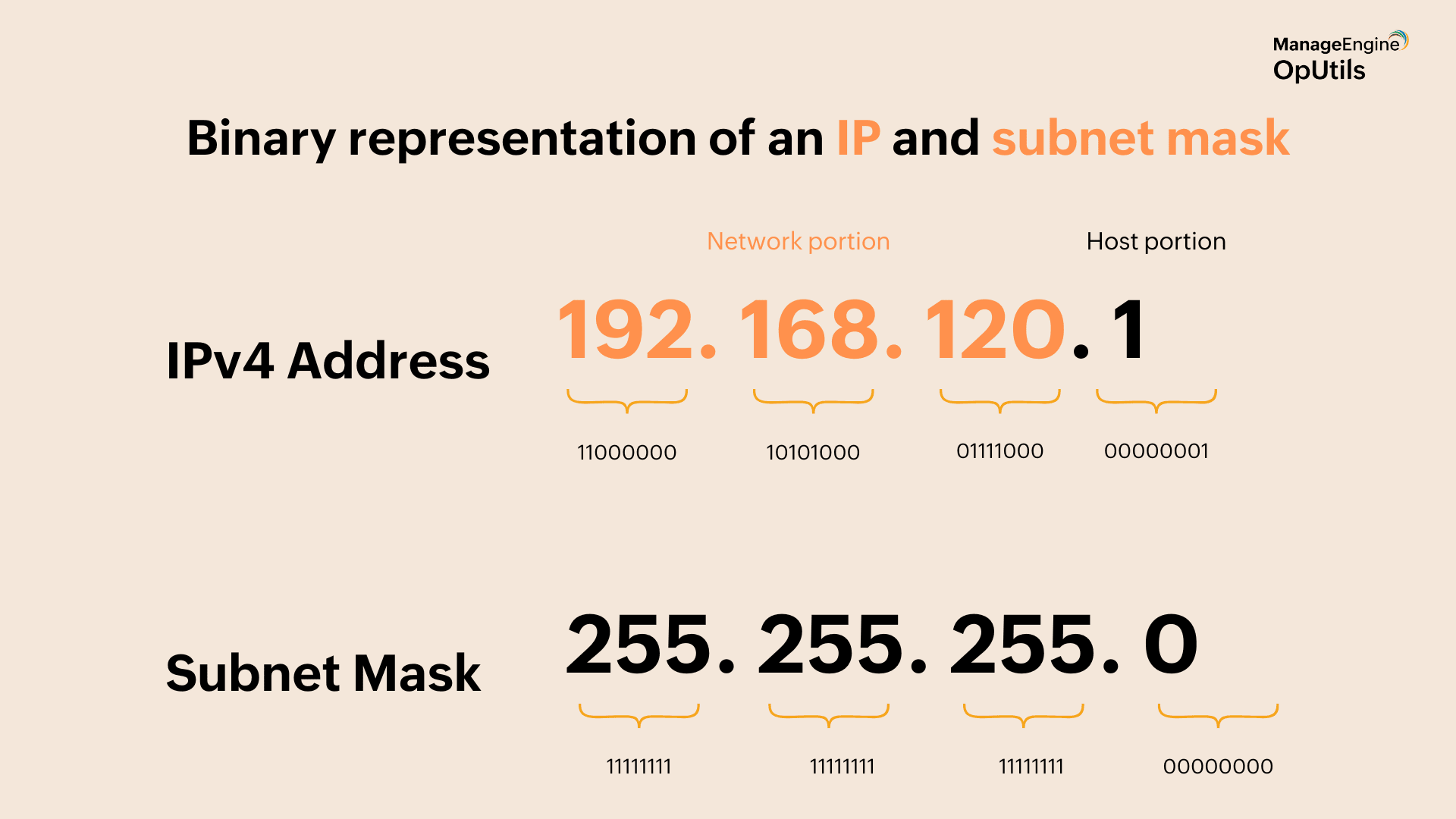
Example:
Decimal: 192.168.120.1
Binary: 11111111.11111111.11111111.00000000
IPv6 address structure:
IPv6 addresses, in contrast, are 128-bit alphanumeric addresses, written in hexadecimal format and separated by colons. To simplify lengthy addresses, zero compression is used - consecutive zeros can be replaced with "::" (but only once per address).
Example:
IPv6 Address: 2001:db8::ff00:42:8339
IPv6 was introduced to overcome IPv4 exhaustion, ensuring a vast address pool to support the growing number of internet-connected devices.
Let's read a little about subnet mask and its importance.
Subnet mask and why do we need it
A subnet mask is a numerical value that divides an IP address into network and host portions. For instance, a subnet mask of 255.255.255.0 indicates that the first three octets represent the network, while the last octet is used to identify individual devices.
Here is why subnet masks are important in a network:
- Simplifies network management: Breaks down large networks into smaller, more manageable subnets.
- Enhances security: Restricts access to unauthorized devices by clearly segmenting the network.
- Optimizes traffic flow: Reduces unnecessary data transmission between subnets, improving network performance.
Read more: Subnetting 101
IPv4 address classes
IPv4 addresses are divided into five classes depending on purpose and network size.
| Class | IP Range | Usage | Supported Hosts |
|---|---|---|---|
| A | 1.0.0.0 – 126.255.255.255 | Large networks (e.g., multinational corporations) | Millions of hosts per network |
| B | 128.0.0.0 – 191.255.255.255 | Medium-sized networks (e.g., universities, enterprises) | Thousands of hosts per network |
| C | 192.0.0.0 – 223.255.255.255 | Small networks (e.g., home, office networks) | Up to 254 hosts per network |
| D | 224.0.0.0 – 239.255.255.255 | Multi-casting (e.g., video streaming, conferencing) | Not used for regular host assignments |
| E | 240.0.0.0 – 255.255.255.255 | Experimental & Research purposes | Not for general use |
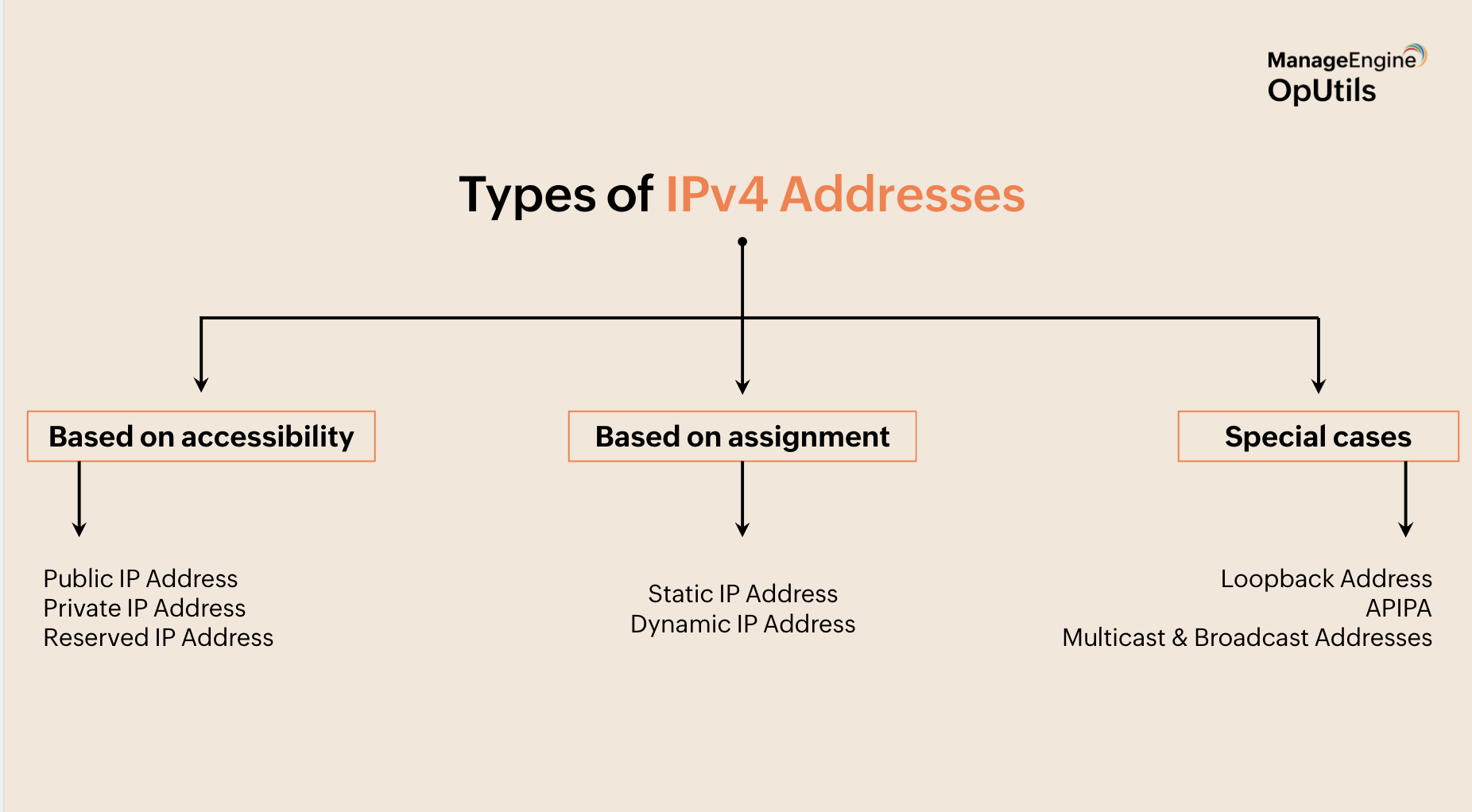
There are different types of IP addresses based on accessibility, assignment, and exceptional use cases. Let's understand each of them.
Types of IPv4 addresses
Based on accessibility
Public IP address: A public IP address is assigned by an Internet Service Provider (ISP) to devices on the internet. It is globally unique and cannot be used by another device simultaneously. Public IPs allow external communication, enabling access to websites, cloud services, and remote connections.
Private IP address: A private IP address is used within local networks to enable communication between devices, such as computers, routers, and printers. These addresses are not unique worldwide and can be repeated across different networks. Common private IP ranges include 192.168.x.x, 10.x.x.x, and 172.16.x.x – 172.31.x.x.
Reserved IP address: Reserved IPs are set aside for special functions and cannot be assigned to regular devices. For example, 127.0.0.1 is used for loopback testing, and 169.254.x.x is assigned when a device fails to get an IP from a DHCP server. These addresses are reserved for critical networking purposes.
Based on assignment
Static IP address: A static IP address is like a permanent home address—it never changes. It is manually assigned to devices that need a consistent identity, such as servers, printers, or network equipment. Since it remains fixed, it ensures reliable connections for hosting websites, remote access, or other essential services.
Dynamic IP address: A dynamic IP address works like a hotel room number—it changes each time you check in. It is automatically assigned by a DHCP (Dynamic Host Configuration Protocol) server, making it the default choice for most personal devices like laptops, phones, and home routers. Since it changes periodically, it adds a layer of security and helps optimize IP address usage.
Special IP addresses
Loopback address (127.0.0.1): Think of the loopback address like throwing a frisbee to yourself—it sends data out and catches it right back. When you use 127.0.0.1, your device tests its own network connection without reaching the internet. This is useful for troubleshooting and local software testing.
APIPA (169.254.x.x): When a device can’t get an IP from a DHCP server, it assigns itself an Automatic Private IP Address (APIPA) in the 169.254.x.x range. It’s like getting a temporary name tag when your official one isn’t ready—you can still interact with nearby devices but not go beyond the local network. APIPA ensures limited connectivity until the DHCP issue is resolved.
Multicast & broadcast addresses: Multicast and broadcast addresses work like group messages.
- Broadcast address (e.g.,
255.255.255.255): Like announcing something to an entire crowd—every device on the network gets the message. - Multicast address (e.g.,
224.0.0.0 – 239.255.255.255): Like sending a group text, reaching only specific devices subscribed to that channel.
These are widely used in video streaming, gaming, and real-time communication. IPv4 has been used for decades, and it integrates well with the existing network infrastructure. Yet, why are we moving towards IPv6? Here's why.
IPv4 vs IPv6: The transition
IPv4 faces address exhaustion due to its 32-bit limitation, leading to the need for IPv6. IPv6 addresses use 128-bit addressing, eliminating the need for NAT and enabling seamless auto-configuration. IPv6 enhances security with built-in IPSec (a protocol for encrypting and authenticating network traffic). Unlike IPv4, which relies on broadcasting, IPv6 supports Unicast, Multicast, and Anycast for efficient communication:
- Unicast: Sends data to a single specific device.
- Multicast: Delivers data to multiple selected devices simultaneously.
- Anycast: Routes data to the nearest node in a group.
This transition ensures scalability, better performance, and future-proof networking.
What is Network Address Translation (NAT)?
Think of NAT as a smart traffic controller for your network. It allows multiple devices—like your laptop, smartphone, and smart TV—to share a single public IP address when connecting to the internet. This not only helps conserve IPv4 addresses but also adds a layer of security by masking internal IPs from external threats.
Types of NAT:
- Static NAT: Maps one private IP to one public IP, ensuring a fixed external identity (commonly used for web servers).
- Dynamic NAT: Assigns a public IP from a pool of addresses, providing flexibility but not guaranteed consistency.
- Overloading (PAT): Also known as Port Address Translation (PAT), this allows multiple devices to share a single public IP by using different port numbers.
Understanding Port Address Translation (PAT) with an example
Imagine a router connecting multiple home devices (laptops, phones, smart TVs) to the internet. PAT ensures that when they access a website, the traffic returns to the right device by tagging requests with different port numbers.
PAT is widely used in home networks, businesses, and ISPs to efficiently manage IP address allocation while enabling seamless internet access.
How to find your IP address?
For individual devices, you can check the IP address using:
Command prompt or terminal:
- On Windows → Run
ipconfig /all - On Linux/macOS → Use
ifconfigorip a
Online tools:
A quick “What’s my IP” search on Google will show your public IP.
Managing a network with numerous devices comes with challenges like IP conflicts, unauthorized access, and inefficient manual tracking. Automating IP allocation, implementing whitelisting and blacklisting, and actively monitoring IP conflicts are essential for maintaining network security and stability.
As networks scale, manual IP management becomes impractical. IP Address Management (IPAM) tools simplify the process, offering real-time tracking, conflict prevention, and improved security.
IPAM solutions provide real-time visibility into all allocated and available IPs across your network, helping prevent conflicts, streamline troubleshooting, and improve security.
Why should you choose OpUtils as your IP address management software?
OpUtils is a comprehensive IP address management and switch port mapping solution that simplifies network administration.
- Built-in security features like rogue device detection and MAC address filtering
- Includes 30+ integrated tools, eliminating the need for multiple solutions
- Monitor devices, bandwidth, configurations, and more
- Seamless integration with specialized monitoring tools
- All functionalities accessible from a single console
Experience OpUtils with our 30-day free trial or book a personalized demo with our product expert today!