Impact of IP conflict on network performance
Even a single IP address conflict can ripple through your network, slowing down critical applications, breaking active sessions, and frustrating users. The impact of IP address conflicts on network performance is often underestimated. What might seem like a minor technical hiccup can quickly escalate into downtime, lost productivity, and increased IT workload. Understanding how IP conflicts disrupt connectivity is the first step toward preventing them.
On this page, you will read:
- Why IP address conflicts degrade network performance
- Symptoms that signal network performance degradation
- Consequences of ignoring IP conflicts
- Diagnosing IP conflicts in enterprise networks
- Resolving IP conflicts to restore performance
- Strategies for minimizing IP conflicts
- Preventing performance degradation from IP conflicts using OpUtils
- Frequently asked questions on IP address conflicts
Why IP address conflicts degrade network performance
An IP address conflict disrupts communication between devices, causing network instability that goes beyond simple connectivity errors. At the protocol level, conflicts trigger several technical behaviors that degrade network performance:
- Confused DHCP lease assignments (DHCPNAK messages): When a DHCP server detects that an IP is already in use, it may send a DHCPNAK message to the client. This denies the lease and forces the client to disconnect and request a new IP, interrupting connectivity.
- ARP cache updates and flooding: Devices claiming the same IP constantly update their ARP tables. Additionally, gratuitous ARP requests are broadcast repeatedly to assert ownership of the IP, which floods the network and consumes bandwidth.
- ARP cache poisoning risk: When two devices claim the same IP, ARP tables on other devices may be populated with conflicting MAC-to-IP mappings. This creates the potential for ARP cache poisoning, which can be exploited by malicious actors and further destabilizes network communication.
- Device disconnections and reconnections: Conflicting IPs cause devices to drop connections and attempt to reconnect repeatedly, which interrupts user sessions and critical application access.
- Application latency and crashes: Real-time applications such as VoIP, video conferencing, or ERP systems may experience lag, session drops, or freezes due to interrupted packet delivery.
- Service downtime and productivity loss: The cumulative effect of these technical disruptions results in service downtime, frustrated users, and reduced employee productivity.
To tackle IP conflicts, understanding performance degradation signals is important.
Symptoms that signal network performance degradation
Spotting the right IP conflict symptoms can help IT teams troubleshoot issues before users are severely impacted. Below are the most common performance-specific warning signs to watch for:
- Slow connection speeds: Devices fighting for the same IP often trigger packet retransmissions and delays. Monitor for throughput degradation, example: 10-30% lower than normal bandwidth, and increased latency in milliseconds (ms) across the subnet.
- Dropped VoIP or video calls: Real-time applications are highly sensitive to IP conflicts. Expect jitter spikes of 20 to 50 milliseconds higher than baseline and an increased packet loss percentage during conflicts, resulting in frequent call drops or frozen video sessions.
- Intermittent outages: Users may briefly lose connectivity and reconnect without explanation. This can correlate with repeated ARP table updates on switches/routers and higher CPU load on network devices, signaling devices are repeatedly negotiating the same IP.
- Application timeouts: Business-critical apps such as ERP or CRM may fail to load or experience transaction timeouts. Track response times and request failure rates where the timeouts typically rise by 15 to 40% during active conflicts.
- Gratuitous ARP flooding: Conflicting devices often send continuous gratuitous ARP requests to claim ownership of the IP. This can lead to broadcast storms and additional strain on network performance, measurable by increased network utilization on affected VLANs or subnets.
- DHCP lease disruptions: DHCP servers may detect an IP in use and issue DHCPNAK messages, causing lease denial and client disconnection. Key metrics to monitor include failed DHCP requests and clients repeatedly attempting to renew their leases.
These signs act as early red flags for admins, enabling faster troubleshooting before minor connectivity issues turn into widespread downtime. Ignoring IP conflicts can quickly lead to repeated disruptions and pricey escalations.
Here’s a reality check - the real consequences of leaving IP conflicts unresolved.
Consequences of ignoring IP conflicts
Overlooking the impact of IP address conflicts may seem harmless at first, but the consequences compound quickly. Both short-term and long-term effects can erode trust in IT, bring operations to a stall, and even put compliance at risk.
- Short-term disruptions: Users experience frequent outages, unstable sessions, and recurring frustration with network performance.
- Degraded user experience: Repeated access failures or inconsistent application behavior due to IP conflicts can damage end-user trust and reduce overall satisfaction.
- Troubleshooting complexity: Conflicting IPs generate misleading alerts and logs, making root-cause analysis harder and increasing time to resolution.
- Impact on DHCP and DNS operations: IP conflicts can interfere with DHCP lease assignments or DNS resolution, cascading into broader network unreliability. Beyond spotting the symptoms, following a structured approach to diagnose IP conflicts can help resolve them more quickly.
- Long-term downtime: Persistent conflicts can trigger extended network downtime, leading to lost productivity, missed deadlines, and mounting IT costs.
- Costly escalations: Issues that go unresolved often result in escalations, SLA breaches, or emergency support calls that drain budgets.
- Security blind spots: Unchecked IP conflicts can become entry points for ARP spoofing or other malicious activity, exposing sensitive data to risk.
| Impact | Consequence | Real-world example |
|---|---|---|
| Short-term disruptions | Users experience frequent outages, unstable sessions, and recurring frustration with network performance. | A corporate office with two printers sharing the same IP may face intermittent access failures for over 50 employees, causing downtime across multiple applications. |
| Degraded user experience | Repeated access failures or inconsistent application behavior reduce end-user trust and satisfaction. | In a retail chain, IP conflicts on POS devices could lead to slow transaction processing, frustrating staff and customers during peak hours. |
| Troubleshooting complexity | Conflicting IPs generate misleading alerts and logs, increasing MTTR and complicating root-cause analysis. | IT teams may end up spending hours chasing false alerts from a duplicated server IP, delaying the resolution of actual network faults. |
| Impact on DHCP and DNS operations | IP conflicts can disrupt DHCP lease assignments or DNS resolution, cascading into broader network instability. | A DHCP server issuing a lease to an already-in-use device could trigger intermittent network disconnections and failed DNS queries for several endpoints. |
| Long-term downtime | Persistent conflicts can cause extended network outages, lost productivity, and missed deadlines. | An unresolved IP conflict on a key network device could bring down connectivity for hours, leaving employees unable to access critical applications and delaying important projects. |
| Costly escalations | Issues that remain unresolved may result in SLA breaches, emergency support, or budget drain. | Escalating the issue to senior IT support can lead to unexpected overtime costs and extra expenses for the company. |
| Security blind spots | IP conflicts can create vulnerabilities like ARP spoofing or man-in-the-middle attacks, risking sensitive data. | If two servers claim the same IP, attackers could exploit the overlap to intercept traffic and expose internal credentials. |
Diagnosing IP conflicts in enterprise networks
Timely detection is critical to mitigate the impact of IP address conflicts. The speed at which administrators pinpoint the source directly determines how quickly network performance is restored. Enterprises typically rely on a combination of manual and automated methods to diagnose IP address conflicts.
- Manual methods: Simple commands like ping, arp, or ipconfig, along with OS alerts, can help identify conflicting devices. While effective for small networks, these methods are time-consuming in large-scale environments.
- Automated IP scanning and monitoring tools: Enterprise-grade tools continuously scan the network, detect duplicates in real-time, and alert admins immediately. These solutions reduce downtime and streamline troubleshooting IP conflicts by pinpointing the root cause quickly.
Read more about detecting IP conflicts here.
Resolving IP conflicts to restore performance
Once identified, fixing IP address conflicts quickly is essential to minimize disruption and restore stability. Quick fixes address the conflict in the moment, while preventive measures ensure the issue doesn’t resurface. In both cases, effective resolution directly contributes to network performance optimization.
- Quick fixes: Commands such as DHCP release/renew or correcting a misconfigured static IP can immediately restore device connectivity and stop conflicts in their tracks.
- Preventive measures: Long-term stability depends on proper subnet planning, maintaining DHCP hygiene by avoiding overlapping pools and expired leases, and configuring IP reservations for critical devices.
By combining fast responses with proactive planning, IT teams ensure conflict-free addressing and smoother network performance overall.
Strategies for minimizing IP conflicts
The best way to maintain reliable performance is to prevent IP conflicts before they affect users. Proactive management avoids disruptions and reduces IT workload in the long run.
Adopting some of these IP address management best practices helps keep networks conflict-free:
- Short lease times for transient devices: Configure shorter DHCP leases for guest Wi-Fi, BYOD, or IoT devices to prevent abandoned IPs from causing overlaps.
- Regular network scans for duplicate IPs: Routine scanning helps detect and correct duplicate assignments before they impact end users.
- Monitoring IP utilization trends: Tracking how address space is consumed over time helps forecast exhaustion and prevents accidental overlaps.
- Proactive alerting systems: Real-time alerts on duplicate IP usage allow admins to act quickly, reducing downtime and ensuring stability.
Preventing performance degradation from IP conflicts using OpUtils
Managing IPs manually is error-prone, especially in large networks. This is where OpUtils for IP conflict resolution makes a measurable difference. As one of the most comprehensive network monitoring tools, it equips IT teams to detect, diagnose, and prevent conflicts before they impact performance.
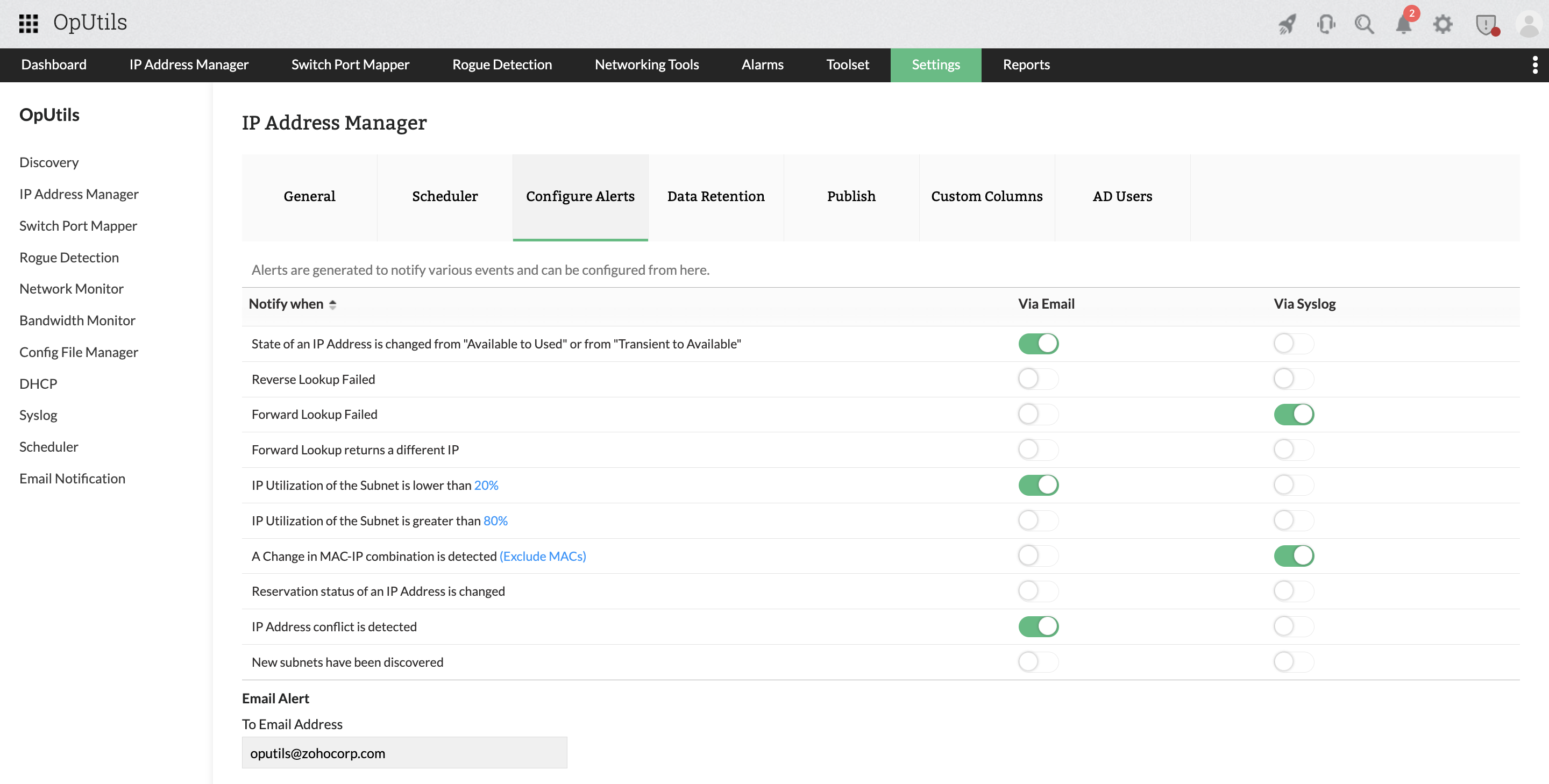
- Real-time conflict detection and alerts: OpUtils continuously scans your network, instantly flagging duplicate IP usage so admins can act before users feel the impact.
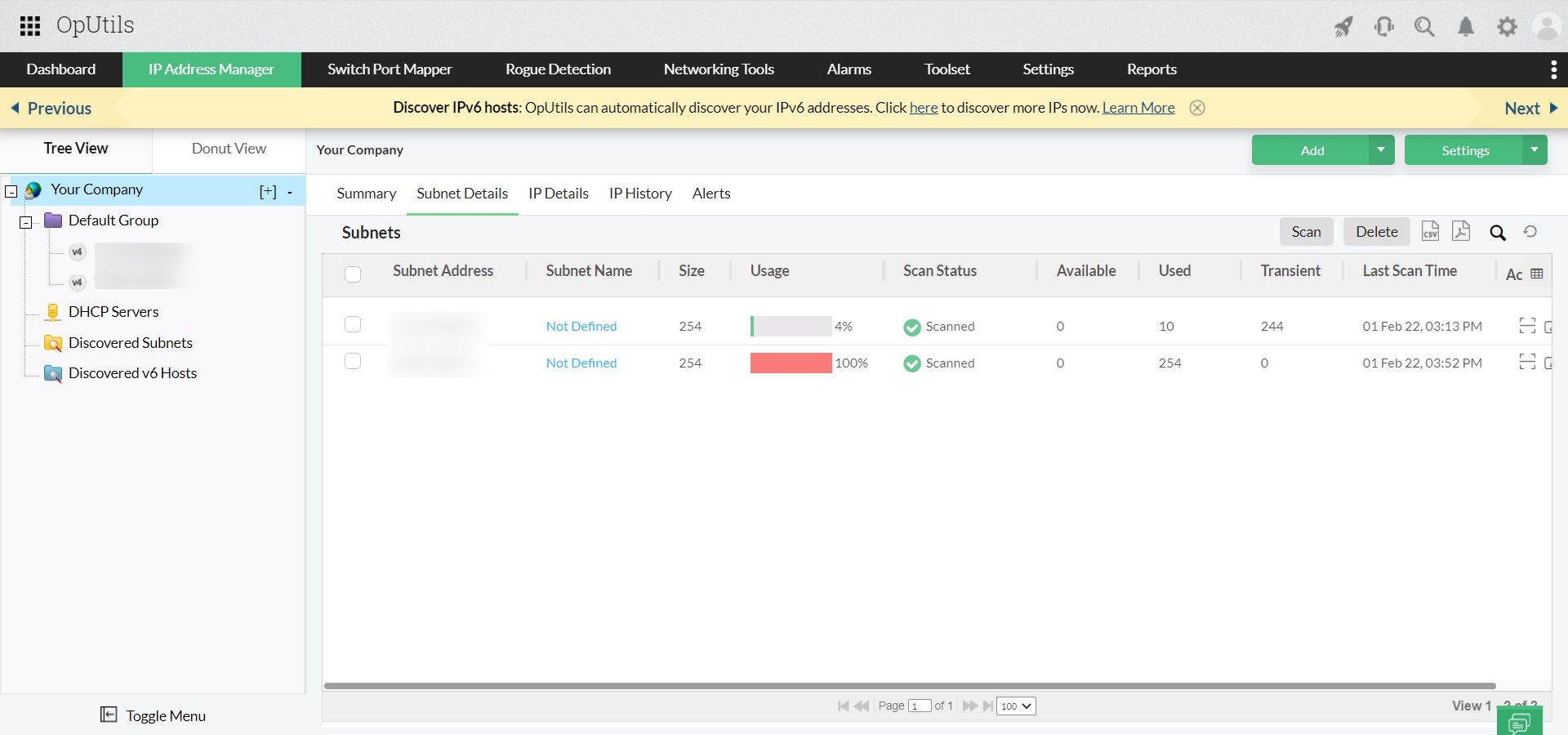
- End-to-end IP address management: A centralized dashboard offers clear visibility into subnets and address assignments, making proactive monitoring simple and intuitive.
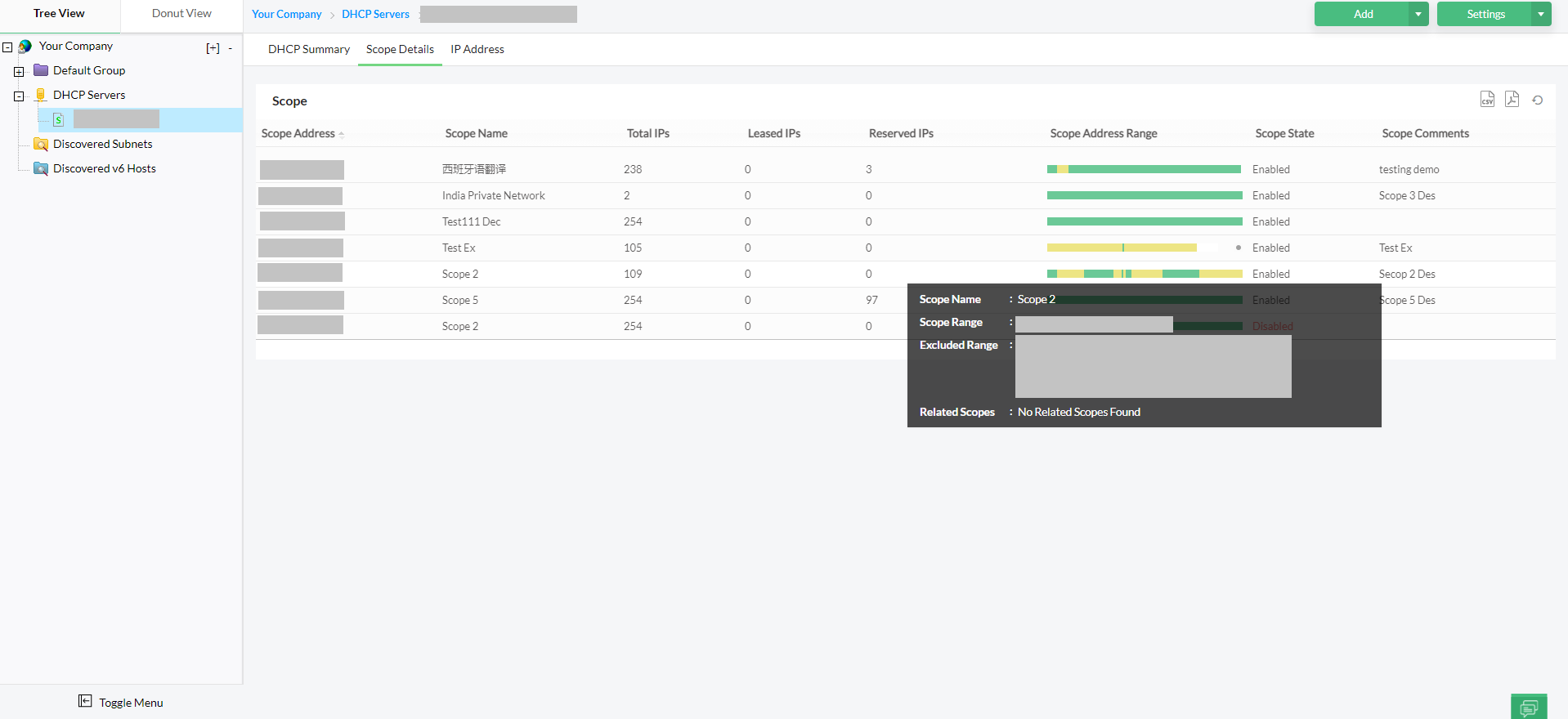
- DHCP/DNS integrations: Tight integration with DHCP and DNS servers helps prevent overlapping address pools and misconfigurations that commonly lead to conflicts.
This along with advanced features like DHCP reservation and MAC address filtering makes OpUtils the right choice to keep your network running at peak performance. Enterprises using OpUtils have significantly reduced detection time, resolved conflicts faster, and minimized costly downtime.
Don’t listen to us; try it all by yourself. Download our 30-day free trial and experience a hassle-free network that is up and running always. You can also schedule a free demo, and we will connect you to the right product expert where you can clear all your product-related queries.
Frequently asked questions on IP address conflicts
What is an IP address conflict?
+What are the most common signs of an IP conflict?
+Are IP address conflicts a security risk?
+Can IP conflicts resolve on their own?
+How can I try OpUtils for free?
+Easily detect and manage IP conflicts in real time with OpUtils
Try OpUtils for free today