IP toolset made simple
OpUtils is a robust IP address management and switch port mapper tool that has over 30 comprehensive network tools that integrated within the software. As network demand increases, the need to use multiple tools to effectively manage the network also grows. However, juggling between multiple tools makes it challenging for administrators to switch between them and correlate the generated data. To address this challenges, ManageEngine OpUtils has come up with a comprehensive toolkit that includes all the essential tools network administrators frequently use.
3 reasons why network admins should try OpUtils' network Toolset
Are you tired of using outdated online tools to troubleshoot your network while managing your IPs and switch ports? There's a better way of doing it. But before diving into the details, here are some key reasons why you should consider trying OpUtils.
Comprehensive network management
Manage all your network devices, IPs, and switch ports while gaining real-time visibility with the OpUtils network toolset. From ping tools for checking availability to network scanners for real-time network analysis, the OpUtils toolset has it all.
Efficient troubleshooting
Minimize the need to switch between multiple tools. With instant alerts and comprehensive data, administrators can address problems before they affect the network.
Cost-effectiveness
With OpUtils, you can access a wide range of tools and meet the growing demands of your network, all while still staying within your budget. Gain a long-term value and increased ROI by purchasing a single tool.
OpUtils network toolset: The all-in-one network solution
Ping Tools
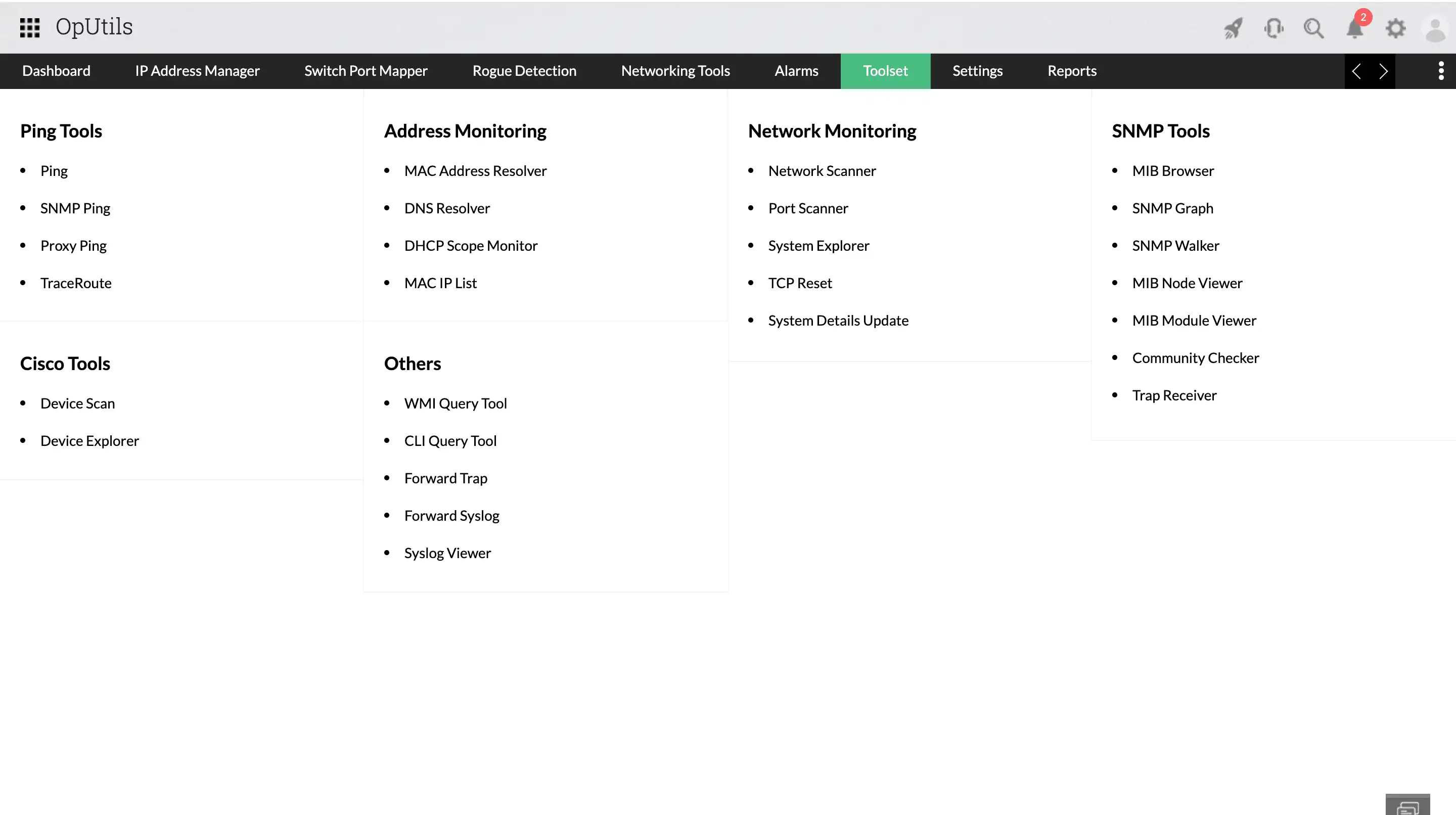
Ping tools are essential for understanding the connectivity of host devices on a network, ensuring availability, testing performance, and troubleshooting. Ping toolkit is made up of 4 tools - Ping (ICMP), SNMP Ping, Proxy Ping and TraceRoute. The Ping tool verifies the availability of a target host by sending ICMP packets and awaits an echo reply. Next is, SNMP Ping, which queries and verifies SNMP-enabled devices. The Proxy Ping tool checks the status of devices behind a proxy by pinging the Cisco router, and the TraceRoute tool maps the route of data packets, displaying hops and IP addresses to identify latency issues and network bottlenecks.


Address Monitoring tools
Address monitoring toolkit again has 4 tools - MAC Address Resolver, DNS Resolver, DHCP Scope Monitor and MAC IP List. These tools ensure efficient functioning of the IP address space. The MAC Address Resolver resolves MAC addresses to corresponding IP addresses, aiding in network troubleshooting. The DNS Resolver translates domain names into IP addresses, simplifying DNS-related operations. The DHCP Scope Monitor manages DHCP scopes efficiently, empowering the administrator to take complete control over DHCP servers. The MAC-IP List provides an updated list of MAC addresses associated with their corresponding IP addresses, facilitating efficient data packet routing within the network.


Network Monitoring tools
The Network Monitoring utilities within the OpUtils Toolset include essential tools that administrators need on-demand. OpUtils' Network Monitoring tools include the Network Scanner, Port Scanner, System Explorer, TCP Reset and System Details Update. The Network Scanner tool scans devices to understand network composition, view the device availability, perform forward and reverse lookup actions and identify bottlenecks. With the help of Port Scanner, identify the status of network ports. System Explorer offers detailed insights into SNMP-enabled devices, TCP Reset terminates unwanted TCP connections, and System Details Update allows viewing and updating SNMP-enabled device details.


SNMP tools
SNMP tools are essential for managing SNMP-enabled network devices, providing crucial insights into their performance and status. OpUtils' SNMP tools include the MIB Browser, which fetches data from SNMP-enabled devices, thereby monitoring health and performance. The SNMP Graph visually depicts performance metrics of the network devices for quick analysis. The MIB Node Viewer shows the hierarchical structure of MIBs, aiding in device management. The MIB Module Viewer explores MIB attributes and specifications, while the Community Checker evaluates SNMP community strings for authentication. Finally, the Trap Receiver collects and analyzes SNMP traps, offering real-time alerts for immediate issue resolution.


Cisco Tools & Others
Cisco Tools in OpUtils include Device Scan, which scans subnets or IP ranges of Cisco devices to gather details like chassis ID and IOS version, and Device Explorer, which provides comprehensive information on Cisco devices, including snapshots, flash memory, and IP routes. Additionally, OpUtils has the WMI Query Tool, CLI Query Tool, Forward Trap, Forward Syslog, and Syslog Viewer, thereby providing comprehensive management, and troubleshooting capabilities for network administrators.


Looking to try OpUtils for free, before purchasing?
One of the best products to manage the environment

Great software, does everything I need, nothing I don't
Networking on the NEXT level