Detecting IP conflicts caused by rogue devices
Rogue devices, be it unmanaged, unauthorized, or misconfigured endpoints, often intensify IP conflicts by consuming IPs outside the planned allocation, thereby making them harder to trace and resolve.
Before diving more into rogue devices and how they contribute to IP conflicts, let’s start by defining what an IP address conflict is. IP conflict happens when two or more devices on a network are assigned the same IP address. This IP allocation overlap disrupts normal communication, leading to connectivity drops, sluggish applications, and even temporary outages that affect both users and services.
While conflicts can arise from configuration errors or DHCP issues, one of the most common, critical, and often overlooked causes is the presence of rogue devices. Unauthorized systems such as unmanaged switches, personal hotspots, or malicious devices set up by attackers which can include wireless access points that bypass established IP address management practices, can introduce duplicate addresses into the network causing an IP conflict.
Understanding how rogue devices contribute to IP conflicts is the first step toward preventing them and ensuring consistent network performance.
On this page, you will read:
- What are rogue devices and why do they matter
- How rogue devices cause IP conflicts and security risks
- Consequences of ignoring IP conflicts caused by rogue devices
- Detecting rogue devices on your network
- Best practices to detect rogue devices in your network
- How to resolve IP conflicts caused by rogue devices
- Using OpUtils to manage IP conflicts from unauthorized devices
- How to prevent IP conflicts caused by rogue devices in the future
- Frequently asked questions on IP conflicts and rogue devices
What are rogue devices and why do they matter
Rogue devices are any unauthorized or unmanaged hardware that connects to your network without proper approval or configuration. They often slip in unnoticed, whether it’s employees bringing their own laptops or mobile hotspots, contractors plugging in unmanaged switches to extend connectivity, or malicious actors setting up rogue wireless access points that mimic legitimate ones. Unlike approved devices that follow IT policies, rogue devices operate outside the scope of your DHCP configurations, IP address reservations, and access controls.
Imagine an employee plugs in a personal Wi-Fi router in their cubicle to get better wireless coverage. This router starts acting as a DHCP server and begins assigning IP addresses from its own private range. Soon, legitimate devices that were already assigned IPs from the corporate DHCP server collide with the rogue assignments, causing widespread IP conflicts. Suddenly, users in that department experience dropped connections and failed logins, which is a classic symptom of an unmanaged rogue device or shadow IT in action.
How rogue devices cause IP conflicts and security risks
When rogue devices slip into a network, they disrupt the normal flow of IP allocation and security controls.
Below are the main ways rogue devices trigger IP conflicts and create wider risks for network stability and safety.
- Duplicate IP assignment:Rogue DHCP servers often hand out IP addresses causing overlap with the authorized local DHCP server's IP pool. This creates overlapping assignments, where two devices share the same IP, leading to conflicts that break connectivity for both the devices.
- Static IP overlaps: BYOD laptops, shadow IT devices, cloned virtual machines, or unauthorized IoT devices may connect with a preconfigured static IP that’s already in use. Since the IP wasn’t assigned through the official DHCP server, the overlap results in connectivity loss for one or both devices.
- Network instability: Every conflict triggers packet loss, retransmissions, and jitter. For real-time applications like VoIP calls or video conferencing, this means frozen video, choppy audio, or sudden disconnections. Over time, repeated conflicts degrade overall network reliability.
- Security loopholes: Because rogue devices operate outside official IT oversight, they can become blind spots in your network. Attackers can exploit them to bypass monitoring tools, deploy malware, or sniff network traffic, all while administrators remain unaware.
- Unauthorized access: Unapproved access points or unmanaged switches allow external users to connect to the internal network. This risks data breaches and spreads conflicts further by introducing more uncontrolled IP usage.
Consequences of ignoring IP conflicts caused by rogue devices
Rogue devices are not just a nuisance; they can quietly destabilize and exhaust your network resources if left unchecked. Flat networks allow a rogue device’s IP conflict to ripple across the entire environment, whereas segmented networks with VLANs and ACLs can contain the conflict to a smaller zone, limiting overall disruption.
Short-term impacts of IP conflicts caused by rogue devices
- Connectivity loss: Endpoints receiving duplicate IPs lose their ability to communicate reliably, often dropping sessions mid-use.
- Application timeouts: Business-critical apps such as ERP or VoIP may hang or disconnect due to unreachable hosts.
- Increased latency: Troubleshooting loops and failed ARP/DHCP transactions add noticeable lag, hurting user experience.
Long-term impacts of IP conflicts caused by rogue devices
- Recurring downtime: Repeated conflicts degrade reliability and erode trust in IT’s ability to maintain uptime.
- SLA breaches: Service-level agreements tied to uptime or response times can be violated, carrying financial penalties.
- Higher IT overhead: Teams spend more time chasing recurring conflicts, diverting resources from strategic projects to constant firefighting.
- Potential data loss: Inconsistent connectivity may lead to file corruption or failed database writes.
Compliance and regulatory risks involved with letting IP conflicts affect your network
Conflicts caused by rogue devices slow down your network and put your organization at legal risk. Regulations like GDPR, HIPAA, and PCI-DSS require strict control over data flows and endpoints. A rogue device causing data leakage, unauthorized access, or unmonitored connectivity can result in heavy fines and reputational damage.
| Impact | Consequence | Example |
|---|---|---|
| Connectivity loss | Users unable to access apps/services | Employees lose access to email or ERP |
| Application timeouts | Disrupted productivity | VoIP calls drop or video sessions freeze |
| SLA breaches | Financial penalties, customer dissatisfaction | Downtime violates contracted 99.9% uptime |
| Security vulnerabilities | Entry points for attackers/malware | Rogue AP exposes internal resources |
| Compliance violations | Fines and legal action | GDPR breach from unmonitored data exfiltration |
Detecting rogue devices on your network
The faster you detect a rogue device, the easier it is to contain IP conflicts before they spread. Detection can be approached in layers, starting with manual inspection and moving toward automated, proactive monitoring.
Step-by-step detection approach to contain rogue devices:
- Physical inspection: Walk through wiring closets or office floors to spot unauthorized access points, unmanaged switches, or plugged-in personal devices.
- MAC/IP tracking: Correlate DHCP leases with device MAC addresses to identify unknown or duplicate endpoints.
- ARP monitoring: Monitor ARP tables for anomalies such as duplicate IP-to-MAC mappings or sudden changes in device ownership.
Manually performing these steps can be tedious and time-consuming, but the right tool can automate the entire process in real time.
Tools to detect rogue devices in your network:
- Network scanners: Map connected hosts, open ports, and unexpected devices.
- IP address management (IPAM) tools: Provide centralized visibility into IP usage and flag conflicts in real time.
- Rogue detection tools: Identify unauthorized or rogue access points broadcasting within your network.
- Automated ARP/DHCP monitoring: Continuously tracks IP-to-MAC bindings and lease activity, instantly spotting duplicates or suspicious changes without manual checks.
- Unified dashboards and alerts: Present network health, conflicts, and rogue-device activity in one place, while sending proactive alerts before users even notice downtime.
- Integration with existing systems: Many advanced tools plug directly into your DHCP servers, switches, or controllers, eliminating guesswork and speeding up remediation.
When combined, these tools automate what would otherwise be a tedious, error-prone process. Instead of manually hunting through logs and wiring closets, IT teams get real-time visibility, faster resolution, and fewer blind spots. In my opinion, adopting a tool-driven approach isn’t just convenient. It’s the most fool-proof way to safeguard your network against the disruptions and risks rogue devices introduce.
Logs and metrics to monitor for rogue devices, proactively:
- DHCP server logs: Look for conflicting leases, repeated NACKs, or MAC flapping to see which IP is moving rapidly between multiple MACs.
- Syslog events from routers/switches: Check for interface flaps, ARP table conflicts, or unauthorized device connections.
- Event correlation: Use IPAM tools to cross-check abnormal DHCP or ARP events with device login attempts.
Best practices to detect rogue devices in your network
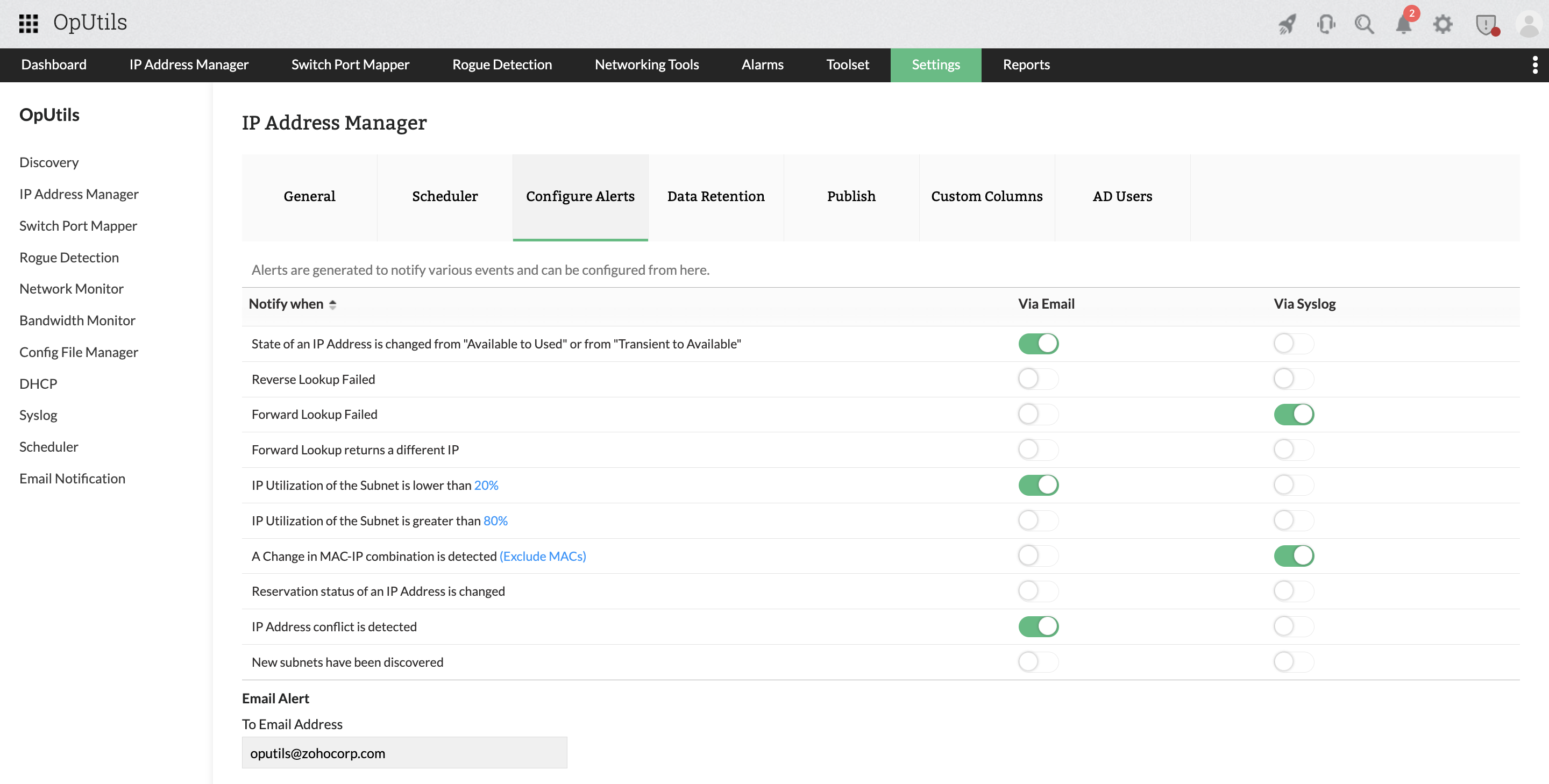
- Automated alerts: Configure alerts for duplicate IP detection or suspicious device connections.
- Scheduled scans: Run periodic network sweeps to baseline “normal” devices and quickly spot new ones.
- Policy enforcement: Use VLAN segmentation, 802.1X authentication, and NAC to limit rogue device impact.
- Rogue device detection (RDD) module: Leverage OpUtils’ Rogue Detection module to automatically identify and flag unauthorized endpoints the moment they connect, saving time and reducing manual effort.
- Centralized reporting: Maintain an updated inventory of all connected devices with trend reports, helping you track recurring rogue activity and strengthen future controls.
How to resolve IP conflicts caused by rogue devices
When rogue devices trigger IP conflicts, a structured response is key to restoring stability quickly. The goal is to isolate the source, restore unique addressing, and harden the network against recurrence.
Step-by-step process to resolve IP conflicts caused by rogue devices
Isolate the rogue device
- Trace the MAC address via switch port monitoring or IPAM.
- Quarantine the port or disable wireless access to stop further conflicts.
Reassign IP addresses
- If the rogue device is legitimate like a BYOD endpoint, allocate a proper DHCP lease or assign a new static IP.
- For malicious/unauthorized devices, block permanently and free the conflicting address.
Clear stale DHCP leases
- Remove duplicate or expired leases from the DHCP server to prevent reassignment conflicts.
Update ARP tables
- Flush ARP caches across affected routers and switches to remove stale mappings.
- Ensure endpoints refresh their IP configuration via ipconfig /renew on Windows or dhclient on Linux.
Tips to troubleshoot IP conflicts in your network
- Handle DHCPNAK messages: Frequent NAKs indicate conflicts in the DHCP pool, recheck scope boundaries and rogue DHCP presence.
- Monitor ARP behavior: Look for rapid ARP changes or duplicate MAC-to-IP bindings.
- Validate DNS/DHCP consistency: Mismatches between DNS records and DHCP assignments can worsen connectivity issues.
- Cross-check switch logs:Flapping ports or unexpected MAC addresses often point to rogue devices.
Using OpUtils to manage IP conflicts from unauthorized devices
OpUtils continuously monitors ARP tables, DHCP scopes, and switch port connections to spot anomalies such as duplicate IP-to-MAC bindings, unauthorized endpoints, or devices bypassing standard DHCP requests.
Its rogue device detection module correlates this data with network policies to quickly flag unrecognized or unauthorized devices the moment they appear.
This helps you to:
- Instantly detect and isolate rogue endpoints before they cause disruptions.
- Maintain an accurate, real-time inventory of all connected devices.
- Strengthen security by ensuring only authorized assets consume network resources.
OpUtils streamlines each stage of the conflict resolution process by providing end-to-end visibility and control over IP usage, rogue device behavior, and switch-level enforcement.
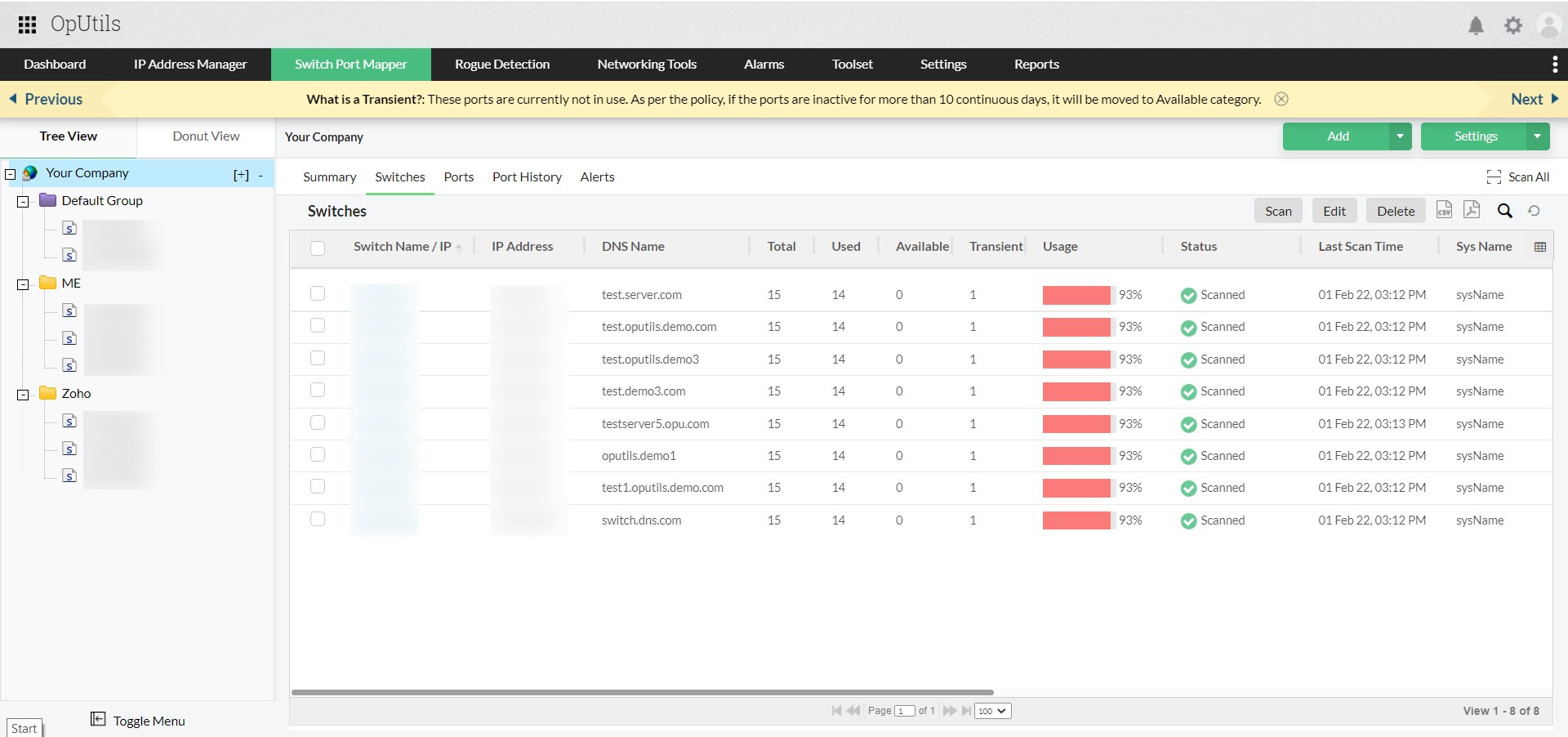
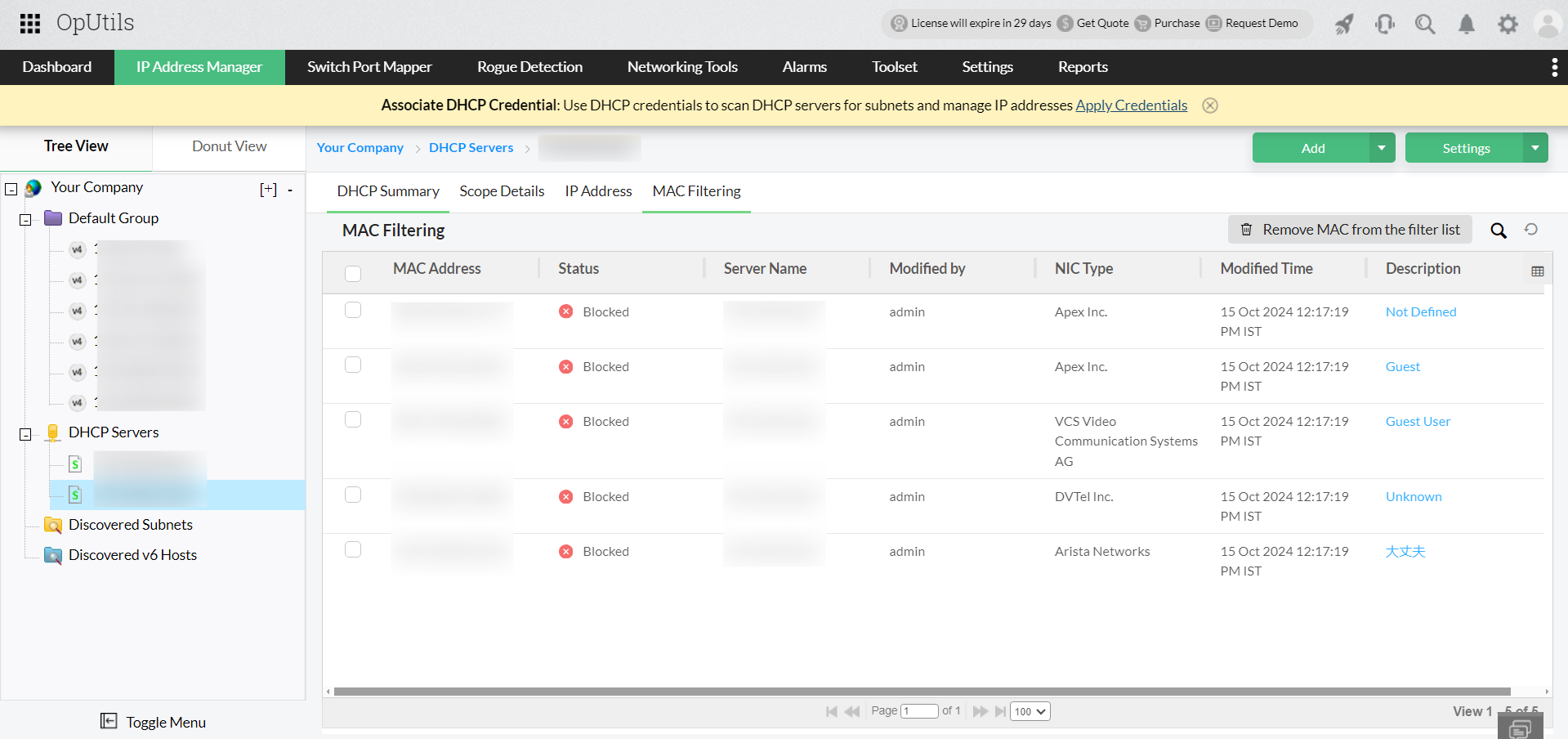
- Isolate rogue devices with switch port mapping and MAC filtering
OpUtils’ switch port mapper traces the exact switch and port where a rogue device is connected. Admins can instantly block the switch port or apply MAC filtering to isolate unauthorized devices and prevent further conflicts. - Reassign conflicting IP addresses using IPAM
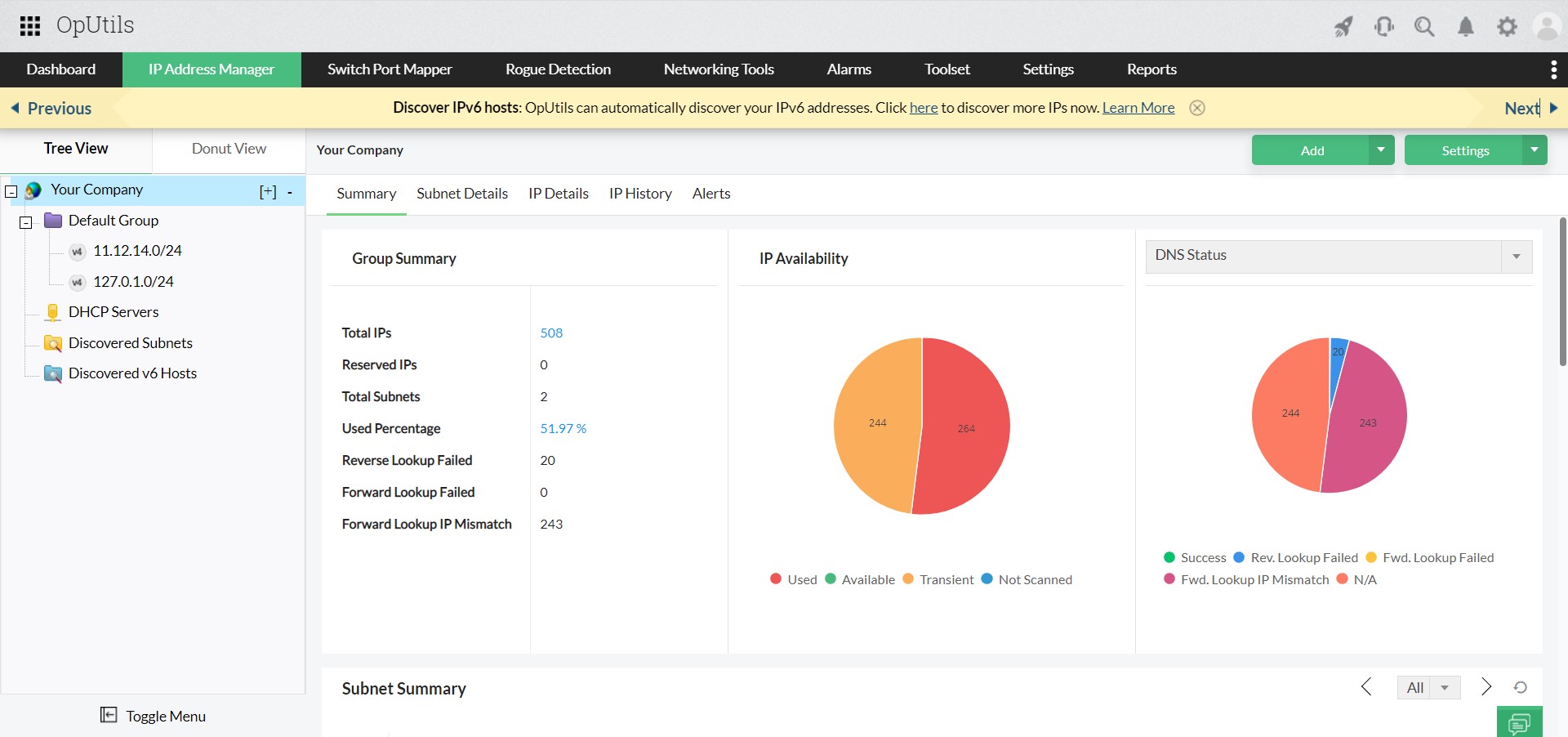
With its integrated IP Address Manager (IPAM), OpUtils detects duplicate or conflicting IPs in real time. Admins can quickly release the conflicting IP and reassign a valid lease, restoring smooth network operations. - Clear stale DHCP leases to prevent recurring conflicts
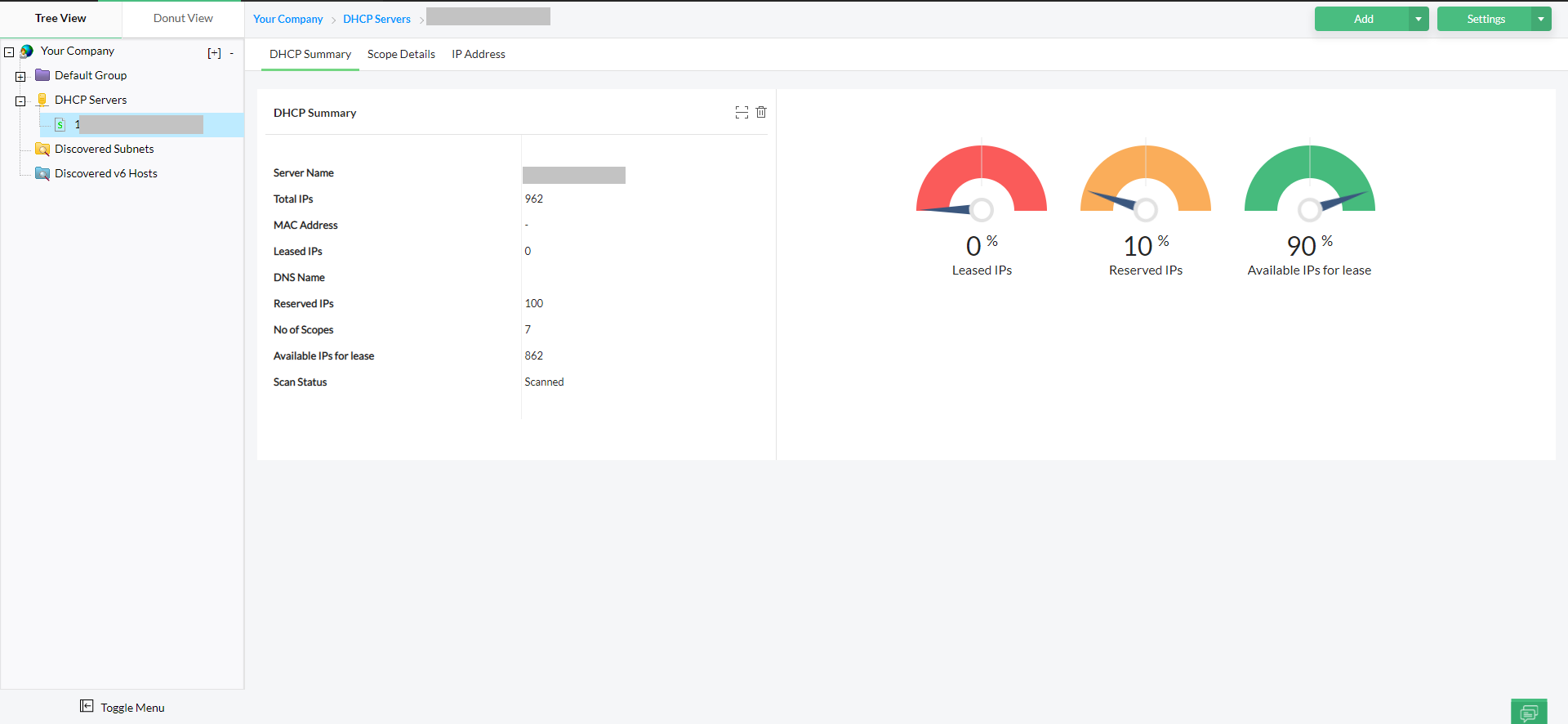
OpUtils integrates with DHCP servers to continuously sync lease data and identify expired or overlapping leases. This ensures DHCP scopes remain accurate, reducing the chance of repeat IP address conflicts. - Update ARP tables for accurate network resolution
By proactively monitoring ARP tables, OpUtils flags suspicious activity, such as duplicate MAC-to-IP bindings. This visibility enables admins to identify and manually flush or refresh ARP tables on devices, ensuring they resolve to the correct IP addresses. - Troubleshoot and validate with real-time conflict alerts
OpUtils provides instant alerts on DHCP conflicts, ARP anomalies, and duplicate IPs. Detailed logs and reports help admins validate DNS, DHCP, and IP assignments, ensuring long-term network stability and compliance.
How to prevent IP conflicts caused by rogue devices in the future
To reduce the risk of rogue devices and duplicate IPs, follow these best practices:
- Run regular network scans to catch conflicts early.
- Use IPAM for centralized IP tracking and real-time conflict alerts.
- Segment networks with VLANs/subnets to contain issues.
- Maintain DHCP hygiene by cleaning stale leases and monitoring logs.
- Monitor rogue devices continuously with alerts and switch port controls.
Try OpUtils for free for the next 30 days and experience a hassle-free network. You can also schedule a personalized demo, and we will connect you with the right product expert.
Frequently asked questions on IP conflicts and rogue devices
What is an IP conflict, and how can it affect my network?
+How do I detect and track down rogue devices on my network?
+Can IP conflicts caused by rogue devices lead to security risks?
+How can IPAM or monitoring tools help prevent these conflicts?
+Proactively detect rogue devices and resolve IP conflicts in real time with OpUtils
Try OpUtils for free today