
DHCP scope monitor
A DHCP scope monitor helps IT teams track and proactively manage IP address availability at the scope level within DHCP servers. By continuously monitoring address usage, lease activity, and threshold limits, it prevents scope exhaustion and network disruptions, before users are impacted.
As networks grow and devices frequently change,DHCP scopes can fill up faster than expected. Without visibility into scope utilization, administrators risk address shortages, failed client requests, and avoidable troubleshooting, such as clients repeatedly retrying DHCP requests or falling back to self-assigned IP addresses.
Monitoring DHCP scopes keeps IP pools healthy, optimizes lease usage, and ensures critical services remain available, especially in enterprise networks where even brief outages can cascade.
Key takeaways:
- What it is: DHCP scope monitoring tracks IP address usage, availability, and lease behavior within DHCP scopes to ensure reliable address allocation.
- Why it matters: Prevents IP exhaustion, avoids unplanned network outages, and ensures devices can connect without disruption, especially in dynamic enterprise environments.
- How it works: Monitoring tools poll Microsoft DHCP via secure WinRM/WMI to collect real-time scope and lease data and trigger utilization-based alerts and insights.
- When to use: Essential for growing networks, BYOD and IoT environments, multi-vendor DHCP setups, compliance-driven organizations, and teams adopting DDI-based IP management.
What is a DHCP scope?
A DHCP scope is a collection of configuration parameters that determine how IP addresses are assigned within a specific subnet. It typically includes:
- IP address range: The pool of IP addresses available for dynamic allocation to clients.
- Subnet association: The network and subnet mask that define which devices the scope applies to.
- Lease duration: The amount of time an IP address is assigned to a device before it must be renewed or released.
- Exclusions and reservations: Addresses excluded from assignment or permanently reserved for specific devices such as servers, printers, or network appliances.
- Scope options (DNS, gateway, domain name, etc.): Network configuration details provided to clients, including default gateways, DNS servers , and domain information.
How DHCP scopes work in enterprise networks
In enterprise environments, DHCP is rarely limited to a single scope or subnet. To support scale, segmentation , and high availability, organizations design DHCP architectures that distribute scopes across locations, VLANs, and servers. Understanding this structure is essential for effective scope monitoring.
- Multiple scopes per server: A single DHCP server often hosts multiple scopes, each serving a different subnet or department. While this simplifies infrastructure, it also means administrators must track utilization across many scopes simultaneously. A problem in one scope can easily go unnoticed if monitoring is limited to server-level health.
- VLAN-based scopes: Enterprises commonly assign separate DHCP scopes to different VLANs to isolate traffic and enforce network policies. Each VLAN has its own IP pool and lease behavior, making visibility into per-VLAN utilization critical, especially in environments with frequent device movement or dynamic access.
- Distributed or regional scopes: Large organizations deploy DHCP scopes across branch offices, data centers, or regional networks. These distributed scopes experience different usage patterns depending on location, working hours, and device types. Without centralized monitoring, regional scope exhaustion can occur long before it is detected.
- Failover and split scopes: To ensure high availability, enterprises configure DHCP failover or split scopes across multiple servers. While this improves resilience, it also adds complexity. Address availability must be monitored across both primary and secondary servers that are on standby or on load balancing modes to avoid uneven utilization or silent depletion during failover scenarios.
Why DHCP scopes need monitoring
Although DHCP scopes automate IP allocation, they are not “set and forget.” Changes in device density, lease duration, unmanaged reservations, or rogue devices can quietly consume available addresses. Without monitoring, these issues such as stale IP leases, misconfigured reservations, and sudden device spikes that often remain hidden until clients fail to obtain IP addresses. Scope monitoring helps administrators detect abnormal usage early, plan capacity accurately, and maintain consistent IP availability across subnets.
What is DHCP scope monitoring?
DHCP scope monitoring is the continuous process of tracking IP address usage, availability, and key operational indicators within a DHCP scope. Instead of relying on occasional checks or reactive troubleshooting, scope monitoring provides real-time visibility into utilization percentage, lease churn, and IP conflict trends to identify scopes at risk of exhaustion. Effective monitoring goes beyond counting free addresses. It helps administrators understand usage patterns, lease behavior, and configuration issues that can impact IP availability across the network.
Key aspects of DHCP scope monitoring include:
- Continuous tracking of IP utilization within a scope: Monitors how many addresses are in use, free, reserved, or excluded at any given time.
- Monitoring lease usage, availability, and exhaustion risk: Tracks active leases, renewal patterns, and threshold breaches to detect when a scope is approaching capacity.
- Visibility into scope health, and trends: Highlights abnormal consumption, and long-term utilization trends that affect capacity planning.
Manual checks vs audits vs real-time monitoring
Not all approaches to managing DHCP scopes provide the same level of visibility or reliability.
- Manual scope checks: Administrators log into DHCP servers and review scope statistics on demand. This approach is time-consuming, inconsistent, and often happens only after users report issues.
- Periodic audits: Scheduled reviews provide a snapshot of scope usage at a specific point in time. While better than manual checks, audits can still miss rapid consumption spikes or short-term exhaustion events.
- Real-time scope monitoring: Continuously tracks scope utilization and lease activity, triggering alerts before exhaustion occurs. This approach enables proactive intervention instead of reactive firefighting.
Bottom line, manual checks and audits don’t scale with modern networks. Real-time scope monitoring delivers always-on visibility and early warnings, enabling IT teams to stay ahead of DHCP exhaustion instead of constantly chasing incidents.
Why DHCP scope monitoring is critical in modern networks
Modern networks are dynamic, device-heavy, and distributed. DHCP scope monitoring plays a critical role in maintaining service availability and ensuring IP address continuity across the enterprise.
Preventing IP address exhaustion
DHCP scope exhaustion rarely happens all at once. It often builds silently as devices accumulate, leases remain active longer than expected, or unused reservations consume address space. Without visibility, administrators may only discover the issue when new devices fail to obtain an IP address. Proactive scope monitoring detects rising utilization early, allowing teams to adjust lease duration, expand scopes, or reclaim unused addresses before users are impacted.
Avoiding unplanned downtime
When a DHCP scope runs out of available IP addresses, devices are unable to join the network. This can disrupt:
- End-user systems failing to obtain connectivity.
- VoIP phones that depend on DHCP for call services.
- Wi-Fi networks where new client connections are rejected.
- VPN users and branch offices relying on centralized DHCP services.
Because DHCP is foundational, even brief scope exhaustion can trigger widespread outages that are hard to trace, as end users appear to have general network problems rather than obvious DHCP failures, increasing MTTR.
Supporting growing and dynamic environments
Enterprise networks are no longer static. DHCP scopes must accommodate constant change driven by:
- BYOD environments with fluctuating device counts.
- IoT devices that remain connected for a long duration.
- Virtual machines and containers that spin up and down rapidly.
- Remote offices and hybrid work setups with unpredictable usage patterns.
DHCP scope monitoring provides the visibility required to adapt IP address allocation strategies as the network evolves, without compromising availability or performance.
Common challenges without a DHCP scope monitor
As networks scale, fragmented DNS and DHCP operations become harder to maintain and more costly to ignore.
No real-time visibility into scope utilization
Without continuous monitoring, administrators rely on static or on-demand views of DHCP scopes. These snapshots fail to reflect rapid changes in address consumption, especially in dynamic environments.
- Static views show utilization only at the moment they are checked.
- Delayed discovery of exhaustion means scopes may already be depleted by the time the issue is noticed.
This causes, IP address shortages often surface only when connectivity is already impacted.
Manual tracking and human error
In the absence of automated monitoring, many teams track scope usage manually using tools that were never designed for ongoing IP management.
- Spreadsheet-based tracking quickly becomes outdated and unreliable.
- CLI-based checks require time, expertise, and consistent follow-up.
- Inconsistent updates across teams lead to gaps in scope visibility.
These manual approaches increase the risk of miscalculations, missed thresholds, and avoidable outages.
Delayed alerts and reactive troubleshooting
Without proactive alerts, DHCP issues are usually discovered indirectly, after users experience problems.
- Administrators learn about issues only after users complain.
- Troubleshooting becomes reactive firefighting instead of planned prevention.
By the time the root cause is identified, multiple services may already be affected.
Difficulty managing multiple DHCP servers
Enterprise networks commonly rely on multiple DHCP servers to support scale and resilience. Without centralized monitoring, managing these environments becomes increasingly complex.
- Windows DHCP servers spread across sites require individual checks.
- Distributed scopes behave differently based on location and usage patterns.
- Lack of centralized visibility makes it difficult to compare utilization or spot imbalances.
This fragmentation increases administrative overhead and slows down issue resolution.
Poor coordination between DHCP, DNS, and IPAM
DHCP does not operate in isolation. When DHCP scope data is disconnected from DNS and IP address management , inconsistencies accumulate over time.
- Orphaned IP addresses that are no longer in use but remain marked as active, for example, when a VM is decommissioned but its DNS record and IP allocation are never released.
- Duplicate records across DHCP and DNS systems.
- Inaccurate network documentation that undermines planning and troubleshooting.
Without coordinated visibility across DDI components, maintaining a clean and reliable IP environment becomes a constant challenge.
Key metrics that need to be tracked by an efficient DHCP scope monitor
A DHCP scope monitor tracks more than just the number of available IP addresses. By continuously analyzing utilization, lease behavior, and configuration changes, it gives administrators the data they need to maintain availability, detect risks early, and plan for growth.
Scope utilization percentage
Scope utilization shows how much of an IP address pool is currently in use versus what remains available.
- Used vs available IP addresses provide an instant view of scope health.
- Threshold-based warnings alert administrators when utilization crosses predefined limits.
This metric is often the first indicator that a scope is nearing exhaustion and requires attention.
Active, free, and reserved IP addresses
Visibility into IP address states helps teams understand how addresses are being consumed within a scope.
- Active IPs currently leased to devices.
- Free IPs available for assignment.
- Reserved IPs permanently allocated to specific devices.
Tracking lease states helps identify underutilized scopes, excessive reservations, and addresses that could be reclaimed.
Lease duration and renewal patterns
Lease behavior has a direct impact on IP availability and network stability.
- Short lease duration can cause frequent renewals, increasing DHCP traffic and operational churn.
- Long lease duration may lead to address waste, especially in transient or BYOD-heavy environments.
Monitoring renewal patterns helps administrators fine-tune lease duration based on actual usage rather than assumptions.
Scope exhaustion trends and capacity planning
Beyond real-time utilization, historical data provides valuable insight into how scopes behave over time.
- Historical usage trends reveal gradual consumption patterns and sudden spikes.
- Peak usage periods help identify when scopes are most stressed.
- Seasonal or cyclical patterns highlight predictable changes driven by business operations, shifts, or events.
This data supports informed capacity planning, enabling teams to resize scopes, add ranges, or adjust policies before exhaustion occurs.
IP conflict detection
IP conflicts can disrupt connectivity even when sufficient addresses appear to be available.
- Detection of duplicate IP address assignments, by comparing active leases, ARP tables, and device responses from network scans to find conflicts in real time.
- Identification of conflicts caused by misconfigured devices or overlapping scopes.
Tracking IP conflicts helps maintain address integrity and prevents intermittent or hard-to-diagnose network issues.
Scope configuration changes
Changes to scope settings can have immediate and wide-reaching effects, which is why scope monitoring tracks who made a change, what was modified, and when it occurred, with history retained for auditing and rollback.
- Detection of unauthorized or accidental configuration changes.
- Visibility into updates to address ranges, exclusions, or lease settings.
- Audit-ready change history for compliance and troubleshooting.
Monitoring configuration changes ensures consistency, accountability, and faster recovery from misconfigurations.
How DHCP scope monitoring works
DHCP scope monitoring relies on securely collecting data from DHCP servers, correlating it with network context, and continuously evaluating scope health against defined thresholds. The goal is to provide real-time visibility and historical insight without disrupting DHCP operations.
Data collection from DHCP servers
The first step in DHCP scope monitoring is connecting the monitoring tool to one or more DHCP servers. This is typically done using agentless, protocol-based access. For example, polling Windows DHCP servers via WinRM/WMI, and other platforms via supported management interfaces , so no additional software needs to be installed on the server. In enterprise environments, DHCP scope data is commonly collected from:
- Windows DHCP servers, which are widely used in corporate networks.
- Monitoring tools connect using supported management interfaces such as WinRM, WMI, or API-based access , depending on the server and deployment model.
Once connected, the tool periodically retrieves scope details such as address ranges, lease states, utilization levels, and configuration settings.
Polling vs event-based monitoring
- Polling-based monitoring queries the DHCP server at regular intervals to collect updated scope data. This approach is simple, reliable, and widely supported.
- Event-based monitoring relies on server-generated events or notifications to detect changes in real time. While faster, it depends on server capabilities and configuration.
Most enterprise setups use a combination of both to balance accuracy and performance. OpUtils supports this approach, combining reliable polling with event-based notifications to ensure timely and accurate DHCP scope monitoring across all platforms.
Correlating scopes with subnets and VLANs
Raw scope data alone provides limited insight. Effective monitoring correlates DHCP scopes with their associated subnets, VLANs, and network segments. This network context helps administrators:
- Understand where utilization issues are occurring.
- Identify which departments, locations, or VLANs are affected.
- Prioritize remediation based on business impact.
Contextual correlation is especially important in environments with multiple scopes across distributed networks.
Real-time alerts and thresholds
DHCP scope monitors continuously evaluate collected data against predefined thresholds to detect risk conditions early.
- Warning alerts notify administrators when utilization approaches critical levels.
- Critical alerts trigger when a scope is close to or has reached exhaustion.
- Proactive notifications allow teams to take action before users are impacted.
Alerts can be configured per scope to reflect different usage patterns and business priorities.
Reporting and historical analysis
In addition to real-time monitoring, DHCP scope monitoring provides reporting and long-term visibility into scope behavior.
- Usage trend reports show how IP consumption changes over time.
- Historical analysis highlights peak usage periods, growth patterns, and recurring stress points.
- Planning reports support capacity expansion, scope resizing, and lease optimization decisions.
This combination of live data and historical insight enables both day-to-day operations and long-term network planning.
Best practices for effective DHCP scope monitoring
Effective DHCP scope monitoring is not just about visibility. It requires consistent policies, tuned alerts, and ongoing hygiene. These best practices help ensure scopes remain available, predictable, and easy to manage as networks grow.
Define utilization thresholds early
Set clear utilization thresholds at the scope level to detect risks before exhaustion occurs.
- Warning thresholds at 70 - 80% utilization help flag growing consumption, but should be tuned to each scope’s size, growth rate, and lease behavior .
- Critical thresholds at 90 - 95% signal immediate action is required.
Early threshold definition allows teams to respond proactively instead of reacting to outages.
Tune alerts to avoid false positives
Not all scopes behave the same way. Alerting should reflect real usage patterns rather than generic defaults.
- Tune thresholds based on scope size and usage volatility.
- Account for expected spikes in guest, Wi-Fi, or temporary networks.
- Reduce noise so alerts remain actionable and trusted.
Well-tuned alerts prevent alert fatigue while still catching genuine risks.
Regularly review lease duration
Lease duration directly affects how efficiently IP addresses are used.
- Short leases can increase churn and DHCP traffic.
- Long leases may cause address wastage in dynamic environments.
Regular review helps strike the right balance based on device behavior and network type.
Clean up stale and unused leases
Unused or abandoned leases quietly consume address space over time.
- Common in guest networks, Wi-Fi environments, and BYOD setups.
- Often caused by devices that connect briefly and never return.
Periodic cleanup ensures IP pools remain available for active devices.
Monitor scopes alongside DNS and IP usage
DHCP scopes should not be monitored in isolation.
- Correlate DHCP data with DNS records and IP address usage.
- Avoid silos that lead to orphaned IPs or inconsistent records.
Integrated visibility across DDI components improves accuracy and simplifies troubleshooting.
Use historical data for capacity planning
Historical scope data provides valuable insight beyond real-time status.
- Identify growth trends and peak utilization periods.
- Forecast future requirements based on actual usage.
- Detect recurring stress points in specific scopes or locations.
This data-driven approach supports informed planning rather than guesswork.
Plan for proactive capacity expansion
Waiting for exhaustion is a risk enterprise networks cannot afford.
- Expand address ranges before thresholds are breached.
- Add new scopes or adjust subnet sizes as device counts grow.
- Review scope design during network changes or expansion projects.
Proactive capacity planning ensures IP availability keeps pace with business growth.
Document scope ownership and responsibilities
Clear ownership reduces confusion during incidents.
- Assign responsibility for each scope or scope group.
- Document escalation paths and change approval processes.
Defined ownership ensures faster response and better accountability when issues arise.
When do you need a dedicated DHCP scope monitor?
In real-world enterprise networks, there are several common use cases where relying on manual or ad hoc DHCP checks creates operational risk.
The network keeps growing, but visibility doesn’t
A campus network starts with a few subnets. Over time, it expands into multiple floors, branches, and remote locations - each with its own VLANs and DHCP scopes. What once fit neatly into a single dashboard is now spread across servers and sites. When an IP shortage occurs in one location, it’s discovered late, and only after users report connectivity issues. At this point, a dedicated scope monitor becomes essential to see utilization across all subnets from one place.
IP exhaustion becomes a recurring fire drill
In some environments, IP address exhaustion isn’t a one-off incident. When it happens, Wi-Fi networks slow down during peak hours, new devices fail to connect after shift changes and temporary workarounds replace long-term fixes. These patterns indicate that scopes are filling up silently. A scope monitor helps expose gradual consumption and exhaustion trends before they disrupt users again.
BYOD and IoT quietly reshape the network
Employee devices connect and disconnect unpredictably. IoT sensors, cameras, and controllers stay online for months without releasing leases. Over time, scopes designed for static environments start behaving unpredictably. Without monitoring, these changes remain invisible until address availability runs out. Dedicated scope monitoring brings clarity to how modern devices consume IP space.
Manual DHCP management stops scaling
What once worked with occasional console checks and spreadsheets no longer keeps up. Different teams manage different scopes. Updates aren’t always documented. Lease changes made during incidents aren’t revisited. As manual processes grow inconsistent, the risk of errors increases. This is often the tipping point where teams move to centralized scope monitoring to regain control.
Multiple DHCP platforms coexist
Many enterprise networks don’t rely on a single DHCP platform. Windows DHCP servers may handle corporate LANs, while Linux-based DHCP services, routers, or firewalls serve branch offices or specialized networks. Without a unified view, scope utilization is tracked in silos. A dedicated DHCP scope monitor helps bring visibility across multi-vendor DHCP environments without switching between tools.
Audits demand proof and not assumptions
Compliance reviews require clear answers: Which scopes are near exhaustion? Who changed lease settings? When were address ranges modified? When this information is scattered across servers or worse, locked in tacit knowledge preparing for audits becomes time-consuming and error-prone. Scope monitoring provides the historical records and configuration visibility auditors expect. Together, a centralized DHCP scope monitor is essential for maintaining visibility, preventing IP exhaustion, and keeping modern networks running smoothly.
How DHCP scope monitoring fits into DDI management
DHCP scope monitoring plays a critical role in DDI (DNS, DHCP, and IP address management) by ensuring IP addresses are allocated efficiently and remain available as networks evolve. While scope monitoring provides visibility into address consumption, its real value emerges when combined with DNS and IPAM context.
Role of DHCP in DDI
Within a DDI framework, DHCP acts as the allocation engine, it dynamically assigns IP addresses to devices as they join the network.
Every IP address used in the environment typically passes through DHCP at some point. As a result, DHCP scope health directly affects:
- Device connectivity
- Service availability
- Network stability
Monitoring DHCP scopes ensures this allocation engine continues to function reliably under changing network conditions.
Why scope monitoring alone isn’t enough
Tracking scope utilization in isolation provides only part of the picture. Without broader DDI context, teams may struggle to understand why addresses are consumed or where issues originate.
- Need for IPAM context: IPAM adds ownership, status, and lifecycle visibility to IP addresses. Without it, identifying unused, duplicate, or incorrectly assigned addresses becomes difficult.
- Need for DNS correlation: DNS records reveal how IP addresses are actually used by devices, services or applications. Without DNS correlation, stale records and orphaned IPs can persist unnoticed.Scope monitoring identifies symptoms, but DNS and IPAM correlation helps uncover root causes.
Benefits of unified DDI visibility
When DHCP scope monitoring is integrated into a unified DDI view, teams gain operational clarity and control.
- Accurate IP tracking across allocation, resolution, and usage.
- Reduced IP conflicts through better visibility into overlaps and stale records.
- Faster troubleshooting by correlating DHCP, DNS, and IP data in a single workflow.
This unified approach helps enterprises move from reactive IP management to proactive, well-governed DDI operations.
How OpUtils helps with DHCP scope monitoring
OpUtils provides centralized, scope-level visibility that helps IT teams proactively manage IP address availability and avoid disruptions caused by silent scope exhaustion. By combining DHCP scope monitoring with DDI context, it enables better control, coordination, and planning across enterprise networks. OpUtils combines multi-vendor DHCP monitoring with focused Microsoft DHCP management capabilities to give network teams a comprehensive view of IP address allocation and scope health across heterogeneous environments.
Centralized DHCP scope monitoring and management
OpUtils provides a centralized console to monitor DHCP scopes across multi-vendor environments while enabling full scope management and policy control for Microsoft DHCP servers. This ensures teams can both see how IP addresses are consumed and act when changes are required. From a single interface, administrators gain:
- Visibility into scope address ranges, total IPs, leased IPs, and available IPs across monitored DHCP servers.
- Unified scope insights in mixed environments, including Microsoft, Cisco, Linux ISC, and Fortinet DHCP servers.
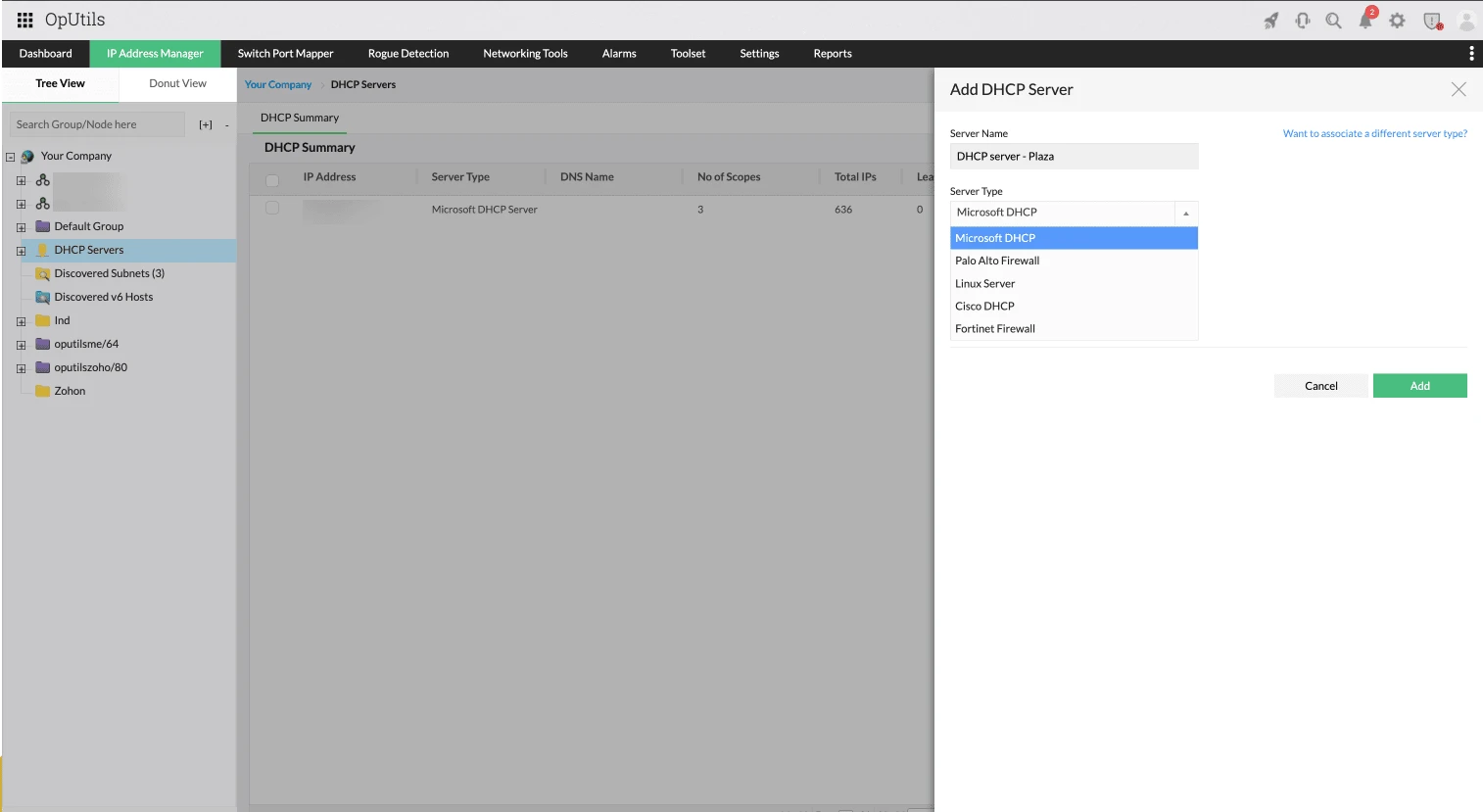
For Microsoft DHCP environments, OpUtils extends beyond monitoring to support:
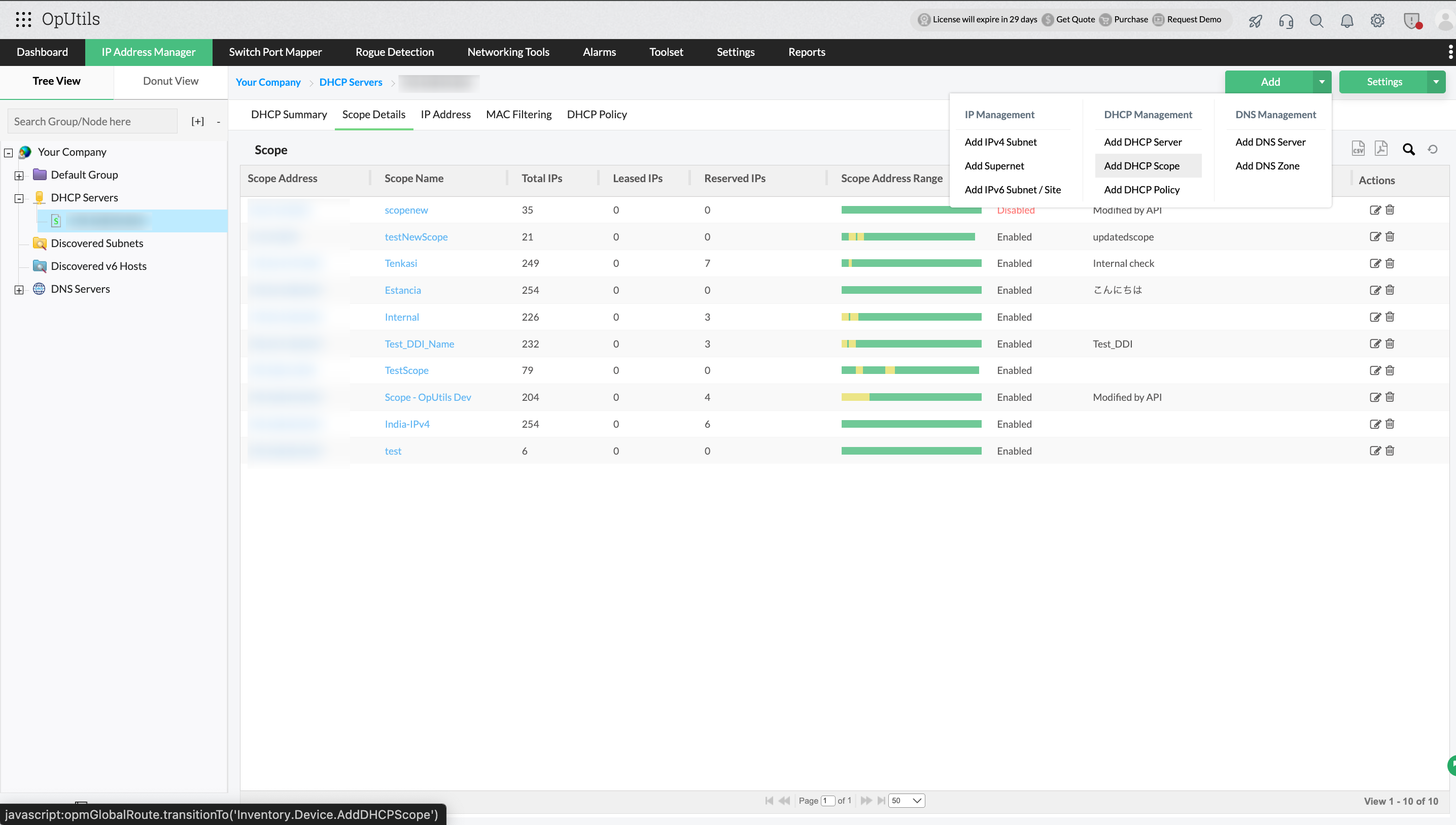
- Scope creation and configuration from a centralized console.
- Management of scope properties, exclusions, reservations, and lease settings.
- Enforcement of consistent DHCP policies across scopes to reduce configuration drift.
- Uses Windows Remote Management ( WinRM ) to securely connect to remote Microsoft DHCP servers without requiring agents.
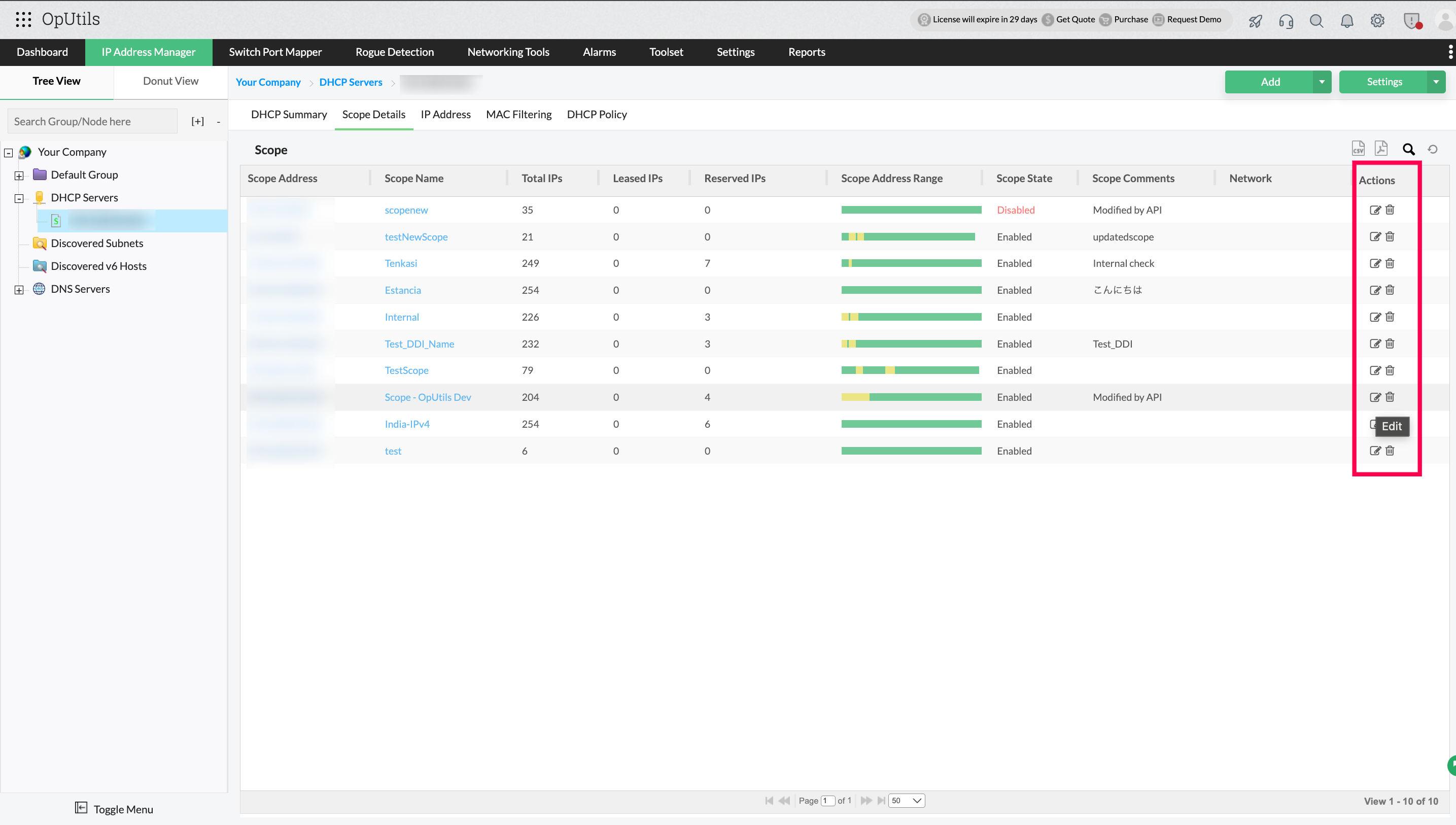
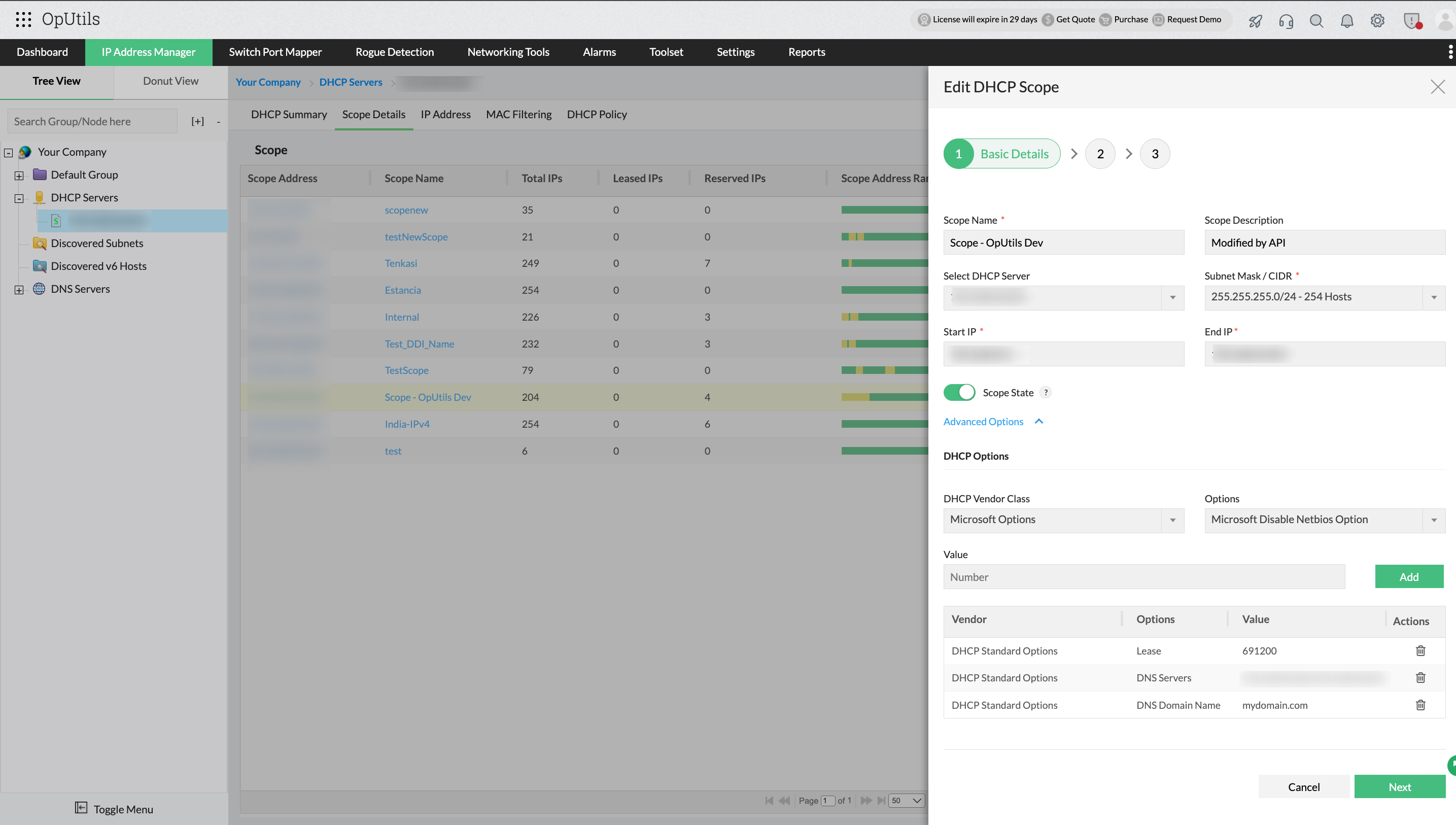
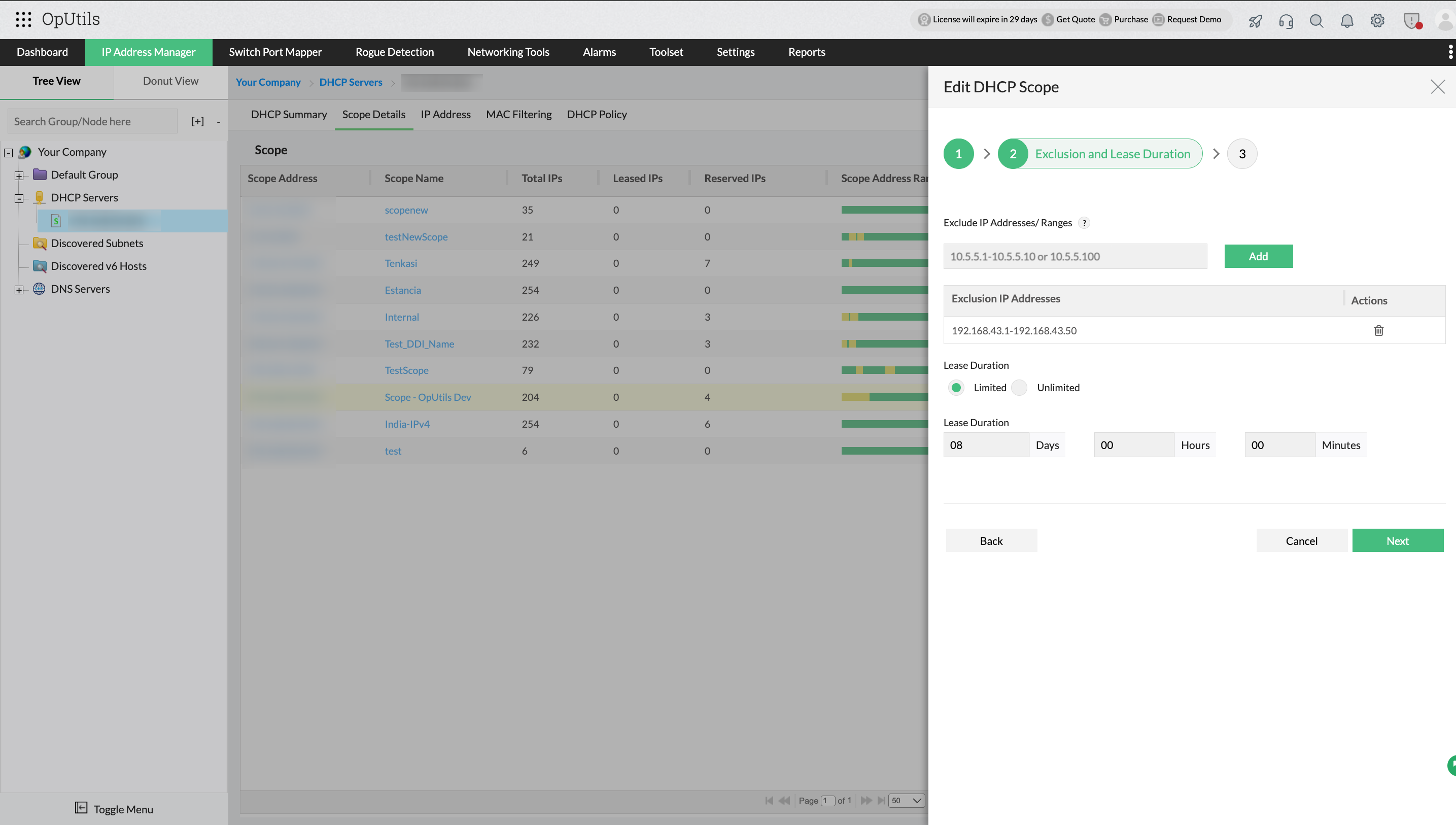
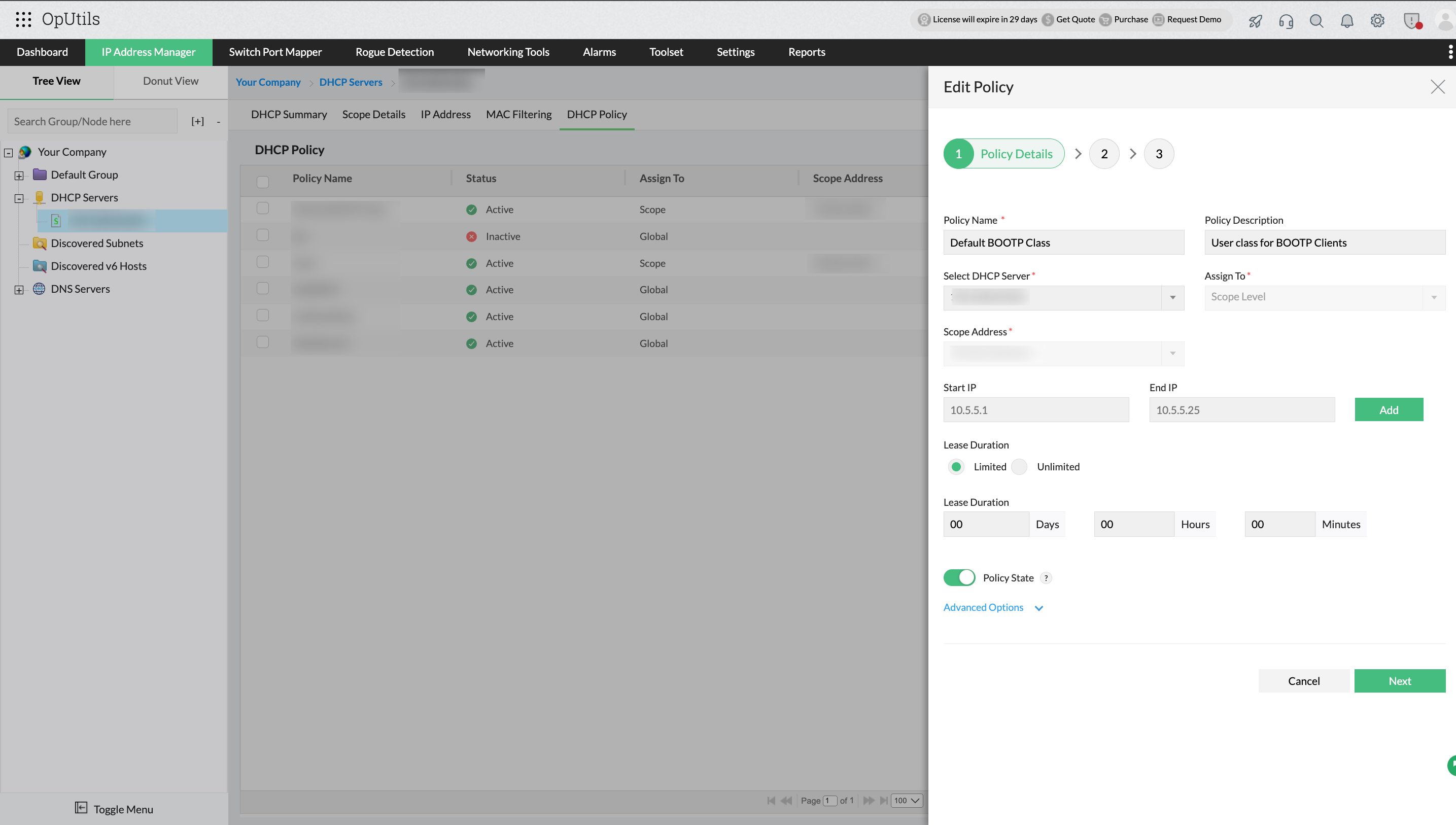
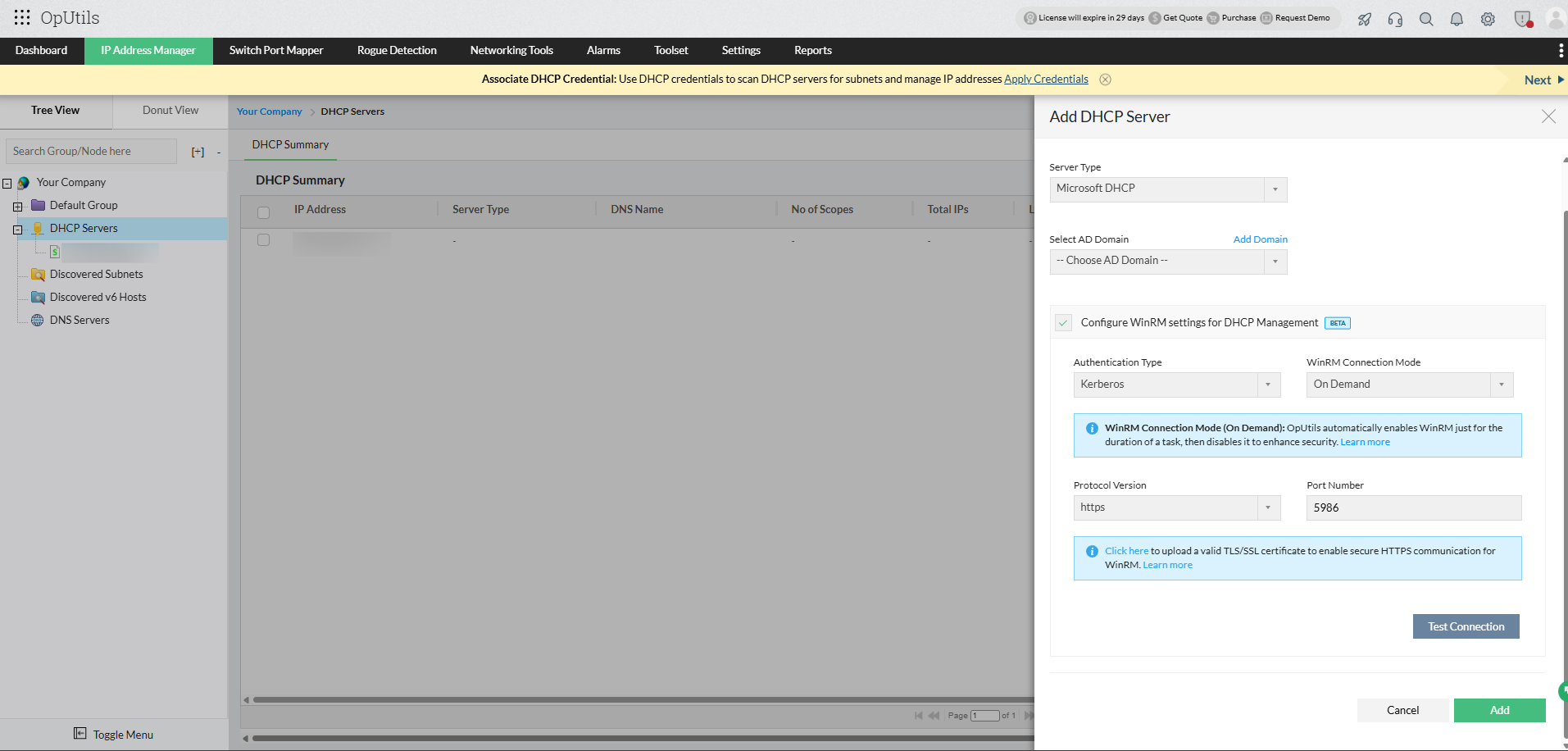
By centralizing both visibility and control, OpUtils eliminates the silos that typically accompany distributed and multi-vendor DHCP infrastructures.
Proactive scope utilization alerts
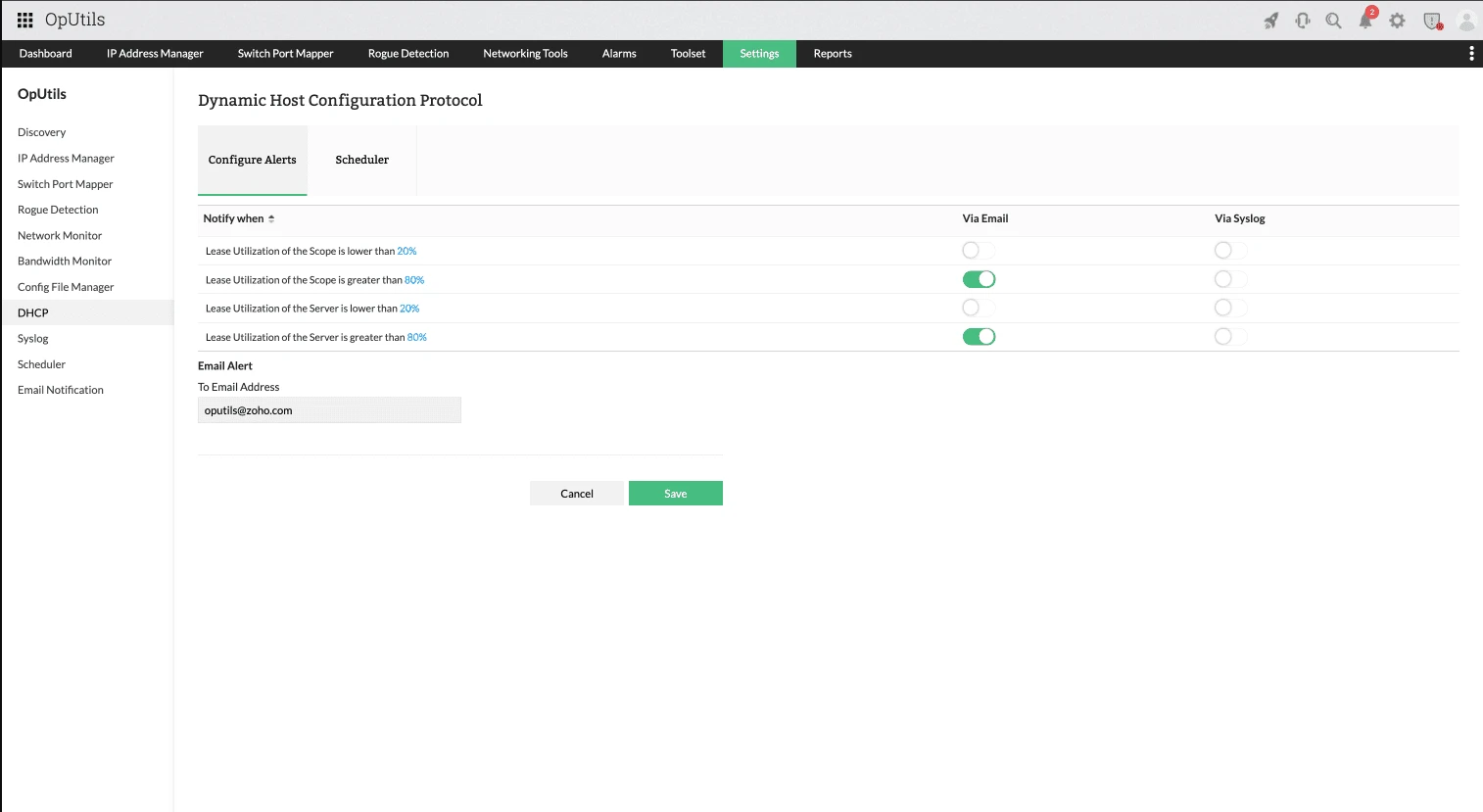
OpUtils continuously evaluates DHCP scope and server lease utilization and triggers alerts based on configurable thresholds, allowing teams to respond before IP availability becomes a problem.
Scope-level utilization alerts
These alerts focus on address consumption within individual scopes:
- Lease utilization of the scope is lower than a defined threshold (for example, lease utilization is below 20%)
- Lease utilization of the scope exceeds a defined threshold (for example, lease utilization is above 80%)
Low-utilization alerts help identify over-allocated scopes, while high-utilization alerts flag scopes at risk of exhaustion.
Server-level utilization alerts
In addition to individual scopes, OpUtils also monitors overall address utilization at the DHCP server level:
- Lease utilization of the server falls below a defined threshold.
- Lease utilization of the server exceeds a defined threshold.
This helps administrators identify uneven scope distribution or capacity imbalances across servers. All utilization thresholds are fully customizable, allowing alerts to be tuned based on scope size, usage patterns, and business criticality.
Integrated DDI capabilities
DHCP scope monitoring in OpUtils is closely tied into its broader DNS , DHCP, and IPAM (DDI) capabilities so that teams don’t just see utilization numbers, they understand what those numbers mean in context.
- Correlate DHCP data with IP address usage patterns and DNS resolution data.
- Cut down IP conflicts by combining DHCP pool insights with IPAM tracking .
- Generate meaningful reports that reflect actual network usage and trends.
This unified perspective helps teams maintain accurate documentation, reduce conflicts, and troubleshoot faster.
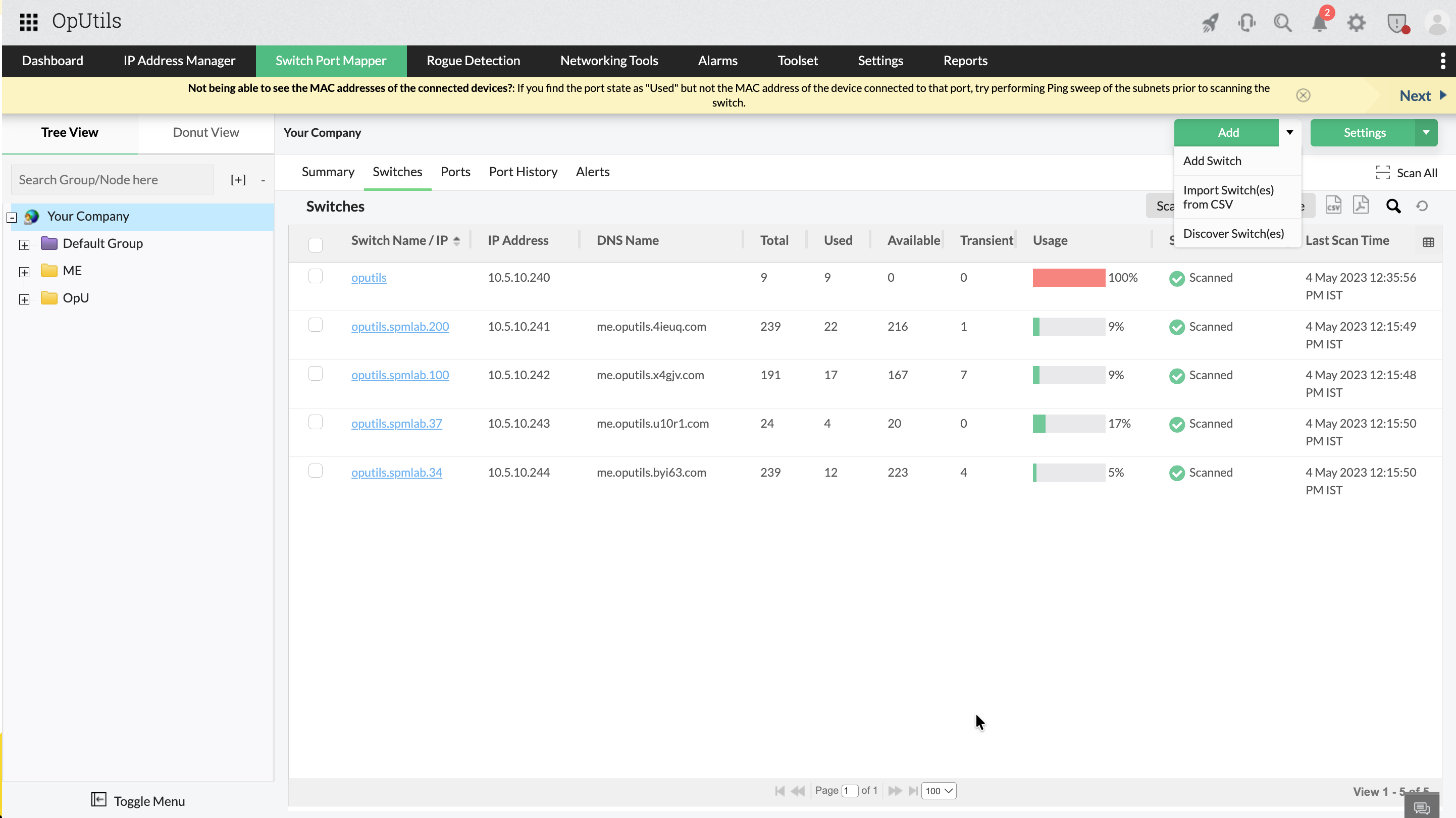
Integrated switch port management and rogue detection
Beyond DDI, OpUtils extends visibility to the network access layer, helping teams understand not just which IP was assigned, but where and how a device entered the network. By integrating switch port management with IP and DHCP data, administrators can:
- Map IP addresses and MAC addresses to specific switch ports.
- Identify unknown or unauthorized devices connected to the network.
- Quickly trace devices during security incidents or connectivity issues.
This correlation is especially valuable when investigating IP conflicts, unauthorized access, or sudden spikes in DHCP consumption.
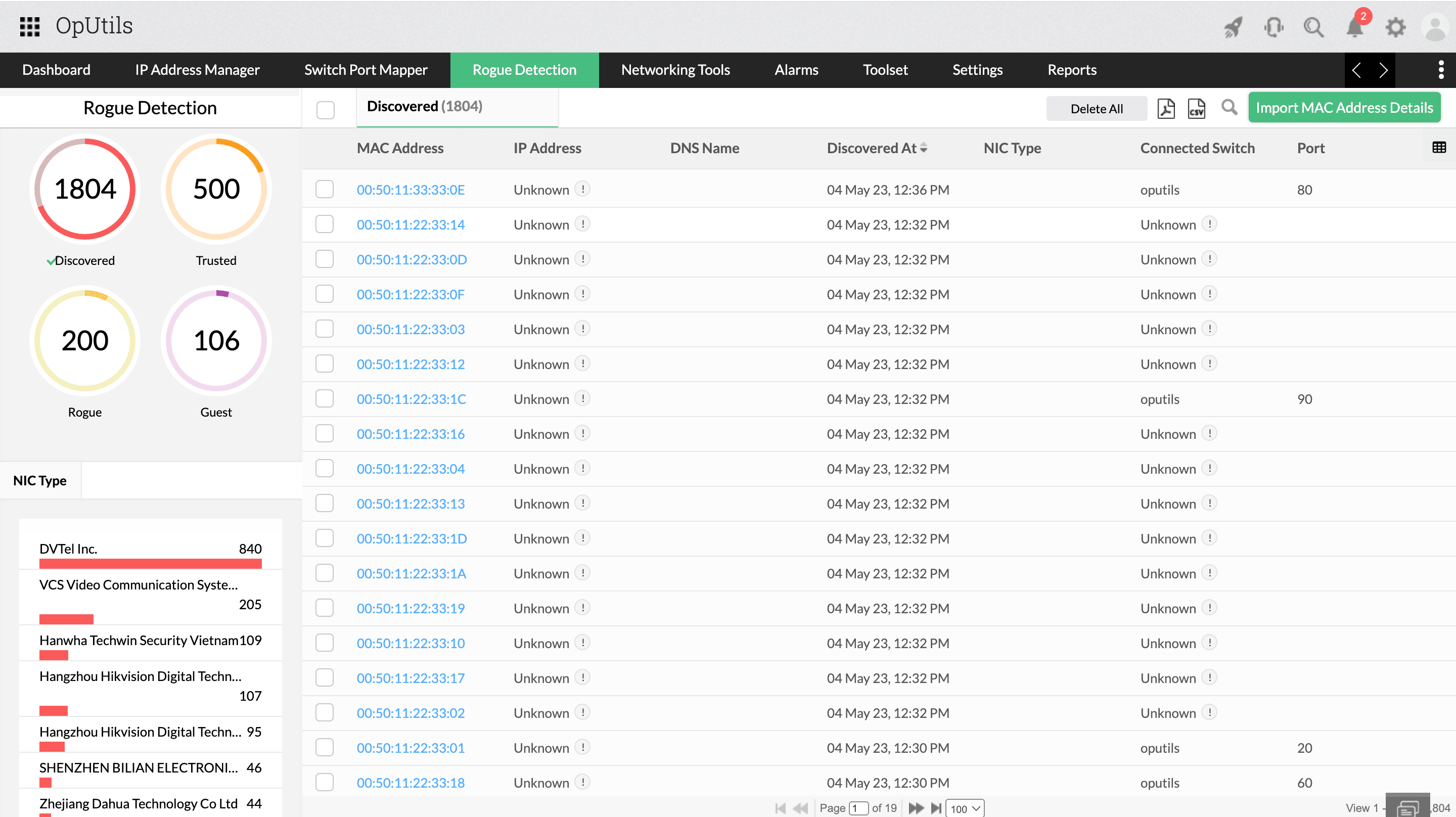
OpUtils also includes rogue device detection capabilities that help teams:
- Detect devices that obtain IP addresses outside expected scopes.
- Identify hosts that bypass standard access policies.
- Respond faster to security and compliance risks.
By linking DHCP allocation data with switch-level visibility, teams gain clearer insight into device behavior across the network.
Reporting and audit readiness
OpUtils also provides robust reporting tools that help with both operational visibility and compliance readiness.
- Scope utilization reports showing leased, available, and reserved address counts.
- Historical trend analysis to track growth patterns and peak periods.
- Scheduled and exportable PDF/CSV report options help with audit processes and capacity planning.
- Data retention ensures historical records are preserved for configurable periods, enabling teams to demonstrate control over IP resources and meet internal or external audit requirements.
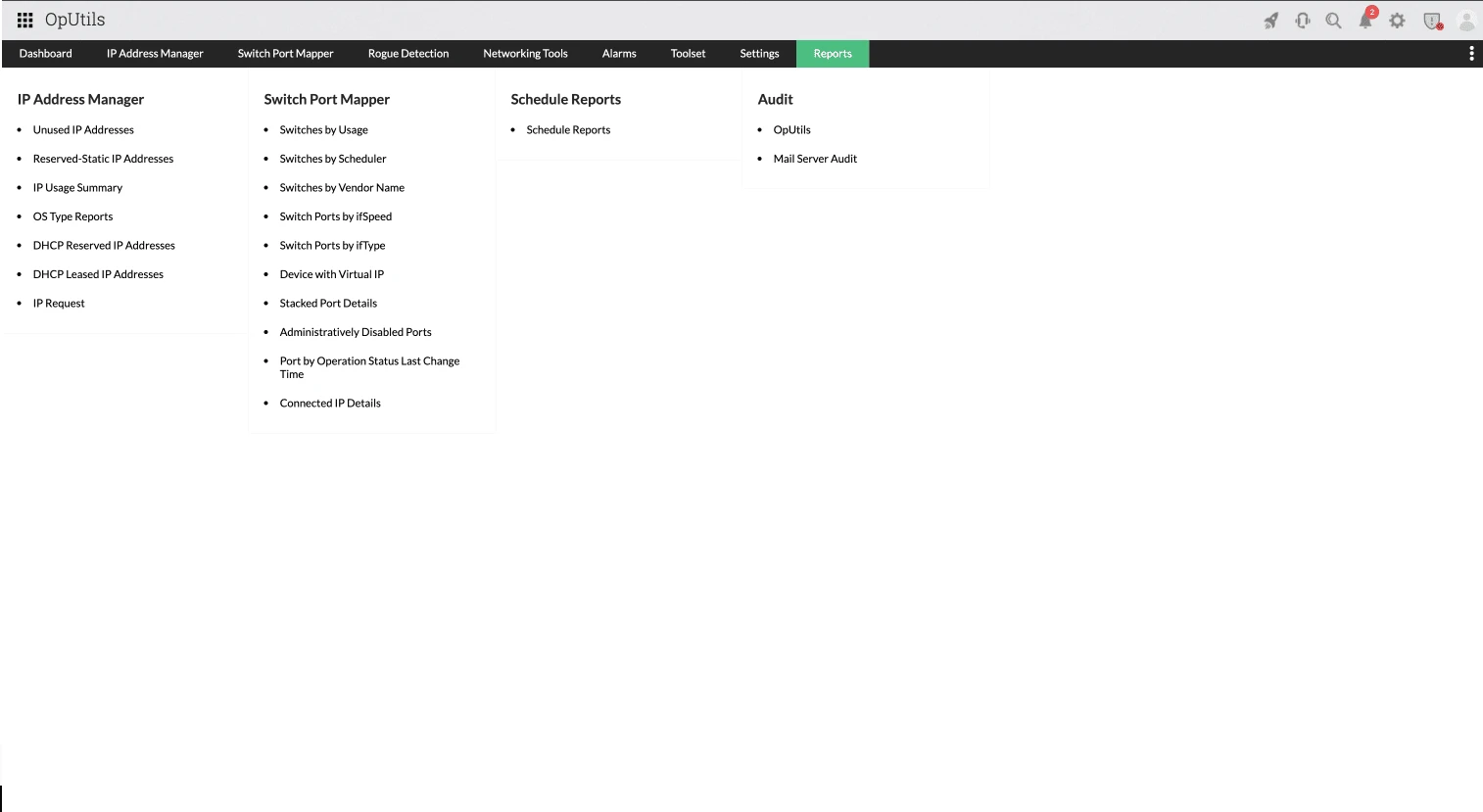
These reports help teams demonstrate control over IP resource allocation and prepare for internal or external audits.
If you'd like to explore OpUtils' DHCP scope monitoring capabilities, learn how its unified DDI management capabilities combine DNS, DHCP, and IP address management (IPAM) to simplify network administration and improve infrastructure visibility.
If you’d like to explore OpUtils’ DHCP scope monitoring capabilities,start with a 30-day free trial to see how it fits your environment. You can alsoschedule a free, personalized demo and connect with a product expert to discuss your specific requirements.
Frequently asked questions about DHCP scope monitoring
What happens when a DHCP scope is full?
When a DHCP scope runs out of available IP addresses, new devices are unable to obtain an IP address. This can prevent users from connecting to the network and disrupt services that rely on DHCP, such as Wi-Fi, VoIP, VPN access, and branch office connectivity. Existing devices may continue to function, but any new or reconnecting clients will fail until address space is freed or expanded.
How often should DHCP scopes be monitored?
DHCP scopes should be monitored continuously, not at fixed intervals. IP consumption can change rapidly due to device churn, guest access, or virtual workloads. Real-time monitoring ensures utilization spikes and exhaustion risks are detected early, rather than discovered after connectivity issues occur.
Is DHCP scope monitoring different for IPv6?
Yes. While IPv6 significantly expands address availability, DHCP scope monitoring is still important. IPv6 environments require visibility into address assignment policies, prefix utilization, and lease behavior. Monitoring helps ensure consistent allocation, prevents misconfiguration, and maintains control over address usage, especially in dual-stack networks.
Can DHCP scope monitoring prevent IP conflicts?
DHCP scope monitoring helps reduce the risk of IP conflicts by providing visibility into lease states, scope utilization, and address assignment patterns. When combined with IP usage tracking and DNS correlation, it becomes easier to detect duplicate assignments, overlapping scopes, or misconfigured devices that can cause conflicts.
Do I need IPAM for DHCP scope monitoring?
Basic DHCP scope monitoring can function on its own, but IPAM adds essential context. IP address management helps track IP ownership, status, and lifecycle beyond active leases. Together, DHCP scope monitoring and IPAM provide a more complete and accurate view of how IP addresses are allocated, used, and maintained across the network.

By Aiswarya Giridharan,
Product Marketer, ManageEngine
Ensure simplified DHCP scope monitoring with OpUtils
Try OpUtils for free today