×![]()
×
×![]()
×
×


Configure OS Deployer Server Settings | ManageEngine
Server settings such as web server port, logging level, and other properties can be configured here. These settings are common to all users using OS Deployer and not user-specific.
To configure server settings
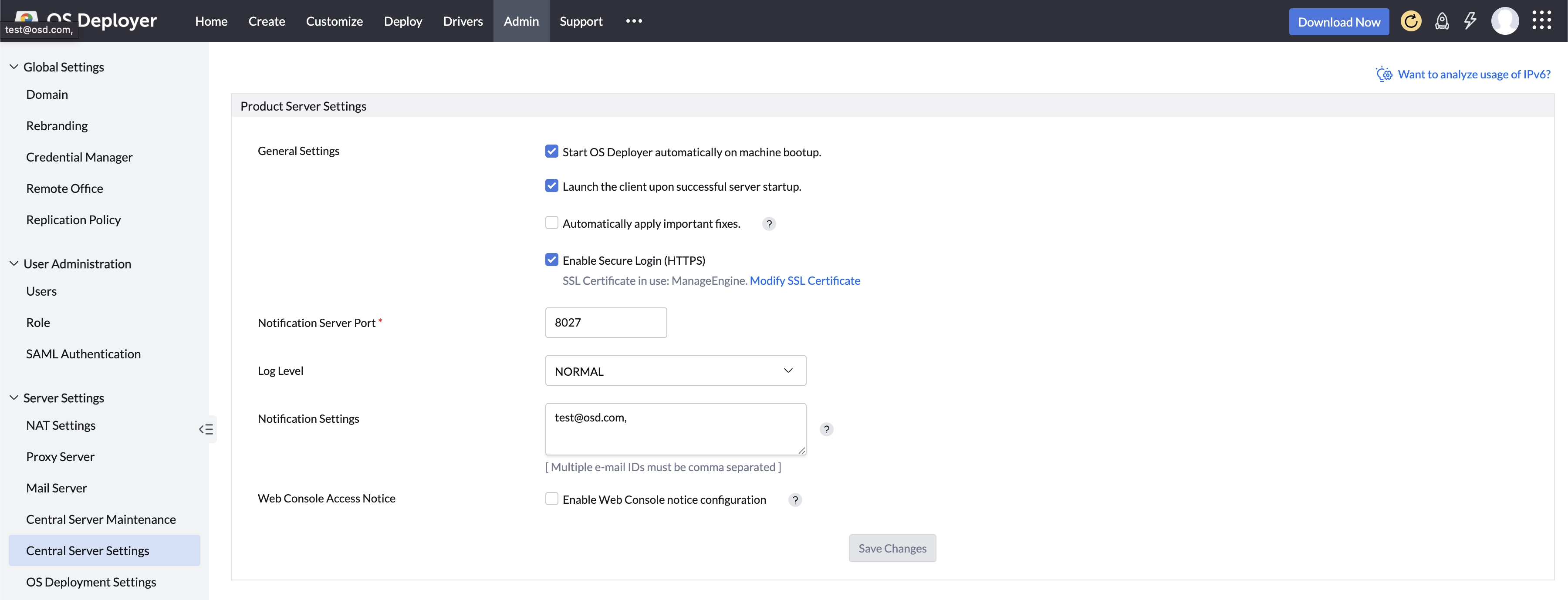
To configure the server settings, navigate to Admin > Server Settings > Central Server Settings.
Enable the following features:
- Select the Start the product automatically on machine bootup checkbox if you wish to start OS Deployer whenever the system starts.
- Select the Launch the web console upon successful server startup checkbox if you wish to open the client when the OS Deployer server is started.
- Select the Automatically apply important fixes checkbox to ensure critical fixes are applied automatically.
- Select the Enable Secure Login (HTTPS) option to enable HTTPS in the client.
- Select the Automatically mark software as commercial with shared community details checkbox if you wish to share commercial software details with the OS Deployer Community.
- Select the Show Configurations & Tasks by all users to everyone checkbox to share configurations and tasks with all users. If disabled, users will only see those created by themselves.
Server Settings
- Specify the Notification server port number.
- Select the current log level (Normal or Debug) from the dropdown.
- Specify the email address to receive notifications and alerts. Note that mail server settings must be configured to receive notifications.
- Select Enable Web Console Notice Configuration to display a message before every user login, presenting your organization's policies and regulations.
Click Save Changes to apply the settings.
 Yes No
Visit our community