Update Active Directory
Cached Credentials using ADSelfService Plus


Remote users often struggle to reset expiring passwords and update their machine's outdated credential cache because they lack a connection to Active Directory. And in instances when they lose machine access due to an expired password, they are unable to reach out to the help desk for assistance and experience decreased productivity.

ADSelfService Plus, an identity security solution with adaptive MFA, SSO, and password management capabilities, enables users to securely reset their Active Directory passwords even when they have no connection to Active Directory. It automatically updates the cached domain credentials on their Windows machines remotely using a VPN client. Cached credentials can also be updated without a VPN when an organization does not have VPN infrastructure or uses a VPN vendor not supported by ADSelfService Plus.

ADSelfService Plus Trusted by


What are Active Directory cached credentials?

When a user logs in to an Active Directory domain for the first time, the login credentials are cached locally on their machine.
These cached credentials are updated each time the machine is connected to Active Directory, i.e., to the corporate network, during login.
Off-site user logs in without network connection, login info verified locally against cached credentials on machine. If the verification succeeds, they can access the machine.
In short, Cached credentials allow users to log in to their machines even when they have no way of reaching the Active Directory domain controller for authentication.

How the Windows Active Directory cached credentials
update works in ADSelfService Plus

 
  • Using a VPN client
  • Without using a VPN client
Using a VPN client

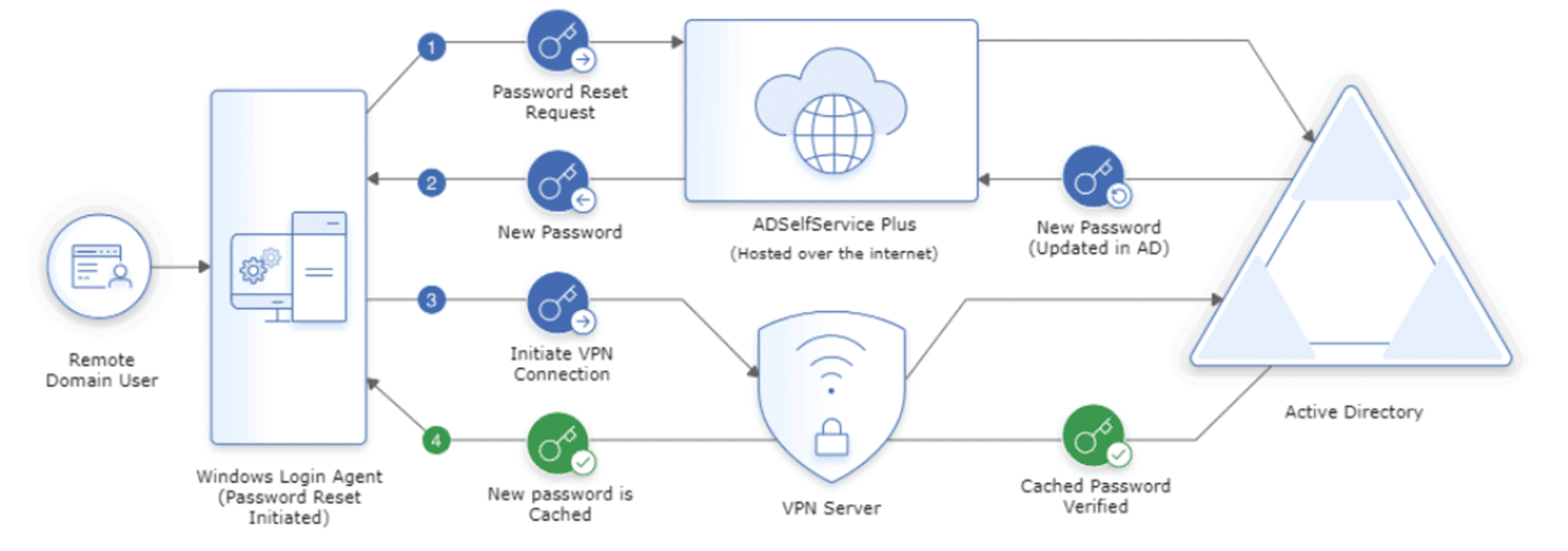
Here's how ADSelfService Plus' cached credentials update via VPN works for remote Windows users.

  • When a remote user forgets their Active Directory password, they use ADSelfService Plus’ login agent to reset their password from their login screen.
  • After users verify their identity through MFA and reset their password, ADSelfService Plus updates Active Directory with the new password.
  • The new password is also sent to the login agent on the user's machine.
  • The login agent automatically establishes a secure connection with Active Directory through VPN and initiates a request for updating the locally cached credentials.
  • Once the request is successfully approved by Active Directory, the cached credentials on the user's machine are automatically updated.
Without using a VPN client

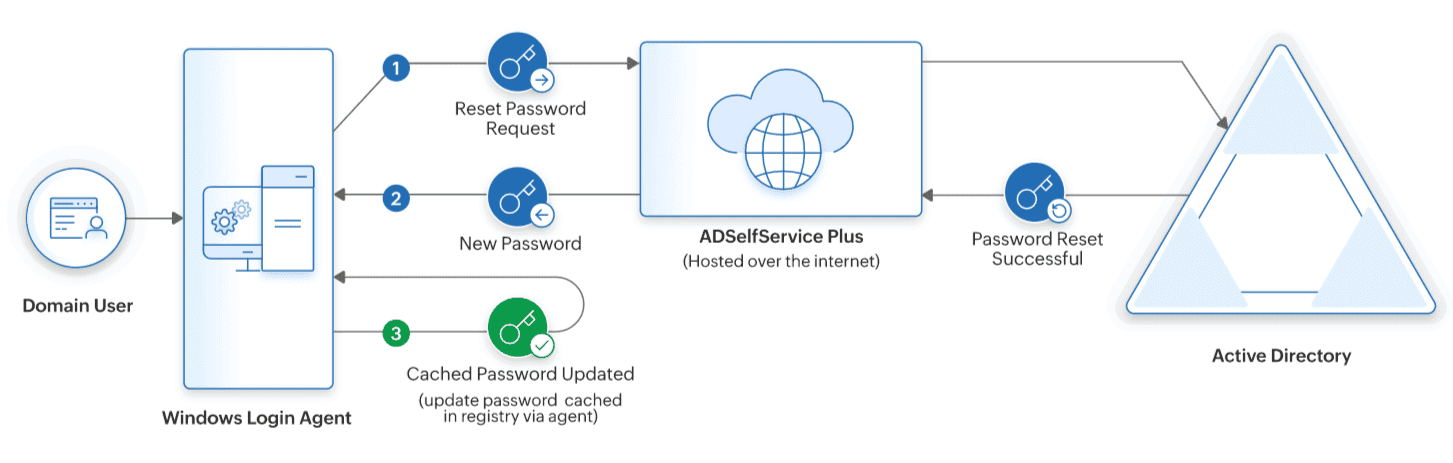
Here's how ADSelfService Plus' cached credentials update works for remote Windows users without using a VPN.

  • When a remote user forgets their Active Directory password, they use ADSelfService Plus’ login agent to reset their password from their login screen.
  • After users verify their identity through MFA and reset their password, ADSelfService Plus updates Active Directory with the new password.
  • Once the new password is updated in Active Directory, the login agent automatically updates the local cache on users' machines with the new password.

Benefits of updating active directory cached credentials using ADSelfService Plus

Allow remote users to update Active Directory cached credentials
from their login screens.

© 2022 Zoho Corporation Pvt. Ltd. All rights reserved.

×

Thank you for downloading!

Your download should begin automatically in 15 seconds. If not, click here to download manually.

Start your 30-day free trial

  •  
  • *
     
  •  
  •  
  •  
  • By clicking 'Submit' you agree to processing of personal data according to the Privacy Policy.