ServiceDesk Plus MSP Cloud is a SaaS solution designed for MSPs to efficiently deliver IT services to their customers. The hosted enterprise-grade PSA and ITSM platform is suitable for modern MSP businesses of all sizes. The application can be accessed via the latest web browsers, eliminating the need for software installations and hardware overheads.
ServiceDesk Plus MSP Cloud is built on a strong SaaS framework that follows industry best practices to provide a scalable, reliable, and secure service desk solution with PSA and ITAM capabilities for MSPs. The solution also incorporates live data backup and disaster recovery options.
ServiceDesk Plus MSP Cloud comprises the following basic components:

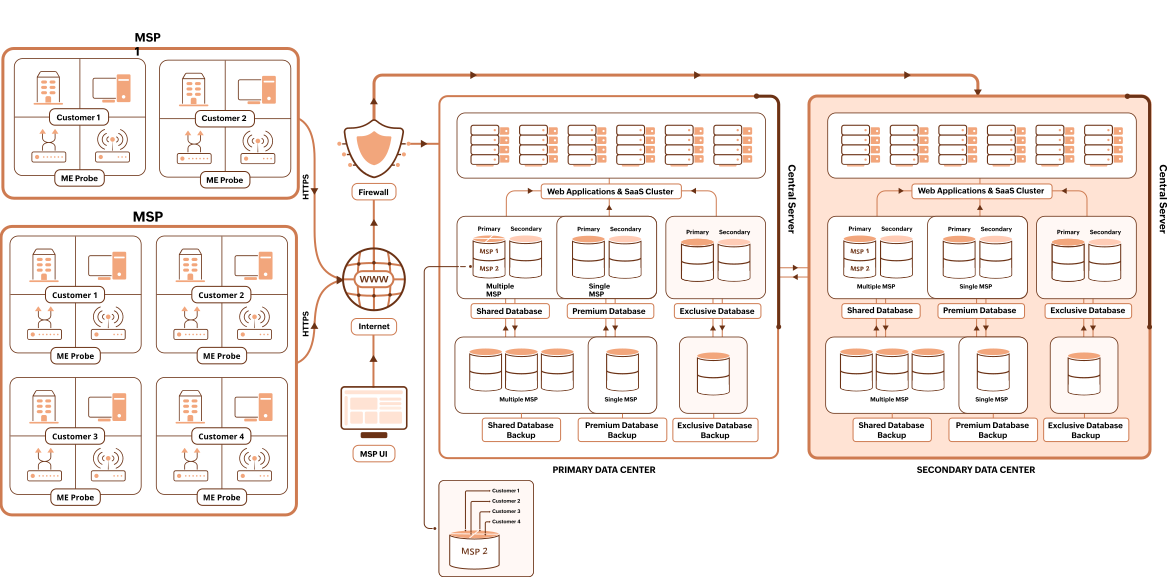
ServiceDesk Plus MSP Cloud relies on a central server that's located in a highly secure data center as the hub for all its operations. This server is responsible for running all your service desk operations and storing customer data.
Administrators, technicians, and end-users access the application through a web interface that can be launched from all standard browsers. Along with a comprehensive ticketing system, ServiceDesk Plus MSP Cloud offers various ITSM practices and PSA capabilities. These include client management, incident management, problem management, change and release management, and project management. Additionally, ServiceDesk Plus MSP Cloud has an advanced IT asset management system to handle asset inventory, purchases, and contracts.
ServiceDesk Plus MSP Cloud is designed to help you cater to the needs of not just the customers that are confined to a single location, but also to those with branches spread across multiple locations.
Remote probes are lightweight executable files that are usually located within your customers' networks. They are designed to automatically scan the IT assets in your customers' IT environments, making asset management more efficient. Deploying probes eliminates the need for manual intervention in asset scanning within that network.
ServiceDesk Plus MSP Cloud is hosted in secure data centers, with enterprise-grade encryption safeguarding all communication between the central server and your web interface. The platform prioritizes security throughout user authentication, data transmission, access, and workflow. Sensitive data is stored in encrypted form within the data centers.
Moreover, the data centers housing customer data adhere to security best practices across physical, technical, personnel, and procedural levels.
Live replication, scheduled backups, and a high availability architecture prevent data loss and ensure uninterrupted business operations.
The data of all customers is logically segregated at the software level.
When you sign up, ServiceDesk Plus MSP Cloud allocates your account part of a segmented database. This can be upgraded to a dedicated database for an extra fee.
To get started with ServiceDesk Plus MSP Cloud, all you need is a standard web browser such as Firefox or Chrome. If you opt to install probes for automatic asset scanning, you can deploy them on Windows machines.
