SharePoint Manager Plus offers a wide range of reports as part of its SharePoint reporting capabilities. The Items Shared with External Users report provides a consolidated view of externally shared content, helping administrators review guest access and sharing links without generating and combining separate site-level reports.
Why you need an Items Shared with External Users report
External sharing is one of SharePoint's most useful collaboration features, and one of the easiest to lose track of. A file shared with a partner can be forwarded, re-shared, or left accessible long after the project ends, without ever generating a single event an admin can review. Native tools provide site-level sharing reports, sharing-policy controls, and audit records for external-sharing activity. However, administrators still need to generate reports for individual sites and correlate sharing events with current access assignments to build a consolidated view across the environment.
Verizon's 2025 Data Breach Investigations Report found that third-party involvement in breaches doubled to 30%, reinforcing why external access to SharePoint files, folders, and list items needs continuous review.
The Items Shared with External Users report brings this information into a single inventory for recurring external-access reviews.
- Identify externally shared content: Review the names, types, and locations of files, folders, and supported SharePoint objects made accessible outside the organisation.
- Distinguish sharing methods: Differentiate access assigned directly to named external users from access provided through supported sharing-link types.
- Review external permission levels: Identify whether external users or supported sharing links provide view or edit access.
- Review identifiable external recipients: Consolidate available external-user details to support vendor, partner, and guest-access reviews.
- Prioritise site reviews: Group results by site to identify where external sharing is most prevalent and focus follow-up efforts accordingly.
What is the Items Shared with External Users report in SharePoint Manager Plus?
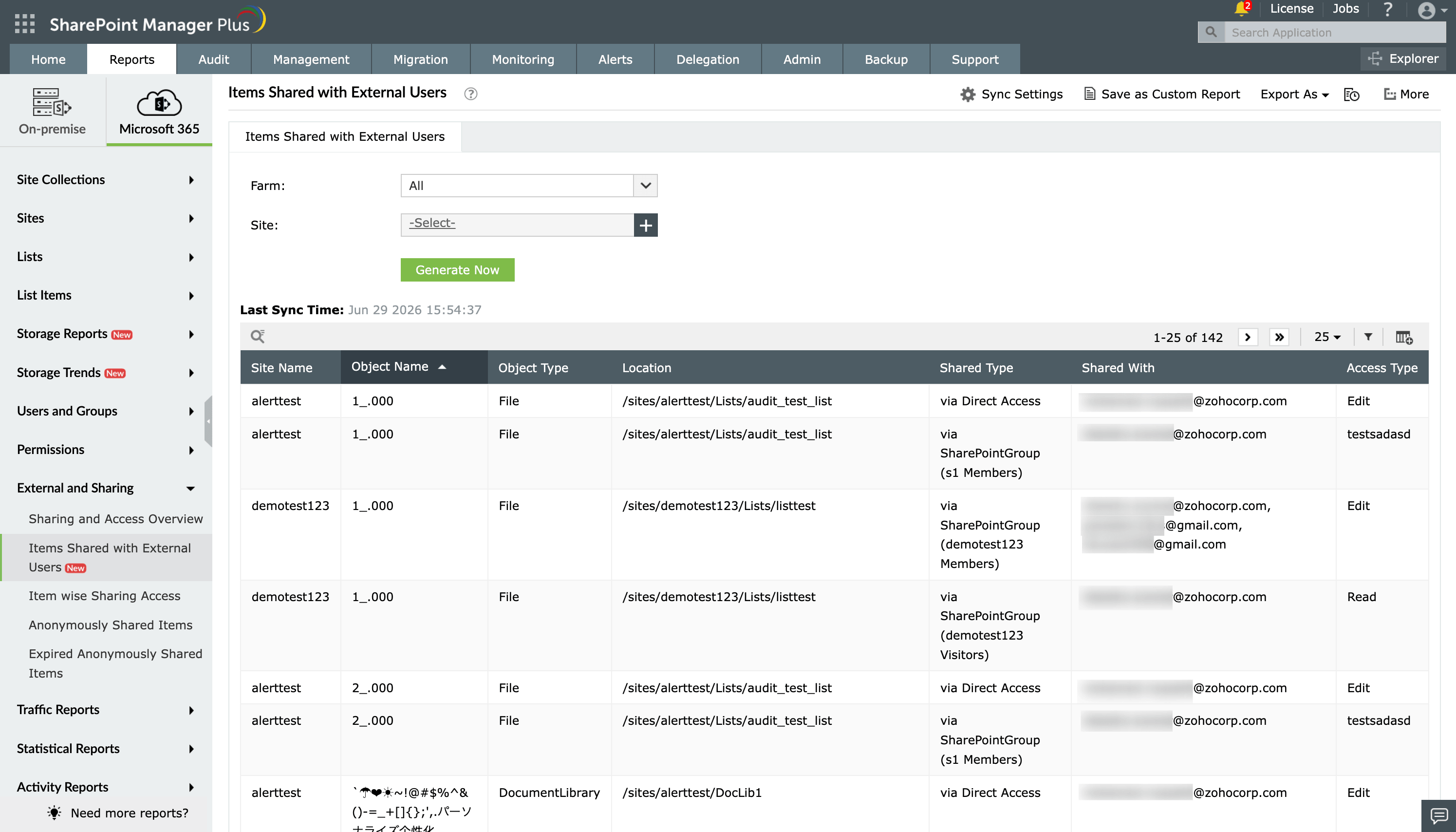
The Items Shared with External Users report identifies files, folders, and supported SharePoint objects that have been made accessible outside the organisation. It displays details such as the object name, location, sharing method, identifiable external recipient, and assigned access level.
What does the Items Shared with External Users report show?
Using SharePoint Manager Plus, you can filter the Items Shared with External Users report with the following fields.
- Farm: Select the specific SharePoint farm or Microsoft 365 tenant whose sites you want to scan for external sharing activity.
- Site: Narrow the report to a specific sites to review items shared with external users within it.
The Items Shared with External Users report displays the following details for every shared object.
| Attribute | Description |
|---|---|
| Site Name | The name of the SharePoint site where the externally shared object resides. |
| Object Name | The name of the file, folder, or list item that has been shared with an external user. |
| Object Type | The type of object shared, such as a file, folder, list, or library. |
| Location | The path within the site where the shared object is stored. |
| Shared Type | Indicates whether the object was shared directly with a named external user or through a sharing link. |
| Shared With | The email address or identity of the external user the object was shared with. |
| Access Type | The permission level granted to the external user, such as view-only or edit access. |
Compliance frameworks supported by the Items Shared with External Users report
Organisations governed by frameworks such as ISO/IEC 27001, NIST CSF, SOC 2, the GDPR, and PCI DSS may need evidence that external access is monitored and reviewed.
The Items Shared with External Users report supports these activities by documenting externally shared SharePoint objects, identifiable recipients, sharing methods, and assigned access levels. Teams can use the report to investigate external access and prepare evidence for governance reviews.
Native SharePoint admin portals and PowerShell vs SharePoint Manager Plus
SharePoint provides site-level sharing reports, external-sharing controls, and audit-log searches for sharing activity. However, administrators may need to run reports for individual sites, correlate audit events with current permissions, or use scripts and additional governance tools to create a consolidated view across the environment.
PowerShell can retrieve and combine sharing data across multiple sites, but it requires scripting knowledge, suitable permissions, output formatting, and additional automation for recurring report generation and delivery.
SharePoint Manager Plus combines consolidated external-sharing visibility with reusable filters, scheduled reporting, formatted exports, email delivery, and supported remediation actions.
| Capability | SharePoint admin center limitations | PowerShell limitations | SharePoint Manager Plus advantage |
|---|---|---|---|
| Report accessibility | ❌ Manual filtering is required every time | ❌ Script execution is required for every run | ✅ Get one-click access to categorized reports |
| Custom reports | ❌ | ❌ | ✅ Create custom reports by saving granular, attribute-based conditional filters |
| Report exports | ✅ Reports can be exported only in CSV or JSON format | ✅ It requires additional scripting to format and export data | ✅ Export reports in CSV, HTML, PDF, and XLSX formats |
| Emailing reports to admins | ❌ | ❌ | ✅ Send report emails to stakeholders and admins in favorable formats |
| Automated report generation | ❌ It requires technical scripting or separate complex add-ons | ❌ It requires Task Scheduler or Azure Automation | ✅ Schedule multiple reports to be generated, filtered, emailed, and exported between defined periods automatically |
For a more detailed comparison, check out this page on how to share files with external users in SharePoint.
Features that enhance the Items Shared with External Users Report
SharePoint Manager Plus provides several built-in tools to help you manage, automate, and secure the data found in the Items Shared with External Users report:
- Automated report generation: Schedule the report to run daily, weekly, or monthly so newly shared items are caught quickly, not discovered months later.
- Export reports: Download the report in CSV, PDF, HTML, or XLSX formats for security reviews or vendor access audits.
- Revoke external access: Remove or downgrade an external user's access to a shared item directly from the SharePoint Manager Plus interface, without navigating to the site's sharing settings separately.
- SharePoint alerts for high-risk activities: Configure real-time alerts for external-sharing thresholds, anonymous links on sensitive sites, and unusual sharing activity.
- Custom fields and filters: Select the fields and filters you need in the Items Shared with External Users report, then save it for quick access, anytime.
Reports that complement the Items Shared with External Users report
If you are auditing how content is exposed to users outside your organization, SharePoint Manager Plus provides several other reports that complement the data found in the Items Shared with External Users report:
Anonymously Shared Items report: Identify files and folders shared through Anyone links, helping you review content accessible without authentication and address unnecessary exposure.
Expired Anonymously Shared Items report: Find files and folders associated with expired anonymous links to verify that temporary sharing access is no longer available.
List Wise External Users report: View external users associated with each SharePoint list and review whether their access is still required.
SharePoint permission reports: Review permissions across sites, libraries, and items to understand the unique and inherited access behind external sharing.
Other features of SharePoint Manager Plus
- SharePoint management: Grant, remove, or copy SharePoint permissions and manage group members in bulk without relying on complex scripts, simplifying your SharePoint administration.
- SharePoint reporting: Access over 140 prebuilt and custom reports for SharePoint, including on permissions, site usage, the content inventory, and security insights—all from a centralized dashboard.
- SharePoint auditing: Maintain a comprehensive, searchable audit trail of activities across your SharePoint environment, including user actions, permission changes, and content modifications.
- SharePoint alerting: Get real-time alerts on critical events such as permission changes, suspicious user activities, site access anomalies, and policy violations.
- Delegated administration: Empower help desk technicians with granular, role-based access for performing specific SharePoint administration tasks, without elevating native privileges.
- SharePoint migration: Simplify SharePoint migration by enabling seamless content and permission migration across sites and tenants, with minimal downtime and full visibility into the migration progress.