

- Free Edition
- Quick Links
- Highlights
- Exchange Online
- Exchange Online Management
- Exchange Online Reports
- Exchange Online Auditing
- Exchange Online Monitoring
- Shared Mailbox Management
- Mailbox Usage Reports
- Exchange Online Mailbox Auditing
- Shared Mailbox Reports
- Exchange Online Delegation
- Mailbox Size Reports
- Mail Traffic Reports
- Non-owner Mailbox Access Report
- Public Folder Reports
- OWA Reports
- Mailbox Content Reports
- Entra ID
- Entra ID Management
- Entra ID Reports
- Entra ID Monitoring
- Entra ID Auditing
- User Management
- Contact Reports
- Security Group Reports
- License Reports
- Entra ID Delegation
- Microsoft 365 User Provisioning
- User Reports
- Distribution Group Reports
- Group Reports
- Inactive Exchange Users
- Entra ID User Auditing
- Entra ID Group Auditing
- Entra ID Logon Auditing
- Microsoft Teams
- OneDrive for Business
- SharePoint Online
- Security and compliance
- Other Features
- Related Products
- ADManager Plus Active Directory Management & Reporting
- ADAudit Plus Hybrid AD, cloud, and file auditing and security
- ADSelfService Plus Identity security with MFA, SSO, and SSPR
- Exchange Reporter Plus Exchange Server Auditing & Reporting
- M365 Security Plus Microsoft 365 Auditing and Alerting
- EventLog Analyzer Real-time Log Analysis & Reporting
- SharePoint Manager Plus SharePoint Reporting and Auditing
- DataSecurity Plus File server auditing & data discovery
- RecoveryManager Plus Enterprise backup and recovery tool
- AD360 Integrated Identity & Access Management
- Log360 (On-Premise | Cloud) Comprehensive SIEM and UEBA
- AD Free Tools Active Directory FREE Tools
SharePoint Online is central to how numerous organizations store, collaborate, and share knowledge. However, managing it through the native admin center often creates more complexity than control. From scattered permission settings to limited visibility into activity and sharing, routine tasks demand time-consuming workarounds or Microsoft Graph API scripts.
M365 Manager Plus removes these roadblocks with a clean, unified console for SharePoint Online administration. Gain instant insights into site usage and user behavior, manage permissions and access at scale, and monitor activity in real time—all without jumping between disconnected tools or writing a single line of code in the Sharepoint Online Management Shell.
Streamlined SharePoint Online management
Managing SharePoint Online through the native admin center often feels like juggling disconnected tasks across multiple screens. Whether you're provisioning sites, applying access controls, or enforcing sharing policies, the process is manual, repetitive, and prone to inconsistency, especially at scale.
M365 Manager Plus simplifies SharePoint Online administration by centralizing management into a single, intuitive console. Adjust permissions across sites and enforce consistent sharing settings. What once took hours of navigation and scripting can now be done in a few guided clicks, giving admins more time to focus on governance and growth.
Point. Click. Manage SharePoint Online.
- Execute management tasks effortlessly
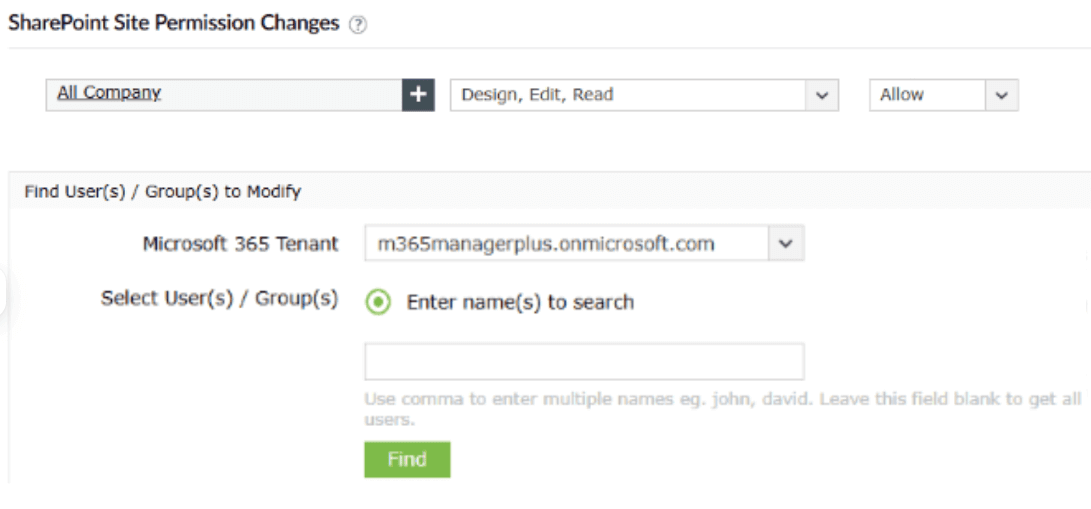
- Execute multiple script-free tasks in a few clicks



Clutter-free SharePoint Online reporting
Accessing detailed insights in SharePoint Online often requires manual effort or scripting. Many critical data points, such as user activity trends, permission modifications, or site-level sharing behavior, are not readily available in a single view for all sites. Retrieving specific information, like inactive sites or granular file access logs, may require Graph API queries. Even with these queries, the data is often raw and fragmented, requiring further processing before it becomes meaningful or actionable.
M365 Manager Plus simplifies your SharePoint Online reporting with a centralized console that can help you generate and schedule reports on site usage, sharing activity, permission changes, and more—filtered to your exact requirements, which makes it the perfect Sharepoint Online permissions reporting tool. Every report is designed to save time, improve accuracy, and help IT teams move from reactive problem-solving to proactive governance.
One view for all of your SharePoint Online insights
- Create your own personalized reports
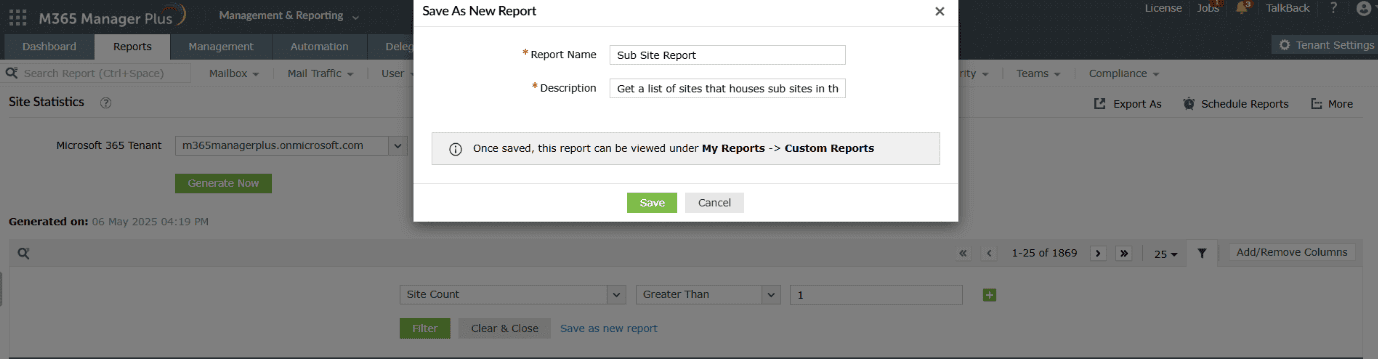
- Schedule reports and access them instantly
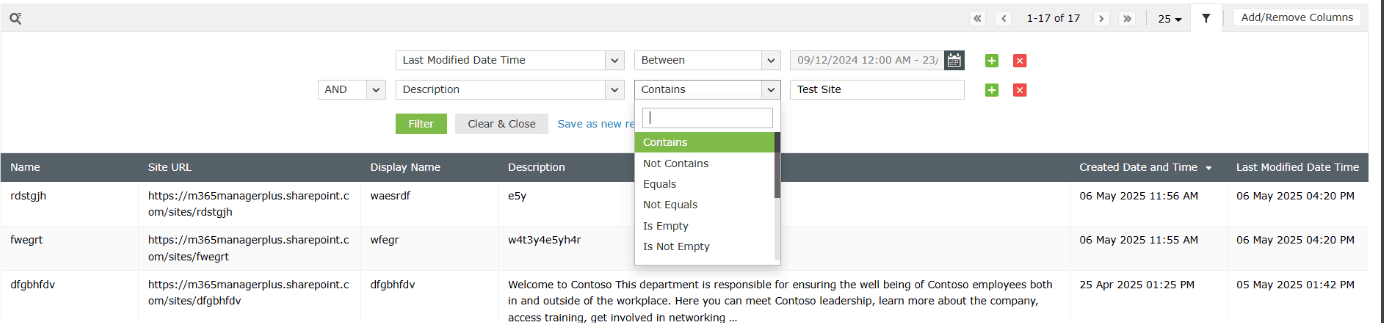
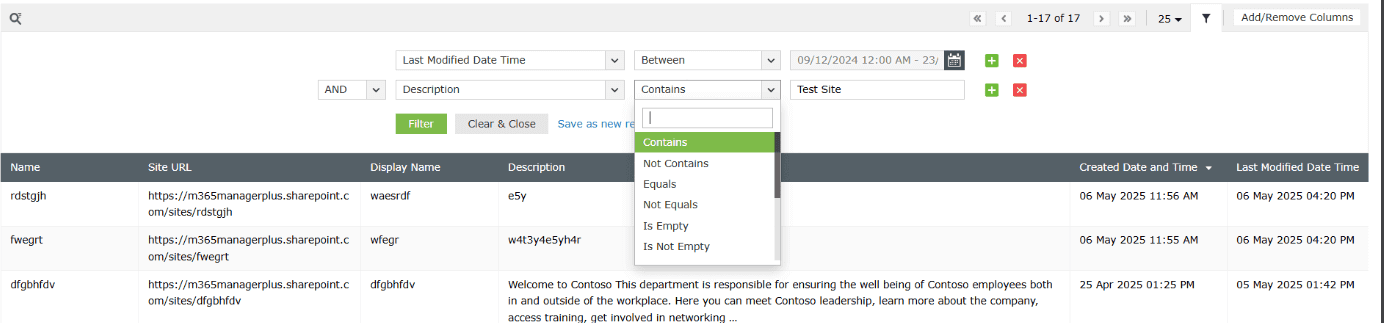
- Granular attribute-based filtering for your reports


Detailed SharePoint Online auditing
Staying on top of changes in SharePoint Online isn’t easy when thousands of users update permissions, move files between sites, or share content externally, all at the same time. Audit logs are retained for only 180 days by default. However, within that window, logs offer minimal filtering and often lack the contextual detail needed to understand the full scope of a change.
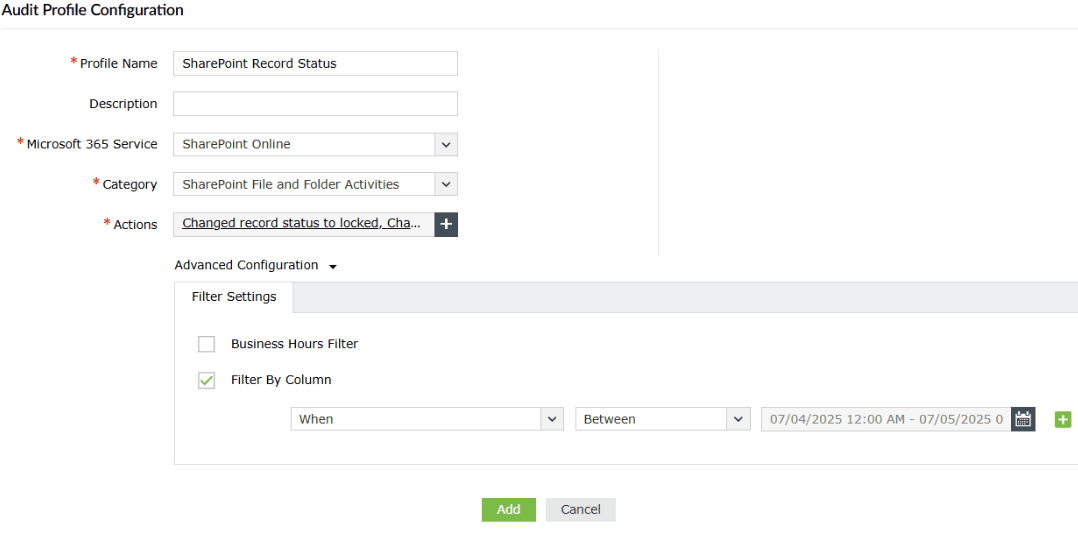
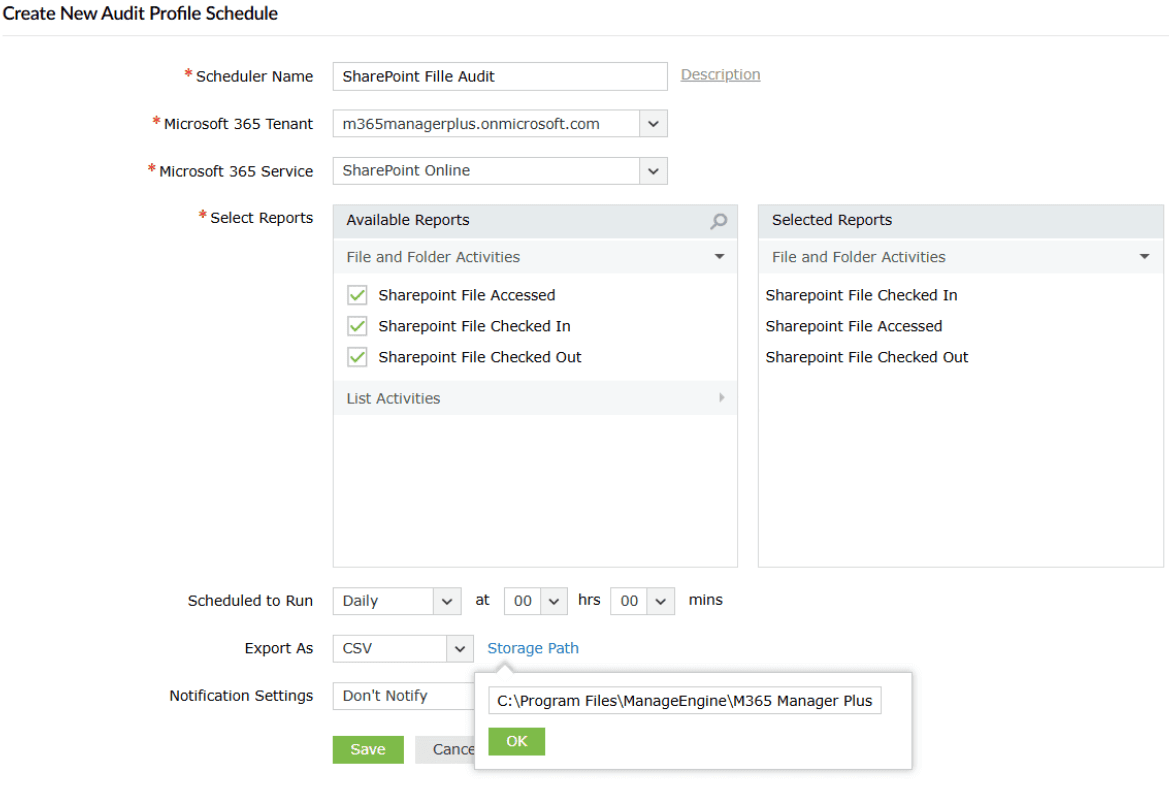
M365 Manager Plus enhances Microsoft 365 native audit logs with real‑time visibility, alerting, and long‑term retention. Monitor permission changes, file access, content movement, and sharing events across all SharePoint Online sites—no scripts needed. Create audit profiles tailored to your environment, automate tracking, and receive alerts for high-risk actions. Your audit trail stays complete, accessible, and actionable.
Monitor site changes in real time
- Create your own personalized audit profiles
- Schedule audits and store them effortlessly
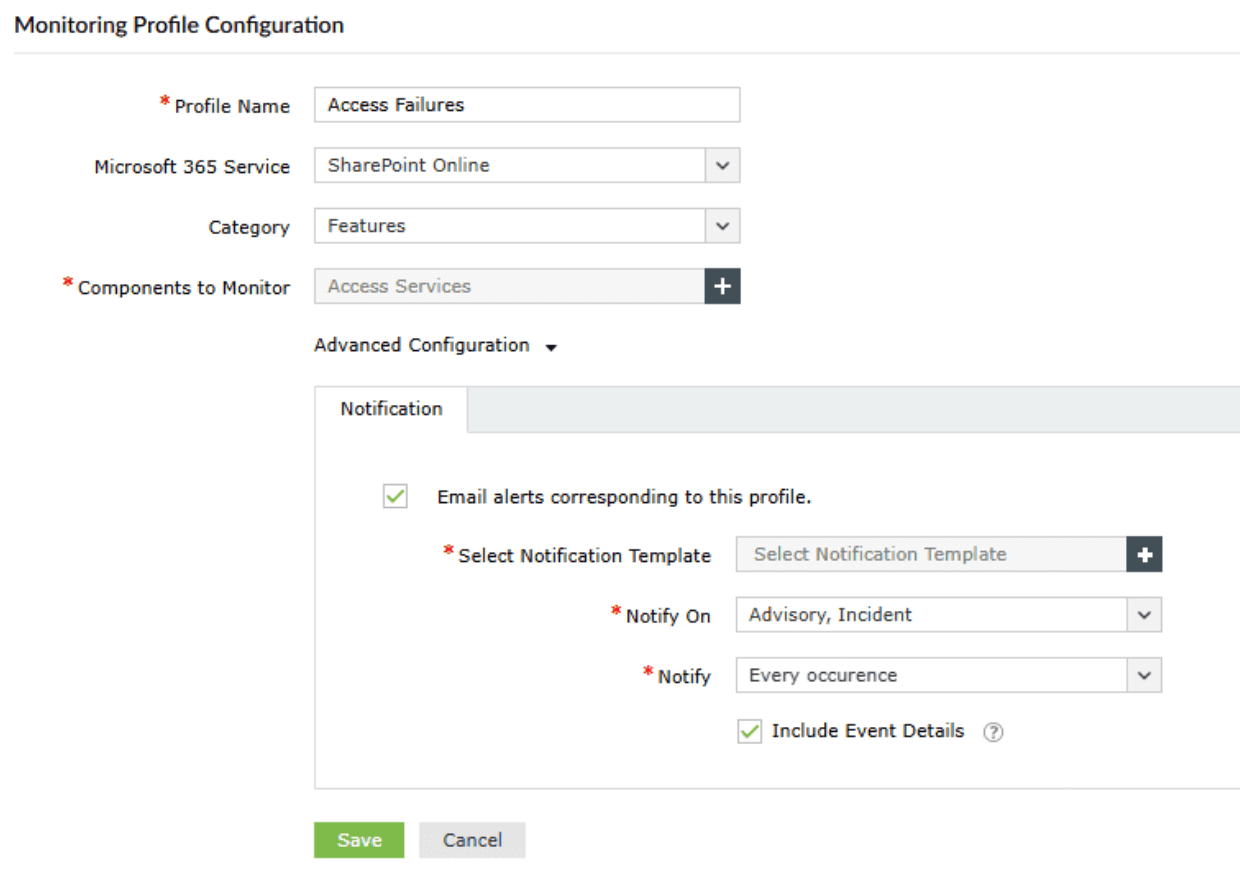
- Granular attribute-based filtering for your audits

- Stay informed of crucial events with real-time alerts


Stay ahead of SharePoint Online disruptions
When SharePoint Online experiences performance issues, native dashboards provide limited visibility and lack real-time granularity. Admins often find out about outages or sync failures through user complaints, not system alerts.
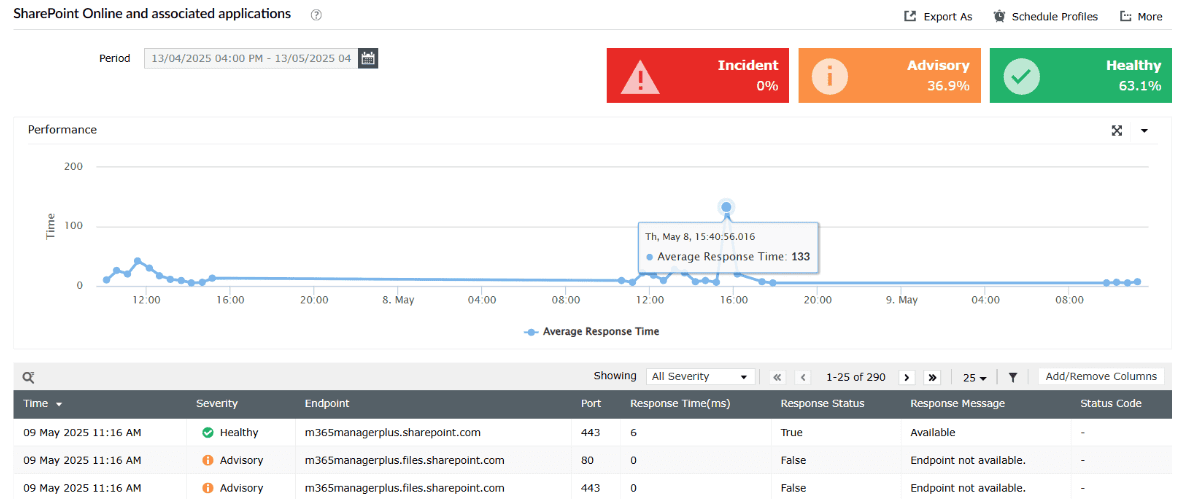
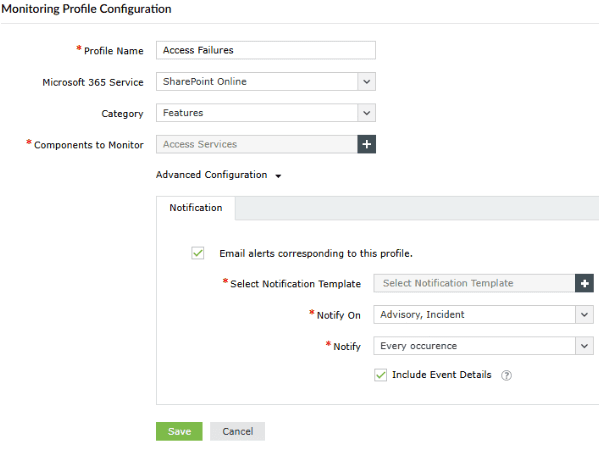
M365 Manager Plus fills that gap with real-time monitoring of service health and endpoint sync status, along with instant notifications for disruptions. IT teams can now spot issues earlier and keep collaboration running smoothly.
Spot SharePoint Online disruptions early.
- Get response rates of endpoints in a few clicks
- Set up alerts for incidents and stay notified


Other services supported by M365 Manager Plus
- Microsoft Entra ID
Get a track record of your Microsoft 365 users, groups, licenses, and applications, and provision them seamlessly.
- Exchange Online
Monitor and manage mailboxes and their permissions, audit for changes to properties, and run scheduled Content Search audits.
- OneDrive for Business
Keep a close eye on file sharing and storage activities in your users' OneDrive for Business folders.
- Microsoft Teams
Stay on top of your Microsoft Teams activities and monitor for any changes effortlessly.