Configuration of DHCP Option 66/67 for PXE in Sophos Firewall
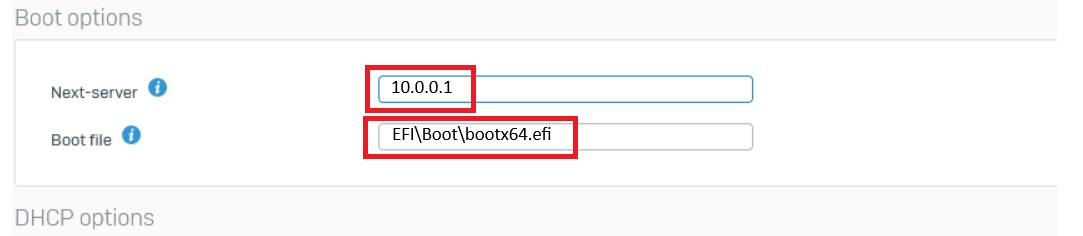
To configure the filename and next-server details for DHCP in Sophos firewall for IPv4 BOOTP/PXE, follow the steps given below:
- Open the Sophos Firewall console.
- Select Network → DHCP → Server.
- Next-server: Enter the IP address of the computer where the central server or distribution server is installed.
- Boot file: Enter EFI\Boot\bootx64.efi for UEFI 64-bit machines or boot\pxeboot.n12 for legacy BIOS machines. Different versions of the Sophos server use different naming conventions. If attempting PXE boot with the above boot file names results in a BSOD, try changing the boot file name to EFI\\Boot\\bootx64.efi for UEFI 64-bit machines or boot\\pxeboot.n12 for legacy BIOS systems.
- Click Save.