Free Edition
By design, Active Directory does not permit password history checks during password resets. While you can enforce password history in Active Directory during password changes, the same does not apply when users reset their passwords. To bridge this gap, ADSelfService Plus. offers the Password Policy Enforcer, which lets administrators check the password history stored in its database during resets, effectively preventing users from reusing expired or previously used passwords.
This ability to enforce password history Active Directory resets ensures that users create strong, fresh passwords, reducing the risk of unauthorized access due to predictable credentials. It also helps organizations maintain compliance with security standards and password management best practices.
Please note that the password history option is only applicable for password resets performed through ADSelfService Plus.
Here's how you can enable this feature in ADSelfService Plus:
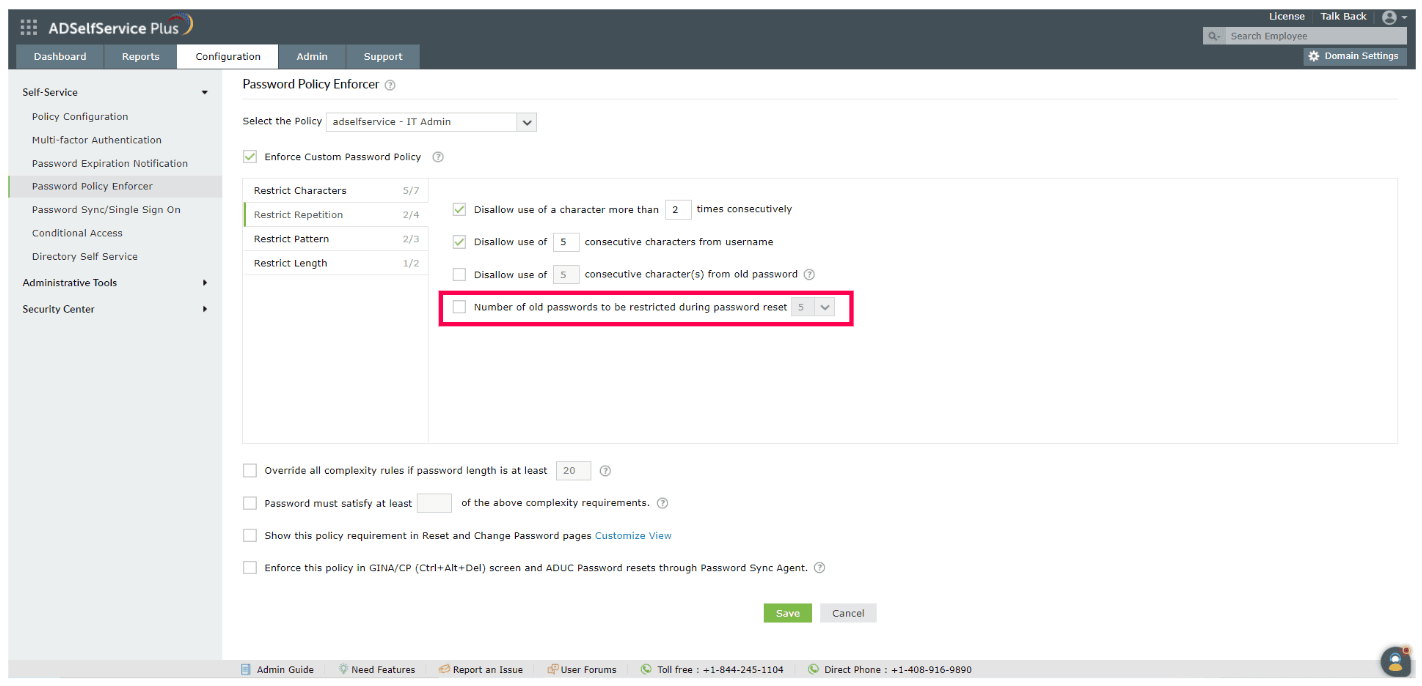
Fig. 1: Steps to configure the Password Policy Enforcer and restrict old password repetition.
Once successfully configured, users will be prevented from reusing previous passwords during resets, promoting stronger security. Additionally, ADSelfService Plus stores the SHA-512 hash of the passwords in its database to ensure the highest level of security and prevent unauthorized access to stored passwords.
For further assistance, please contact us at support@adselfserviceplus.com.
Need further assistance? Fill this form, and we'll contact you rightaway.
Allow Active Directory users to self-service their password resets and account unlock tasks, freeing them from lengthy help desk calls.
Get seamless one-click access to 100+ cloud applications. With enterprise single sign-on, users can access all their cloud applications using their Active Directory credentials.
Intimate Active Directory users of their impending password and account expiry via email and SMS notifications.
Synchronize Windows Active Directory user passwords and account changes across multiple systems automatically, including Microsoft 365, Google Workspace, IBM iSeries, and more.
Strong passwords resist various hacking threats. Enforce Active Directory users to adhere to compliant passwords by displaying password complexity requirements.
Enable Active Directory users to update their latest information themselves. Quick search features help admins scout for information using search keys like contact numbers.