The MTTR: The secret key to measuring the incident response impact
Aug 01 | 04 mins read

Measuring metrics is a key component of ITSM operations as it helps teams identify areas needing improvement and ensure operations run optimally. One such metric that is quantified by IT teams is the mean time to repair (MTTR). In ITSM, it is important to ensure disrupted processes are restored to standard operation immediately, and this metric helps teams identify the impact of incident response.
In case you are wondering how this metric works, in this article, we will look at the MTTR, how to calculate it, and how to reduce yours.
What is the MTTR, and why should your IT teams monitor it?
When a critical IT system fails, IT teams must get the system running as soon as possible. Delays in restoring IT systems can lead to a loss of revenue and impact critical business operations. A well-organized response and recovery strategy can help IT teams respond to unplanned downtime and restore operations effectively. The MTTR measures the average time taken to repair or troubleshoot an asset and make it operational again.
The cost of downtime increases as the MTTR increases. A high MTTR suggests that your response and recovery operations are not quick and effective. System failures are unavoidable, but the MTTR encourages teams to react to asset failures in a timely, strategic way.
An MTTR example
A software company faced a zero-day attack on a video game it was developing due to a vulnerability in the code. The attack disrupted operations like Wi-Fi and surveillance systems. This led to the attackers accessing the organization's network domain and confidential business files.
The cybersecurity team had informed employees about zero-day attacks and where they could report them. Also, every IT asset in the organization had been equipped with next-generation antivirus (NGAV) software.
However, the attack disabled the LAN and employee self-service portal, hindering the operations of the organization. Within an hour of the attack, the cybersecurity team was informed and helped by the NGAV software, which leveraged threat analytics and the behavior patterns of users to identify the suspicious activity. The cybersecurity team immediately ran a patch management script to rectify the vulnerability in the code and locked down its on-premises network to avoid further impacts on operations and data theft.
How to calculate the MTTR
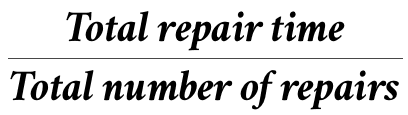
The MTTR is the total time taken to repair an IT component or system divided by the total number of repairs made during a time period. For example: A printer breaks down three times in a week, and it takes one hour, four hours, and half an hour to repair it. The MTTR is (1+4+0.5)/3 = 5.5/3 = 1.83 hours.
How to reduce your MTTR
- Employ an efficient IT asset management strategy that helps drive better decision-making by identifying bottlenecks and directing that assets be repaired or replaced. This saves money and storage space.
- Define the responsibilities and roles for technicians to streamline the incident detection and resolution process.
- Provide technicians with detailed standard operating procedures to reduce miscommunications and confusion during downtime.
- Measure the MTTR using an enterprise asset management solution that centralizes asset maintenance and monitoring information. This also helps you optimize the utilization of assets, collect asset data, and predict possible downtime.
Summary
The MTTR indicates the time spent on repairs and how quickly your IT teams are able to diagnose disruptions. This metric empowers IT teams to achieve higher operational efficiency by pinpointing the root cause of persistent incidents. IT teams can improve their incident response strategy with a clear picture of areas where IT operations are impacted.
Organizations can implement metrics such as the MTTR by using them as KPIs rather than just performance objectives. Metrics point out areas needing process simplification and operational improvements and are not merely targets to hit.
About the author