- What exactly is a Zero-Day Vulnerability in cybersecurity
- Zero-Day Vulnerability vs. Zero-Day Attack
- A real-life Zero-Day vulnerability occurrence
- Why is tight IT security necessary to stop a Zero-Day attack
- What is the difference between a Zero-Day vulnerability and N-Day vulnerability
- What are the common challenges in addressing Zero-Day Vulnerabilities
- How to mitigate Zero-Day threat with Vulnerability Manager Plus
- Final thoughts
- Frequently asked questions on Zero-Day vulnerability
Share this article




What exactly is a Zero-Day Vulnerability in cybersecurity?
A zero-day vulnerability is a critical flaw that is unknown, more like an undisclosed one that the vendor must provide a fix for as soon as possible before it becomes devastating. The term itself reveals its meaning: the moment the malicious code gains entry and exploits the vulnerability, the defender now has less than a day's notice to react. This element of surprise is what makes it devastating .
To understand the magnitude of this risk, you have to look at the lifecycle of the vulnerability. It starts quietly with a coding error. You might wonder why the vendor didn't notice it before pushing the code live. The reality is that finding a hidden logic flaw in millions of lines of code is more like finding a needle in a haystack. Once it slips through, it becomes a race. If security researchers find it, they try to warn the vendor. But if the attackers find it first, they treat it more like a secret weapon, exploiting it immediately while the vendor is still completely unaware.
However, when a researcher identifies this issue, they typically give the vendor a strict 90-day period to rectify it. And, if the vendor fails to provide a patch within this period, the researcher will publish the flaw. That is the exact moment it becomes a zero-day.
Zero-Day Vulnerability vs. Zero-Day Attack: What’s the Difference?
While these terms are often used interchangeably, they represent two different stages of a security crisis. Understanding the distinction is key to building a pre-emptive defense strategy.
- The Zero-Day Vulnerability (The Flaw): This is the "open window" in your software. It is a coding error or a logic flaw that exists in your system but hasn't been patched because the vendor doesn't know it exists yet. It is a latent risk—a ticking time bomb waiting for a trigger.
- The Zero-Day Attack (The Action): This is when a threat actor finds that open window and climbs through it. An attack is the actual execution of malicious code (the exploit) to steal data, deploy ransomware, or gain unauthorized access.
You can have a vulnerability in your network for months without ever suffering an attack. However, the goal of a solution like Vulnerability Manager Plus is to identify that vulnerability during the "Limbo Period"—the gap between discovery and patch—so you can bolt the window shut before an attack ever begins.
A real-life Zero-Day Vulnerability occurrence
Look no further than the massive Ivanti Connect Secure breach in early 2024. Hackers discovered a critical flaw in their VPN gateways and started exploiting it immediately. They didn't announce it; they just walked right in. The flaw was dangerous because it allowed them to bypass authentication entirely, essentially providing a skeleton key to the front door of thousands of companies. By the time the vendor realized what was happening, the attack was already widespread. For the vendor, the clock didn't just start ticking; it had already run out. They had zero days to prepare. They scrambled to find a fix while hackers breached corporate networks. It wasn't a warning; it was a cleanup operation.
So, when the clock runs out, the reactive approach fails. Relying solely on patches is more like chasing the attacker after they have already gained access. This is where Vulnerability Manager Plus changes the game. We enable you to shift to a proactive, pre-emptive defense, helping you identify and mitigate risks immediately, well before a disclosure forces your hand. By automating patch management and hardening system configurations, we ensure you are no longer a sitting duck. It is about giving you control over the attack surface, ensuring that even if a zero-day vulnerability emerges, your doors are already bolted shut.
Why is tight IT security necessary to stop a Zero Day attack?
Relying on luck is not a strategy. Since we established that you can't patch a flaw you are not yet aware of, maintaining a tight security posture is the only thing that holds the line. It acts as the shield that buys you time, ensuring that when an attack happens, your network is resilient enough to absorb the shock rather than crumbling immediately.
- The critical 'window of vulnerability' and time-to-exploit This concept comes down to simple math. The 'window of vulnerability' is the calculated gap between the moment a flaw is exposed and the moment the fix is applied. Attackers know this gap exists and move immediately to exploit it. It is more like leaving your front door wide open in a rough neighborhood; the longer it stays open, the higher the risk. Minimizing this time-to-exploit is essential because every second of delay gives the attacker more leverage to dig deeper into your system.
- What makes Zero-Days so uniquely dangerous and stealthy?The real danger isn't just that the flaw is unknown; it is that traditional defenses are blind to it. Standard antivirus tools work by matching 'signatures' or the fingerprints of known threats. However, a zero-day vulnerability has no known fingerprint yet. It is more like a criminal walking past a security guard who has been told only to look for people wearing red shirts. The malicious code slips through immediately because your security tools literally cannot see it.
- What are the consequences of a successful Zero-Day breach?From the Ivanti case, we know the immediate impact is loss of control. But the long-term fallout is often worse. The reality is, once trust is broken, it is gone. It is more like a permanent stain on your reputation that no software patch can fix. Clients lose faith in your ability to protect them immediately. Beyond the technical cleanup, you face legal penalties and regulatory fines that can cripple the business financially long after the hackers have vanished.
What is the difference between a Zero-Day vulnerability and N-Day vulnerability
The difference is very simple: If there is no patch or fix and the team has zero days to fix it, it is called a zero-day vulnerability. If there is a patch or fix readily available from the vendor but still you haven't fixed it, it is an N-day vulnerability.
| Feature | Zero-Day Vulnerability | N-Day Vulnerability |
|---|---|---|
| Is there a fix? | No. The vendor is usually unaware or still trying to build it. | Yes. The patch is out and waiting for you to install it. |
| Who is Responsible? | The Vendor. They are racing against time to create the patch. | You. The tool is in your hands, but you haven't used it yet. |
| Who is Attacking? | Elite Hackers. Mostly state-sponsored spies or professionals using secret methods. | Everyone. Since the method is public, even amateurs and bots can attack you. |
| Can you detect it? | No. Traditional antivirus is blind to it because there is no known signature. | Yes. Vulnerability scanners can spot it immediately because it is documented. |
| The Defense Strategy | You can rely on a tool like our Vulnerability Manager Plus to apply pre-emptive mitigations and harden configurations immediately. | You can use a tool like our Vulnerability Manager Plus or a similar one to run your standard patch management to close the hole. |
What are the common challenges in addressing Zero-Day Vulnerabilities?
The biggest problem is that the odds are stacked against you. You are trying to defend against something that technically does not exist yet.
- 1. The Invisibility Cloak:Most security tools rely on known signatures to catch bad guys.Since a zero-day has no signature, it is invisible to standard antivirus software.It is more like trying to catch a criminal who has no face, no fingerprints, and no record. You often don't know you have been hit until it is too late.
- 2. The Helpless Waiting Game Even if you detect the attack, you cannot just "fix" it because the patch doesn't exist. You are forced to wait for the vendor to write the code. This leaves you in a dangerous limbo where you are exposed but powerless. It is more like being stuck on a sinking ship while waiting for the coast guard to build a life raft from scratch..
- 3. The Fear of Breaking ThingsWhen a workaround is finally suggested, it is often messy. Disabling a protocol or blocking a port might stop the hackers, but it might also crash your critical business apps. IT teams are stuck in a hard place, deciding whether to risk a security breach or risk shutting down the business operations themselves.
How to mitigate Zero-Day threat with Vulnerability Manager Plus?
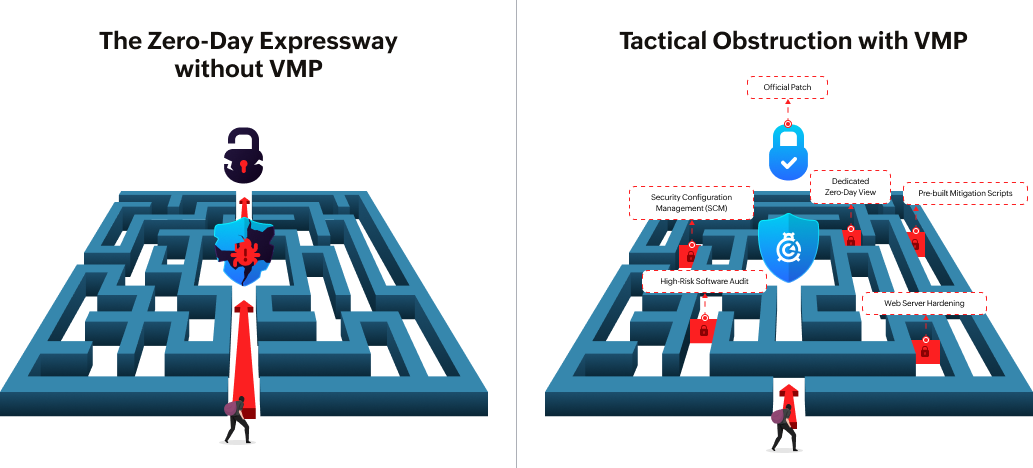
You cannot stop a zero-day from existing, but you can stop it from wrecking your network. Vulnerability Manager Plus shifts your defense from "wait and see" to "detect and deny." We give you the specific tools to reduce your attack surface and fight back before the vendor even releases a fix.
Streamline the entire vulnerability management lifecycle
A zero-day response is only as good as your daily routine. We manage the entire lifecycle, from discovering assets to prioritizing risks and deploying the final fix. We don't just dump a list of bugs on your desk; we rank them based on real-world exploitability. It is more like an emergency room triage system, ensuring you treat the critical wounds immediately instead of wasting time on minor scratches.
Leverage a dedicated view for Zero-Day intel
You can't fight what you can't see. While other tools bury zero-days in a pile of generic alerts, we give you a dedicated view specifically for these critical threats. Our security researchers are constantly probing the internet for new dangers, verifying them, and syncing that intel directly to your console. It is more like having a watchtower that spots the smoke on the horizon before the fire ever reaches your building.
Deploy mitigation scripts instantly to bridge the gap
Waiting for a vendor patch is a dangerous move. We bridge that wait time by offering pre-built mitigation scripts that you can deploy immediately. These scripts act as an emergency shield, disabling legacy protocols, closing vulnerable ports, or altering registry keys to block the exploit path. It is more like boarding up a broken window to keep the storm out while you wait for the glazier to arrive with the new glass.
Harden the attack surface with Security Configuration Management (SCM)
Existing misconfigurations like open ports or outdated protocols are just making the attacker's job easy. Use Vulnerability Manager Plus to automatically audit and fix these security gaps. We lock down your configurations so that even if an attacker find a way in, they have nowhere to go. It is more like locking every internal door in the office so a burglar is trapped in the lobby instead of roaming freely.
Waiting for a vendor patch is a dangerous move. We bridge that wait time by offering pre-built mitigation scripts that you can deploy immediately. These scripts act as an emergency shield, disabling legacy protocols, closing vulnerable ports, or altering registry keys to block the exploit path. It is more like boarding up a broken window to keep the storm out while you wait for the glazier to arrive with the new glass.
Eliminate ticking time bombs with High-Risk Software audits
Software that has reached its End-of-Life (EOL) stops receiving patches, making it a permanent zero-day vulnerability. We use our High-Risk Software Audit to identify and help you remove these ticking time bombs immediately. By eliminating unauthorized and obsolete software, we shrink the target area, giving attackers fewer places to land.
Final thoughts
The harsh reality is that zero-day attacks don't give you a warning shot. Relying solely on the vendor to release a patch is not a strategy; it is a gamble. As we discussed, the gap between discovery and the fix is exactly where the damage happens. This is why you must shift from a reactive stance to a proactive defense. With Vulnerability Manager Plus, you stop being a bystander. By hardening configurations and removing risky software, you shrink the attack surface immediately. Control the risk before it controls you.
Frequently asked questions on Zero-Day Vulnerability
1. What is the difference between a zero-day vulnerability and an exploit ?
The vulnerability is a mistake in the code, whereas exploit is the actual method hackers use to break in through that window..
2. If there is no patch available, am I completely helpless?
No, you can use mitigation scripts to disable the specific port or protocol. You block the attack path immediately even without a permanent fix.
3. Why didn't my Antivirus catch the zero-day attack?
Antivirus tools look for "signatures" or known fingerprints. Since a zero-day is new, it has no fingerprint, so it slips past undetected.
4. How does Vulnerability Manager Plus help without a patch?
We provide pre-built scripts to disable the vulnerable setting immediately, serving as a temporary shield until the official fix is available.
 About the author