Custom DHCP options
Table of Contents
About Custom DHCP options
Custom Option- Data Types
Encapsulated Type Options (Option Spaces)
About Custom DHCP options
Defining custom DHCP options enable network administrators to extend and tailor DHCP functionality beyond the standard configuration parameters. Custom DHCP options provide a way to convey specific information to DHCP clients during the lease negotiation process. Here's a general process for defining custom DHCP options:
In ManageEngine DDI, Custom Options are defined and values are provided within the respective fields provided within the GUI by specifying details like: the user-defined option name, code, and any data type restrictions as shown in the image below. These custom options can be defined at multiple levels. To define cluster level custom options, go to DHCP-> Config-> Custom Option.
[option-name] [option-space] [option-description] [option- data-type] [option-code] are the parameters that help define a custom DHCP option.
To create a Custom option in DDI:
Click on the green + (plus) button besides the Options dropdown box.
The Add Definition window appears. Here you can declare and define your new Custom option in DDI:

- NAME: This is a required field where you would enter the name of the new custom option you are defining. It should be a unique identifier that accurately describes the option you're adding.
- USE EXISTING SPACE: This toggle indicates whether the new custom option should be added to an existing set of options (an option space) or if it's going to define a new one. If the toggle is enabled (turned on), you should select an existing space from the OPTION SPACE field.
- OPTION SPACE: If you are using an existing space (as indicated by the toggle above), you would enter the name of that space here. This would be the grouping or category under which your new option will be classified.
- DESCRIPTION: This required field is where you would provide a detailed explanation of what the custom option does and what values it expects; the valid punctuation like: some data types accept only spaces while some options accept comma separated values. The description helps users understand the purpose, grammar, and usage of the option.
- DATA TYPE: Here, you choose the type of data the custom option will use. The data types include boolean, string, integer, IP address, etc., depending on what the system allows.
- CODE: This is a required field where you enter the specific code that identifies the custom option. This is often a numeric value that is used in configuration files or by the system to recognize the option.
- Save Button: After filling out all the necessary information, click Save to save the new custom option to the system.
Note:
The option-name must be different from server-defined options and consist of alphanumeric characters and '-'.
The option-code is typically between 128 and 254.
Supported option-types include boolean, integer[(signed) integer8, 16, 32, unsigned integer 8, 16, 32], string, text and IPv4 or IPv6 address, array of IP addresses, record and encapsulation.
Custom Option- Data Types
Boolean Type Options
The ISC BIND declaration format is shown below along with an example definition of a boolean option named my-option with code 209.
Declaration: option my-option code 209 = boolean;
Once declared, this option can accept values based on the grammar defined.
Setting: option my-option true;
Integer Type Options
Options of data type integer include specification of signed or unsigned (or blank) and integer length of either 8, 16, or 32 bits.
Declaration: option bits-per-sec code 210 = unsigned integer 32;
Setting: option bits-per-sec 1544000;
String Type Options
A string type option consists of a hexadecimal-encoded colon-separated octet string.
Declaration: option mac-manufacturer code 211 = string;
Setting: option mac-manufacturer a4:80:1f;
Text Type Options
Text type options specify values encoded as ASCII text strings.
Declaration: option your-help-contact code 212 = text;
Setting: option your-help-contact 'John Smith';
IPv4 Address Type Options
The IP-address data type enables specification of an IPv4 address or resolvable domain name.
Declaration: option our-file-server code 213 = ip-address;
Setting: option our-file-server 10.0.209.12;
option our-file-server fileserv1.ipamww.com;
IPv6 Address Type Options
The IP6- address data type enables specification of an IPv6 address
Declaration: option our-video-server code 214 = ip6-address;
Setting: option our-video-server fc01:273e:90a:2::b1 ;
option dhcp6.some-server code 1234 = array of ip6-address;
option dhcp6.some-server 3ffe:bbbb:aaaa:aaaa::1, 3ffe:bbbb:aaaa:aaaa::2;
Array Type Options
Array options provide a way to specify multiple values for boolean integer or IP address data type values (all of the same type) by simply inserting 'array of' before the data type. Array elements are defined when setting the option values using comma-separated values.
Declaration: option my-ip-array code 198 = array of ip-address;
Setting: option my-ip-array 10.0.100.1 10.100.0.1;
Note:
Options can contain arrays of any of the supported data types except for the text and string types, which aren’t currently supported in arrays.
Encapsulated Type Options (Option Spaces)
An option space groups multiple options, typically with a common purpose. This grouping of options can be 'encapsulated' within a single user-defined option code. Consider the example of creating a db option space to specify some database connection suboptions.
Declaration: option space db;
Setting value:
option db.db-server code 1 = ip-address;
option db.loginid code 2 = text;
option db.db-name code 3 = text;
option database-encapsulated code 221 = encapsulate db;
The first line option space db; defines the db option space. Next three suboptions are defined within this space. Each suboption has a unique code which is typically numbered from 1 since these are suboption code values. These suboptions are encapsulated within the parent option of code 221 named database-encapsulated. The setting statements below would set values to suboptions 1 2 and 3 encapsulated within option 221.
Setting: option db.db-server 10.199.200.37;
option db.loginid 'database';
option db.db-name 'mydatabase';
Record Type Options
While array options provide specification of multiple elements of the same type, Record types options enable specification of multiple elements of different types. Each element of the record is specified in order in the UI. The following example defines an option of data type record including an integer (16 bit) text boolean and IP address as input values..
Note:
Unlike arrays, record element values accept only space separated not comma separated.
Definition: option my-rec code 198 = { integer 16 text boolean ip-address };
Values:option my-rec 4096 'cio' true 10.10.99.12;
Custom Options in Modern (Kea) DHCP
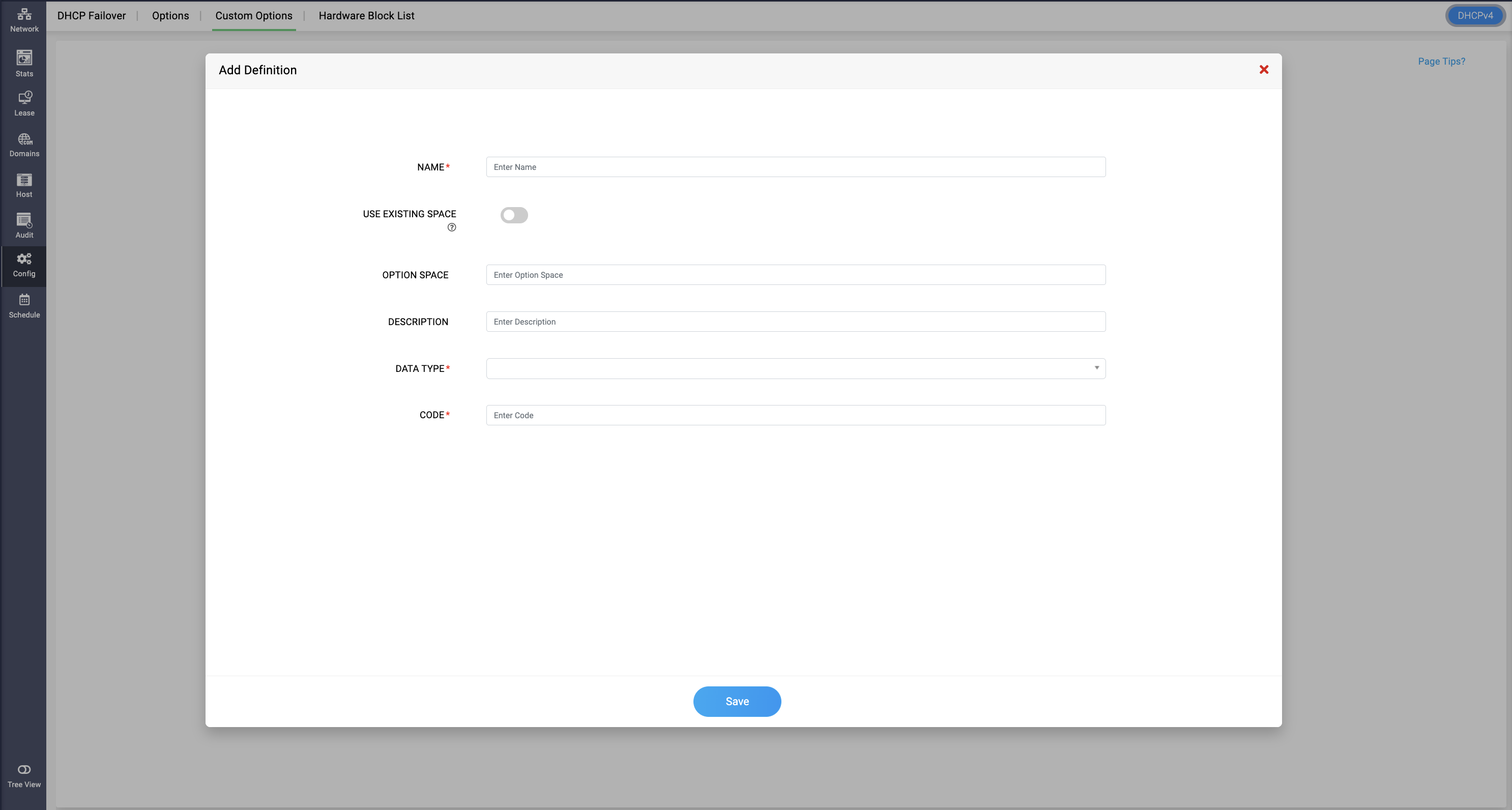
Modern DHCP (Kea) also supports Custom Options — letting admins define additional DHCP options beyond the standard set, for vendor-specific or non-standard client needs.
- Name — The name of the custom option.
- Use Existing Space — Toggle on to attach this option to an option space that already exists, instead of creating a new one.
- Option Space — The option space this custom option belongs to. Leave blank and the option is created under the default DHCPv4/DHCPv6 space.
- Description — Optional notes on what the option is for.
- Data Type — The data type the option's value will hold (e.g., string, IP address, integer).
- Encapsulate — Only appears once an Option Space is entered. Controls how this option nests relative to that space.
- Code — The numeric option code, unique within its space.
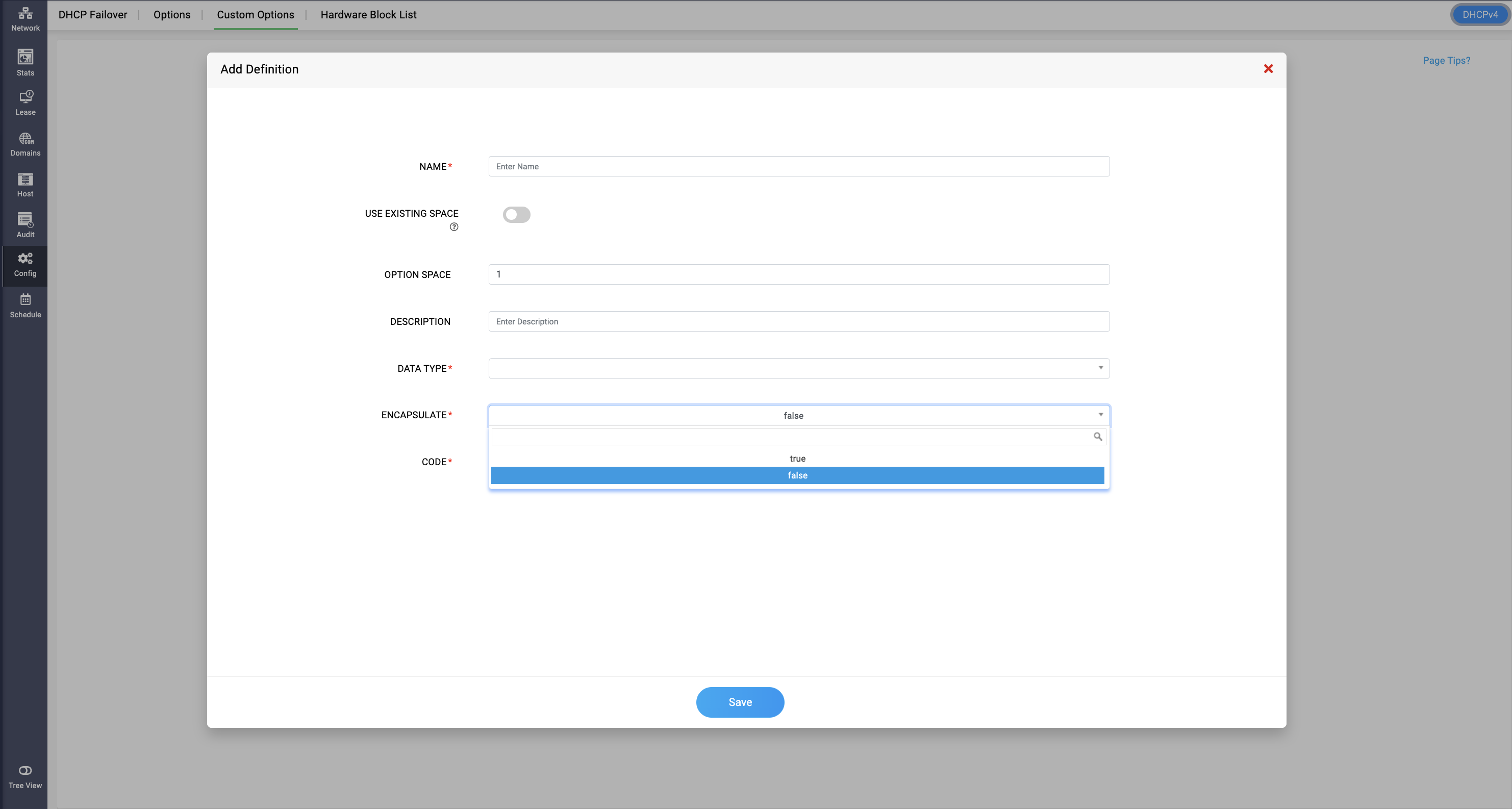
How Option Space and Encapsulate work together
- No Option Space entered: the option is created under the default DHCPv4/DHCPv6 space. It behaves as a standard-style option, but it cannot carry custom configuration code — so leave Option Space blank only for simple, standalone options.
- Option Space entered: an Encapsulate field appears, which decides where the option actually lives:
- Encapsulate = true — the option is joined to the existing option space (the standard/default space), effectively extending it.
- Encapsulate = false — the option is joined under the custom option space the admin just created, keeping it separate from the default space.