In this article:
Objective
This article provides the prerequisites and precautions you will need to follow when updating to build 4800 from builds 4703 and below.
From builds 4800 and above, the PostgreSQL database bundled with M365 Manager Plus will be version 15.7 to improve performance and protect against exploits targeted at versions below 15.7. When updating from builds 4703 and below to build 4800, the built-in PostgreSQL database will also be updated. In larger environments, this update might require more space, and M365 Manager Plus will experience more downtime as a result.
Prerequisite
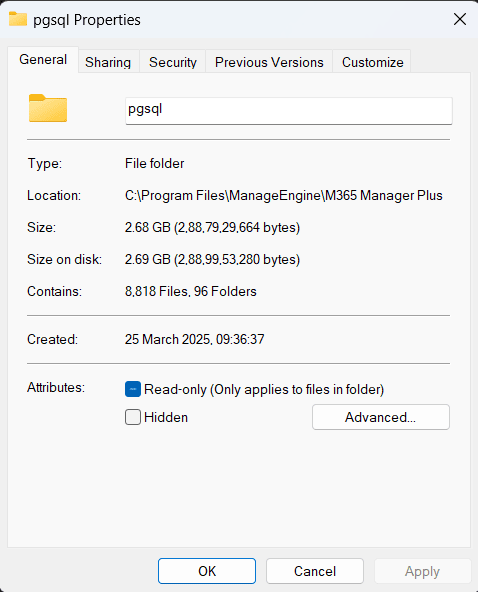
- Free up disk space at least 1.3 times the size of the bundled PostgreSQL database. This space is only required for migrating the database from the old version to the new version. It will be freed up once the update is complete. Follow the steps mentioned below to find the size of your product database.
- Right-click on the pgsql folder in your M365 Manager Plus installation directory. By default, the default path to the installation directory is C:\Program Files\ManageEngine\M365 Manager Plus.
- Click Properties.
- View the disk space occupied by your product database in the Size on disk field.
Steps to follow
There are two ways you can update M365 Manager Plus. You can either use Auto Update or manually apply a service pack.
Auto Update
Since M365 Manager Plus will experience additional downtime for this update, Auto Update will be paused to let you review and consent to the requirements for the update to ensure minimal effect on your operations.
- Log in to M365 Manager Plus as a technician delegated with the Check for Update function.
- You can provide your consent by checking the notification menu for the following alert:"Admin consent required to update to build <build number>". Once you have verified the requirements, click Consent now.
- After you provide your consent, Auto Update will update M365 Manager Plus and the built-in PostgreSQL database at the next scheduled time.
- If you wish to update immediately, navigate to the Support tab, click Check for Update, and select Update.
Manual update
- Download the M365 Manager Plus service pack for build 4800 from this page and follow the instructions.
- You will be prompted with the update requirements after you open Update Manager and apply the downloaded service pack. You can choose to consent and proceed with the update by clicking Yes or stop the update for now by selecting No.
Verification
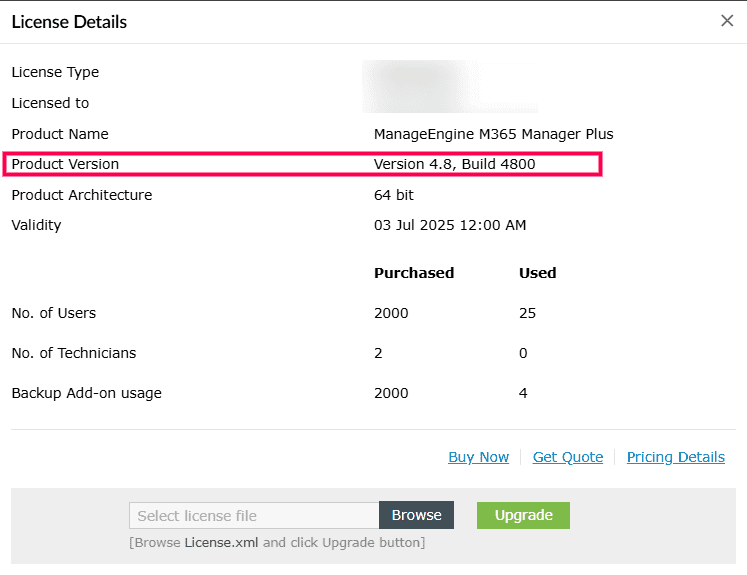
- Click the License option in the top-right corner of the product screen.
- Verify whether the Product Version field displays "Version 4.8, Build 4800".
How to reach support
If you have any further questions or require any assistance with this update, please reach out to our support team at m365managerplus-support@manageengine.com or call us at +1-408-916-9836. We are happy to help you out.