How to change how long permanently deleted items are kept for Exchange Online mailboxes using Microsoft Graph PowerShell
Items like messages, calendars, and tasks in Exchange Online are moved to a folder called Recoverable Items when they are permanently deleted. They can be recovered from this state in 14 days, by default. This period, called the retention period, can be changed and extended up to 180 days by using Microsoft Graph PowerShell scripts.
ManageEngine M365 Manager Plus, a comprehensive tool used for reporting, managing, monitoring, auditing, and alerting for critical activities in your Microsoft 365 environments, can also be used for this purpose.
The following table is a comparison on how to change retention period using Microsoft Graph PowerShell and M365 Manager Plus.
Microsoft 365
Steps to change how long permanently deleted items are kept for Exchange Online mailboxes using Microsoft Graph PowerShell
- Open Windows PowerShell, connect to Microsoft Graph PowerShell, and execute the following script:
Update-MgUserMailboxSetting -UserId "<Mailbox_Name>" -MailboxRetentionPeriod <Retention_Period>
M365 Manager Plus
Steps to change how long permanently deleted items are kept for Exchange Online mailboxes using M365 Manager Plus
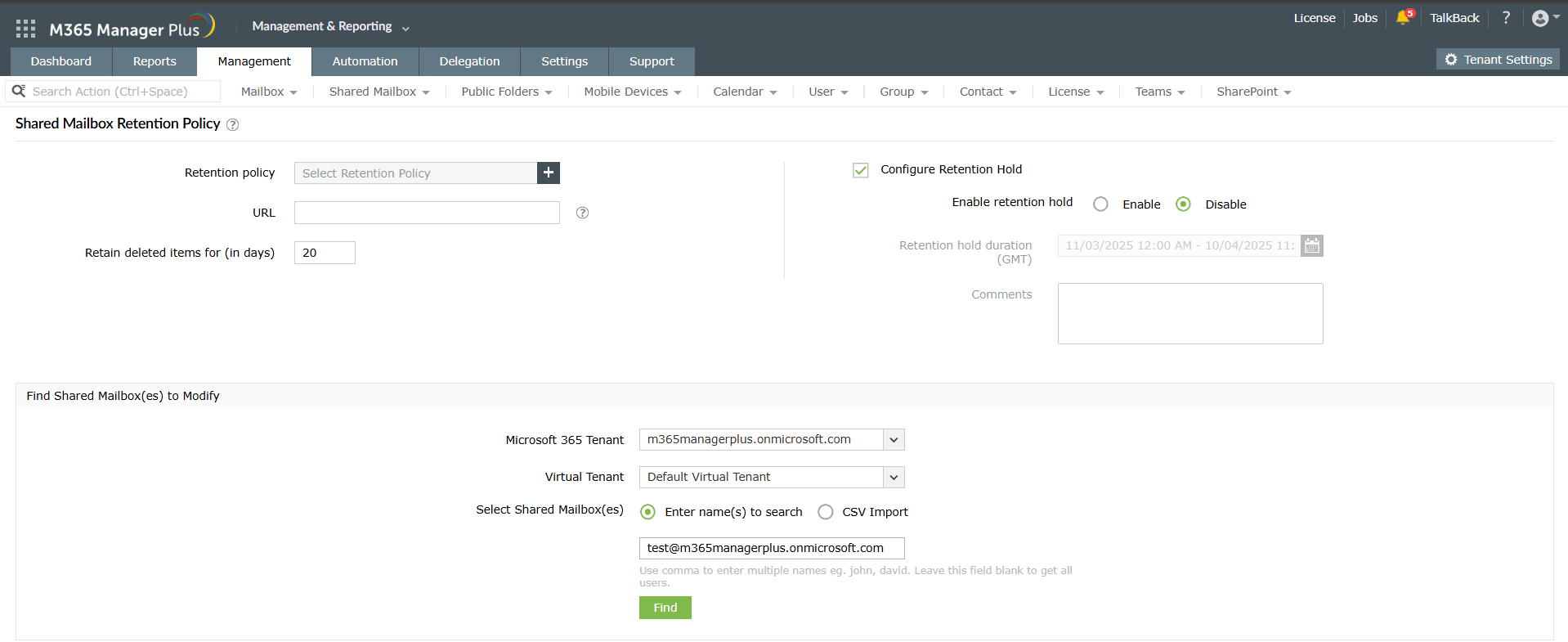
- Log in to M365 Manager Plus and navigate to the Management tab > Exchange Online > Mailbox Management > Configure Mailbox Retention Policy or Configure Shared Mailbox Retention Policy based on the type of mailbox that you want to configure the retention period for.
- Type in how long you want deleted items to be retained in the Retain deleted items field.
- Fill in the mailbox name and click Find to generate a list of matching users.
- Check the users that you want to delete and click Apply.
Limitations of using Microsoft Graph PowerShell to change how long permanently deleted items are kept for Exchange Online mailboxes
- Administrators must have sufficient permissions to modify retention period using the above-mentioned Microsoft Graph PowerShell script. However, scripts are time-consuming, can affect productivity, and are prone to errors.
- Assigning granular permissions to execute individual tasks in a broad category is not possible.
Benefits of using M365 Manager Plus to change how long permanently deleted items are kept for Exchange Online mailboxes
- Manage users, groups, contacts, mailboxes, teams, and sites in bulk without Microsoft Graph PowerShell scripting.
- Back up Exchange Online emails, calendar entries, contacts, and tasks with periodic incremental backups and restore them fully or granularly based on your needs, way past the 180 day limit of the native retention period.
- Delegate granular permissions to technicians without elevating their Microsoft 365 privileges and create custom roles with any combination of reporting, management, and auditing tasks.
- Gain a thorough understanding of your Exchange Online, Entra ID, SharePoint Online, Microsoft Teams, OneDrive for Business, and other Microsoft 365 services with detailed reports.
- Keep tabs on even the most granular user activities in your Microsoft 365 environment with real-time audit alerts.
- Monitor the health and performance of Microsoft 365 features and endpoints around the clock.
One-stop solution for your Microsoft 365 management needs.
Streamline your Microsoft 365 governance and administration with M365 Manager Plus
Get Your Free Trial