How to update user profiles in bulk in Entra ID
Keeping user accounts updated is paramount for any organization's productivity and security. System administrators regularly need to update user accounts when employees change roles, update contact information, or require modifications to group memberships. The steps mentioned below can be used to update user profiles in bulk in Microsoft Entra ID. ManageEngine M365 Manager Plus, an extensive tool used for reporting, managing, monitoring, auditing, and creating alerts for critical activities in your Microsoft 365 environments, can also be used for this purpose.
The table is a comparison on how to bulk update user profiles in Entra ID using the native admin center and M365 Manager Plus.
Entra ID
Steps to update user profiles in Entra ID using the native admin center
- Log in to the Microsoft Entra admin center with at-least an User Administrator account.
- Navigate to Identity > Users > All users.
- Select the users you want to edit by clicking the check boxes next to them.
- Click Edit on the top ribbon and select Edit Properties.
- Edit individual attributes of the selected users in bulk to the same value, and click Save.
M365 Manager Plus
Steps to update user profiles in Entra ID using M365 Manager Plus
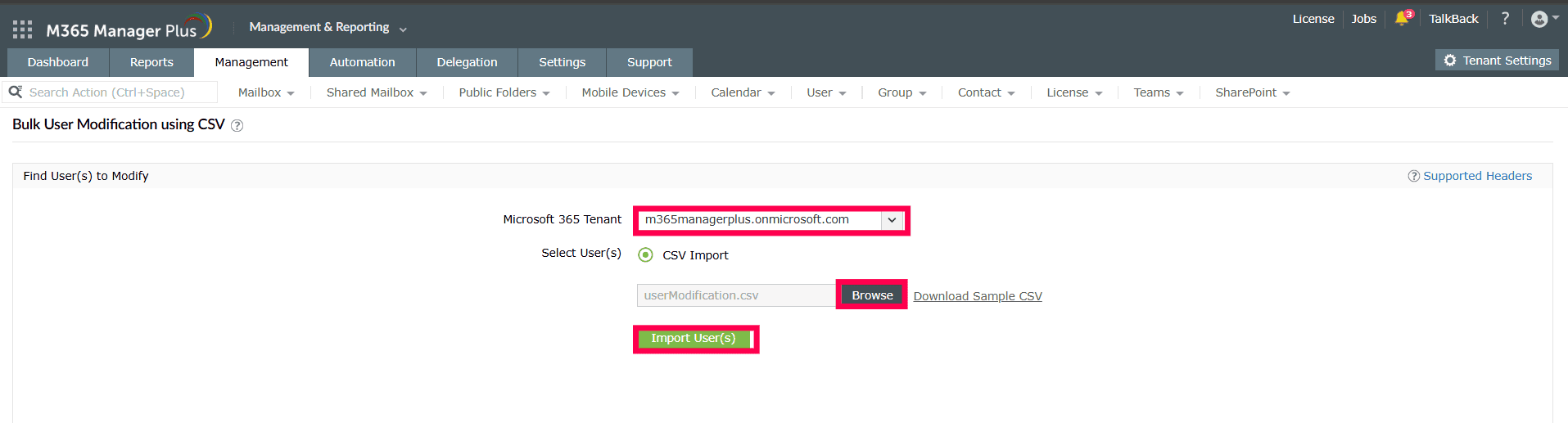
- Log in to M365 Manager Plus and navigate to the Management tab > Azure Active Directory > User Management > Bulk User Modification using CSV.
- Click Browse to select the file with the details of the users you want to modify in bulk and click Import User(s).
- Verify the attributes that you want to modify, and click OK.
- Verify the details of users that you want to create and click Apply
Limitations of using Microsoft 365 native tools to update user profiles in Entra ID
- You can only select up to 60 users for a single bulk operation.
- As of 14 May, 2025, only 12 attributes can be edited using the bulk edit option.
- All users will be assigned the same values in bulk. Unique values cannot be assigned to individual users in a single operation
- Administrators must be assigned the required role to access individual native admin centers and execute tasks in them.
- Assigning granular permissions to execute individual tasks in a broad category is not possible.
- Generating reports and conducting management tasks on services in Microsoft 365 have to be carried out in their respective admin centers, which can be exhausting and time-consuming.
Benefits of using M365 Manager Plus to update user profiles in Entra ID
- M365 Manager Plus allows the modification of Microsoft 365 users in bulk, without any limits on the number of objects that can be processed in a single operation.
- All Entra ID user attributes can be edited with M365 Manager Plus.
- M365 Manager Plus supports customized Entra ID bulk user modification with unique values for each user effortlessly with CSV-based modification.
- Delegate granular permissions to technicians without elevating their Microsoft 365 privileges, and create custom roles with any combination of reporting, management, and auditing tasks.
- Gain a thorough understanding of not just your Microsoft Entra ID environment but also Exchange Online, SharePoint Online, OneDrive for Business, and other Microsoft 365 services with detailed reports and intuitive visualizations.
- Keep tabs on even the most granular user activities in your Microsoft Entra ID and Microsoft 365 environments.
- Monitor the health and performance of Microsoft 365 features and endpoints around the clock.
One-stop solution for your Microsoft 365 management needs.
Streamline your Microsoft 365 governance and administration with M365 Manager Plus
Get Your Free Trial