Apple MDM Software for iOS, iPadOS, macOS and tvOS
Start your free 30-day trial
Key takeaways
- Apple MDM software uses the management framework built into Apple operating systems, so IT can configure, secure, and update iPhones, iPads, Macs, and Apple TVs over the air.
- The enrollment method decides how much IT can control: Automated Device Enrollment supervises organization-owned devices, while User Enrollment keeps BYOD management limited to work data.
- Apple Business Manager and Apple School Manager let new devices enroll automatically during setup, and Return to Service lets IT erase and re-enroll them for the next user.
- ManageEngine Mobile Device Manager Plus manages Apple devices from enrollment to retirement, alongside Android, Windows, and ChromeOS devices, in one console.
Apple MDM (Apple mobile device management) is the remote management of Apple devices used for work, through the device-management framework Apple builds into its operating systems. On an iPhone, MDM means an organization manages that work iPhone remotely through a profile installed when the device enrolled, which lets IT apply settings, apps, and security policies without touching the device. Organizations use Apple MDM to enroll devices, configure them, secure corporate data, install apps, control software updates, monitor compliance, troubleshoot problems, and reassign or retire devices, without handling each device in person.
Apple's management framework covers iPhone, iPad, Mac, and Apple TV, and Apple has also extended it to Apple Watch and Apple Vision Pro. MDM Plus manages iPhone, iPad, Mac, and Apple TV. Most organization-owned devices are set up through Apple Business Manager or Apple School Manager, where Automated Device Enrollment places them under management and supervision the first time they're turned on. Employee-owned devices take a different path: User Enrollment manages only work accounts, apps, and data, and keeps the employee's personal content out of IT's reach.
ManageEngine Mobile Device Manager Plus (MDM Plus) manages iPhones, iPads, Macs, and Apple TVs from the same console it uses for Android, Windows, and ChromeOS devices.
This Apple MDM guide covers the following:
- Key features of Apple MDM software
- What is Apple MDM?
- How does Apple MDM work?
- Why do organizations need Apple device management?
- Apple device enrollment methods compared
- Supervised vs. unsupervised Apple devices
- macOS MDM: Mac management with ManageEngine MDM Plus
- Traditional Apple MDM vs. Declarative Device Management
- Apple device management lifecycle
- Managing BYOD Apple devices and employee privacy
- Managing iOS and iPadOS updates across enterprise devices
- Reassigning Apple devices with Return to Service
- Apple device management for shared and frontline devices
- Managing Apple devices for remote and distributed workforces
- How to manage Apple devices with ManageEngine MDM Plus
- Why choose ManageEngine Mobile Device Manager Plus for Apple device management?
Key Features of Apple MDM Software
Apple Device Enrollment and Provisioning
- Apple Business Manager and Apple School Manager: Link MDM Plus to Apple Business Manager or Apple School Manager to assign devices to your MDM server and buy apps in volume.
- Automated Device Enrollment: Enroll and supervise organization-owned devices during setup. Learn how to enroll devices with ADE.
- User Enrollment: Enroll personal devices through account-driven User Enrollment using a Managed Apple Account.
- Device Enrollment: Enroll devices through invites, enrollment links, or self enrollment, authenticated with a one-time passcode or Active Directory credentials.
- Apple Configurator: Add devices bought outside Apple's programs and supervise them. See how to enroll with Apple Configurator and enroll Apple TV into ABM.
- APNs certificate: Required before any Apple device can enroll. Learn how to create an APNs certificate.
- Zero-touch provisioning: Devices assigned to a group at enrollment receive that group's profiles and apps automatically.
- Mac provisioning: Enroll Macs through Automated Device Enrollment, invites, or self enrollment, and create a local administrator account during Automated Device Enrollment. See Mac management with MDM Plus.
Learn more about Apple device enrollment.
Apple Device Configuration and Policy Management
Configuration profiles let IT prepare devices remotely, so users get working access to corporate resources without typing settings by hand:
- Wi-Fi, VPN, and network settings: Connect devices to corporate networks and internal resources automatically, including Global HTTP Proxy on supervised devices.
- Certificates: Distribute certificates and use SCEP for certificate-based authentication.
- Email and accounts: Configure Exchange and email accounts so users don't have to set them up.
- Passcodes: Set complexity, length, and maximum failed attempts.
- Restrictions: Control the camera, Safari, App Store access, screen capture, and more. Restrict AirDrop and iCloud features, such as iCloud Photos, to stop corporate data leaving the device.
- Bluetooth and device-specific controls: Manage settings like Bluetooth modification, and lock devices into apps with App Lock.
Settings vary by platform and enrollment. Many restrictions, including blocking AirDrop and App Store installs, require supervision. Macs, iPhones, iPads, and Apple TVs each support a different set of payloads. User Enrollment allows only a limited set. Learn more about Apple profile management.
Apple Application and Content Management
- App Store apps: Distribute public apps to devices and groups.
- Custom and in-house apps: Distribute custom apps from Apple Business Manager and in-house enterprise apps.
- Managed apps: Apps installed by MDM are managed, so IT can configure them, control data sharing, and remove them along with their data.
- Apple Business Manager app distribution: Buy apps and books in volume through Apps and Books (formerly the Volume Purchase Program, or VPP), and assign licenses to devices so users don't need an Apple Account. On User Enrollment devices, licenses are assigned to the user's Managed Apple Account instead.
- Location tokens: Use separate tokens to manage licenses by department or location.
- Silent installation: Install apps without user interaction on supervised devices.
- App configuration: Push settings, such as server URLs, to managed apps.
- App updates: Control when apps update, and track license usage in reports.
- App removal: Remove managed apps and their data.
- Allowlisting and blocklisting:Blocklist user-installed and system apps, or allow only approved apps.
- Managed content: Distribute documents securely to managed devices.
Users can also install approved apps on their own from an App Catalog. Learn more about Apple app management.
Apple Device Security and Compliance
- Passcode policies: Enforce passcode strength and the maximum number of failed attempts.
- Encryption: iPhones and iPads encrypt their storage by default. Setting a passcode ties the data protection keys to that passcode, which is why enforcing a passcode policy matters. On Macs, MDM Plus manages FileVault encryption.
- Jailbreak detection: The ManageEngine MDM Self Service app detects jailbroken iOS devices. Jailbroken devices are blocked at enrollment. For devices already enrolled, admins can enable a setting that removes a device from management automatically when a jailbreak is detected.
- Activation Lock: On supervised devices, retrieve the bypass code so a device can be reused even if a user's Apple Account locked it. Learn how to turn off Activation Lock.
- Lost Mode: On supervised devices, lock the device, show a contact message, and locate it with Lost Mode.
- Remote lock: Lock a device immediately.
- Full wipe: Erase all data on a device enrolled through Device Enrollment or Automated Device Enrollment.
- Corporate data removal: Remove managed apps, accounts, and profiles while leaving personal data, which is the only wipe option under User Enrollment.
- Compliance monitoring: Track applied and failed policies, and apply compliance profiles such as geofencing.
- Certificates and device identity: Distribute identity certificates through SCEP for authentication to corporate services.
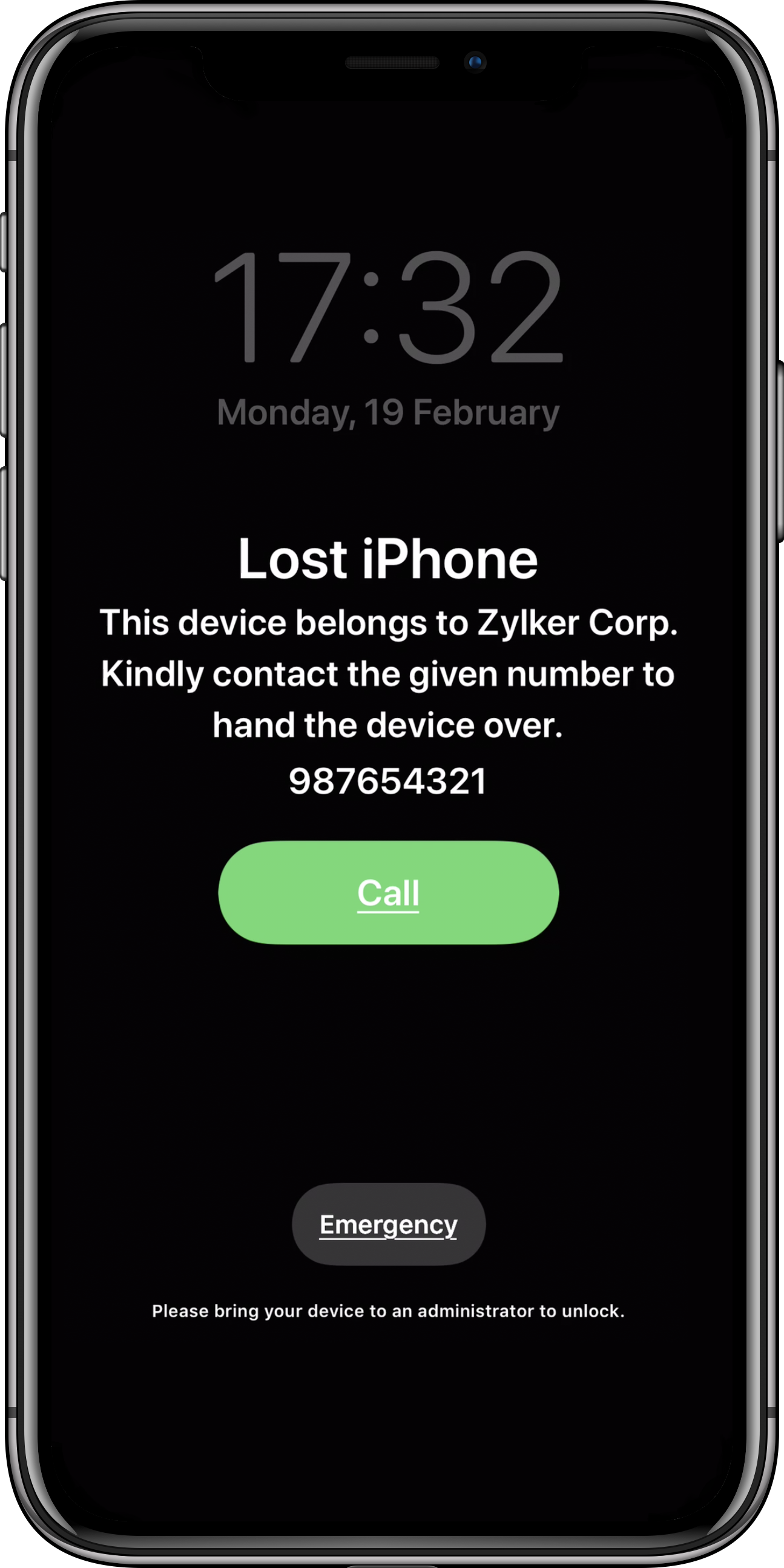
Learn more about Apple security management and how to secure lost devices.
Apple OS and App Update Management
- Software update policies: Automate OS updates for iOS, iPadOS, and tvOS devices through a single policy that applies to future updates. These automated policies rely on Apple's legacy software update commands, which Apple deprecated in its OS 26 releases and removed in its OS 27 releases.
- Scheduled updates: Set the enforcement date and time, and notify users ahead of the update.
- Enforced updates: Force critical updates, with the option to clear the passcode so a locked device can install.
- Update deferrals: Delay updates for up to 90 days from the OS release date to test business apps first, on devices running iOS or iPadOS 26 or earlier.
- Supervision requirements: Automated update policies require supervised devices running iOS or iPadOS 10.0 or later, or tvOS 12.0 or later.
- Declarative software update management: On-Demand OS Update Policies target a specific OS version by a deadline on Apple devices running OS 17 or later, including iOS 27 and iPadOS 27.
- App update policies: Choose which apps update and when.
- Update compliance: See which devices haven't installed the update a policy requires.
OS update management is available in the Professional, Free, and Trial editions. It isn't included in the Standard edition. See Managing iOS and iPadOS updates for details.
Apple Kiosk and Shared Device Management
- Single App Mode: Lock a supervised iPhone or iPad to one app.
- Multi-app kiosk: Allow a small set of approved apps on iPads in kiosk mode.
- Shared iPad: Configure iPads for multiple users, each with their own session.
- Dedicated devices: Set up check-in tablets, digital signage, and POS devices.
- POS and frontline devices: Keep devices on the business app, with settings locked.
- Education and shared devices: Prepare devices that pass between classes or shifts.
Remote Apple Device Management and Troubleshooting
- Remote lock: Available on devices enrolled through Device Enrollment or Automated Device Enrollment.
- Lost Mode: Requires a supervised iPhone or iPad.
- Device wipe: Full erase isn't available on User Enrollment devices. Those support only removal of managed data.
- Passcode clearing: Clear a forgotten passcode on iPhones and iPads enrolled through Device Enrollment or Automated Device Enrollment.
- Restart and shutdown: Available on supervised devices.
- Device information queries: Scan devices on demand for current details.
- Location-related actions: Track device location, and locate supervised devices in Lost Mode.
Apple Device Inventory, Compliance, and Reporting
- Hardware inventory: Model, storage, battery, and network details.
- OS versions: Spot devices behind on updates.
- Installed apps: See which apps are on each device.
- Configuration status: Check which profiles applied successfully.
- Activation Lock status: See whether Activation Lock is on.
- Compliance status: Find devices that don't meet policies.
- Certificate status: Review installed certificates.
- Security posture: Review passcode, encryption, and restriction status.
- Reports and audits: Run built-in or custom reports, and review the audit log of admin actions.
Learn more about reports and asset management.
What Is Apple MDM?
Apple Mobile Device Management is a protocol, built into iOS, iPadOS, macOS, tvOS, watchOS, and visionOS, that lets an organization's MDM server send settings and commands to Apple devices. Because the framework is part of the operating system, the device applies settings itself, without a separate management agent. In MDM Plus, the one exception is jailbreak detection, which uses the ManageEngine MDM Self Service app.
Several pieces work together. An MDM server, such as MDM Plus, holds the policies. The Apple Push Notification service (APNs) tells a device when the server has something new for it. Configuration profiles carry settings like Wi-Fi, VPN, and restrictions. Commands perform actions like lock or erase. Enrollment is the step that connects a device to the MDM server in the first place, and the enrollment method decides how much control the server gets.
Apple Business Manager isn't an MDM. It's Apple's portal for buying devices and apps and assigning them to an MDM server. MDM Plus links to Apple Business Manager or Apple School Manager with a server token, receives the devices and app licenses assigned to it, and does the actual management.
With MDM Plus, organizations can manage iPhones, iPads, Macs, and Apple TVs. To learn more, see our guide on what is iOS MDM.
How Does Apple MDM Work?
- Apple's built-in management framework: Every Apple OS includes the MDM client. The device trusts the MDM server it enrolled with and accepts settings and commands only from that server.
- MDM server: The cloud or on-premises server where admins create profiles, assign apps, and send commands. It never connects to devices directly to push data. It queues work and waits for the device to check in.
- Apple Push Notification service (APNs): When the server has queued work, it sends a lightweight push through APNs. The push contains no data. It only wakes the device so it contacts the server. This is why every Apple MDM needs a valid APNs certificate.
- Enrollment profile: A special profile that registers the device with the MDM server and establishes trust. With Automated Device Enrollment, the device downloads it during Setup Assistant. With other methods, the user installs it or signs in with a Managed Apple Account.
- Configuration profiles: Files that contain payloads such as Wi-Fi, VPN, email, passcode, and restrictions. The MDM installs them over the air and can remove them later.
- Device commands: One-time actions like lock, erase, restart, clear passcode, or install an app.
- Status reporting: The device sends back inventory details, such as OS version, installed apps, and installed profiles, along with the results of each command.
- Supervision: A state set at enrollment, usually through Automated Device Enrollment, that marks a device as organization-owned and unlocks additional controls.
- Declarative Device Management (DDM): An extension to the MDM protocol that lets devices apply configurations on their own and report status changes as they happen, instead of waiting for the server to ask.
Why Do Organizations Need Apple Device Management?
Automate Apple Device Provisioning
Setting up devices by hand doesn't scale past a few dozen. With Automated Device Enrollment, a new iPhone or Mac configures itself during setup, so IT can ship it straight to the employee.
Secure Corporate Data and Devices
A lost iPhone with corporate email on it is a data incident waiting to happen. MDM enforces passcodes, restricts data sharing, and lets IT lock, locate, or erase a device remotely.
Standardize Apple Device Configurations
Profiles assigned to a group reach every device in it, so Wi-Fi, VPN, email, and security settings are the same on the first device and the five-hundredth.
Manage Corporate-Owned and BYOD Devices
Organization-owned devices need broad control. Employee-owned devices need privacy. Apple's enrollment methods support both, and MDM applies the right level of management to each.
Deploy and Manage Business Applications
Apps purchased through Apple Business Manager can be assigned to devices and installed without users signing in with an Apple Account, then configured and updated centrally.
Control OS Updates and Compliance
Untested OS updates can break business apps, while delayed updates leave security holes open. MDM lets IT test updates on a pilot group first, then enforce them by a deadline.
Manage Large and Distributed Apple Fleets
For devices spread across offices, stores, schools, and homes, MDM provides one inventory and one place to act, wherever the devices are.
Apple Device Enrollment Methods Compared
| Enrollment method | Best suited for | Device ownership | Supervision | Level of IT control | User privacy | User involvement | Zero-touch capability |
|---|---|---|---|---|---|---|---|
| Automated Device Enrollment | New organization-owned devices bought from Apple or an authorized reseller | Organization | Yes | Highest; MDM can be made non-removable | Device is treated as corporate | Minimal; enrollment happens during setup | Yes |
| Account-driven User Enrollment | Employee-owned iPhones, iPads, and Macs | Employee | No | Limited to managed accounts, apps, and data | Strongest; personal data and device identifiers stay private | User signs in with a Managed Apple Account in Settings | No |
| Account-driven Device Enrollment | Organization-owned devices that weren't added to Apple Business Manager | Organization | No | Broad device management without supervision-only controls | Moderate | User signs in with a Managed Apple Account in Settings | No |
| Profile-based Device Enrollment | Devices enrolled through an invite, link, or self-enrollment portal | Organization or employee | No | Broad device management without supervision-only controls; user can remove the profile | Moderate | User downloads and installs the enrollment profile | No |
| Apple Configurator | Organization-owned devices bought outside Apple's programs | Organization | Yes | High, comparable to Automated Device Enrollment | Device is treated as corporate | IT handles each device, then it enrolls during setup | Partly; after IT adds the device, setup is automatic |
Automated Device Enrollment is the recommended route for organization-owned devices bought through Apple or an authorized reseller and assigned in Apple Business Manager or Apple School Manager, because it supervises them during setup. User Enrollment is designed for BYOD and gives the strongest privacy separation. Apple no longer supports profile-based User Enrollment on iOS 18, iPadOS 18, macOS 15, or later, so BYOD enrollment on current devices uses the account-driven flow.
Supervised vs. Unsupervised Apple Devices
Supervision tells the device that the organization owns it. Supervision depends on the enrollment method, not simply on who bought the device. Devices enrolled through Automated Device Enrollment or prepared with Apple Configurator are supervised. Devices enrolled through User Enrollment, account-driven Device Enrollment, or profile-based Device Enrollment are not.
| Aspect | Supervised | Unsupervised |
|---|---|---|
| Device ownership | Organization | Organization or employee |
| Enrollment method | Automated Device Enrollment, Apple Configurator | User Enrollment, account-driven or profile-based Device Enrollment |
| MDM profile removal | Can be blocked when enrolled through Automated Device Enrollment | User can remove management |
| Restrictions available | Full set, including supervised-only restrictions such as blocking AirDrop, app installation and removal, and account changes | Standard restrictions only |
| Kiosk / Single App Mode | Supported | Not supported |
| Activation Lock management | MDM can retrieve a bypass code and control whether Activation Lock can be turned on | Not available |
| App controls | Silent installation and removal of apps | Users may be prompted to install apps |
| OS update controls | Scheduling and enforcement by deadline, plus deferral on iOS and iPadOS 26 and earlier | Limited |
| User privacy | Corporate device; IT still can't read personal content like messages or photos | Greater user control; strongest privacy under User Enrollment |
| Best deployment scenario | Company phones, shared iPads, kiosks, Macs issued to staff | BYOD, or corporate devices that can't go through Apple Business Manager |
macOS MDM: Mac Management with ManageEngine MDM Plus
MDM Plus manages Macs from the same console as iPhones, iPads, and Apple TVs, using the same APNs certificate and Apple Business Manager connection. Most of what this page describes applies to Macs too, but a few capabilities work differently.
Enroll Macs
New Macs assigned to MDM Plus in Apple Business Manager or Apple School Manager enroll through Automated Device Enrollment during setup, and MDM Plus can create a local administrator account at the same time for maintenance and troubleshooting. Macs already in use can enroll through an invite, and employee-owned Macs can use self enrollment or account-driven User Enrollment.
Encrypt and Secure Macs
Turn on FileVault encryption across managed Macs from one console, and set passcode, firewall, and Recovery Lock or firmware password policies. If a Mac goes missing, lock it remotely, track its location, or wipe it completely. When an employee leaves a personal Mac, a corporate wipe removes only what MDM Plus installed. MDM Plus can also unlock a user account that's locked after too many failed logins.
Configure Profiles and Restrictions
Push Wi-Fi, VPN, per-app VPN, certificates, SCEP, Global HTTP Proxy, and web content filter settings. Mac-specific payloads include Privacy Preferences Policy Control (PPPC), system and kernel extension allowlists, and Active Directory binding. For anything MDM Plus doesn't offer as a payload, upload a custom configuration profile.
Deploy Mac Apps
Apps bought through Apps and Books in Apple Business Manager install silently on managed Macs, and location tokens let you manage licenses by department or site.
What's Different on Macs
- Return to Service: In MDM Plus, Return to Service covers iOS, iPadOS, and tvOS only. To reassign a Mac, run a complete wipe and re-enroll it.
- OS updates: The Automate OS Updates policies and Update View in MDM Plus cover iOS, iPadOS, and tvOS devices.
- Lost Mode: Lost Mode applies to supervised iPhones and iPads. On Macs, use remote lock and location tracking.
- DDM app status tracking: Automatic app status tracking through DDM isn't available on macOS yet.
Learn more about Mac management with MDM Plus.
Traditional Apple MDM vs. Declarative Device Management
Declarative Device Management doesn't replace the MDM protocol. It extends it, and both work side by side on the same device. Apple is moving more capabilities to the declarative model, with software updates the most significant example. Apple deprecated the legacy software update commands, restrictions, and queries in iOS 26, iPadOS 26, and macOS 26, and removed them in the OS 27 releases. On iOS 27 and iPadOS 27, software updates are managed only through declarations.
| Aspect | Traditional MDM | Declarative Device Management |
|---|---|---|
| Management model | Imperative: the server tells the device what to do | Declarative: the server describes the desired state |
| Command delivery | Server queues a command, sends an APNs push, and the device runs it on check-in | Server sends declarations the device stores and applies |
| Desired-state enforcement | Server has to re-check and resend if something changes | Device keeps applying the declared state |
| Status reporting | Server polls the device with queries | Device reports changes through a status channel as they happen |
| Device autonomy | Low | High |
| Server dependency | High; frequent round trips | Lower; fewer check-ins |
| Scalability | Polling adds load as fleets grow | Less traffic per device |
| Software update management | Legacy update commands and deferral restrictions; deprecated in OS 26 and removed in OS 27 | Target version and enforcement deadline set by declaration; the only supported method on OS 27 |
DDM in MDM Plus today. MDM Plus turns on DDM automatically for supported devices running iOS 16, iPadOS 16, macOS 13, tvOS 16, or later. The device's DDM status shows as Supported, Unsupported, or In Progress in the inventory. Current DDM features are instant status reporting, which updates the inventory as soon as a device changes, and automatic app status tracking, which shows whether an app is installing, pending, or installed (not yet available on macOS). For software updates, use On-Demand OS Update Policies on devices running iOS 27 or iPadOS 27. Learn more about DDM in MDM Plus.
Apple Device Management Lifecycle
Enroll and Provision Apple Devices
Upload the APNs certificate, link Apple Business Manager or Apple School Manager, and assign devices to your MDM server. Associate profiles and apps with a group before devices enroll, so each device is ready when the user reaches the home screen.
Configure Device and Network Settings
Push Wi-Fi, VPN, certificate, email, and passcode profiles. Keep account settings separate from restrictions, so editing a restriction doesn't force users to re-enter credentials.
Deploy and Manage Applications
Assign Apps and Books licenses to devices, push in-house apps, and configure them with managed app settings.
Secure Devices and Corporate Data
Apply restrictions that fit the enrollment type. Supervised devices can take the full set. BYOD devices get controls focused on managed apps and data.
Monitor Device Health and Compliance
Review inventory, OS versions, installed profiles, and Activation Lock status. Schedule reports to catch problems before users raise them.
Manage OS and App Updates
Test new OS versions on a pilot group, deferring them on iOS and iPadOS 26 and earlier, then enforce them by a deadline. Schedule app updates outside working hours.
Troubleshoot and Secure Devices Remotely
Scan devices for current details, clear a forgotten passcode, or lock and locate a missing device.
Reassign, Reset, or Retire Devices
Use Return to Service to erase and re-enroll an iPhone, iPad, or Apple TV for the next user. Retire devices at end of life with a full erase, and turn off Activation Lock first so the device can be reused or resold.
How the lifecycle differs.
- Organization-owned devices go through every stage, from Automated Device Enrollment to Return to Service or retirement.
- BYOD devices skip provisioning and reset. Management covers only managed accounts, apps, and data, and ends when the user unenrolls or IT removes management.
- Shared devices cycle through reset and reassignment often, which makes Return to Service especially useful.
- Supervised devices unlock kiosk mode, Lost Mode, update enforcement, and Activation Lock management at every stage.
Managing BYOD Apple Devices and Employee Privacy
Apple's User Enrollment is designed for employee-owned devices. It limits management to the organization's accounts, apps, settings, and data, and leaves the user's personal Apple Account and content alone. MDM Plus supports account-driven User Enrollment for BYOD device management.
- How it works: The user goes to Settings, chooses to sign in with a work or school account, and enters their Managed Apple Account. The device discovers the MDM server and enrolls.
- Separation of corporate and personal data: Apple creates separate encryption keys for managed data. Managed apps and accounts use the Managed Apple Account, and personal apps use the personal Apple Account.
- Managed Apple Accounts: Organization-owned accounts, formerly called Managed Apple IDs, created in Apple Business Manager or Apple School Manager.
- What IT can see: Managed apps, managed accounts, and the profiles it installed.
- What IT can't see: Personal apps, photos, messages, browsing history, and hardware identifiers such as the serial number.
- What IT can control: Managed apps and their data, managed accounts, and the settings Apple allows under User Enrollment, such as Wi-Fi and per-app VPN.
- Corporate data removal: IT can remove managed apps, accounts, and data, but can't erase the device.
- What happens when a user unenrolls: Managed apps, accounts, and data are removed, and personal content stays.
- User Enrollment vs. Device Enrollment: Device Enrollment gives IT device-wide control, including full erase and passcode clearing. User Enrollment trades that control for privacy. It's the right choice for employee-owned devices.
Managing iOS and iPadOS Updates Across Enterprise Devices
- How IT controls OS updates: Create an OS update policy under Device Mgmt > Automate OS Updates and associate it with device groups.
- Current OS versions: On iOS 26 and iPadOS 26, both automated and On-Demand OS Update Policies apply. Apple removed the legacy software update commands in iOS 27 and iPadOS 27, so on those devices, use On-Demand OS Update Policies, which target a specific version by a deadline.
- Supervision requirements: Automated update policies apply to supervised devices running iOS or iPadOS 10.0 or later, or tvOS 12.0 or later.
- Deferral vs. enforcement: Deferral delays an update for up to 90 days from its release, so you can test apps against it, on devices running iOS or iPadOS 26 or earlier. Enforcement installs a chosen version by a set date.
- Scheduling: On-Demand OS Update Policies set an enforcement date and time. Choose Periodically to send users one reminder a day for the 14 days before the deadline, or choose 1 hour before enforcement to send a single reminder an hour before the update.
- Minimum OS requirements: Starting with iOS 17, iPadOS 17, and macOS 14, Apple lets an MDM require a minimum OS version during Automated Device Enrollment, so the device updates before setup can finish.
- Update compliance: The Update View shows devices that haven't installed the version a policy requires.
- Declarative update enforcement: On-Demand OS Update Policies work on Apple devices running OS 17 or later and take precedence over automated policies.
- Managing remote devices: Devices need at least 50 percent battery and a Wi-Fi connection, or Allow More Data on 5G turned on, to install updates. Failed updates are retried automatically.
Learn more about managing OS updates.
Reassigning Apple Devices with Return to Service
Return to Service erases a managed iPhone, iPad, or Apple TV and re-enrolls it in MDM automatically, so it's ready for the next user without anyone stepping through Setup Assistant.
- When to use it: When a device moves to a new user, comes back from repair, or needs a clean reset to fix a problem.
- How it works: MDM sends an erase command with a Wi-Fi profile. After erasing, the device joins that network, skips Setup Assistant, re-enrolls, and receives its groups, user, profiles, apps, and policies again.
- Wi-Fi requirements: The device needs the Wi-Fi profile to reconnect. If it's out of range, the user only needs to select the network, and no credentials are required.
- Apple Business Manager and Apple School Manager integration: Devices assigned to your MDM server in Apple Business Manager or Apple School Manager re-enroll through it.
- Reassignment workflows: In MDM Plus, go to Enrollment > Devices, select the devices, choose Deprovision (Wipe), select Return to Service, and pick the Wi-Fi profile.
- Shared, frontline, and education use cases: Retail and hospitality devices between shifts, classroom iPads between students, and loaner devices between employees.
In MDM Plus, Return to Service requires iOS or iPadOS 17 or later, or tvOS 18 or later, and Activation Lock must be turned off first. It doesn't cover Macs. According to the MDM Plus help documentation, a device is typically ready about 15 to 20 minutes after the reset, though timing varies with the network and how many apps reinstall. Apple Account sign-ins aren't restored, so apps not assigned through Apps and Books need the user to sign in again. Learn more about Return to Service in MDM Plus.
Apple Device Management for Shared and Frontline Devices
Shared iPads in schools, check-in tablets in clinics, ordering devices in restaurants, POS devices in stores, and field-service iPhones all pass through many hands. They need to stay consistent and recover quickly when something goes wrong.
Shared iPad Management
Shared iPad lets several users sign in to one supervised iPad with their own Managed Apple Accounts, keeping each person's data separate.
Kiosk and Single-Purpose Devices
Single App Mode and multi-app kiosk keep supervised devices on the job they're meant to do, such as a check-in form or a payment app.
Device Reset and Reassignment
When a device changes hands, a full erase removes the last user's data before the next user starts.
App and Configuration Consistency
Group-based profiles and app assignments make every device in a store or classroom behave the same way.
Return to Service for Shared Devices
Return to Service turns a reset into a hands-off process. The device erases, re-enrolls, and gets its apps and profiles back without IT handling it.
Managing Apple Devices for Remote and Distributed Workforces
- Automated Device Enrollment: Devices enroll during setup, wherever the user is.
- Shipping devices directly to employees: Devices go straight from Apple or the reseller to the employee.
- Remote configuration: Profiles reach devices over the internet.
- App deployment: Apps install silently on supervised devices.
- Wi-Fi and VPN provisioning: Remote users reach internal resources securely.
- Certificate deployment: Certificates authenticate users and devices without manual setup.
- Software update enforcement: Devices update by a deadline, even far from the office.
- Compliance monitoring: Find devices that fall out of policy.
- Lost-device protection and remote wipe: Lock, locate, or erase a device as soon as it's reported missing.
Managing Apple Devices for Multiple Clients or Tenants
Managed service providers can manage Apple devices for many customers with Mobile Device Manager Plus MSP. Each customer's devices are kept separate in one console, and admins switch between customers to see only that customer's devices. Policies can be set per customer, and technicians can be given access only to the customers they manage.
How to Manage Apple Devices with ManageEngine MDM Plus
Step 1: Configure the APNs Certificate
Every Apple device needs a valid APNs certificate before it can enroll. Create an APNs certificate and upload it to MDM Plus. Note its expiry date, because devices stop receiving commands if it lapses.
Step 2: Integrate Apple Business Manager or Apple School Manager Where Required
For organization-owned devices, add MDM Plus as an MDM server in Apple Business Manager or Apple School Manager, and upload the server token to MDM Plus. Add a location token for Apps and Books.
Step 3: Select the Appropriate Enrollment Method
Use Automated Device Enrollment for organization-owned devices in Apple Business Manager, Apple Configurator for devices bought outside Apple's programs, and account-driven User Enrollment for BYOD.
Step 4: Enroll and Assign Devices
Assign devices to groups during enrollment, so profiles and apps follow automatically.
Step 5: Create and Deploy Configuration Profiles
Under Device Mgmt > Profiles, create Wi-Fi, VPN, email, passcode, and restriction profiles, then associate them with groups or devices.
Step 6: Distribute Business Applications and Content
Add App Store and in-house apps to the App Repository, assign Apps and Books licenses, and distribute apps and documents to groups.
Step 7: Apply Security and Compliance Policies
Set passcode and restriction policies, enable jailbreak detection settings, and create OS update and app update policies.
Step 8: Monitor, Update, Troubleshoot, Reassign, or Retire Devices
Track devices in Inventory and reports, roll out updates, troubleshoot with remote commands, and use Return to Service or a full erase when devices change hands or reach end of life.
Why Choose ManageEngine Mobile Device Manager Plus for Apple Device Management?
MDM Plus covers every stage of an Apple device's life, from the first time it's switched on to the day it's handed to the next user, and it does this from the same console you use for the rest of your fleet. Here's what that means in practice:
- Apple Business Manager and Apple School Manager integration: Link MDM Plus once with a server token, and devices your organization buys are assigned to it automatically. Apps and Books licenses sync too, so you can distribute apps without users signing in with an Apple Account.
- Automated Device Enrollment and supervision: New iPhones, iPads, Macs, and Apple TVs enroll and are supervised during setup, so they arrive with their profiles and apps and with the management profile locked in place. Supervision is what unlocks kiosk mode, Lost Mode, silent app installs, and Activation Lock management.
- Account-driven User Enrollment for BYOD: Employees enroll personal iPhones, iPads, and Macs by signing in with a Managed Apple Account. IT manages only work accounts, apps, and data, and can't see personal content or erase the device.
- Declarative Device Management, on by default: MDM Plus turns on DDM automatically for devices running iOS 16, iPadOS 16, macOS 13, tvOS 16, or later, so the inventory updates as soon as a device changes instead of waiting for the next check-in.
- OS updates that keep up with Apple: On-Demand OS Update Policies enforce a specific OS version by a deadline on devices running OS 17 or later, including iOS 27 and iPadOS 27, where Apple removed the legacy update commands. On iOS 26 and earlier, you can still defer updates for up to 90 days to test apps first. OS update management is part of the Professional edition.
- App and content management: Distribute App Store, custom, and in-house apps silently to supervised devices, push app configurations, blocklist risky apps, and share documents securely.
- Activation Lock management and Lost Mode: On supervised iPhones and iPads, MDM Plus stores Activation Lock bypass codes so a returned device can be reused, and Lost Mode locks and locates a missing device. Activation Lock management is part of the Professional edition.
- Return to Service: Erase an iPhone, iPad, or Apple TV and have it re-enroll and get its apps and profiles back without anyone stepping through Setup Assistant. It works on iOS and iPadOS 17 or later and tvOS 18 or later.
- One console for every platform: Manage Apple devices alongside Android, Windows, and ChromeOS devices, with the same groups, policies, and reports.
- Cloud or on-premises: Run MDM Plus in the cloud with nothing to maintain, or on your own servers if your device data has to stay in-house.
- Published pricing and a free edition: The free edition manages up to 25 devices with every Professional feature, and cloud Standard plans start at $64 per month for 50 devices. See MDM Plus pricing.
Learn more about Mac management and iPad management with MDM Plus.
Frequently Asked Questions
1. Can Apple MDM manage iPhones, iPads, Macs, and Apple TVs from one console?
Yes. ManageEngine Mobile Device Manager Plus manages iPhones, iPads, Macs, and Apple TVs from one console, along with Android, Windows, and ChromeOS devices. Available features differ by platform and enrollment method. For example, kiosk mode and Lost Mode require supervised iPhones and iPads.
2. How do I bulk enroll Apple devices?
Use Automated Device Enrollment through Apple Business Manager or Apple School Manager. Devices bought from Apple or an authorized reseller are assigned to your MDM server and enroll automatically during setup, supervised, with the profiles and apps of their assigned group. For devices bought elsewhere, add them with Apple Configurator first.
3. What is the best MDM software for managing Apple devices?
ManageEngine Mobile Device Manager Plus is built to manage Apple devices across their whole life, and it's a strong choice for most organizations for five reasons. It covers the full Apple lifecycle, from Automated Device Enrollment through Apple Business Manager or Apple School Manager to Return to Service when a device changes hands. It handles both company-owned devices, with supervision, kiosk mode, Lost Mode, and Activation Lock management, and personal devices, with account-driven User Enrollment. It keeps up with Apple's changes, with Declarative Device Management turned on automatically and On-Demand OS Update Policies that enforce updates on iOS 27 and iPadOS 27. It manages iPhones, iPads, Macs, and Apple TVs from the same console as Android, Windows, and ChromeOS devices, in the cloud or on-premises. And it's easy to try: the free edition manages up to 25 devices with every Professional feature, cloud Standard plans start at $64 per month for 50 devices, and a 30-day trial covers unlimited devices.
4. Can ManageEngine MDM Plus manage employee-owned iPhones?
Yes. MDM Plus supports Apple's account-driven User Enrollment, where employees sign in with a Managed Apple Account in Settings. IT manages only the organization's accounts, apps, and data on the device.
5. Can employers see personal data on BYOD iPhones?
Not when the iPhone is enrolled through User Enrollment. Under User Enrollment, IT can't see personal apps, photos, messages, browsing history, or hardware identifiers such as the serial number, and it can't erase the device. IT can manage and remove only the managed apps, accounts, and data it installed. If a personal iPhone is enrolled through profile-based Device Enrollment instead, IT gets device-wide management, including a full erase, and can see more device information, such as the serial number and the full list of installed apps.
6. Can ManageEngine MDM Plus remotely install apps on iPhones and iPads?
Yes. MDM Plus distributes App Store, custom, and in-house apps, and assigns Apps and Books licenses from Apple Business Manager to devices so users don't need an Apple Account. On User Enrollment devices, licenses are assigned to the user's Managed Apple Account instead, because device-based assignment isn't supported. Apps install silently on supervised devices. On unsupervised devices, users may be prompted to approve the installation.
7. Can ManageEngine MDM Plus force iOS and iPadOS updates?
Yes, on supervised devices. On iOS and iPadOS 26 and earlier, admins can defer updates for up to 90 days and force critical updates, with the option to clear the passcode so a locked device can install. On-Demand OS Update Policies enforce a specific version by a deadline on devices running OS 17 or later, and they're the way to enforce updates on iOS 27 and iPadOS 27, where Apple removed the legacy update commands. OS update management is available in the Professional, Free, and Trial editions, not the Standard edition.