



×Zoomed image

Trusted by over 15,000 happy customers globally

Saint Gobian
NASA
Time Warner Cable
Lorean Paris
Siemens
DHL
Alcatel Lucent

Centralized configuration management for your entire Fortinet infrastructure

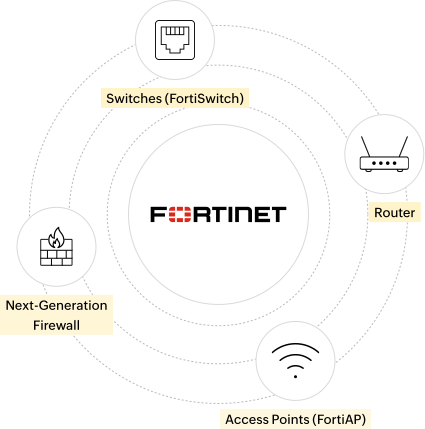
Fortinet environments span data centres, campuses, and branch networks where services must stay tightly aligned, yet as they scale, even small configuration changes can cause outages, inconsistencies, or audit gaps. ManageEngine Network Configuration Manager centralises visibility, version control, change tracking, and compliance auditing, helping teams manage change confidently while reducing risk.

FortiGate Next Generation Firewalls (NGFW)

Eliminate configuration drift across FortiGate firewalls in data centres and branches. Automatically back up running and startup configurations, track every revision of the full device configuration, and compare versions to see exactly what changed and when. Roll back to a known-good configuration to recover quickly from misconfigurations, failed updates, or unintended policy changes.

Access Points (FortiAP)

Ensure consistent wireless configurations across FortiAP deployments controlled by FortiGate. Automatically back up the FortiGate configuration containing SSIDs, VLAN assignments, authentication parameters, and radio settings. Track changes over time and roll back to a stable configuration to reduce disruptions caused by unintended updates affecting user access.

Switches (FortiSwitch)

Ensure consistent access-layer configuration across FortiSwitch deployments controlled by FortiGate. Automatically back up VLAN, trunk, port, and PoE settings captured within the FortiGate configuration, compare revisions to identify drift across sites, and restore approved versions to quickly recover from changes affecting segmentation or endpoint connectivity.

Routers

Maintain visibility across Fortinet routing and edge devices supporting WAN and branch connectivity. Automatically back up the full device configuration, including static routes, dynamic routing protocols, and WAN interface settings. Compare configuration revisions to identify routing changes and roll back to a known-good version to quickly stabilise connectivity after disruptive modifications.

Centralized configuration management for your entire Fortinet infrastructure

Fortinet environments span data centres, campuses, and branch networks where services must stay tightly aligned, yet as they scale, even small configuration changes can cause outages, inconsistencies, or audit gaps. ManageEngine Network Configuration Manager centralises visibility, version control, change tracking, and compliance auditing, helping teams manage change confidently while reducing risk.

Configuration and change management for Fortinet environments

Frequent configuration changes across Fortinet environments make it difficult to trace outages without structured tracking. Network Configuration Manager establishes baselines and maintains version-controlled configuration history across FortiGate, FortiSwitch, and FortiAP devices.

  • Establish baseline configurations for Fortinet devices
  • Automatically back up running and startup configurations
  • Maintain detailed, time-stamped configuration history
  • Compare configurations using side-by-side diff views
  • Restore previously approved versions to recover from misconfigurations
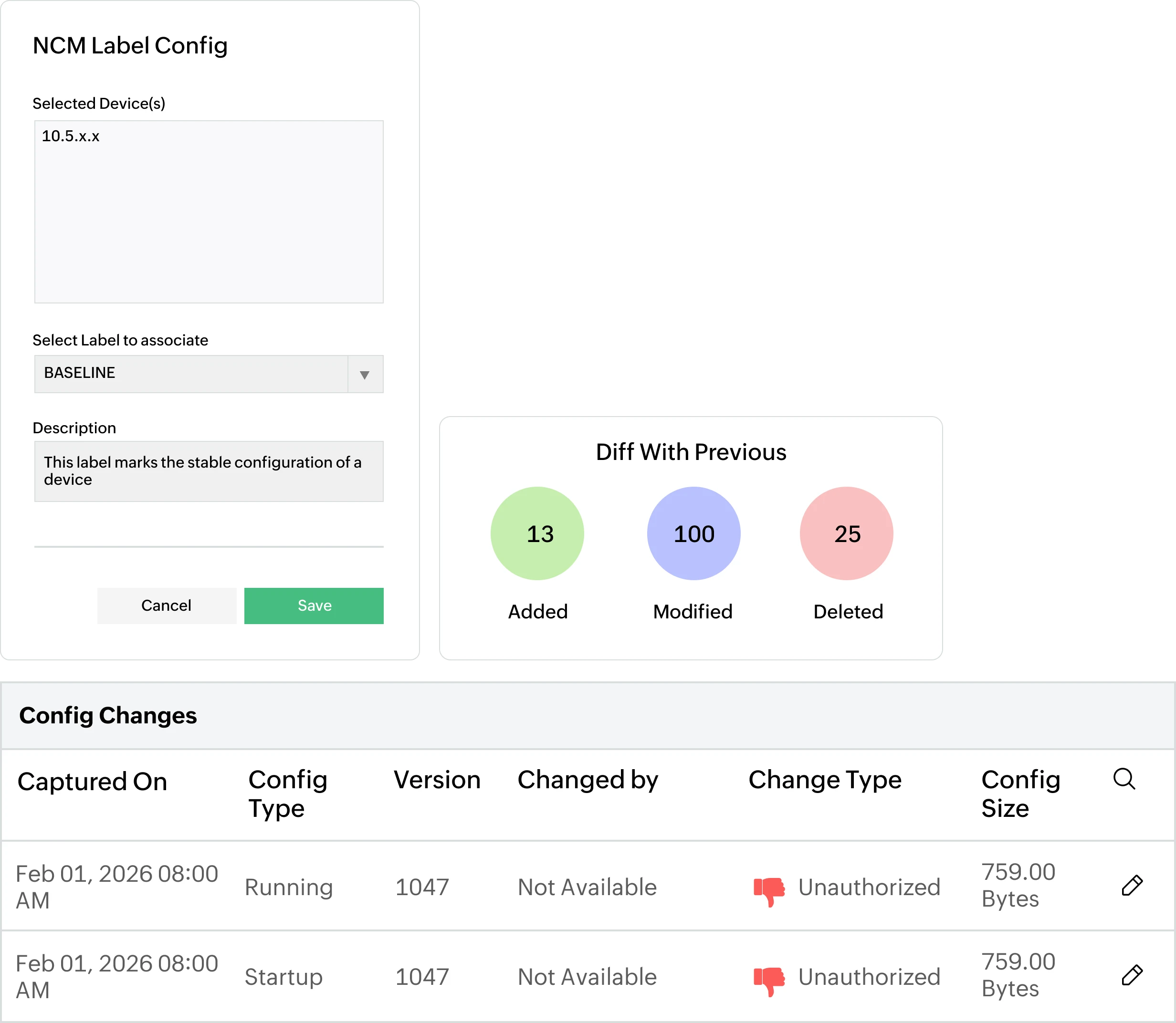
Configuration and change management
Configuration and change management for Fortinet environments
Continuous compliance with Compliance IQ for Fortinet

Continuous compliance with Compliance IQ for Fortinet

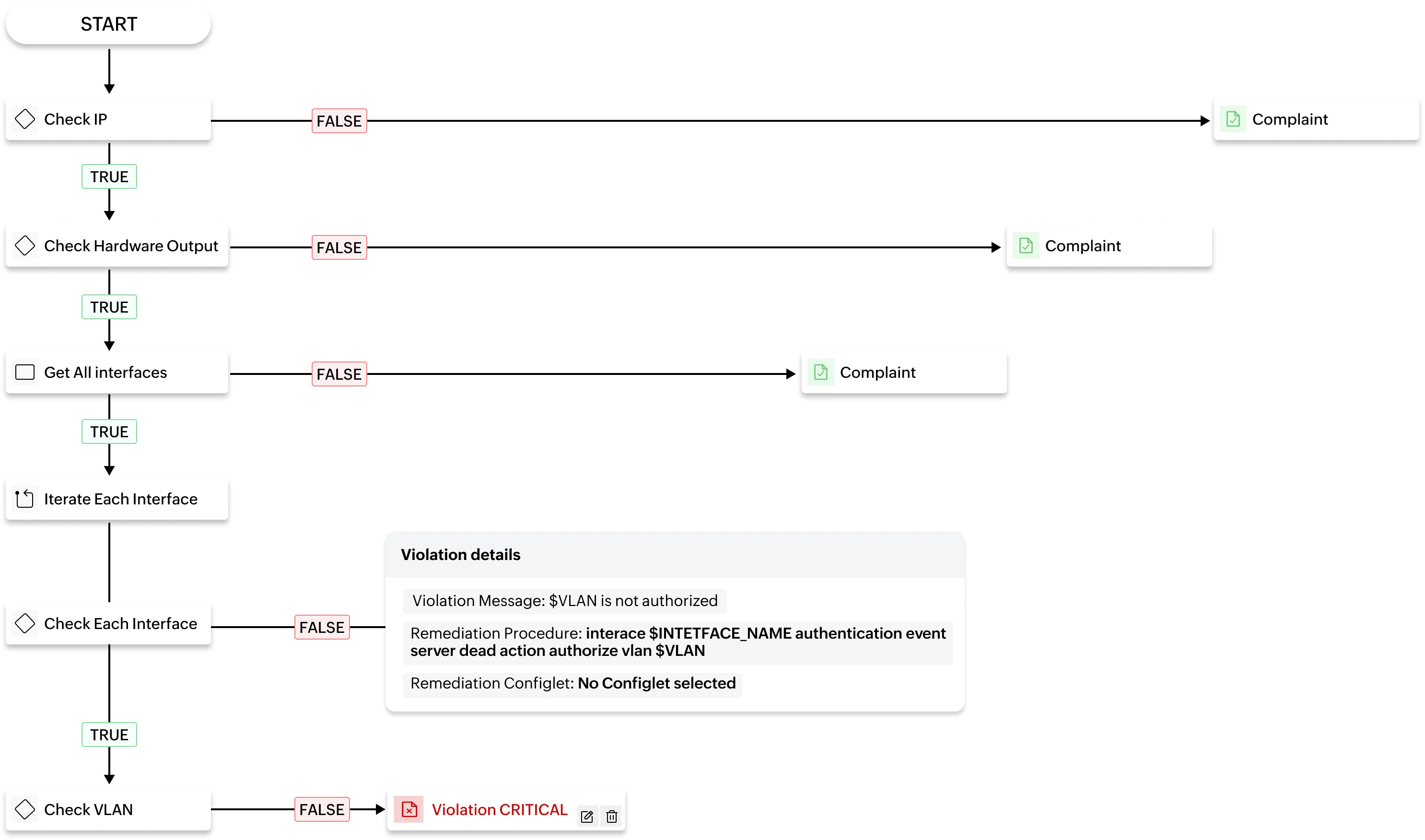
As Fortinet environments scale, maintaining alignment with internal configuration standards becomes critical. Compliance IQ uses a visual, sequence-based approach to continuously validate device configurations against industry standards and custom standards of your enterprise.

  • Define compliance policies aligned to Fortinet configuration standards
  • Continuously evaluate device configurations against policy sequences
  • Visually highlight deviations that introduce operational or security risk
  • Generate compliance reports to support audit requirements
Compliance IQ

Firmware vulnerability management and patch visibility for Fortinet devices

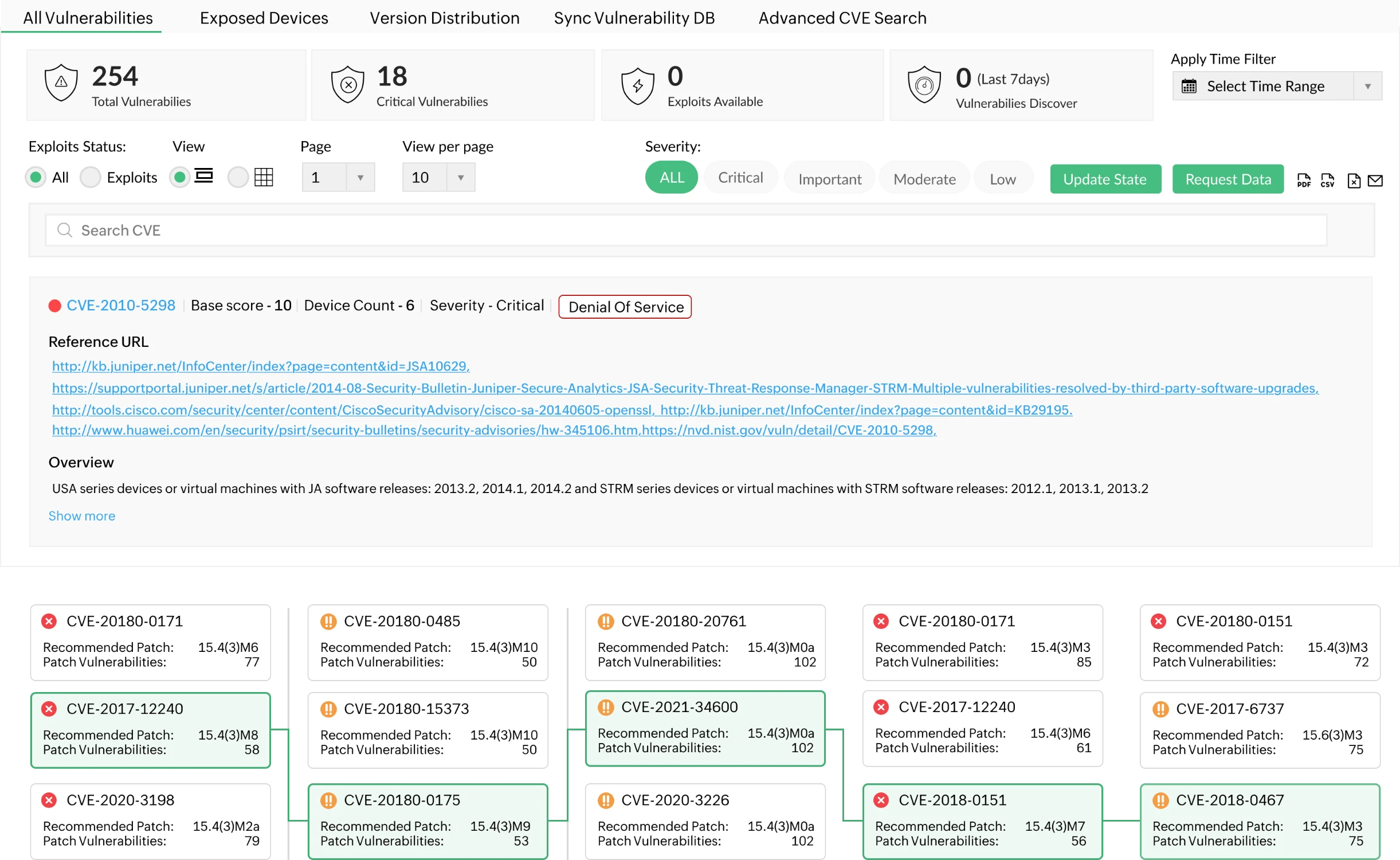
Maintaining secure, up-to-date firmware across Fortinet infrastructure is critical, but limited visibility makes it difficult to track outdated versions, available patches, and version differences. Network Configuration Manager provides structured firmware and vulnerability visibility for Fortinet devices.

  • View firmware versions across firewalls, switches, and wireless devices from a centralised console
  • Identify devices affected by known firmware vulnerabilities
  • Use the visual firmware tree to explore available versions, patch levels, and upgrade paths
  • Understand version differences before planning upgrades
  • Back up device configurations before firmware updates to preserve the current operational state
  • Restore configurations if post-upgrade behaviour requires rollback
Firmware vulnerability management
Firmware vulnerability management for Fortinet devices
Scaling Fortinet configuration changes with programmable configlets

Scaling Fortinet configuration changes with programmable configlets

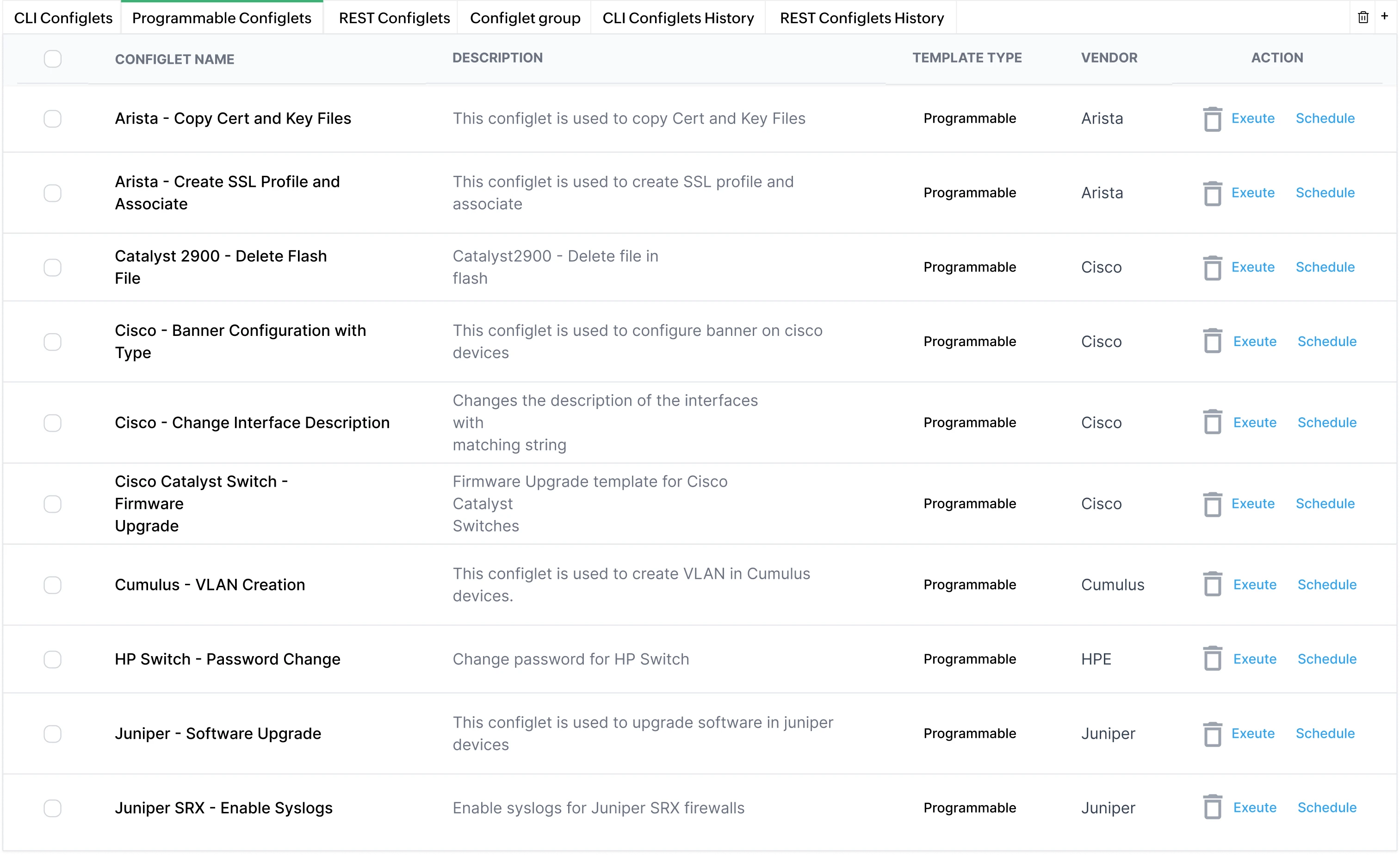
Applying consistent configuration standards across large Fortinet deployments is challenging and error-prone when done manually. Programmable configlets in Network Configuration Manager enable reusable, logic-driven configurations that adapt to device-specific parameters.

  • Create reusable configuration logic aligned to approved Fortinet standards
  • Use variables and conditional logic to adapt changes per device
  • Apply configuration updates across multiple devices in a controlled manner
  • Maintain version tracking of configlet-driven changes
  • Reduce repetitive CLI work during branch expansions or bulk updates
Programmable Configlets

How Network Configuration Manager solves real operational challenges

In Fortinet and multi-vendor infrastructures

Config drift
Config rollback
Standardization
Compliance
Firmware upgrades

Controlling configuration drift across Fortinet firewalls and branch devices

Large Fortinet environments with distributed branches often experience incremental firewall and routing changes that slowly introduce inconsistencies between sites.

Use case

Detecting and correcting configuration drift across FortiGate devices deployed across multiple branches.

Scenario

Over time, different administrators modify firewall rules, SD-WAN parameters, or routing configurations on branch FortiGate devices. Some changes are urgent fixes, others are local adjustments. Months later, certain branches behave differently due to unnoticed configuration divergence.

How Network Configuration Manager helps

Network Configuration Manager automatically backs up running and startup configurations, versions every change, and compares device configurations against approved baselines using structured side-by-side diff views.

Result

Configuration drift is identified early, and branch devices can be realigned to approved standards before inconsistencies impact connectivity or security enforcement.

Rolling back unintended FortiGate policy changes

Firewall rule updates can unintentionally disrupt traffic flow or expose services if changes are not validated carefully.

Use case

Restoring network access after an unintended firewall rule or NAT modification.

Scenario

An administrator modifies a firewall policy on a FortiGate device to allow new application traffic. Shortly after, users report blocked services or unexpected routing behaviour. The exact rule change causing the issue is unclear.

How Network Configuration Manager helps

All configuration changes are versioned with time stamps. Administrators compare the current configuration with a previous version using diff views to identify the exact modification and roll the firewall back to a known-good configuration.

Result

Service disruption is resolved quickly by reverting the configuration, avoiding prolonged outage investigation.

Standardizing configurations across Fortinet and multi-vendor switches

In mixed environments, Fortinet switches coexist with other vendor infrastructure, making consistency harder to maintain.

Use case

Applying standardized VLAN and segmentation configurations across Fortinet and third-party switches.

Scenario

A network team introduces new segmentation standards across access-layer switches. Manual configuration across FortiSwitch and other vendor switches results in inconsistent VLAN assignments and trunk configurations.

How Network Configuration Manager helps

Programmable configlets are used to define reusable, parameter-driven configuration logic aligned with approved standards. These configlets can be applied across Fortinet and multi-vendor devices while maintaining version control.

Result

Segmentation policies are implemented consistently across vendors, reducing configuration errors and post-deployment corrections.

Identifying policy-level configuration violations in Fortinet environments

Maintaining structured configuration standards across Fortinet firewalls and switches becomes more complex as environments scale and multiple administrators make changes over time.

Use case

Validating FortiGate and FortiSwitch configurations against structured internal security and operational standards.

Scenario

Security teams require that unused interfaces are disabled, specific management access settings are restricted, firewall policies follow defined sequencing rules, and certain configuration blocks contain exact ordered statements. Manually verifying these conditions across multiple devices is time-consuming and error-prone because checks must be performed within specific configuration blocks, not just across the entire configuration file.

How Network Configuration Manager helps

Compliance IQ allows administrators to build structured flow-based rules using Conditions, Block Identification, Loops, and Variables. Configuration blocks such as interfaces or firewall policies can be isolated, evaluated individually, and validated against defined criteria including exact set matching, pattern validation, or ordered sequence checks. Violations can be assigned severity levels and linked to remediation procedures or remediation configlets.

Result

Policy-level configuration deviations are accurately detected within the correct configuration context. Compliance status becomes structured and reportable, supporting audit readiness and consistent enforcement of Fortinet configuration standards.

Safeguarding configurations during Fortinet firmware upgrades

Firmware updates are necessary to address vulnerabilities, but upgrades can introduce unintended configuration impact.

Use case

Preserving configuration integrity before and after Fortinet firmware upgrades.

Scenario

FortiGate and FortiSwitch devices are scheduled for firmware updates to address known vulnerabilities. The team needs visibility into current firmware versions and wants assurance that configurations can be restored if post-upgrade behavior changes.

How Network Configuration Manager helps

Network Configuration Manager provides centralized firmware version visibility and a visual firmware tree to review available versions and patch levels. Device configurations are backed up before upgrades and can be compared afterward to validate state.

Result

Teams approach firmware upgrades with greater confidence and can restore previous configurations if required, reducing operational risk during patch cycles.

Best practices for managing Fortinet firewall configurations

Establish baseline configurations

Establish approved baseline configurations for FortiGate devices as the reference standard for expected configuration state.

Automate configuration backups

Automate running and startup configuration backups to ensure a complete, recoverable history is always available.

Track change history

Track every configuration change with time-stamped version history to maintain a full audit trail across all devices.

Use side-by-side diff views

Use side-by-side diff comparison to identify added, modified, or deleted lines between any two configuration versions.

Detect configuration drift

Detect configuration drift across distributed FortiGate deployments before inconsistencies introduce outages or security gaps.

Enforce structured compliance

Enforce structured compliance using Compliance IQ flow-based rules to validate configurations within the correct context.

Protect firmware upgrades

Preserve configurations before firmware upgrades and validate state after changes to ensure no unintended impact was introduced.

Use programmable configlets

Use programmable configlets to apply standardised configuration updates consistently across devices without repetitive manual CLI work.

FAQs on fortinet configuration management

How often should I update my fortinet device configurations?


Fortinet configurations should be updated whenever there is a controlled operational requirement; such as firewall policy changes, new branch roll-outs, segmentation updates, or firmware-related adjustments. Instead of focusing on frequency, the priority should be controlled change management. With Network Configuration Manager, every update is automatically backed up, versioned, and available for comparison or rollback, ensuring changes can be implemented safely and traced later.

What should I do if my current configuration is causing connectivity issues?


How to recover stable fortinet device configurations after network disaster?


Manage Fortinet configurations easily using Network Configuration Manager


CXLEGACY