


1 Million and Counting

Saint Gobain
NASA
Time Warner Cable
Loreal Paris
Siemens
DHL

Gain complete load balancer visibility with OpManager

Fragmented monitoring across cloud and on-prem environments forces teams to juggle multiple tools, making it easy to miss early warning signs. When a load balancer becomes a bottleneck or fails, it can take down entire applications and most tools only surface issues after users are affected. ManageEngine OpManager addresses this by correlating load balancer health with backend server performance in a single, unified view, helping teams detect issues early, understand real-time impact, and resolve problems faster without switching dashboards or manually piecing together data.

Monitor real service health, not just device uptime

  • Catch failures before your users do:

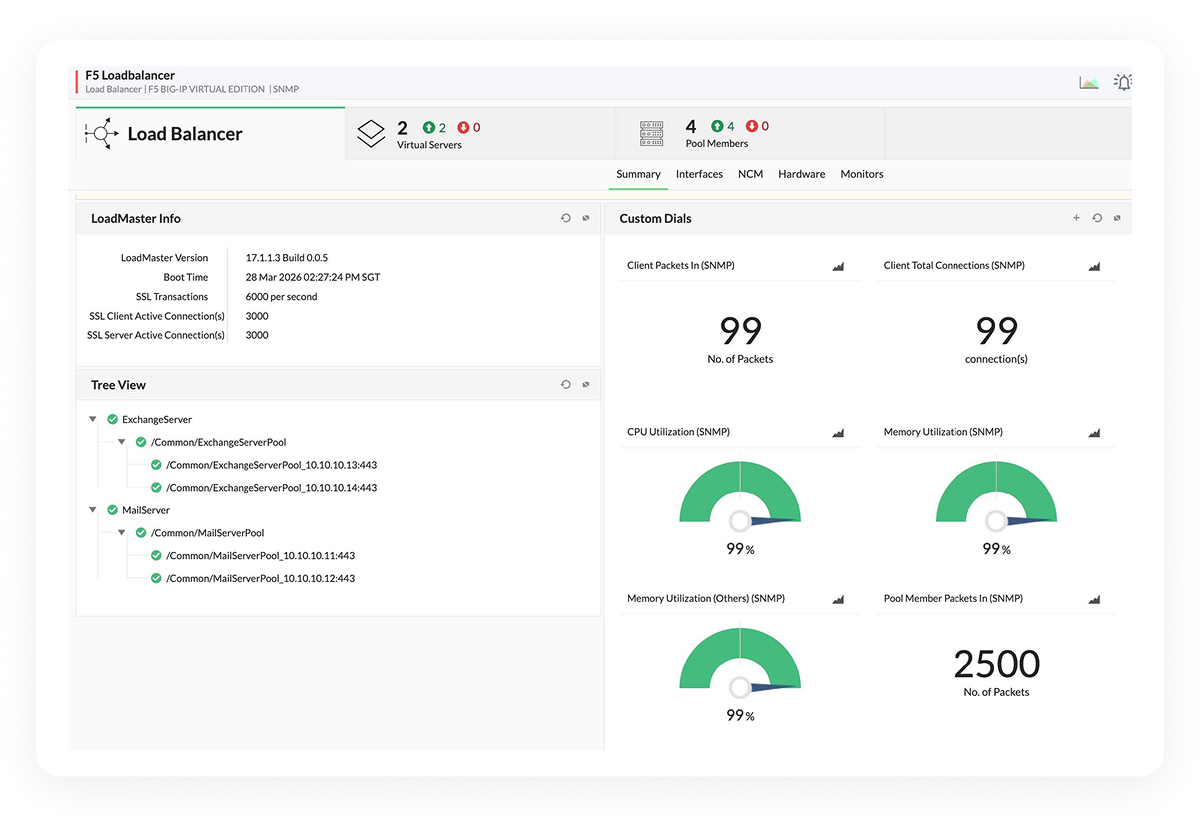
    OpManager monitors the specific services behind your load balancer (like TCP ports, HTTP URLs, and FTP services), not just the device itself. If the web server is running but the application pool is down, you get alerted immediately saving your helpdesk from the flood of "Is the site down?" calls.

  • Eliminate the "It works for me" chaos:

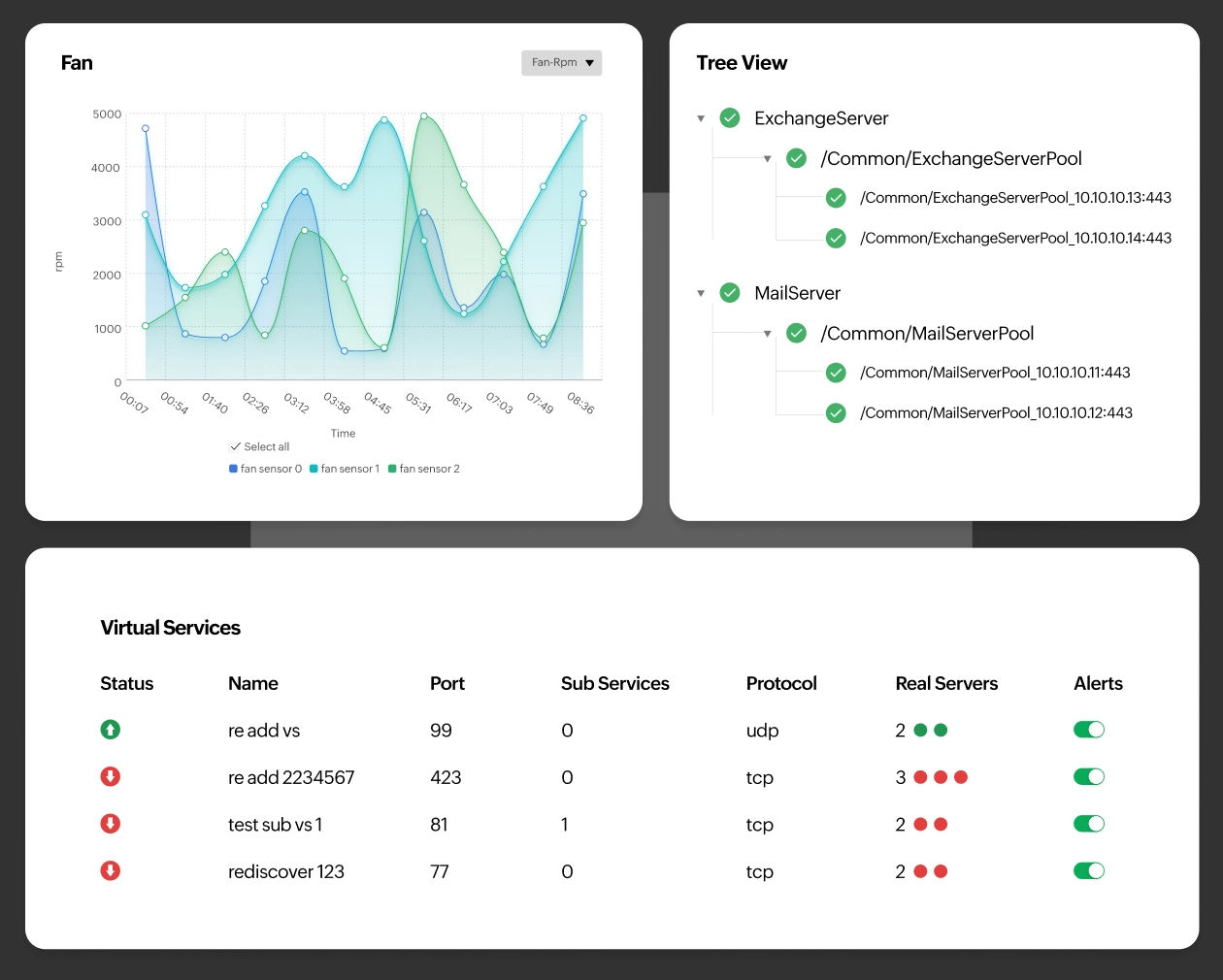
    Get a real-time health status for every pool member. You instantly know which servers are actually serving traffic versus which ones are dead but still showing as "online" in basic monitoring tools.

  • Maintain SLAs with surgical precision:

    Prove uptime to your stakeholders with granular availability reports. When a customer claims downtime, you have the data to show exactly when services were available and how traffic was routed.
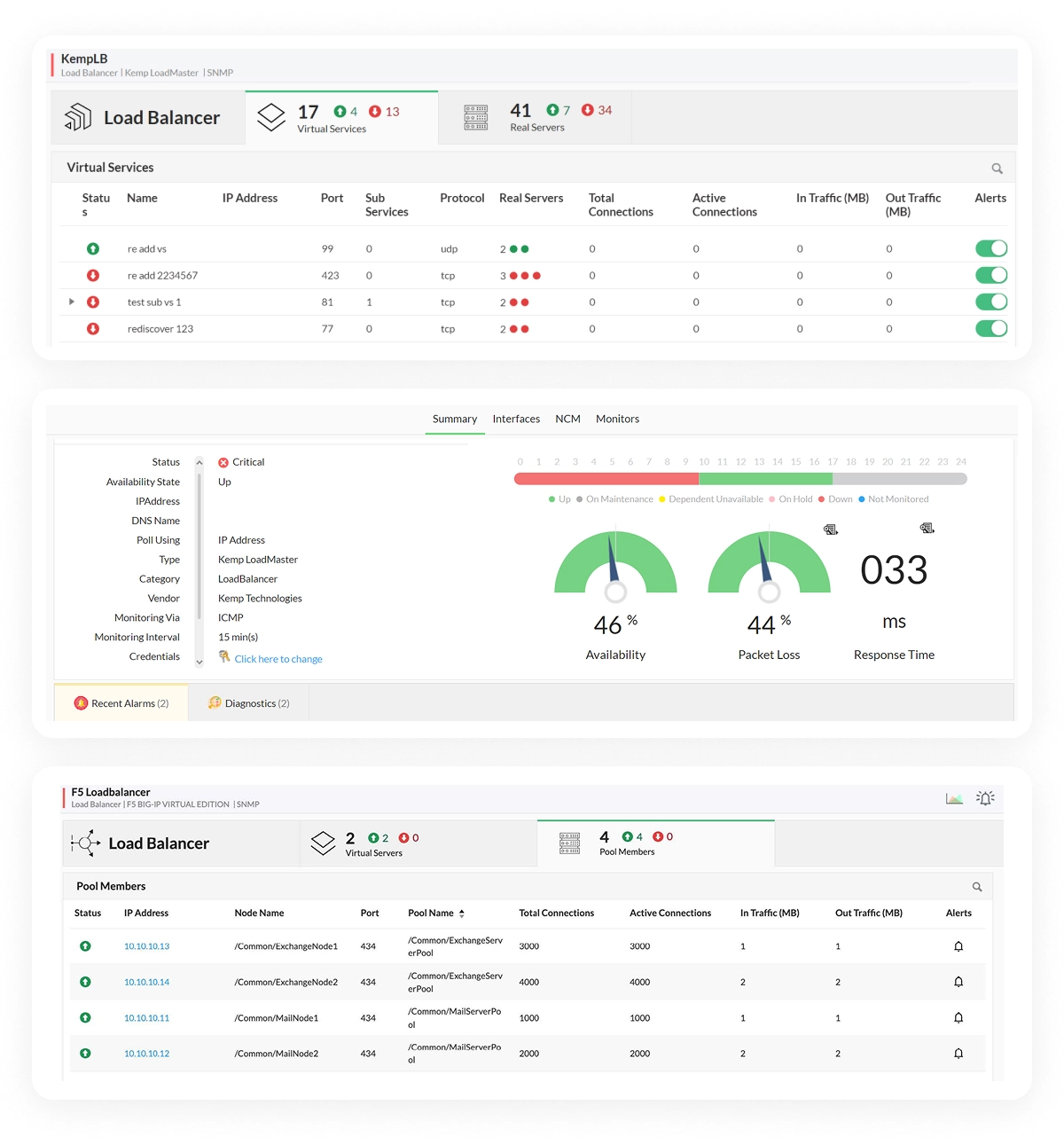
Monitor real service health, not just device uptime
Track the metrics that predict performance issues and failures

Track the metrics that predict performance issues and failures

  • Spot bottlenecks before they crash:

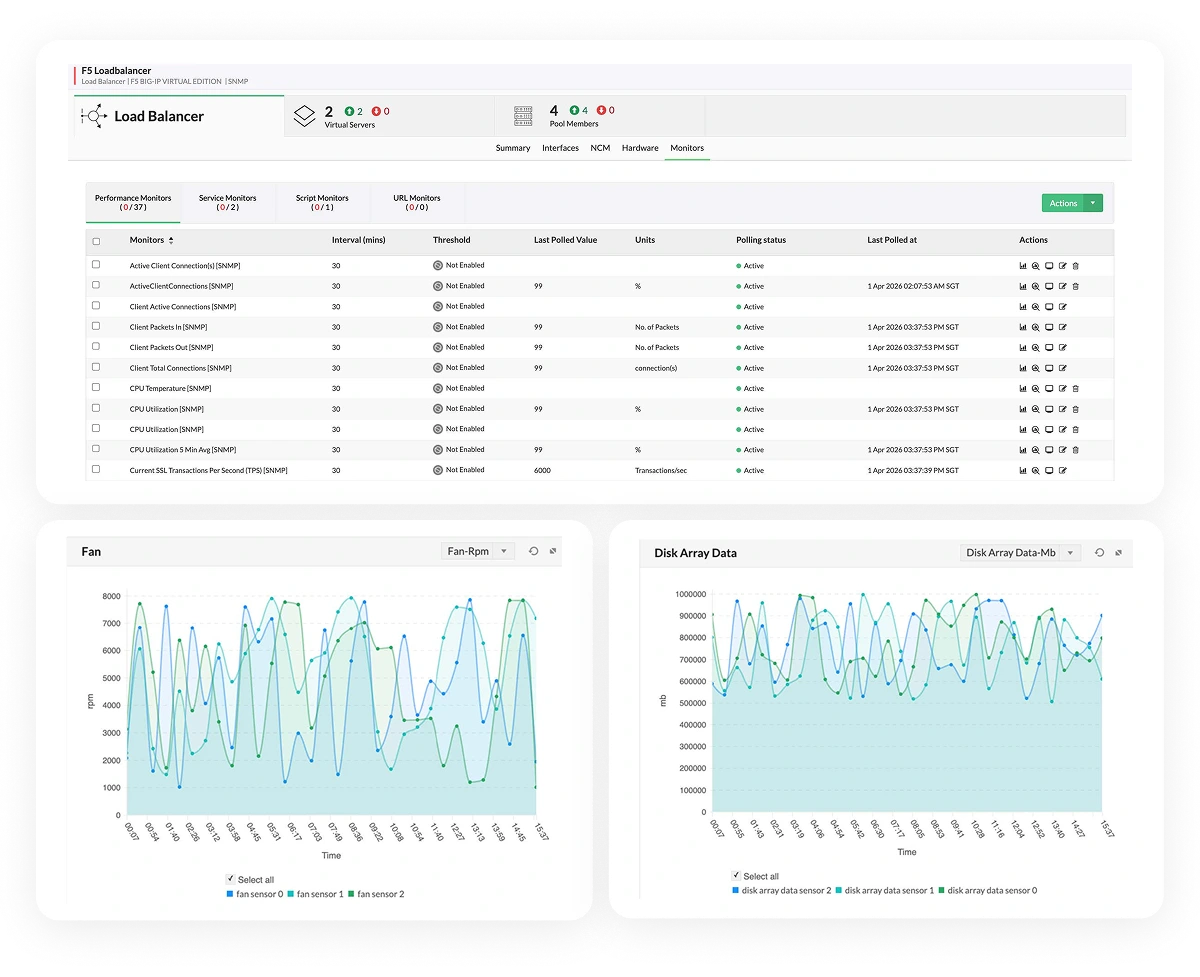
    Track active connections and throughput in real-time. If one server is handling 80% of the traffic while others sit idle, you catch the load imbalance immediately before that server gets overwhelmed and takes down the application.

  • Stop chasing ghosts with packet-level visibility:

    When users complain about slow apps, drill straight into packet errors and HTTP request rates. You'll know instantly whether the issue is the load balancer configuration, the backend server, or the network itself.

  • Protect your physical infrastructure investment:

    Monitor hardware vitals like CPU temperature and fan speed on your F5 appliances. Avoid catastrophic hardware failures that require emergency replacements and unplanned maintenance windows.

Turn performance data into early warning signals

Modern networks don’t fail without warning, they show subtle signs first. By continuously analyzing real-time load balancer metrics like connections, latency, and throughput, you can catch anomalies early and understand when something isn’t right. Instead of reacting to outages, you gain the ability to act on early signals, preventing disruptions before they impact your users.

Metric Why it matters to you
Active Connections Know exactly how much load your infrastructure is handling in real time. Spot traffic surges before they overwhelm servers and cause outages.
Connection Rate (New/SYN) Detect DDoS attacks or sudden traffic spikes instantly. Trigger automated defenses before users are impacted.
Failed Connection Count A spike indicates servers are refusing connections. Quickly identify backend health issues or load balancer stress.
Current & Maximum Connections Helps you right-size infrastructure. Constantly hitting limits means it's time to scale; low usage means wasted capacity.
Throughput (In/Out – Bytes) Track how much data flows through your load balancer. Identify bandwidth-heavy applications and prevent network congestion.
Latency & Response Time Measure how quickly requests are processed. Even small delays can impact user experience and conversions.
Packet Errors (Dropped/Retransmitted) Detect network-level issues. High error rates often signal misconfigurations or physical network problems.
HTTP Request Rate (per second) Understand application traffic patterns. Track growth, dips, and unexpected spikes in user requests.
Pool Member Health Status Monitor backend server health. Quickly see how many servers are available vs failed.
Hardware Health (Temp/Fan/PSU) Prevent hardware-related outages. Identify overheating or failing components early.
Connect the dots between the load balancer and what's behind it

Connect the dots between the load balancer and what's behind it

  • Cut troubleshooting time from hours to minutes:

    When a pool member fails, you see immediately whether it's a server crash (CPU at 100%), a disk issue (disk full), or a network problem. No more logging into five different systems to find the root cause.

  • Visualize the entire application stack:

    OpManager's topology maps overlay backend server health directly onto the load balancer view. You see exactly which servers are struggling and how that impacts the traffic distribution, all in one glance.

  • Prevent cascading failures:

    When a backend server starts degrading, OpManager correlates that degradation with increased error rates on the load balancer. You get one alert telling you exactly where to look, not 50 alerts about symptoms.

Reduce downtime with proactive alerts and automated workflows

  • Kill alert fatigue forever:

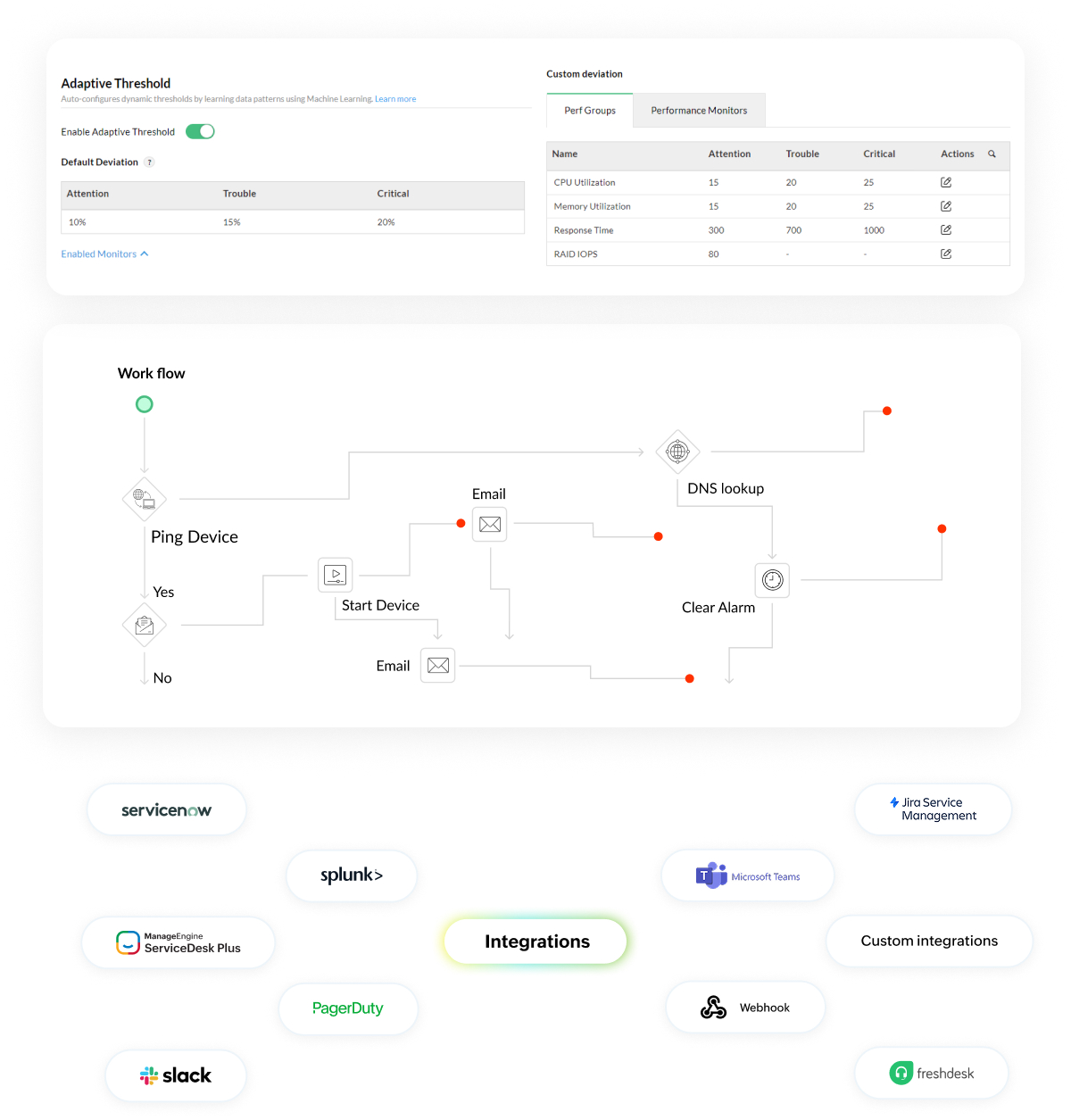
    OpManager learns what "normal" looks like for your environment. Instead of waking you up at 3 AM for a routine CPU spike, OpManager alerts you only when traffic deviates significantly from the baseline like a 50% spike in connections that signals a real issue.

  • Automate the fix, not just the notification:

    Trigger no-code workflows that act the moment an issue is detected. When a pool member fails, OpManager can automatically execute predefined actions like restarting services, running remediation scripts, or creating tickets, reducing manual intervention and speeding up recovery.

  • Integrate with the tools you already use:

    Automatically create ServiceNow tickets, alert your team on Slack, and trigger remediation workflows. OpManager also integrates with tools like Ansible to execute playbooks so you can respond faster without changing your existing setup.

Reduce downtime with proactive alerts and automated workflows

Multi-vendor load balancer monitoring with OpManager

OpManager supports major application delivery controllers like F5, Citrix, Radware, Fortinet, and Cisco along with SNMP-based devices across hybrid environments.

Supported Load Balancer & ADC Vendors

  • F5 Networks (BIG-IP, VIPRION, VELOS, BIG-IQ)
  • Citrix Systems (NetScaler / ADC, SD-WAN)
  • Cisco Systems (WAVE series)
  • Radware (Alteon series)
  • Fortinet (FortiADC)
  • Symantec (ProxySG / SG series)
  • IBM (BladeCenter, Flex, IMM)
  • Nortel Networks (Alteon switches)
  • Coyote Point Systems (Equalizer series)

Additional supported infrastructure devices

  • ForeScout Technologies
  • Gigamon
  • Juniper Networks
  • NetApp
  • Riverbed Technology
  • Opengear
  • Sangfor Technologies

Common load balancer challenges and how to solve them

Traffic resilience
Backend health
Unified visibility

Traffic spikes are crashing your applications

Scenario

Traffic surges during campaigns, flash sales, or peak usage hours drive a sudden spike in user requests, putting intense pressure on your load balancer. Without clear insight into traffic distribution and backend capacity, the load balancer struggles to handle the volume, leading to uneven load distribution and performance strain.

Impact

Slow response times, dropped requests, and lost transactions directly affecting revenue and user trust.

How OpManager helps

Monitors active connections, request rates, and latency in real time, alerting on overload conditions and correlating with backend health so teams can act before users are impacted.

Failing backend servers are hurting users silently

Scenario

Individual servers within the load balancer pool begin to degrade due to resource exhaustion, configuration issues, or partial failures. Since traffic continues to be routed to these nodes, the problem remains hidden without clear visibility into backend health across the pool.

Impact

Intermittent errors, failed logins, and inconsistent user experience that’s hard to detect and troubleshoot.

How OpManager helps

Tracks pool member health and failed connections, clearly identifying unhealthy nodes and correlating them with performance metrics reducing troubleshooting time and preventing prolonged impact.

You don’t have a single view of your load balancers

Scenario

Load balancers spread across cloud and on-prem environments are monitored through separate tools, each providing limited visibility. This forces teams to switch between multiple dashboards to understand traffic flow and backend performance, making it difficult to see the complete picture.

Impact

Longer MTTR, fragmented troubleshooting, and delayed root cause identification.

How OpManager helps

Provides unified, vendor-agnostic visibility so teams can monitor performance, traffic, and backend health in one place and resolve issues faster.

FAQs on load balancer monitoring

Can OpManager monitor cloud and on-prem load balancers in one place?


Yes. OpManager supports cloud platforms like AWS, Azure, and GCP via APIs, and on-prem devices via SNMP giving you a unified view of your hybrid load balancer infrastructure without switching tools.

Does OpManager support load balancers like Citrix NetScaler and F5 BIG-IP?


How does OpManager reduce alert noise in load balancer monitoring?


Is OpManager suitable for both enterprises and growing teams?


What if your load balancer never became your bottleneck?

Request a demo to see how IT teams use OpManager to monitor load balancers, detect failures early, and resolve issues before users are impacted.

By clicking 'Submit', you agree to processing of personal data according to the Privacy Policy.

Loved by customers all over the world


“Easy Implementation, Excellent support & Lower Cost Tool - Team Lead, IT Services Industry”

Reviewer Role: Infrastructure and Operations

Company size: 500M - 1B USD

We have been using OpManager since 2011 and our overall experience has been excellent. The tool plays a vital role in providing the value to our organization and to the customers we are supporting. The support is excellent and staff takes full responsibilities in resolving the issues. Innovation is never stopping and clearly visible with newer versions.

“OpManager - 10 steps ahead of the competition, one step away from being unequaled - Network Services Manager, Government Organization”

Reviewer Role: Infrastructure and Operations

Company size: 5,000 - 50,000 Employees

I have a long standing relationship with ManageEngine. OpManager has always missed one or two features that would make it truly the best tool on the market, but over it is the most comprehensive and easy to use the product on the market.

“Easy Implementation with a feature rich catalogue, support has some room for improvement - NOC Manager, IT Services Industry”

Reviewer Role: Program and Portfolio Management

Company size: 500M - 1B USD

The vendor has been supportive during the implementation & POC phases providing trial licenses. Feature requests and feedbacks is usually acted upon swiftly. There was sufficient vendor support during the implementation phase. After deployment, the support is more than adequate, where the vendor could make some improvements.

“Great Monitoring tool - CIO in Finance Industry”

Reviewer Role: CIO

Company size: 1B - 3B USD

ManageEngine provides a suite of tools that have made improvements to the availability of our internal applications. From monitoring, management and alerting, we have been able to peak performance within our data center.

“Simple Implementation, Easy To Use. Very Intuitive. - Principle Engineer in IT Services”

Reviewer Role: Enterprise Architecture and Technology Innovation

Company size: 250M - 500M USD


ManageEngine support was responsive to all our queries.

Capterra
Getapp
Software Advice
G2
Altaleb Alshenqiti

“OpManager helps me monitor all aspects of the data-center and equipment like servers, switches and routers. It is fast, intuitive and centralized and you do not need to be an expert to deal with OpManager.”

Altaleb Alshenqiti

NGHA

Donald Stewart

“Donald Stewart, IT Manager of Crest Industries is happy with ManageEngine OpManager for its end-to-end network monitoring software. It is easy-to-use and offers fault and performance management for router.”

Donald Stewart

IT Manager, Crest Industries

John Rosser

“John Rosser, MIS Manager of Yale Chase talks about the proactive nature of ManageEngine OpManager & how his organisation gained value from it.”

John Rosser

MIS Manager


 Pricing  Get Quote