Remote Network Monitoring Software | Top Software for MSPs
In recent times, businesses have migrated to a highly scalable digital infrastructure with a large network consisting of multiple networking devices and servers, running in different locations. A dedicated managed service provider is essential to manage a complex network environment. A Managed Service Provider (MSP) software helps you manage a customer's IT infrastructure and network devices, remotely. Implementing effective MSP software helps you optimize IT operations, reduce costs, and deliver better client service whether you’re a small team supporting a few SMBs or a large provider managing multiple client sites.
OpManager - Managed Service Provider Software
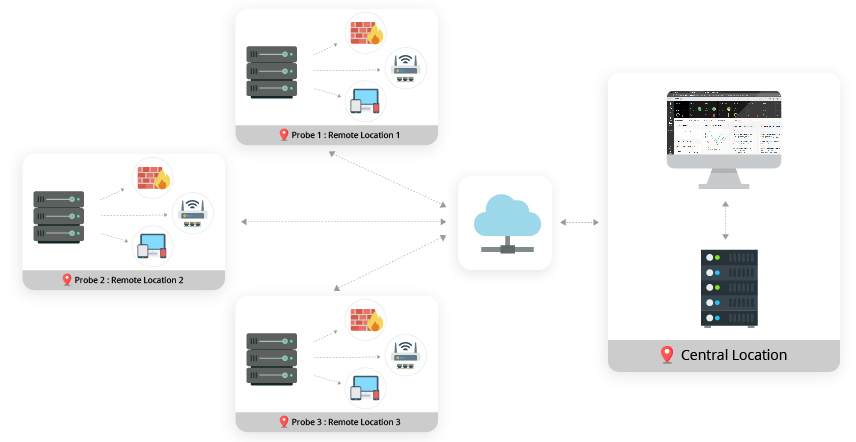
OpManager's Probe-Central architecture lets you manage multiple remote locations and is designed to scale the network monitoring needs of large enterprises. By adding probes at remote locations, OpManager's Central server offers a centralized console to visualize performance hiccups across every client location. You can monitor critical performance metric like CPU and memory utilization, availability status and metrics related to storage and bandwidth.
Highlights:
- Remote network monitoring and maintenance : You can troubleshoot and update configurations across each remote location with OpManager. Changes done in OpManager Central will be reflected across all the probes.
- Visibility: Every individual probe location can be monitored from the Central server and each probe can be configured based on the local language, thus eliminating language barriers.
- Simple licensing model: OpManager supports license sharing for the probe across remote sites. No restrictions based on location or probe.
- High Availability: Uninterrupted monitoring with no loss in connectivity. Failover ensures that the data is stored in a local database and is pushed as soon as connection is restored.
- Scalability: Deploy multiple probes in the same site or client network for higher scalability. You can also distribute the monitoring load across the probes.
Customer-based Grouping | OpManager
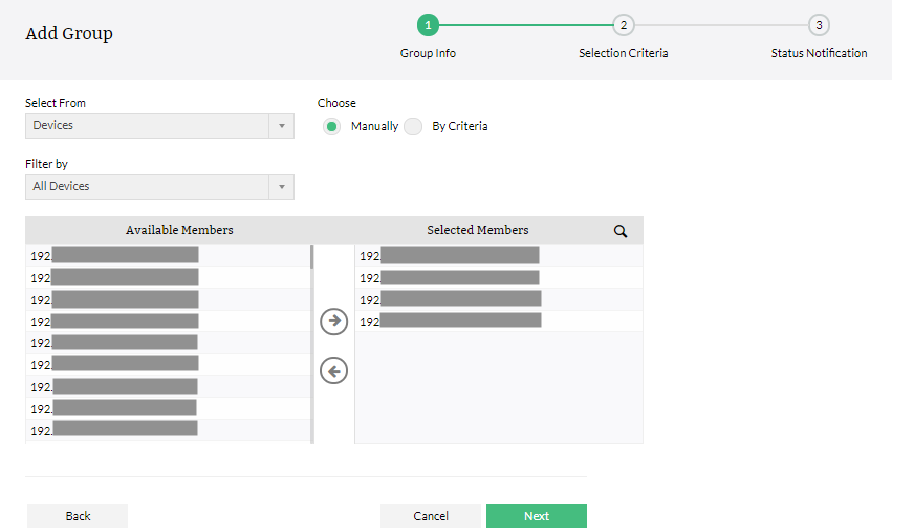
OpManager's Grouping feature helps Managed Service Providers to assort client's network devices based on location, department type, device type, based on vendors or based on customer preference. Pre-defined rules can be set-up to automatically add devices to specific groups based on criteria. The created groups can be accessed and applied as a default filter. To simplify the clients' network management, OpManager also offers alarm generation based on availability of network devices in a group - this can be viewed in the exclusive Group snapshot page and if the status of any device changes, an alarm will be automatically generated.
Customer Dashboards | OpManager
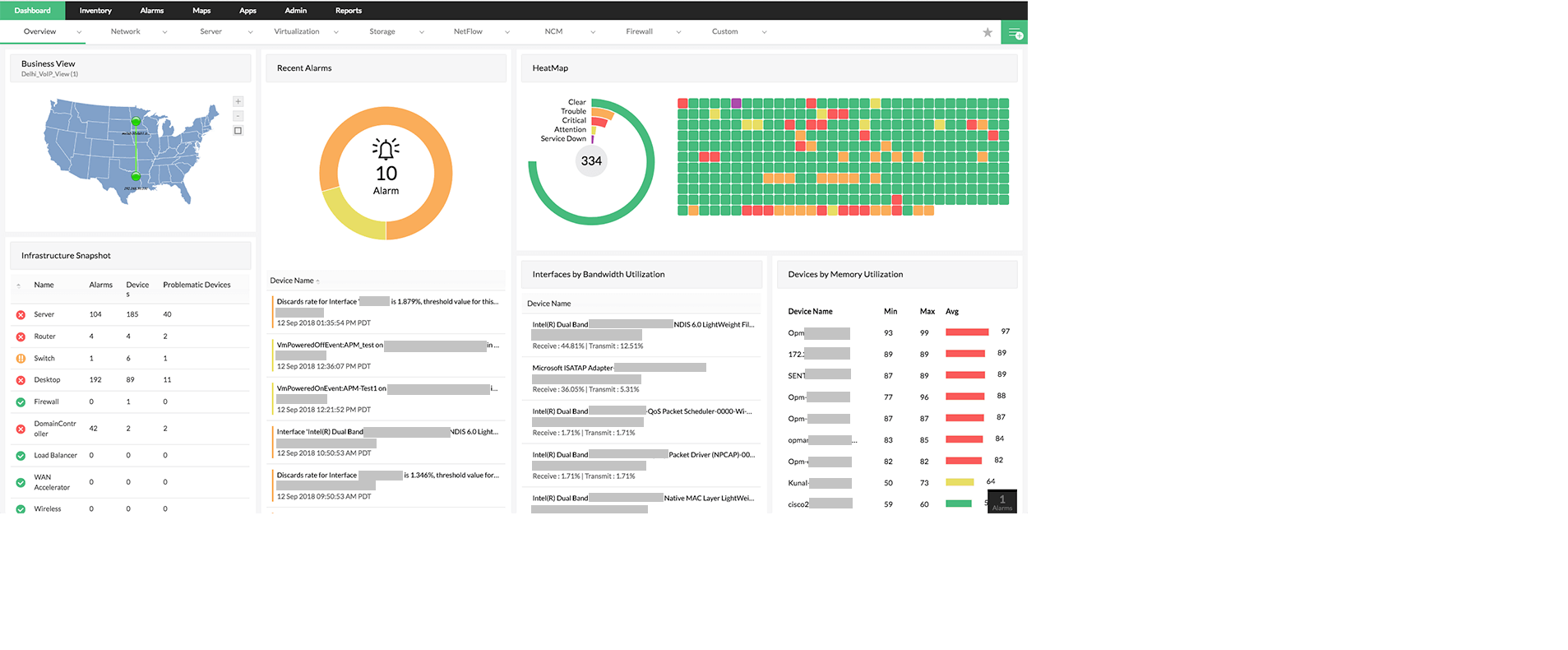
OpManager Dashboard provides complete visibility into the current status of your client's network, and displays critical metrics from routers, switches, firewalls, servers, services, application, URLs, printer, UPS and other infrastructure devices in a single screen. With over 150 widgets, the intuitive dashboard can be modified to satisfy the requirements of an individual network administrator or at the same time helps managed service providers present a read-only overview for their customers. Based on customer requirements, MSPs can create custom dashboards to highlight critical metrics in the client network.
Automated Workflows | OpManager
MSPs offer pre-defined routine checks, maintenance and automatic first level troubleshooting for customers. Manually executing each of these tasks can be a tiresome and tedious repetitive activity. OpManager's powerful IT workflow automation engine helps you automate tasks without any codes or complex scripts and reduces 'Mean Time To Repair' (MTTR). It offers an agile and flexible drag and drop workflow builder with over 70 workflow checks and actions grouped under 9 different categories. Automate client network maintenance and create a structured contextual workflow to address the IT automation needs of customers, remotely.
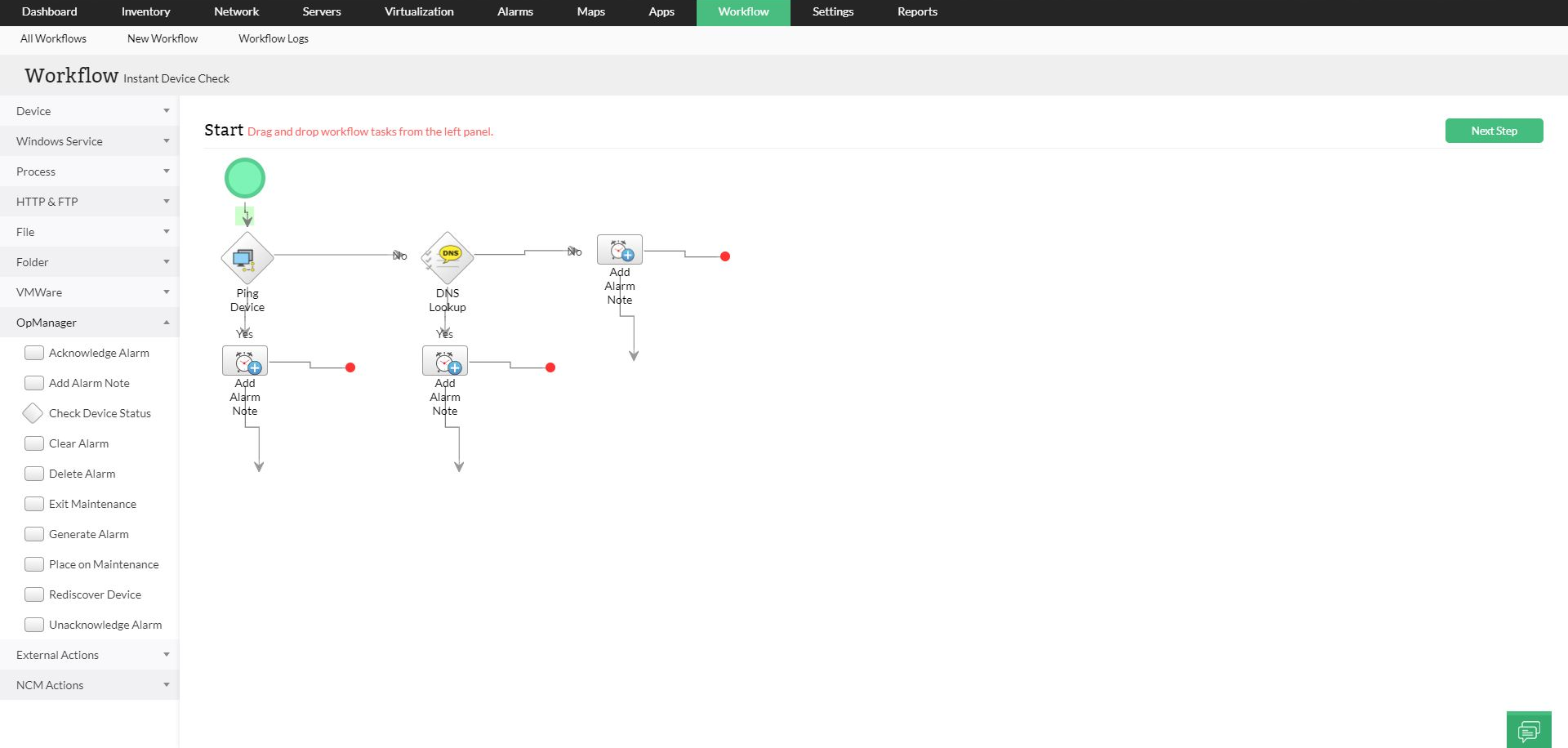
Advantages of OpManager Workflow:
- Intuitive drag-n-drop workflow builder.
- Automate network troubleshooting and routine maintenance checks.
- Export workflows and ensure structured practices across IT.
- Generate workflow logs for detailed analysis and audits.
- Eliminate the need for additional workforce, avoid human errors and reduce operational costs.
OpManager: Built for lean MSP teams and small-business clients
Small MSPs rarely have a dedicated NOC. One or two engineers cover many small clients, so they need multi-client monitoring that doesn’t carry an enterprise price tag. OpManager MSP,built on OpManager and designed for service providers, is made for that:
- Multi-tenant from one console: Handle the network operations of multiple clients at once, and troubleshoot or update configurations across client locations without needing a local administrator.
- Clients grouped your way: Sort each client’s devices by location, department, device type, vendor, or your own preference.
- A dashboard per client: See the current status of each client’s routers, switches, firewalls, servers, services, applications, printers, and UPS devices in one view.
- Alerts that catch real problems: Set multiple thresholds on every critical monitor, and track WAN link latency, jitter, round-trip time, and packet loss.
- Always-on monitoring: Failover and failback keep monitoring running if the primary server goes down.
- Simple and affordable: It can be set up and deployed in minutes, with transparent pricing options.
If you later need a probe at each client site, with local data collection and one Central console across many locations, the Probe-Central architecture (OpManager Enterprise Edition) is the step up. Most lean teams don’t need it on day one.
Choosing an MSP network monitoring tool: OpManager, Auvik, and WhatsUp Gold
MSPs usually shortlist a mix of cloud-based and self-hosted tools. Auvik is a cloud-based network management platform aimed at MSPs, and WhatsUp Gold is an infrastructure monitoring tool that publishes per-device pricing tiers. OpManager and OpManager MSP are self-hosted. Four questions help separate them for a lean team:
- Can one engineer cover many clients? Look for multi-tenant support, automatic client grouping, and per-client dashboards, so adding a client doesn’t mean building new views by hand.
- How is it priced, and can you see the price? OpManager publishes starting prices for its editions and lists transparent pricing options for OpManager MSP. Compare how each alternative counts what you pay for.
- How much can you automate? OpManager includes a visual, drag-and-drop workflow engine with 70+ checks and actions for routine checks and first-level fixes. Ask each tool whether the same needs scripting.
- What happens when you grow? OpManager MSP covers lean multi-client monitoring, and OpManager Enterprise Edition adds probes for client sites that need local collection and scale.
For a detailed side-by-side, see how OpManager compares as an alternative to Auvik and alternative to WhatsUp Gold.