
Accounts and privileges overview
This is the master reference for all accounts and credentials used by ADAudit Plus across every auditing module. Use this page to understand which accounts are needed for your environment and navigate to the detailed privilege guide for each module.
How ADAudit Plus uses accounts
ADAudit Plus collects audit data from many different data source types. Each data source type requires credentials for authentication. Some data sources share the same account; others require independent credentials.
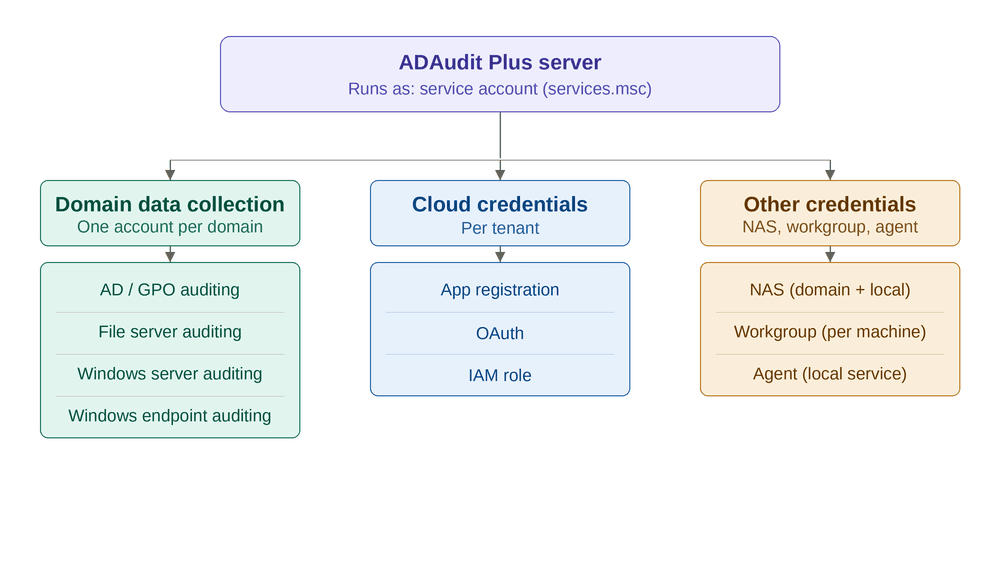
Master account matrix
| # | Auditing Module | Account Name | Account Type | Sharing Model | Configuration Location | Detailed Guide |
|---|---|---|---|---|---|---|
| 1 | Active Directory & GPO | Domain Data Collection Account | AD domain user / gMSA | Shared — same account for AD, File, Server, Endpoint within a domain | Admin → Domain Settings | AD & GPO Privileges |
| 2 | File Server | Domain Data Collection Account | AD domain user / gMSA | Shared (same as #1) | Admin → Domain Settings | File Server Privileges |
| 3 | Windows Server | Domain Data Collection Account | AD domain user / gMSA | Shared (same as #1) | Admin → Domain Settings | Windows Server Privileges |
| 4 | Windows Endpoint | Domain Data Collection Account | AD domain user / gMSA | Shared (same as #1) | Admin → Domain Settings | Windows Endpoint Privileges |
| 5 | Agent-based Collection | Agent Service Account | Local System (default) or domain user | Independent — per agent installation | services.msc on agent machine | Agent Guide |
Account sharing explained
Shared: Domain Data Collection Account
For Windows domain-based data sources, ADAudit Plus needs a single Windows identity per domain to authenticate to all target machines:
- Domain Controllers (AD/GPO auditing)
- File Servers
- Windows Servers (member servers)
- Windows Endpoints (workstations)
This identity can be provided in two ways:
- Service Account as process identity — if the service runs as a domain user/gMSA with privileges, no separate account is needed (single-domain only)
- Explicit Data Collection Account — configured in Admin → Domain Settings (required when Service Account is Local System, or for additional domains)
Each data source type requires different privileges, but the identity itself is shared across all four modules within a domain.
For more information about the Domain Data Collection Account, see Domain Data Collection Account.
Independent: Agent service account
When the ADAudit Plus Agent is installed on a machine, the agent collects audit data locally. The agent runs as a Windows service (default: Local System) and does not require the Domain Data Collection Account.
To know more, see Agent Configuration Guide.
ADAudit Plus Service Account
| Account | What it is | Default | When to change |
|---|---|---|---|
| ADAudit Plus Service Account | The Windows identity under which the ADAudit Plus server process runs | Local System | Only when the server process needs network access (remote MSSQL, remote archive, remote report share) |
Most customers leave the Service Account as Local System and use the Data Collection Account in Domain Settings for data collection. The Service Account is primarily relevant when the ADAudit Plus process itself needs to access remote network resources.
Note In single-domain environments, if you change the Service Account to a domain user/gMSA with the required privileges, it can also serve as the data collection identity — eliminating the need for a separate account in Domain Settings. This is an alternative approach; see Service Account for details.
To know more about the Service Account, see ADAudit Plus Service Account.
Quick decision guide
| If you are auditing... | You need... |
|---|---|
| Any Windows domain data source (AD, File, Server, Endpoint) | A Data Collection Account in Domain Settings (one per domain) |
| Multiple domains | A Data Collection Account per domain in Domain Settings |
| Cloud (Entra ID / Azure / AWS / GCP) | Cloud-specific credentials (completely separate from domain account) |
| NAS (NetApp, EMC, Synology, etc.) | Domain Account (for SID resolution) + NAS Local Account (per device) |
| Workgroup machines | Per-machine local admin credentials |
| Agent-based endpoints | Agent Service Account on each agent machine (default Local System) |
| Remote MSSQL / remote archive / remote report share | Custom Service Account (domain user or gMSA) instead of Local System |