Unable to apply the license file in ADManager Plus
Last updated on:In this page
Issue description
ADManager Plus is an on-premises application that requires users to manually update the license file obtained from the sales team to activate features beyond the trial period.
Users may encounter issues such as limited functionality, expired trial notifications, or errors while uploading the license file if the license is not updated correctly. Ensuring the timely upload of a valid license file is essential to maintain seamless operations.
Observed behavior
After applying for the license, the screen spins and never completes. After attempting to apply the license file, the interface becomes unresponsive, and the screen continues to load indefinitely without completing the process.
Possible causes
- License compatibility issue: The license file is not compatible with the installed version.
- Corrupt or incomplete file: The file may be corrupted or not downloaded properly.
Prerequisites
Before applying the license file, ensure:
- You have the latest valid license file from ManageEngine.
- The license file is not corrupted (check by opening the file in a text editor to verify the contents are intact).
Resolution
Step 1: Restart the ADManager Plus service
- Open services.msc in the ADManager Plus server.
- Locate the ManageEngine ADManager Plus service.
- Right-click the service and select Restart.
Step 2: Try accessing ADManager in a different browser
- Access ADManager Plus using Incognito Mode and attempt to apply the license again.
Step 3: Upload the license file
- Click the Browse button in the License Details window.
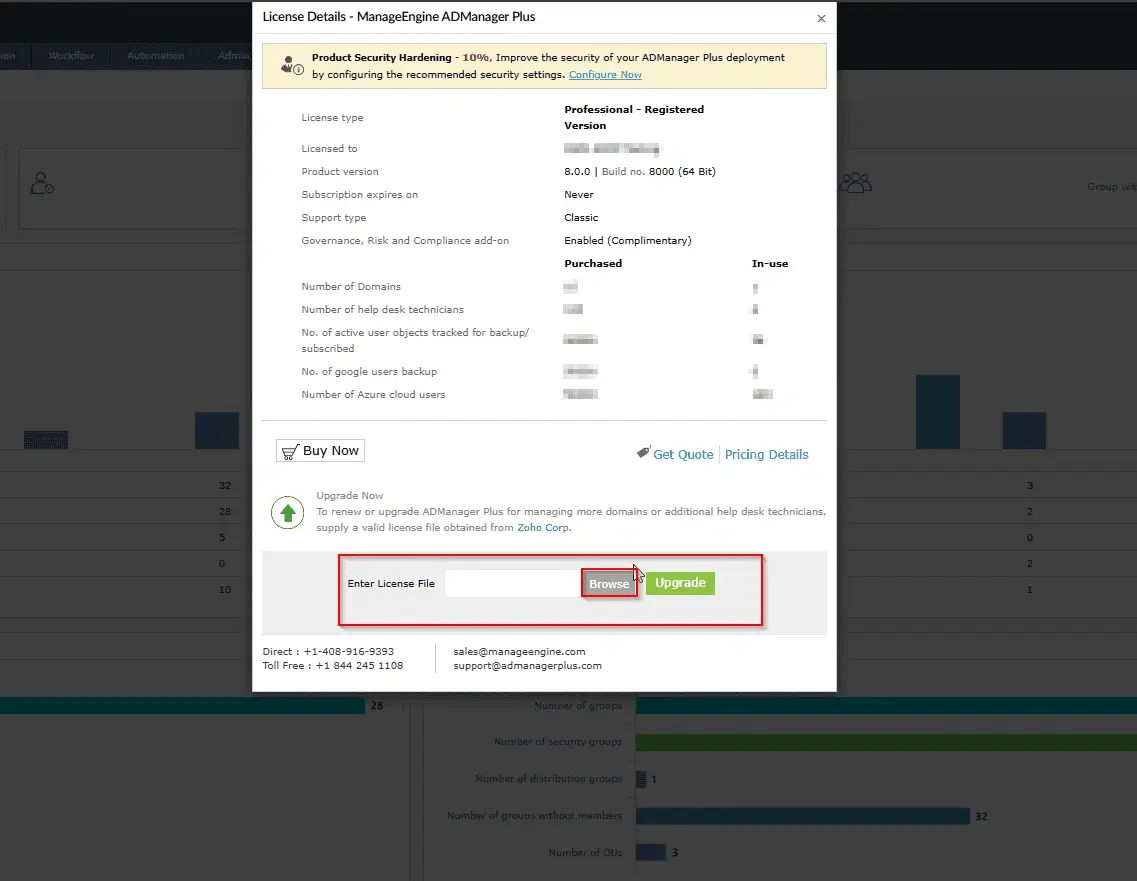
- Locate the license file (XML or LIC) on your system.
- Select the file and click Open.
- Click upgrade to upload the license.
Tips
- Do not rename or modify the license file before uploading.
- Run ADManager Plus as an administrator if issues occur.
How to reach support
If the issue persists, contact our support team here.