Website Content Monitoring Tool
- Website Defacement - An Overview
- Monitoring Website Content - What we do.
- Creating a new Website Content Monitor
- Monitored Parameters
Website Defacement - An Overview
Website defacement, a great threat to any online business, refers to unauthorized hacks on your website. It includes modifying or altering a website with insertion of potentially hazardous content, images, malicious code, or even deletion of the same and in some cases, instances like code injections. A defaced web page can thus inflict severe damage to your business reputation and reliability.
Monitoring Website Content - What we do
Website monitoring tools like Applications Manager lets you monitor your websites for defacement, modification and malicious insertions and be notified promptly during a hack detection. The Website Content monitor from Applications Manager allows you to monitor six basic HTML elements namely Text, Script, Image, Anchor, Iframe and Link. It detects website hack and any change in website content and reports before it can affect your customer. The altered content is displayed in separate tabs. The tabs (hidden by default) are shown only when there is a content modification or defacement.
Our standard defacement monitoring includes tracking for unauthorized addition or modification of the following HTML elements:
- Text Defacement - Identify content changes concerning the visible content in the rendered web page.
- Script Defacement - Identify changes in the scripts embedded and detect any 'src' attribute changes for the external script.
- Image Defacement - Identify 'src' attribute changes in the images present in the web page. Alert if there is any image displayed from a new domain other than the captured domains.
- Anchor Defacement - Identify 'href' attribute changes in the anchor links present in the web page. Alert if there is a link to a new domain other than the captured domains.
- Iframe Defacement - Identify 'src' attribute changes in the iframe elements and notify if there is a change in the domain name in the configured URL.
- Link Defacement - Identify 'href' attribute changes in the link elements of the web page.
In this help document, you will learn how to enhance your website monitoring capabilities by safeguarding your webpages from defacement using Applications Manager's Website Content monitor.
Creating a new Website Content Monitor
Prerequisites for monitoring Website Content metrics:Click here
To create a new Website Content monitor, follow the steps given below:
- Click on New Monitor link.
- Select Website Content Monitor under Web Server/Services category.
- Specify the Display Name of the Website Content Monitor.
- Enter the complete Domain URL of the Website which you want to monitor.
Click on Get Webpages to fetch the webpages present in the current website. Upon clicking, a popup window will be shown displaying the list of webpages related to the specified website. Select the webpages that you wish to monitor, then specify the display name and their corresponding script and text threshold value of defacement (in percentage) for the selected webpages.
Note:
- A maximum of ten web pages can be selected for monitoring and configuring defacement.
- When the script or text defacement exceeds the configured threshold value for a website, an alert will be generated.
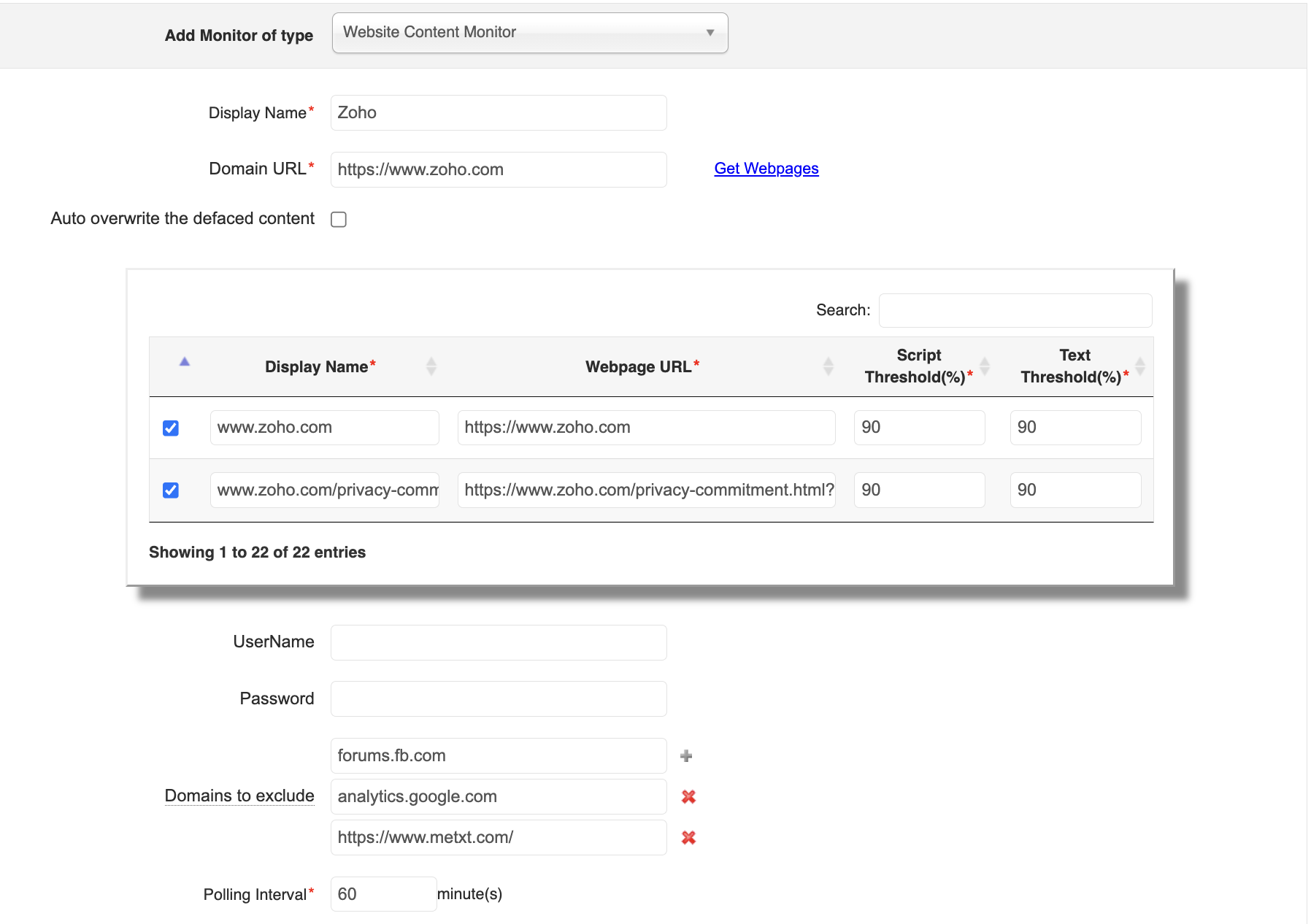
- Check the Auto overwrite the defaced content, if you want to overwrite the original web content with the web content fetched during the particular poll. This overwrite will happen only when the defacement persists for 1 hour.
- Enter the Username and Password if you have enabled it for the website.
Use the Domains to exclude field to specify trusted third-party domains. This ensures they are not flagged as defacement elements, reducing false alerts.
Note: This option is supported only from Applications Manager v174700.
- Specify the Polling Interval in minutes.
- Choose the Monitor Group with which you want to associate the Monitor (optional).
- Edit the Threshold percentage or Display names of the webpages listed.
- Click on Add Monitor to add the monitors.
Monitored Parameters
Go to the Monitors Category View by clicking the Monitors tab. Click on Website Content Monitor under the Web Server/Services table. Displayed is the Website Content monitor's bulk configuration view distributed into three tabs:
- Availability tab gives the Availability history for the past 24 hours or 30 days.
- Performance tab gives the Health Status and events for the past 24 hours or 30 days.
- List view enables you to perform bulk admin configurations.
On clicking a monitor from the list, you'll be taken to the Website Content Monitor dashboard, where you can view the list of monitored webpage URLs and their current status. Following are the list of metrics that are monitored in Website Content monitor:
Website Content
Webpage Content
Website Content
| Parameter | Description |
|---|---|
| WEBPAGE DETAILS | |
| Webpage URL | The URL of the webpage. |
| Defaced Script Percent (%) | The percentage change in the current script against the original script. |
| Defaced Text Percent (%) | The percentage change in the current text against the original text. |
| Page Size (KB) | The current page size. This metric helps you validate the current web page size. |
Webpage Content
| Parameter | Description |
|---|---|
| PAGE SIZE | |
| Page Size | The current page size. This metric helps you validate the current web page size. |
| DEFACEMENT PERCENTAGE DETAILS | |
| Defaced Script Percent | The percentage change in the current script against the original script. |
| Defaced Text Percent | The percentage change in the current text against the original text. |
| Parameter | Description |
|---|---|
| DEFACED SCRIPT DETAILS | |
| Original & Modified Content | The current and original script to help you identify changes with respect to the scripts embedded and detect any 'src' attribute change for the external script. |
| Parameter | Description |
|---|---|
| DEFACED TEXT DETAILS | |
| Original & Modified Content | The current and original text to help you identify any content changes with respect to the visible content in the rendered website page. |
| Parameter | Description |
|---|---|
| DEFACED ELEMENT DETAILS | |
| Original & Modified Content | The current and original content to help you identify any 'href/src' attribute changes present in the anchor/image/link/iframe elements present in the webpage. |

