How to check mailbox size in Exchange admin center?

Your download is in progress and it will be complete in just a few seconds! If you face any issues, download manually here

Thank you for registering with ManageEngine.

We will send the download link to the registered email ID shortly.

Stay informed about Exchange with Exchange Reporter Plus

  •  
  •  
  •  
  • By clicking 'Download 30-day free trial' you agree to processing of personal data according to the Privacy Policy.

Exchange Online Reports

Mailboxes are essential resources for effective communication in today's work environment. They allow users in the organization to access and manage emails, calendars, and tasks seamlessly. Monitoring mailbox size helps prevent potential issues, such as reaching storage limits, which leads to missed emails and interruptions in the workflow. For administrators, having access to the mailbox size statistics is important for optimizing resource allocation to ensure compliance with organizational policies and planning for future storage needs.

ManageEngine Exchange Reporter Plus—an extensive tool used for reporting, auditing, monitoring, and creating alerts for critical activities in your Exchange environment—simplifies this task with the Mailbox Size report.

This table compares how you can check mailbox size for all users in Exchange using Exchange admin center and Exchange Reporter Plus.

Exchange admin center

Steps to check all users' mailbox size using Exchange admin center

  • Log in to the Exchange admin center with an account that has administrator privileges.
  • Navigate to Recipients.
  • Click Mailboxes in the side pane.
  • Click on the mailbox for which you want to see the mailbox size.
  • Click the icon icon on the top.
  • A new window named Edit User Mailbox opens.
  • In the newly opened window, navigate to Mailbox Usage.

Exchange Reporter Plus

Steps to check all users' mailbox size using Exchange Reporter Plus

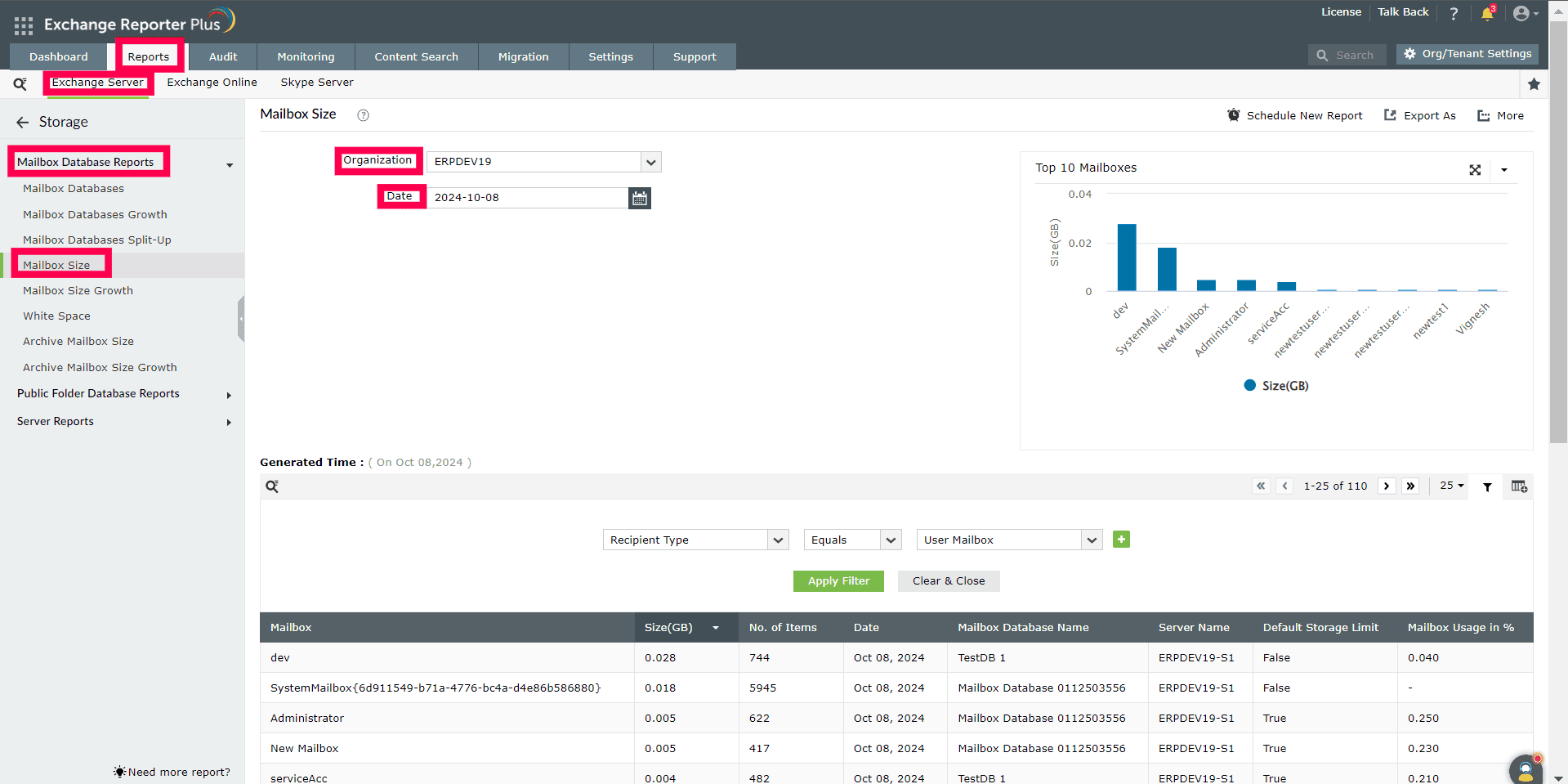
  • Log in to Exchange Reporter Plus and navigate to Reports > Exchange Server > Mailboxes > Size Reports > Mailbox Size.
  • Select the Exchange Organization and Date for which you want to generate the report.

Limitations of using the Exchange admin center to check mailbox size

  • The user account used to access the Exchange admin center must have administrator privileges to check mailbox size.
  • Checking mailbox size in Exchange admin center requires manually selecting each mailbox. This process can be time-consuming for large organizations with numerous mailboxes.
  • While the Exchange admin center does allow you to check the mailbox size, it does not offer a comprehensive view of the storage trends in your organization.

Benefits of using Exchange Reporter Plus to check mailbox size

  • Eliminate Exchange privilege elevation: Delegate custom roles to technicians to fetch reports regarding your Exchange environment without the need to elevate their native Exchange privileges.
  • Script-free Exchange reporting: Generate comprehensive reports on various aspects of your Exchange environment without the need to memorize or execute complex PowerShell scripts.
  • Over 450 intuitive reports: Generate comprehensive reports on every aspect of Exchange Server, Exchange Online, and Skype for Business. These reports can be exported as CSV, HTML, PDF, XLS, or XLSX files.
  • Customized audit profiles: Create actions that you want to audit and schedule profiles to generate audit reports at regular intervals.
  • 24/7 endpoint and service monitoring: Monitor Exchange server services, databases, database availability groups, storage, and email queues to ensure a hassle-free environment.
  • Mailbox content search: Perform pattern and keyword-based searches to find important information in your organization's mailboxes.
  • Real-time alerts: Configure alert profiles to receive immediate SMS or email notifications when a specific alert is triggered.
  • Exchange migration: Transfer emails, contacts, tasks, and calendars from Exchange Server to Exchange Online with ease.
A single pane of glass for Exchange Server Monitoring, Reporting and Auditing