Policy Overview Report in ManageEngine Firewall Analyzer
The Policy Overview Report in Firewall Analyzer gives you a high-level summary of all firewall policies (rules) configured on your firewall devices.
This report provides an organized snapshot of:
- Total number of policies (rules) configured.
- How many of those rules:
- Allow traffic (Allowed Rules)
- Deny traffic (Denied Rules)
- Are for inbound or outbound traffic
- Are inactive or unused
- Have logging disabled
- Are risky (like "ANY to ANY" rules)
Note: Firewall Analyzer now includes an Exclude Rule feature, enabling users to omit specific rules from Rule Management and Compliance Reports. Click here to learn more.
Rule Types
Total Rules
This is the complete list of all rules and policies in your firewall device. For example, if your firewall has 50 rules created, this report shows all 50—no filtering.
Allowed Rules
These are the rules that permit network traffic. It shows which traffic is being allowed to pass through your firewall—helps identify open paths into your network.
Denied Rules
These rules block or reject traffic. Useful for checking what traffic is intentionally being stopped for security reasons.
Firewall Inbound Rules
Rules that control incoming traffic from outside into your network (e.g., from internet to your internal server). It helps you see what kind of external traffic is allowed or denied access into your network.
Firewall Outbound Rules
Rules that control outgoing traffic from inside your network to outside (e.g., users browsing the web). Useful for seeing which internal users or devices can access external resources.
Inactive Rules
These are rules that exist in your firewall but are currently turned off or disabled. Helps clean up unused rules and avoid confusion or misconfiguration.
Logging Disabled Rules
These rules are not generating logs, even if traffic matches them. This can be a blind spot—without logs, you can't see if the rule is being used or abused.
Allowed ANY to ANY Rules
These are risky rules that allow traffic from any source to any destination, often without restriction. These are major security concerns, often used temporarily but forgotten—Firewall Analyzer helps you find them.
Allowed Rules with ANY Services
These rules allow traffic for any protocol or service (e.g., HTTP, FTP, SSH), without limiting what kind of traffic can go through. Like “ANY to ANY” rules, this is dangerous if left open—too permissive and can be exploited.
Bidirectional Rules
Bidirectional rules refer to firewall policies or rules that allow traffic in both directions between two network zones or entities. When configuring firewall rules, each rule typically allows traffic from a specific source to a destination, using certain network and service objects.
This setup means that:
- Rule 1 allows traffic initiated from A going to B.
- Rule 2 allows traffic initiated from B going to A.
Although the direction of communication is different, both rules together enable full two-way communication between A and B.
Object Details
- Network Objects: These are predefined IP addresses, ranges, or subnets used in rules (like Source A or Destination B).
- Service Objects: These represent protocols/ports (like HTTP, SSH) involved in the communication.
Object Details view shows which network/service objects are used in each rule.
NAT Rules
Network Address Translation (NAT) rules define how internal IPs are translated to public/external IPs (and vice versa).
Firewall Analyzer displays NAT rules that may influence how traffic flows between A and B. Bidirectional rules may also involve bidirectional NAT, where both source and destination addresses are translated in both directions.
- Cisco
- FortiGate
- Palo Alto
- SonicWall
- Firepower
- Pfsense
- Clavister NetWall
- Clavister NetShield
- Barracuda
- Check Point
- ZYWALL
- Huawei
- Juniper SRX
- MikroTik
- Vyatta
- Hillstone Firewall
- Forcepoint
- Cisco Meraki
- WatchGuard
- Sophos XG
- Sophos UTM
Actions Dropdown
The Actions dropdown in the Policy Overview pages provides quick access to commonly used operations on the listed firewall policies and rules. Using this menu, users can efficiently share, export, customize, and monitor policy data without navigating away from the page.
The following options are available:
- Send Mail
Allows you to email the current policy or rules view to selected recipients for review or reference. - Export to PDF
Exports the policy details into a PDF format, suitable for audits, documentation, or offline sharing. - Export to Excel
Downloads the policy data as an Excel file, enabling further analysis, filtering, or reporting. - Export to CSV
Exports the policy information in CSV format for easy integration with external tools or systems. - Choose Columns
Lets you customize the table view by selecting which columns should be displayed in the policy overview. - Schedule
Enables scheduling of reports or exports at defined intervals for automated policy reporting. - Alert
Allows you to configure alerts to get notified about specific changes or conditions related to firewall policies.
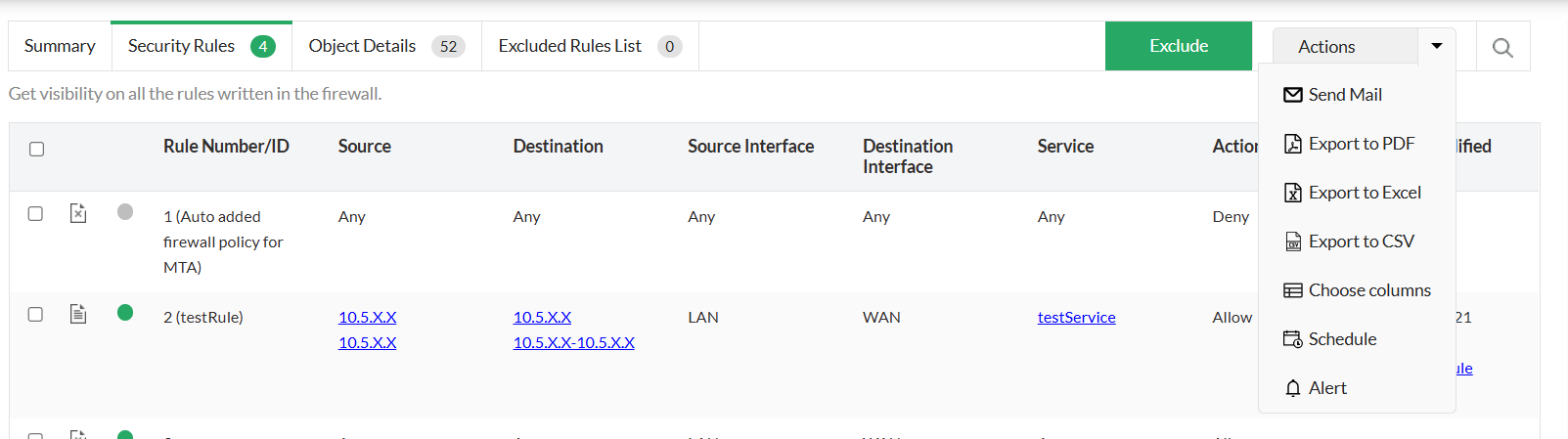
This dropdown helps streamline policy management tasks by centralizing all key actions in a single, accessible location.
Why It's Useful
- Helps understand the overall security posture of your firewall.
- Quickly highlights potential risks (e.g., too many "allow all" rules).
- Aids in rule optimization by identifying:
- Redundant or inactive rules
- Rules without logging
- Broad or overly permissive rules