DHCP reservation
As networks continue to grow, effective IP address management becomes increasingly vital. In large enterprises, the sheer volume of IP addresses can increase exponentially, making it essential to implement a robust IP management solution. OpUtils, an evolving DDI (DNS, DHCP, and IP Address Management) solution, introduces a powerful feature called DHCP reservation for Microsoft DHCP servers. This tool simplifies the management of DHCP allocations, ensuring seamless control over IP assignments and enhancing overall network efficiency.
What is DHCP reservation?
DHCP reservation involves notifying the DHCP server to set aside certain IP addresses for future use, ensuring that these addresses are consistently assigned to critical devices rather than being allocated randomly, which could disrupt connectivity. This is achieved by linking the MAC address of a critical device to a specific IP address. For instance, this feature is especially beneficial for ensuring that devices such as printers, routers, and servers retain the same IP address, thus preventing interruptions to services reliant on stable network configurations.
Previously, managing these reservations required direct access to the DHCP server. However, OpUtils has simplified this process by incorporating it into its intuitive interface, making network operations more efficient for administrators.
How to utilize DHCP reservation in OpUtils
- Input MAC Address: Begin by entering the MAC address of the critical device you wish to reserve an IP address for.
- Associate with IP Address: Next, link this device to a specific IP address that you want to reserve.
- Reserve the IP: With just a single click, reserve the IP address. This action ensures that the designated IP is locked for the critical device and will not be allocated to any other device within the network.
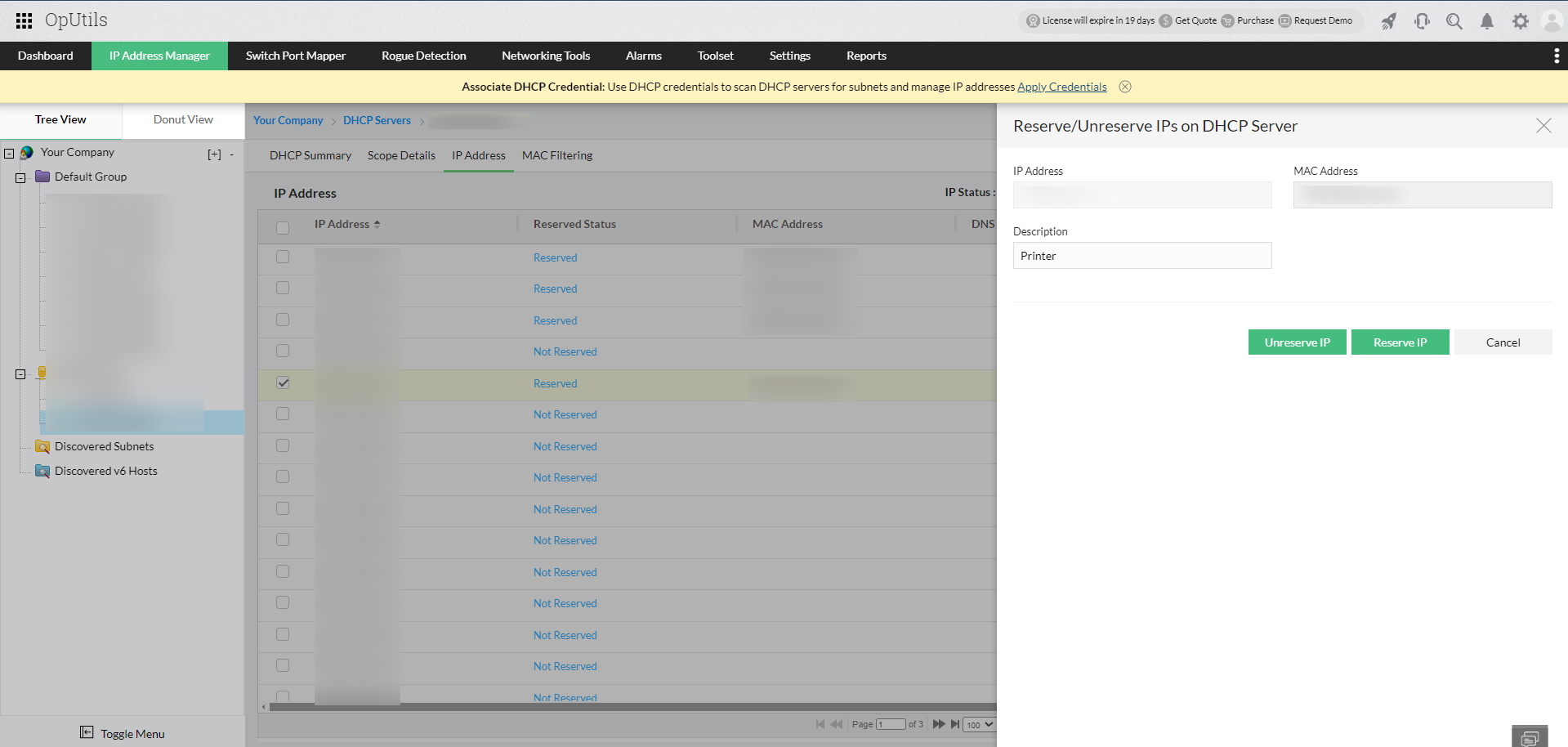
By following these simple steps, you can streamline your network management and maintain reliable connectivity for your essential devices.
Once reserved, the IP status is updated in both the DHCP and IPAM modules, ensuring synchronization across OpUtils. This allows for a unified and accurate view of IP allocation and availability within your infrastructure.
How DHCP reservation feature works behind the scenes?
The DHCP reservation feature operates seamlessly in the background by utilizing WinRM (Windows Remote Management) and PowerShell scripts to synchronize data between the DHCP server and OpUtils. This ensures that any modifications made in the OpUtils interface are instantly reflected on the DHCP server, maintaining consistent and efficient IP management across the network.
Why is DHCP reservation important?
Here are the key points on why DHCP reservation is necessary:
- Network stability:DHCP reservation guarantees that critical devices consistently receive the same IP address, preventing disruptions in connectivity.
- Reliable connectivity: By reserving IP addresses for essential devices like printers, servers, and routers, organizations ensure stable communication vital for daily operations.
- Streamlined network management: DHCP reservation streamlines network management by eliminating the need for manual IP address tracking, making the process easier for administrators.
- Enhanced performance: Consistent IP assignments for critical devices enhance network performance by ensuring quick communication, as the relevant IP-to-MAC address mappings are stored in the ARP cache.
- Increased productivity: A stable network configuration supports efficient business operations, leading to improved overall productivity.
- Adaptability to growing network: Implementing DHCP reservation is a strategic approach that helps organizations optimize IP address management as their network needs evolve.
Difference between reserved status in IPAM and DHCP Server
Administrators using OpUtils may wonder about the distinction between the two. While both IPAM and the DHCP server offer reservation capabilities, they serve different purposes.
- IPAM reserved status: In IPAM, reserved status helps administrators pre-allocate specific IPs for future use. For example, if you currently manage 5 servers but plan to expand, you can reserve 10 sequential IPs for future servers. When the new servers arrive, the reserved IPs can be allocated immediately, ensuring that the IP plan remains intact and future services run smoothly.
- DHCP reserved status: In contrast, DHCP reservation ensures that a specific IP is always assigned to the same device. For instance, a printer’s MAC address could be mapped to a fixed IP, ensuring it receives the same address every time it connects to the network, preventing interruptions in service.
OpUtils' new DHCP reservation feature gives administrators greater control over IP assignments, balancing flexibility with stability in the network. With its user-friendly interface and automated backend synchronization, OpUtils makes managing DHCP reservations a breeze, boosting the overall efficiency of IP address management in complex IT networks.
Experience OpUtils by downloading a free 30-day trial, or schedule a personalized demo today. We'll connect you with the right product expert to address all your questions.
Looking to simplify DHCP management beyond reservations? Explore OpUtils' unified DDI management capabilities to centrally manage DNS, DHCP, and IP address management (IPAM), automate administrative tasks, and gain end-to-end visibility across your network infrastructure.