Free Edition
Enrollment is the only task that has to be completed before users can start enjoying the benefits of ADSelfService Plus password self-service. But many a time, administrators might have to constantly shoot out reminders urging users to enroll. Or much worse, they could be pushed to the extent of taking it head-on by enrolling all their users themselves, one at a time!
The glad news is that we’ve got just what is needed to wade through all this trouble. ADSelfService Plus allows administrators the convenience of performing bulk enrollment of their hitherto unenrolled users so that they can avail password self-service.
Today, we will look at the ways to bulk enroll Duo Security-enabled users for password self-service. Duo Security is a trusted access platform that organizations employ to verify user identities, ensuring secure access.
Administrators can choose between two options to perform bulk enrollment. They are:
Method 1: Bulk enrollment by importing Duo Security users from CSV file
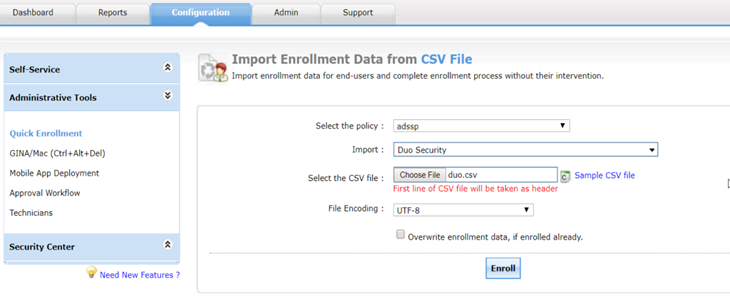
CSV enrollment
Method 2: Bulk enrollment by importing Duo Security users from external database
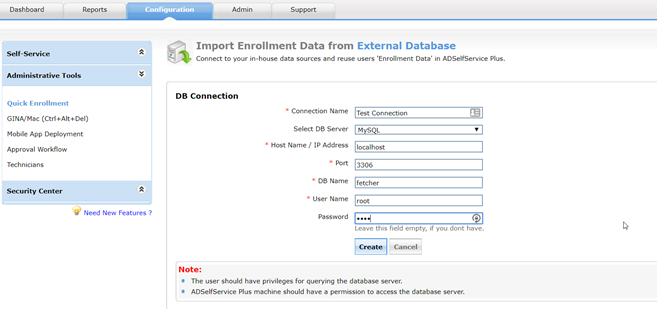
Connection configuration
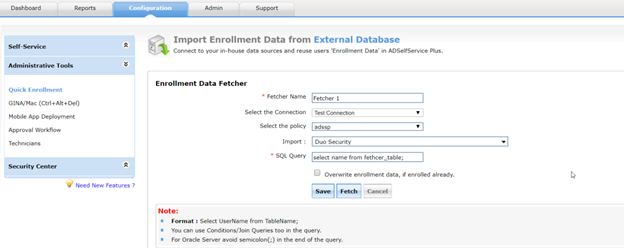
Fetcher configuration
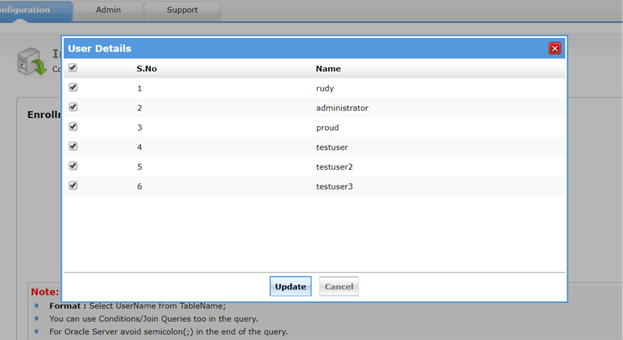
Fetched data
Like this tip? Get the most out of ADSelfService Plus by checking out more tips and tricks here.
Need further assistance? Fill this form, and we'll contact you rightaway.
Allow Active Directory users to self-service their password resets and account unlock tasks, freeing them from lengthy help desk calls.
Get seamless one-click access to 100+ cloud applications. With enterprise single sign-on, users can access all their cloud applications using their Active Directory credentials.
Intimate Active Directory users of their impending password and account expiry via email and SMS notifications.
Synchronize Windows Active Directory user passwords and account changes across multiple systems automatically, including Microsoft 365, Google Workspace, IBM iSeries, and more.
Strong passwords resist various hacking threats. Enforce Active Directory users to adhere to compliant passwords by displaying password complexity requirements.
Enable Active Directory users to update their latest information themselves. Quick search features help admins scout for information using search keys like contact numbers.