You trust your network monitor to keep you in total control of your network every second of the day. Since every single network incident - device sickness, unhealthy bandwidth levels, DoS attacks etc., is immediately brought to your notice, you are in a position to act quickly preventing business-affecting repercussions.
What happens when a server that runs your trusted network monitor crashes or loses network connection? You will want to be alerted on this and also have the situation automatically remedied using a back-up/stand-by of another twin network monitor application installation.
OpManager's failover and failback functionality ensures an always-monitored network environment with the database also having a secondary copy that is ready to be switched to primary mode anytime. OpManager's failover and failback mechanism ensures:
- Instant primary server failure recognition.
- Immediate notification via email of primary failure.
- 100% uptime and uninterrupted network management.
- Automated, seamless switching between Primary to Standby Server and vice versa.
OpManager's MS SQL Failover working
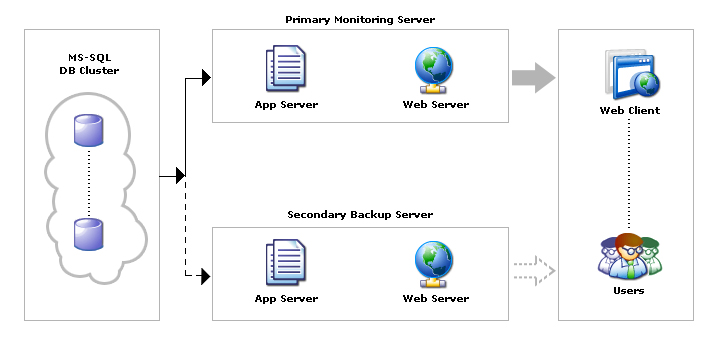
OpManager's standby server recognizes and continuously checks the availability of the primary server. During any abnormal termination of the primary server, OpManager automatically switches over to the standby server. When the primary server recovers, the standby server exchanges the roles swiftly and fails-back. This functionality is currently supported only for the MS SQL backend. Both the primary and standby servers point to the MS SQL clustered instances. Refer to the Online Help document for details on configuring the failover for OpManager.
Advanced alerting
With advanced alerting system, OpManager alerts you instantly in the event of a failover. You can choose to receive notifications through different channels such as SMS, Email, slack messages, web alrms and more. This way, network admins need not keep checking the OpManager window or miss out on important alerts either. OpManager also supports one-click integration with Microsoft Teams, Telegram and more using Webhooks.
Ensure uninterrupted network operations even when the network fails, with OpManager
Download 30-day free trialCustomer reviews

Case Studies - OpManager
Awards & Honors
- Recognized as a May 2019 Gartner Peer Insights Customers' Choice for Network Performance Monitoring and Diagnostics Software
- Recognised as an April 2019 Gartner Peer Insights Customers' Choice for IT Infrastructure Monitoring Tools.
- Network Management and Monitor Vendor of the Year 2018, 2019
- Entered the 2019 Gartner NPMD Magic Quadrant.
- Ranked #2 in the Infotech Research Software Reviews Data Quadrant 2018.