(Feature available only in Premium Edition)
Any action performed on a password, be it just a password access or modification or changing the share permission or when the password expires or when password policy is violated, notifications are to be sent to the password owners and/or to those who have access to the passwords or to any other users as desired by the administrators. The 'Password Action Notification' feature helps in achieving this.
You can configure E-mail notification on the occurrence of specific events as mentioned above. When password shares are changed and when passwords expire, in addition to notifications, there is option for password reset action to be performed by the PMP server. When a password belongs to multiple groups and each group has different actions configured, every distinct action will be performed once.
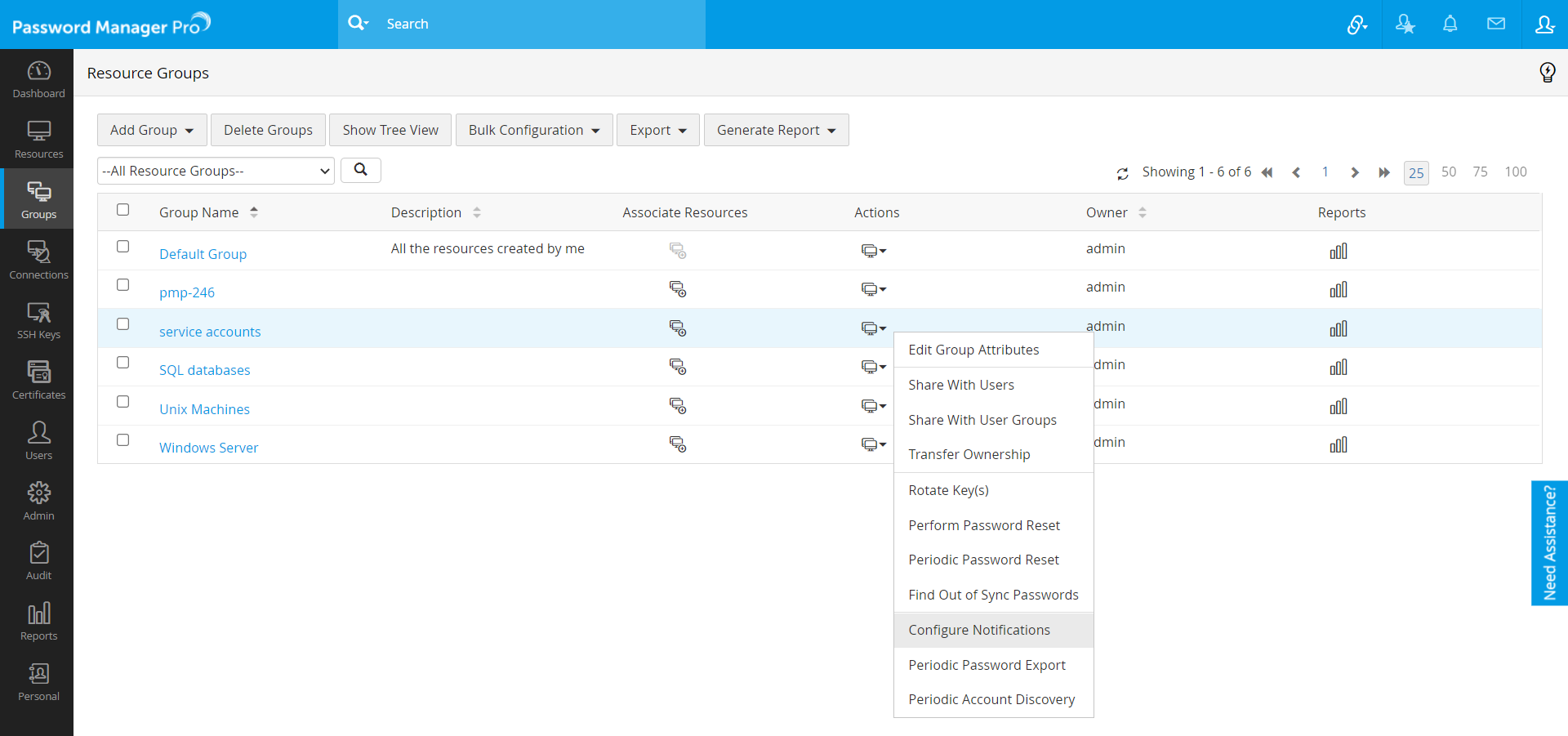
Go to "Resources" tab in the web interface
Click "Resource Groups" tab (alternatively, you can launch this page directly through the "Add Resource Group" link under the "Links" tab)
Click the icon
present against the
resource group for which password action notification is to be enabled
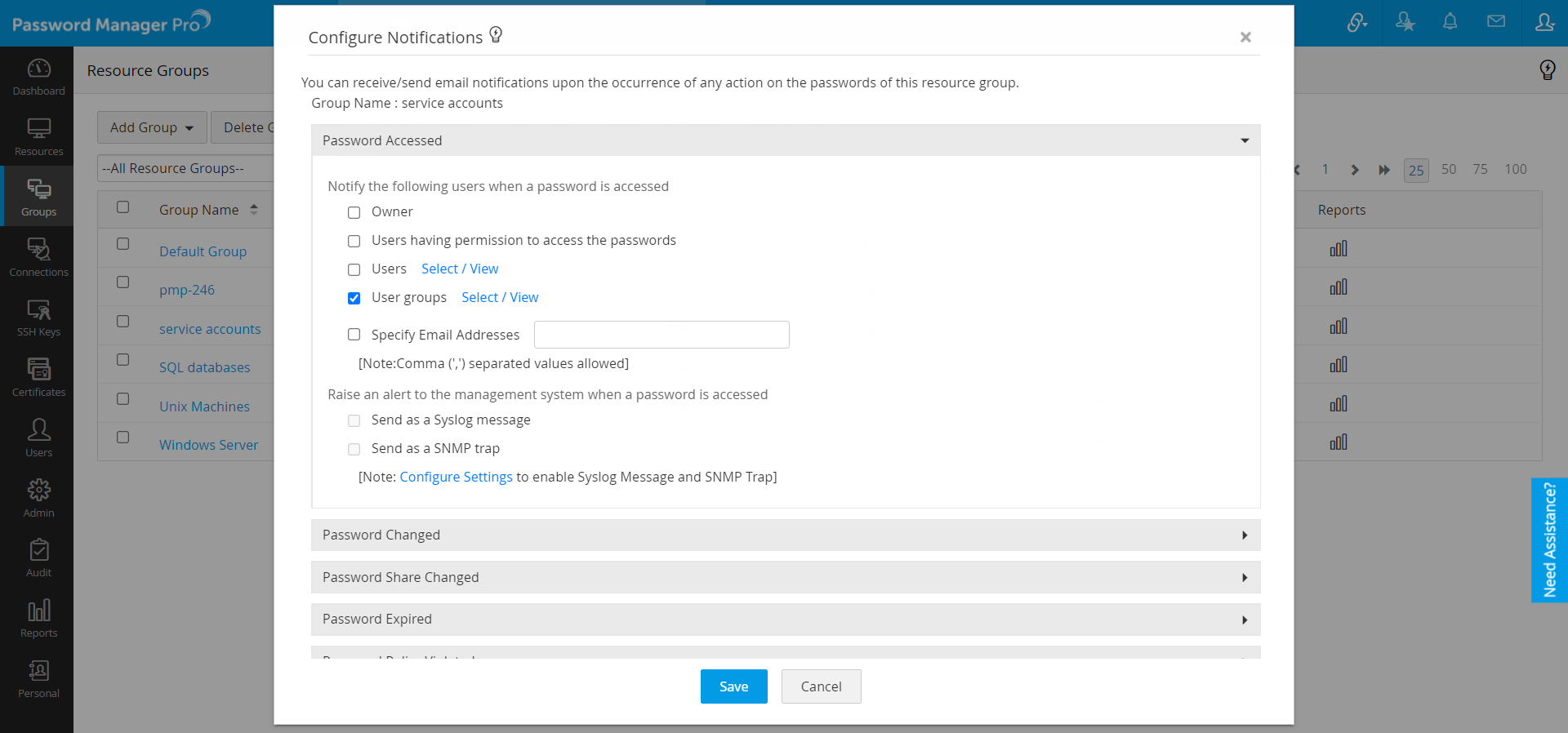
In the UI that opens up, select the condition upon which you wish to send notifications and click the button at the end
As mentioned earlier, when a user views a password, email notification (informing the access) could be sent to desired recipients.
If you want to make use of this action,
Specify the recipients of the notification -
Owner - the owner of the password
Users having access to the passwords - users who possess any one of the share permission (read only, read and write, manage) for the password, at the time when notification is generated
Other Users/ User Groups - any other specific user(s) as selected from the list
Email ids - to generate notifications to specified list of email aliases or email addresses. If you want to enter multiple ids, you may do so by separating each address with a comma
Click "Save"
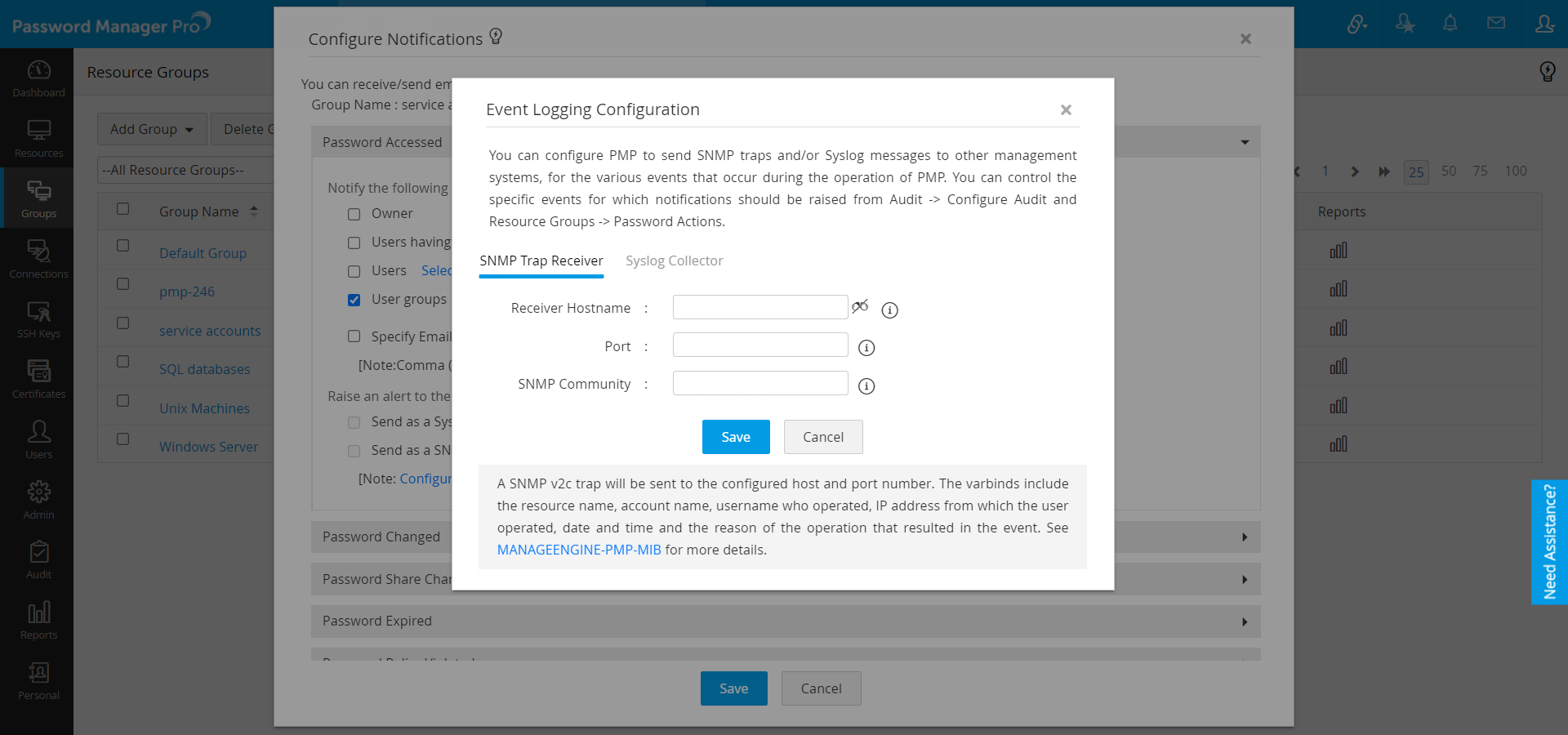
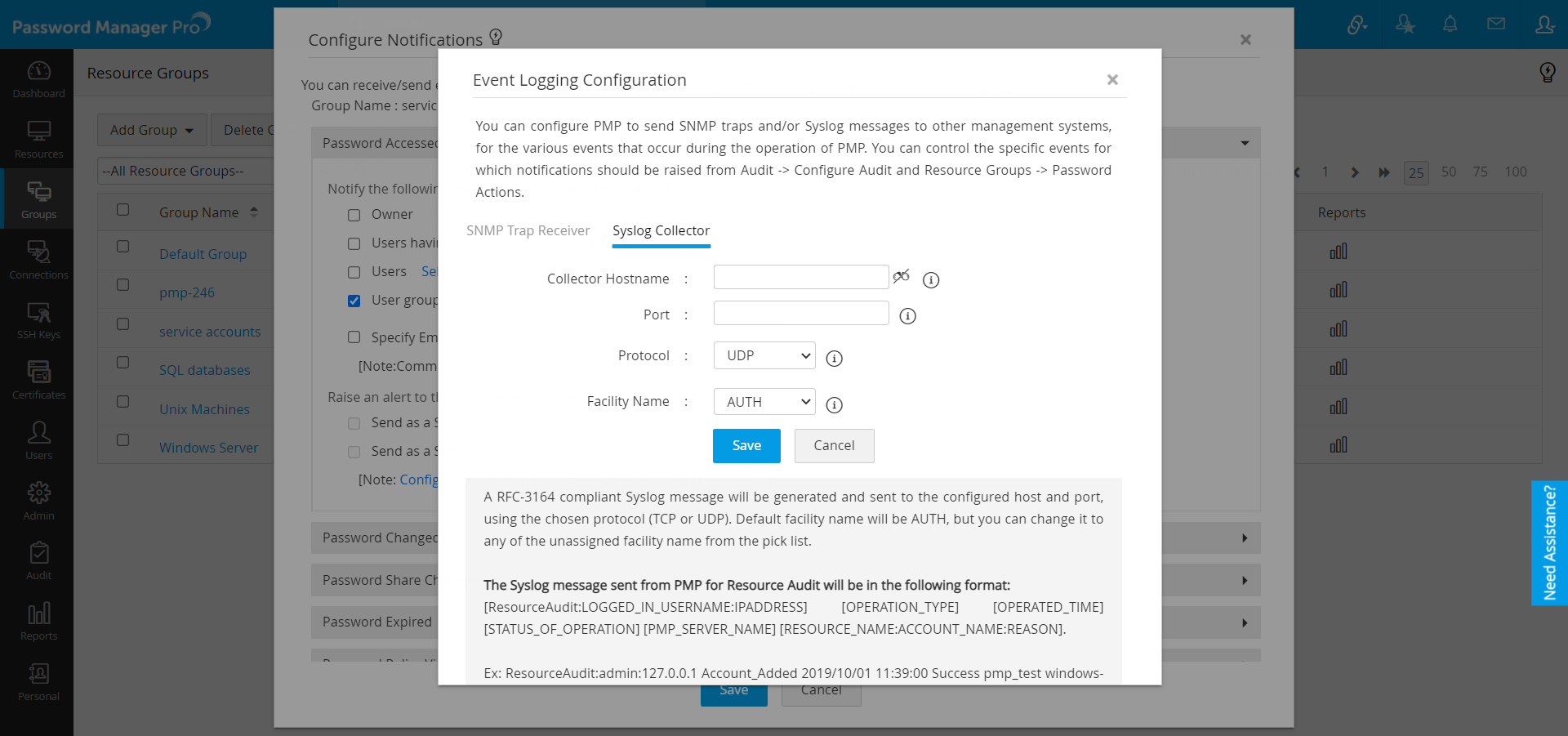
You can also generate a SNMP Trap and/or Syslog Message to your network management system. Before selecting an option here, make sure you have carried out SNMP Trap/Syslog settings.
As mentioned above, when a password is changed, notification (informing the change) could be sent to desired recipients.
If you want to make use of this action,
Specify the recipients of the notification -
Owner - the owner of the password
Users having access to the passwords - users who possess any one of the share permission (read only, read and write, manage) for the password, at the time when notification is generated
Other Users/ User Groups - any other specific user(s) as selected from the list
Email ids - to generate notifications to specified list of email aliases or email addresses. If you want to enter multiple ids, you may do so by separating each address with a comma
Click "Save"
You can also generate a SNMP Trap and/or Syslog Message to your network management system. Before selecting an option here, make sure you have carried out SNMP Trap/Syslog settings.
In multi-user environments, passwords are shared among multiple persons. In such a scenario, when a password permission of a password is changed, notification (informing the change) could be sent to desired recipients.
If you want to make use of this action,
Specify the recipients of the notification -
Owner - the owner of the password
Users having access to the passwords - users who possess any one of the share permission (read only, read and write, manage) for the password, at the time when notification is generated
Other Users/ User Groups - any other specific user(s) as selected from the list
Email ids - to generate notifications to specified list of email aliases or email addresses. If you want to enter multiple ids, you may do so by separating each address with a comma
You have the option to reset passwords in addition to sending notifications. For example, when the share for a password is removed, if you wish to automatically reset the password, you may do so by selecting the checkbox 'Reset the password when a share is removed'. Password reset action is applicable and performed only for passwords for which it is currently supported and correctly configured, using one of remote or agent modes
Click "Save"
You can also generate a SNMP Trap and/or Syslog Message to your network management system. Before selecting an option here, make sure you have carried out SNMP Trap/Syslog settings.
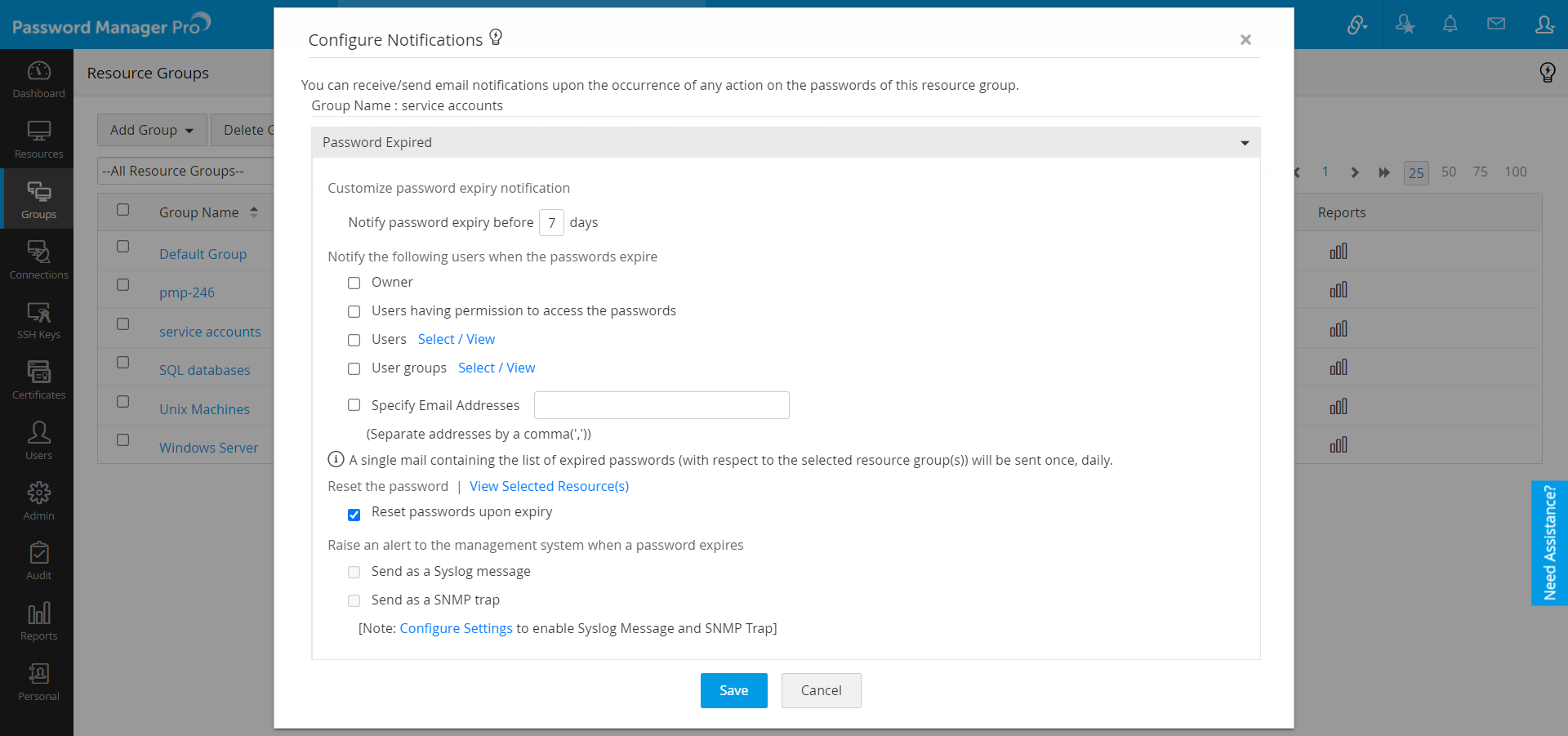
To enhance password security, passwords of sensitive accounts would be rotated periodically. In such a scenario, validity period is set for a password. When the validity ends, the password expires and a notification (informing the expiry) could be sent to desired recipients.
|
How do I set Password Expiry for a resource?
Password Validity Period could be set through password policies. After the validity period, the password would expire and it has to be reset. |
If you want to make use of this action,
Specify the recipients of the notification -
Owner - the owner of the password
Users having access to the passwords - users who possess any one of the share permission (read only, read and write, manage) for the password, at the time when notification is generated
Other Users/ User Groups - any other specific user(s) as selected from the list
Email ids - to generate notifications to specified list of email aliases or email addresses. If you want to enter multiple ids, you may do so by separating each address with a comma
You have the option to reset passwords in addition to sending notifications. For example, when a password expires, if you want to automatically reset the password, you need to select the checkbox 'Reset passwords upon expiry'. Password reset action is applicable and performed only for passwords for which it is currently supported and correctly configured, using one of remote or agent modes
Click "Save"
You can also generate a SNMP Trap and/or Syslog Message to your network management system. Before selecting an option here, make sure you have carried out SNMP Trap/Syslog settings.
If you have defined a password policy and if the passwords are in violation to the policy defined, notifications (informing the violation) could be sent to desired recipients. The notification would be sent everyday.
If you want to make use of this action,
Specify the recipients of the notification -
Owner - the owner of the password
Users having access to the passwords - users who possess any one of the share permission (read only, read and write, manage) for the password, at the time when notification is generated
Other Users/ User Groups - any other specific user(s) as selected from the list
Email ids - to generate notifications to specified list of email aliases or email addresses. If you want to enter multiple ids, you may do so by separating each address with a comma
You have the option to reset passwords in addition to sending notifications. For example, when a password policy violation is identified, if you wish to automatically reset the password, you may do so by selecting the checkbox 'Reset the password upon violation'. Password reset action is applicable and performed only for passwords for which it is currently supported and correctly configured, using one of remote or agent modes
Click "Save"
You can also generate a SNMP Trap and/or Syslog Message to your network management system. Before selecting an option here, make sure you have carried out SNMP Trap/Syslog settings.
When the passwords stored in PMP differ with those in the resource, notifications (informing the out of sync) could be sent to desired recipients. Every night at 1 AM, PMP tries to establish connection with the target systems for which remote password sync has been enabled. Once the connection is established, it tries to login with the credentials stores in PMP. If login does not succeed, PMP concludes that the password is out of sync. In case, PMP is not even able to establish connection with the system due to some network problem, it will not be taken as password out of sync.
The out of sync notification would be sent everyday.
If you want to make use of this action,
Specify the recipients of the notification -
Owner - the owner of the password
Users having access to the passwords - users who possess any one of the share permission (read only, read and write, manage) for the password, at the time when notification is generated
Other Users/ User Groups - any other specific user(s) as selected from the list
Email ids - to generate notifications to specified list of email aliases or email addresses. If you want to enter multiple ids, you may do so by separating each address with a comma
Click "Save"
You can also generate a SNMP Trap and/or Syslog Message to your network management system. Before selecting an option here, make sure you have carried out SNMP Trap/Syslog settings.
See also "Running Integrity Check on demand".
In all the above cases, email notifications are sent to the specified recipients. PMP provides the option to customize the email content. Refer to the "Email Templates" section for complete details.
© 2009, ZOHO Corp. All Rights Reserved.