

- Home
- Play books
- Cisco Duo - Abnormal policy change investigation and remediation
Cisco Duo - Abnormal policy change investigation and remediation
In this page
Playbook Description
This playbook investigates abnormal policy updates by analyzing user activity, checking for unauthorized changes to security policies, and evaluating the potential impact of such changes on the organization's security posture.
MITRE ATT&CK mapping
| Tactics | Techniques | Sub-techniques |
|---|---|---|
| Defense Evasion(TA0005) | System Binary Proxy Execution(T1218) | InstallUtil(T1218.004) |
MITRE D3FEND mapping
| Tactics | Techniques | Sub-techniques |
|---|---|---|
| Model(D3-Model) | Application Hardening(D3-AH) | Process Segment Execution Prevention(D3-PSEP) |
Playbook input type
Alert
Prerequisites
- VirusTotal connection - Need to connect with VirusTotal API to check URL and file hash reputation.
- Cisco Duo configuration - Need to connect Cisco Duo using HMAC connection with Integration and secret key.
Playbook creation input
- connectionName - Provide the VirusTotal connection name for executing the VirusTotal APIs
Dependencies
Extensions - VirusTotal
- virustotal_ipReputation
- virustotal_calculateRiskScore
Extensions - Cisco Duo
- ciscoduo_retrieveAdministrators
- ciscoduo_retrieveUserById
- ciscoduo_modifyUser
- ciscoduo_retrievePolicies
- ciscoduo_modifyAdministrators
- ciscoduo_deletePolicy
Utility functions:
- utility_compareListElements
- utility_convertToMap
- utility_parseAggregateLog
- utility_extractFieldFromList
- utility_getRequiredTime
- utility_convertTimeToUTC
- utility_validateResponses
- utility_filterAndMatchEvents virustotal_extractRansomwareByHash
- utility_sendMail
Connections
VirusTotal connection - Need to connect with VirusTotal API and fetch access key to check the malware IP/URL/File details.
Cisco Duo connection - Need to connect Cisco Duo using Integration Key, Secret Key and API Hostname.
Execution workflow
Investigation:
- Fetches the user activity.
- Extracts the IP from the logs.
- Checks the IP reputation in batch.
- Checks the IP risk score in batch.
- Fetches the malicious IP list.
- Fetches the fallback list.
- Extracts the auth mechanism list from logs.
- Fetches the downgrade list from logs.
- Fetches trusted list.
- Extracts the endpoint status list.
- Fetches the endpoint status list.
- Passes critical policy list.
- Fetches the policy list.
- Fetches the matched list.
Decision logic:
- Proceeds to remediation based on the following conditions:
- Malicious IP addresses were identified.
- Related investigation findings are present.
- If suspicious but not confirmed malicious, sends a notification for manual review and stops further actions.
- If no malicious indicators are confirmed, the playbook ends with no further actions.
Remediation:
- Fetches the aggregated logs.
- Fetches all policies.
- Fetches the matched policy keys in batch.
- Extracts the policy key from list in batch.
- Revokes the policies updated in batch.
- Validates the policy revoke response.
- Converts the auth logs to map.
- Enriches the user.
- Checks whether user is under any directory.
- Passes disable user input.
- Disables the user.
- Passes endpoint results.
- Checks if any user roles got escalated.
- Checks whether any role escalated.
- Extracts the admin list.
- Retrieves the administrators.
- Fetches the matched admin list from logs in batch.
- Extracts the admin key list in batch.
- Revert the admin role in batch.
- Passes admin results.
- Checks if any remediation failed.
- Builds the notification email with remediation details and findings.
- Sends a notification email regarding the actions taken and required next steps.
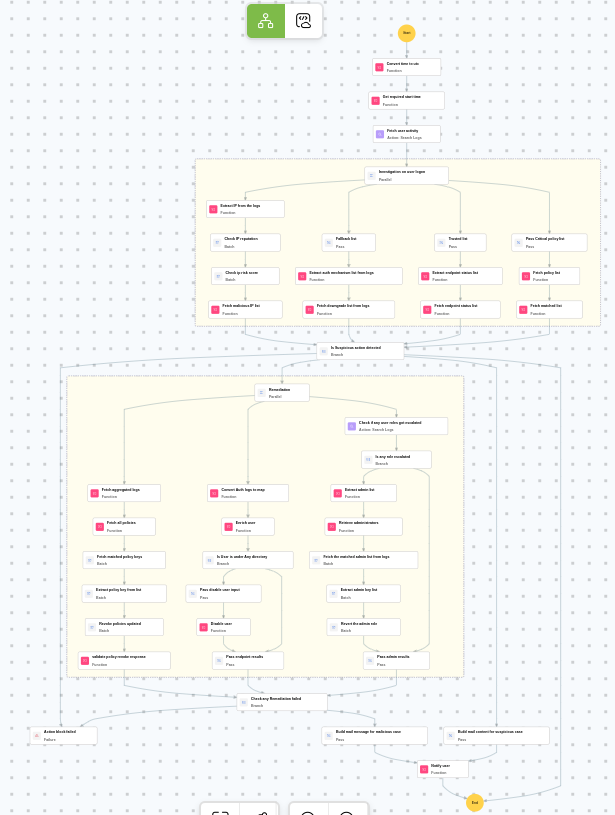
Post execution procedure
- Review the reverted policies to ensure they are correctly restored.
- Investigate whether any sensitive data or configurations were modified during the unauthorized access.
- Review Cisco Duo admin audit logs for any additional unauthorized changes.
- Consider enforcing additional authentication requirements for administrative actions.
- Audit all administrator accounts in Cisco Duo for signs of compromise.

