
- Home
- Play books
- Okta - Multi-logon failure defense
Okta - Multi-logon failure defense
In this page
Playbook Description
This playbook investigates Okta multilogon failure alerts by checking recent successful logons, device type, IP reputation, ASN similarity, and user role, then remediates confirmed abuse by revoking sessions, enforcing password resets, suspending non-super-admin users, and blocking malicious IPs or ASNs; suspicious but unconfirmed cases are sent for manual review.
MITRE ATT&CK mapping
| Tactics | Techniques | Sub-techniques |
|---|---|---|
| Initial Access(TA0001) | Valid Accounts(T1078) | Cloud Accounts(T1078.004) |
MITRE D3FEND mapping
| Tactics | Techniques | Sub-techniques |
|---|---|---|
| Evict(D3-Evict) | Credential Eviction(D3-CE) | Account Locking(D3-AL) |
Playbook input type
Alert
Prerequisites
- VirusTotal API - Need to connect with VirusTotal API and fetch access key to check the malware IP details.
- Okta configuration - Need to connect Okta using API key.
Playbook creation input
- connectionName - Provide the VirusTotal connection name for executing the VirusTotal APIs
Dependencies
Extensions - Okta
- okta_suspendAUser
- okta_resetPassword
- okta_endUserSession
Extensions - VirusTotal
- virustotal_ipReputation
- virustotal_calculateRiskScore
Utility functions:
- utility_getRequiredTime
- utility_convertToString
- utility_convertTimeToUTC
- utility_extractMaliciousEntitiesByRiskScore
- utility_classifyListUniformity okta_detectDeviceType
- utility_parseAggregateLog
- utility_sendMail
Connections
Okta connection - Need to connect Okta using API Key.
VirusTotal connection - Need to connect with VirusTotal API and fetch access key to check the malware IP/URL/File details.
Sub playbooks
- Okta - Block IP or ASN
Execution workflow
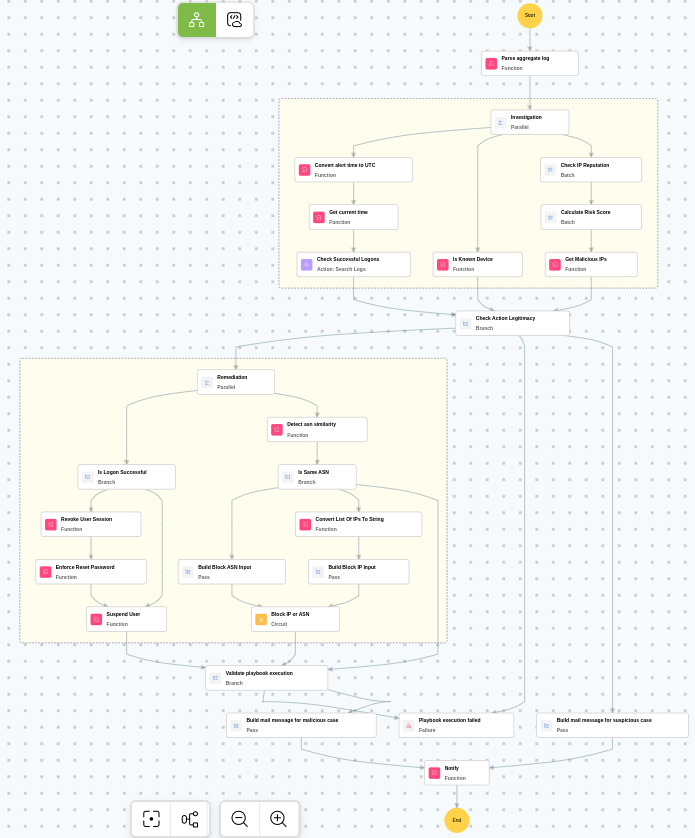
Investigation:
- Parses the aggregate log.
- Checks the successful logons.
- Checks whether known device exists.
- Checks the IP reputation in batch.
- Calculates the risk score in batch.
- Identifies malicious entities based on their risk scores.
Decision logic:
- Proceeds to remediation based on the following conditions:
- Related investigation findings are present.
- Malicious IP addresses were identified.
- If suspicious but not confirmed malicious, sends a notification for manual review and stops further actions.
- If no malicious indicators are confirmed, the playbook ends with no further actions.
Remediation:
- Checks whether logon is successful.
- Revokes the user session.
- Enforces password reset.
- Suspends non-super-admin users.
- Detects the ASN similarity.
- Checks whether same ASN exists.
- Builds the Block ASN input.
- Executes the "Okta - Block IP or ASN" sub-playbook.
- Validates if all remediation actions are completed successfully.
- Builds the notification email with remediation details and findings.
- Sends a notification email regarding the actions taken and required next steps.
Post execution procedure
- Review the blocked IP addresses and ASN numbers to ensure no legitimate traffic was affected.
- Investigate whether the compromised account was used to access any sensitive resources or data during the logon failures.
- Review Okta system logs for any signs of lateral movement or additional brute-force attempts.
- Consider enforcing additional MFA factors for the affected user before re-enabling access.
- Confirm that the affected user is notified about the account actions taken before re-enabling access.
- Audit other accounts in the organization for similar multi-logon failure patterns.

