

- Home
- Play books
- Windows - Defender quick scan
Windows - Defender quick scan
In this page
Playbook Description
Initiates a quick scan using Windows Defender on a specified endpoint, allowing security teams to rapidly assess and respond to potential threats detected on the device.
MITRE D3FEND mapping
| Tactics | Techniques | Sub-techniques |
|---|---|---|
| (Detect) D3-Detect | (File Analysis) D3-FA | - |
Playbook input type
Log
Prerequisites
Windows device configuration - Please provide Windows Administrator credentials in Windows device configuration page. Username: DOMAIN\Administrator or .\Administrator (for local accounts). Password: .
Dependencies
Utility-Functions:
- utility_dateTimetoFilter
Scripts
| Script Name | Description | Arguments |
|---|---|---|
| StartDefenderScan.ps1 | Starts a Microsoft Defender Quick Scan as a background job and returns the scan start time | - |
| MonitorsForScanCompletion.ps1 | Polls Windows Defender Operational event log (Event ID 1001) to detect when a scan completes after a given start time | ScanStartTime |
Execution workflow
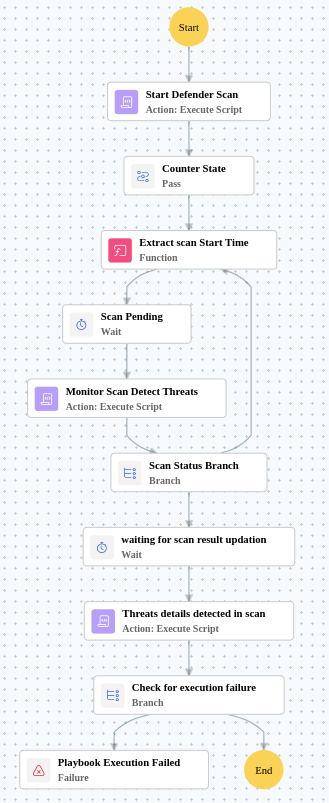
- Starts the Defender Scan.
- Waits for 30 seconds before checking status.
- Monitors the Scan Detect Threats.
- Scans the Status Branch.
- Waits for 1 minute(s) before checking status.
- Threats details detected in scan.
- Checks for execution failure.
Post execution procedure
- Review the quick scan results for any detected threats on the endpoint.
- If threats are detected, initiate a full scan or quarantine the affected files.
- Investigate any scan execution failures and retry if necessary.
- Verify that Windows Defender definitions are up to date on the scanned endpoint.
- Consider running a full scan if the quick scan identified suspicious activity.

