

- Free Edition
- Quick Links
- Highlights
- Exchange Online
- Exchange Online Management
- Exchange Online Reports
- Exchange Online Auditing
- Exchange Online Monitoring
- Shared Mailbox Management
- Mailbox Usage Reports
- Exchange Online Mailbox Auditing
- Shared Mailbox Reports
- Exchange Online Delegation
- Mailbox Size Reports
- Mail Traffic Reports
- Non-owner Mailbox Access Report
- Public Folder Reports
- OWA Reports
- Mailbox Content Reports
- Entra ID
- Entra ID Management
- Entra ID Reports
- Entra ID Monitoring
- Entra ID Auditing
- User Management
- Contact Reports
- Security Group Reports
- License Reports
- Entra ID Delegation
- Microsoft 365 User Provisioning
- User Reports
- Distribution Group Reports
- Group Reports
- Inactive Exchange Users
- Entra ID User Auditing
- Entra ID Group Auditing
- Entra ID Logon Auditing
- Microsoft Teams
- OneDrive for Business
- SharePoint Online
- Security and compliance
- Other Features
- Related Products
- ADManager Plus Active Directory Management & Reporting
- ADAudit Plus Hybrid AD, cloud, and file auditing and security
- ADSelfService Plus Identity security with MFA, SSO, and SSPR
- Exchange Reporter Plus Exchange Server Auditing & Reporting
- M365 Security Plus Microsoft 365 Auditing and Alerting
- EventLog Analyzer Real-time Log Analysis & Reporting
- SharePoint Manager Plus SharePoint Reporting and Auditing
- DataSecurity Plus File server auditing & data discovery
- RecoveryManager Plus Enterprise backup and recovery tool
- AD360 Integrated Identity & Access Management
- Log360 (On-Premise | Cloud) Comprehensive SIEM and UEBA
- AD Free Tools Active Directory FREE Tools
OneDrive for Business is a core part of organizational storage, but managing it with the SharePoint admin center can be complicated. Getting clear insights into storage usage, file activity, or user permissions requires tedious filtering and manual work.
M365 Manager Plus eliminates these inefficiencies with instant reports, real-time monitoring, and comprehensive auditing—streamlining OneDrive administration while enhancing security and compliance.
OneDrive insights with minimal effort
OneDrive holds critical business data, but it can be challenging to get clear insights from the SharePoint admin center. Finding out who accessed files, which folders were shared externally, or how storage is being used means navigating scattered reports and endless filtering. Tracking inactive sites or monitoring permission changes takes even more effort, leaving admins reactive instead of proactive.
M365 Manager Plus removes these hurdles with ready-to-use reports on file activity, sharing trends, storage usage, inactive sites, and permission changes, helping IT teams stay ahead with accurate, effortless insights.
Gain an enhanced view of your OneDrive activities
- Create your own personalized reports

- Schedule reports and access them instantly
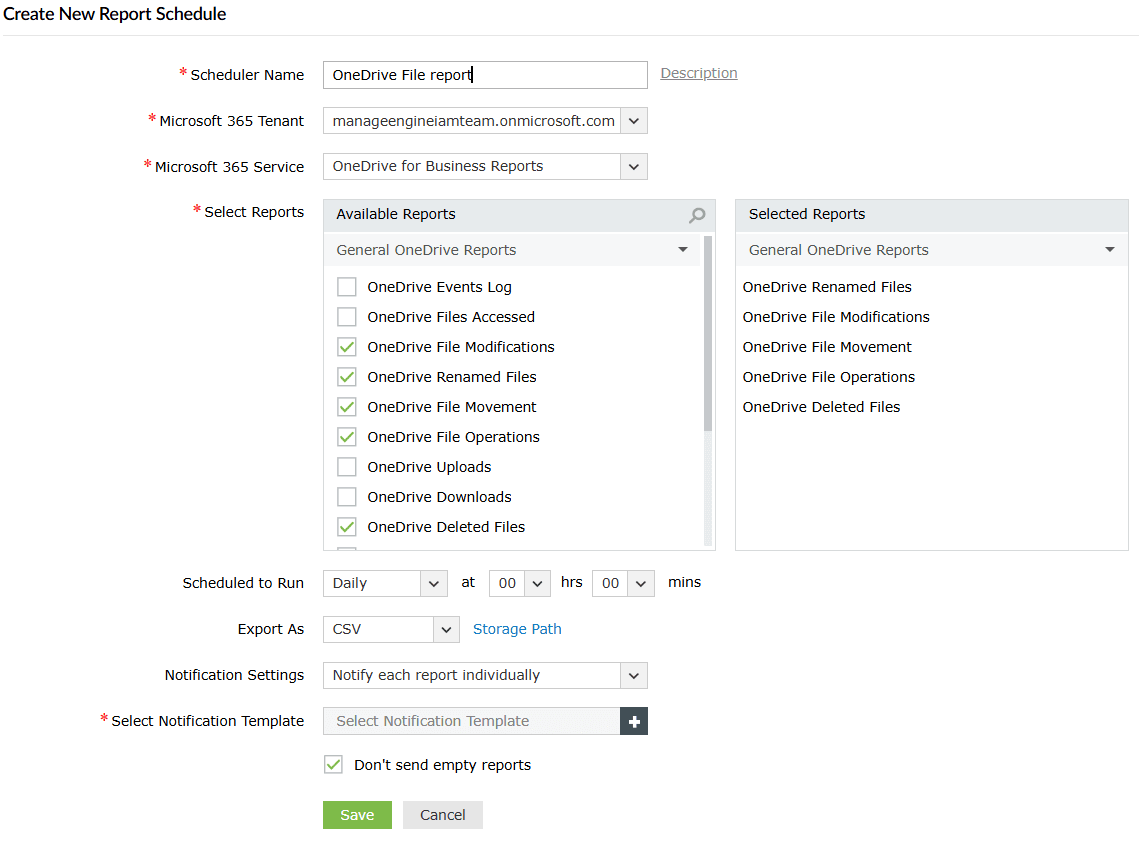
- Granular attribute-based filtering for your reports


Never miss details in your OneDrive audits
Your OneDrive audits aren't just about compliance. They're also about ensuring accountability for your users' actions. Most risks aren’t caused by external actors, but by unmonitored activity like bulk downloads that go unnoticed or uneven usage patterns. OneDrive’s 180-day retention limit for audit logs makes long-term tracking difficult, and investigating past activity is often impossible if you haven't been saving your logs periodically.
M365 Manager Plus eliminates these risks with real-time tracking of file activities, permission modifications, sharing changes, and suspicious events for full visibility and control over your OneDrive administration. Moreover, you can overcome the native 180-day limit and retain audit logs for as long as necessary for compliance requirements.
Total visibility for OneDrive security
- Create your own personalized audit profiles

- Schedule audits and store them effortlessly
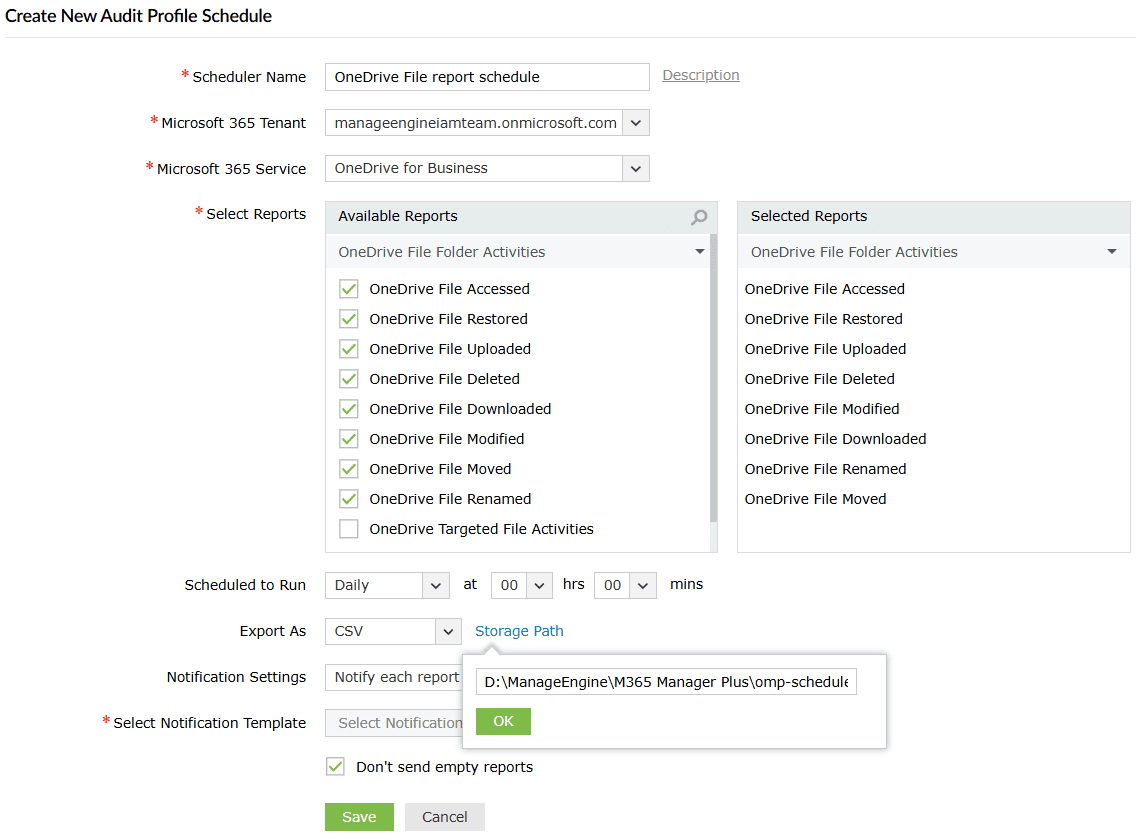
- Granular attribute-based filtering for your audits

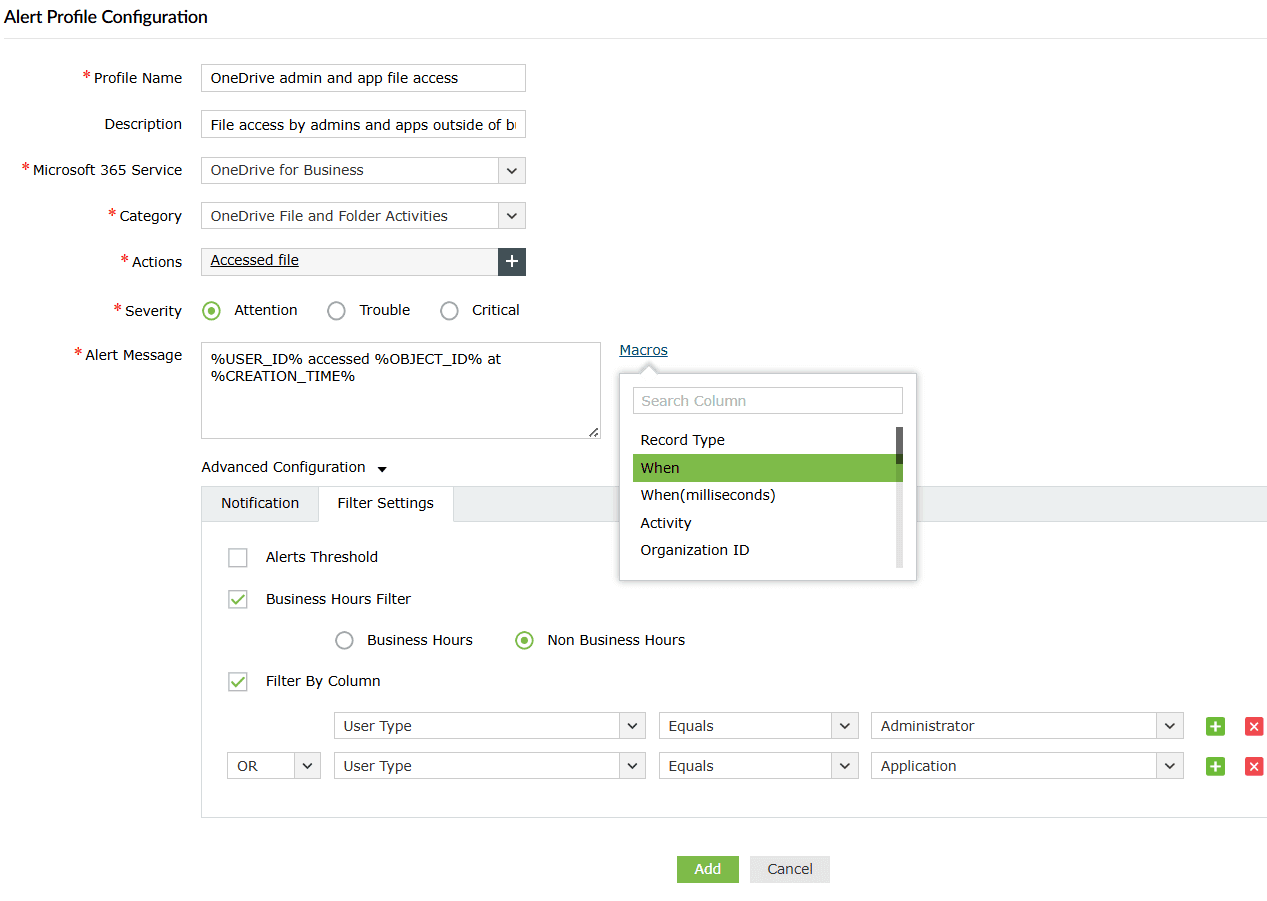
- Stay informed of crucial events with real-time alerts


Smarter OneDrive monitoring for seamless operations
A slow or unresponsive OneDrive can disrupt workflows, but native tools don’t always provide the right insights when it matters most. When issues like sync failures or access disruptions occur, IT teams are left scrambling to identify the cause and provide users with an estimated resolution time.
M365 Manager Plus helps bridge this gap with instant alerts for high-priority events, real-time service health monitoring, and endpoint sync tracking.
Monitor OneDrive downtime proactively
- Monitor service health and issue history

- Get response rates of endpoints in a few clicks


Other services supported by M365 Manager Plus
- Microsoft Entra ID
Get a track record of your Microsoft 365 users, groups, licenses, and applications, and provision them seamlessly.
- Exchange Online
Monitor and manage mailboxes and their permissions, audit for changes to properties, and run scheduled Content Search audits.
- SharePoint Online
Secure, track, and control access and permissions to your SharePoint Online sites.
- Microsoft Teams
Stay on top of your Microsoft Teams activities and monitor for any changes effortlessly.