Custom Instrumentation using Java Annotations
Using Java annotations, APM Insight provides an easier way to custom-instrument your application classes and methods. By using Java annotations, you can define custom names for transactions and assign them to specific components.
Note:
- Download the apminsight-javaagent.zip file, which includes the agent JAR, its associated files, and the apminsight-javaagent-api.jar.
- Add the apminsight-javaagent-api.jar file to your project’s build path. Ensure that the JAR is packaged along with the application's libraries during deployment.
- The Java Agent API library provides two annotations that can be used to track the performance of your custom classes and methods:
- ApmTracker — Can be applied to any class or method. It instruments the target and includes it in the transaction trace.
- ApmRootTracker — Should be used on methods that act as entry points for background transaction execution.
@ApmTracker
This annotation can be used on classes and methods.
When applied at the class level, the specified attributes are inherited by all methods in the class, overriding any method-level annotations. The annotation supports the following attributes:
component— Optional attribute
Specifies a custom component name for the annotated class or method.
Example:
Case 1: Usage on Class@ApmTrackerpublic class Category {...}Case 2:@ApmTracker(component="payment"public class PaymentProcessor {...}Case 3: Usage on Methodspublic class Product {@ApmTrackerpublic int getPrice(String product, String brand) {...}...@ApmTracker(component="FetchBrand")private List fetchAllBrandsList(String product) {...}}name— Optional attribute
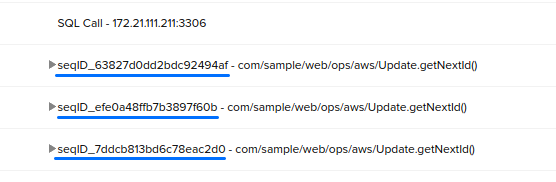
Defines a custom name for the annotated method. This name will be prepended to the actual method name in the trace. You can include method parameters in the name by referencing the argument index using the $ prefix (e.g., $1, $2, etc., where indexing starts at 1).

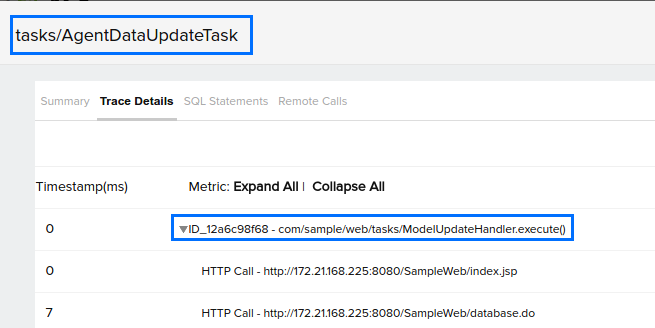
The instrumented methods and their custom names will be displayed under Traces in Applications Manager.
@ApmRootTracker
This annotation can be used only on methods.
If the annotated method is the first method invoked on the server to process a transaction, the transaction is renamed using the value of the txnName attribute. Otherwise, it is treated as a regular method call and is included in the trace. The supported attributes are:
component— Optional attribute
Specifies a custom component for the annotated method.
name— Optional attribute
Defines a custom name for the annotated method. This name will be prepended to the actual method name in the trace.
You can also include method parameters by referencing their index using the $ prefix (e.g., $1, $2, etc., with indexing starting at 1).txnName— Mandatory attribute
Specifies the name for the background transaction only if the annotated method is the entry point of the transaction.
If the method is not the entry point, it is tracked as a normal method and added to the trace accordingly.
The transaction will be named based on the value provided for the txnName attribute.