API REST do OpManager

    O OpManager oferece APIs REST para adicionar e buscar dados do OpManager. Usando essas APIs, é possível integrar o OpManager com software de gerenciamento de TI/service desk de terceiros.

    Como as APIs REST do OpManager funcionam?

    As APIs funcionam com uma chave de API. A chave de API é única para cada conta OpManager e é obrigatória para todas as solicitações de API. Aprenda como habilitar ou desabilitar chaves da API Rest

    Como visualizar uma chave de API

    Para visualizar ou copiar uma chave de API, acesse Links rápidos > opção Chave de API Rest no cliente web do OpManager. (A opção de link rápido é o ícone de engrenagem no canto superior direito)

    Como enviar uma apiKey?

    A funcionalidade de autenticação apiKey baseada em parâmetros de solicitação foi descontinuada. Antes da versão 128100, a apiKey pode ser enviada por meio do parâmetro de solicitação. A partir da versão 128100, a apiKey agora pode ser enviada no cabeçalho da solicitação ou como um parâmetro de solicitação.

    Observação: O suporte para autenticação apiKey baseada em parâmetros de solicitação será encerrado em breve. A lista de URLs a seguir deve ser chamada com apiKey somente por meio do cabeçalho da solicitação. A autenticação apiKey baseada em parâmetros de solicitação não funcionará para estes URLs.

    API
    /api/json/alarm/listAlarms
    /api/json/admin/addLinuxCredential
    /api/json/discovery/addDiscoveryProfile
    /api/json/discovery/editDiscoveryProfile
    /api/json/v2/discovery/addDiscoveryProfile
    /api/json/v2/discovery/editDiscoveryProfile
    /api/json/ncmsettings/importSSHKey
    /api/json/ncmsettings/importDevices
    /api/json/ncmsettings/uploadConfigletFile
    /api/json/ncmsettings/uploadConfigletPreView
    /api/json/ncmsettings/importConfiglets
    /api/json/ncmdevice/updateHostNamefromFileImp
    /api/json/ncmdevice/editCustomColfromFileImp
    /api/json/ncmdevice/importDG
    /api/json/ipam/addSubnet
    /api/json/spm/addSwitch

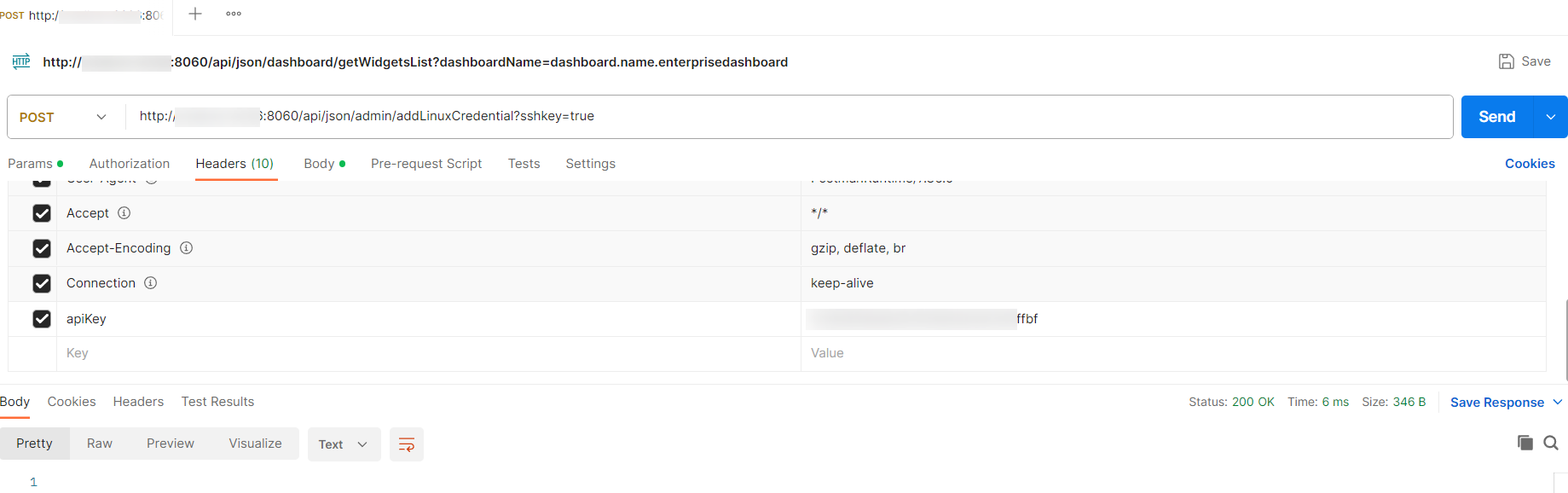
    Exemplo de configuração com cabeçalho:api_header

    Habilitar/Desabilitar acesso à API Rest

    A partir da versão 127131, a opção de habilitar/desabilitar a API Rest foi adicionada.

    O que mudou?

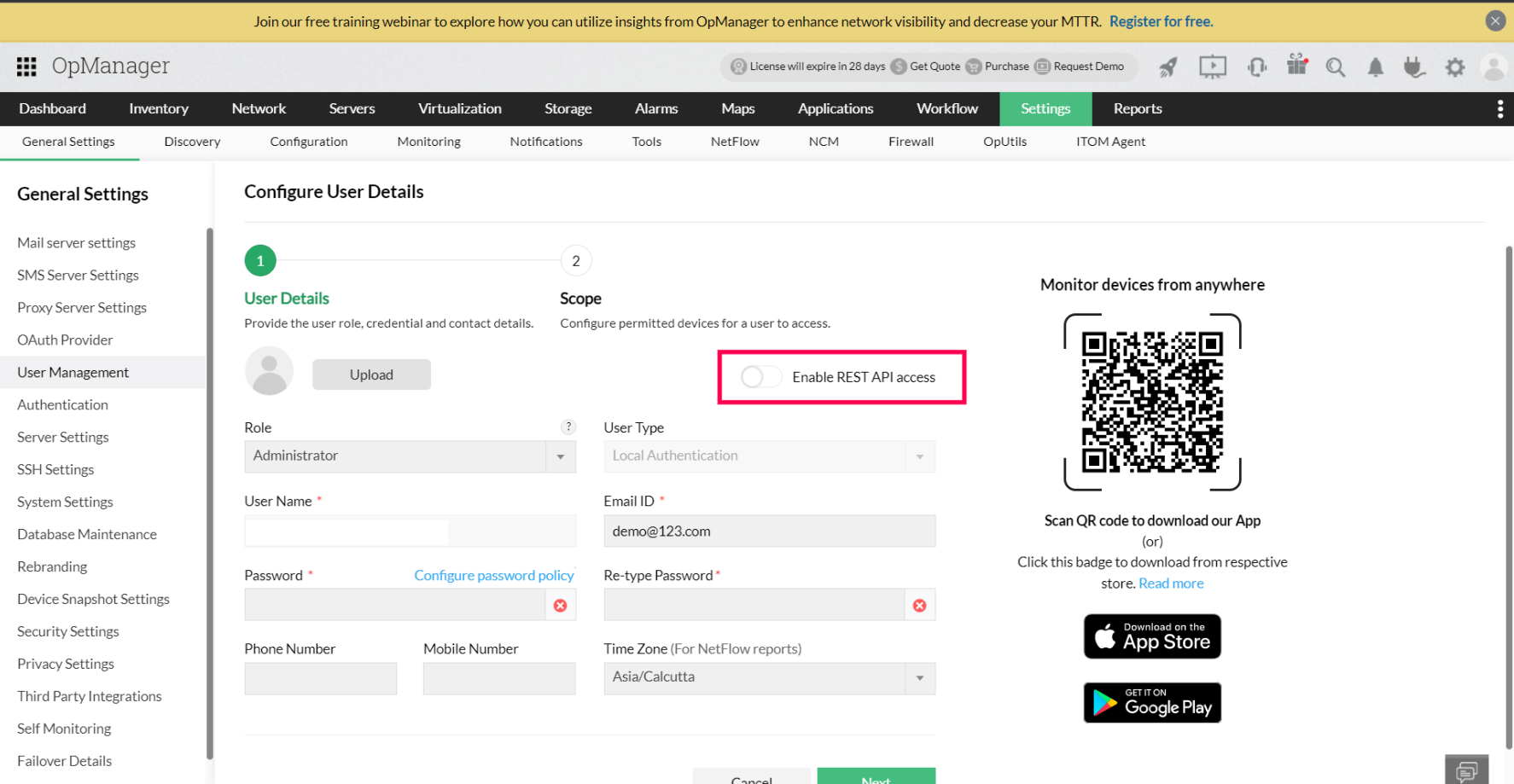
    • O acesso à API REST será desabilitado por padrão para os novos usuários criados no Gerenciamento de Usuários. Um administrador com acesso completo a todos os módulos e dispositivos poderá editar o usuário no Gerenciamento de Usuários e fornecer acesso à API Rest, se necessário.
    • enable-api-1

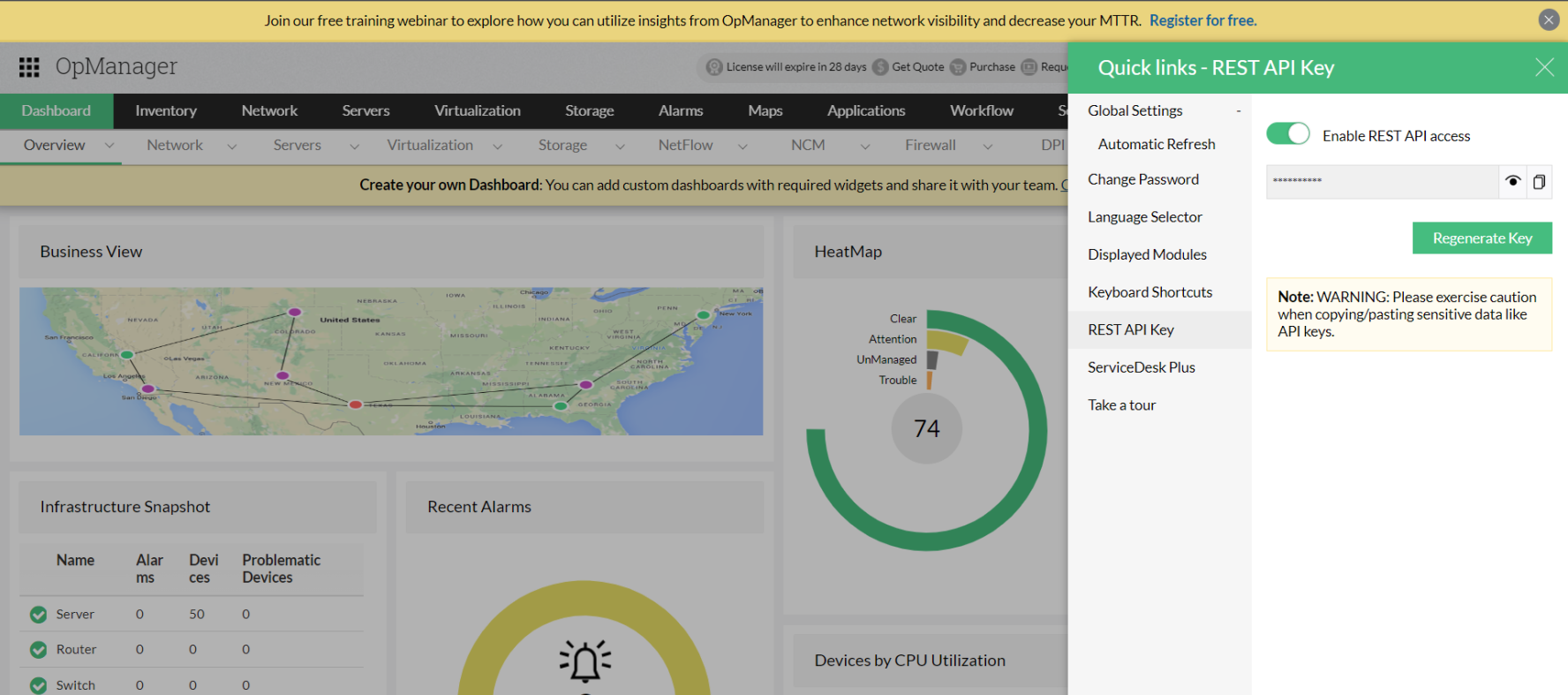
    • Se o acesso RestApikey tiver sido habilitado para os usuários, o menu da API Rest em Links rápidos exibirá o RestApikey, e chamadas externas de API Rest serão permitidas somente se o acesso à API Rest tiver sido habilitado para o usuário.
    • enable-api-2

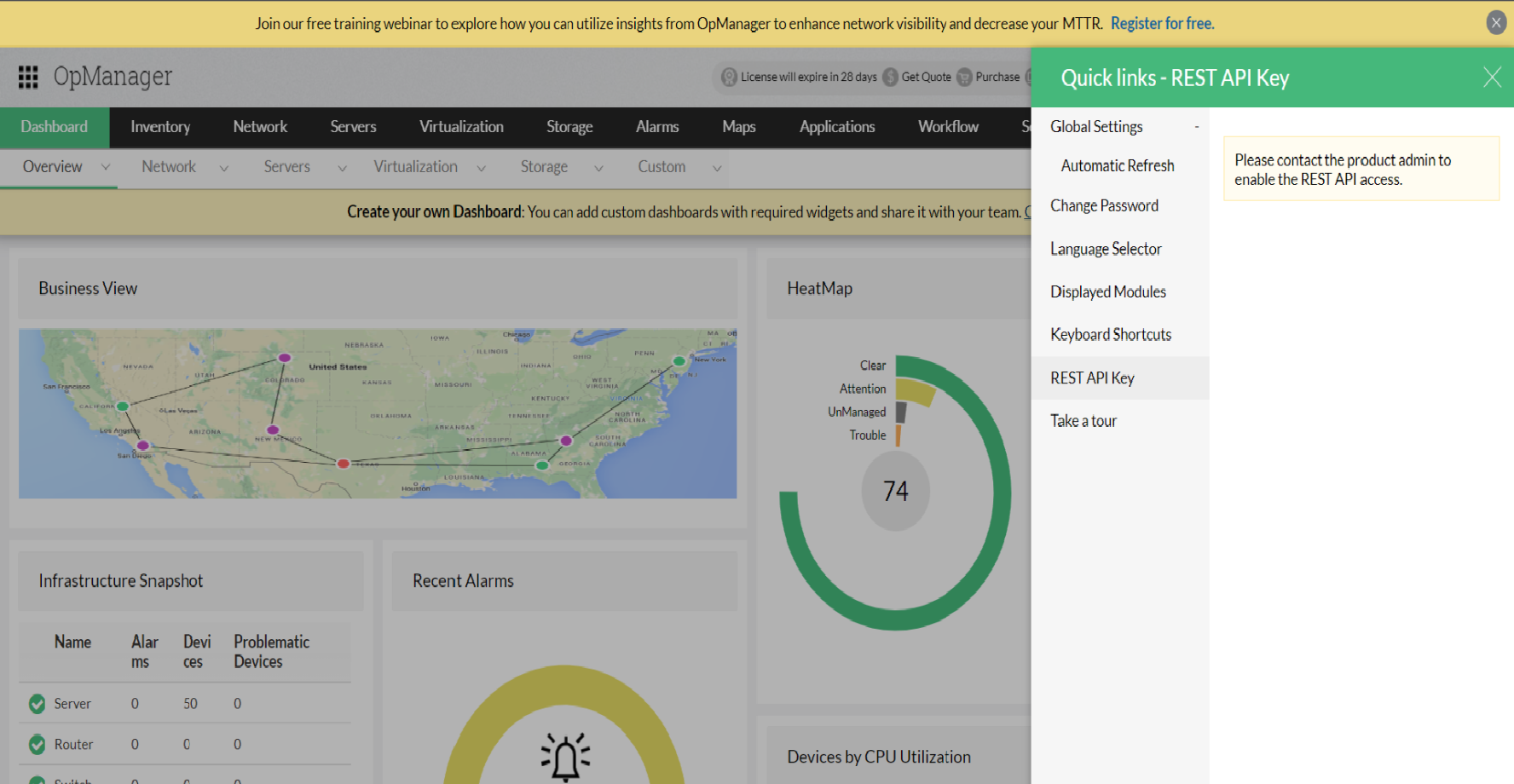
    • Se o acesso à API Rest tiver sido desabilitado, o menu da API Rest em Links rápidos exibirá "Entre em contato com o usuário administrador".
    • enable-api-3

    Observação:

    Sincronização de usuário da versão Enterprise: O acesso à API Rest não será sincronizado para usuários dos servidores Central e Probe. Os usuários sincronizados no Probes não terão acesso permanente à API Rest. Enquanto isso, para os usuários criados no servidor Probe, o acesso à API Rest pode ser atualizado conforme necessário.

    TFA: Se a autenticação de dois fatores tiver sido configurada, a validação TFA OTP será obrigatória para habilitar o acesso à API Rest.

    Regenerar uma chave de API: para gerar uma chave de API, vá para Configurações > Configurações básicas > API REST no cliente web do OpManager e clique em Regenerar chave.

    Alarms

    listAlarms

    Método: GET

    Description: Lists all the alarms generated in OpManager.

    Sample URL: http://localhost:8060/api/json/alarm/listAlarms?apiKey=********&deviceName=test1.zoho.com&severity=1&category=Device_Category&entity=sample_entity&alertType=ActiveAlarms&fromTime=2022-05-02 08:00:00&toTime=2022-06-02 18:30:00

    Sample Response: [{"severity":"<img src='/images/devices/status3.gif'> Attention","numericSeverity":3,"severityString":"Attention","statusStr":"Attention","displayName":"opm-server1","message":"CPU Utilization is 0%, threshold value for this monitor is 4%: Top 3 Processes:-MEEDRInferenceEngine - 1.299%;svchost#42 - 0.812%;WmiPrvSE#3 - 0.65%","deviceName":"opm-server1","statusNum":3,"modTimeLong":1709902027793,"modTime":"8 Mar 2024 06:17:07 PM IST","alarmId":"1","category":"Desktop","entity":"3_CPUUSAGE","status":3,"who":"Unacknowledged"},{"severity":" Critical","numericSeverity":1,"severityString":"Critical","statusStr":"Critical","displayName":"opm-server1","message":"Disk Utilization is 54%, threshold value for this monitor is 6%","deviceName":"opm-server1","statusNum":1,"modTimeLong":1709875112703,"modTime":"8 Mar 2024 10:48:32 AM IST","alarmId":"3","category":"Desktop","entity":"5_DiskUtilization","status":1,"who":"Unacknowledged"},{"severity":"<img src='/images/devices/status2.gif'> Trouble","numericSeverity":2,"severityString":"Trouble","statusStr":"Trouble","displayName":"opm-server1","message":"IO Read and Write Rate is 1258 Operations/Sec, threshold value for this monitor is 5 Operations/Sec","deviceName":"opm-server1","statusNum":2,"modTimeLong":1709875109126,"modTime":"8 Mar 2024 10:48:29 AM IST","alarmId":"2","category":"Desktop","entity":"10","status":2,"who":"Unacknowledged"}]

    Parameter name
    Description
    apiKey*
    API Key to access your OpManager server.
    deviceName
    Device Name of the alarm. The device name can be taken from the URL of the device snapshot page.
    severity
    Severity of the alarm. The severity could range anywhere from 1 to 5. 1 = Critical, 2 = Trouble, 3 = Attention, 4 = Service Down, 5 = Clear.
    category
    Device category of the alarm
    alertType
    alertType of the alarm. The alert type can be any of the following: ActiveAlarms, EventLogAlarms, SyslogAlarms, TrapAlarms, NCMAlarms, NFAAlarms, WebAlarms, FWAAlarms, StorageAlarms.
    fromTime
    Start time for the custom time period range. It could be of the format yyyy-mm-dd or yyyy-mm-dd hh:mm:ss. If no time is specified (i.e, yyyy-mm-dd format), the default time will be set to 12 A.M(start of the day).
    toTime
    End time for the custom time period range. It could be of the format yyyy-mm-dd or yyyy-mm-dd hh:mm:ss. If no time is specified (i.e, yyyy-mm-dd format), the default time will be set to 12 A.M(start of the day).
    probeName
    The name of the Probe. The probe name could be obtained by executing the listProbes API , where the parameter name in the response refers to the probeName. [Applicable only for Central Server]

    alarmProperties

    Método: GET

    Description: To list alarm properties of the particular alarm

    Sample URL: https://localhost:8060/api/json/alarm/alarmProperties?apiKey=***************&entity=sample_entity

    Sample Response: { "statusStr": "Critical", "displayName": "opm-server1", "PRIORITY": "0", "workflows": [ { "logSeverity": 5, "moDispName": "opm-server1", "logMessage": "Workflow has been executed successfully.", "rbName": "workflow1", "taskList": [ { "logSeverity": 5, "logMessage": "Ping command used was : C:\\WINDOWS\\System32\\ping -n 4 -w 1000 -l 32 127.0.0.1", "logSeverityStr": "Info", "taskName": "Ping Device", "logTimeLong": "2022-10-26 17:34:18.481", "logTime": "26 Oct 2022 05:34:18 PM IST" }, { "logSeverity": 5, "logMessage": "Ping output : \nPinging 127.0.0.1 with 32 bytes of data:\nReply from 127.0.0.1: bytes=32 time<1ms TTL=128\nReply from 127.0.0.1: bytes=32 time<1ms TTL=128\nReply from 127.0.0.1: bytes=32 time<1ms TTL=128\nReply from 127.0.0.1: bytes=32 time<1ms TTL=128\n\nPing statistics for 127.0.0.1:\n Packets: Sent = 4, Received = 4, Lost = 0 (0% loss),\nApproximate round trip times in milli-seconds:\n Minimum = 0ms, Maximum = 0ms, Average = 0ms\n", "logSeverityStr": "Info", "taskName": "Ping Device", "logTimeLong": "2022-10-26 17:34:18.481", "logTime": "26 Oct 2022 05:34:18 PM IST" }, { "logSeverity": 5, "logMessage": "Ping was successful.", "logSeverityStr": "Info", "taskName": "Ping Device", "logTimeLong": "2022-10-26 17:34:18.481", "logTime": "26 Oct 2022 05:34:18 PM IST" } ], "rbID": 301, "moID": 302, "logTime": "26 Oct 2022 05:34:18 PM IST" } ], "source": "opm-server1", "stringseverity": "Critical", "GROUPNAME": "", "strCreateTime": "26 Oct 2022 05:27:50 PM IST", "id": "5", "events": [ { "severity": "Critical", "statusStr": "Critical", "source": "opm-server1", "id": "5", "time": "26 Oct 2022 05:27:50 PM IST", "text": "Disk Utilization is 44%, threshold value for this monitor is 5%", "category": "Desktop", "imgsrc": "/images/devices/status1.gif", "entity": "37_DiskUtilization", "statusNum": "1" } ], "severity": "/images/devices/status1.gif", "WEBNMS": "", "strModTime": "26 Oct 2022 05:27:50 PM IST", "ALARMCODE": "THRESHOLD-DOWN_WMI-DiskUtilization", "message": "Disk Utilization is 44%, threshold value for this monitor is 5%", "previousSeverity": "-1", "priority": "0", "deviceID": 302, "OWNERNAME": "", "statusNum": "1", "MAPNAME": "", "EVENTTYPE": "Threshold Down", "stage": "0", "modTime": "1666785470844", "createTime": "1666785470844", "pollid": "37", "category": "Desktop", "entity": "37_DiskUtilization", "stringpreviousseverity": "", "who": "Unacknowledge" }

    Parameter name
    Description
    apiKey*
    API Key to access your OpManager server.
    entity
    Entity of the alarm
    deviceID
    MOID of the alarm

    addNotes

    Método: POST

    Description: This API is used to add notes to an alarm

    Sample URL: https://localhost:8060/api/json/alarm/addNotes?apiKey=***************&entity=sample_entity

    Sample Response: { "result": { "message": "Successfully Added" } }

    Parameter name
    Description
    apiKey*
    API Key to access your OpManager server.
    entity*
    Entity of the alarm
    notes*
    Notes description to be added
    type
    To mention whether single or multiple alarms are selected

    acknowledgeAlarm

    Método: POST

    Description: This API is used to acknowledge an alarm

    Sample URL: https://localhost:8060/api/json/alarm/acknowledgeAlarm?apiKey=***************&entity=sample_entity

    Sample Response: { "result": { "message": "Alarm has been successfully Acknowledged" } }

    Parameter name
    Description
    apiKey*
    API Key to access your OpManager server.
    entity*
    Entity of the alarm
    type
    To mention whether single or multiple alarms are selected

    unAcknowledgeAlarm

    Método: POST

    Description: This API is used to unacknowledge an alarm

    Sample URL: http://localhost:8060/api/json/alarm/unAcknowledgeAlarm?apiKey=********&entity=sample_entity

    Sample Response: { "result": { "message": "Alarm has been successfully UnAcknowledged" } }

    Parameter name
    Description
    apiKey*
    API Key to access your OpManager server.
    entity*
    Entity of the alarm
    type
    To mention whether single or multiple alarms are selected

    clearAlarm

    Método: POST

    Description: This API is used to clear an Alarm.

    Sample URL: https://localhost:8060/api/json/alarm/clearAlarm?apiKey=***************&entity=sample_entity

    Sample Response: { "result": { "message": "Alarm has been successfully Cleared!" } }

    Parameter name
    Description
    apiKey*
    API Key to access your OpManager server.
    entity*
    Entity of the alarm
    type
    To mention whether single alarm or multiple alarms are selected

    deleteAlarm

    Método: POST

    Description: This API is to delete an alarm

    Sample URL: https://localhost:8060/api/json/alarm/deleteAlarm?apiKey=***************&entity=sample_entity

    Sample Response: { "result": { "message": "Alarm has been successfully Deleted!" } }

    Parameter name
    Description
    apiKey*
    API Key to access your OpManager server.
    entity*
    Entity of the alarm
    type
    To mention whether single or multiple alarm is selected

    ConfigureSuppressAlarm

    Método: POST

    Description: This API is used to suppress alarms for a specific device.

    Sample URL: https://localhost:8060/api/json/device/ConfigureSuppressAlarm?apiKey=&name=test.abc&suppressInterval=-2&startTime=2024-08-16 16:30&endTime=2024-08-16 16:50

    Sample Response: { "result": { "message": "Alarm Suppression rule has been added successfully" } }

    Parameter name
    Description
    apiKey*
    API Key to access your OpManager server.
    name*
    The Managed Entity name refers to the device to be suppressed. It can be found in the URL of the corresponding Device Snapshot.
    suppressInterval*
    The time period during which the device should be suppressed from receiving alarms.
    Accepted Values:
    • 0 = Never
    • -1 = Forever
    • -2 = Custom Time Period (For Custom Time Period, specify the startTime and endTime parameters in the format YYYY-MM-DD HH:MM)
    • 3600000 = One Hour
    • 7200000 = Two Hours
    • 28800000 = Eight Hours
    • 43200000 = Twelve Hours
    • 86400000 = One Day
    • 604800000 = One Week
    startTime
    Alarm suppression start time in YYYY-MM-DD HH:MM format. (To be specified only for suppressInterval = -2)
    endTime
    Alarm suppression end time in YYYY-MM-DD HH:MM format. (To be specified only for suppressInterval = -2)

    getTopDevicesByAlarms

    Método: GET

    Description: This API is to get alarms based on devices

    Sample URL: https://localhost:8060/api/json/alarm/getTopDevicesByAlarms?apiKey=***************&entity=sample_entity

    Sample Response: [ { "ipaddress": "127.0.0.1", "moname": "opm-server1", "devicename": "opm-server1", "alarmcount": 162, "type": "Windows 10", "category": "Desktop", "mapname": "Desktops_Map.netmap", "status": 1 }, { "ipaddress": "127.0.0.1", "moname": "opm-server2", "devicename": "opm-server2", "alarmcount": 2, "type": "Windows 2019", "category": "Server", "mapname": "Servers_Map.netmap", "status": 1 } ]

    Parameter name
    Description
    apiKey*
    API Key to access your OpManager server.
    eventType*
    Event type of the alarm

    getAnnotation

    Método: GET

    Description: This API is to get notes of the alarms

    Sample URL: https://localhost:8060/api/json/alarm/getAnnotation?apiKey=***************&entity=sample_entity

    Sample Response: [ { "notes": "This is a test note", "modTime": 1666786020066, "noteID": 1, "modTimeStr": "26 Oct 2022 05:37:00 PM IST", "entity": "37_DiskUtilization", "who": "admin" } ]

    Parameter name
    Description
    apiKey*
    API Key to access your OpManager server.
    entity*
    Entity of the alarm

    Availability

    getPingResponse

    Método: POST

    Description: ICMP/Ping response for the given device.

    Sample URL: https://localhost:8060/api/json/device/getPingResponse?apiKey=***************&deviceName=xxx.xxx.xx.x

    Sample Response: {"PingResponse":{"Details":"\nPinging 127.0.0.1 with 32 bytes of data:\nReply from 127.0.0.1: bytes=32 time=21ms TTL=251\n\nPing statistics for 127.0.0.1:\n Packets: Sent = 1, Received = 1, Lost = 0 (0% loss),\nApproximate round trip times in milli-seconds:\n Minimum = 21ms, Maximum = 21ms, Average = 21ms\n"}}

    Parameter name
    Description
    apiKey*
    API Key to access your OpManager server.
    deviceName*
    Name of the device - Managed Entity name as seen in the URL of device snapshot page OR 'deviceName' property value in the listDevices API response.

    getTraceResponse

    Método: POST

    Description: Trace route command response for the given device

    Sample URL: https://localhost:8060/api/json/device/getTraceResponse?apiKey=***************&deviceName=xxx.xxx.xx.x

    Sample Response: {"TraceResponse":{"Details":"\nTracing route to 127.0.0.1 over a maximum of 30 hops\n\n 1 8 ms 9 ms 3 ms 127.0.0.1 \n 2 1 ms 1 ms 1 ms 127.0.0.1 \n 3 20 ms 20 ms 20 ms 127.0.0.1 \n 4 22 ms 21 ms 22 ms 127.0.0.1 \n 5 21 ms 20 ms 20 ms 127.0.0.1 \n\nTrace complete.\n"}}

    Parameter name
    Description
    apiKey*
    API Key to access your OpManager server.
    deviceName*
    Name of the device - Managed Entity name as seen in the URL of device snapshot page OR 'deviceName' property value in the listDevices API response.

    getDownDevices

    Método: GET

    Description: Lists the devices that are currently in down state and having device status as 'critical'

    Sample URL: https://localhost:8060/api/json/discovery/getDownDevices?apiKey=******************

    Sample Response: {"DownDevices":{"Details":[{"name":"127.0.0.1","type":"HPSwitch 3900X","category":"Switch","displayName":"SwitchDevice_SP"},{"name":"127.0.0.2","type":"Windows Server 2018","category":"Server","displayName":"AppServer-04"},{"name":"UserPC_Michael","type":"Linux RedHat","category":"Server","displayName":"127.0.0.3"}]}}

    Parameter name
    Description
    apiKey*
    API Key to access your OpManager server.

    getAvailabilityGraphData

    Método: GET

    Description: Fetches the Availability graphs for the given device or interface.

    Sample URL: https://localhost:8060/api/json/device/getAvailabilityGraphData?apiKey=******************&isFluidic=true&name=opmserver.mydomain.com

    Sample Response: {"uptimeData":{"Today":100,"This week":100,"Last week":99,"Last 30 days":99,"Last month":0,"This month":99,"Last 24 hours":100,"Yesterday":100,"Last 7 days":99,"Last 12 hours":100},"graphData":[{"seriesname":"Up","data":[["Last 12 hours",100],["Today",100],["Last 24 hours",100],["Yesterday",100],["This week",100],["Last 7 days",99.093],["Last week",98.867],["This month",99.269],["Last 30 days",99.093],["Last month",0]]},{"seriesname":"On Maintenance","data":[["Last 12 hours",0],["Today",0],["Last 24 hours",0],["Yesterday",0],["This week",0],["Last 7 days",0],["Last week",0],["This month",0],["Last 30 days",0],["Last month",0]]},{"seriesname":"Dependent Unavailable","data":[["Last 12 hours",0],["Today",0],["Last 24 hours",0],["Yesterday",0],["This week",0],["Last 7 days",0],["Last week",0],["This month",0],["Last 30 days",0],["Last month",0]]},{"seriesname":"On Hold","data":[["Last 12 hours",0],["Today",0],["Last 24 hours",0],["Yesterday",0],["This week",0],["Last 7 days",0],["Last week",0],["This month",0],["Last 30 days",0],["Last month",0]]},{"seriesname":"Down","data":[["Last 12 hours",0],["Today",0],["Last 24 hours",0],["Yesterday",0],["This week",0],["Last 7 days",0],["Last week",0],["This month",0],["Last 30 days",0],["Last month",0]]},{"seriesname":"Not Monitored","data":[["Last 12 hours",0],["Today",0],["Last 24 hours",0],["Yesterday",0],["This week",0],["Last 7 days",0.907],["Last week",1.133],["This month",0.731],["Last 30 days",0.907],["Last month",100]]}]}

    Parameter name
    Description
    apiKey*
    API Key to access your OpManager server.
    name*
    Name of the device or interface - Managed Entity name as seen in the URL of device/interface snapshot page OR 'deviceName' property value of listDevices API or 'interfaceName' property value in the listInterfaces API response [Example: opmserver.mydomain.com or IF-xx.xx.24.223-115]
    instance
    Set instance=Interface if the Availability graph is requested for the interface. Mandatory field if the interface data is being fetched. This API can also be used to fetch availability of other monitors. [Example: Interface|URL|winService|service|process]
    isFluidic*
    Set value as TRUE by default (for internal purpose)

    listDownTimeSchedules

    Método: GET

    Description: Provides the list of downtime schedules created in OpManager.

    Sample URL: https://localhost:8060/api/json/admin/listDownTimeSchedules?apiKey=****************

    Sample Response: [{"name":"Test","id":"1","type":"Once","nextscheduledtime":"Mon, Nov 28, 2022 13:00:00","statusNum":"1","status":"Enabled"}]

    Parameter name
    Description
    apiKey*
    API Key to access your OpManager server.

    addDowntimeSchedule

    Método: POST

    Description: Allows you to schedule downtimes for groups and devices.

    Sample URL: https://localhost:8060/api/json/admin/addDowntimeSchedule?apiKey=&operation=Add&scheduleName=FirmwareUpgrade&status=Enabled&scheduleDesc=&recurrence=OnceOnly&selectDevicesMétodo=Device&once_startat=2024-07-10 00:00&once_endate=2024-07-11 04:00&selectedDevices=172.21.191.167,30.30.30.6,opm-sql

    Sample Response: {"result":{"message":"Downtime Scheduler has been added successfully."}}

    Parameter name
    Description
    apiKey*
    API Key to access your OpManager server.
    operation
    Add (to create new downtime scheduler)
    scheduleName
    Name of the schedule (Strig value)
    status
    Enabled/Disabled
    scheduleDesc
    Downtime scheduler description (Optional)
    recurrence
    OnceOnly/Daily
    selectDevicesMétodo
    Device
    once_startat
    Start date & time (applicable only if recurrence is 'OnceOnly')
    once_endate
    End date & time (applicable only if recurrence is 'OnceOnly')
    daily_effectfrom
    Downtime scheduler start date & time (applicable only if recurrence is 'Daily')
    from_time
    Start date & time (applicable only if recurrence is 'Daily')
    to_time
    End date & time (applicable only if recurrence is 'Daily')
    selectedDevices
    Device IP (comma-separated values)
    selectedLogicalGroups
    Devices Group name (comma-separated values)
    mailID
    Email id to which the report should be sent​
    recurrence
    Once | Daily | Weekly | Monthly
    selectDevicesMétodo
    Device | Category | BV | URL
    selectedCateg
    Device category (applicable only if selectDevicesMétodo is 'Category')
    selectedBV
    Business view name suffixed with '_bv' (applicable only if selectDevicesMétodo is 'Business View')
    selectedURL
    URL Monitor name (applicable only if selectDevicesMétodo is 'URLs')
    monthlyType
    monthlyDate | monthlyDay (applicable only if recurrence is 'Monthly')
    startday
    Start day of the week (applicable only for Daily)
    endday
    End day of the week (applicable only for Daily)
    weekday
    Day of the week (applicable only if recurrence is 'Monthly' and monthlyType is 'monthlyDay')
    from_time
    Start date & time (applicable only if recurrence is 'Daily')
    to_time
    End date & time (applicable only if recurrence is 'Daily')
    from_hrs
    Start hour (applicable only if recurrence is 'Monthly')
    to_hrs
    End hour (applicable only if recurrence is 'Monthly')
    from_mins
    Start Minutes (applicable only if recurrence is 'Monthly')
    to_mins
    End minutes (applicable only if recurrence is 'Monthly')

    updateDowntimeSchedule

    Método: POST

    Description: Used to update downtime schedule.

    Sample URL: http://localhost/api/json/admin/updateDowntimeSchedule?operation=Edit&MS_INSTANCEID=14&scheduleId=14

    Sample Response: [{"name":"Test","id":"1","type":"Once","nextscheduledtime":"Mon, Nov 28, 2022 13:00:00","statusNum":"1","status":"Enabled"}]

    Parameter name
    Description
    operation
    Edit will be sent by default (Edit).
    MS_INSTANCEID
    Downtime scheduler ID.
    scheduleId
    Downtime scheduler ID.
    scheduleName
    Downtime scheduler name.
    status
    Status will be set as Enabled by default.
    scheduleDesc
    Downtime scheduler description.
    recurrence
    Downtime frequency (OnceOnly | Daily | Weekly | Monthly).
    selectDevicesMétodo
    Filter by option (Category | BV | Device | URL | GROUP).

    Only one param will be sent from the following five parameters based on the selected filter.

    Parameter name
    Description
    selectedCateg
    Selected category.
    selectedDevices
    Selected devices.
    selectedBV
    Selected Business View.
    selectedURL
    Selected URLs.
    selectedLogicalGroup
    Selected logical group.

    The following two parameters will be used only for once-only downtime frequency.

    Parameter name
    Description
    once_startat
    Start time (yyyy-mm-dd hh:mm).
    once_endat
    End time (yyyy-mm-dd hh:mm).

    The following three parameters will be used only for daily downtime frequency.

    Parameter name
    Description
    from_time
    Start time (hh:mm) for Daily downtime frequency.
    to_time
    End time (hh:mm) for Daily downtime frequency.
    daily_effectfrom
    Effect from date (yyyy-mm-dd) for Daily downtime frequency.

    The following four parameters will be used only for weekly downtime frequency.

    Parameter name
    Description
    startday
    Start day (Sunday | Monday | Tuesday | Wednesday | Thursday | Friday | Saturday) for Weekly downtime frequency.
    endday
    End day (Sunday | Monday | Tuesday | Wednesday | Thursday | Friday | Saturday) for Weekly downtime frequency.
    from_time
    Start time (hh:mm) for Weekly downtime frequency.
    to_time
    End time (hh:mm) for Weekly downtime frequency.

    This parameter will be used only for monthly downtime frequency.

    Parameter name
    Description
    monthlyType
    Monthly downtime type (monthlyDate | monthlyDay).

    The following parameters will be used for monthly date-based downtime frequency.

    Parameter name
    Description
    startday
    Start day (month date, 32 for the last day of the month) for Monthly date-wise frequency.
    endday
    End day (month date, 32 for the last day of the month) for Monthly date-wise frequency.
    from_mins
    Start minute (00 to 59) for Monthly date-wise frequency.
    to_mins
    End minute (00 to 59) for Monthly date-wise frequency.
    from_hrs
    Start hour (00 to 23) for Monthly date-wise frequency.
    to_hrs
    End hour (00 to 23) for Monthly date-wise frequency.

    The following parameters will be used for monthly day-based downtime frequency.

    Parameter name
    Description
    weekOfMonth
    Week of the month (1-5 or last week) for Monthly day-wise frequency.
    weekday
    Day of the week (Sunday | Monday | Tuesday | Wednesday | Thursday | Friday | Saturday) for Monthly day-wise frequency.
    from_mins
    Start minute (00 to 59) for Monthly day-wise frequency.
    to_mins
    End minute (00 to 59) for Monthly day-wise frequency.
    from_hrs
    Start hour (00 to 23) for Monthly day-wise frequency.
    to_hrs
    End hour (00 to 23) for Monthly day-wise frequency.

    getDowntimeSchedule

    Método: GET

    Description: Used to get the downtime scheduler details

    Sample URL: http://localhost/api/json/admin/getDowntimeSchedule?scheduleName=test&_=1564738493372

    Sample Response: [{"name":"Test","id":"1","type":"Once","nextscheduledtime":"Mon, Nov 28, 2022 13:00:00","statusNum":"1","status":"Enabled"}]

    Parameter name
    Description
    operation
    Downtime scheduler name

    setManaged

    Método: POST

    Description: Manage or Unmanage the devices,interfaces or URL monitors that are currently added in OpManager.

    Sample URL: https://localhost:8060/api/json/device/setManaged?manage=true&apiKey=***************

    Sample Response: {"result":{"message":"Device is being managed."}}

    Parameter name
    Description
    apiKey*
    API Key to access your OpManager server.
    manage*
    Enables monitoring of devices or interfaces if manage=true, disables monitoring if manage=false
    name*
    Name of the device or interface. (Managed Entity name as seen in the URL of device/interface snapshot page OR 'deviceName' property value in the listDevices API response)
    type
    Set type as 'INTERFACE' if the managed entity is an interface. Set type as 'URL' if the managed entity is an Url monitor.
    isInterface
    This parameter will take effect only when the value 'INTERFACE' is supplied to type param. Set the value for this param as 'true' if the managed entity is an interface. By default, the entity will be assumed as device, hence it is not required to pass this parameter for managing device.

    Business views

    getBusinessView

    Método: GET

    Description: Lists all the business views created in OpManager.

    Sample URL: https://localhost:8060/api/json/businessview/getBusinessView?apiKey=***************

    Sample Response: {"BusinessView":{"Details":[{"name":"New BusinessView_bv","total":"3","error":"0","displayName":"New BusinessView","status":"5","alarms":"0"}]}}

    Parameter name
    Description
    apiKey*
    API Key to access your OpManager server.

    getBusinessDetailsView

    Método: GET

    Description: Lists all the devices available in the given business view

    Sample URL: https://localhost:8060/api/json/businessview/getBusinessDetailsView?apiKey=***************&bvName=ProductionSite_bv

    Sample Response: {"BusinessDetailsView":{"Details":[{"severity":"5","MemUtilization":0,"CPUUtilization":0,"displayName":"OPMSwitch_TeamA","name":"OPMSwitch","IpAddress":"127.0.0.1","type":"Unknown","status":"Clear"},{"severity":"5","MemUtilization":0,"CPUUtilization":0,"displayName":"OPMRouter_TeamA","name":"OPMRouter","IpAddress":"127.0.0.1","type":"Unknown","status":"Clear"},{"severity":"5","MemUtilization":0,"CPUUtilization":0,"displayName":"OPMServer_AD","name":"OPMServer_Domaincontroller","IpAddress":"127.0.0.1","type":"Unknown","status":"Clear"}],"TotalRecords":"3"}}

    Parameter name
    Description
    apiKey*
    API Key to access your OpManager server.
    bvName*
    Name of the Business View (as shown in the URL of Business View page).

    Dashboard

    getWidgetData

    Método: GET

    Description: This API is used to fetch the data to be loaded for a given widget id.

    Sample URL: https://localhost:8060/api/json/v2/dashboard/getWidgetData?apiKey=***************&widgetID=495

    Sample Response: {"623": {"WidgetName": "Devices by Availability","WidgetForwardPage": "availDetails","WidgetAdditionalData": {},"WidgetData": [{"parentKey":"NULL","onHold":"0s","displayName":"OPM-Firewall1","dependentUnavailable":"0s","ipAddress":"y.y.y.y","availability":"100","downPercent":"0","deviceName":"y.y.y.y","maintenance":"0s","down":"0s","NOTMONITORED":"0s","uptime":"1d"},{"parentKey":"NULL","onHold":"0s","displayName":"OPM-Firewall2","dependentUnavailable":"0s","ipAddress":"x.x.x.x","availability":"100","downPercent":"0","deviceName":"x.x.x.x","maintenance":"0s","down":"0s","NOTMONITORED":"0s","uptime":"1d"}],"Period": "twfourhours","WidgetType": "Grid","WidgetHeaders": ["Name","IPAddress","Up","On Hold","Maintenance","Dependent Unavailable","Down","Not Monitored","Availability(%)"],"Name": "widget.name.topnavail"}}

    Parameter name
    Description
    apiKey*
    API Key to access your OpManager server.
    widgetID*
    The widget ID for which data is to be fetched.
    widgetName
    The name of the widget.
    widgetType
    The widget type.

    getWidgetsList

    Método: GET

    Description: This API is used to list the widgets to be loaded for a given dashboard.

    Sample URL: https://localhost:8060/api/json/dashboard/getWidgetsList?apiKey=***************&dashboardName=dashboardname

    Sample Response: {"dashName": "Enterprise Dashboard","dashboardID": "31","isDashPropsAvailable": true,"isDefaultDashboard": true,"dashDesc": "contains widgets from all products","noOfCols": "4","colWidths": [{"colWidth": "50","colID": "1"},{"colWidth": "50","colID": "2"}],"configureWidget": true,"editDashboard": false,"widgetList": [{"widgetID": "277","name": "Infrastructure Snapshot","width": "2","x": "0","y": "15","id": "619","type": "Grid","desc": "Infrastructure Snapshot","widgetUniqueName": "widget.name.infrasnap","height": "43"},{"widgetID":"9006","name":"Tree View","width":"2","x":"0","y":"58","id":"9007","type":"DeviceTree","desc":"Tree view of elements","widgetUniqueName":"widget.name.treeView","height":"48"},{"widgetID":"266","name":"HeatMap","width":"2","x":"2","y":"0","id":"618","type":"Heatmap","desc":"HeatMap","widgetUniqueName":"widget.name.heatmap","height":"15"},//and other widget data in above format]}

    Parameter name
    Description
    apiKey*
    API Key to access your OpManager server.
    dashboardName*
    Name of the dashboard.

    Devices

    listDevices

    Método: GET

    Description: Lists all the devices added in OpManager.

    Sample URL: https://localhost:8060/api/json/device/listDevices?apiKey=****************&

    Sample Response: {"total":1,"page":1,"rows":[{"isSNMP":true,"ipaddress":"127.0.0.1","statusStr":"Critical","prettyTime":"10 minutes ago","displayName":"OPMRouterDevice","isNew":false,"type":"Cisco 2900 IS Series","vendorName":"Cisco","deviceName":"127.0.0.1","statusNum":"1","addedTime":"28 Nov 2022 01:08:41 PM IST","interfaceCount":14,"category":"Router"},{"isSNMP":false,"ipaddress":"127.0.0.1","statusStr":"Clear","prettyTime":"50 minutes ago","displayName":"OPMSwitch_Site1","isNew":false,"type":"Unknown","vendorName":"Unknown","deviceName":"127.0.0.1","statusNum":"5","addedTime":"28 Nov 2022 12:29:06 PM IST","interfaceCount":0,"category":"Unknown"}],"records":2}

    Parameter name
    Description
    apiKey*
    API Key to access your OpManager server.
    isFluidic
    Set value as 'true' by default.(for internal purpose)
    type
    Fetches the list of devices that fall under the given Device Type. [Example: type=Cisco2081]
    category
    Fetches the list of devices that fall under the given device category [Example: Server, Switch, etc.]
    app
    Fetches the list of devices that have the given App in it and monitored in OpManager [Example: MSSQL, Exchange, Domain Controller]
    bvName
    Fetches the list of devices that are under the given Business View map name
    vendor
    Fetches the list of devices that have the given vendor name.
    protocol
    Filter devices by protocol [Example: all|SNMP|WMI|CLI|VIWebService|VIWMI|CLI|XenService|PrismAPI|NetAppAPI|SMI]
    severity
    Filter devices by severity [Example: 1 (Critical), 2 (Trouble), 3 (Attention), 4 (service down), 5 (Clear), 7 (Unmanaged)]
    selectedVTypes
    Filter devices by Virtual device type [Example: VMware-VM|VMware-Host|HyperV-VM|Xen-VM|VMware-vCenter|Xen-Host|HyperV-Host]
    groupName
    Filter devices by Group name
    customFields
    To fetch custom field values associated to the device. Set as 'true' if you are using v2 API applicable in OpManager version above 12.x. [Example: /api/json/v2/device/listDevices]
    getInterfaces
    To fetch devices with associated interfaces. Boolean value: TRUE/FALSE
    page
    To fetch devices in batches. This should be combinedly used with 'rows' parameter. [Example: page=1, rows=200, page=2, rows=200]
    rows
    To fetch devices in batches. This should be combinedly used with 'page' parameter [Example: page=1, rows=200, page=2, rows=200]
    sortByType
    Defining sort type to be ascending or descending  [Example, sortByType=asc Or sortByType=desc]
    sortByColumn
    Sorting device list by columns [Example: displayName, interfaceCount, ipaddress, type, etc.]

    getDeviceInfo

    Método: GET

    Description: Provides the Hardware Informations of a device

    Sample URL: https://localhost:8060/api/json/device/getDeviceInfo?apiKey=***************&deviceName=xxx.xxx.xx.x

    Sample Response: {"OperatingSystem":"Windows", "MACAddress":"00:00:00:11:11:11", "SoftwareVersion":"10.0.1", "SerialNumber":"RKQTHT", "ServiceTag":"ADRFB126", "Model":"ProLiant BL460c", Manufacturer:"HP", "HDD":"512", "RAM":"16384", ...}

    Parameter name
    Description
    apiKey*
    API Key to access your OpManager server.
    deviceName/ipAddress/dnsName*
    Either one of these three parameters can be used to retrieve the device details. These parameters are the managed Entity name as seen in the URL of the device snapshot page (OR 'deviceName' property value in the listDevices API response), or the IP address of the device, or the DNS name of the device.

    setDeviceInfo

    Método: POST

    Description: API to update the Hardware Information of any device.

    Sample URL: https://localhost:8060/api/json/device/setDeviceInfo?apiKey=***************&deviceName=xxx.xxx.xx.x

    Sample Body: values=[{"metricName":"SoftwareVersion","metricValue":"12345"},{"metricName":"RAM","metricValue":"800"}, ...]

    Sample Response: {"Hardware details updated successfully."}

    Parameter name
    Description
    apiKey*
    API Key to access your OpManager server.
    deviceName/ipAddress/dnsName*
    Either one of these three parameters can be used to update the device details. These parameters are the managed Entity name as seen in the URL of the device snapshot page (OR 'deviceName' property value in the listDevices API response), or the IP address of the device, or the DNS name of the device.
    values*

    The JSON array containing metricName and metricValue for Hardware details update:

    (a) metricName - The Hardware metric(s) that need to be changed. These metrics include Model, SoftwareVersion, OperatingSystem, RAM, HDD, and Manufacturer. [Note: These metrics are case-sensitive and must be used as it is]

    (b) metricValue - The value corresponding to the respective metricName to be changed.

    getDeviceNotes

    Método: GET

    Description: Provides custom field values associated to the given device such as Building, Cabinet, Serial number, etc.

    Sample URL: https://localhost:8060/api/json/device/getDeviceNotes?apiKey=***************&name=xxx.xxx.xx.x

    Sample Response: [{"FIELDVALUE":"","DATATYPE":"Text","ISEDITABLE":true,"DESCRIPTION":"Building where the device is present","FIELDNAME":"Building","ALIASNAME":"UDF2","FIELDLENGTH":100},{"FIELDVALUE":"","DATATYPE":"Text","ISEDITABLE":true,"DESCRIPTION":"Cabinet where the device is located","FIELDNAME":"Cabinet","ALIASNAME":"UDF4","FIELDLENGTH":100},{"FIELDVALUE":"","DATATYPE":"Text","ISEDITABLE":true,"DESCRIPTION":"Comments about the device","FIELDNAME":"Comments","ALIASNAME":"UDF8","FIELDLENGTH":800},{"FIELDVALUE":"user-DevTeam","DATATYPE":"Text","ISEDITABLE":true,"DESCRIPTION":"Contact person for the device","FIELDNAME":"Contact Name","ALIASNAME":"UDF6","FIELDLENGTH":100},{"FIELDVALUE":"","DATATYPE":"Text","ISEDITABLE":true,"DESCRIPTION":"Department for which the device services","FIELDNAME":"Department","ALIASNAME":"UDF5","FIELDLENGTH":100},{"FIELDVALUE":"","DATATYPE":"Text","ISEDITABLE":true,"DESCRIPTION":"Floor where the device is located","FIELDNAME":"Floor","ALIASNAME":"UDF3","FIELDLENGTH":100},{"FIELDVALUE":"FGL120A10AY","DATATYPE":"Text","ISEDITABLE":true,"DESCRIPTION":"Serial Number of the device","FIELDNAME":"SerialNumber","ALIASNAME":"UDF1","FIELDLENGTH":100},{"FIELDVALUE":"","DATATYPE":"Text","ISEDITABLE":true,"DESCRIPTION":"Contact number for this device","FIELDNAME":"Telephone Number","ALIASNAME":"UDF7","FIELDLENGTH":100}]

    Parameter name
    Description
    apiKey*
    API Key to access your OpManager server.
    name*
    Name of the device - Managed Entity name as seen in the URL of the device snapshot page OR 'deviceName' property value in the listDevices API response.

    getInfrastructureDetailsView

    Método: GET

    Description: Provides categorywise details of devices such as device name, device displayname, status, IP Address, Device type and the associated performance monitor values.

    Sample URL: https://localhost:8060/api/json/discovery/getInfrastructureDetailsView?apiKey=**************&categoryName=Server

    Sample Response: {"InfrastructureDetailsView":{"Details":[{"intfCount":"0","severity":"5","displayName":"127.0.0.1","name":"127.0.0.1","IpAddress":"127.0.0.1","type":"Unknown","monitors":{"DiskUtilization":0,"CPUUtilization":0,"MemoryUtilization":0},"status":"Clear"},{"intfCount":"0","severity":"5","displayName":"127.0.0.1","name":"127.0.0.1","IpAddress":"127.0.0.1","type":"Windows 2016","monitors":{"DiskUtilization":0,"CPUUtilization":0,"MemoryUtilization":0},"status":"Clear"}],"TotalRecords":"2"}}

    Parameter name
    Description
    apiKey*
    API Key to access your OpManager server.
    categoryName*
    Name of the device category. [Example: Server, Desktop, etc]

    getDeviceSummary

    Método: GET

    Description: Provides the device details as in the Device snapshot page

    Sample URL: https://localhost:8060/api/json/device/getDeviceSummary?apiKey=**************&name=opmserver.testdomain.com

    Sample Response: {"NFA_ID":"","recBandwidth":"1","IntfIpaddress":"127.0.0.1","instance":"101","displayName":"ciscostackswitchdevice874","Util":"5","availability":{"Down":0,"Dependent Unavailable":0,"On Hold":0,"Not Monitored":0,"Parent Down":98.34,"On Maintenance":0,"Up":1.66},"avgOutPackets":"500 ","outTraffic":"0.008 ","moID":"10000000310","isIPAvailable":true,"inSpeedDisplayValue":"1 bps","intfDisplayName":"GigabitEthernet1/0/1","txUtil":"0.89","typeIdDescr":"Ethernet (6)","operStateImg":"","isSubInterface":"false","managed":"true","snapDetails":{"snapList":[{"indexCount":0,"ondemandWidget":false,"refresh":false,"type":"IntfSummary","sizex":10,"expand":false,"apiurl":"/client/api/json/device/getInterfaceSummary","rowNum":1,"parameter":"interfaceName","isEnabled":true,"colNum":1,"name":"opm.interface.summary","header":false,"id":10000000081,"snapid":10000000081,"snapshotData":{"EE_PROBE_REQ":"true"},"expandtime":false,"parameters":[],"sizey":12,"timeSelection":false,"desc":"dashboard.name.nwconfig"},{"indexCount":1,"ondemandWidget":false,"refresh":false,"type":"IntfGraphs","sizex":10,"expand":false,"apiurl":"/client/api/json/device/getInterfaceGraphs","rowNum":13,"parameter":"interfaceName","isEnabled":true,"colNum":1,"name":"opm.interface.graphs","header":true,"id":10000000082,"snapid":10000000082,"snapshotData":{"EE_PROBE_REQ":"true"},"expandtime":false,"parameters":[{"param":"graphName","paramData":[],"value":"totalPackets"},{"param":"isFluidic","paramData":[],"value":"true"},{"paramType":"opmtime","param":"period","paramData":[],"value":"Today"}],"sizey":13,"timeSelection":true,"desc":"webclient.devices.details.totalbytes"},{"indexCount":2,"ondemandWidget":false,"refresh":false,"type":"IntfGraphs","sizex":10,"expand":false,"apiurl":"/client/api/json/device/getInterfaceGraphs","rowNum":15,"parameter":"interfaceName","isEnabled":true,"colNum":1,"name":"opm.interface.graphs","header":true,"id":10000000083,"snapid":10000000083,"snapshotData":{"EE_PROBE_REQ":"true"},"expandtime":false,"parameters":[{"param":"graphName","paramData":[],"value":"traffic"},{"param":"isFluidic","paramData":[],"value":"true"},{"paramType":"opmtime","param":"period","paramData":[],"value":"Today"}],"sizey":13,"timeSelection":true,"desc":"webclient.snapshot.name.Interface.Traffic"},{"indexCount":3,"ondemandWidget":false,"refresh":false,"type":"IntfGraphs","sizex":10,"expand":false,"apiurl":"/client/api/json/device/getInterfaceGraphs","rowNum":17,"parameter":"interfaceName","isEnabled":true,"colNum":1,"name":"opm.interface.graphs","header":true,"id":10000000084,"snapid":10000000084,"snapshotData":{"EE_PROBE_REQ":"true"},"expandtime":false,"parameters":[{"param":"graphName","paramData":[],"value":"utilization"},{"param":"isFluidic","paramData":[],"value":"true"},{"paramType":"opmtime","param":"period","paramData":[],"value":"Today"}],"sizey":13,"timeSelection":true,"desc":"webclient.snapshot.name.Interface.Utilization"},{"indexCount":4,"ondemandWidget":false,"refresh":false,"type":"IntfGraphs","sizex":10,"expand":false,"apiurl":"/client/api/json/device/getInterfaceGraphs","rowNum":19,"parameter":"interfaceName","isEnabled":true,"colNum":1,"name":"opm.interface.graphs","header":true,"id":10000000085,"snapid":10000000085,"snapshotData":{"EE_PROBE_REQ":"true"},"expandtime":false,"parameters":[{"param":"graphName","paramData":[],"value":"errors"},{"param":"isFluidic","paramData":[],"value":"true"},{"paramType":"opmtime","param":"period","paramData":[],"value":"Today"}],"sizey":13,"timeSelection":true,"desc":"webclient.devices.details.errndiscards"},{"indexCount":5,"ondemandWidget":false,"refresh":false,"type":"IntfGraphs","sizex":10,"expand":false,"apiurl":"/client/api/json/device/getInterfaceGraphs","rowNum":21,"parameter":"interfaceName","isEnabled":true,"colNum":1,"name":"opm.interface.graphs","header":true,"id":10000000086,"snapid":10000000086,"snapshotData":{"EE_PROBE_REQ":"true"},"expandtime":false,"parameters":[{"param":"graphName","paramData":[],"value":"discardRate"},{"param":"isFluidic","paramData":[],"value":"true"},{"paramType":"opmtime","param":"period","paramData":[],"value":"Today"}],"sizey":13,"timeSelection":true,"desc":"webclient.snapshot.name.Discard.Rate"},{"indexCount":6,"ondemandWidget":false,"refresh":false,"type":"IntfGraphs","sizex":10,"expand":false,"apiurl":"/client/api/json/device/getInterfaceGraphs","rowNum":23,"parameter":"interfaceName","isEnabled":true,"colNum":1,"name":"opm.interface.graphs","header":true,"id":10000000087,"snapid":10000000087,"snapshotData":{"EE_PROBE_REQ":"true"},"expandtime":false,"parameters":[{"param":"graphName","paramData":[],"value":"packets"},{"param":"isFluidic","paramData":[],"value":"true"},{"paramType":"opmtime","param":"period","paramData":[],"value":"Today"}],"sizey":13,"timeSelection":true,"desc":"opu.views.PACKETS"},{"indexCount":7,"ondemandWidget":false,"refresh":false,"type":"IntfGraphs","sizex":10,"expand":false,"apiurl":"/client/api/json/device/getInterfaceGraphs","rowNum":25,"parameter":"interfaceName","isEnabled":true,"colNum":1,"name":"opm.interface.graphs","header":true,"id":10000000088,"snapid":10000000088,"snapshotData":{"EE_PROBE_REQ":"true"},"expandtime":false,"parameters":[{"param":"graphName","paramData":[],"value":"errorRate"},{"param":"isFluidic","paramData":[],"value":"true"},{"paramType":"opmtime","param":"period","paramData":[],"value":"Today"}],"sizey":13,"timeSelection":true,"desc":"webclient.snapshot.name.Error.Rate"},{"indexCount":8,"ondemandWidget":false,"refresh":false,"type":"Grid","sizex":10,"expand":false,"apiurl":"/client/api/json/device/getInterfaceMonitors","rowNum":50,"parameter":"interfaceName","isEnabled":true,"colNum":1,"name":"opm.interface.monitors","header":true,"id":10000000089,"snapid":10000000089,"snapshotData":{"colModelList":[{"name":"monitorName","index":"monitorName"},{"name":"interval","index":"interval"},{"name":"collectionTime","index":"collectionTime"},{"formatter":"intfValuesWithUnits","name":"value","index":"value"},{"hidden":true,"name":"displayName","index":"displayName"},{"hidden":true,"name":"unit","index":"unit"}],"colNamesList":["webclient.devices.details.monitors","webclient.map.edit.interval","webclient.devices.details.lastpoll","webclient.action.currVal","",""],"EE_PROBE_REQ":"true"},"expandtime":false,"parameters":[],"sizey":14,"timeSelection":false,"desc":"webclient.admin.url.monitors"},{"indexCount":9,"ondemandWidget":false,"refresh":false,"type":"Grid","sizex":10,"expand":false,"apiurl":"/client/api/json/device/getInterfaceMonitors","rowNum":50,"parameter":"interfaceName","isEnabled":true,"colNum":1,"name":"opm.interface.monitors","header":true,"id":10000000971,"snapid":10000000971,"snapshotData":{"colModelList":[{"name":"monitorName","index":"monitorName"},{"name":"interval","index":"interval"},{"name":"collectionTime","index":"collectionTime"},{"formatter":"intfValuesWithUnits","name":"value","index":"value"},{"hidden":true,"name":"displayName","index":"displayName"},{"hidden":true,"name":"unit","index":"unit"}],"colNamesList":["webclient.devices.details.monitors","webclient.map.edit.interval","webclient.devices.details.lastpoll","webclient.action.currVal","",""],"EE_PROBE_REQ":"true"},"expandtime":false,"parameters":[],"sizey":14,"timeSelection":false,"desc":"webclient.admin.url.monitors"},{"indexCount":10,"ondemandWidget":false,"refresh":false,"type":"Grid","sizex":10,"expand":false,"apiurl":"/client/api/json/device/getInterfaceNotes","rowNum":64,"parameter":"interfaceName","isEnabled":true,"colNum":1,"name":"opm.interface.notes","header":true,"id":10000000090,"snapid":10000000090,"snapshotData":{"colModelList":[{"hidden":true,"classes":"GridColHidden","name":"ALIASNAME","width":"0","index":"ALIASNAME","key":true},{"hidden":true,"classes":"GridColHidden","name":"DATATYPE","width":"0","index":"DATATYPE","key":true},{"formatter":"custField_escapeHtmlTags","name":"FIELDNAME","index":"FIELDNAME"},{"formatter":"custField_escapeHtmlTags","name":"DESCRIPTION","index":"DESCRIPTION"},{"formatter":"custField_escapeHtmlTags","name":"FIELDVALUE","index":"FIELDVALUE"}],"actionurls":[{"name":"Edit","url":"InterfaceNotes"}],"colNamesList":["","","webclient.devices.customfields.fieldname","webclient.devices.customfields.description","webclient.widget.value"]},"expandtime":false,"parameters":[],"sizey":14,"timeSelection":false,"desc":"webclient.commontext.customfields"}],"snapshotID":"10000000005","snapshotDesc":"snapshot.desc.Interface","snapshotName":"OPMInterface","tabs":{"tabs":[{"tabid":10000000026,"name":"webclient.snapshot.testlinks.summary","order":1},{"tabid":10000000027,"name":"webclient.snapshot.name.Interface.Graphs","order":2},{"tabid":10000000028,"name":"webclient.admin.url.monitors","order":3}],"tabWidgets":{"10000000028":[{"ROW":50,"ASSOCIATIONID":10000000089}],"10000000027":[{"ROW":13,"ASSOCIATIONID":10000000082},{"ROW":15,"ASSOCIATIONID":10000000083},{"ROW":17,"ASSOCIATIONID":10000000084},{"ROW":19,"ASSOCIATIONID":10000000085},{"ROW":21,"ASSOCIATIONID":10000000086},{"ROW":23,"ASSOCIATIONID":10000000087},{"ROW":25,"ASSOCIATIONID":10000000088}],"10000000026":[{"ROW":1,"ASSOCIATIONID":10000000081},{"ROW":64,"ASSOCIATIONID":10000000090}]}},"timeSelectionNeeded":true,"yScale":25,"maxColumns":10},"ifPhysAddr":"20","adminState":"Up","transBandwidth":"1","statusPolledVia":"SNMP","outSpeedDisplayValue":"1 bps","rstime":"1 bps","availabilityTimeLine":["ParentDown,1670178610981,1670233674317","ParentDown,1670234394000,1670234514150","UP,1670234514150,1670237050981","UP,1670233674317,1670234394000"],"rxPackets":"0.005 ","ifAdminStatus":"1","rxUtil":"0.89","ifSpeedIn":"1","isAddedToNFA":"false","Discards":"2","stringStatus":"Down","txPackets":"0.002 ","Errors":"2","ifSpeedOut":"1","inTraffic":"0.008 ","operState":"Up","intfmanaged":"true","name":"xxx.xxx.x.xx.10000000001","typeId":"6","ifOperStatus":"1","category":"Switch","adminStateImg":"","avgInPackets":"200 ","status":"2","desc":"GigabitEthernet1/0/1","trafficCounter":"32 bit"}

    Parameter name
    Description
    apiKey*
    API Key to access your OpManager server.
    name*
    Name of the device - Managed Entity name as seen in the URL of device snapshot page OR 'deviceName' property value in the listDevices API response.
    isFluidic
    Set value as TRUE by default. (for internal purpose)
    snapType
    Type of the device snapshot. If the device is monitored only in OpManager, set value as 'MonitoringDevice'. If Flow monitoring is enabled for this device, set value as 'FlowDevice'
    RouterID
    Router ID of the device if the snapType is set as 'FlowDevice'.

    getDeviceCompleteDetails

    Método: GET

    Description: Lists the basic details and availability of the device

    Sample URL: https://localhost:8060/api/json/v2/device/getDeviceCompleteDetails?apiKey=***************&name=devicename

    Sample Response: { "nfadetails":{"NFAStatus":"Not Added"}, "statusStr":"Critical", "responseTime":"001ms", "format":"dd-MM-yy HH:mm:ss", "dnsName":"xxx.xxx.xxx.xx", "timeZone":"Asia/Calcutta", "availability":["DownTime,1672597848117,1672654248117"], "todayTimeAvail":{"todayStartTime":"1672597848132","endTimeVal":"1672654248132"}, "type":"Cisco 2800 Series", "vendorName":"Cisco", "statusNum":"1", "isStorage":false, "ncmdetails":{"SUMMARY_NOT_AVAILABLE":true}, "packetLoss":"11", "configBackup":{"RunningConfig":{},"StartupConfig":{}}, "opmdetails":{ "Type":"Cisco 2800 Series", "dependentDisplayName":"None", "Category":"Server", "hardwareInfo":{"HW_MANUFACTURER":"Cisco","HW_SERIALNUMBER":"FHK1112F402","IS_ALARM_SUPPRESSED":"false","ISPDPresent":false,"HW_MODEL":"CISCO2801","LAST_UPDATED_TIME":"May 10, 2018 05:39 AM","MOID":8438,"IS_MONITORED":"true"}, "displayCategory":"Servers", "PollInterval":"7", "IPAddress":"xxx.xxx.xx.xx", "DNSName":"xxx.xxx.xx.xx", "SysDescription":"Cisco IOS Software, 2801 Software (C2801-ADVENTERPRISEK9-M), Version 15.1(3)T1, RELEASE SOFTWARE (fc2)\r\nTechnical Support: http://www.cisco.com/techsupport\r\nCopyright (c) 1986-2011 by Cisco Systems, Inc.\r\nCompiled Sun 27-Mar-11 07:15 by prod_rel_team", "Monitoring":"ICMP", "UpLinkDependency":"None" }, "state":"2", "availdata":{"Down":100,"Dependent Unavailable":0,"On Hold":0,"Not Monitored":0,"Parent Down":0,"On Maintenance":0,"Up":0} }

    Parameter name
    Description
    apiKey*
    API Key to access your OpManager server.
    name*
    Name of the device

    Virtual Devices

    listVirtualDevices

    Método: GET

    Description: Lists all the entities of selected virtual type.

    Sample URL: https://localhost:8060/api/json/device/listVirtualDevices?apiKey=***************&virtualDeviceType=VM

    Sample Response: {"VENDOR_NAME":"VMware, Inc.","BUILD_INFO":"VMware ESXi 6.7.0 build-8169922","CPU_PACKAGES":2,"TotalDataStores":2,"NUM_PNIC":2,"OS_TYPE":"vmnix-x86","CPU_MODEL":"Intel(R) Xeon(R) Silver 4114 CPU @ 2.20GHz","MAINTENANCE_MODE":false,"TotalVms":11,"VCENTERDISPLAYNAME":"opm-user-vc","SYSUPTIME":"2021-09-19 21:24:17.745","CONNECTION_STATUS":"connected","CPU_THREADS":40,"CPU_SPEED_MHZ":2194,"HARDWARE_VENDOR":"Dell Inc.","NUM_HBA":3,"CPU_CORES":"20 x 2.20GHz","LASTUPDATEDTIME":"2023-01-09 17:47:25.159","MEM_CAPACITY_MB":"127 GB ","VCENTERNAME":"opm-user-vc.xxx.usercorpin.com","UUID":"4c4c4544-0047-4b10-8043-c4c04f305432","HARDWARE_MODEL":"PowerEdge C6420","ENTITYNAME":"xxx.xx.xxx.xx","POWER_STATE":"On"}

    Parameter name
    Description
    apiKey*
    API Key to access your OpManager server.
    virtualDeviceType*
    Type of virtual entity which you want to list. (Allowed values: VHOST, VDATASTORE, VM, VCENTER, HyperV-Host, HyperV-VM, HyperV-Disk, Xen-Host, Xen-VM, Xen-SR, Xen-Pool, Nutanix-Cluster, Nutanix-Host, Nutanix-VM)

    getVMWareHosts

    Método: GET

    Description: Lists all the VMware ESX Host for a particular vCenter

    Sample URL: http://localhost:8060/api/json/device/getVMWareHosts?apiKey=***************&name=vCenter-1

    Sample Response: [{"DISPLAYNAME":"ESXHost-2","STATUS_STR":"Critical","NUM_PNIC":2,"OS":"ESXServer","OS_TYPE":"vmnix-x86","SYSUPTIME":"Apr 22, 2023 21:52 PM","CONNECTION_STATUS":"connected","NAME":"ESXHost-2","VHOST_ID":23703,"STATUS":"1","CPU_SPEED_MHZ":2195,"MEM_CAPACITY_MB":130698,"POWER_STATE":"On"},{"DISPLAYNAME":"ESXHost-1","STATUS_STR":"Clear","NUM_PNIC":2,"OS":"ESXServer","OS_TYPE":"vmnix-x86","SYSUPTIME":"Apr 23, 2023 01:53 AM","CONNECTION_STATUS":"connected","NAME":"ESXHost-1","VHOST_ID":22505,"STATUS":"5","CPU_SPEED_MHZ":2195,"MEM_CAPACITY_MB":130698,"POWER_STATE":"On"}]

    Parameter name
    Description
    name
    Name of the vCenter device - Managed Entity name as seen in the URL of device snapshot page OR 'deviceName' property value in the listDevices API response.

    getDataCenterDetails

    Método: GET

    Description: Lists all the Datacenters present in a particular vCenter

    Sample URL: http://localhost:8060/api/json/device/getDataCenterDetails?apiKey=***************&moID=13

    Sample Response: [{"NO_OF_DATASTORES":5,"STATUS_STR":"Unknown","STATUS":"7","NO_OF_NETWORKS":3,"ENTITY_NAME":"Datacenter"},{"NO_OF_DATASTORES":0,"STATUS_STR":"Unknown","STATUS":"7","NO_OF_NETWORKS":0,"ENTITY_NAME":"Datacenter 2"},{"NO_OF_DATASTORES":0,"STATUS_STR":"Unknown","STATUS":"7","NO_OF_NETWORKS":0,"ENTITY_NAME":"Datacenter 1"}]

    Parameter name
    Description
    moID
    Unique ID for vCenter device - 'moID' property value in the getDeviceSummary API response.

    getClusterDetails

    Método: GET

    Description: Lists all the Clusters present in a particular vCenter

    Sample URL: http://localhost:8060/api/json/device/getClusterDetails?apiKey=***************&moID=13

    Sample Response: [{"NO_OF_DATASTORES":5,"STATUS_STR":"Clear","STATUS":"5","NO_OF_NETWORKS":2,"EFFECTIVE_CPU":76780,"NO_OF_HOSTS":2,"TOTAL_CPU_GHZ":86,"DRS_ENABLED":false,"DAS_ENABLED":true,"EFFECTIVE_MEMORY":208229,"ENTITY_NAME":"VSANLab","TOTAL_MEMORY_GB":255}]

    Parameter name
    Description
    moID
    Unique ID for vCenter device - 'moID' property value in the getDeviceSummary API response.

    getVMWareVMs

    Método: GET

    Description: Lists all the Virtual Machines present in the given entity type

    Sample URL: http://localhost:8060/api/json/device/getVMWareVMs?apiKey=***************&name=esx2&type=HOST

    Sample Response: [{"VM_CONNECTIONSTATE":"connected","DISPLAYNAME":"VMware-vm1","VM_ID":33002,"VIRTUAL_TYPE":"VMware-VM","NUM_ETHERNET":1,"VM_POWERSTATE":"Off","OS_NAME":"CentOS 4/5 or later (32-bit)","NUM_VDISK":1,"VHOST_ID":22505,"MEMORY_MB":1024,"MOID":-4,"IS_ORPHANED":"false","NUM_VCPU":1},{"VM_CONNECTIONSTATE":"connected","DISPLAYNAME":"VMware-VM2","STATUS_STR":"Trouble","VM_ID":23716,"VIRTUAL_TYPE":"VMware-VM","NUM_ETHERNET":1,"VM_POWERSTATE":"On","MAX_CPU_MHZ":17560,"IPADDRESS":"172.24.141.242","OS_NAME":"Microsoft Windows Server 2016 (64-bit)","NUM_VDISK":1,"NAME":"VMware-VM-3","VHOST_ID":23703,"MEMORY_MB":16384,"STATUS":"2","MOID":27302,"MAX_MEMORY_MB":16384,"IS_ORPHANED":"false","NUM_VCPU":8}]

    Parameter name
    Description
    name
    Name of the selected entity type - Managed Entity name as seen in the URL of device snapshot page OR 'deviceName' property value in the listDevices API response.
    type
    Type of virtual entity which you want to list. (Allowed values: VCENTER , HOST , DATASTORE)


    getVMWareDataStores

    Método: GET

    Description: Lists all the Datastores present in the given entity type

    Sample URL: http://localhost:8060/api/json/device/getVMWareDataStores?apiKey=***************&name=esxHost2&type=HOST

    Sample Response: [{"HostCount":1,"DATASTORENAME":"VMDatastorage (1)","Datastore_ID":23719,"FILESYSTEM_TYPE":"VMFS","CAPACITY_MB":3224,"DATASTORE_URL":"ds:///vmfs/volumes/442ec0fc-67dad2ec-386f-b496913ce490/","MOID":48373,"FREESPACE_MB":615,"deviceName":"device1_com_datastore-1923","IS_ACCESSIBLE":"5"},{"HostCount":1,"DATASTORENAME":"VMFSdatastore (3)","Datastore_ID":23718,"FILESYSTEM_TYPE":"VMFS","CAPACITY_MB":492,"DATASTORE_URL":"ds:///vmfs/volumes/342ebecc-2b289b6a-dd6e-b496913ce490/","MOID":48372,"FREESPACE_MB":427,"deviceName":"device2_datastore-1922","IS_ACCESSIBLE":"5"},{"HostCount":2,"DATASTORENAME":"VSANDatastore","Datastore_ID":32101,"FILESYSTEM_TYPE":"vsan","CAPACITY_MB":1862,"DATASTORE_URL":"ds:///vmfs/volumes/vsan:56f4a7b4df993895-66fa8c0ed80efd32/","MOID":61801,"FREESPACE_MB":1840,"deviceName":"device3_datastore-2718","IS_ACCESSIBLE":"5"}]

    Parameter name
    Description
    name
    Name of the selected entity type - Managed Entity name as seen in the URL of device snapshot page OR 'deviceName' property value in the listDevices API response.
    type
    Type of virtual entity which you want to list. (Allowed values: VCENTER , HOST , VM)

    getNutanixVDisks

    Método: GET

    Description: Lists all the Virtual disks present in the given entity type

    Sample URL: http://localhost:8060/api/json/device/getNutanixVDisks?apiKey=***************&name=Nutanix-VM-8

    Sample Response: [{"CAPACITY":"150","NFSFILEPATH":"/General/.acropolis/vmdisk/343e6469-b11d-e321-b30a-1598371a20f8","VDISK_ID":1,"DISKADDRESS":"scsi.0","UUID":"343e6469-b11d-e321-b30a-1598371a20f8"}]

    Parameter name
    Description
    name
    Name of the selected entity type - Managed Entity name as seen in the URL of device snapshot page OR 'deviceName' property value in the listDevices API response.

    getNutanixDetails

    Método: GET

    Description: Lists all the Virtual disks present in the given entity type

    Sample URL: http://localhost:8060/api/json/device/getNutanixDetails?apiKey=***************&deviceName=Nutanix-VM8&entityType=Nutanix-VM

    Sample Response: {"DISPLAYNAME":"NutanixVM2","clusterMoName":"Nutanix-Cluster-1","hostName":"Nutanix-Host-1","VCPUCOUNT":2,"VM_ID":21,"statusStr":"Clear","TOOLSMOUNTED":false,"TOOLSVERSION":"1.2.0.3","VM_POWERSTATE":"Powered On","DISKCAPACITY":"150","IPADDRESS":"172.24.151.114","uuid":"3af940cd-b453-485d-89ab-2cab95aba188","deviceName":"Nutanix-VM-1","MEMORYCAPACITY":"6","statusNum":5,"ISCONTROLLERVM":"False","STATUS":" Clear","NOOFNETWORKADAPTERS":1,"clusterName":"Nutanix-Cluster-1","hostMoName":"Nutanix-Host-1","MOID":307,"MEMRESERVEDCAPACITY":"6","ENTITYNAME":"Nutanix-VM-2"}

    Parameter name
    Description
    deviceName
    Name of the selected entity type - Managed Entity name as seen in the URL of device snapshot page OR 'deviceName' property value in the listDevices API response.
    entityType
    Type of virtual entity which you want to list . Allowed values are Nutanix-Cluster , Nutanix-Host , Nutanix-VM

    Discovery

    addDevice

    Método: POST

    Description: Allows you to add individual devices to OpManager for monitoring.

    Sample URL: https://localhost:8060/api/json/discovery/addDevice?apiKey=***************&name=opmserver.mydomain.com

    Sample Response: {"device":{"deviceIp":"127.0.0.1","message":"Device added successfully.","deviceName":"127.0.0.1","moid":365}}

    Parameter name
    Description
    apiKey*
    API Key to access your OpManager server.
    deviceName*
    Hostname, FQDN name or IP Address of the device
    credentialName
    Name of the credential used to access the device to fetch device information.

    Enterprise

    listProbes

    Método: GET

    Description: This API is to list all the probes

    Sample URL: https://localhost:8060/api/json/admin/listProbes?apiKey=***************

    Sample Response: [ { "severity": "1", "serverMode": "PRIMARY", "serverStatus": "Server down", "contactEmail": "opm@user1.com", "deviceCount": "1", "natProtocol": "http", "probeID": "10000000001", "isConnected": "false", "contactPerson": "OpmUser1", "statusImg": "images/status1.gif", "ipslaCount": "0", "lastContact": "26 Oct 2022 12:42:59 PM IST", "natName": "opm-probe1", "name": "Probe1", "probeDisplayName": "Probe1", "ncmCount": "-1", "attr": { "deviceCount": { "rowspan": "1" }, "name": { "rowspan": "1" }, "lastContact": { "rowspan": "1" } }, "natPort": "8062", "status": "Critical" } ]

    Parameter name
    Description
    apiKey*
    API Key to access your OpManager server.

    Events

    listEvents

    Método: GET

    Description: Lists event history.

    Sample URL: https://localhost:8060/api/json/events/listEvents?apiKey=***************

    Sample Response: { "severityVsCount": { "Trouble": 1, "Critical": 2, "Attention": 3 }, "List": [ { "modTimeLong": "1666786290075", "statusStr": "Attention", "prettyTime": "5 minutes ago", "displayname": "opm-server1", "text": "CPU Utilization is 12%, threshold value for this monitor is 2%: Top 3 Processes:-WmiPrvSE#4 - 1.467%;CynetMS - 1.381%;Code#4 - 0.69%", "category": "Desktop", "statusNum": "3" }, { "modTimeLong": "1666785470844", "statusStr": "Critical", "prettyTime": "19 minutes ago", "displayname": "opm-server1", "text": "Disk Utilization is 44%, threshold value for this monitor is 5%", "category": "Desktop", "statusNum": "1" }, { "modTimeLong": "1666785450689", "statusStr": "Trouble", "prettyTime": "19 minutes ago", "displayname": "opm-server1", "text": "Memory Utilization is 75%, threshold value for this monitor is 4%: Top 3 Processes:-java.exe - 7.247%;CynetMS.exe - 3.791%;explorer.exe - 3.216%", "category": "Desktop", "statusNum": "2" }, { "modTimeLong": "1666785429095", "statusStr": "Attention", "prettyTime": "20 minutes ago", "displayname": "opm-server1", "text": "CPU Utilization is 21%, threshold value for this monitor is 2%: Top 3 Processes:-svchost#25 - 12.362%;MEARWService - 6.266%;msedge#7 - 2.371%", "category": "Desktop", "statusNum": "3" }, { "modTimeLong": "1666091221235", "statusStr": "Critical", "prettyTime": "8 days ago", "displayname": "System", "text": "File Integrity : New files were found during the last scan.", "category": "Security settings", "statusNum": "1" }, { "modTimeLong": "1666090716359", "statusStr": "Attention", "prettyTime": "8 days ago", "displayname": "opm-server1", "text": "CPU Utilization is 9%, threshold value for this monitor is 2%: Top 3 Processes:-java - 6.377%;svchost#21 - 6.207%;msedge#6 - 1.616%", "category": "Desktop", "statusNum": "3" } ], "Details": { "Desktop": [ { "value": 3, "status": 3, "label": "Attention" }, { "value": 1, "status": 2, "label": "Trouble" }, { "value": 1, "status": 1, "label": "Critical" } ], "Security settings": [ { "value": 1, "status": 1, "label": "Critical" } ] } }

    Parameter name
    Description
    apiKey*
    API Key to access your OpManager server.
    deviceName
    Device name for which the events to be listed
    entity
    Entity of the event
    period
    Time period for which events should be listed
    severity
    Severity of the alarm
    category
    Device category of the alarm
    eventType
    EventType of the alarm

    addEvent

    Método: POST

    Description: This API can be used to generate a new Event which can trigger an alarm

    Sample URL: https://localhost:8060/api/json/events/addEvent?source=Test_Device_MoName&severity=1&message=Sample_Critical_Message&alarmCode=Sample_AlarmCode&entity=Sample_Entity&apiKey=***

    Sample Response: {"result":{"message":"Event has been successfully generated."}}

    Parameter name
    Description
    apiKey*
    API Key to access your OpManager Server
    source*
    Source device of of the alarm.
    severity*
    Severity of the alarm. The severity could range anywhere from 1 to 5. 1 = Critical, 2 = Trouble, 3 = Attention, 4 = Service Down, 5 = Clear.
    message*
    Message of the alarm.
    alarmCode*
    Alarm code of the alarm.
    entity*
    Unique Value for the generating Alarm
    eventType*
    EventType of the Alarm. It will be used to identify the group of alerts.

    Groups

    listAllLogicalGroups

    Método: GET

    Description: Lists all the groups available in OpManager. Also provides basic group information such as members count and group health.

    Sample URL: https://localhost:8060/api/json/admin/listAllLogicalGroups?apiKey=***************

    Sample Response: [{"groupDisplayName":"Devices","groupType":"Device","groupName":"devices-363","device_Count":"2","groupID":"363","count":"2","description":"No Description","availability":"NA","statusImg":"/images/devices/status1.gif","displayGroupType":"Device","statusLabel":"Critical","status":"1"}]

    Parameter name
    Description
    apiKey*
    API Key to access your OpManager server.

    getLogicalGroupInfo

    Método: GET

    Description: Provides details (such as members count, group status, etc.) of the given group.

    Sample URL: https://localhost:8060/api/json/admin/getLogicalGroupInfo?apiKey=***************&groupName=NorthBayRegion-4201&period=3&snapType=LogicalDeviceGroup

    Sample Response: {"GroupDetails":{"groupType":"Device","groupID":"363","count":"2","description":"No Description","statusImg":"/images/devices/status1.gif","deviceDevice_Count":"2","statusLabel":"Critical","groupDisplayName":"Devices","groupName":"devices-363","alertCount":3,"statusChangeCount":2,"displayGroupType":"Device","status":"1"},"snapDetails":{"snapList":[{"indexCount":0,"ondemandWidget":false,"refresh":false,"type":"GroupSummary","sizex":10,"expand":false,"apiurl":"/client/api/json/admin/getLogicalGroupInfo","rowNum":1,"parameter":"groupName","isEnabled":true,"colNum":1,"name":"opm.intfGroup.Summary","header":true,"id":884,"snapid":884,"expandtime":false,"parameters":[{"param":"period","paramData":[],"value":"3"}],"sizey":9,"timeSelection":false,"desc":"webclient.storage.summary"},{"indexCount":1,"ondemandWidget":false,"refresh":false,"type":"Grid","sizex":5,"expand":false,"apiurl":"/client/api/json/admin/getLogicalGroupAlerts","rowNum":12,"parameter":"groupName","isEnabled":true,"colNum":1,"name":"opm.devicegrouping.Alarms","header":true,"id":885,"snapid":885,"snapshotData":{"colModelList":[{"formatter":"opm_linkToElementAlarmSnapshot","classes":"pointer","name":"message","index":"message"},{"hidden":true,"name":"severity","index":"severity"},{"formatter":"opm_gElemAlarmToElemSnap","classes":"pointer","name":"displayName","index":"displayName"},{"hidden":true,"name":"groupType","index":"groupType"},{"hidden":true,"name":"name","index":"name"},{"hidden":true,"name":"entity","index":"entity"},{"hidden":true,"name":"status","index":"status"},{"name":"modTime","index":"modTime"},{"hidden":true,"name":"alarmId","index":"alarmId"}],"colNamesList":["webclient.admin.traps.message","","webclient.fault.event.displayName","","","","","webclient.fault.details.properties.modttime","alarmid"],"onselectfunction":"opm_groupsAlert"},"expandtime":false,"parameters":[],"sizey":2,"timeSelection":false,"desc":"webclient.logicDevfGroup.deviceAlarms"},{"indexCount":2,"ondemandWidget":false,"refresh":false,"type":"Grid","sizex":5,"expand":false,"apiurl":"/client/api/json/admin/listLogicalGroupMembers","rowNum":12,"parameter":"groupName","isEnabled":true,"colNum":6,"name":"opm.grouping.devices","header":true,"id":886,"snapid":886,"snapshotData":{"colModelList":[{"formatter":"opm_linkToGroupSnap","classes":"pointer","name":"displayname","index":"displayname"},{"hidden":true,"name":"statusNum","index":"statusNum"},{"name":"type","index":"type"},{"hidden":true,"name":"name","index":"name"},{"hidden":true,"name":"moid","index":"moid"},{"hidden":true,"name":"groupType","index":"groupType"}],"colNamesList":["webclient.fault.addnotes.device_name","","webclient.topo.objectdetails.type","","",""],"onselectfunction":"opm_groupsElements"},"expandtime":false,"parameters":[],"sizey":2,"timeSelection":false,"desc":"webclient.grouping.device.list"}],"snapshotID":"89","snapshotDesc":"snapshot.desc.groupsummary","snapshotName":"LogicalDeviceGroup","tabs":{"tabs":[{"tabid":383,"name":"webclient.group.summary","order":1}],"tabWidgets":{"383":[{"ROW":1,"ASSOCIATIONID":884},{"ROW":12,"ASSOCIATIONID":885},{"ROW":12,"ASSOCIATIONID":886}]}},"timeSelectionNeeded":false,"yScale":25,"maxColumns":10}}

    Parameter name
    Description
    apiKey*
    API Key to access your OpManager server.
    groupName*
    Name of the group with MOID appended in the suffix. such as -
    period
    Time for which the availability data is to be fetched.[Example: twelvehours(16),Today(6),twfourhours(3),Yesterday(7),thisweek(8),Last_7_Days(4),lastweek(9),thismonth(10),Last_30_Days(5),Last_Month(11),custom(23)]
    snapType
    Group Snapshot type. [Example: LogicalGroup|LogicalIntfGroup|LogicalDeviceGroup]

    getLogicalGroupAlerts

    Método: GET

    Description: Fetches the alarms generated from the members (devices/interfaces) of the given group.

    Sample URL: https://localhost:8060/api/json/admin/getLogicalGroupAlerts?apiKey=***************&groupName=bvgcty-4201

    Sample Response: [{"severity":"Critical","groupType":"device","severityString":"/images/devices/status1.gif","modTime":"25 Nov 2022 02:27:11 PM IST","displayName":"Pradh","name":"opm-server","alarmId":1,"type":"device","message":"Device Down: No response from device for last 5 polls","entity":"opm-server_Poll","status":1},{"severity":"Attention","groupType":"device","severityString":"/images/devices/status3.gif","modTime":"25 Nov 2022 07:17:49 PM IST","displayName":"HPswitch9","name":"127.0.0.1","alarmId":33,"type":"device","message":"Device not responding: Probably down or busy","entity":"127.0.0.1_Poll","status":3},{"severity":"Attention","groupType":"device","severityString":"/images/devices/status3.gif","modTime":"25 Nov 2022 02:50:59 PM IST","displayName":"HPswitch9","name":"127.0.0.1","alarmId":26,"type":"device","message":"Response Time is 21 ms, threshold value for this device is 10 ms","entity":"154_Device","status":3}]

    Parameter name
    Description
    apiKey*
    API Key to access your OpManager server.
    groupName
    Name of the group

    listLogicalGroupMembers

    Método: GET

    Description: Provides information on the members available in the given group.

    Sample URL: https://localhost:8060/api/json/admin/listLogicalGroupMembers?apiKey=***************&groupName=NorthBayRegion-4201

    Sample Response: [{"groupType":"Device","statusStr":"Clear","displayname":"OPMServer","name":"OPMServer","type":"Device","moid":"10","statusNum":"5"},{"groupType":"Device","statusStr":"Attention","displayname":"HPswitch","name":"127.0.0.1","type":"Device","moid":"362","statusNum":"3"}]

    Parameter name
    Description
    apiKey*
    API Key to access your OpManager server.
    groupName
    Name of the Device/Interface Group having suffix as '- '. [Example: - ]

    addToGroup

    Método: POST

    Description: Allows you to add device(s) to the specified Group.

    Sample URL: https://localhost:8060/api/json/device/addToGroup?apiKey=***************&groupType=device&selectedMembers=10.1.1.20,opmserver

    Sample Response: {"result":{"message":"The Device(s) have been associated to the group successfully."}}

    Parameter name
    Description
    apiKey*
    API Key to access your OpManager server.
    groupName*
    Name of the Device/Interface Group with MOID in the suffix. [Example: - ]
    groupType*
    Type of the group [Example: device|interface]
    selectedMembers*
    Device name(s) supplied as a comma-separated string. Device name is a Managed entity name as seen in the device snapshot page URL OR in 'deviceName' property of the listDevices API response

    Interfaces

    listInterfaces

    Método: GET

    Description: Lists all the interfaces monitored in OpManager

    Sample URL: https://localhost:8060/api/json/device/listInterfaces?apiKey=***************&isFluidic=true&rows=100&page=1&sortByColumn=statusNum&sortByType=desc

    Sample Response: {"total":"1","records":"5","page":"1","rows":[{"interfaceDisplayName":"Loopback55-\"Loop Back 55\"","statusStr":"Clear","displayName":"OPMRouterDevice","ipAddress":"","outSpeed":"8 Gbps","inSpeed":"8 Gbps","type":"Software Loopback","deviceName":"127.0.0.1","interfaceStatus":5,"statusNum":5,"adminStatus":"Up","operStatus":"Up","id":"1","interfaceName":"IF-127.0.0.1-415"},{"interfaceDisplayName":"Loopback51-Lo51","statusStr":"Clear","displayName":"OPMRouterDevice","ipAddress":"","outSpeed":"8 Gbps","inSpeed":"8 Gbps","type":"Software Loopback","deviceName":"127.0.0.1","interfaceStatus":5,"statusNum":5,"adminStatus":"Up","operStatus":"Up","id":"2","interfaceName":"IF-127.0.0.1-417"}]}

    Parameter name
    Description
    apiKey*
    API Key to access your OpManager server.
    isFluidic
    Set value as 'true' by default (for internal purpose)
    rows
    To fetch interface list in batches. This should be combinedly used with 'page' parameter [Example: page=1, rows=200, page=2, rows=200]
    page
    To fetch interface list in batches. This should be combinedly used with 'rows' parameter [Example: page=1, rows=200, page=2, rows=200]
    sortByColumn
    Sorting interfaces list with columns [Example: inSpeed, displayName, ipaddress, outSpeed, statusNum, severity - 1 (Critical), 2 (Trouble), 3 (Attention), 4 (service down), 5 (Clear), 7 (Unmanaged)]
    sortByType
    Defining ascending or descending sort of interfaces list [Example, sortByType=asc Or sortByType=desc]
    severity
    Filter interfaces with severity. [Example: 1 (Critical), 2 (Trouble), 3 (Attention), 4 (service down), 5 (Clear), 7 (Unmanaged)]
    type
    Filter interface with interface type. [Example: Ethernet,Software Loopback, etc]
    intfProps
    To fetch additional interface properties such as ifName (Interface ifName), moid (internal managed object identifier used for interface/device), physAddress

    getInterfaceSummary

    Método: GET

    Description: Provides basic details of the interface such as ifIndex, ifName, ifDesc, ifAlias, parent device, Rx/Tx Traffic, etc.

    Sample URL: https://localhost:8060/api/json/device/getInterfaceSummary?apiKey=***************&interfaceName=IF-172.24.146.225-4429

    Sample Response: {"NFA_ID":"","recBandwidth":"1","IntfIpaddress":"127.0.0.1","instance":"101","displayName":"ciscostackswitchdevice874","Util":"5","availability":{"Down":0,"Dependent Unavailable":0,"On Hold":0,"Not Monitored":0,"Parent Down":98.34,"On Maintenance":0,"Up":1.66},"avgOutPackets":"500 ","outTraffic":"0.008 ","moID":"10000000310","isIPAvailable":true,"inSpeedDisplayValue":"1 bps","intfDisplayName":"GigabitEthernet1/0/1","txUtil":"0.89","typeIdDescr":"Ethernet (6)","operStateImg":"","isSubInterface":"false","managed":"true","snapDetails":{"snapList":[{"indexCount":0,"ondemandWidget":false,"refresh":false,"type":"IntfSummary","sizex":10,"expand":false,"apiurl":"/client/api/json/device/getInterfaceSummary","rowNum":1,"parameter":"interfaceName","isEnabled":true,"colNum":1,"name":"opm.interface.summary","header":false,"id":10000000081,"snapid":10000000081,"snapshotData":{"EE_PROBE_REQ":"true"},"expandtime":false,"parameters":[],"sizey":12,"timeSelection":false,"desc":"dashboard.name.nwconfig"},{"indexCount":1,"ondemandWidget":false,"refresh":false,"type":"IntfGraphs","sizex":10,"expand":false,"apiurl":"/client/api/json/device/getInterfaceGraphs","rowNum":13,"parameter":"interfaceName","isEnabled":true,"colNum":1,"name":"opm.interface.graphs","header":true,"id":10000000082,"snapid":10000000082,"snapshotData":{"EE_PROBE_REQ":"true"},"expandtime":false,"parameters":[{"param":"graphName","paramData":[],"value":"totalPackets"},{"param":"isFluidic","paramData":[],"value":"true"},{"paramType":"opmtime","param":"period","paramData":[],"value":"Today"}],"sizey":13,"timeSelection":true,"desc":"webclient.devices.details.totalbytes"},{"indexCount":2,"ondemandWidget":false,"refresh":false,"type":"IntfGraphs","sizex":10,"expand":false,"apiurl":"/client/api/json/device/getInterfaceGraphs","rowNum":15,"parameter":"interfaceName","isEnabled":true,"colNum":1,"name":"opm.interface.graphs","header":true,"id":10000000083,"snapid":10000000083,"snapshotData":{"EE_PROBE_REQ":"true"},"expandtime":false,"parameters":[{"param":"graphName","paramData":[],"value":"traffic"},{"param":"isFluidic","paramData":[],"value":"true"},{"paramType":"opmtime","param":"period","paramData":[],"value":"Today"}],"sizey":13,"timeSelection":true,"desc":"webclient.snapshot.name.Interface.Traffic"},{"indexCount":3,"ondemandWidget":false,"refresh":false,"type":"IntfGraphs","sizex":10,"expand":false,"apiurl":"/client/api/json/device/getInterfaceGraphs","rowNum":17,"parameter":"interfaceName","isEnabled":true,"colNum":1,"name":"opm.interface.graphs","header":true,"id":10000000084,"snapid":10000000084,"snapshotData":{"EE_PROBE_REQ":"true"},"expandtime":false,"parameters":[{"param":"graphName","paramData":[],"value":"utilization"},{"param":"isFluidic","paramData":[],"value":"true"},{"paramType":"opmtime","param":"period","paramData":[],"value":"Today"}],"sizey":13,"timeSelection":true,"desc":"webclient.snapshot.name.Interface.Utilization"},{"indexCount":4,"ondemandWidget":false,"refresh":false,"type":"IntfGraphs","sizex":10,"expand":false,"apiurl":"/client/api/json/device/getInterfaceGraphs","rowNum":19,"parameter":"interfaceName","isEnabled":true,"colNum":1,"name":"opm.interface.graphs","header":true,"id":10000000085,"snapid":10000000085,"snapshotData":{"EE_PROBE_REQ":"true"},"expandtime":false,"parameters":[{"param":"graphName","paramData":[],"value":"errors"},{"param":"isFluidic","paramData":[],"value":"true"},{"paramType":"opmtime","param":"period","paramData":[],"value":"Today"}],"sizey":13,"timeSelection":true,"desc":"webclient.devices.details.errndiscards"},{"indexCount":5,"ondemandWidget":false,"refresh":false,"type":"IntfGraphs","sizex":10,"expand":false,"apiurl":"/client/api/json/device/getInterfaceGraphs","rowNum":21,"parameter":"interfaceName","isEnabled":true,"colNum":1,"name":"opm.interface.graphs","header":true,"id":10000000086,"snapid":10000000086,"snapshotData":{"EE_PROBE_REQ":"true"},"expandtime":false,"parameters":[{"param":"graphName","paramData":[],"value":"discardRate"},{"param":"isFluidic","paramData":[],"value":"true"},{"paramType":"opmtime","param":"period","paramData":[],"value":"Today"}],"sizey":13,"timeSelection":true,"desc":"webclient.snapshot.name.Discard.Rate"},{"indexCount":6,"ondemandWidget":false,"refresh":false,"type":"IntfGraphs","sizex":10,"expand":false,"apiurl":"/client/api/json/device/getInterfaceGraphs","rowNum":23,"parameter":"interfaceName","isEnabled":true,"colNum":1,"name":"opm.interface.graphs","header":true,"id":10000000087,"snapid":10000000087,"snapshotData":{"EE_PROBE_REQ":"true"},"expandtime":false,"parameters":[{"param":"graphName","paramData":[],"value":"packets"},{"param":"isFluidic","paramData":[],"value":"true"},{"paramType":"opmtime","param":"period","paramData":[],"value":"Today"}],"sizey":13,"timeSelection":true,"desc":"opu.views.PACKETS"},{"indexCount":7,"ondemandWidget":false,"refresh":false,"type":"IntfGraphs","sizex":10,"expand":false,"apiurl":"/client/api/json/device/getInterfaceGraphs","rowNum":25,"parameter":"interfaceName","isEnabled":true,"colNum":1,"name":"opm.interface.graphs","header":true,"id":10000000088,"snapid":10000000088,"snapshotData":{"EE_PROBE_REQ":"true"},"expandtime":false,"parameters":[{"param":"graphName","paramData":[],"value":"errorRate"},{"param":"isFluidic","paramData":[],"value":"true"},{"paramType":"opmtime","param":"period","paramData":[],"value":"Today"}],"sizey":13,"timeSelection":true,"desc":"webclient.snapshot.name.Error.Rate"},{"indexCount":8,"ondemandWidget":false,"refresh":false,"type":"Grid","sizex":10,"expand":false,"apiurl":"/client/api/json/device/getInterfaceMonitors","rowNum":50,"parameter":"interfaceName","isEnabled":true,"colNum":1,"name":"opm.interface.monitors","header":true,"id":10000000089,"snapid":10000000089,"snapshotData":{"colModelList":[{"name":"monitorName","index":"monitorName"},{"name":"interval","index":"interval"},{"name":"collectionTime","index":"collectionTime"},{"formatter":"intfValuesWithUnits","name":"value","index":"value"},{"hidden":true,"name":"displayName","index":"displayName"},{"hidden":true,"name":"unit","index":"unit"}],"colNamesList":["webclient.devices.details.monitors","webclient.map.edit.interval","webclient.devices.details.lastpoll","webclient.action.currVal","",""],"EE_PROBE_REQ":"true"},"expandtime":false,"parameters":[],"sizey":14,"timeSelection":false,"desc":"webclient.admin.url.monitors"},{"indexCount":9,"ondemandWidget":false,"refresh":false,"type":"Grid","sizex":10,"expand":false,"apiurl":"/client/api/json/device/getInterfaceMonitors","rowNum":50,"parameter":"interfaceName","isEnabled":true,"colNum":1,"name":"opm.interface.monitors","header":true,"id":10000000971,"snapid":10000000971,"snapshotData":{"colModelList":[{"name":"monitorName","index":"monitorName"},{"name":"interval","index":"interval"},{"name":"collectionTime","index":"collectionTime"},{"formatter":"intfValuesWithUnits","name":"value","index":"value"},{"hidden":true,"name":"displayName","index":"displayName"},{"hidden":true,"name":"unit","index":"unit"}],"colNamesList":["webclient.devices.details.monitors","webclient.map.edit.interval","webclient.devices.details.lastpoll","webclient.action.currVal","",""],"EE_PROBE_REQ":"true"},"expandtime":false,"parameters":[],"sizey":14,"timeSelection":false,"desc":"webclient.admin.url.monitors"},{"indexCount":10,"ondemandWidget":false,"refresh":false,"type":"Grid","sizex":10,"expand":false,"apiurl":"/client/api/json/device/getInterfaceNotes","rowNum":64,"parameter":"interfaceName","isEnabled":true,"colNum":1,"name":"opm.interface.notes","header":true,"id":10000000090,"snapid":10000000090,"snapshotData":{"colModelList":[{"hidden":true,"classes":"GridColHidden","name":"ALIASNAME","width":"0","index":"ALIASNAME","key":true},{"hidden":true,"classes":"GridColHidden","name":"DATATYPE","width":"0","index":"DATATYPE","key":true},{"formatter":"custField_escapeHtmlTags","name":"FIELDNAME","index":"FIELDNAME"},{"formatter":"custField_escapeHtmlTags","name":"DESCRIPTION","index":"DESCRIPTION"},{"formatter":"custField_escapeHtmlTags","name":"FIELDVALUE","index":"FIELDVALUE"}],"actionurls":[{"name":"Edit","url":"InterfaceNotes"}],"colNamesList":["","","webclient.devices.customfields.fieldname","webclient.devices.customfields.description","webclient.widget.value"]},"expandtime":false,"parameters":[],"sizey":14,"timeSelection":false,"desc":"webclient.commontext.customfields"}],"snapshotID":"10000000005","snapshotDesc":"snapshot.desc.Interface","snapshotName":"OPMInterface","tabs":{"tabs":[{"tabid":10000000026,"name":"webclient.snapshot.testlinks.summary","order":1},{"tabid":10000000027,"name":"webclient.snapshot.name.Interface.Graphs","order":2},{"tabid":10000000028,"name":"webclient.admin.url.monitors","order":3}],"tabWidgets":{"10000000028":[{"ROW":50,"ASSOCIATIONID":10000000089}],"10000000027":[{"ROW":13,"ASSOCIATIONID":10000000082},{"ROW":15,"ASSOCIATIONID":10000000083},{"ROW":17,"ASSOCIATIONID":10000000084},{"ROW":19,"ASSOCIATIONID":10000000085},{"ROW":21,"ASSOCIATIONID":10000000086},{"ROW":23,"ASSOCIATIONID":10000000087},{"ROW":25,"ASSOCIATIONID":10000000088}],"10000000026":[{"ROW":1,"ASSOCIATIONID":10000000081},{"ROW":64,"ASSOCIATIONID":10000000090}]}},"timeSelectionNeeded":true,"yScale":25,"maxColumns":10},"ifPhysAddr":"20","adminState":"Up","transBandwidth":"1","statusPolledVia":"SNMP","outSpeedDisplayValue":"1 bps","rstime":"1 bps","availabilityTimeLine":["ParentDown,1670178610981,1670233674317","ParentDown,1670234394000,1670234514150","UP,1670234514150,1670237050981","UP,1670233674317,1670234394000"],"rxPackets":"0.005 ","ifAdminStatus":"1","rxUtil":"0.89","ifSpeedIn":"1","isAddedToNFA":"false","Discards":"2","stringStatus":"Down","txPackets":"0.002 ","Errors":"2","ifSpeedOut":"1","inTraffic":"0.008 ","operState":"Up","intfmanaged":"true","name":"xxx.xxx.x.xx.10000000001","typeId":"6","ifOperStatus":"1","category":"Switch","adminStateImg":"","avgInPackets":"200 ","status":"2","desc":"GigabitEthernet1/0/1","trafficCounter":"32 bit"}

    Parameter name
    Description
    apiKey*
    API Key to access your OpManager server.
    interfaceName*
    ManagedObject name of the interface as seen in the URL of interface snapshot page.

    getIntfAtAGlanceReportDetails

    Método: GET

    Description: Provides a consolidated availability and performance monitoring health report data for the given interface.

    Sample URL: https://localhost:8060/api/json/v2/device/getIntfAtAGlanceReportDetails?apiKey=***************&InterfaceName=IF-xxx.xxx.xx.4-3820&period=Today

    Sample Response: {"intfDisplayName":"VLAN555-VLAN555","InterfaceCategory":"LAN","Details":{"Parent Name":"HPswitch9","IfDescr":"VLAN555","IfAlias":"VLAN555","IfIndex":"1132","Receive Bandwidth":"0 bps","IfName":"VLAN555","Transmit Bandwidth":"0 bps","Circuit ID":"-"},"repType":7,"graphData":{"Errors":[{"seriesname":"inErrors","data":[[1669619780249,0,"0 "],[1669620680708,0,"0 "]],"xyTitles":["Time","Errors/sec"],"yaxiscolumnorder":[0],"suffix":""},{"seriesname":"outErrors","data":[[1669619780249,0,"0 "],[1669620680708,0,"0 "]],"xyTitles":["Time","Errors/sec"],"yaxiscolumnorder":[0],"suffix":""}],"Unicast":[{"seriesname":"broadcast","data":[[1669619780249,0,"0 "],[1669620680708,0,"0 "]],"xyTitles":["Time","%"],"yaxiscolumnorder":[0],"suffix":""},{"seriesname":"unicast","data":[[1669619780249,0,"0 "],[1669620680708,0,"0 "]],"xyTitles":["Time","%"],"yaxiscolumnorder":[0],"suffix":""}],"outBytes":[{"seriesname":"outBytes","data":[[1669619780249,0,"0 "],[1669620680708,0,"0 "]],"xyTitles":["Time",""],"yaxiscolumnorder":[0],"suffix":""}],"inTraffic":[{"seriesname":"inTraffic","data":[[1669619780249,0,"0 "],[1669620680708,0,"0 "]],"xyTitles":["Time","bps"],"yaxiscolumnorder":[0],"suffix":""}],"inBytes":[{"seriesname":"inBytes","data":[[1669619780249,0,"0 "],[1669620680708,0,"0 "]],"xyTitles":["Time","Bytes/sec"],"yaxiscolumnorder":[0],"suffix":""}],"inUtilization":[{"seriesname":"inUtilization","data":[[1669619780249,0,"0 "],[1669620680708,0,"0 "]],"xyTitles":["Time","Percentage"],"yaxiscolumnorder":[0],"suffix":""}],"outUtilization":[{"seriesname":"outUtilization","data":[[1669619780249,0,"0 "],[1669620680708,0,"0 "]],"xyTitles":["Time","Percentage"],"yaxiscolumnorder":[0],"suffix":""}],"Discards":[{"seriesname":"inDiscards","data":[[1669619780249,0,"0 "],[1669620680708,0,"0 "]],"xyTitles":["Time","Discards/sec"],"yaxiscolumnorder":[0],"suffix":""},{"seriesname":"outDiscards","data":[[1669619780249,0,"0 "],[1669620680708,0,"0 "]],"xyTitles":["Time","Discards/sec"],"yaxiscolumnorder":[0],"suffix":""}],"totalUtilization":[{"seriesname":"totalUtilization","data":[[1669619780249,0,"0 "],[1669620680708,0,"0 "]],"xyTitles":["Time","Percentage"],"yaxiscolumnorder":[0],"suffix":""}],"inFrames":[{"seriesname":"inFrames","data":[[1669619780249,0,"0 "],[1669620680708,0,"0 "]],"xyTitles":["Time","Frames/sec"],"yaxiscolumnorder":[0],"suffix":""}],"outFrames":[{"seriesname":"outFrames","data":[[1669619780249,0,"0 "],[1669620680708,0,"0 "]],"xyTitles":["Time","Frames/sec"],"yaxiscolumnorder":[0],"suffix":""}],"outTraffic":[{"seriesname":"outTraffic","data":[[1669619780249,0,"0 "],[1669620680708,0,"0 "]],"xyTitles":["Time","bps"],"yaxiscolumnorder":[0],"suffix":""}]}}

    Parameter name
    Description
    apiKey*
    API Key to access your OpManager server.
    InterfaceName*
    Name of the interface - Managed Entity name as seen in the URL of interface snapshot page OR 'interfaceName' property value in the listInterfaces API response.
    period*
    Period for which the interface data is required. [Example: twelvehours,Today,twfourhours,Yesterday,thisweek,Last_7_Days,lastweek,thismonth,Last_30_Days,Last_Month,custom]
    startDate
    From Date. This parameter is applicable only if 'custom' time is opted in period param value
    endDate
    To Date. This parameter is applicable only if 'custom' time is opted in period param value

    getIntfBWOutageReportDetails

    Método: GET

    Description: Provides data for consolidated Bandwidth report (Rx/Tx Traffic) for the given interface.

    Sample URL: https://localhost:8060/api/json/v2/device/getIntfBWOutageReportDetails?apiKey=***************&interfaceName=IF-xxx.xxx.xx.x-3836&period=Today

    Sample Response: {"InSpeed":"0 bps","IfDesc":"VLAN555","repType":9,"consolidatedValues":{"Total":{"95thpercentileValue":"0 ( 0.0 % )","minCollectionTime":"1669619780249","maxVal":"0 ( 0.0 % )","currVal":"0 ( 0.0 % )","minVal":"0 ( 0.0 % )","seriesName":"Total","95thpercRawVal":"0.0","avgVal":"0 ( 0.0 % )","95thperc":"0 ( 0.0 % )","maxCollectionTime":"1669619780249","95thpercVal":"0.0"},"InTraffic":{"95thpercentileValue":"0 ( 0.0 % )","minCollectionTime":"1669619780249","maxVal":"0 ( 0.0 % )","currVal":"0 ( 0.0 % )","minVal":"0 ( 0.0 % )","seriesName":"InTraffic","95thpercRawVal":"0.0","avgVal":"0 ( 0.0 % )","95thperc":"0 ( 0.0 % )","maxCollectionTime":"1669619780249","95thpercVal":"0.0"},"OutTraffic":{"95thpercentileValue":"0 ( 0.0 % )","minCollectionTime":"1669619780249","maxVal":"0 ( 0.0 % )","currVal":"0 ( 0.0 % )","minVal":"0 ( 0.0 % )","seriesName":"OutTraffic","95thpercRawVal":"0.0","avgVal":"0 ( 0.0 % )","95thperc":"0 ( 0.0 % )","maxCollectionTime":"1669619780249","95thpercVal":"0.0"}},"seriesNames":["OutTraffic","OutTraffic-95th","Total","Total-95th","InTraffic","InTraffic-95th"],"bwChartData":[{"seriesname":"OutTraffic","isRaw":true,"data":[[1669619780249,0,"0 "],[1669620680708,0,"0 "]],"xyTitles":["Time","Bits per Second"]},{"seriesname":"OutTraffic-95th","data":[[1669619780249,0,"0 "],[1669620680708,0,"0 "]],"xyTitles":["Time","Bits per Second"]},{"seriesname":"Total","isRaw":true,"data":[[1669619780249,0,"0 "],[1669620680708,0,"0 "]],"xyTitles":["Time","Bits per Second"]},{"seriesname":"Total-95th","data":[[1669619780249,0,"0 "],[1669620680708,0,"0 "]],"xyTitles":["Time","Bits per Second"]},{"seriesname":"InTraffic","isRaw":true,"data":[[1669619780249,0,"0 "],[1669620680708,0,"0 "]],"xyTitles":["Time","Bits per Second"]},{"seriesname":"InTraffic-95th","data":[[1669619780249,0,"0 "],[1669620680708,0,"0 "]],"xyTitles":["Time","Bits per Second"]}],"InterfaceDisplayName":"VLAN555-VLAN555","IfAlias":"VLAN555","suffix":"","availData":{"Down":100,"Dependent Unavailable":0,"On Hold":0,"Not Monitored":0,"Parent Down":0,"On Maintenance":0,"Up":0},"deviceName":"IF-127.0.0.1-353","interfaceDetails":{"Parent Name":"HPswitch9","IfDescr":"VLAN555","IfIndex":"1132","IfAlias":"VLAN555","IfName":"VLAN555","Circuit ID":"-"},"OutSpeed":"0 bps","name":"HPswitch9","CircuitID":"-","IfIndex":"1132","InterfaceName":"IF-127.0.0.1-353","IfName":"VLAN555"}

    Parameter name
    Description
    apiKey*
    API Key to access your OpManager server.
    interfaceName*
    Name of the interface - Managed Entity name as seen in the URL of interface snapshot page OR 'interfaceName' property value in the listInterfaces API response
    period*
    Period for which the interface graph is required. [Example: twelvehours,Today,twfourhours,Yesterday,thisweek,Last_7_Days,lastweek,thismonth,Last_30_Days,Last_Month,custom]
    startDate
    From Date. This paramete is applicable only if 'custom' time is opted in period param value
    endDate
    To Date. This param is applicable only if 'custom' time is opted in period param value

    getInterfaces

    Método: GET

    Description: Provides the list of interfaces monitored in a device.

    Sample URL: https://localhost:8060/api/json/device/getInterfaces?apiKey=***************&name=opmserver.testdomain.com

    Sample Response: {"downCount":"0","interfaces":[{"ifIndex":"1","ifAdminStatus":"1","ifIndexNum":1,"statusStr":"Clear","ifType":"Ethernet","displayName":"Backplane-GigabitEthernet0/3-Ba0/3","imagePath":"/apiclient/ember/images/intfTypes/ifType6.gif","RouterPortType":"","trimmedDispName":"Backplane-GigabitEtherne...","outSpeed":"1 G","inSpeed":"1 G","type":"Interface","moid":"301","outTraffic":"0 (0.0%)","nfEnabled":"false","statusNum":"5","bgColor":"00ff00","inTraffic":"0 (0.0%)","isSubInterface":"false","statusString":"Clear","name":"IF-http://127.0.0.1-301","ifOperStatus":"1","errors":"0","status":"5"},{"ifIndex":"4","ifAdminStatus":"1","ifIndexNum":4,"statusStr":"Clear","ifType":"Ethernet","displayName":"GigabitEthernet0/2-Gi0/2","imagePath":"/apiclient/ember/images/intfTypes/ifType6.gif","RouterPortType":"","trimmedDispName":"GigabitEthernet0/2-Gi0/2","outSpeed":"1 G","inSpeed":"1 G","type":"Interface","moid":"305","outTraffic":"160.279 K (0.02%)","nfEnabled":"false","statusNum":"5","bgColor":"00ff00","inTraffic":"32.239 K (0.0%)","isSubInterface":"false","statusString":"Clear","name":"IF-http://127.0.0.1-305","ifOperStatus":"1","errors":"0","status":"5"}],"interfaceCount":"2"}

    Parameter name
    Description
    apiKey*
    API Key to access your OpManager server.
    name*
    Name of the parent device - Managed Entity name of the parent device as seen in the URL of device snapshot page OR 'deviceName' property value in the listDevices API response

    getInterfaceNotes

    Método: GET

    Description: Fetches the custom field values associated to the given interface.

    Sample URL: https://opmserver:8060/api/json/device/getInterfaceNotes?apiKey=************&interfaceName=IF-opmserver.testdomain.com-4505

    Sample Response: [{"CUSTOMFIELDID":"16","DATATYPE":"Text","DESCRIPTION":"Circuit ID","FIELDNAME":"Circuit ID","ALIASNAME":"UDF1","FIELDLENGTH":250},{"CUSTOMFIELDID":"20","DATATYPE":"Text","DESCRIPTION":"Any comments about the interface","FIELDNAME":"Comments","ALIASNAME":"UDF5","FIELDLENGTH":800},{"CUSTOMFIELDID":"21","DATATYPE":"Text","DESCRIPTION":"Contact person","FIELDNAME":"Contact Name","ALIASNAME":"UDF3","FIELDLENGTH":100},{"CUSTOMFIELDID":"18","DATATYPE":"Text","DESCRIPTION":"SLA related details","FIELDNAME":"SLA","ALIASNAME":"UDF2","FIELDLENGTH":250},{"CUSTOMFIELDID":"22","DATATYPE":"Text","DESCRIPTION":"Contact number","FIELDNAME":"Telephone Number","ALIASNAME":"UDF4","FIELDLENGTH":100}]

    Parameter name
    Description
    apiKey*
    API Key to access your OpManager server.
    interfaceName*
    Name of the interface - Managed Entity name as seen in the URL of interface snapshot page OR 'interfaceName' property value in the listInterfaces API response

    getInterfaceGraphs

    Método: GET

    Description: Fetches the collected data (such as traffic, errors & discards, etc.) for the given interface.

    Sample URL: https://localhost:8060/api/json/device/getInterfaceGraphs?apiKey=***************&interfaceName=IF-xxx.xxx.xx.xxx-329&graphName=rxutilization

    Sample Response: {"interfaceDetails":{"Parent Name":"OPMRouter1","IfDescr":"GigabitEthernet0/2","IfIndex":"4","IfAlias":"-","IfName":"Gi0/2","Circuit ID":"-"},"displayName":"Total Bytes Transfered","consolidatedValues":{"Total Bytes":{"95thpercentileValue":"61.616 M","minCollectionTime":"1669383479403","maxVal":"61.616 M","currVal":"21.658 M","minVal":"21.658 M","seriesName":"Total Bytes","95thpercRawVal":"5.02440515E7","avgVal":"51.868 M","95thperc":"50.244 M","maxCollectionTime":"1669371779404","95thpercVal":"50.2440515"},"Rx Bytes":{"95thpercentileValue":"14.783 M","minCollectionTime":"1669383479403","maxVal":"14.783 M","currVal":"3.626 M","minVal":"3.626 M","seriesName":"Rx Bytes","95thpercRawVal":"1.1226045333333334E7","avgVal":"11.734 M","95thperc":"11.226 M","maxCollectionTime":"1669364579398","95thpercVal":"11.226045333333333"},"Tx Bytes":{"95thpercentileValue":"48.097 M","minCollectionTime":"1669383479403","maxVal":"48.097 M","currVal":"18.031 M","minVal":"18.031 M","seriesName":"Tx Bytes","95thpercRawVal":"3.8807332333333336E7","avgVal":"40.134 M","95thperc":"38.807 M","maxCollectionTime":"1669371779404","95thpercVal":"38.807332333333335"}},"seriesNames":["Rx Bytes","Tx Bytes","Total Bytes"],"xyTitles":["Time","Bytes"],"graphData":[{"seriesname":"Rx Bytes","data":[[1669364579398,14.783359,"14.783 M"],[1669368179398,11.846604,"11.846 M"],[1669371779404,13.519316,"13.519 M"],[1669375379404,12.7214,"12.721 M"],[1669378979402,13.057771,"13.057 M"],[1669382579404,12.584193,"12.584 M"],[1669383479403,3.626988,"3.626 M"]]},{"seriesname":"Tx Bytes","data":[[1669364579398,46.577838,"46.577 M"],[1669368179398,38.532922,"38.532 M"],[1669371779404,48.097261,"48.097 M"],[1669375379404,41.533208,"41.533 M"],[1669378979402,44.321489,"44.321 M"],[1669382579404,43.847161,"43.847 M"],[1669383479403,18.031376,"18.031 M"]]},{"seriesname":"Total Bytes","data":[[1669364579398,61.361197,"61.361 M"],[1669368179398,50.379526,"50.379 M"],[1669371779404,61.616577,"61.616 M"],[1669375379404,54.254608,"54.254 M"],[1669378979402,57.37926,"57.379 M"],[1669382579404,56.431354,"56.431 M"],[1669383479403,21.658364,"21.658 M"]]}],"suffix":"M"}

    Parameter name
    Description
    apiKey*
    API Key to access your OpManager server.
    interfaceName*
    Name of the interface - Managed Entity name as seen in the URL of interface snapshot page OR 'interfaceName' property value in the listInterfaces API response
    graphName
    Name of the interface graph [Example: totalPackets|traffic|utilization|errors|discardRate|packets|errorRate]
    isFluidic
    Set as 'true' by default (for internal purpose)
    period
    Period for which the interface graph is required. [Example: twelvehours(16),Today(6),twfourhours(3),Yesterday(7),thisweek(8),Last_7_Days(4),lastweek(9),thismonth(10),Last_30_Days(5),Last_Month(11),custom(23)]
    startDate
    From Date. This parameter is applicable only if 'custom' time is opted in period param value
    endDate
    To Date. This parameter is applicable only if 'custom' time is opted in period param value

    Monitoring

    getDeviceAssociatedMonitors

    Método: GET

    Description: Lists all the monitors associated to the device

    Sample URL: https://localhost:8060/api/json/device/getDeviceAssociatedMonitors?apiKey=***************&name=devicename

    Sample Response: {"performanceMonitors":{"total":6,"statusIcon":"images/servicestatus5.gif","down":0,"monitors":[{"DISPLAYNAME":"CPU Utilization","YAXISTEXT":"Percentage","graphType":"multiple","checkNumeric":"true","data":[{"instance":"-1","value":98}],"policyName":"WMI-CPUUtilization","Instance":"","THRESHOLDENABLED":"true","GRAPHID":"203","thresholdStatus":"Normal","isMultiple":"true","sSave":"true","type":"multiple","thresholdImg":"images/thresholdConOK.gif","lastCollectedTime":"16 Nov 2022 12:27:48 PM IST","DisplayColumn":"","pollId":"124","name":"WMI-CPUUtilization","numericType":"1","interval":"15","Protocol":"WMI"},{"DISPLAYNAME":"Memory Utilization","YAXISTEXT":"Percentage","graphType":"multiple","checkNumeric":"true","data":[{"instance":"-1","value":85}],"policyName":"WMI-MemoryUtilization","Instance":"","THRESHOLDENABLED":"true","GRAPHID":"204","thresholdStatus":"Normal","isMultiple":"true","sSave":"true","type":"multiple","thresholdImg":"images/thresholdConOK.gif","lastCollectedTime":"16 Nov 2022 12:27:33 PM IST","DisplayColumn":"","pollId":"125","name":"WMI-MemoryUtilization","numericType":"1","interval":"15","Protocol":"WMI"},{"DISPLAYNAME":"Partition Details of the Device(%)-C:","YAXISTEXT":"Percentage","graphType":"multiplenode","checkNumeric":"true","data":[{"instance":"-1","value":99}],"policyName":"WMI-PartitionDetails","Instance":"","THRESHOLDENABLED":"false","GRAPHID":"304","thresholdStatus":"Not Enabled","isMultiple":"false","sSave":"true","type":"node","thresholdImg":"images/thresholdNonConfigured.gif","lastCollectedTime":"16 Nov 2022 11:57:16 AM IST","DisplayColumn":"","pollId":"123","name":"C:","numericType":"1","interval":"60","Protocol":"WMI"},{"DISPLAYNAME":"Disk Utilization","YAXISTEXT":"Percentage","graphType":"multiple","checkNumeric":"true","data":[{"instance":"-1","value":99}],"policyName":"WMI-DiskUtilization","Instance":"","THRESHOLDENABLED":"false","GRAPHID":"205","thresholdStatus":"Not Enabled","isMultiple":"true","sSave":"true","type":"multiple","thresholdImg":"images/thresholdNonConfigured.gif","lastCollectedTime":"16 Nov 2022 11:57:16 AM IST","DisplayColumn":"","pollId":"122","name":"WMI-DiskUtilization","numericType":"1","interval":"60","Protocol":"WMI"}]},"deviceProtocol":"WMI","ntServiceMonitors":{"total":2,"statusIcon":"images/servicestatus1.gif","down":1,"monitors":[{"statusStr":"Clear","name":"DNS Server","serviceName":"DNS","serviceID":"4","moid":"405","status":"/images/devices/status5.gif","statusNum":"5"},{"statusStr":"Critical","name":"Telnet","serviceName":"TlntSvr","serviceID":"12","moid":"404","status":"/images/devices/status4.gif","statusNum":"1"}]},"fileMonitors":{"total":0,"statusIcon":"images/servicestatus5.gif","down":0,"monitors":[]},"adMonitors":{"total":39,"statusIcon":"images/servicestatus5.gif","down":0,"monitors":[{"YAXISTEXT":"Sessions","checkNumeric":"true","Description":"This monitor shows the number of connected Address Book client sessions.","data":[{"instance":"-1","value":0}],"statusStr":"Clear","severityIcon":"images/thresholdNonConfigured.gif","displayName":"AB Client Sessions","THRESHOLDENABLED":"false","GRAPHID":"605","groupingName":"Network","oid":"AD.Perf.ABClientSessions","PREVIOUSSEVERITY":"5","ID":"129","Protocol":"WMI","DISPLAYNAME":"AB Client Sessions","graphType":"node","thresholdFontColor":"#999999","policyName":"ABClientSessions","encodedName":"ABClientSessions","thresholdStatus":"Not Enabled","sSave":"true","statusNum":"5","lastCollectedTime":"16 Nov 2022 12:32:33 PM IST","name":"ABClientSessions","numericType":"1","interval":"15"}]},"folderMonitors":{"total":1,"statusIcon":"images/servicestatus5.gif","down":0,"monitors":[{"foldermonitorid":"259","folderpath":"C:\\Program Files","monitorname":"Local Directory","statusStr":"Clear","statusIcon":"/webclient/devices/images/servicestatus5.gif","state":"1","status":"5","statusNum":5}]},"isVM":false,"isHost":false,"serverMonitors":{"total":1,"down":0,"monitors":[{"portNo":"53","failureThreshold":1,"statusStr":"Clear","responseTime":"50","statusText":"Up","name":"DNS","THRESHOLDENABLED":"false","thresholdStatus":"Not Enabled","moid":"402","statusNum":"5"}]},"urlMonitors":{"total":1,"statusIcon":"images/servicestatus5.gif","down":0,"monitors":[{"compactURL":"http://localhost:8060/","availPercentage":"100.0","urlName":"localhost","stringstatus":"Clear","name":"localhost_URL","RESPONSETIME":"NA","completeURL":"http://localhost:8060/","deviceName":"localhost","url":"http://localhost:8060/","statusNum":"5"}]},"processMonitors":{"total":2,"statusIcon":"images/servicestatus5.gif","down":0,"monitors":[{"path":"C:\\Windows\\system32\\svchost.exe","statusStr":"Clear","cmdLineArgs":"-k UnistackSvcGroup","statusIcon":"/webclient/devices/images/servicestatus5.gif","name":"svchost.exe","state":"1","id":"407","proName":"svchost.exe","trimName":"svchost.exe","status":"5","statusNum":"5"},{"path":"C:\\Windows\\system32\\winlogon.exe","statusStr":"Clear","cmdLineArgs":"winlogon.exe","statusIcon":"/webclient/devices/images/servicestatus5.gif","name":"winlogon.exe","state":"1","id":"408","proName":"winlogon.exe","trimName":"winlogon.exe","status":"5","statusNum":"5"}]},"exchangeMonitors":{"total":30,"exchangeVersion":"Exchange 2016","statusIcon":"images/servicestatus5.gif","down":0,"monitors":[{"YAXISTEXT":"Calls","checkNumeric":"true","Description":"This monitor shows the number of calls disconnected after an internal system error occurred.","data":[{"instance":"-1","value":0}],"statusStr":"Clear","severityIcon":"images/thresholdNonConfigured.gif","displayName":"Calls Disconnected on Irrecoverable Internal Error","THRESHOLDENABLED":"false","GRAPHID":"1030","groupingName":"Unified Messaging Performance","oid":"Exchange.UMAvailability.CallsDisconnectedonIrrecoverableInternalError","PREVIOUSSEVERITY":"5","ID":"194","Protocol":"WMI","DISPLAYNAME":"Calls Disconnected on Irrecoverable Internal Error","graphType":"node","thresholdFontColor":"#999999","policyName":"CallsDisconnectedonIrrecoverableInternalError","encodedName":"CallsDisconnectedonIrrecoverableInternalError","thresholdStatus":"Not Enabled","sSave":"true","statusNum":"5","lastCollectedTime":"16 Nov 2022 12:27:39 PM IST","name":"CallsDisconnectedonIrrecoverableInternalError","numericType":"1","interval":"15"},{"YAXISTEXT":"%","checkNumeric":"true","Description":"This monitor shows the percentage of mailbox connection attempts that have failed in the last hour.","data":[{"instance":"-1","value":0}],"statusStr":"Clear","severityIcon":"images/thresholdNonConfigured.gif","displayName":"Percent of Failed Mailbox Connection Attempts Over the Last Hour","THRESHOLDENABLED":"false","GRAPHID":"1028","groupingName":"Unified Messaging Performance","oid":"Exchange.UMAvailability.PercentofFailedMailboxConnectionAttemptsOvertheLastHour","PREVIOUSSEVERITY":"5","ID":"185","Protocol":"WMI","DISPLAYNAME":"Percent of Failed Mailbox Connection Attempts Over the Last Hour","graphType":"node","thresholdFontColor":"#999999","policyName":"PercentofFailedMailboxConnectionAttemptsOvertheLastHour","encodedName":"PercentofFailedMailboxConnectionAttemptsOvertheLastHour","thresholdStatus":"Not Enabled","sSave":"true","statusNum":"5","lastCollectedTime":"16 Nov 2022 12:27:41 PM IST","name":"PercentofFailedMailboxConnectionAttemptsOvertheLastHour","numericType":"1","interval":"15"}]},"exchangeServices":{"total":15,"statusIcon":"images/servicestatus1.gif","down":14,"monitors":[{"displayName":"Microsoft Exchange Compliance Audit","description":"The Microsoft Exchange Compliance Audit service.","serviceMOID":368,"state":2,"serviceName":"MSComplianceAudit","serviceID":22,"status":4},{"displayName":"Microsoft Exchange Compliance Service","description":"Host for Compliance Services.","serviceMOID":369,"state":2,"serviceName":"MSExchangeCompliance","serviceID":23,"status":4},{"displayName":"Microsoft Exchange Health Manager Recovery","description":"Recovery Service for Health Manager","serviceMOID":370,"state":2,"serviceName":"MSExchangeHMRecovery","serviceID":24,"status":4},{"displayName":"Microsoft Exchange Mailbox Assistants","description":"Performs background processing of mailboxes in the Exchange store.","serviceMOID":361,"state":2,"serviceName":"MSExchangeMailboxAssistants","serviceID":15,"status":4},{"displayName":"Microsoft Exchange Monitoring","description":"Allows applications to call the Exchange diagnostic cmdlets.","serviceMOID":362,"state":2,"serviceName":"MSExchangeMonitoring","serviceID":16,"status":4},{"displayName":"Microsoft Exchange Notifications Broker","description":"The Microsoft Exchange Notifications Broker service provides generation and routing of Exchange notifications to local and remote Exchange processes.","serviceMOID":371,"state":2,"serviceName":"MSExchangeNotificationsBroker","serviceID":25,"status":4},{"displayName":"Microsoft Exchange Service Host","description":"Provides a host for several Exchange services.","serviceMOID":364,"state":2,"serviceName":"MSExchangeServiceHost","serviceID":18,"status":4},{"displayName":"Microsoft Exchange Throttling","description":"Limits the rate of user operations.","serviceMOID":365,"state":2,"serviceName":"MSExchangeThrottling","serviceID":19,"status":4},{"displayName":"Microsoft Exchange Unified Messaging Service","description":"Enables Microsoft Exchange Unified Messaging features.","serviceMOID":367,"state":2,"serviceName":"MSExchangeUM","serviceID":21,"status":4},{"displayName":"Microsoft Filtering Management Service","description":"Manages the queuing and dispatching of scan requests.","serviceMOID":372,"state":1,"serviceName":"FMS","serviceID":26,"status":5},{"displayName":"MS Exchange Active Directory Topology Service","description":"Provides Active Directory topology information to Exchange services.","serviceMOID":359,"state":2,"serviceName":"MSExchangeADTopology","serviceID":13,"status":4},{"displayName":"MS Exchange IMAP4","description":"Provides IMAP4 service to clients.","serviceMOID":360,"state":2,"serviceName":"MSExchangeImap4","serviceID":14,"status":4},{"displayName":"MS Exchange Information Store","description":"Information Store service - Stores all the user information, documents, messages and other informations. It contains user mail boxes where it stores user mails.","serviceMOID":358,"state":2,"serviceName":"MSExchangeIS","serviceID":12,"status":4},{"displayName":"MS Exchange POP3","description":"Provides POP3 service to clients.","serviceMOID":363,"state":2,"serviceName":"MSExchangePop3","serviceID":17,"status":4},{"displayName":"MS Exchange Transport","description":"The Microsoft Exchange Transport Service.","serviceMOID":366,"state":2,"serviceName":"MSExchangeTransport","serviceID":20,"status":4}]},"eventlogMonitors":{"period":"300","total":2,"statusIcon":"images/servicestatus5.gif","isActive":"true","down":0,"monitors":[{"ruleName":"Any Application failure","id":"2"},{"ruleName":"Any Directory Service failure","id":"45"}]},"scriptMonitors":{"total":1,"statusIcon":"images/servicestatus5.gif","down":0,"monitors":[{"checkNumeric":"true","data":[{"instance":"count","value":"17"}],"statusStr":"Clear","displayName":"Instance Count","thresholdSeverity":"Not Enabled","OID":"301","sSave":"true","statusNum":"5","lastCollectedTime":"16 Nov 2022 12:37:36 PM IST","pollid":"258","interval":"15","thresholdSevFont":"#999999","numericType":"1"}]},"adServices":{"total":11,"statusIcon":"images/servicestatus1.gif","down":1,"monitors":[{"displayName":"DFS Replication","description":"This service enables synchronizing folders on multiple servers across local or WAN network","serviceMOID":"346","serviceName":"DFSR","serviceID":"1","status":"5"},{"displayName":"DNS Client Service","description":"This service resolves and caches (Domain Name Server) DNS names.","serviceMOID":"347","serviceName":"Dnscache","serviceID":"2","status":"5"},{"displayName":"File Replication Service","description":"This service maintains file synchronization of file directory contents among multiple servers.","serviceMOID":"348","serviceName":"NtFrs","serviceID":"3","status":"4"},{"displayName":"Intersite Messaging Service","description":"This service is used for mail-based replication between sites. Active Directory includes support for replication between sites by using SMTP over IP transport.","serviceMOID":"349","serviceName":"IsmServ","serviceID":"4","status":"5"},{"displayName":"Kerberos Key Distribution Center Service","description":"This service enables users to log on to the network using the Kerberos version 5 authentication protocol.","serviceMOID":"350","serviceName":"kdc","serviceID":"5","status":"5"},{"displayName":"Net Logon Service","description":"This service supports pass-through authentication of account logon events for computers in a domain. ","serviceMOID":"351","serviceName":"Netlogon","serviceID":"6","status":"5"},{"displayName":"Remote Procedure Call (RPC) Service","description":"This service provides the name services for RPC clients.","serviceMOID":"352","serviceName":"RpcSs","serviceID":"7","status":"5"},{"displayName":"Security Accounts Manager Service","description":"This service signals other services that the Security Accounts Manager subsystem is ready to accept requests.","serviceMOID":"353","serviceName":"SamSs","serviceID":"8","status":"5"},{"displayName":"Server Service","description":"This service enables the computer to connect to other computers on the network based on the SMB protocol.","serviceMOID":"354","serviceName":"lanmanserver","serviceID":"9","status":"5"},{"displayName":"Windows Time service","description":"The service synchronizes the time between domain controllers, which prevents time skews from occurring.","serviceMOID":"355","serviceName":"W32Time","serviceID":"10","status":"5"},{"displayName":"Workstation Service","description":"This service provides network connections and communications.","serviceMOID":"356","serviceName":"lanmanworkstation","serviceID":"11","status":"5"}]}}

    Parameter name
    Description
    apiKey*
    API Key to access your OpManager server.
    name*
    Name of the device

    Performance Monitors

    getPerformanceMonitors

    Método: GET

    Description: Lists all the available performance monitors for a particular device (based on the device's category and type)

    Sample URL: https://localhost:8060/api/json/device/getPerformanceMonitors?apiKey=***************&deviceName=devicename&category=Desktop&type=Windows 2008 R2

    Sample Response: {"General Monitors":[{"DISPLAYNAME":"SysUpTime","Description":"The time (in hundredths of a second) since the network management portion of the system was last re-initialized","name":"SysUpTime","isSelected":"false","GRAPHID":1166,"interval":"900","Protocol":"SNMP","thresholdEnabled":"false","STANDARDNAME":"General Monitors"},{"DISPLAYNAME":"Network Interfaces","Description":"The number of network interfaces (regardless of their current state) present on this system","name":"Number of Network Interfaces","isSelected":"false","GRAPHID":1167,"interval":"3600","Protocol":"SNMP","thresholdEnabled":"false","STANDARDNAME":"General Monitors"},{"DISPLAYNAME":"IP Routing discards","Description":"The number of routing entries which were chosen to be discarded even though they are valid","name":"ipRoutingDiscards","isSelected":"false","GRAPHID":1168,"interval":"3600","Protocol":"SNMP","thresholdEnabled":"false","STANDARDNAME":"General Monitors"}],"Performance Monitors":[{"DISPLAYNAME":"File Access Violations","Description":"Monitors the number of access permission violations encountered on this server.","name":"Win-FileAccessViolations","isSelected":"false","GRAPHID":4604,"interval":"900","Protocol":"SNMP","thresholdEnabled":"false","isCustomGraph":"false"},{"DISPLAYNAME":"Number of System Errors","Description":"Monitors the number of system errors encountered on the server.","name":"Win-NumberOfSystemErrors","isSelected":"false","GRAPHID":4605,"interval":"900","Protocol":"SNMP","thresholdEnabled":"false","isCustomGraph":"false"},{"DISPLAYNAME":"Number of installed services","Description":"Monitors the number of network services installed on this server.","name":"Win-NumberOfInstalledServices","isSelected":"false","GRAPHID":4606,"interval":"3600","Protocol":"SNMP","thresholdEnabled":"false","isCustomGraph":"false"},{"DISPLAYNAME":"Number of Shared Resources","Description":"Monitors the number of shared resources on this server.","name":"Win-NumberOfSharedResources","isSelected":"false","GRAPHID":4607,"interval":"900","Protocol":"SNMP","thresholdEnabled":"false","isCustomGraph":"false"},{"DISPLAYNAME":"Number of Print Queued Jobs","Description":"Monitors the total number of print jobs that have been spooled on the server.","name":"Win-NumberOfPrintQueuedJobs","isSelected":"false","GRAPHID":4609,"interval":"900","Protocol":"SNMP","thresholdEnabled":"false","isCustomGraph":"false"},{"DISPLAYNAME":"Logical Drive status","Description":"Monitors the status of logical drives. KEY: 2 - Ok, 3 - Failed, 10 - Overheating, 11 - Shutdown, 13 - notAvailable","name":"Win-LogicalDriveStatus","isSelected":"false","GRAPHID":4603,"interval":"900","Protocol":"SNMP","thresholdEnabled":"false","isCustomGraph":"false"},{"DISPLAYNAME":"Number of Opened Files","Description":"Monitors the total number of files that have been opened on the server.","name":"Win-NumberOfOpenedFiles","isSelected":"false","GRAPHID":4608,"interval":"900","Protocol":"SNMP","thresholdEnabled":"false","isCustomGraph":"false"},{"DISPLAYNAME":"Number of Failed Logins","Description":"Monitors the number of password violations encountered on the server.","name":"WinFailedLogins","isSelected":"false","GRAPHID":4610,"interval":"900","Protocol":"SNMP","thresholdEnabled":"false","isCustomGraph":"false"}],"HOST-RESOURCES Monitors":[{"DISPLAYNAME":"CPU Utilization","Description":"Monitors the CPU Utilization based on HOSTRESOURCE MIB","name":"Win-CPUUtilization","isSelected":"false","GRAPHID":35,"interval":"900","Protocol":"SNMP","thresholdEnabled":"false","STANDARDNAME":"HOST-RESOURCES Monitors"},{"DISPLAYNAME":"Memory Utilization","Description":"Monitors the Memory Utilization","name":"Win-MemoryUtilization","isSelected":"false","GRAPHID":36,"interval":"900","Protocol":"SNMP","thresholdEnabled":"false","STANDARDNAME":"HOST-RESOURCES Monitors"},{"DISPLAYNAME":"Disk Utilization","Description":"Monitors the Disk Utilization","name":"DiskUtilization","isSelected":"false","GRAPHID":37,"interval":"3600","Protocol":"SNMP","thresholdEnabled":"false","STANDARDNAME":"HOST-RESOURCES Monitors"},{"DISPLAYNAME":"Free Disk Space in GB","Description":"Monitors the free disk space in GB using SNMP","name":"Win-FreeDiskSpaceInGB","isSelected":"false","GRAPHID":276,"interval":"3600","Protocol":"SNMP","thresholdEnabled":"false","STANDARDNAME":"HOST-RESOURCES Monitors"},{"DISPLAYNAME":"Free Disk Space in MB","Description":"Monitors the Free disk space in MB using SNMP","name":"Win-FreeDiskSpaceInMB","isSelected":"false","GRAPHID":277,"interval":"3600","Protocol":"SNMP","thresholdEnabled":"false","STANDARDNAME":"HOST-RESOURCES Monitors"},{"DISPLAYNAME":"Used Disk Space in GB","Description":"Monitors the used disk space in GB","name":"Win-UsedDiskSpaceInGB","isSelected":"false","GRAPHID":278,"interval":"3600","Protocol":"SNMP","thresholdEnabled":"false","STANDARDNAME":"HOST-RESOURCES Monitors"},{"DISPLAYNAME":"Used Disk Space in MB","Description":"Monitors the used disk space in MB using SNMP","name":"Win-UsedDiskSpaceInMB","isSelected":"false","GRAPHID":279,"interval":"3600","Protocol":"SNMP","thresholdEnabled":"false","STANDARDNAME":"HOST-RESOURCES Monitors"},{"DISPLAYNAME":"Partition Details of the Device (%)","Description":"Monitoring the usage in each partition of the Device.","name":"PartitionWiseDiskDetails","isSelected":"false","GRAPHID":280,"interval":"3600","Protocol":"SNMP","thresholdEnabled":"false","STANDARDNAME":"HOST-RESOURCES Monitors"},{"DISPLAYNAME":"CPU Utilization(UCD SNMP MIB)","Description":"Monitors the CPU Utilization based on UCD SNMP MIB","name":"Lin-CPUUtilization","isSelected":"false","GRAPHID":330,"interval":"900","Protocol":"SNMP","thresholdEnabled":"false","STANDARDNAME":"HOST-RESOURCES Monitors"},{"DISPLAYNAME":"Process Count","Description":"Monitors the Number of Processes running in a machine.","name":"ProcessCount","isSelected":"false","GRAPHID":375,"interval":"900","Protocol":"SNMP","thresholdEnabled":"false","STANDARDNAME":"HOST-RESOURCES Monitors"},{"DISPLAYNAME":"Memory Utilization(UCD SNMP MIB)","Description":"Monitors the Memory utilization based on UCD SNMP MIB","name":"Lin-MemoryUtilization","isSelected":"false","GRAPHID":549,"interval":"900","Protocol":"SNMP","thresholdEnabled":"false","STANDARDNAME":"HOST-RESOURCES Monitors"}],"Custom Monitor":[{"DISPLAYNAME":"ifSpeed","Description":"ifSpeed","name":"ifSpeed","isSelected":"false","GRAPHID":4646,"interval":"900","Protocol":"SNMP","thresholdEnabled":"false","isCustomGraph":"true"}]}

    Parameter name
    Description
    apiKey*
    API Key to access your OpManager server.
    deviceName*
    Name of the device
    category*
    Category of the device
    type*
    Type of the device

    getPerformanceMonitorDetails

    Método: GET

    Description: Lists the details of an associated performance monitor from a particular device

    Sample URL: https://localhost:8060/api/json/device/getPerformanceMonitorDetails?apiKey=***************&name=devicename&policyName=WMI-CPUUtilization&graphName=WMI-CPUUtilization&checkNumeric=true

    Sample Response: {"statsList":[{"minimumValue":"84","averageValue":"85","instance":"PhysicalMemUtilization","percentile":"85","lastPolledValue":"86","maximumValue":"86"}],"monitors":{"YAXISTEXT":"Percentage","checkNumeric":"true","Description":"Monitors the Memory Utilization using WMI","Instance":"","THRESHOLDENABLED":"true","GRAPHID":"204","oid":"Memory Utilization","type":"multiple","PREVIOUSSEVERITY":"5","defaultMessage_AT":"$MONITOR is $CURRENTVALUE $UNITS,Expected value for this monitor is $EXPECTEDVALUE $UNITS, current adaptive threshold is $THRESHOLDVALUE $UNITS","defaultMessage":"$MONITOR is $CURRENTVALUE%, threshold value for this monitor is $THRESHOLDVALUE%","id":"125","Protocol":"WMI","FAILURETHRESHOLD":"1","DISPLAYNAME":"Memory Utilization","thresholdSet":[{"severity":"2","clrMessage":"$MONITOR is now back to normal, current value is $CURRENTVALUE $UNITS","troubleThresholdType":"max","troubleThresholdName":"1668514350868814042","troubleMessage":"$MONITOR is $CURRENTVALUE $UNITS,Expected value for this monitor is $EXPECTEDVALUE $UNITS, current adaptive threshold is $THRESHOLDVALUE $UNITS","oidType":"","rearmValue":"0","troubleThresholdValue":"15"},{"severity":"1","clrMessage":"$MONITOR is now back to normal, current value is $CURRENTVALUE $UNITS","criticalThresholdName":"1668514350869567781","criticalMessage":"$MONITOR is $CURRENTVALUE $UNITS,Expected value for this monitor is $EXPECTEDVALUE $UNITS, current adaptive threshold is $THRESHOLDVALUE $UNITS","criticalThresholdValue":"20","oidType":"","rearmValue":"0","isAtEnabled":true,"criticalThresholdType":"max"},{"severity":"3","clrMessage":"$MONITOR is now back to normal, current value is $CURRENTVALUE $UNITS","warningThresholdName":"1668514350867431743","warningMessage":"$MONITOR is $CURRENTVALUE $UNITS,Expected value for this monitor is $EXPECTEDVALUE $UNITS, current adaptive threshold is $THRESHOLDVALUE $UNITS","warningThresholdType":"max","oidType":"","warningThresholdValue":"10","rearmValue":"0","isAtEnabled":true}],"graphType":"multiple","policyName":"WMI-MemoryUtilization","agentName":"localhost","isMultiple":"true","sSave":"true","defaultClrMessage":"$MONITOR is now back to normal, current value is $CURRENTVALUE%","DisplayColumn":"","name":"WMI-MemoryUtilization","numericType":"1","interval":"15","Id":"125","isAtEnabled":true}}

    Parameter name
    Description
    Note
    apiKey*
    API Key to access your OpManager server.
    -
    name*
    Name of the device
    -
    policyName*
    Policy name of the performance monitor
    -
    graphName*
    Graph name of the performance monitor.
    The "policyName" and "graphName" values can be obtained from getDeviceAssociatedMonitors API
    checkNumeric*
    true (or) false.
    -

    addPerformanceMonitors

    Método: POST

    Description: Adds a new performance monitor (or multiple performance monitors) to the device

    Sample URL: https://localhost:8060/api/json/device/addPerformanceMonitors?apiKey=***************&name=devicename&selectedMonitors=1166,3337,304,204,205,203,3327

    Sample Response: {"result":{"message":"Monitor added successfully"}}

    Parameter name
    Description
    Note
    apiKey*
    API Key to access your OpManager server.
    -
    name*
    Name of the device
    -
    selectedMonitors*
    GraphID of the performance monitor(s) to be added (multiple values separated by commas).
    The GraphID value(s) can be obtained from getPerformanceMonitors API

    deletePerformanceMonitors

    Método: POST

    Description: Deletes performance monitor(s) from the device

    Sample URL: https://localhost:8060/api/json/device/deletePerformanceMonitors?apiKey=***************&name=devicename&pollId=332,213

    Sample Response: {"result":{"message":"The monitor(s) will be deleted. Please check after sometime."}}

    Parameter name
    Description
    Note
    apiKey*
    API Key to access your OpManager server.
    -
    name*
    Name of the device
    -
    pollId*
    pollId of the performance monitor (multiple values separated by commas).
    The pollId value(s) can be obtained from getDeviceAssociatedMonitors API

    TestMonitor

    Método: POST

    Description: Tests a performance monitor in a particular device

    Sample URL: https://localhost:8060/api/json/device/TestMonitor?apiKey=***************&name=devicename&policyName=WMI-MemoryUtilization&graphName=WMI-MemoryUtilization

    Sample Response: {"protocol":"SNMP","checkNumeric":"true","reasons":[],"monitorname":"Win-MemoryUtilization","data":[89],"displayName":"Memory Utilization","isMultiple":"false","oid":".1.3.6.1.2.1.25.5.1.1.2","units":"Percentage","deviceName":"localhost"}

    Parameter name
    Description
    Note
    apiKey*
    API Key to access your OpManager server.
    -
    name*
    Name of the device
    -
    policyName*
    Policy name of the monitor
    -
    graphName*
    Graph name of the monitor.
    The "policyName" and "graphName" values can be obtained from getDeviceAssociatedMonitors API
    instanceName
    Instance name (only applicable for MSSQL monitors).
    -

    Process Monitors

    getAssociatedProcessMonitors

    Método: GET

    Description: Fetches the list of process monitors that have been associated to a device

    Sample URL: https://localhost:8060/api/json/device/getAssociatedProcessMonitors?apiKey=***************&deviceName=devicename

    Sample Response: {"protocol":"WMI","Templates":[{"protocol":"CLI","associatedDeviceCount":"0","templateName":"httpd","displayName":"httpd","description":"Process Template for httpd","templateId":"2"},{"protocol":"WMI","associatedDeviceCount":"2","templateName":"sqlservr.exe","displayName":"MSSQL","description":"Process Template for MSSQL","templateId":"1"}],"AssignedMonitors":[{"path":"C:\\Program Files\\Microsoft SQL Server\\MSSQL\\Binn\\sqlservr.exe","statusStr":"Clear","cmdLineArgs":"","statusIcon":"/webclient/devices/images/servicestatus5.gif","name":"MSSQL","state":"1","id":"611","proName":"sqlservr.exe","trimName":"MSSQL","status":"5","statusNum":"5"}],"ActiveProcesses":{"7244":{"path":"C:\\Windows\\System32\\msdtc.exe","trimArgs":"","trimPath":"C:\\Windows\\System32\\msdtc.exe","cmdLineArgs":"","name":"msdtc.exe","trimName":"msdtc.exe"},"3680":{"path":"C:\\Windows\\system32\\SearchIndexer.exe","trimArgs":"/Embedding","trimPath":"C:\\Windows\\system32\\SearchIndexer.exe","cmdLineArgs":"/Embedding","name":"SearchIndexer.exe","trimName":"SearchIndexer.exe"},"4692":{"path":"-","trimArgs":"","trimPath":"-","cmdLineArgs":"","name":"csrss.exe","trimName":"csrss.exe"},"1473196":{"path":"C:\\Program Files (x86)\\DesktopCentral_Agent\\appctrl\\bin\\DriverCtrl.exe","trimArgs":" ","trimPath":"C:\\Program Files (x86)\\DesktopCentral_Ag...","cmdLineArgs":" ","name":"DriverCtrl.exe","trimName":"DriverCtrl.exe"},"4652":{"path":"C:\\Windows\\system32\\winlogon.exe","trimArgs":"winlogon.exe","trimPath":"C:\\Windows\\system32\\winlogon.exe","cmdLineArgs":"winlogon.exe","name":"winlogon.exe","trimName":"winlogon.exe"},"1473196":{"path":"C:\\Program Files (x86)\\DesktopCentral_Agent\\appctrl\\bin\\DriverCtrl.exe","trimArgs":" ","trimPath":"C:\\Program Files (x86)\\DesktopCentral_Ag...","cmdLineArgs":" ","name":"DriverCtrl.exe","trimName":"DriverCtrl.exe"},"4652":{"path":"C:\\Windows\\system32\\winlogon.exe","trimArgs":"winlogon.exe","trimPath":"C:\\Windows\\system32\\winlogon.exe","cmdLineArgs":"winlogon.exe","name":"winlogon.exe","trimName":"winlogon.exe"}},"deviceName":"localhost"}

    Parameter name
    Description
    apiKey*
    API Key to access your OpManager server.
    deviceName*
    Name of the device

    associateProcessMonitor

    Método: POST

    Description: Associates process monitor(s) to a device

    Sample URL: https://localhost:8060/api/json/device/associateProcessMonitor?apiKey=***************&deviceName=devicename&processId=408,8,68&protocol=WMI

    Sample Response: {"result":{"message":"Process monitor(s) associated successfully."}}

    Parameter name
    Description
    Note
    apiKey*
    API Key to access your OpManager server.
    -
    deviceName*
    Name of the device.
    -
    processId*
    ID of the processes that need to be associated
    The processId value(s) can be obtained from getAssociatedProcessMonitors API

    getAssociatedServiceMonitors

    Método: GET

    Description: Fetches the list of service monitors that have been associated to a device

    Sample URL: https://localhost:8060/api/json/device/getAssociatedServiceMonitors?apiKey=***************&name=devicename

    Sample Response: {"remainingServices":["DNS(53)","Echo(7)","FTP(21)","HTTPS(443)","IMAP(143)","LDAP(389)","MSSQL(1433)","MySQL(3306)","NNTP(119)","Oracle(1521)","POP(110)","SMTP(25)","Telnet(23)","Web(80)","WebLogic(7001)"],"selectedServices":["MSSQL(1433)"]}

    Parameter name
    Description
    apiKey*
    API Key to access your OpManager server.
    name*
    Name of the device

    associateServiceMonitor

    Método: POST

    Description: Associates service monitor(s) to a device

    Sample URL: https://localhost:8060/api/json/admin/associateServiceMonitor?apiKey=***************&deviceName=devicename&serviceName=DNS,FTP,Echo

    Sample Response: {"result":{"message":"Service Monitor associated successfully"}}

    Parameter name
    Description
    apiKey*
    API Key to access your OpManager server.
    deviceName*
    Name of the device for which the service to be associated. Give the names by comma separated for bulk association
    serviceName*
    Name of the service(s) (multiple values separated by commas).

    Windows Service Monitors

    getDeviceAssociatedWindowsServiceMonitors

    Método: GET

    Description: Lists the associated Windows Service Monitors for a device

    Sample URL: https://localhost:8060/api/json/device/getDeviceAssociatedWindowsServiceMonitors?apiKey=***************&name=devicename

    Sample Response: [{"displayName": "Diagnostic Service Host","serviceName": "WdiServiceHost","serviceID": "349","status": "Critical"},{"displayName": "Diagnostic System Host","serviceName": "WdiSystemHost","serviceID": "350","status": "Critical"},{"displayName": "Print Spooler","serviceName": "Spooler","serviceID": "1","status": "Clear"}]

    Parameter name
    Description
    apiKey*
    API Key to access your OpManager server.
    name*
    Name of the device

    URL Monitors

    listURLMonitors

    Método: GET

    Description: Lists all the global URL monitors available in OpManager

    Sample URL: https://localhost:8060/api/json/admin/listURLMonitors?apiKey=***************

    Sample Response: {"List":[{"availPercentage":0,"urlName":"Google","statusStr":"Service Down","name":"Google_URL","RESPONSETIME":"No Response","url":"http://www.google.com","moID":961,"statusNum":4},{"availPercentage":0,"urlName":"HTTP Url","statusStr":"Service Down","name":"HTTP Url_URL","RESPONSETIME":"No Response","url":"http://localhost:8060","moID":996,"statusNum":4},{"availPercentage":0,"urlName":"HTTPS Url","statusStr":"Service Down","name":"HTTPS Url_URL","RESPONSETIME":"No Response","url":"https://www.zoho.com","moID":997,"statusNum":4}],"Details":{"00-10%":[{"Status":4,"Label":"Service Down","Count":6}]},"DialCounter":[{"title":"Service Down","value":6,"status":4}]}

    Parameter name
    Description
    apiKey*
    API Key to access your OpManager server.

    URL Monitors

    listAllDevicesSpecificURLs

    Método: GET

    Description: Lists all the device-specific URL monitors available in OpManager

    Sample URL: https://localhost:8061/api/json/admin/listAllDevicesSpecificURLs?apiKey=***************

    Sample Response: {"List":[{"parentName":"localhost","urlName":"URL_1","stringstatus":"Clear","parentDispName":"localhost","name":"URL_1_URL","url":"https://google.com","status":"5","statusNum":"5"},{"parentName":"localhost","urlName":"URL_2","stringstatus":"Clear","parentDispName":"localhost","name":"URL_2_URL","url":"https://google.com","status":"5","statusNum":"5"}]

    Parameter name
    Description
    apiKey*
    API Key to access your OpManager server.

    Script Monitors

    listScriptMonitors

    Método: GET

    Description: Lists all the script templates available in OpManager

    Sample URL: https://localhost:8060/api/json/admin/listScriptMonitors?apiKey=***************

    Sample Response: [{"graphName":"Cache Memory","scriptID":"102","executeFrom":"1","graphDesc":"Perl Script to get cache memory of a linux system","graphID":"1207"},{"graphName":"File Size","scriptID":"103","executeFrom":"1","graphDesc":"Shell script to get memory size of a file in linux system","graphID":"1208"},{"graphName":"Instance Count","scriptID":"101","executeFrom":"0","graphDesc":"VBScript to get number of instances running for a given process","graphID":"1206"},{"graphName":"Thread Count","scriptID":"104","executeFrom":"0","graphDesc":"Powershell script to get thread count of a process","graphID":"1209"}]

    Parameter name
    Description
    apiKey*
    API Key to access your OpManager server.

    Notifications

    listNotificationProfiles

    Método: GET

    Description: This API is used to list all the Notification Profiles created in OpManager.

    Sample URL: https://localhost:8060/api/json/admin/listNotificationProfiles?apiKey=***************&isGlobal=true&profileFilter=All&deviceName=devicename

    Sample Response: [{"profileName":"Play Sound","hasSubProfiles":false,"profileType":"Run Program","profileLabel":"Run Program","profileID":"1","hasCriteria":false,"isDevice":false,"status":"true"}, {"profileName":"testProfile","hasSubProfiles":false,"profileType":"Send Email","profileLabel":"Send Email","profileID":"301","isDevice":false,"hasAssociated":true,"status":"true"}]

    Parameter name
    Description
    apiKey*
    API Key to access your OpManager server.
    isGlobal
    false - To list all the Device Specific Profiles
    profileFilter
    All / Send Email / Send SMS / Send Modem SMS / Run System Command / Run Program / Log a Ticket / Web Alarm / Send SysLog / Send Trap / Chat / SDPOnDemand / Webhook (All - To list all the Global Profiles / Any one of other values - To list that particular type of Global Profiles)
    deviceName
    Name of the device - To list all Global Proflies with device association hint in it. (The value of hasAssociated key in API response will be "true", if that particular Notification profile is associated to the given device name)

    Note:

    1. The API gives expected results, only with two parameters selected. The parameter apiKey is a mandatory parameter, and select one of the remaining three parameters and use it as per your requirement.
    2. Notification Profiles that are created from Inventory->Device->Device Snapshot page->Click on the mail icon from top right panel->Add option are called as Device Specific profiles.
    3. Notification Profiles that are created from Settings->Notification->Add option are called as Global profiles.

    associateNotificationProfiles

    Método: POST

    Description: This API is used to associate notification profiles to devices.

    Sample URL: https://localhost:8060/api/json/admin/associateNotificationProfiles?apiKey=***************&deviceName=devicename&profiles=501

    Sample Response: {"result":{"message":"Notification Profile has been associated successfully"}}

    Parameter name
    Description
    apiKey*
    API Key to access your OpManager server.
    deviceName*
    Name of the devices to be associated
    profiles*
    ProfileID of the profiles to be associated.

    updateNotificationProfileStatus

    Método: POST

    Description: This API is used to enable/disable notification profiles. This API will be available from OpManager version 127189

    Sample URL: https://localhost:8060/api/json/admin/updateNotificationProfileStatus?apiKey=***************&profileName=testprofile&profileId=301&status=disable

    Sample Response:{"message":"Notification Profile(s) enabled successfully"} or {"message":"Notification Profile(s) disabled successfully"}

    Parameter name
    Description
    apiKey*
    API Key to access your OpManager server.
    profileName*
    Name of the profile which has to be enabled/disabled
    profileId*
    ID of the profile which has to be enabled/disabled
    status*
    enable or disable
    deviceName
    Name of the device on which the Notification profile is created. [Only for Device Specific Notification Profiles and not required for Global Notification Profiles]

    getNotificationProfiles

    Método: GET

    Description: This API is used to list notification profiles specific to the device.

    Sample URL: https://localhost:8060/api/json/device/getNotificationProfiles?apiKey=***************&name=devicename

    Sample Response:[{"profileName":"Default Notification Profile","actionDisplayName":"Send Email","profileLabel":"Send Email","criteriaId":"301","profileId":"601","isGlobal":true,"actionName":"Send Email","status":"true"}]

    Parameter name
    Description
    apiKey*
    API Key to access your OpManager server.
    name*
    Name of the device for which the profiles has to be listed

    Reports

    getAdvancedReportData

    Método: GET

    Description: getAdvancedReportData functions based on lazy loading. When the first API call is made, it will give the count of the rows present in the report as a response. The subsequent API calls will bring the appropriate response based on the specified params.

    Example:
    Make the listAllAdvancedReports API call to get the reportId data. Then make the getAdvancedReportData API call subsequently.

    First API Call: https://<Host>:<port>/api/json/reports/getAdvancedReportData?getColumnDetails=true&reportID=901&apiKey=***********************************

    Params: getColumnDetails=true, reportID=901, apiKey=**********************************************

    Sample Response: { "headers": [ "Availability (%)", "Up time", "On Hold time", "Maintenance Time", "Parent Down Time", "Dependent Down Time", "Down time" ], "total": 1, "groupByCount": 0, "reportID": "6903", "reportName": "sdfsf", "records": 1, "totalColumns": 7, "groupHeader": [] }

    Response:
    {
    deviceNameIndex: 0
    groupByCount: 0
    groupHeader: []
    headers: ["Device Name", "Status", "Availability (%)"]
    moduleId: "1"
    records: 4289
    total: 86
    totalColumns: 3
    }

    Note: Records represent the total number of rows present in the report. Depending on the records (the number of rows) you can decide the number of API calls to be made. In a single API call, you can get up to 1000 rows. So, if your report has 5000 rows totally, you have to make 5 consecutive API calls to get the complete data.

    Consecutive API calls

    https://<Host>:<port>/api/json/reports/getAdvancedReportData?fetchFromRowNumber=1&rowsToFetch=1000&reportId=901&apiKey=***********************************
    https://<Host>:<port>/api/json/reports/getAdvancedReportData?fetchFromRowNumber=1001&rowsToFetch=1000&reportId=901&apiKey=***********************************
    https://<Host>:<port>/api/json/reports/getAdvancedReportData?fetchFromRowNumber=2001&rowsToFetch=1000&reportId=901&apiKey=***********************************
    https://<Host>:<port>/api/json/reports/getAdvancedReportData?fetchFromRowNumber=3001&rowsToFetch=1000&reportId=901&apiKey=***********************************
    https://<Host>:<port>/api/json/reports/getAdvancedReportData?fetchFromRowNumber=4001&rowsToFetch=289&reportId=901&apiKey=***********************************

    Sample Response: { "total": 1, "reportID": "6903", "reportName": "Report 1", "records": 1, "page": "1", "rows": [ { "Maintenance Time": "0 seconds", "Maintenance Time": "0 seconds", "Availability (%)": "0", "name": "Ground Floor ADServer", "On Hold time": "0 seconds", "Down time": "23 hours 0 minutes 0 seconds", "Dependent Down Time": "0 seconds", "Up time": "0 seconds", "moName": "xxx.xx.xxx.xxx.x0000000001", "moid": 20000049227 } ], "headerKeyVsTypeMap": { "Maintenance Time": 2, "Parent Down Time": 2, "Availability (%)": 2, "name": 12, "On Hold time": 2, "Down time": 2, "Dependent Down Time": 2, "Up time": 2, "moid": -5 } }

    Parameter name
    Description
    rowsToFetch
    Number of Rows to Fetch -- range is from 1 to 1000
    fetchFromRowNumber
    Specifies the starting number of rows to fetch the data.
    getOnlyColumnDetails
    Specify either true or false. If true, Report MetaData will be returned, if false, remaining parameters should be sent mandatory.
    reportId
    Unique and varies for each report
    apiKey
    An apiKey enables you to access OpManager server.

    getReportsList

    Método: GET

    Description: This API is to list all the reports

    Sample URL: https://localhost:8060/api/json/reports/getReportsList?apiKey=***************&isFavouriteNeeded=true&hideintegratedReports=true&hideHardwareReport=true

    Sample Response: [ { "displayName": "System", "list": [ { "list": [ { "customStatus": "False", "displayName": "Notification Profiles Triggered", "isCustom": "false", "id": 6, "url": "/reports/GenerateReports.do?firstTime=true&reportID=6", "Name": "Notification Profiles Triggered", "desc": "Get report of notification profiles triggered" }, { "customStatus": "False", "displayName": "Downtime Scheduler Log", "isCustom": "false", "id": 7, "url": "/reports/GenerateReports.do?firstTime=true&reportID=7", "Name": "Downtime Scheduler Log", "desc": "Get report of downtime scheduler log" }, { "customStatus": "False", "displayName": "Schedule Reports Log", "isCustom": "false", "id": 8, "url": "/reports/GenerateReports.do?firstTime=true&reportID=8", "Name": "Schedule Reports Log", "desc": "Get report of schedule reports log" }, { "customStatus": "False", "displayName": "All Down Events", "isCustom": "false", "id": 2, "url": "/reports/GenerateReports.do?firstTime=true&reportID=2", "Name": "All Down Events", "desc": "Get report for all down events" }, { "customStatus": "False", "displayName": "All Alerts", "isCustom": "false", "id": 84, "isFavourite": "True", "url": "/reports/GenerateReports.do?firstTime=true&reportID=84", "Name": "All Alerts", "desc": "Get report for all alerts" }, { "customStatus": "False", "displayName": "All Events", "isCustom": "false", "id": 1, "isFavourite": "True", "url": "/reports/GenerateReports.do?firstTime=true&reportID=1", "Name": "All Events", "desc": "Get report for all events" }, { "customStatus": "False", "displayName": "All Down Alerts", "isCustom": "false", "id": 85, "url": "/reports/GenerateReports.do?firstTime=true&reportID=85", "Name": "All Down Alerts", "desc": "Get report for all down alerts" }, { "customStatus": "False", "displayName": "SNMP Trap Log", "isCustom": "false", "id": 3, "url": "/reports/GenerateReports.do?firstTime=true&reportID=3", "Name": "SNMP Trap Log", "desc": "Get SNMP trap log report" }, { "customStatus": "False", "displayName": "Windows Event Log", "isCustom": "false", "id": 4, "url": "/reports/GenerateReports.do?firstTime=true&reportID=4", "Name": "Windows Event Log", "desc": "Get windows event log report" }, { "customStatus": "False", "displayName": "Performance Monitor Error Log", "isCustom": "false", "id": 5, "url": "/reports/GenerateReports.do?firstTime=true&reportID=5", "Name": "Performance Monitor Error Log", "desc": "Get performance monitor error log report" }, { "customStatus": "False", "displayName": "All Alerts with Notes", "isCustom": "false", "id": 721, "url": "/reports/GenerateReports.do?firstTime=true&reportID=721", "Name": "All Alerts with Notes", "desc": "Get report for all alerts with Notes" }, { "customStatus": "False", "displayName": "Top SysLog Count by Source", "isCustom": "false", "id": 95, "url": "/reports/GenerateReports.do?firstTime=true&reportID=95", "Name": "webclient.top.syslog.reports", "desc": "Top N devices with most number of SysLogs" }, { "customStatus": "False", "displayName": "Top EventLog Count by Source", "isCustom": "false", "id": 94, "url": "/reports/GenerateReports.do?firstTime=true&reportID=94", "Name": "webclient.top.eventlog.reports", "desc": "Top N devices with most number of EventLogs" }, { "customStatus": "False", "displayName": "Top Trap Count by Source", "isCustom": "false", "id": 93, "url": "/reports/GenerateReports.do?firstTime=true&reportID=93", "Name": "webclient.top.trap.reports", "desc": "Top N devices with most number of Traps" }, { "customStatus": "False", "displayName": "Suppressed Devices", "isCustom": "false", "id": 92, "url": "/reports/GenerateReports.do?firstTime=true&reportID=92", "Name": "webclient.suppress.devices.reports", "desc": "Get report for suppressed devices" }, { "customStatus": "False", "displayName": "DataCollection Error Logs", "isCustom": "false", "id": 151, "url": "/reports/GenerateReports.do?firstTime=true&reportID=151", "Name": "widget.name.dataCollectionLog", "desc": "Get datacollection failure details" }, { "customStatus": "False", "displayName": "Active Alerts", "isCustom": "false", "id": 149, "url": "/reports/GenerateReports.do?firstTime=true&reportID=149", "Name": "webclient.report.name.activealarms", "desc": "Get report for active alerts" }, { "customStatus": "False", "displayName": "Workflow Logs", "isCustom": "false", "id": 90, "url": "/reports/GenerateReports.do?firstTime=true&reportID=90", "Name": "Workflow Logs", "desc": "Workflow logs report" }, { "customStatus": "False", "displayName": "Syslog Events", "isCustom": "false", "id": 88, "url": "/reports/GenerateReports.do?firstTime=true&reportID=88", "Name": "Syslog Events", "desc": "Get Syslog events report " }, { "displayName": "DataCollection Error Logs for N Consecutive Time(s)", "id": "ServerHealthReport", "desc": "Get datacollection failure details for N consecutive times" }, { "displayName": "Audit Report", "id": "Audit", "url": "/reports/AuditReport.do", "desc": "Audit Report" } ], "title": "" } ], "Name": "System" }, { "displayName": "Health and Performance", "list": [ { "list": [ { "customStatus": "True", "displayName": "Servers by Rx Utilization", "isCustom": "true", "id": 28, "url": "/reports/GenerateReports.do?firstTime=true&reportID=28", "Name": "Servers by Rx Utilization", "desc": "Identify servers with heavy incoming traffic utilization" }, { "customStatus": "True", "displayName": "Servers by Tx Utilization", "isCustom": "true", "id": 29, "url": "/reports/GenerateReports.do?firstTime=true&reportID=29", "Name": "Servers by Tx Utilization", "desc": "Identify servers with heavy outgoing traffic utilization" }, { "customStatus": "True", "displayName": "Volumes with Least Free Space", "isCustom": "true", "id": 30, "url": "/reports/GenerateReports.do?firstTime=true&reportID=30", "Name": "Volumes with Least Free Space", "desc": "Identify disk partitions with least free space" }, { "customStatus": "True", "displayName": "Volumes with Most Free Space", "isCustom": "true", "id": 31, "url": "/reports/GenerateReports.do?firstTime=true&reportID=31", "Name": "Volumes with Most Free Space", "desc": "Identify disk partitions with most free space" }, { "customStatus": "True", "displayName": "All Servers Disk Usage Report", "isCustom": "true", "id": 32, "url": "/reports/GenerateReports.do?firstTime=true&reportID=32", "Name": "All Servers Disk Usage Report", "desc": "Get partition wise disk usage report for all servers" }, { "customStatus": "True", "displayName": "Routers Health Report", "isCustom": "true", "id": 33, "url": "/reports/GenerateReports.do?firstTime=true&reportID=33", "Name": "Routers Health Report", "desc": "Get health report of routers" }, { "customStatus": "True", "displayName": "Routers by CPU Utilization", "isCustom": "true", "id": 34, "url": "/reports/GenerateReports.do?firstTime=true&reportID=34", "Name": "Routers by CPU Utilization", "desc": "Identify busy routers with high CPU Utilization" }, { "customStatus": "True", "displayName": "Routers by Memory Utilization", "isCustom": "true", "id": 35, "url": "/reports/GenerateReports.do?firstTime=true&reportID=35", "Name": "Routers by Memory Utilization", "desc": "Identify overloaded routers with high Memory Utilization" }, { "customStatus": "True", "displayName": "Router Interfaces by Rx Traffic", "isCustom": "true", "id": 36, "url": "/reports/GenerateReports.do?firstTime=true&reportID=36", "Name": "Router Interfaces by Rx Traffic", "desc": "Identify interfaces with heavy incoming traffic" }, { "customStatus": "True", "displayName": "Router Interfaces by Tx Traffic", "isCustom": "true", "id": 37, "url": "/reports/GenerateReports.do?firstTime=true&reportID=37", "Name": "Router Interfaces by Tx Traffic", "desc": "Identify interfaces with heavy outgoing traffic" }, { "customStatus": "True", "displayName": "Router Interfaces by Rx Errors", "isCustom": "true", "id": 38, "url": "/reports/GenerateReports.do?firstTime=true&reportID=38", "Name": "Router Interfaces by Rx Errors", "desc": "Identify interfaces with high incoming errors" }, { "customStatus": "True", "displayName": "Router Interfaces by Tx Errors", "isCustom": "true", "id": 39, "url": "/reports/GenerateReports.do?firstTime=true&reportID=39", "Name": "Router Interfaces by Tx Errors", "desc": "Identify interfaces with high incoming errors" }, { "customStatus": "True", "displayName": "Router Interfaces by Rx Utilization", "isCustom": "true", "id": 40, "url": "/reports/GenerateReports.do?firstTime=true&reportID=40", "Name": "Router Interfaces by Rx Utilization", "desc": "Identify interfaces with high % Receive utilization" }, { "customStatus": "True", "displayName": "Router Interfaces by Tx Utilization", "isCustom": "true", "id": 41, "url": "/reports/GenerateReports.do?firstTime=true&reportID=41", "Name": "Router Interfaces by Tx Utilization", "desc": "Identify interfaces with high % Transmit utilization" }, { "customStatus": "True", "displayName": "Switches Health Report", "isCustom": "true", "id": 42, "url": "/reports/GenerateReports.do?firstTime=true&reportID=42", "Name": "Switches Health Report", "desc": "Get health report of switches" }, { "customStatus": "True", "displayName": "Ports by Rx Traffic", "isCustom": "true", "id": 43, "url": "/reports/GenerateReports.do?firstTime=true&reportID=43", "Name": "Ports by Rx Traffic", "desc": "Identify ports with heavy incoming traffic" }, { "customStatus": "True", "displayName": "Ports by Tx Traffic", "isCustom": "true", "id": 44, "url": "/reports/GenerateReports.do?firstTime=true&reportID=44", "Name": "Ports by Tx Traffic", "desc": "Identify ports with heavy outgoing traffic" }, { "customStatus": "True", "displayName": "Ports by Rx Errors", "isCustom": "true", "id": 45, "url": "/reports/GenerateReports.do?firstTime=true&reportID=45", "Name": "Ports by Rx Errors", "desc": "Identify ports with most Receive errors" }, { "customStatus": "True", "displayName": "Ports by Tx Errors", "isCustom": "true", "id": 46, "url": "/reports/GenerateReports.do?firstTime=true&reportID=46", "Name": "Ports by Tx Errors", "desc": "Identify ports with most Transmit errors" }, { "customStatus": "True", "displayName": "Ports by Tx Utilization", "isCustom": "true", "id": 48, "url": "/reports/GenerateReports.do?firstTime=true&reportID=48", "Name": "Ports by Tx Utilization", "desc": "Identify ports with high % Transmit utilization" }, { "customStatus": "True", "displayName": "DCs by CPU Utilization", "isCustom": "true", "id": 49, "url": "/reports/GenerateReports.do?firstTime=true&reportID=49", "Name": "DCs by CPU Utilization", "desc": "Identify busy DCs with high CPU Utilization" }, { "customStatus": "True", "displayName": "DCs by Memory Utilization", "isCustom": "true", "id": 50, "url": "/reports/GenerateReports.do?firstTime=true&reportID=50", "Name": "DCs by Memory Utilization", "desc": "Identify overloaded DCs with high Memory Utilization" }, { "customStatus": "True", "displayName": "DCs by Disk Utilization", "isCustom": "true", "id": 51, "url": "/reports/GenerateReports.do?firstTime=true&reportID=51", "Name": "DCs by Disk Utilization", "desc": "Identify overloaded DCs with high Disk Utilization" }, { "customStatus": "True", "displayName": "Ports by Rx Utilization", "isCustom": "true", "id": 47, "url": "/reports/GenerateReports.do?firstTime=true&reportID=47", "Name": "Ports by Rx Utilization", "desc": "Identify ports with high % Receive utilization" }, { "customStatus": "False", "displayName": "Health Report", "isCustom": "false", "id": 9, "url": "/reports/GenerateReports.do?firstTime=true&reportID=9", "Name": "Health Report", "desc": "Get health report of all devices" }, { "customStatus": "False", "displayName": "Devices by CPU Utilization", "isCustom": "false", "id": 10, "url": "/reports/GenerateReports.do?firstTime=true&reportID=10", "Name": "Devices by CPU Utilization", "desc": "Identify overloaded devices with high CPU Utilization" }, { "customStatus": "False", "displayName": "Devices by Memory Utilization", "isCustom": "false", "id": 11, "url": "/reports/GenerateReports.do?firstTime=true&reportID=11", "Name": "Devices by Memory Utilization", "desc": "Identify overloaded devices with high Memory Utilization" }, { "customStatus": "False", "displayName": "Devices by Disk Utilization", "isCustom": "false", "id": 12, "url": "/reports/GenerateReports.do?firstTime=true&reportID=12", "Name": "Devices by Disk Utilization", "desc": "Identify overloaded devices with high Disk Utilization" }, { "customStatus": "False", "displayName": "Disk Usage by Drives", "isCustom": "false", "id": 13, "url": "/reports/GenerateReports.do?firstTime=true&reportID=13", "Name": "Disk Usage by Drives", "desc": "Identify overloaded devices with high Disk Utilization by drives" }, { "customStatus": "False", "displayName": "All Interfaces by Utilization", "isCustom": "false", "id": 14, "url": "/reports/GenerateReports.do?firstTime=true&reportID=14", "Name": "All Interfaces by Utilization", "desc": "Identify devices with heavy traffic utilization" }, { "customStatus": "False", "displayName": "WAN Links by Utilization", "isCustom": "false", "id": 15, "isFavourite": "True", "url": "/reports/GenerateReports.do?firstTime=true&reportID=15", "Name": "WAN Links by Utilization", "desc": "Identify WAN links with heavy traffic utilization" }, { "customStatus": "False", "displayName": "Interfaces by Rx Traffic", "isCustom": "false", "id": 16, "url": "/reports/GenerateReports.do?firstTime=true&reportID=16", "Name": "Interfaces by Rx Traffic", "desc": "Identify devices with heavy incoming traffic" }, { "customStatus": "False", "displayName": "Interfaces by Tx Traffic", "isCustom": "false", "id": 17, "url": "/reports/GenerateReports.do?firstTime=true&reportID=17", "Name": "Interfaces by Tx Traffic", "desc": "Identify devices with heavy outgoing traffic" }, { "customStatus": "False", "displayName": "Interfaces by Rx Utilization", "isCustom": "false", "id": 18, "url": "/reports/GenerateReports.do?firstTime=true&reportID=18", "Name": "Interfaces by Rx Utilization", "desc": "Identify devices with heavy incoming traffic utilization" }, { "customStatus": "False", "displayName": "Interfaces by Tx Utilization", "isCustom": "false", "id": 19, "url": "/reports/GenerateReports.do?firstTime=true&reportID=19", "Name": "Interfaces by Tx Utilization", "desc": "Identify devices with heavy outgoing traffic utilization" }, { "customStatus": "False", "displayName": "Interfaces by Rx Errors", "isCustom": "false", "id": 20, "url": "/reports/GenerateReports.do?firstTime=true&reportID=20", "Name": "Interfaces by Rx Errors", "desc": "Identify interfaces with high incoming errors" }, { "customStatus": "False", "displayName": "Interfaces by Tx Errors", "isCustom": "false", "id": 21, "url": "/reports/GenerateReports.do?firstTime=true&reportID=21", "Name": "Interfaces by Tx Errors", "desc": "Identify interfaces with high outgoing errors" }, { "customStatus": "True", "displayName": "Servers Health Report", "isCustom": "true", "id": 22, "isFavourite": "True", "url": "/reports/GenerateReports.do?firstTime=true&reportID=22", "Name": "Servers Health Report", "desc": "Get health report of servers" }, { "customStatus": "True", "displayName": "Servers by CPU Utilization", "isCustom": "true", "id": 23, "url": "/reports/GenerateReports.do?firstTime=true&reportID=23", "Name": "Servers by CPU Utilization", "desc": "Identify busy servers with high CPU Utilization" }, { "customStatus": "True", "displayName": "Servers by Memory Utilization", "isCustom": "true", "id": 24, "url": "/reports/GenerateReports.do?firstTime=true&reportID=24", "Name": "Servers by Memory Utilization", "desc": "Identify overloaded servers with high Memory Utilization" }, { "customStatus": "True", "displayName": "Servers by Disk Utilization", "isCustom": "true", "id": 25, "url": "/reports/GenerateReports.do?firstTime=true&reportID=25", "Name": "Servers by Disk Utilization", "desc": "Identify overloaded servers with high Disk Utilization" }, { "customStatus": "True", "displayName": "Servers by Rx Traffic", "isCustom": "true", "id": 26, "url": "/reports/GenerateReports.do?firstTime=true&reportID=26", "Name": "Servers by Rx Traffic", "desc": "Identify servers with heavy incoming traffic" }, { "customStatus": "True", "displayName": "Servers by Tx Traffic", "isCustom": "true", "id": 27, "url": "/reports/GenerateReports.do?firstTime=true&reportID=27", "Name": "Servers by Tx Traffic", "desc": "Identify servers with heavy outgoing traffic" }, { "customStatus": "True", "displayName": "All Interfaces By Traffic", "isCustom": "true", "id": 81, "url": "/reports/GenerateReports.do?firstTime=true&reportID=81", "Name": "All Interfaces By Traffic", "desc": "Get traffic report of all interfaces" }, { "customStatus": "True", "displayName": "Volumes With Low Disk Utilization", "isCustom": "true", "id": 82, "url": "/reports/GenerateReports.do?firstTime=true&reportID=82", "Name": "Volumes With Low Disk Utilization", "desc": "Identify volumes with low disk utilization" }, { "customStatus": "True", "displayName": "Volumes With High Disk Utilization", "isCustom": "true", "id": 83, "url": "/reports/GenerateReports.do?firstTime=true&reportID=83", "Name": "Volumes With High Disk Utilization", "desc": "Identify volumes with high disk utilization" }, { "customStatus": "False", "displayName": "Top N Errors And Discards", "isCustom": "false", "id": 86, "url": "/reports/GenerateReports.do?firstTime=true&reportID=86", "Name": "Top N Errors And Discards", "desc": "Identify interfaces with high errors and discards" }, { "customStatus": "False", "displayName": "Interfaces By TotalBytes Transfered", "isCustom": "false", "id": 89, "url": "/reports/GenerateReports.do?firstTime=true&reportID=89", "Name": "Interfaces By TotalBytes Transfered", "desc": "Identify interfaces with high total bytes transfered" }, { "customStatus": "False", "displayName": "Hardware Health Report", "isCustom": "false", "id": 142, "url": "/reports/GenerateReports.do?firstTime=true&reportID=142", "Name": "webclient.reports.hardware.title", "desc": "Get Hardware Health Report" }, { "customStatus": "True", "displayName": "Processes by CPU Utilization", "isCustom": "true", "id": 144, "url": "/reports/GenerateReports.do?firstTime=true&reportID=144", "Name": "Processes by CPU Utilization", "desc": "Identify processes with high CPU Utilization" }, { "customStatus": "True", "displayName": "Processes by Memory Utilization", "isCustom": "true", "id": 145, "url": "/reports/GenerateReports.do?firstTime=true&reportID=145", "Name": "Processes by Memory Utilization", "desc": "Identify processes with high Memory Utilization" }, { "customStatus": "True", "displayName": "Processes by Absolute Memory", "isCustom": "true", "id": 148, "url": "/reports/GenerateReports.do?firstTime=true&reportID=148", "Name": "Processes by Absolute Memory", "desc": "Identify absolute memory value of the Process" }, { "customStatus": "False", "displayName": "Flap Count Summary", "isCustom": "false", "id": 768, "url": "/reports/GenerateReports.do?firstTime=true&reportID=768", "Name": "webclient.bgp.title.flapCount", "desc": "Get Flap Count Summary for BGP Peers" }, { "customStatus": "False", "displayName": "Flap Summary", "isCustom": "false", "id": 769, "url": "/reports/GenerateReports.do?firstTime=true&reportID=769", "Name": "webclient.bgp.title.flapSummary", "desc": "Flap Summary for each BGP Peers" }, { "customStatus": "False", "displayName": "Devices with Performance Monitors", "isCustom": "false", "id": 772, "url": "/reports/GenerateReports.do?firstTime=true&reportID=772", "Name": "webclient.perf.monitors.report", "desc": "Get report for devices with Perforamance monitors" }, { "customStatus": "False", "displayName": "Devices with File Monitors", "isCustom": "false", "id": 773, "url": "/reports/GenerateReports.do?firstTime=true&reportID=773", "Name": "webclient.file.monitors.report", "desc": "Get report for devices with File monitors" }, { "customStatus": "False", "displayName": "Devices with Folder Monitors", "isCustom": "false", "id": 774, "url": "/reports/GenerateReports.do?firstTime=true&reportID=774", "Name": "webclient.folder.monitors.report", "desc": "Get report for devices with Folder monitors" }, { "customStatus": "False", "displayName": "Devices with Process Monitors", "isCustom": "false", "id": 775, "url": "/reports/GenerateReports.do?firstTime=true&reportID=775", "Name": "webclient.process.monitors.report", "desc": "Get report for devices with Process monitors" }, { "customStatus": "False", "displayName": "Devices with AD Monitors", "isCustom": "false", "id": 776, "url": "/reports/GenerateReports.do?firstTime=true&reportID=776", "Name": "webclient.AD.monitors.report", "desc": "Get report for devices with AD monitors" }, { "customStatus": "False", "displayName": "Devices with Exchange Monitors", "isCustom": "false", "id": 777, "url": "/reports/GenerateReports.do?firstTime=true&reportID=777", "Name": "webclient.exchange.monitors.report", "desc": "Get report for devices with Exchange monitors" }, { "customStatus": "False", "displayName": "Devices with MSSQL Monitors", "isCustom": "false", "id": 778, "url": "/reports/GenerateReports.do?firstTime=true&reportID=778", "Name": "webclient.mssql.monitors.report", "desc": "Get report for devices with MSSQL monitors" }, { "customStatus": "False", "displayName": "Devices with AD Service Monitors", "isCustom": "false", "id": 779, "url": "/reports/GenerateReports.do?firstTime=true&reportID=779", "Name": "webclient.ADService.monitors.report", "desc": "Get report for devices with AD Service monitors" }, { "customStatus": "False", "displayName": "Devices with MSSQL Service Monitors", "isCustom": "false", "id": 780, "url": "/reports/GenerateReports.do?firstTime=true&reportID=780", "Name": "webclient.mssqlservice.monitors.report", "desc": "Get report for devices with MSSQL Service monitors" }, { "customStatus": "False", "displayName": "Devices with Exchange Service Monitors", "isCustom": "false", "id": 781, "url": "/reports/GenerateReports.do?firstTime=true&reportID=781", "Name": "webclient.exchangeservice.monitors.report", "desc": "Get report for devices with Exchange Service monitors" }, { "customStatus": "False", "displayName": "Devices with NT Service Monitors", "isCustom": "false", "id": 782, "url": "/reports/GenerateReports.do?firstTime=true&reportID=782", "Name": "webclient.ntservice.monitors.report", "desc": "Get report for devices with NT Service monitors" }, { "customStatus": "False", "displayName": "Devices with URL Monitors", "isCustom": "false", "id": 783, "url": "/reports/GenerateReports.do?firstTime=true&reportID=783", "Name": "webclient.url.monitors.report", "desc": "Get report for devices with URL monitors" }, { "customStatus": "False", "displayName": "Devices with Service Monitors", "isCustom": "false", "id": 784, "url": "/reports/GenerateReports.do?firstTime=true&reportID=784", "Name": "webclient.service.monitors.report", "desc": "Get report for devices with Service monitors" }, { "customStatus": "False", "displayName": "VPN Summary", "isCustom": "false", "id": 895, "url": "/reports/GenerateReports.do?firstTime=true&reportID=895", "Name": "webclient.opm.reports.vpnSummary", "desc": "Get summary report for Site-to-Site VPN devices." } ], "title": "" } ], "Name": "Health and Performance" }, { "displayName": "Availability and Response", "list": [ { "list": [ { "customStatus": "True", "displayName": "SMTP Servers by Response Time", "isCustom": "true", "id": 65, "url": "/reports/GenerateReports.do?firstTime=true&reportID=65", "Name": "SMTP Servers by Response Time", "desc": "Identify SMTP servers with high Response Time" }, { "customStatus": "True", "displayName": "Process Monitors Availability", "isCustom": "true", "id": 146, "url": "/reports/GenerateReports.do?firstTime=true&reportID=146", "Name": "Process Monitors Availability", "desc": "Get availability report for all process monitors" }, { "customStatus": "True", "displayName": "Windows Service Monitors Availability", "isCustom": "true", "id": 147, "url": "/reports/GenerateReports.do?firstTime=true&reportID=147", "Name": "Windows Service Monitors Availability", "desc": "Get availability report for all windows service monitors" }, { "customStatus": "True", "displayName": "HTTP Servers by Response Time", "isCustom": "true", "id": 64, "url": "/reports/GenerateReports.do?firstTime=true&reportID=64", "Name": "HTTP Servers by Response Time", "desc": "Identify Web servers with high Response Time" }, { "customStatus": "False", "displayName": "Devices by Packet Loss", "isCustom": "false", "id": 58, "url": "/reports/GenerateReports.do?firstTime=true&reportID=58", "Name": "Devices by Packet Loss", "desc": "Identify devices with high packet loss" }, { "customStatus": "False", "displayName": "Devices by Response Time", "isCustom": "false", "id": 57, "url": "/reports/GenerateReports.do?firstTime=true&reportID=57", "Name": "Devices by Response Time", "desc": "Identify devices with high response time" }, { "customStatus": "True", "displayName": "Web Servers Availability", "isCustom": "true", "id": 63, "url": "/reports/GenerateReports.do?firstTime=true&reportID=63", "Name": "Web Servers Availability", "desc": "Get availability report for all web servers" }, { "customStatus": "False", "displayName": "WAN Links Availability", "isCustom": "false", "id": 54, "isFavourite": "True", "url": "/reports/GenerateReports.do?firstTime=true&reportID=54", "Name": "WAN Links Availability", "desc": "Get availability report for all interfaces" }, { "customStatus": "False", "displayName": "All Interfaces Availability", "isCustom": "false", "id": 87, "isFavourite": "True", "url": "/reports/GenerateReports.do?firstTime=true&reportID=87", "Name": "All Interfaces Availability", "desc": "Get availability report for all interfaces" }, { "customStatus": "False", "displayName": "URLs Availability", "isCustom": "false", "id": 55, "url": "/reports/GenerateReports.do?firstTime=true&reportID=55", "Name": "URLs Availability", "desc": "Get availability report for all URLs" }, { "customStatus": "False", "displayName": "Service Monitors Availability", "isCustom": "false", "id": 56, "isFavourite": "True", "url": "/reports/GenerateReports.do?firstTime=true&reportID=56", "Name": "Service Monitors Availability", "desc": "Get availability report for all service monitors" }, { "customStatus": "True", "displayName": "DCs Availability Report", "isCustom": "true", "id": 62, "url": "/reports/GenerateReports.do?firstTime=true&reportID=62", "Name": "DCs Availability Report", "desc": "Get availability report for all DCs" }, { "customStatus": "True", "displayName": "Servers Availability Report", "isCustom": "true", "id": 61, "url": "/reports/GenerateReports.do?firstTime=true&reportID=61", "Name": "Servers Availability Report", "desc": "Get availability report for all services" }, { "customStatus": "False", "displayName": "Devices Availability", "isCustom": "false", "id": 52, "url": "/reports/GenerateReports.do?firstTime=true&reportID=52", "Name": "Devices Availability", "desc": "Get availability report for all devices" }, { "customStatus": "False", "displayName": "Devices Availability Dashboard", "isCustom": "false", "id": 53, "url": "/reports/GenerateReports.do?firstTime=true&reportID=53", "Name": "Devices Availability Dashboard", "desc": "Get availability report for all devices" }, { "customStatus": "False", "displayName": "DownTime Report For Interfaces", "isCustom": "false", "id": 724, "url": "/reports/GenerateReports.do?firstTime=true&reportID=724", "Name": "DownTime Report For Interfaces", "desc": "DownTime history for all interfaces" }, { "customStatus": "False", "displayName": "Services by Response Time", "isCustom": "false", "id": 60, "url": "/reports/GenerateReports.do?firstTime=true&reportID=60", "Name": "Services by Response Time", "desc": "Identify services with high response time" }, { "customStatus": "False", "displayName": "URLs by Response Time", "isCustom": "false", "id": 59, "url": "/reports/GenerateReports.do?firstTime=true&reportID=59", "Name": "URLs by Response Time", "desc": "Identify URLs with high response time" }, { "customStatus": "True", "displayName": "Telnet Servers by Response Time", "isCustom": "true", "id": 68, "url": "/reports/GenerateReports.do?firstTime=true&reportID=68", "Name": "Telnet Servers by Response Time", "desc": "Identify Telnet servers with high Response Time" }, { "customStatus": "False", "displayName": "DownTime Report", "isCustom": "false", "id": 91, "url": "/reports/GenerateReports.do?firstTime=true&reportID=91", "Name": "DownTime Report", "desc": "DownTime history for all devices" }, { "customStatus": "True", "displayName": "FTP Servers by Response Time", "isCustom": "true", "id": 67, "url": "/reports/GenerateReports.do?firstTime=true&reportID=67", "Name": "FTP Servers by Response Time", "desc": "Identify FTP servers with high Response Time" }, { "customStatus": "True", "displayName": "MySQL Servers by Response Time", "isCustom": "true", "id": 66, "url": "/reports/GenerateReports.do?firstTime=true&reportID=66", "Name": "MySQL Servers by Response Time", "desc": "Identify MySQL servers with high Response Time" } ], "title": "" } ], "Name": "Availability and Response" }, { "displayName": "Inventory", "list": [ { "list": [ { "customStatus": "True", "displayName": "Devices Down", "isCustom": "true", "id": 722, "url": "/reports/GenerateReports.do?firstTime=true&reportID=722", "Name": "widget.name.devicesdown", "desc": "Get report for all devices down" }, { "customStatus": "False", "displayName": "Notification Profiles Applied by Type", "isCustom": "false", "id": 72, "url": "/reports/GenerateReports.do?firstTime=true&reportID=72", "Name": "Notification Profiles Applied by Type", "desc": "Get report of all notification profiles applied by profile type" }, { "customStatus": "False", "displayName": "Notification Profiles Applied", "isCustom": "false", "id": 71, "url": "/reports/GenerateReports.do?firstTime=true&reportID=71", "Name": "Notification Profiles Applied", "desc": "Get report of all notification profiles applied" }, { "customStatus": "False", "displayName": "Devices by Category", "isCustom": "false", "id": 70, "isFavourite": "True", "url": "/reports/GenerateReports.do?firstTime=true&reportID=70", "Name": "Devices by Category", "desc": "Get inventory report of devices by device category" }, { "customStatus": "False", "displayName": "Devices by Device Type", "isCustom": "false", "id": 69, "url": "/reports/GenerateReports.do?firstTime=true&reportID=69", "Name": "Devices by Device Type", "desc": "Get inventory report of devices by device type" }, { "customStatus": "False", "displayName": "Hardware Information", "isCustom": "false", "id": 155, "url": "/reports/GenerateReports.do?firstTime=true&reportID=155", "Name": "webclient.reports.hardwareinfo.title", "desc": "Get report of Hardware Information" }, { "customStatus": "True", "displayName": "Non SNMP Devices", "isCustom": "true", "id": 80, "url": "/reports/GenerateReports.do?firstTime=true&reportID=80", "Name": "Non SNMP Devices", "desc": "Get inventory report of all SNMP not enabled devices" }, { "customStatus": "True", "displayName": "SNMP Enabled Devices", "isCustom": "true", "id": 79, "url": "/reports/GenerateReports.do?firstTime=true&reportID=79", "Name": "SNMP Enabled Devices", "desc": "Get inventory report of all SNMP enabled devices" }, { "customStatus": "True", "displayName": "Desktop", "isCustom": "true", "id": 78, "url": "/reports/GenerateReports.do?firstTime=true&reportID=78", "Name": "Desktops", "desc": "Get inventory report of desktops" }, { "customStatus": "True", "displayName": "Server", "isCustom": "true", "id": 77, "url": "/reports/GenerateReports.do?firstTime=true&reportID=77", "Name": "Servers", "desc": "Get inventory report of servers" }, { "customStatus": "False", "displayName": "Threshold Details of Devices", "isCustom": "false", "id": 150, "url": "/reports/GenerateReports.do?firstTime=true&reportID=150", "Name": "webclient.report.name.thresholdreports", "desc": "Get report of all thresholds configured" }, { "customStatus": "True", "displayName": "All Devices", "isCustom": "true", "id": 76, "url": "/reports/GenerateReports.do?firstTime=true&reportID=76", "Name": "All Devices", "desc": "Get inventory report of all devices" }, { "customStatus": "False", "displayName": "Interfaces by Type", "isCustom": "false", "id": 75, "url": "/reports/GenerateReports.do?firstTime=true&reportID=75", "Name": "Interfaces by Type", "desc": "Get report of all interfaces by type" }, { "customStatus": "False", "displayName": "Interface Speed Report", "isCustom": "false", "id": 74, "url": "/reports/GenerateReports.do?firstTime=true&reportID=74", "Name": "Interface Speed Report", "desc": "Get report of interface bandwidth" }, { "customStatus": "False", "displayName": "Notification Profiles Applied by Device", "isCustom": "false", "id": 73, "url": "/reports/GenerateReports.do?firstTime=true&reportID=73", "Name": "Notification Profiles Applied by Device", "desc": "Get report of all notification profiles applied by device" }, { "customStatus": "False", "displayName": "Devices by Added Time", "isCustom": "false", "id": 725, "url": "/reports/GenerateReports.do?firstTime=true&reportID=725", "Name": "Devices by Added Time", "desc": "Get Devices with its Added Time" }, { "customStatus": "False", "displayName": "Uplink Dependency Devices", "isCustom": "false", "id": 727, "url": "/reports/GenerateReports.do?firstTime=true&reportID=727", "Name": "Up Link Dependency Devices", "desc": "Get inventory report of all dependent devices" }, { "customStatus": "False", "displayName": "Credentials Associated Devices", "isCustom": "false", "id": 761, "url": "/reports/GenerateReports.do?firstTime=true&reportID=761", "Name": "webclient.credential.devices.report", "desc": "Get report of credentials associated to devices" }, { "customStatus": "False", "displayName": "Agent-monitored devices", "isCustom": "false", "id": 862, "url": "/reports/GenerateReports.do?firstTime=true&reportID=862", "Name": "Agent Devices", "desc": "Get an Inventory report of all agent-monitored devices" }, { "customStatus": "False", "displayName": "IPMI Information", "isCustom": "false", "id": 723, "url": "/reports/GenerateReports.do?firstTime=true&reportID=723", "Name": "webclient.reports.ipmi.info.title", "desc": "Get a report of your IPMI devices and related hardware" } ], "title": "" } ], "Name": "Inventory" }, { "displayName": "WAN RTT Monitors", "list": [ { "list": [ { "customStatus": "False", "displayName": "Top N Paths with Maximum RTT", "isCustom": "false", "id": 101, "url": "/reports/GenerateReports.do?firstTime=true&reportID=101", "Name": "Top N Paths with Maximum RTT", "desc": "Top paths with maximum Round Trip Time" }, { "customStatus": "False", "displayName": "Round Trip Time History Report", "isCustom": "false", "id": 97, "url": "/reports/GenerateReports.do?firstTime=true&reportID=97", "Name": "Round Trip Time Trend Report", "desc": "Show RTT of icmp packets between source and destination host" }, { "customStatus": "False", "displayName": "Availability History", "isCustom": "false", "id": 98, "url": "/reports/GenerateReports.do?firstTime=true&reportID=98", "Name": "Link Availability and Error Statistics", "desc": "Show availability of destination also show type of errors in case of failed operation" }, { "customStatus": "False", "displayName": "RTT Threshold Violation Report", "isCustom": "false", "id": 96, "url": "/reports/GenerateReports.do?firstTime=true&reportID=96", "Name": "RTT Threshold Violation Report", "desc": "Shows threshold violation of icmp packets between source and destination host" }, { "customStatus": "False", "displayName": "Top N Least Available Paths", "isCustom": "false", "id": 99, "url": "/reports/GenerateReports.do?firstTime=true&reportID=99", "Name": "Top N Least Available Paths", "desc": "Top paths with least availability" }, { "customStatus": "False", "displayName": "Top N Paths with Maximum Threshold Violation", "isCustom": "false", "id": 100, "url": "/reports/GenerateReports.do?firstTime=true&reportID=100", "Name": "Top N Paths with Maximum Threshold Violation", "desc": "Top paths with maximum threshold violation" } ], "title": "" } ], "Name": "WAN RTT Monitors" }, { "displayName": "VoIP Monitors", "list": [ { "list": [ { "customStatus": "False", "displayName": "Round Trip Time History Report", "isCustom": "false", "id": 107, "url": "/reports/GenerateReports.do?firstTime=true&reportID=107", "Name": "Round Trip Time History Report", "desc": "Shows RTT (Round Trip Time) of VoIP packets in both directions" }, { "customStatus": "False", "displayName": "Top N Call Paths by Jitter", "isCustom": "false", "id": 110, "url": "/reports/GenerateReports.do?firstTime=true&reportID=110", "Name": "Top N Call Paths by Jitter", "desc": "Top call paths with maximum Jitter" }, { "customStatus": "False", "displayName": "Top N Call Paths by Packet Loss", "isCustom": "false", "id": 109, "url": "/reports/GenerateReports.do?firstTime=true&reportID=109", "Name": "Top N Call Paths by Packet Loss", "desc": "Top call paths with maximum Packet Loss" }, { "customStatus": "False", "displayName": "Top N Call Paths by MOS", "isCustom": "false", "id": 108, "url": "/reports/GenerateReports.do?firstTime=true&reportID=108", "Name": "Top N Call Paths by MOS", "desc": "Top call paths with minimum MOS" }, { "customStatus": "False", "displayName": "Top N Call Paths by Latency", "isCustom": "false", "id": 111, "url": "/reports/GenerateReports.do?firstTime=true&reportID=111", "Name": "Top N Call Paths by Latency", "desc": "Top call paths with maximum Latency" }, { "customStatus": "False", "displayName": "Latency History Report", "isCustom": "false", "id": 102, "url": "/reports/GenerateReports.do?firstTime=true&reportID=102", "Name": "Latency History Report", "desc": "Shows latency of VoIP packets in both directions" }, { "customStatus": "False", "displayName": "Jitter History Report", "isCustom": "false", "id": 103, "url": "/reports/GenerateReports.do?firstTime=true&reportID=103", "Name": "Jitter History Report", "desc": "Shows jitter (inter packet delay) of VoIP packets in bonfa.overview.Qos=QoS" }, { "customStatus": "False", "displayName": "Packet Loss History Report", "isCustom": "false", "id": 104, "url": "/reports/GenerateReports.do?firstTime=true&reportID=104", "Name": "Packet Loss History Report", "desc": "Shows packetloss of VoIP packets in both directions" }, { "customStatus": "False", "displayName": "VoIP Errors History Report", "isCustom": "false", "id": 105, "url": "/reports/GenerateReports.do?firstTime=true&reportID=105", "Name": "VoIP Errors History Report", "desc": "Shows various errors (timeout, tail drop,MIA etc.,) generated in the VoIP traffic" }, { "customStatus": "False", "displayName": "MOS History Report", "isCustom": "false", "id": 106, "url": "/reports/GenerateReports.do?firstTime=true&reportID=106", "Name": "MOS History Report", "desc": "Report shows MOS (Mean Opinion Score) of VoIP traffic. MOS is the key quality indicator of VoIP traffic" } ], "title": "" } ], "Name": "VoIP Monitors" }, { "displayName": "Virtual Servers Report", "list": [ { "list": [ { "customStatus": "False", "displayName": "HyperV-Host vs Disk Mapping", "isCustom": "false", "id": 154, "url": "/reports/GenerateReports.do?firstTime=true&reportID=154", "Name": "webclient.virtual.hyperv.hostdisk.report", "desc": "Get report for all Monitored HyperV-Host Vs Disk Mappings" }, { "customStatus": "False", "displayName": "Datastore vs VMware-Host Mapping", "isCustom": "false", "id": 153, "url": "/reports/GenerateReports.do?firstTime=true&reportID=153", "Name": "webclient.virtual.vmware.datastorehost.report", "desc": "Get report for all Datastore Vs Monitored VMware-Host Mappings" }, { "customStatus": "False", "displayName": "Datastore vs VMware-VM Mapping", "isCustom": "false", "id": 152, "url": "/reports/GenerateReports.do?firstTime=true&reportID=152", "Name": "webclient.virtual.vmware.datastorevm.report", "desc": "Get report for all Datastore Vs Monitored VMware-VM Mappings" }, { "customStatus": "False", "displayName": "VMware Idle VMs", "isCustom": "false", "id": 156, "url": "/reports/GenerateReports.do?firstTime=true&reportID=156", "Name": "widget.name.vmware.idleVms", "desc": "List of Idle VMs" }, { "customStatus": "False", "displayName": "Top VMware VMs by CPU Under Allocated", "isCustom": "false", "id": 157, "url": "/reports/GenerateReports.do?firstTime=true&reportID=157", "Name": "widget.name.vmware.vmUnderAllocatedCPU", "desc": "vms with under allocated CPU" }, { "customStatus": "False", "displayName": "Top VMware VMs by CPU Over Allocated", "isCustom": "false", "id": 158, "url": "/reports/GenerateReports.do?firstTime=true&reportID=158", "Name": "widget.name.vmware.vmOverAllocatedCPU", "desc": "VMs with CPU over allocated" }, { "customStatus": "False", "displayName": "Top VMware VMs by Memory Under Allocated", "isCustom": "false", "id": 159, "url": "/reports/GenerateReports.do?firstTime=true&reportID=159", "Name": "widget.name.vmware.vmUnderAllocatedMemory", "desc": "VMs with memory under allocated" }, { "customStatus": "False", "displayName": "Top VMware VMs by Memory Over Allocated", "isCustom": "false", "id": 160, "url": "/reports/GenerateReports.do?firstTime=true&reportID=160", "Name": "widget.name.vmware.vmOverAllocatedMemory", "desc": "VMs with memory over allocated" }, { "customStatus": "False", "displayName": "All Virtual Machines", "isCustom": "false", "id": 726, "url": "/reports/GenerateReports.do?firstTime=true&reportID=726", "Name": "widget.name.vmware.vmsList", "desc": "List of virtual machines based on virtual type" } ], "title": "" } ], "Name": "Virtual Servers Report" }, { "displayName": "Storage Reports", "list": [ { "list": [ { "customStatus": "False", "displayName": "Growth Trend", "isCustom": "false", "id": 174, "url": "/reports/GenerateReports.do?firstTime=true&reportID=174", "Name": "webclient.reports.growthtrend.title", "desc": "Growth Trend" }, { "customStatus": "False", "displayName": "Storage Summary", "isCustom": "false", "id": 161, "url": "/reports/GenerateReports.do?firstTime=true&reportID=161", "Name": "webclient.reports.storagesummary.title", "desc": "Storage Summary" }, { "customStatus": "False", "displayName": "RAID Capacity Utilization", "isCustom": "false", "id": 162, "url": "/reports/GenerateReports.do?firstTime=true&reportID=162", "Name": "webclient.reports.topncapacity", "desc": "RAID Capacity Utilization" }, { "customStatus": "False", "displayName": "RAID IOPS ", "isCustom": "false", "id": 163, "url": "/reports/GenerateReports.do?firstTime=true&reportID=163", "Name": "webclient.reports.topnraidiops", "desc": "RAID IOPS " }, { "customStatus": "False", "displayName": "RAID Reads/Sec", "isCustom": "false", "id": 164, "url": "/reports/GenerateReports.do?firstTime=true&reportID=164", "Name": "webclient.reports.topnraidreads", "desc": "RAID Reads/Sec" }, { "customStatus": "False", "displayName": "RAID Writes/Sec", "isCustom": "false", "id": 165, "url": "/reports/GenerateReports.do?firstTime=true&reportID=165", "Name": "webclient.reports.topnraidwrites", "desc": "RAID Writes/Sec" }, { "customStatus": "False", "displayName": "RAID Latency", "isCustom": "false", "id": 166, "url": "/reports/GenerateReports.do?firstTime=true&reportID=166", "Name": "webclient.reports.topnraidlatency", "desc": "RAID Latency" }, { "customStatus": "False", "displayName": "RAID Controller IOPS", "isCustom": "false", "id": 167, "url": "/reports/GenerateReports.do?firstTime=true&reportID=167", "Name": "webclient.reports.topnraidcontrolleriops", "desc": "RAID Controller IOPS" }, { "customStatus": "False", "displayName": "RAID Controller Reads/Sec", "isCustom": "false", "id": 168, "url": "/reports/GenerateReports.do?firstTime=true&reportID=168", "Name": "webclient.reports.topnraidcontrollerreads", "desc": "RAID Controller Reads/Sec" }, { "customStatus": "False", "displayName": "RAID Controller Writes/Sec", "isCustom": "false", "id": 169, "url": "/reports/GenerateReports.do?firstTime=true&reportID=169", "Name": "webclient.reports.topnraidcontrollerwrites", "desc": "RAID Controller Writes/Sec" }, { "customStatus": "False", "displayName": "Disk IOPS", "isCustom": "false", "id": 170, "url": "/reports/GenerateReports.do?firstTime=true&reportID=170", "Name": "webclient.reports.topndiskiops", "desc": "Disk IOPS" }, { "customStatus": "False", "displayName": "Disk Reads/Sec", "isCustom": "false", "id": 171, "url": "/reports/GenerateReports.do?firstTime=true&reportID=171", "Name": "webclient.reports.topndiskreads", "desc": "Disk Reads/Sec" }, { "customStatus": "False", "displayName": "Disk Writes/Sec", "isCustom": "false", "id": 172, "url": "/reports/GenerateReports.do?firstTime=true&reportID=172", "Name": "webclient.reports.topndiskwrites", "desc": "Disk Writes/Sec" }, { "customStatus": "False", "displayName": "RAID Forecast By Utilization", "isCustom": "false", "id": 173, "url": "/reports/GenerateReports.do?firstTime=true&reportID=173", "Name": "webclient.reports.forecast.title", "desc": "RAID Forecast By Utilization" } ], "title": "" } ], "Name": "Storage Reports" }, { "displayName": "Forecast Reports", "list": [ { "list": [ { "customStatus": "False", "displayName": "Memory Forecast", "isCustom": "false", "id": 177, "url": "/reports/GenerateReports.do?firstTime=true&reportID=177", "Name": "Memory Forecast", "desc": "Forecasts the Memory Utilization" }, { "customStatus": "False", "displayName": "Disk Forecast By Usage", "isCustom": "false", "id": 175, "url": "/reports/GenerateReports.do?firstTime=true&reportID=175", "Name": "Disk Forecast By Usage", "desc": "Disk Forecast By Usage" }, { "customStatus": "False", "displayName": "CPU Forecast", "isCustom": "false", "id": 178, "url": "/reports/GenerateReports.do?firstTime=true&reportID=178", "Name": "CPU Forecast", "desc": "Forecasts the CPU utilization" } ], "title": "" } ], "Name": "Forecast Reports" }, { "displayName": "Nutanix Reports", "list": [ { "list": [ { "customStatus": "False", "displayName": "Top N Hosts by IOPS", "isCustom": "false", "id": 740, "url": "/reports/GenerateReports.do?firstTime=true&reportID=740", "Name": "webclient.nutanix.hostsUnderIOPS.report", "desc": "Get report for Top Hosts with IOPS rate" }, { "customStatus": "False", "displayName": "Disk Inventory", "isCustom": "false", "id": 739, "url": "/reports/GenerateReports.do?firstTime=true&reportID=739", "Name": "webclient.nutanix.disk.report", "desc": "Get report for all Disk Inventory Details" }, { "customStatus": "False", "displayName": "Storage Containers", "isCustom": "false", "id": 738, "url": "/reports/GenerateReports.do?firstTime=true&reportID=738", "Name": "webclient.nutanix.storagecontainers", "desc": "Get report for all Storage Container Details" }, { "customStatus": "False", "displayName": "Cluster Latency", "isCustom": "false", "id": 736, "url": "/reports/GenerateReports.do?firstTime=true&reportID=736", "Name": "webclient.nutanix.cluster.latency.report", "desc": "Get report for all Cluster Latency Data" }, { "customStatus": "False", "displayName": "Cluster IOPS", "isCustom": "false", "id": 735, "url": "/reports/GenerateReports.do?firstTime=true&reportID=735", "Name": "webclient.nutanix.cluster.iops.report", "desc": "Get report for all Cluster IOPS Data" }, { "customStatus": "False", "displayName": "Cluster Inventory", "isCustom": "false", "id": 734, "url": "/reports/GenerateReports.do?firstTime=true&reportID=734", "Name": "webclient.nutanix.cluster.report", "desc": "Get report for all Cluster details" }, { "customStatus": "False", "displayName": "VM Summary by Host", "isCustom": "false", "id": 733, "url": "/reports/GenerateReports.do?firstTime=true&reportID=733", "Name": "webclient.nutanix.hostToVmMap.report", "desc": "Get report for VMs Details based on its Host" }, { "customStatus": "False", "displayName": "VM Summary by Cluster", "isCustom": "false", "id": 732, "url": "/reports/GenerateReports.do?firstTime=true&reportID=732", "Name": "webclient.nutanix.clusterToVMMap.report", "desc": "Get report for VM Details based on its Cluster" }, { "customStatus": "False", "displayName": "Host Summary", "isCustom": "false", "id": 737, "url": "/reports/GenerateReports.do?firstTime=true&reportID=737", "Name": "webclient.nutanix.clusterToHostMap.report", "desc": "Get report for all Host Details based on its Cluster" }, { "customStatus": "False", "displayName": "Top N Hosts by IO Bandwidth", "isCustom": "false", "id": 743, "url": "/reports/GenerateReports.do?firstTime=true&reportID=743", "Name": "webclient.nutanix.hostUnderBandwidth.report", "desc": "Get report for Top Disks with IO Bandwidth rate" }, { "customStatus": "False", "displayName": "Top N Hosts by Latency", "isCustom": "false", "id": 742, "url": "/reports/GenerateReports.do?firstTime=true&reportID=742", "Name": "webclient.nutanix.hostUnderLatency.report", "desc": "Get report for Top Hosts with Latency" }, { "customStatus": "False", "displayName": "Top N Disks by free space", "isCustom": "false", "id": 741, "url": "/reports/GenerateReports.do?firstTime=true&reportID=741", "Name": "webclient.nutanix.diskUnderFreespace.report", "desc": "Get report for Top Disks with Free space" } ], "title": "" } ], "Name": "Nutanix Reports" }, { "displayName": "WLC Reports", "list": [ { "list": [ { "customStatus": "False", "displayName": "AP Availability", "isCustom": "false", "id": 837, "url": "/reports/GenerateReports.do?firstTime=true&reportID=837", "Name": "webclient.availability.accessPoints.report", "desc": "Get availability report for Access points" }, { "customStatus": "False", "displayName": "Rogue SSID Details", "isCustom": "false", "id": 839, "url": "/reports/GenerateReports.do?firstTime=true&reportID=839", "Name": "webclient.inventory.RougeAP.report", "desc": "Get inventory report of Rogue SSIDs" }, { "customStatus": "False", "displayName": "AP Details", "isCustom": "false", "id": 838, "url": "/reports/GenerateReports.do?firstTime=true&reportID=838", "Name": "webclient.inventory.accessPoints.report", "desc": "Get inventory report of Access points" } ], "title": "" } ], "Name": "WLC Reports" }, { "displayName": "Meraki Reports", "list": [ { "list": [ { "customStatus": "False", "displayName": "Meraki MS Details", "isCustom": "false", "id": 855, "url": "/reports/GenerateReports.do?firstTime=true&reportID=855", "Name": "webclient.opm.reports.meraki.msdetails", "desc": "Get summary reports of Meraki Switch devices." }, { "customStatus": "False", "displayName": "Meraki AP Details", "isCustom": "false", "id": 860, "url": "/reports/GenerateReports.do?firstTime=true&reportID=860", "Name": "webclient.opm.reports.meraki.apDetails", "desc": "Get inventory reports of Meraki Access Points." }, { "customStatus": "False", "displayName": "Meraki Rogue SSID Details", "isCustom": "false", "id": 859, "url": "/reports/GenerateReports.do?firstTime=true&reportID=859", "Name": "webclient.opm.reports.meraki.rogue", "desc": "Get inventory reports of Meraki Rogue SSIDs." }, { "customStatus": "False", "displayName": "Meraki Cellular Gateway Details", "isCustom": "false", "id": 858, "url": "/reports/GenerateReports.do?firstTime=true&reportID=858", "Name": "webclient.opm.reports.meraki.mgdetails", "desc": "Get summary reports of Meraki Gateway devices." }, { "customStatus": "False", "displayName": "Meraki MV Details", "isCustom": "false", "id": 857, "url": "/reports/GenerateReports.do?firstTime=true&reportID=857", "Name": "webclient.opm.reports.meraki.mvdetails", "desc": "Get summary reports of Meraki Vision devices." }, { "customStatus": "False", "displayName": "Meraki MR Details", "isCustom": "false", "id": 856, "url": "/reports/GenerateReports.do?firstTime=true&reportID=856", "Name": "webclient.opm.reports.meraki.mrdetails", "desc": "Get summary reports of Meraki Radio devices." }, { "customStatus": "False", "displayName": "Meraki Organization Summary", "isCustom": "false", "id": 853, "url": "/reports/GenerateReports.do?firstTime=true&reportID=853", "Name": "webclient.opm.reports.meraki.orgSummary", "desc": "Get inventory reports of devices in each organization" }, { "customStatus": "False", "displayName": "Meraki MX Details", "isCustom": "false", "id": 854, "url": "/reports/GenerateReports.do?firstTime=true&reportID=854", "Name": "webclient.opm.reports.meraki.mxdetails", "desc": "Get summary reports of Meraki Security appliances." }, { "customStatus": "False", "displayName": "Down Meraki Devices", "isCustom": "false", "id": 861, "url": "/reports/GenerateReports.do?firstTime=true&reportID=861", "Name": "webclient.opm.reports.meraki.down", "desc": "Get reports for all Meraki devices that are down." } ], "title": "" } ], "Name": "Meraki Reports" }, { "displayName": "My Favorites", "list": [ { "list": [ { "customStatus": "False", "displayName": "All Alerts", "isCustom": "false", "id": 84, "isFavourite": "True", "url": "/reports/GenerateReports.do?firstTime=true&reportID=84", "Name": "All Alerts", "desc": "Get report for all alerts" }, { "customStatus": "False", "displayName": "All Events", "isCustom": "false", "id": 1, "isFavourite": "True", "url": "/reports/GenerateReports.do?firstTime=true&reportID=1", "Name": "All Events", "desc": "Get report for all events" }, { "customStatus": "False", "displayName": "WAN Links by Utilization", "isCustom": "false", "id": 15, "isFavourite": "True", "url": "/reports/GenerateReports.do?firstTime=true&reportID=15", "Name": "WAN Links by Utilization", "desc": "Identify WAN links with heavy traffic utilization" }, { "customStatus": "True", "displayName": "Servers Health Report", "isCustom": "true", "id": 22, "isFavourite": "True", "url": "/reports/GenerateReports.do?firstTime=true&reportID=22", "Name": "Servers Health Report", "desc": "Get health report of servers" }, { "customStatus": "False", "displayName": "WAN Links Availability", "isCustom": "false", "id": 54, "isFavourite": "True", "url": "/reports/GenerateReports.do?firstTime=true&reportID=54", "Name": "WAN Links Availability", "desc": "Get availability report for all interfaces" }, { "customStatus": "False", "displayName": "All Interfaces Availability", "isCustom": "false", "id": 87, "isFavourite": "True", "url": "/reports/GenerateReports.do?firstTime=true&reportID=87", "Name": "All Interfaces Availability", "desc": "Get availability report for all interfaces" }, { "customStatus": "False", "displayName": "Service Monitors Availability", "isCustom": "false", "id": 56, "isFavourite": "True", "url": "/reports/GenerateReports.do?firstTime=true&reportID=56", "Name": "Service Monitors Availability", "desc": "Get availability report for all service monitors" }, { "customStatus": "False", "displayName": "Devices by Category", "isCustom": "false", "id": 70, "isFavourite": "True", "url": "/reports/GenerateReports.do?firstTime=true&reportID=70", "Name": "Devices by Category", "desc": "Get inventory report of devices by device category" } ], "title": "" } ], "Name": "My Favorites" }, { "ScheduleReports": true, "FavoriteReports": false, "CustomReports": true } ]

    Parameter name
    Description
    apiKey*
    API Key to access your OpManager server.
    isFavouriteNeeded
    Boolean value to show favourites reports or not.
    hideintegratedReports
    Boolean value to show integrated reports or not.
    hideHardwareReport
    Boolean value to show hardware report or not.

    getReportsData

    Método: GET

    Description: The API to get the required report data.

    Sample URL: https://localhost:8060/api/json/reports/getReportsData?apiKey=***************&reportID=84&isExcludeDays=true&excludedDays=Monday,Tuesday&category=Desktop&bview=All&time=Last_Month&timeWindow=8-20&isBusinessHour=false&showType=0&top=1000&viewAs=json

    Sample Response: [ { "clientParams": { "top": 0, "genAt": "15 May 2022 02:26:08 AM IST", "showType": 0, "time": "Last_7_Days", "isFavourite": true, "genAtMilliseconds": 1652561768907 }, "additionalRespData": { "RECORDS": "1", "SKIPCOLUMNS": [ 1, 6 ] }, "graphDetails": [ [ "xxx.xxx.xxx.xx", "xxx.xxx.xxx.xx", "Device Active and Responding", "Clear", "Server", "13 May 2022 09:47:16 AM IST", 1652415436543 ], [ "xxx.xxx.xxx.xx", "xxx.xxx.xxx.xx", "Device Active and Responding", "Clear", "Server", "13 May 2022 09:47:16 AM IST", 1652415436543 ] ], "forward": "eventList", "graphHeaders": [ "Device Name", "Message", "Severity", "Category", "Alert Time", "" ], "vmClientParams": { "RECORDS": 1, "SKIPCOLUMNS": [ 1, 6 ] }, "ReportGraphName": "All Alerts", "graphDispName": "All Alerts" } ]

    Parameter name
    Description
    apiKey*
    API Key to access your OpManager server.
    reportID
    Unique ID for individual reports.
    viewAs
    Format to view the resultant report data.
    time
    The time period to fetch the report data.
    isExcludeDays
    Boolean value to exclude days or not.
    excludedDays
    The day to be excluded in report data.
    category
    The category to view the report data.
    logicalGroup
    The logical group to view the report data.
    bview
    The business view to view the report data.
    timeWindow
    The time window to fetch the report data.
    showType
    To show the top or bottom contents of report data.
    top
    To show the top of the reports data.
    startTime
    Start time of custom time period.
    endTime
    End time of custom time period.
    startHour
    Start hour of custom time period.
    endHour
    End hour of custom time period.
    customerId
    Probe Id to be filtered.
    customerName
    Probe name to be filtered.
    fromEmailid
    From mail id for report to be sent.
    toEmailid
    To mail id for report to be sent.
    emailSubject
    Mail Subject
    isBusinessHour
    Boolean value to show business hour data or not.
    businessRuleID
    ID of the business rule created previously.

    listBusinessRules

    Método: GET

    Description: This api can be used to list all the created Business Hour Rules.

    Sample URL: https://localhost:8060//api/json/admin/listBusinessRules?apiKey=***************

    Parameter name
    Description
    apiKey*
    API Key to access your OpManager server.

    addBusinessRules

    Método: POST

    Description: This api is used to configure business hour rule from Monday to Sunday.

    Sample URL: https://localhost:8060/api/json/admin/addBusinessRules?apiKey=***************&businessRuleName=Rule1&description=Indian standard time shift 1.&timeSettings={"monday":"1-5","tuesday":"3-6","wednesday":"3-5","thursday":"2-5","friday":"5-13"}

    Parameter name
    Description
    apiKey*
    API Key to access your OpManager server.
    description
    Description about the business rule.
    businessRuleName
    Name of the business hour rule.
    timeSettings
    Time configuration from Monday to Sunday.

    deleteBusinessRules

    Método: POST

    Description: This api is to delete business hour rule created already.

    Sample URL: https://localhost:8060//api/json/admin/deleteBusinessRules?apiKey=***************&businessRuleId=1

    Parameter name
    Description
    apiKey*
    API Key to access your OpManager server.
    businessRuleId
    ID of the business hour rule.

    viewBusinessRules

    Método: GET

    Description: This api is to view the business hour rule created already.

    Sample URL: https://localhost:8060//api/json/admin/viewBusinessRules?apiKey=***************&businessRuleId=1

    Parameter name
    Description
    apiKey*
    API Key to access your OpManager server.
    businessRuleId
    ID of the business hour rule.

    updateBusinessRules

    Método: POST

    Description: This api is used to update the configured business hour rule From Monday to Sunday.

    Sample URL: https://localhost:8060/api/json/admin/updateBusinessRules?apiKey=***************&businessRuleName=Rule1&description=Indian standard time shift 1.&timeSettings={"monday":"1-5","tuesday":"3-6","wednesday":"3-5","thursday":"2-5","friday":"5-13"}&businessRuleId=1

    Parameter name
    Description
    apiKey*
    API Key to access your OpManager server.
    description
    Description about the business rule.
    businessRuleName
    Name of the business hour rule.
    timeSettings
    Time configuration From Monday to Sunday.
    businessRuleId
    ID of the business hour rule.

    getReportData

    Método: POST

    Description: The api to fetch data of report builder reports.

    Sample URL: https://localhost:8060/api/json/v2/device/getReportData?apiKey=***************&deviceList=moname1,moname2&monitorList=DevicesAvailability,ResponseTime,WMI-CPUUtilization,MSSQLDataFilesSizeKB&timePeriod=Last_Month&view=table&timeWindow=0-24&startDate=2020-11-09&endDate=2020-11-18-18

    Sample Response: { "DevicesAvailability - Percentage": [ { "seriesname": "Ground Floor AD Server", "data": [ [ 1667759400000, 0, "DevicesAvailability" ], [ 1667763000000, 0, "DevicesAvailability" ], [ 1667766600000, 0, "DevicesAvailability" ], [ 1667770200000, 0, "DevicesAvailability" ], [ 1667773800000, 0, "DevicesAvailability" ], [ 1667777400000, 0, "DevicesAvailability" ], [ 1667781000000, 0, "DevicesAvailability" ], [ 1667784600000, 0, "DevicesAvailability" ], [ 1667788200000, 0, "DevicesAvailability" ], [ 1667791800000, 0, "DevicesAvailability" ], [ 1667795400000, 0, "DevicesAvailability" ], [ 1667799000000, 0, "DevicesAvailability" ] ], "yaxiscolumnorder": [ 0 ], "id": "20000049227" } ], "Packet Loss - Percentage": [ { "seriesname": "Ground Floor AD Server", "data": [ [ 1667759400000, 100, "Packet_Loss" ], [ 1667763000000, 100, "Packet_Loss" ], [ 1667766600000, 100, "Packet_Loss" ], [ 1667770200000, 100, "Packet_Loss" ], [ 1667773800000, 100, "Packet_Loss" ], [ 1667777400000, 100, "Packet_Loss" ], [ 1667781000000, 100, "Packet_Loss" ], [ 1667784600000, 100, "Packet_Loss" ], [ 1667788200000, 100, "Packet_Loss" ], [ 1667791800000, 100, "Packet_Loss" ], [ 1667795400000, 100, "Packet_Loss" ], [ 1667799000000, 100, "Packet_Loss" ] ], "id": "20000001078" } ] }

    Parameter name
    Description
    apiKey*
    API Key to access your OpManager server.
    deviceList
    Device list to fetch the report data.
    monitorList
    Monitor list to fetch the report data.
    timePeriod
    Time period to fetch the report data.
    view
    Viewing report in table/graph format.
    tableView
    To show the report data in instance/Monitor wise.
    combinedTable
    Boolean value to show combined table results.
    startDate
    Start date of the report data.
    endDate
    End date of the report data.
    startHour
    Start hour of the report data.
    endHour
    End hour of the report data.
    timeWindow
    The time window to fetch the report data.

    listAllAdvancedReports

    Método: GET

    Description: This api can be used to fetch all the created Advanced Reports.

    Sample URL: https://: /api/json/reports/listAllAdvancedReports?apiKey=***********************************

    Sample Response: [ { "Description": "Interfaces Availability report", "ReportId": 6903, "Name": "Intf Rep" }, { "Description": "Availbility reports for servers", "ReportId": 6904, "Name": "Device Avail" }, { "Description": "Report one for interfaces", "ReportId": 16201, "Name": "Report 1" }, { "Description": "Report two for devices", "ReportId": 16806, "Name": "Report 2" } ]

    Parameter name
    Description
    apiKey
    An apiKey enables you to access OpManager server.

    Subnets

    listSubnets

    Método: GET

    Description: Lists all the Subnets monitored in OpManager

    Sample URL: https://localhost:8060/api/json/device/listSubnets?apiKey=***************

    Sample Response: {"127.0.0.0.10000000001":{"data":[{"Status":"7","Label":"Unknown","Count":"25"}],"displayName":"127.0.0.0","subnetDisplayName":"ProductionSite"},"xxx.xxx.xxx.x.10000000001":{"data":[{"Status":"1","Label":"Critical","Count":"147"}],"displayName":"xxx.xxx.xxx.x","subnetDisplayName":"TestingPlant"}}

    Parameter name
    Description
    apiKey*
    API Key to access your OpManager server.

    Wireless

    getWirelessNetworkDetails

    Método: GET

    Description: Lists Access Points, Client Count and Network Usage for each SSID in Wireless LAN Controller

    Sample URL: https://localhost:8060/api/json/wireless/getWirelessNetworkDetails?apiKey=***************&deviceName=CiscoWirelessController

    Sample Response: [{"ClientCount":"40","TotalBytes":"224.548 MBps","SSIDName":"Mobile-Connect","APCount":"20"},{"ClientCount":"20","TotalBytes":"224.546 MBps","SSIDName":"Machine-Connect","APCount":"20"},{"ClientCount":"20","TotalBytes":"196.161 MBps","SSIDName":"Free-Connect","APCount":"20"}]

    Parameter name
    Description
    apiKey*
    API Key to access your OpManager server.
    deviceName*
    Name of the WLC device (Managed Entity name as seen in the URL of device snapshot page OR 'deviceName' property value in the listDevices API response)

    getWirelessAPList

    Método: GET

    Description: Lists all Access Points in the WLC Device.

    Sample URL: https://localhost:8060/api/json/wireless/getWirelessAPList?apiKey=***************&deviceName=CiscoWirelessController

    Sample Response: [{"macAddress":"1:50:bf:7:xx:xx","channels":"53,64","statusStr":"Clear","ipAddress":"127.0.0.1","apDisplayName":"South-0011","advanceMonitoringEnabled":"true","apName":"ap-127.0.0.1-1.80.191.7.xxx.xx","statusNum":"5"},{"macAddress":"1:50:bf:7:xx:xx","channels":"53,64","statusStr":"Not Monitored","ipAddress":"127.0.0.1","apDisplayName":"North021","advanceMonitoringEnabled":"false","apName":"ap-127.0.0.1-1.80.191.7.xxx.xx","statusNum":"7"},{"macAddress":"1:50:bf:7:xx:xx","channels":"53,64","statusStr":"Not Monitored","ipAddress":"127.0.0.1","apDisplayName":"South0021","advanceMonitoringEnabled":"false","apName":"ap-127.0.0.1-1.80.191.7.xxx.xx","statusNum":"7"},{"macAddress":"1:50:bf:7:xx:xx","channels":"53,64","statusStr":"Not Monitored","ipAddress":"127.0.0.1","apDisplayName":"North0031","advanceMonitoringEnabled":"false","apName":"ap-127.0.0.1-1.80.191.7.xxx.xx","statusNum":"7"}]

    Parameter name
    Description
    apiKey*
    API Key to access your OpManager server.
    deviceName*
    Name of the WLC device (Managed Entity name seen in the URL of device snapshot page OR 'deviceName' property value in the listDevices API response)

    getSSIDClientList

    Método: GET

    Description: Lists all the SSID Clients associated with the given WLC device.

    Sample URL: https://localhost:8060/api/json/wireless/getSSIDClientList?apiKey=***************&deviceName=CiscoWirelessController

    Sample Response: {"clientData":[{"displayName":"Mobile-Connect","ClientCount":"40"},{"displayName":"Free-Connect","ClientCount":"20"},{"displayName":"Machine-Connect","ClientCount":"20"}],"clientCount":80}

    Parameter name
    Description
    apiKey*
    API Key to access your OpManager server.
    deviceName*
    Name of the WLC device (Managed Entity name as seen in the URL of device snapshot page OR 'deviceName' property value in the listDevices API response)

    getClientDetails

    Método: GET

    Descrição: Procura os dispositivos clientes ligados ao SSID fornecido do dispositivo WLC.

    Resposta de amostra: https://localhost:8060/api/json/wireless/getClientDetails?apiKey=***************&deviceName=CiscoWirelessController&ssidName=WorkstationNetwork

    Resposta de amostra: [{"ClientCount":"2","TotalBytes":"28.156 MBps","APMOName":"ap-127.0.0.1-1.80.191.7.xxx.xx","advanceMonitoringEnabled":"false","apName":"North0041"},{"ClientCount":"2","TotalBytes":"28.154 MBps","APMOName":"ap-127.0.0.1-1.80.191.7.xxx.xx","advanceMonitoringEnabled":"false","apName":"North0031"},{"ClientCount":"2","TotalBytes":"14.079 MBps","APMOName":"ap-127.0.0.1-1.80.191.7.xxx.xx","advanceMonitoringEnabled":"false","apName":"North0101"},{"ClientCount":"2","TotalBytes":"14.079 MBps","APMOName":"ap-127.0.0.1-1.80.191.7.xxx.xx","advanceMonitoringEnabled":"false","apName":"South0081"},{"ClientCount":"2","TotalBytes":"14.079 MBps","APMOName":"ap-127.0.0.1-1.80.191.7.xxx.xx","advanceMonitoringEnabled":"false","apName":"North0061"},{"ClientCount":"2","TotalBytes":"14.078 MBps","APMOName":"ap-127.0.0.1-1.80.191.7.xxx.xx","advanceMonitoringEnabled":"false","apName":"North0091"},{"ClientCount":"2","TotalBytes":"14.078 MBps","APMOName":"ap-127.0.0.1-1.80.191.7.xxx.xx","advanceMonitoringEnabled":"false","apName":"North0071"},{"ClientCount":"2","TotalBytes":"14.077 MBps","APMOName":"ap-127.0.0.1-1.80.191.7.xxx.xx","advanceMonitoringEnabled":"false","apName":"South0031"},{"ClientCount":"2","TotalBytes":"14.077 MBps","APMOName":"ap-127.0.0.1-1.80.191.7.xxx.xx","advanceMonitoringEnabled":"false","apName":"North0051"}]

    Nome do parâmetro
    Descrição
    apiKey*
    Chave API para aceder ao seu servidor OpManager.
    deviceName*
    Nome do dispositivo WLC (nome da entidade gerida conforme visto no URL da página de instantâneo do dispositivo OU valor da propriedade 'deviceName' na resposta da API listDevices)
    ssidName*
    Nome SSID da rede sem fios associada ao WLC

    Configurações

    getCategoryList

    Método: POST

    Descrição: Lista todas as categorias de dispositivos disponíveis

    Resposta de amostra: https://localhost:8060/api/json/device/getCategoryList?apiKey=***************

    Resposta de amostra: {"Wireless":"Wireless","Server":"Server","UCS":"UCS","WirelessLANController":"Wireless LAN Controller","DomainController":"DomainController","Printer":"Printer","IoT":"IoT","MerakiRadio":"Meraki Radio","Unknown":"Unknown","MerakiCellularGateway":"Meraki Cellular Gateway","UPS":"UPS","WirelessAccessPoint":"Wireless Access Point","MerakiVision":"Meraki Vision","SDN":"SDN","TapeLibrary":"TapeLibrary","PDU":"PDU","IPMI":"IPMI","MerakiSwitch":"Meraki Switch","FCSwitch":"FCSwitch","LoadBalancer":"Load Balancer","Router":"Router","RAID":"RAID","Firewall":"Firewall","Storage":"Storage","Desktop":"Desktop","Switch":"Switch","MerakiController":"Meraki Controller","MerakiSecurity":"Meraki Security","WANAccelerator":"WAN Accelerator"}

    Nome do parâmetro
    Descrição
    apiKey*
    Chave API para aceder ao seu servidor OpManager.

    Obrigado pelo seu feedback!

    Este conteúdo foi útil??

    Lamentamos. Ajude-nos a melhorar esta página.

    Como podemos melhorar esta página?
    Precisa de ajuda com este tópico?
    Ao clicar em Enviar, concorda com o tratamento dos dados pessoais de acordo com o política de Privacidade.

    Obrigado pelo seu feedback!

    Este conteúdo foi útil??

    Lamentamos. Ajude-nos a melhorar esta página.

    Como podemos melhorar esta página?
    Precisa de ajuda com este tópico?
    Ao clicar em Enviar, concorda com o tratamento dos dados pessoais de acordo com o política de Privacidade.

    Avaliações de clientes

    OpManager

    OpManager - 10 passos à frente da concorrência e a um passo de ser inigualável.

    - Gerente de Serviços de Rede, Organização governamental

    Função de revisão: Infraestrutura e Operações Porte da empresa: Governo/PS/ED 5.000 - 50.000 funcionários

    "Tenho um relacionamento de longo prazo com a ManageEngine. O OpManager sempre desconsiderou um ou dois recursos que o tornariam realmente a melhor ferramenta do mercado, mas acima de tudo é o produto mais completo e fácil de usar do mercado"

    OpManager

    Implementação simples, excelente suporte e ferramenta de menor custo

    - Líder de Equipe, Setor de Serviços de TI

    Função de revisão: Infraestrutura e Operações Porte da empresa: US$ 500 MILHÕES - 1 BILHÃO

    "Usamos o OpManager desde 2011 e nossa experiência geral tem sido excelente. A ferramenta desempenha um papel fundamental em agregar valor à nossa organização e aos clientes que apoiamos. O suporte é excelente e a equipe assume total responsabilidade na resolução dos problemas. A inovação nunca para e é claramente visível nas versões mais recentes"

    OpManager

    Implementação fácil com um catálogo rico em recursos, mas o suporte tem espaço para melhorar

    - Gerente de NOC no Setor de Serviços de TI

    Função de revisão: Gerenciamento de Programas e PortfólioPorte da empresa: US$ 500 MILHÕES - 1 BILHÃO

    "O fornecedor vem nos apoiando durante as fases de implementação e POC, fornecendo licenças de teste. As solicitações de recursos e o feedback geralmente são atendidos rapidamente. Recebemos suporte suficiente do fornecedor durante a fase de implementação. Após a implantação, o suporte é mais que adequado, onde o fornecedor poderia fazer algumas melhorias"

    OpManager

    Excelente ferramenta de monitoramento

    - CIO no Setor Financeiro

    Função de revisão: CIO Porte da empresa: 1B - 3BUSD

    "A ManageEngine oferece um conjunto de ferramentas que melhorou a disponibilidade das nossas aplicações internas. Do monitoramento, passando pelo gerenciamento e alertas, conseguimos atingir o máximo desempenho no nosso datacenter"


    Estudos de Caso - OpManager

    OpManager

    A Hinduja Global Solutions economiza US$ 3 milhões por ano usando o OpManager

    Setor: TI

    A Hinduja Global Solutions (HGS) é uma organização indiana de gerenciamento de processos de negócios (BPM) com sede em Bangalore e parte do Hinduja Group. A HGS combina automação, análise e serviços digitais baseados em tecnologia com foco em processos de back office.

    Saiba mais

    OpManager

    Organização de saúde sediada nos EUA monitora dispositivos de rede usando o OpManager e o Network Configuration Manager

    Setor: Saúde

    Um dos maiores grupos de radiologia do país, com uma equipe de mais de 200 radiologistas certificados, oferece a mais de 50 hospitais e clínicas especializadas parceiras cobertura e interpretações de radiologia no local.

    Saiba mais

    OpManager

    Empresa de dados imobiliários sediada na Holanda evita tempo de inatividade do sistema usando o OpManager e o Firewall Analyzer

    Setor: Imobiliário

    Vabi é uma empresa sediada na Holanda que fornece "dados imobiliários em ordem, para todos". Desde 1972, a empresa tem se concentrado na criação de softwares que calculam o desempenho de edifícios. Desde então, ampliou seu escopo, passando a fazer cálculos.

    Saiba mais

    OpManager

    Bonita

    Setor: Negócios e Serviços

    Bonita usa o OpManager para monitorar sua infraestrutura de rede e eliminar gargalos.

    Saiba mais

    OpManager

    Thorp Reed & Armstrong

    Setor: Governo

    Randy S. Hollaway da Thorp Reed & Armstrong confia no OpManager para alertas e relatórios imediatos

    Saiba mais
     
     
    Zona de vídeo
    OpManager Customer Videos
    Altaleb Alshenqiti - Ministério da Guarda Nacional - Assuntos de Saúde
      
    •  Administrador de TI da "Royal Flying Doctor Service", Austrália
       Jonathan, Cliente da ManageEngine
    •  Michael - Rede e Tecnologia, Cliente da ManageEngine
       Altaleb Alshenqiti - Ministério da Guarda Nacional - Assuntos de Saúde
    •  David Tremont, Diretor Associado de Infraestrutura, EUA
       Todd Haverstock Diretor Administrativo
    •  Donald Stewart, gerente de TI da Crest Industries
       John Rosser, Gerente de MIS - Yale Chase Equipment & Services

    Produtos relacionados