
Understanding playbook states
Last updated on:
In this page
Overview
Playbook states are the building blocks used to design automated workflows in the playbook builder. Each state represents a discrete action, control mechanism, or operation that is executed as part of the playbook flow. States are configured using inputs derived from the playbook payload and are executed sequentially, conditionally, or in parallel based on the playbook design.
State grouping in the playbook builder
When adding a state in the playbook builder, states are grouped exactly as shown in the User Interface. You must first choose a category, and then select the required state within that category. The available categories are:
- Flow control
- Functional
- Log360Cloud
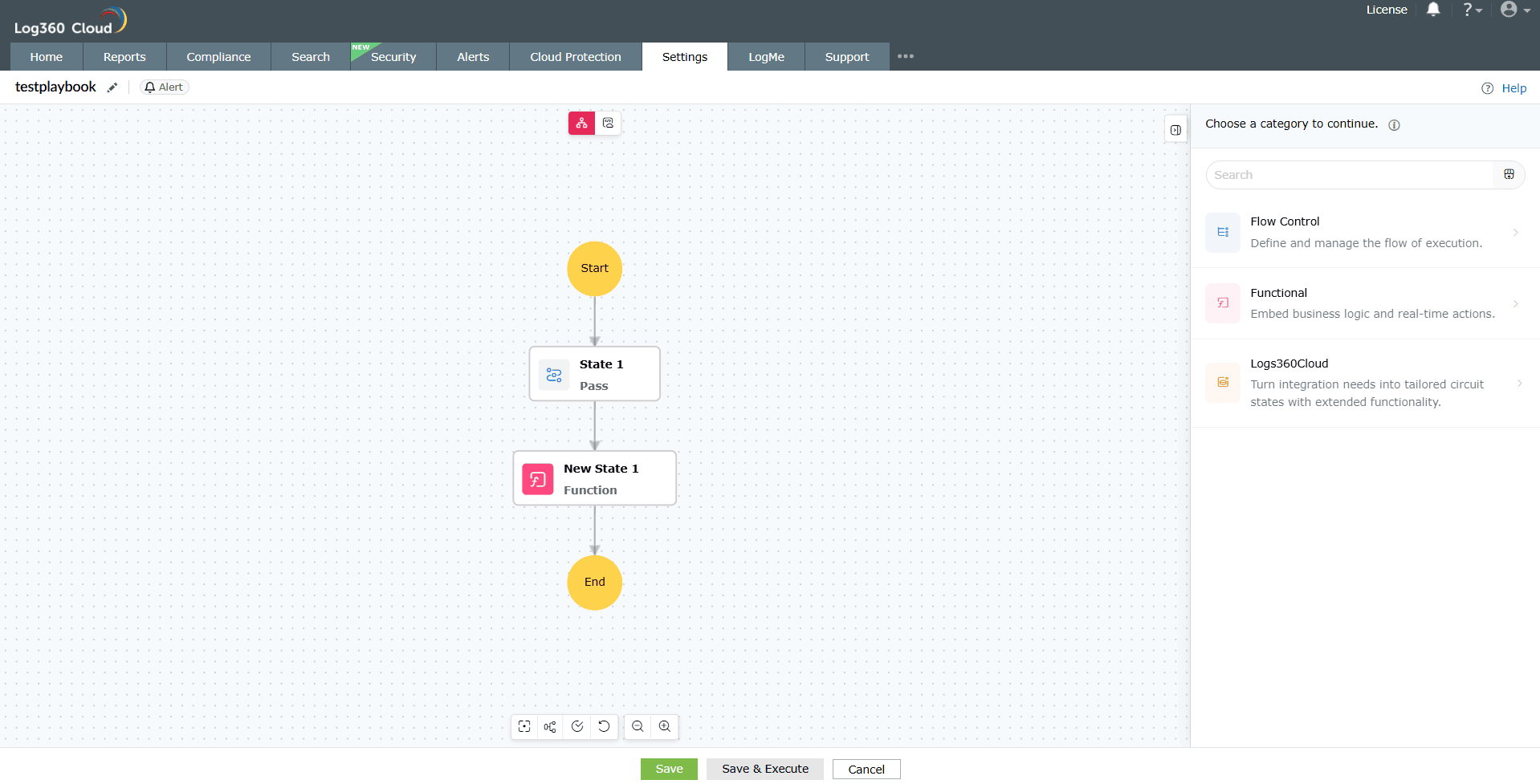
Each category contains a fixed set of supported states for this release. Playbook states are organized into the following categories:
Flow control states
Flow control states define and manage how execution moves through the playbook. These states do not perform data processing or remediation actions.
| State name | Description | Purpose |
|---|---|---|
| Pass | Passes the current execution data to the next state without modification. |
|
| Branch | Routes execution into different paths based on defined conditions. |
|
| Parallel | Runs multiple states simultaneously. |
|
| Wait | Pauses execution for a defined duration. |
|
| Batch | Groups items and processes them together in batches. |
|
| Success | Terminates the execution as successfully completed. | Explicitly end execution after successful handling. |
| Failure | Terminates the execution as failed. | Stop execution when a critical condition is met. |
Functional states
Functional states embed business logic, reusable workflows, and integrations within a playbook. These states are used to execute logic or communicate with external systems without directly performing product or endpoint actions.
| State name | Description | Purpose |
|---|---|---|
| Function | Invoke custom functions created and deployed in Log360 Cloud (Developer Space → Custom Functions) to execute user-defined logic within the playbook workflow. |
NOTE
|
| Circuit | Invoke another playbook as a sub-playbook, allowing modular and reusable automation workflows. |
|
Log360 Cloud states
Log360 Cloud states allow playbooks to interact with platform services and managed endpoints. These states are grouped in the UI based on their behavior.
| Action name | Description | Parameters | Response | ||||||
|---|---|---|---|---|---|---|---|---|---|
| Configuration field display name | Input data type | Field description | Success response example | Error Code | HTTP Status | Title | Error Message | ||
| Create Incident | Creates a new incident record.
Purpose: Automatic incident creation |
Name | string | Unique name of the incident
Maximum Length: 250 |
{ "data": { "incident_id": 100123, "incident_id_str": "100123", "message": "Incident has been created successfully." } } | 10001043 | 401 | Unauthorized | Access Denied |
| Description | string | Description of the incident
Maximum Length: 1000 |
10001068 | 400 | Bad Request | This name is already in use. Please choose a different name. | |||
| Severity | string | Severity of the incident. Allowed values - critical, trouble, attention | 10001010 | 400 | Bad Request | Something went wrong (ID=0) | |||
| Status | string | Status of the incident. Allowed values - open, in_progress, closed | 10001013 | 400 | Required Params Missing | Evidence provided without source field | |||
| Assignee | string | Assignee of the incident | |||||||
| Due date | string | Due date of the incident, in ISO 8601 date-time format.
The value must be ≥ 1970-01-01T00:00:00Z. |
|||||||
| Notes | string array | Notes for the incident.
Maximum Length: 100000 |
|||||||
| Source | string | Source of the evidence. Allowed values - search, report, alert, Incident Workbench | |||||||
| Evidence | string array | Evidence for the incident. uuids can be taken from the search, report, alert fetch states or from Playbook input | |||||||
| Update Incident | Updates an existing incident.
Purpose: Change status, severity, or assignment |
Incident id | string | Unique Id of the incident to be updated | { "data": { "message": "Incident has been updated successfully." } } | 10001013 | 400 | Bad Request | Required params missing |
| Name | string | Unique name of the incident
Maximum Length: 250 |
10001043 | 401 | Unauthorized | Access Denied | |||
| Description | string | Description of the incident
Maximum Length: 1000 |
10001068 | 400 | Bad Request | This name is already in use. Please choose a different name. | |||
| Severity | string | Severity of the incident. Allowed values - critical, trouble, attention | 10001010 | 400 | Bad Request | Generic error | |||
| Status | string | Status of the incident. Allowed values - open, in_progress, closed | |||||||
| Assignee | string | Assignee of the incident | |||||||
| Due date | string | Due date of the incident, in ISO 8601 date-time format. The value must be ≥ 1970-01-01T00:00:00Z. | |||||||
| Notes | string array | Notes for the Incident
Maximum Length: 100000 |
|||||||
| Source | string | Source of the evidence. Allowed values - search, report, alert, Incident Workbench | |||||||
| Evidence | string array | Evidence for the incident. uuids can be taken from the search, report, alert fetch states or from Playbook input | |||||||
| List Incident | Lists all existing incidents.
Purpose: Incident triage and review |
Incident name | string | Unique name of the incident
Maximum Length: 260 |
{ "data": [ { "incident_id": 100123, "incident_id_str": "100123", "incident_name": "Suspicious Logon Activity", "incident_description": "Multiple failed login attempts from unknown IP", "created_time": "2026-04-24 10:30:00", "due_date": "2026-04-25 10:30:00", "created_by": "Admin", "assign_to": "Security Analyst", "severity": "Critical", "status": "Open" } ], "meta": { "total_items": 50, "per_page": 10, "total_pages": 5 } } | 10001013 | 400 | Bad Request | Required params missing |
| Severity | string array | Filters incidents based on severity levels. Allowed values - critical, trouble, attention. | 10001002 | 403 | Forbidden | Invalid FROM/LIMIT | |||
| Status | string array | Filters incidents based on their status. Allowed values - open, in_progress, closed. | 10001043 | 401 | Unauthorized | Access Denied | |||
| Created by user id | string | Filters incidents based on created users with user id | |||||||
| Assign to | string | Filters incidents based on assignee with user id | 10001015 | 200 | Forbidden | {} | |||
| From | integer | The starting index of the response range. | 10001010 | 400 | Bad Request | Generic error | |||
| Limit | integer | The number of incidents to return in the search response.
Maximum: 100 |
|||||||
| Delete Incident | Deletes an existing incident.
Purpose: Cleanup invalid or duplicate incidents |
Incident ids | string array | List of incident IDs to delete. It can be taken from the List Incidents state or from playbook input | { "data": { "message": "Incident has been deleted successfully." } } | 10001043 | 401 | Unauthorized | Access Denied |
| 10001010 | 400 | Bad Request | Delete failed | ||||||
| 0000107 | 400 | Bad request | The value for the parameter incident_ids.0 is invalid | ||||||
| Get Alerts | Fetches alerts from the platform.
Purpose: Retrieve alert context for downstream actions |
Query | string | Search query formed using the MetaData APIs.
Maximum Length: 5000 |
10001014 | 400 | Invalid Query | ||
| Start Time | string | Start time range for Search in ISO 8601 date-time format. The value must be greater than or equal to 1970-01-01T00:00:00Z. Timezone offsets are supported. | 10001001 | 403 | Forbidden | Max search hits exceeded | |||
| End Time | string | End time range for Search in ISO 8601 date-time format. The value must be greater than or equal to 1970-01-01T00:00:00Z. Timezone offsets are supported. | 10001015 | 200 | Forbidden | {} | |||
| From | integer | The starting index of the response range. | 10001010 | 400 | Bad Request | Generic error | |||
| Limit | integer | The number of alerts to return in the search response. Users can specify a value up to a maximum of 500. | 10001002 | 403 | Forbidden | Invalid FROM/LIMIT | |||
| Severity | string array | Filters alerts based on severity levels. Allowed values - critical, trouble, attention. | |||||||
| Profile ids | string array | List of profile IDs to filter the alerts. It can be retrieved using the List Alert Profile state or from playbook input | |||||||
| List Alert Profiles | Lists configured alert profiles.
Purpose: Profile-based automation |
From | integer | The starting index of the response range. | { "data": [ { "profile_id": 12345, "profile_id_str": "12345", "profile_name": "Failed Logon Attempts", "severity": "Critical", "profile_type": "Custom", "threshold_interval": 300, "threshold_occurrence": 5, "status": "enabled", "creator_type": "Admin", "created_by": "admin@company.com", "notification_type": ["Email"] } ], "meta": { "total_items": 50, "per_page": 10, "total_pages": 5 } } | 10001015 | 200 | Forbidden | {} |
| Limit | integer | The number of alert profiles to return in the search response. Users can specify a value up to a maximum of 100. | 10001010 | 400 | Bad Request | Generic error | |||
| Severity | string array | Filters alerts based on severity levels. Allowed values - critical, trouble, attention. | |||||||
| status | string | Filters alerts based on their status. Allowed values - enabled, disabled. | |||||||
| Profile type | string | Filters alerts based on profile type. Allowed values - Rule based, Report based, custom, compliance. | |||||||
| Get Log Sources | Retrieves available log sources.
Purpose: Source validation |
Log source | string | The name of the log source
Maximum Length: 250 |
{ "data": { "log_sources": [{ "log_type_name": "Windows", "log_source_id": 10000000000339450, "log_type": "Windows", }] }, "meta": { "total": 36, "limit": 10, "from": 1, "page": 1, "no_of_log_sources": 36 } } | 10001012 | 400 | Bad Request | Invalid FROM/LIMIT |
| Log source ID | string | The ID of the log source from playbook input |
|
|
|
|
|||
| Log Type | string | Type of the Log
Maximum Length: 250 |
|||||||
| Domain name | string | The name of the domain to fetch computer details from.
Maximum Length: 250 |
|||||||
| Log source group | string | The name of the log source group.
Maximum Length: 250 |
|||||||
| Log collection status | string | The status of the log collector. Allowed values: active, inactive, decommissioned_device | |||||||
| Log collector state | string | The state of the log collection. Allowed values: Active, InActive, Decommissioned Devices | |||||||
| Page | integer | Page number
Maximum: 1000 Default: 1 |
|||||||
| From | integer | Starting point for the results.
Default: 1 Maximum: 1000 |
|||||||
| Limit | integer | Number of results per page.
Maximum: 1000 Default: 10 |
|||||||
| Sort | string | Sort based on log source parameters. Allowed values: log_source_id, log_source
Default: log_source_id |
|||||||
| is ascending | boolean | Sort order — `true` for ascending, `false` for descending
Default: true |
|||||||
| Fetch process tree | Fetches the process tree for analysis.
Purpose: Investigate process lineage |
After time | string | Time upto which log has to be processed in ISO 8601 date-time format. The value must be ≥ 1970-01-01T00:00:00Z. | - | 10001010 | 400 | Bad Request | Generic error |
| ID | string | Process ID in the Log
Maximum Length: 20 |
|||||||
| Log UUID | string | UUID of the Log which can be obtained from Playbook input
Maximum Length: 150 |
|||||||
| Domain name | string | Domain Name
Maximum Length: 256 |
|||||||
| Child Limit | integer | Maximum Supported depth for Child process.
Maximum: 5 |
|||||||
| Parent Depth Limit | integer | Maximum Supported depth for Parent process.
Maximum : 10 |
|||||||
| Log time | string | Time of the log which has to be processed in ISO 8601 date-time format. The value must be ≥ 1970-01-01T00:00:00Z. | |||||||
| Before time | string | Time before which log has to be processed in ISO 8601 date-time format. The value must be ≥ 1970-01-01T00:00:00Z. | |||||||
| Risk Score | Retrieves or calculates the risk score.
Purpose: Risk-based decision making |
Entity type | integer | Type of Entity.
Allowed Values: User (0), Host (1) Default 0(user) |
test | 10001010 | 400 | Bad Request | Generic error |
| Domain name | string | Domain name of the entity
Maximum Length: 256 |
|||||||
| Entity name | string | Name of the Entity
Maximum Length: 256 |
|||||||
| Get working hours | Retrieves configured working hours.
Purpose: Time-aware automation |
{ "data": { "working_hours_type": "custom", "working_hours_settings": { "working_days": [1,2,3,4,5], "working_hours": { "start": "09:00", "end": "18:00" } } } } | 10001010 | 400 | Bad Request | Generic error | |||
| Search Logs | Searches logs using a query and filter conditions. Purpose: Investigate related activity; validate event context | Query | string | The search query, which can be formed using the log fields API.
Maximum Length: 6000 |
{ "data": { "rows": [ { "hostname": "server01", "message": "User logon successful" } ] }, "meta": { "total_items": 1500 } } | 10001013 | 400 | Bad Request | Required params missing |
| Start Time | string | Start time for the search range, in ISO 8601 date-time format. The value must be ≥ 1970-01-01T00:00:00Z. |
|
|
|
|
|||
| End Time | string | End time for the search range, in ISO 8601 date-time format. The value must be ≥ 1970-01-01T00:00:00Z. | |||||||
| Log Source Group IDs | string array | List of device group IDs to search. Can be obtained via the log sources API.
Maximum: 100 group IDs |
10001014 | 400 | Bad Request | Query not valid | |||
| Log Types | string array | List of log types to search. Can be obtained via the log types API.
Maximum: 100 log types |
10001003 | 403 | Forbidden | URL Throttle limit exceeded | |||
| Log source IDs | string array | List of host IDs to search. Can be obtained via the log sources API.
Maximum: 100 host IDs |
10001015 | 200 | Forbidden | {} | |||
| From | integer | Start Range of the response. Default: 1 | |||||||
| Limit | integer | Count of logs in search response.
Maximum: 500 Default: 10 |
|||||||
| Manage Service | Starts, stops, or restarts a service on the target device using service name and host details.
Purpose: Service-level remediation Use cases: Stopping malicious or resource-intensive services |
Service Name | string | Service Name in Destination device
Maximum Length: 100 |
{ "data":{"STATUS":3}} | 10001102 | 404 | Device credential not found | The device credential is not available or has not been updated in the database. |
| Domain Name | string | Domain Name of the Destination Device
Maximum Length: 255 |
|||||||
| Operation | string | Actions to be performed on the provided service.
Allowed values: StartService, StopService, TestService |
|||||||
| Destination Device | string | Destination device in which the action will be performed. Provide Host ID or Device Name from configured device.
Maximum Length: 64 |
10001105 | 400 | Invalid action | The input parameters provided are invalid. | |||
| Manage Process | Manages processes running on the target device.
Purpose: Terminate or manage suspicious processes Use cases: Killing suspicious processes |
Name | string | Command to start the process. Only non-interactive processes will be created in remote machines.
Maximum Length: 2000 |
{ "data":{"STATUS":3}} | 10001102 | 404 | Device credential not found | The device credential is not available or has not been updated in the database. |
| Path | string | The directory from where you want to execute the process
Maximum Length: 255 |
|||||||
| Domain Name | string | Domain Name of the Destination Device
Maximum Length: 255 |
|||||||
| Operation | string | Actions to be performed on the provided process.
Allowed value: StartProcess, StopProcess, TestProcess |
|||||||
| Destination Device | string | Destination device in which the action will be performed. Provide Host ID or Device Name from configured device.
Maximum Length: 64 |
10001105 | 400 | Invalid action | The input parameters provided are invalid. | |||
| Machine Actions | Performs machine-level actions such as logoff, shutdown, or restart.
Purpose: Endpoint containmentUse cases: Immediate containment actions |
Force Action | boolean | check to force the action on the device | {"data":{"STATUS":3}} | 10001102 | 404 | Device credential not found | The device credential is not available or has not been updated in the database. |
| Domain Name | string | Domain Name of the Destination Device
Maximum Length: 255 |
10001105 | 400 | Invalid action | The input parameters provided are invalid. | |||
| Destination Device | string | Destination device in which the action will be performed. Provide Host ID or Device Name from configured device.
Maximum Length: 64 |
|||||||
| Operation | string | Actions to be performed on the destination deviceAllowed values: LogOff, ShutDownSystem, RestartSystem | |||||||
| Disable Usb | Disables USB devices on endpoints.
Purpose: Prevent data exfiltration Use cases: Preventing data exfiltration or malware spread |
Dismount All Drive | boolean | check to dismount all removable drives on the device | {"data":{"STATUS":3}} | 10001102 | 404 | Device credential not found | The device credential is not available or has not been updated in the database. |
| Domain Name | string | Domain Name of the Destination Device
Maximum Length: 255 |
|||||||
| Destination Device | string | Destination device in which the action will be performed. Provide Host ID or Device Name from configured device.
Maximum Length: 64 |
|||||||
| Write To File | Writes content to files on endpoints.
Purpose: Store execution or remediation data Use cases: Logging remediation actions; creating audit artifacts |
File Name | string | Name of the File
Maximum Length: 255 |
{"data":{"STATUS":3}} | 10001102 | 404 | Device credential not found | The device credential is not available or has not been updated in the database. |
| Path | string | Path where the file will be present
Maximum Length: 255 |
|||||||
| Data | string | Data that should be written to the file
Maximum Length: 5000 |
|||||||
| Append To File | boolean | Check this box to append the text to the file if it already exists. If unchecked, an existing file will be overwritten | |||||||
| Prepend Time Stamp | boolean | Check this box to prepend the current timestamp before the data. If unchecked, only the data will be appended to the file without the timestamp. | |||||||
| Domain Name | string | Domain Name of the Destination Device
Maximum Length: 255 |
|||||||
| Destination Device | string | Destination device in which the action will be performed. Provide Host ID or Device Name from configured device.
Maximum Length: 64 |
|||||||
| Send Popup Message | Sends popup notifications to endpoints.
Purpose: User notification |
Message | string | Message to be shown in the popup notification.
PowerShell is required to send sound alert on Windows machines. Maximum Length: 255 |
{"data":{"STATUS":3}} | 10001102 | 404 | Device Credential Not Found | The device credential is not available or has not been updated in the database. |
| Domain Name | string | Domain Name of the Destination Device
Maximum Length: 255 |
|||||||
| Destination Device | string | Destination device in which the action will be performed.
Provide Host ID or Device Name from configured device. Maximum Length: 64 |
|||||||
| Execute Script | Executes scripts on target devices.
Purpose: Custom remediation actions Use cases: User notification; security warnings |
Script Type | string | Type of the script that will be executed. Allowed values: VBScript, Powershell, Batch, Shell, Bash | {"data": {"STATUS": 3,"TASK_RESULT": {"OUTPUT": "<Response Content>"}}} | 10001102 | 404 | Device Credential Not Found | The device credential is not available or has not been updated in the database. |
| Script File Name | string | File name of the script that will be executed.
Maximum Length: 255 |
|||||||
| Arguments | string | Script arguments as a comma-separated string.
Maximum Length: 10000 |
|||||||
| Timeout (seconds) | integer | Timeout in seconds for script execution
Maximum: 120 |
10001106 | 400 | Invalid Parameters | The input parameters provided are invalid. | |||
| Working Directory | string | Location where the script should be executed
Maximum: 255 |
|||||||
| Domain Name | string | Domain Name of the Destination Device
Maximum Length: 255 |
|||||||
| Destination Device | string | Destination device in which the action will be performed. Provide Host ID or Device Name from configured device.
Maximum Length: 64 |
|||||||
| Ping Device | Pings a device to test connectivity.
Purpose: Reachability validation Use cases: Network validation |
Number of Requests | integer | Limit to avoid flooding the destination.
Maximum: 5 |
{"data": {"STATUS": 3,"TASK_RESULT": {"OUTPUT": "<Response Content>"}}} | - | - | - | - |
| Packet Size (bytes) | integer | Size of each packet to be sent in bytes
Maximum: 1472 |
|||||||
| Timeout (seconds) | integer | Timeout in seconds to wait for each ping reply
Maximum: 10 |
|||||||
| Retry Count | integer | Number of retries to attempt
Maximum: 3 |
|||||||
| Domain Name | string | Domain Name of the Destination Device
Maximum Length: 255 |
|||||||
| Agent ID | string | Agent Id from which the action to be executed | |||||||
| Destination Device | string | Device for which ping to be performed
Maximum Length: 64 |
|||||||
| Trace Route | Traces the network path to a destination device.
Purpose: Network troubleshooting |
Max Hops | integer | The maximum number of hops (TTL values) to attempt
Maximum: 64 |
{"data": {"STATUS": 3,"TASK_RESULT": {"OUTPUT": "<Response Content>"}}} | - | - | - | - |
| Timeout (seconds) | integer | Timeout in seconds to wait for each trace
Maximum: 10 |
|||||||
| Domain Name | string | Domain Name of the Destination Device
Maximum Length: 255 |
|||||||
| Agent ID | string | Agent Id from which the action to be executed | |||||||
| Destination Device | string | Device for which trace route to be performed
Maximum Length: 64 |
|||||||
| Invoke Url Via Agent | Invokes a URL through the endpoint agent.
Purpose: Agent-based API and integration calls Use cases: External integrations; API-based automation |
URL | string | The request URL whose resources need to be accessed
Maximum Length: 1000 |
{"data": {"STATUS": 3,"TASK_RESULT": {"OUTPUT": "<Response Content>"}}} | 10001106 | 400 | Invalid Parameters | The input parameters provided are invalid. |
| HTTP Method | string | The HTTP request method
Allowed Values: GET, POST, PATCH, PUT, DELETE |
|||||||
| Headers | JSON Object | The attributes or the header values
Maximum Length: 5000 |
|||||||
| Query Params | JSON Object | The query parameters to be appended to the URL
Maximum Length: 5000 |
|||||||
| Body | JSON Object | The body of the request
Maximum Length: 5000 |
|||||||
| Connection Name | string | The connection name of the required application
Maximum Length: 256 |
10001110 | 400 | Missing Required Parameters | One or more required parameters are missing. | |||
| Destination Device | string | Provide Host ID or Device Name from configured device to get associated connection.
Maximum Length: 64 |
|||||||
| Domain Name | string | Domain Name of the Destination Device
Maximum Length: 255 |
|||||||
| Agent ID | string | Agent Id from which the action to be executed | |||||||
Sample error message:
{
"code": "<Error Code>",
"message": "<Error message>"
}
"Create Incident" state content issues"
Dynamic error cases
| Error Code | Error Message | Scenario |
|---|---|---|
| JSON_SCHEMA_VALIDATION_FAILED | $.<param>: must have a maximum value of <max-length> | Dynamic value exceeds max length defined in qntrl conf file |
| JSON_SCHEMA_VALIDATION_FAILED | $: required property '<param>' not found | Dynamic value resolved to null or missing |
| JSON_SCHEMA_VALIDATION_FAILED | $.<param>: string found, number expected | Dynamic value for mismatched data type |
Example format for ISO 8601 date time formatting report
- Due date of the incident, in ISO 8601 date-time format.
- The value must be ≥ 1970-01-01T00:00:00Z.
- Examples: 2024-03-15T10:30:00Z, 2024-03-15T10:30:00+05:30
Common Error Applicable for all Agent Actions
| Error Code | HTTP Status | Title | Error Message |
|---|---|---|---|
| 10001101 | 500 | Internal Error | An unexpected error occurred on the server. |
| 10001103 | 502 | Agent Action Failure | An internal error occurred while executing the agent action. |
| 10001104 | 404 | Device Not Found | The specified device is not available in the database. |
| 10001107 | 400 | Incompatible Device | The device is incompatible. (Unsupported OS type or script type) |
| 10001108 | 503 | Device Offline | The device is not reachable. (agent not running, upgrading or offline) |
| 10001109 | 409 | Duplicate Collector | A duplicate device entry exists in the database. |
State execution notes
- States are selected and added based on the category structure shown in the builder UI
- Execution follows the configured flow unless altered by flow control states
Read also
This page explained the different playbook state types available in Log360 Cloud and how they are used to control execution flow, embed logic, and perform platform and endpoint actions. To continue learning about playbook design and automation, refer to the following pages: