

- Free Edition
- Quick Links
- Highlights
- Exchange Online
- Exchange Online Management
- Exchange Online Reports
- Exchange Online Auditing
- Exchange Online Monitoring
- Shared Mailbox Management
- Mailbox Usage Reports
- Exchange Online Mailbox Auditing
- Shared Mailbox Reports
- Exchange Online Delegation
- Mailbox Size Reports
- Mail Traffic Reports
- Non-owner Mailbox Access Report
- Public Folder Reports
- OWA Reports
- Mailbox Content Reports
- Entra ID
- Entra ID Management
- Entra ID Reports
- Entra ID Monitoring
- Entra ID Auditing
- User Management
- Contact Reports
- Security Group Reports
- License Reports
- Entra ID Delegation
- Microsoft 365 User Provisioning
- User Reports
- Distribution Group Reports
- Group Reports
- Inactive Exchange Users
- Entra ID User Auditing
- Entra ID Group Auditing
- Entra ID Logon Auditing
- Microsoft Teams
- OneDrive for Business
- SharePoint Online
- Security and compliance
- Other Features
- Related Products
- ADManager Plus Active Directory Management & Reporting
- ADAudit Plus Hybrid AD, cloud, and file auditing and security
- ADSelfService Plus Identity security with MFA, SSO, and SSPR
- Exchange Reporter Plus Exchange Server Auditing & Reporting
- M365 Security Plus Microsoft 365 Auditing and Alerting
- EventLog Analyzer Real-time Log Analysis & Reporting
- SharePoint Manager Plus SharePoint Reporting and Auditing
- DataSecurity Plus File server auditing & data discovery
- RecoveryManager Plus Enterprise backup and recovery tool
- AD360 Integrated Identity & Access Management
- Log360 (On-Premise | Cloud) Comprehensive SIEM and UEBA
- AD Free Tools Active Directory FREE Tools
Keeping an eye on users and what they are up to in Microsoft 365 is crucial to ensuring efficiency and security in your organization. Tracking your employees can help you understand what they are doing, which Microsoft 365 services they are using, are they using the licenses assigned to them to the fullest, etc. Once you understand these aspects, you can manage your Microsoft 365 organization in an orderly and efficient manner.
For example, by tracking the employee activities in Microsoft 365, you can see if they have been assigned a license they don't use. This allows you to remove that license for that user. You can even track how many times the user has logged on to work, how much they are using a Microsoft 365 service, etc.
The native Microsoft 365 environment offers a few user activity reports that offer data regarding various activities of users in your Microsoft 365 organization. But you might find yourself looking for more in terms of data and features. This is where M365 Manager Plus comes in. M365 Manager Plus provides you with a wider range of user activity reports that can help you track your employees and manage your organization efficiently.
Tracking Microsoft 365 user activity with M365 Manager Plus
The biggest advantage that ManageEngine M365 Manager Plus has to offer in terms of user activity tracking is the wide variety of reports it offers. With over 400 preconfigured, extensive reports covering various Microsoft 365 services, such as Exchange Online and Azure Active Directory, you can easily and efficiently keep track of your users and their activities in your environment. From the Mailbox Users report to the Password Changed Users report, M365 Manager Plus has a report for every user activity.
M365 Manager Plus helps you track user activities across the following Microsoft 365 services:
- Exchange Online
- Azure Active Directory
- OneDrive for Business
- Yammer
- SharePoint Online
- Microsoft Teams
User activity reports in M365 Manager Plus
Here are some of the Microsoft 365 user activity reports ManageEngine M365 Manager Plus provides:
| Report | Description |
|---|---|
| Active Users by Service | Shows count of active Microsoft 365 users by service. |
| Last User Activity by Service | Shows details of Microsoft 365 services for which users have license, and their last activity. |
| Last User Activity by Date | Shows details of users who have activated Microsoft 365 and when their last activity date was. |
| User Logon Activity | Shows summary of logon attempts by users and their status. |
| Password Changed Users | Shows details about users who changed their password in the past 'n' number of days. |
| Licensed Users by Service Status | Shows all available licensed users based on services used. |
| Daily Active Microsoft 365 Users Count | Shows count of Microsoft 365 users who were active, on a per day basis. |
| OneDrive User Activities | Shows details of every day OneDrive for Business user activities. |
| Sharing Activities | Shows details of files and folders that were shared including to whom it was shared and when. |
| Daily Yammer User Activities | Shows details of every day Yammer user activities. |
| Teams User Daily User Activity | Shows details of every day Microsoft Teams user activities. |
| Exchange User Activities | Shows user activities in audit logging enabled mailboxes including who performed what action and when. |
| Yammer Events Log | Shows audit details on user activities in Yammer. |
Export reports: M365 Manager Plus allows you to export its user activity reports in various formats, like PDF, CSV, XML, and HTML.
View reports: You can also preview M365 Manager Plus' reports in the printable view before you export them to know what they will look like once printed.
Schedule reports: M365 Manager Plus also lets you schedule these reports so you do not have to manually generate them whenever they are required.
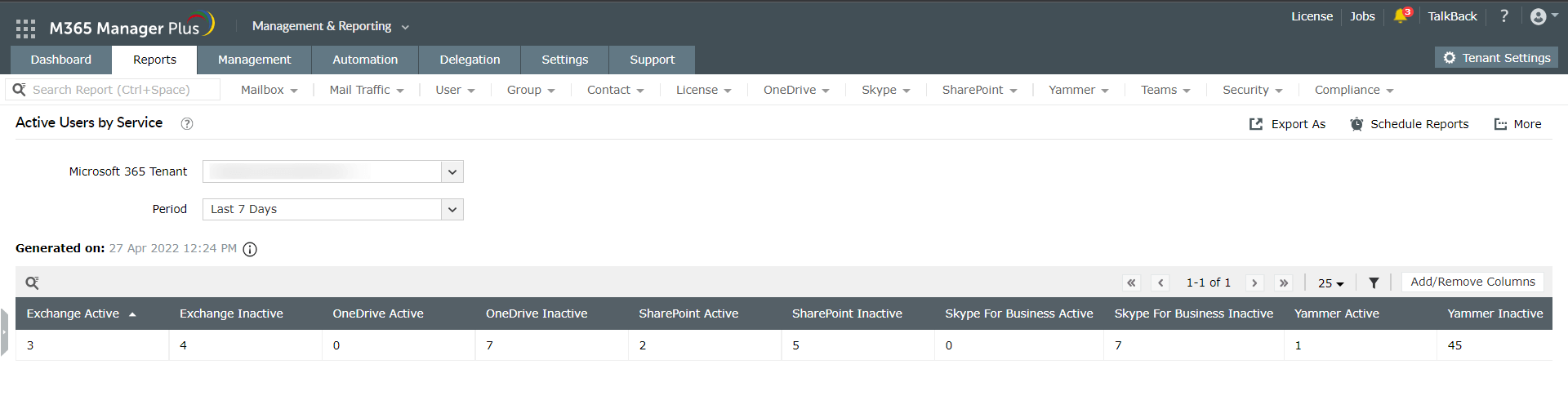
1. Export reports: M365 Manager Plus allows you to export its user activity reports in various formats, like PDF, CSV, XML, and HTML.
2. View reports: You can also preview M365 Manager Plus' reports in the printable view before you export them to know what they will look like once printed.
Schedule reports: M365 Manager Plus also lets you schedule these reports so you do not have to manually generate them whenever they are required.
Filter reports: You can generate user activity reports in M365 Manager Plus based on virtual tenants and filter them further based on domains or groups. This makes it easier to understand the activities of the users in your Microsoft 365 environment.
View comprehensive user details: M365 Manager Plus' reports provide user details, such as who, what, when, where, and the status of an activity. By combining all the important details in the same report, M365 Manager Plus can save you both time and effort.
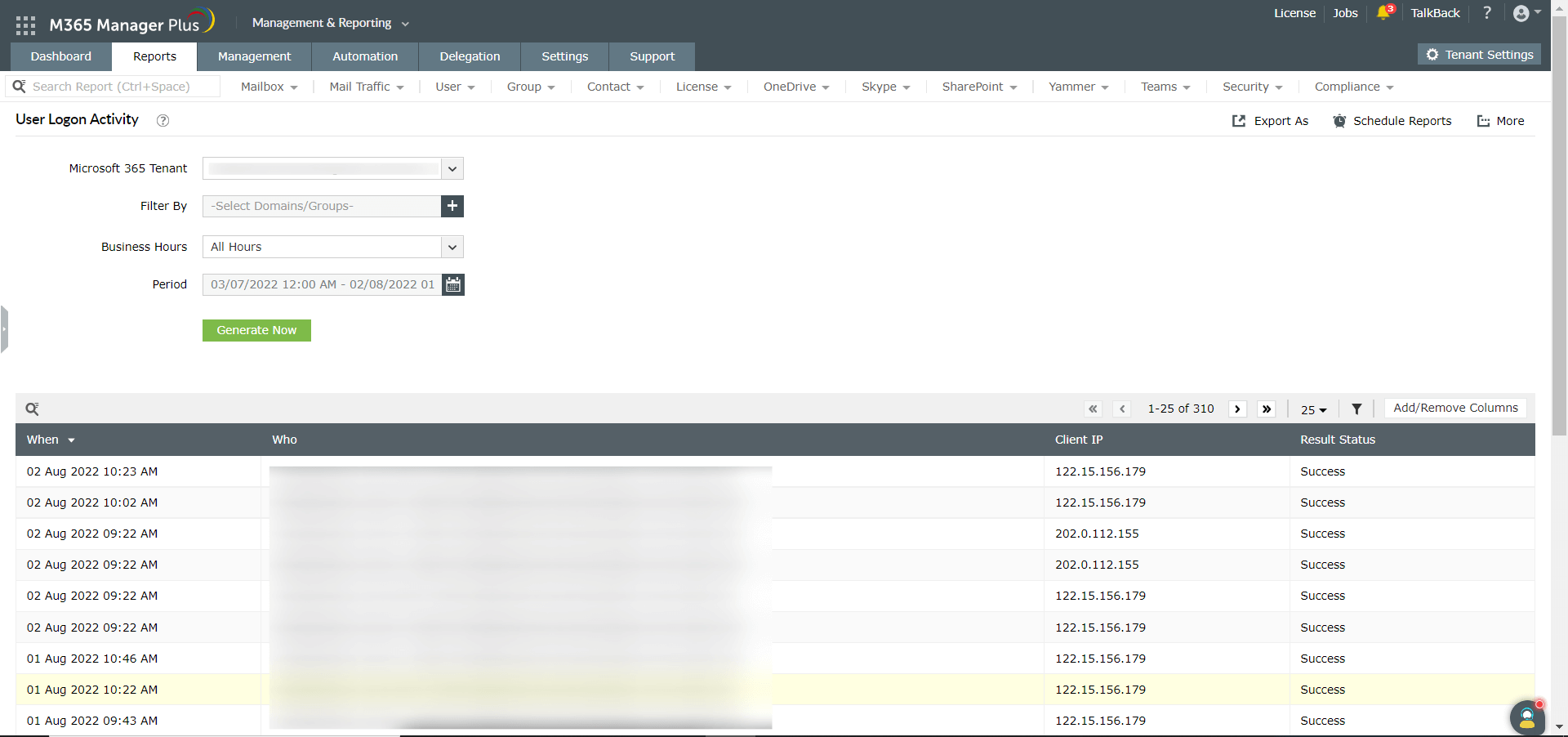
1. Filter reports: You can generate user activity reports in M365 Manager Plus based on virtual tenants and filter them further based on domains or groups. This makes it easier to understand the activities of the users in your Microsoft 365 environment.
2. View comprehensive user details: M365 Manager Plus' reports provide user details, such as who, what, when, where, and the status of an activity. By combining all the important details in the same report, M365 Manager Plus can save you both time and effort.