

- Free Edition
- Quick Links
- Active Directory Auditing
- Active Directory auditor
- Active Directory monitoring
- Account lockout analyzer
- Login monitoring software
- Active Directory change notifier
- User logon audit reports
- AD logon logoff tracker
- User logon failure auditing
- Login history tracking tool
- AD change auditor
- Insider threat detection software
- Permissions change auditing
- Entra ID reporting
- Privileged user monitoring
- User behavior analytics tool
- Active Directory security monitoring
- Group Policy auditing tool
- GPO change auditor
- Entra ID auditing
- Audit user account management
- OU change auditor
- Audit group membership changes
- Active Directory auditing and reporting tool
- GPO reporting tool
- Remote desktop monitoring software
- PowerShell logging and auditing
- Azure password protection auditing
- Azure sign-in risk detection
- File Server Auditing
- Windows Server Auditing
- Employee Tracking
- Workstations Auditing
- Compliance Auditing
- Other features
- SIEM Integration
- Windows DNS - Schema Auditing
- Windows security event log monitoring
- SIEM audit solution
- Schedule Active Directory change reports
- Reports from Archived Data
- Aggregated summary reports
- AD new/old attribute changes
- Audit trail
- Audit Active Directory LAPS
- Scheduled Reports & Alerts
- Account lockout examiner
- Industry
- Documents
- Success Stories
- Related Products
- Log360 (On-Premise | Cloud) Comprehensive SIEM and UEBA
- ADManager Plus Active Directory Management & Reporting
- ADAudit Plus Real-time Active Directory Auditing and UBA
- ADSelfService Plus Identity security with MFA, SSO, and SSPR
- DataSecurity Plus File server auditing & data discovery
- Exchange Reporter Plus Exchange Server Auditing & Reporting
- M365 Manager Plus Microsoft 365 Management & Reporting Tool
- RecoveryManager Plus Enterprise backup and recovery tool
- SharePoint Manager Plus SharePoint Reporting and Auditing
- AD360 Integrated Identity & Access Management
- AD Free Tools Active Directory FREE Tools
Employee time tracking with ADAudit Plus
Active time on workstation
Beyond system startup and shut down, ADAudit Plus factors in screensaver invoke and dismiss and console lock and unlock events to calculate actual active time; distinguishing genuine work hours from idle session time.
Multi-machine session detection
Identify users with concurrent or overlapping sessions on more than one machine, which matters for both workforce visibility and for catching potential credential sharing or suspicious access.
Remote and hybrid workforce tracking
Correlate on-premises AD logon data with Microsoft Entra ID (previously known as Azure AD) sign-in records to get a unified attendance picture for remote and hybrid employees.
Attendance anomaly detection
Machine learning baselines each user's normal logon patterns. Logons outside normal hours, unusual session volumes, and first-time host access all surface as anomalies without manual threshold configuration.
Compliance-ready time records
Pre-configured reports map employee logon activity to SOX, HIPAA, GDPR, and other compliance requirements. Custom report profiles let you combine specific users, time ranges, and activity filters into saved views for HR and auditors.
Automated alerts on access events
Receive immediate notifications when a user logs on outside their normal hours, accesses a new host, or holds concurrent sessions. Alerts can trigger tickets in ServiceNow, Zendesk, or other connected ITSM tools.
What is employee time tracking software?
Employee time tracking software records when workers are active, how long sessions last, and where they're working from. Organizations use this data for payroll validation, HR audits, compliance evidence, and workforce planning. ADAudit Plus derives attendance records directly from Windows logon and logoff events in AD so the data exists automatically for every domain user without requiring manual input or a clock-in application.
Track employee work hours automatically
ADAudit Plus reads Windows startup and shutdown, screensaver invoke and dismiss, console lock and unlock, and other logon related events from all monitored workstations and domain controllers and calculates active hours per user per day. No timesheet submission, clock-in app, or change to employee behavior is required.
- The User Work Hours report shows session start time, end time, and total hours per user per workstation, day by day, filterable by user, machine, or time range.
- The Users First and Last Logon By Computers report records the earliest and most recent logon time per user per workstation, giving you a day-level attendance record grounded in AD event data, not employee-submitted timesheets.
- Export to CSV, PDF, or XLSX for payroll reconciliation or HR records, or schedule the report for automated email delivery to HR, management, or audit teams on a recurring basis.
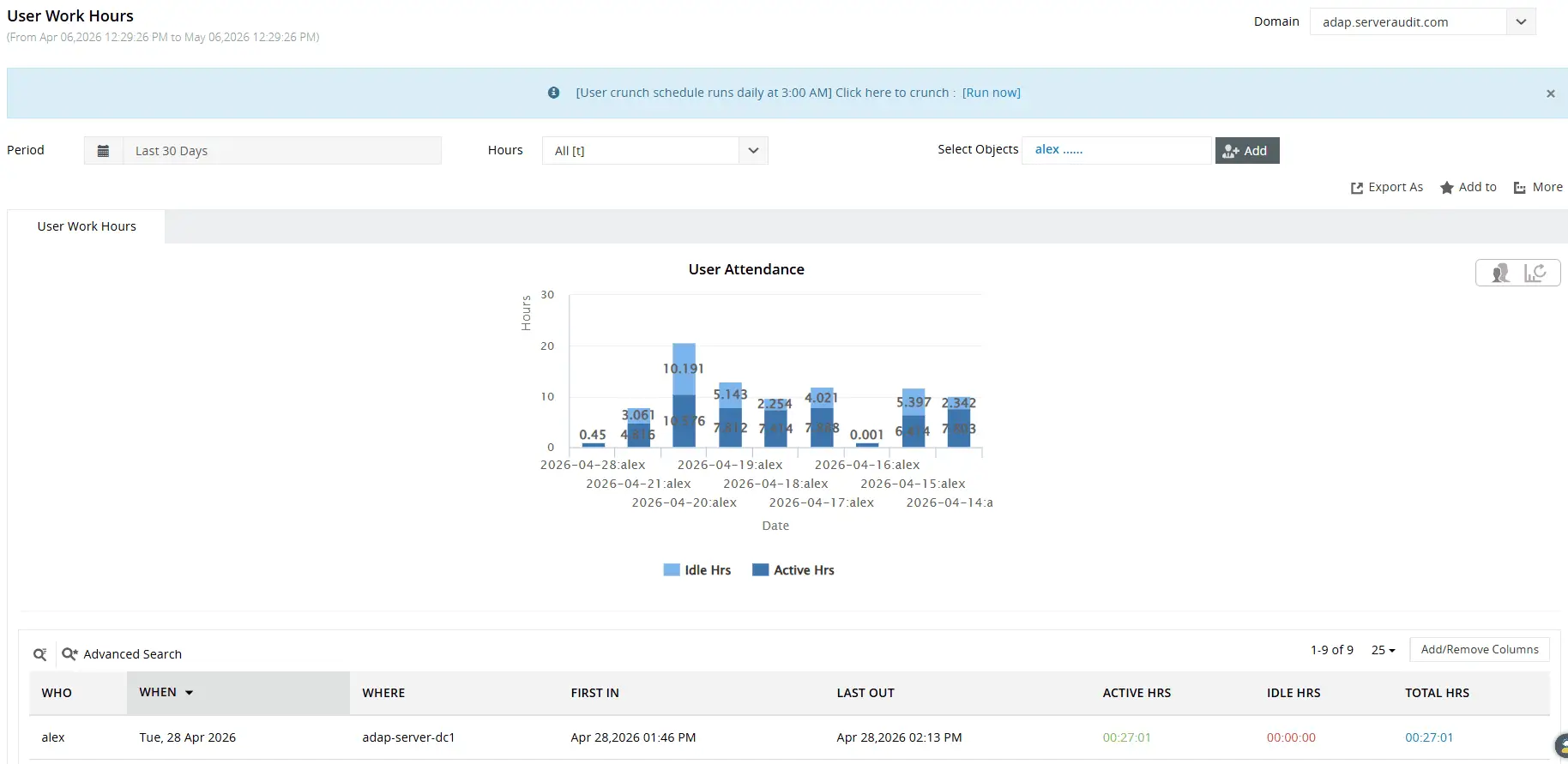
Gain quick visual insights on how users spend their workday, and quickly spot the employee with least amount of productivity.
Monitor active sessions and attendance in real time
ADAudit Plus provides both a live view of who is currently at their workstation and a historical record of how long each session lasted, covering shift management, incident investigation, and security oversight from a single set of reports.
- The Currently Logged On Users report shows every user with an open session in real time, along with the workstation they're using and when the session started.
- The Logon Duration report records the exact start and end of every session per user per machine.
- The Users Logged into Multiple Computers report surfaces concurrent sessions per user with each machine name and timestamp, relevant for both HR oversight and for detecting credential sharing or unauthorized account use.
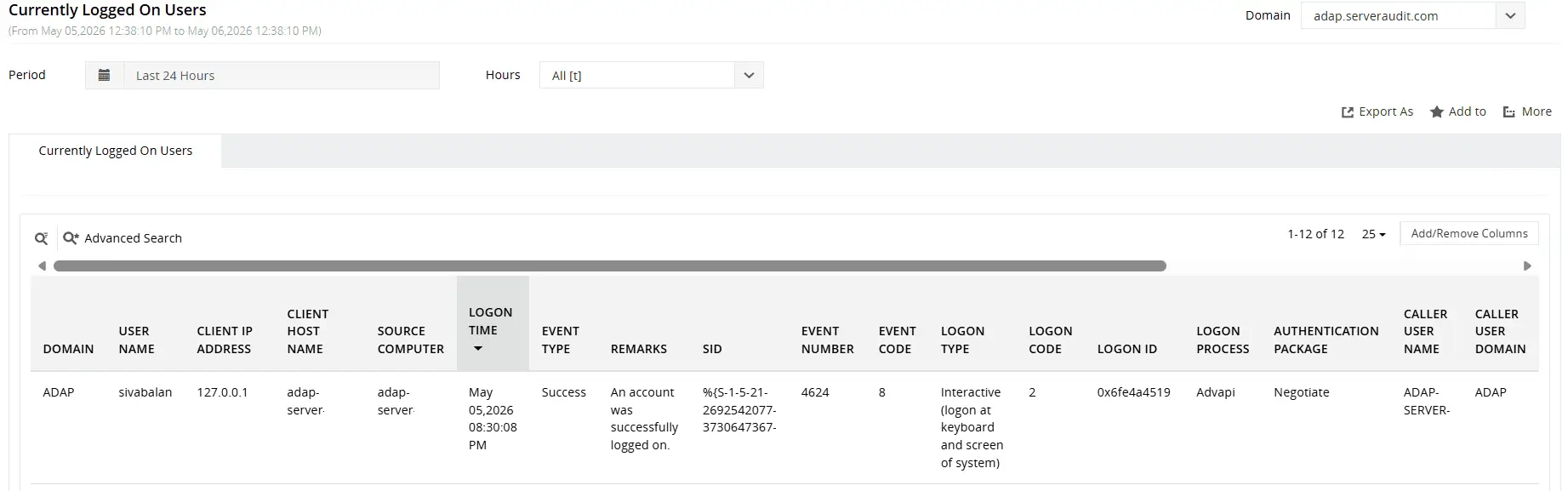
View active user accounts, the workstation name each user is logged on to, session start time, and more.
Audit remote and hybrid employee activity
Remote and hybrid workforces create a visibility gap when on-premises tools cannot see cloud authentication events. ADAudit Plus closes that gap by correlating on-premises AD logon data with Microsoft Entra ID sign-in records in a single console, so remote and hybrid employees appear in the same reports as on-site users.
- Track sign-in times for remote employees connecting through Entra ID without separate cloud reporting, and surface sign-ins using legacy authentication protocols that bypass modern MFA enforcement.
- The Remote Desktop Services Activity report captures session start and end times, the originating client IP address, and gateway routing information for every RDP connection.
- Identify RDP sessions from unexpected IP addresses or geographic locations, and track session duration for contractors or temporary staff accessing the environment remotely.
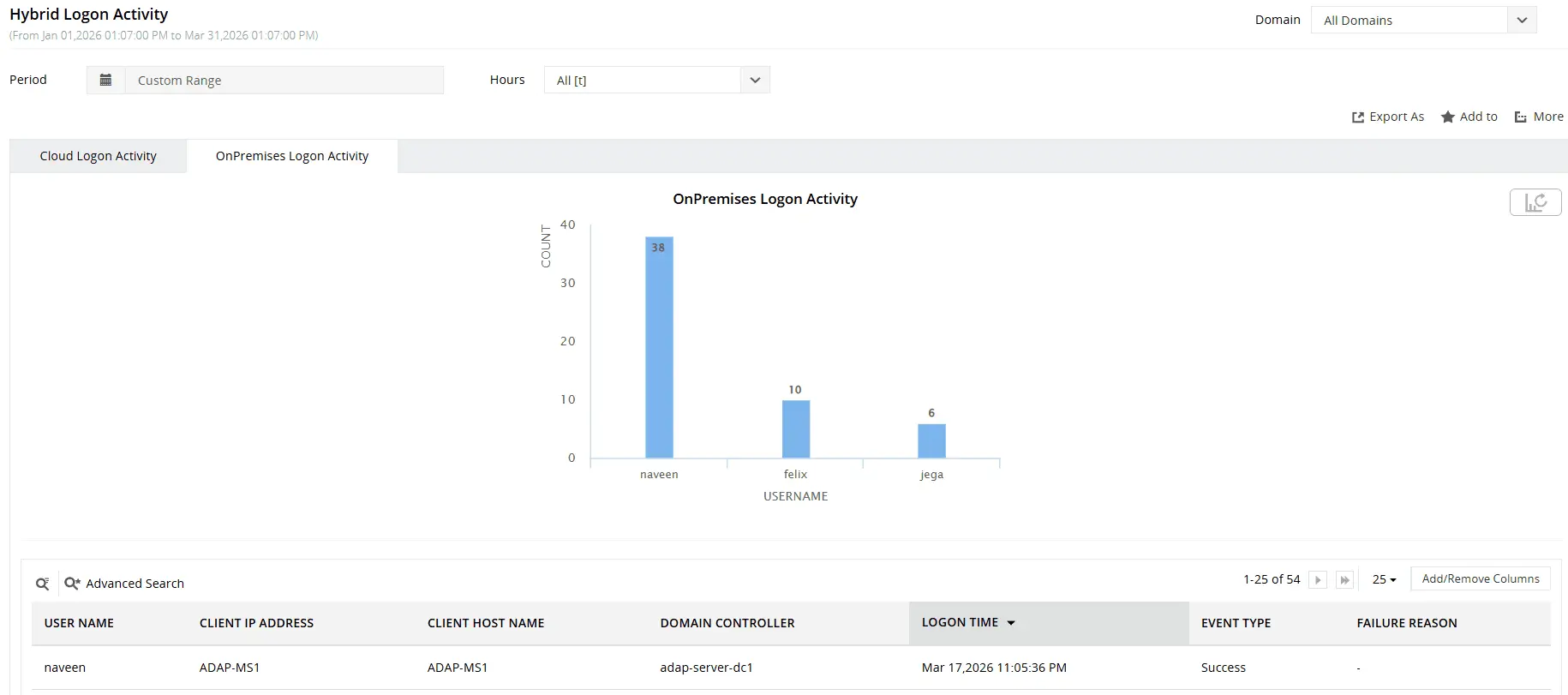
Get an overview of logon activity across your AD and Entra ID environments.
Detect attendance anomalies with user behavior analytics (UBA)
ADAudit Plus applies machine learning to build a behavioral baseline for each individual user, covering their typical logon times, the machines they normally access, etc. Deviations from that baseline are flagged automatically in the Analytics tab, without requiring manual threshold configuration.
- Unusual Logon Activity Time flags any logon that falls outside the hours that user normally works, per their own individual historical baseline.
- First Time Host Accessed by User identifies the first time a user logs on to a machine they have never accessed before, which can indicate lateral movement or a new work location.
- Unusual Volume of Logon Failure detects a spike in failed authentication attempts above a user's individual baseline, consistent with brute-force activity or a credential compromise.
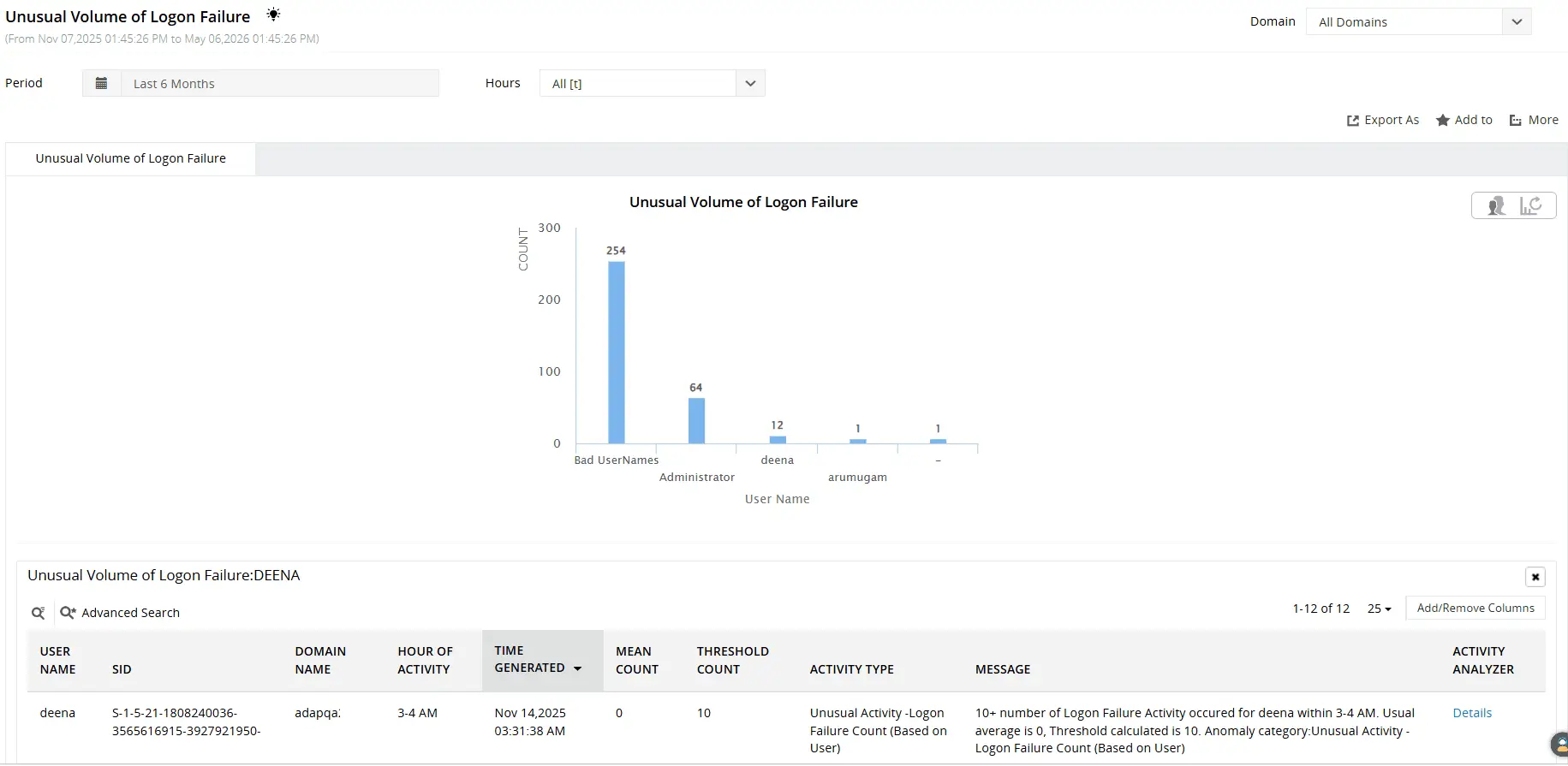
Leverage machine learning to track unusual volumes of logon failures, logon activity times, new accesses to the host, and more.
Get real-time alerts on attendance and access events
ADAudit Plus includes pre-configured alert profiles covering the logon and session events most relevant to attendance and access monitoring. When an alert fires, your team is notified through email or SMS, and each alert can auto-create a ticket in ServiceNow, Zendesk, ManageEngine Service Desk Plus, Freshservice, Jira, or Kayako.
- Unusual Logon Time alerts notify your team the moment a user authenticates outside their normal hours, so unusual access is investigated before it becomes a larger incident.
- Disabled Users Logon Attempt alerts surface logon activity from accounts that have been disabled.
- First Time Host accessed by User alerts flag a first-time connection to an unrecognized machine so you can confirm the session is authorized rather than discovering it in a retrospective audit.
Meet compliance requirements for employee time records
Employee attendance records carry legal and regulatory weight across several frameworks. ADAudit Plus provides pre-configured compliance reports mapped to SOX, HIPAA, PCI DSS, FISMA, GLBA, GDPR, and ISO 27001, covering the logon, access, and session events each standard requires.
- SOX requires documented access controls and evidence that system changes are authorized; logon activity reports and permission change records satisfy this without additional tooling.
- HIPAA requires an audit trail of who accessed systems containing protected health information; the logon and session reports cover this at the user and workstation level.
- GDPR requires that access to personal data is logged and reviewable; both on-premises and Entra ID logon events are captured and reportable.
- Custom report profiles combine specific users, time ranges, and activity types into saved views that schedule for automatic email delivery to auditors and HR teams.
Why manual timesheets and basic tools fall short
Manual timesheets rely on employees recording their own hours accurately and on time, and disputes are difficult to resolve without an independent record. Basic clock-in applications add a step employees must take each shift, with failure points when users forget, share credentials, or log on from an unregistered device. Neither approach produces an audit trail verifiable against a system record.
- Windows Security event logs generate a continuous, immutable record of every domain logon and logoff event; ADAudit Plus reads those events centrally across all monitored domain controllers and workstations.
- Security event logs are stored locally on each domain controller, making cross-DC attendance reporting impossible without a tool that aggregates them centrally.
- Neither Event Viewer nor PowerShell produces a formatted, filterable work hours report without significant scripting overhead that most environments don't maintain.
4 compelling reasons to choose ADAudit Plus
Widely recognized
ADAudit Plus has been recognized as a Gartner Peer Insights Customers' Choice for Security Incident & Event Management (SIEM) for four consecutive years.
Easy deployment
Go from downloading ADAudit Plus to receiving predefined reports and alerts in under 30 minutes, without any professional help.
Competitive pricing
ADAudit Plus is licensed per-server, unlike other IT auditors which are licensed per-user. With per-server licensing, even with a growing number of users each year, you can continue to ingest log data without additional costs.
Unified visibility
ADAudit Plus consolidates auditing, security, and compliance across Active Directory, Entra ID, Windows servers, workstations, and file servers into a single pane of glass, eliminating the need to juggle multiple tools.
Frequently asked questions
No. ADAudit Plus derives work hour records from Windows logon and logoff events that AD generates automatically for every domain user, with no action required from employees. The same authentication events Windows already generates become the attendance record without any additional configuration.
ADAudit Plus uses Event ID 4624 (successful logon), Event ID 4634 (account logged off), and Event ID 4647 (user-initiated logoff) as the primary sources for session start and end times. Startup and shutdown events (IDs 4608 and 4609), workstation lock and unlock events (IDs 4800 and 4801), and screensaver invoke and dismiss events (IDs 4802 and 4803) are also captured. The User Work Hours report calculates active hours per user per workstation per day from these events automatically.
Retention is governed by your ADAudit Plus archive settings and storage configuration, and you can configure the tool to retain audit data for the period your compliance obligations require. ADAudit Plus supports configurable retention policies and archiving options to match those requirements.