

- Free Edition
- Quick Links
- Active Directory Auditing
- Active Directory auditor
- Active Directory monitoring
- Account lockout analyzer
- Login monitoring software
- Active Directory change notifier
- User logon audit reports
- AD logon logoff tracker
- User logon failure auditing
- Login history tracking tool
- AD change auditor
- Insider threat detection software
- Permissions change auditing
- Entra ID reporting
- Privileged user monitoring
- User behavior analytics tool
- Active Directory security monitoring
- Group Policy auditing tool
- GPO change auditor
- Entra ID auditing
- Audit user account management
- OU change auditor
- Audit group membership changes
- Active Directory auditing and reporting tool
- GPO reporting tool
- Remote desktop monitoring software
- PowerShell logging and auditing
- Azure password protection auditing
- Azure sign-in risk detection
- File Server Auditing
- Windows Server Auditing
- Employee Tracking
- Workstations Auditing
- Compliance Auditing
- Other features
- SIEM Integration
- Windows DNS - Schema Auditing
- Windows security event log monitoring
- SIEM audit solution
- Schedule Active Directory change reports
- Reports from Archived Data
- Aggregated summary reports
- AD new/old attribute changes
- Audit trail
- Audit Active Directory LAPS
- Scheduled Reports & Alerts
- Account lockout examiner
- Industry
- Documents
- Success Stories
- Related Products
- Log360 (On-Premise | Cloud) Comprehensive SIEM and UEBA
- ADManager Plus Active Directory Management & Reporting
- ADAudit Plus Real-time Active Directory Auditing and UBA
- ADSelfService Plus Identity security with MFA, SSO, and SSPR
- DataSecurity Plus File server auditing & data discovery
- Exchange Reporter Plus Exchange Server Auditing & Reporting
- M365 Manager Plus Microsoft 365 Management & Reporting Tool
- RecoveryManager Plus Enterprise backup and recovery tool
- SharePoint Manager Plus SharePoint Reporting and Auditing
- AD360 Integrated Identity & Access Management
- AD Free Tools Active Directory FREE Tools
Remote employee time tracking with ADAudit Plus
Remote desktop and network authentication visibility
Remote Desktop Protocol (RDP) sessions, Remote Desktop Gateway connections, and Network Policy Server (NPS) authentication events are all captured.
Hybrid logon correlation for remote teams
Employees who authenticate through Microsoft Entra ID (previously known as Azure AD) are captured alongside on-premises AD logon events in a single console view.
Real-time alerts on critical logon events
Alert profiles fire the moment a disabled account attempts to log in, an account locks out, or a logon occurs outside expected hours. Alerts route to your ITSM tool automatically.
Compliance-ready logon reports
Pre-configured report sets map directly to SOX, HIPAA, PCI DSS, FISMA, GLBA, GDPR, and ISO 27001 requirements. No custom scripting required to produce an audit-ready output.
What is remote employee time tracking software?
Tracking employee hours in a distributed environment using manual timesheets or standalone clock-in apps creates a gap between what employees report and what actually happened on your network. The logon event record in AD is more reliable than a self-reported timestamp: it captures when a session started, when it ended, and from which machine, with no employee action required.
ADAudit Plus turns that logon data into structured time tracking reports. Every remote employee's first logon, last logoff, and active session duration is available in pre-configured reports that can be scheduled, exported, and delivered to managers or auditors automatically.
Key employee time tracking metrics monitored by ADAudit Plus
| Audit area | What ADAudit Plus captures |
|---|---|
| Daily logon and logoff times | First logon and last logoff per user per workstation, with exact timestamps |
| Active times | Active time each user spent logged in |
| Remote desktop sessions | RDP session start, end, and duration through Remote Desktop Services; external connection activity through RD Gateway |
| Network authentications | Remote Authentication Dial-In User Service (RADIUS)/NPS authentication, including failures and success history |
| Multi-machine sessions | Users logged into more than one machine concurrently, with logon times per machine |
| Currently active users | Real-time view of who is logged in right now and from where |
| Entra ID sign-ins | Employee authentications through Microsoft Entra ID, correlated with on-premises data |
Track remote employee logon times and actual work hours
ADAudit Plus captures logon and logoff events across every domain-joined machine. Review each employee's active hours for any date range without querying individual domain controllers (DCs) or writing a PowerShell script.
- Each user's first logon and last logoff for any day, week, or custom period is available across all workstations they used.
- Session duration is recorded per logon event, with separate start time, end time, and duration columns for each session.
- ADAudit Plus factors in screensaver invoke and dismiss events, along with console lock and unlock activities, to calculate actual active time beyond simple system startup and shutdown events; distinguishing genuine work hours from idle session time.
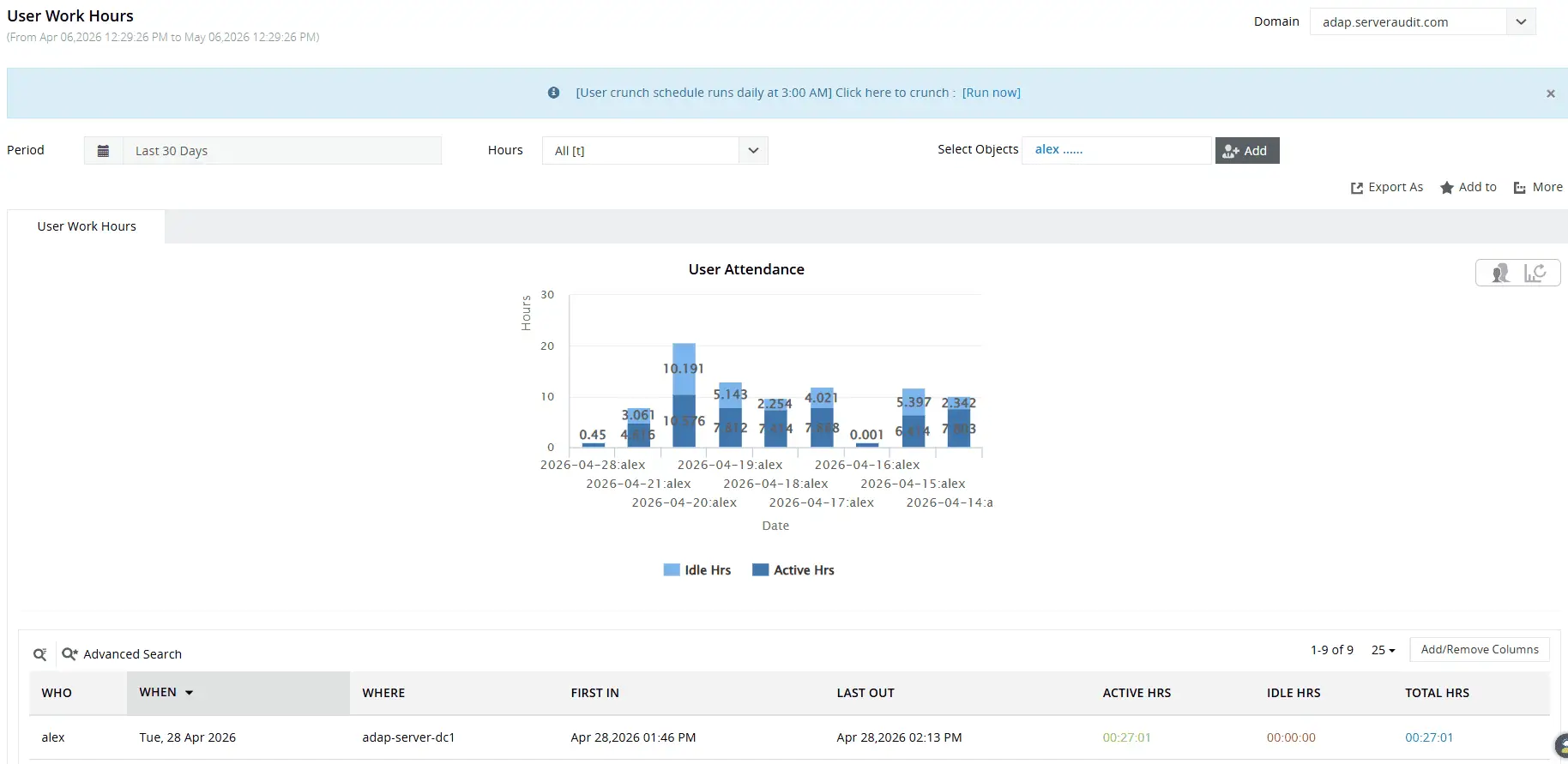
Gain quick visual insights into how users spend their workday and easily identify employees with the lowest productivity.
Monitor remote desktop and RADIUS/NPS authentication
ADAudit Plus captures logon and logoff events across every domain-joined machine. Review each employee's active hours for any date range without querying individual domain controllers (DCs) or writing a PowerShell script.
- Each user's first logon and last logoff for any day, week, or custom period is available across all workstations they used.
- Session duration is recorded per logon event, with separate start time, end time, and duration columns for each session.
- ADAudit Plus factors in screensaver invoke and dismiss events, along with console lock and unlock activities, to calculate actual active time beyond simple system startup and shutdown events; distinguishing genuine work hours from idle session time.
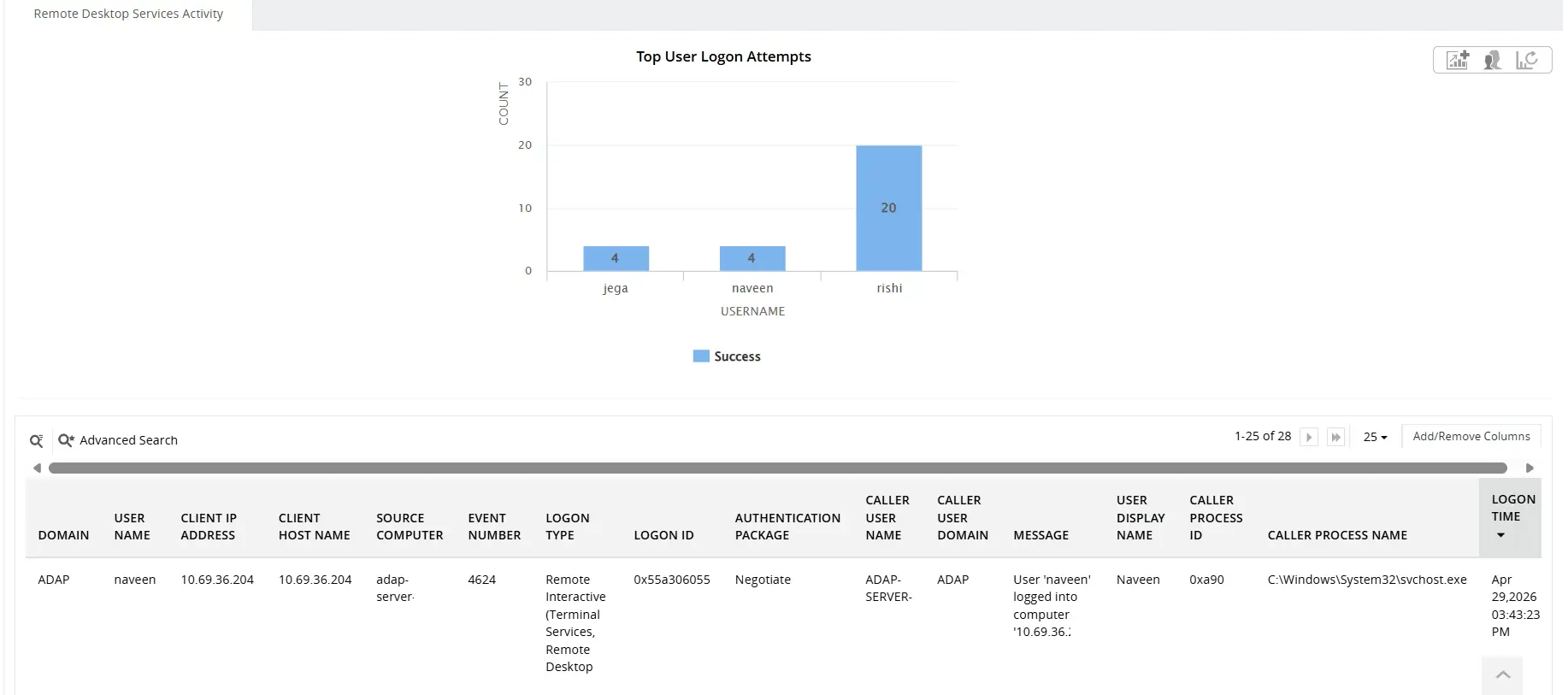
Identify who logged in remotely, when they logged in, which computer they accessed, and where they connected from.
Extend tracking to cloud environments
ADAudit Plus audits both on-premises AD and Microsoft Entra ID from a single console. Employee sign-ins through Entra ID appear in the same reporting view as traditional domain logons.
- Every Entra ID sign-in event is captured with user identity, source IP, geo-location, device information, and MFA result.
- The Hybrid Logon Activity report correlates on-premises AD and Entra ID events
- Legacy authentication sign-ins using older protocols that bypass MFA appear in their own report.
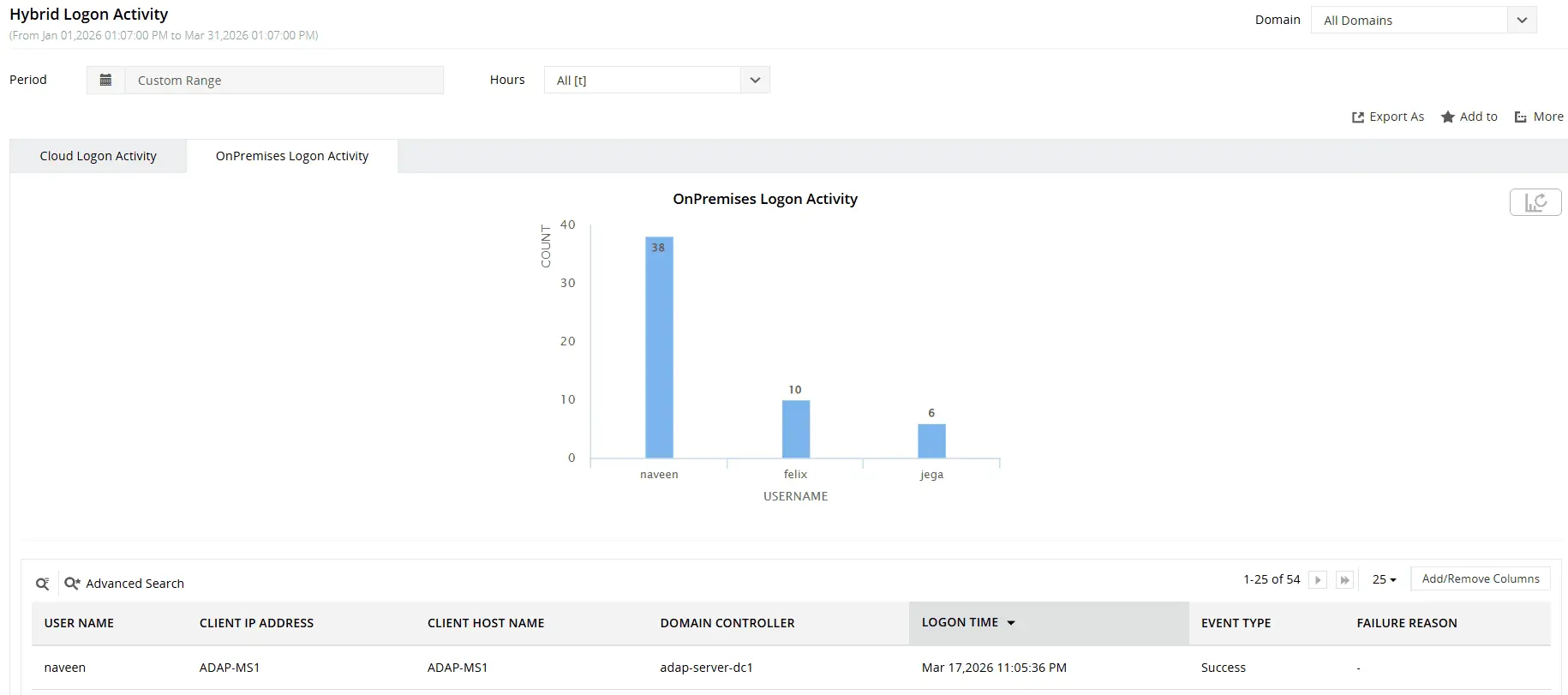
Get an overview of logon activity across your AD and Entra ID environments.
Get real-time alerts on remote logon events
ADAudit Plus ships with pre-configured alert profiles covering the logon events most likely to require immediate attention from your team.
- When a disabled account attempts to log in, your team is notified immediately, so you can determine whether a former employee's credentials are being used before any damage is done.
- When an account lockout event fires, the alert reaches the responsible administrator without waiting for a help desk ticket, which reduces the time between lockout and resolution, particularly for remote employees locked out outside business hours.
- When a logon occurs at an unusual time for a specific user, the alert gives you the context to decide whether this is a legitimate after-hours session or a compromised credential, rather than making that call after the fact from a log.
You control which events cross the threshold for an alert, so high-volume environments only escalate events that genuinely require a response rather than generating noise. When an alert fires, ADAudit Plus can automatically create a ticket in ServiceNow, Jira, or your preferred ITSM tool so the right team member receives the event without waiting for manual triage.
Meet compliance requirements
Logon records are audit evidence. ADAudit Plus includes pre-configured compliance report sets for SOX, HIPAA, PCI-DSS, FISMA, GLBA, GDPR, and ISO 27001. Each set maps logon activity, session duration, and access events to the specific controls the standard requires, with no custom scripting needed.
Custom report profiles let you combine specific users, audit actions, date ranges, and machines into a saved profile that generates the exact slice of logon data an audit requires, without reconfiguring the report each time. All reports export to CSV, PDF, HTML, and XLSX and can be scheduled for automatic delivery to auditors or compliance officers.
Why native tools fall short
Windows Security Event logs contain the raw logon data you need for remote employee time tracking. The problem is that these logs are stored locally on each machine, with no built-in mechanism to aggregate them across your environment.
- Security event logs are stored locally on each DC and workstation, with no native consolidated view across machines or sites.
- Event Viewer has no session duration calculation; logon and logoff events are separate records that must be manually matched and subtracted, and logoff events are not always recorded consistently.
- PowerShell can aggregate logs across DCs, but building and maintaining scripts to produce formatted, schedulable attendance reports is a significant ongoing overhead, not a monitoring capability.
- Neither Event Viewer nor built-in cmdlets produce a unified view covering both on-premises AD logon events and Microsoft Entra ID sign-ins in the same output.
ADAudit Plus replaces that manual, fragmented workflow. Logon data is collected and correlated across all monitored systems automatically, reports are pre-configured and schedulable, and both on-premises and Entra ID sign-in events appear in a single reporting view. The work hour record that takes a team hours to extract manually is available in minutes.
4 compelling reasons to choose ADAudit Plus
Widely recognized
ADAudit Plus has been recognized as a Gartner Peer Insights Customers' Choice for Security Incident & Event Management (SIEM) for four consecutive years.
Easy deployment
Go from downloading ADAudit Plus to receiving predefined reports and alerts in under 30 minutes, without any professional help.
Competitive pricing
ADAudit Plus is licensed per-server, unlike other IT auditors which are licensed per-user. With per-server licensing, even with a growing number of users each year, you can continue to ingest log data without additional costs.
Unified visibility
ADAudit Plus consolidates auditing, security, and compliance across Active Directory, Entra ID, Windows servers, workstations, and file servers into a single pane of glass, eliminating the need to juggle multiple tools.
Frequently asked questions
The 7-minute rule is a US Fair Labor Standards Act payroll rounding convention: time within seven minutes of a quarter-hour boundary rounds down, and eight minutes or more rounds up. ADAudit Plus records exact logon and logoff timestamps and does not apply rounding; your payroll system handles that calculation separately.
In most jurisdictions, monitoring logon activity on employer-owned systems is lawful when employees are notified through an acceptable-use policy. ADAudit Plus monitors authentication events on your own AD infrastructure. Review your jurisdiction's employment and data protection requirements and document your monitoring policy before deployment.
Yes. ADAudit Plus supports role-based access delegation, allowing you to grant managers read-only access to work hours reports scoped to their team. Managers log in to the ADAudit Plus console with delegated credentials and access their reports without requiring IT to generate or distribute them.