
 Live Demo
 Free Edition
 Download Now
How to send an email notification for account lockout?
Written by Mahidhar Adarsh, IT security team, ManageEngine Updated on June 2025
This script shows how to automatically send an email notification to the administrator whenever a user account is locked out.
import-module activedirectory
$Event = Get-EventLog -LogName Security -InstanceId
4740 -Newest 1
$Usr = $Event.Message -split [char]13
# [#] is the line number in the output
$Usr = $Usr[10]
# (#) is the substring of that line
$Usr = $Usr.substring(17)
$Usr2 = Get-ADUser $Usr | Select-Object
-ExpandProperty name $OU = Get-ADUser $Usr -Properties
distinguishedname,cn | select @{n='AD OU:
';e={$_.distinguishedname -replace
'^.+?,(CN|OU.+)','$1'}}
$Email = Get-ADUser $Usr -Properties mail
$TelephoneNumber = Get-ADUser $Usr -Properties
telephoneNumber | Select-Object -ExpandProperty
telephoneNumber
#send lockout notification to helpdesk ticketing system.
$MailBody= $Event.Message + "`r`n`t" +
$Event.TimeGenerated + "`r`n`t" + $OU + "`r`n`t" +
$Email.mail + "`r`n`t" + "Direct: $TelephoneNumber" +
"`r`n`t" + "`r`n`t" + "
*ATTENTION* Do not automatically unlock the user's account,
please follow up with them first"
$MailSubject= "User Account Locked Out: " + $Usr2
$SmtpClient = New-Object system.net.mail.smtpClient
$SmtpClient.host = "newport.abc.int"
$MailMessage = New-Object system.net.mail.mailmessage
$MailMessage.from = "AcctLockNotify@abc.edu"
$MailMessage.To.add("helpdesk@abc.edu")
$MailMessage.IsBodyHtml = 0
$MailMessage.Subject = $MailSubject
$MailMessage.Body = $MailBody
$SmtpClient.Send($MailMessage)
#send message to the locked out users
$SmtpClient = New-Object system.net.mail.smtpClient
$SmtpClient.host = "newport.abc.int"
$MailMessage.from = "AcctLockNotify@abc.edu"
$MailMessage.To.add("$email.mail")
$MailMessage.Body = "$Usr2 Your abc logon has been locked out.
Please contact the IT DepT (302)736-4199, or come to the IT Dept. office to have your abc Account unlocked."
$SmtpClient.Send($MailMessage)
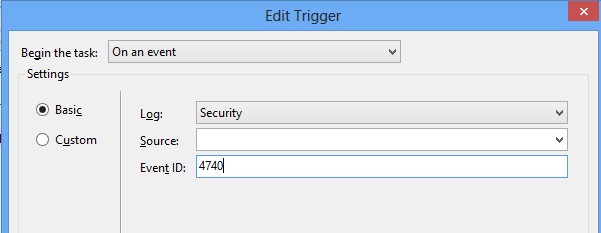
1. Create a scheduled task to run that PowerShell script. Edit the trigger as follows:
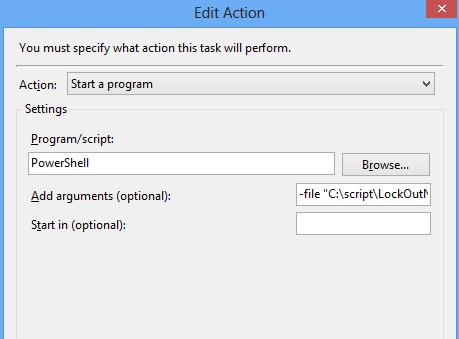
2. In action option, select start a program. The argument "-file" should be with the script path.
Explore Active Directory auditing and reporting with ADAudit Plus.
- Related Products
- ADManager Plus Active Directory Management & Reporting
- ADAudit Plus Real-time Active Directory Auditing and UBA
- EventLog Analyzer Real-time Log Analysis & Reporting
- ADSelfService Plus Self-Service Password Management
- AD360 Integrated Identity & Access Management
- Log360 (On-Premise | Cloud) Comprehensive SIEM and UEBA
- AD Free Tools Active Directory FREE Tools